Ingress-nginx: GLBC: Ingress can't be properly created: Insufficient Permission
I recently upgraded to kubernetes 1.7 with RBAC on GKE, and I am seeing this problem:
  FirstSeen LastSeen    Count   From            SubObjectPath   Type        Reason      Message
  --------- --------    -----   ----            -------------   --------    ------      -------
  6h        6m      75  loadbalancer-controller         Warning     GCE :Quota  googleapi: Error 403: Insufficient Permission, insufficientPermissions
I have double-checked my quotas, and they are all green.
I have also tried granting the Node service account Project > Editor permissions, and I have added the Node service account to the cluster-admin ClusterRole, just in case it had anything to do with that (which it should not, right?).
GKE Cluster logs (slightly redacted):
{
 insertId:  "x"
 jsonPayload: {
  apiVersion:  "v1"
  involvedObject: {
   apiVersion:  "extensions"
   kind:  "Ingress"
   name:  "ingress-testing"
   namespace:  "default"
   resourceVersion:  "425826"
   uid:  "x"
  }
  kind:  "Event"
  message:  "googleapi: Error 403: Insufficient Permission, insufficientPermissions"
  metadata: {
   creationTimestamp:  "2017-07-15T12:54:37Z"
   name:  "ingress-testing.x"
   namespace:  "default"
   resourceVersion:  "53520"
   selfLink:  "/api/v1/namespaces/default/events/ingress-testing.14d1822c5ed30595"
   uid:  "x"
  }
  reason:  "GCE :Quota"
  source: {
   component:  "loadbalancer-controller"
  }
  type:  "Warning"
 }
 logName:  "projects/x/logs/events"
 receiveTimestamp:  "2017-07-15T19:11:59.117152623Z"
 resource: {
  labels: {
   cluster_name:  "app-cluster"
   location:  ""
   project_id:  "x"
  }
  type:  "gke_cluster"
 }
 severity:  "WARNING"
 timestamp:  "2017-07-15T19:11:54Z"
}
I have tried figuring out what the cause might be, but have not found anything that was applicable.
What can I do to get Ingress working again in my cluster?
Thanks!
 bbzg
bbzg
All 60 comments
@bbzg There's a bug with 1.7 that causes this problem for the ingress controller on manual GCP networks. If you contact GKE support, they can mitigate it for you.
 nicksardo
on 16 Jul 2017
nicksardo
on 16 Jul 2017
Great, I will contact support!
Is there anything I can do to avoid this on the production cluster, when I upgrade it to 1.7?
@nicksardo
bbzg
on 16 Jul 2017
Will this issue be expected to go away if I wait for say 1.7.1+ or do we need to contact support in either case?
 icereval
on 17 Jul 2017
icereval
on 17 Jul 2017
How exactly does one contact GKE support? I am also experiencing this issue, all quotas look fine, but all my ingress broke. Took every site in my cluster offline. =(
 zquestz
on 17 Jul 2017
zquestz
on 17 Jul 2017
@bbzg @icereval This and another issue regarding the service controller (https://github.com/kubernetes/kubernetes/issues/48848) will be fixed in a forked, patched version of 1.7.1 on GKE. For anyone running their own K8s clusters on GCE, you'll have to wait for the 1.7.2 cut.
In general, major releases have a higher likelihood of bugs. Would recommend avoiding upgrading production clusters to any new .0 release.
nicksardo
on 17 Jul 2017
@nicksardo any suggestions on best immediate steps. Right now I have 5 sites offline and no idea how to get them back up. Is there an ETA for 1.7.1 on GKE?
zquestz
on 17 Jul 2017
@zquestz It shouldn't take your sites offline. It should stop the controller from updating if you make changes to the ingress resource.
See https://cloud.google.com/support/#comparison for details on support levels. Don't quote me on this, but I believe 1.7.1 might be available sometime tomorrow.
For manual mitigation, I think your best bet is to manage the HTTP(S) LB through the GCP console.
nicksardo
on 17 Jul 2017
Yeah I can't even open a ticket without paying $150/mo... to fix something I didn't break. Anyhow, will look forward to the update soon. =\
Do you know if disabling RBAC fixes the issue?
zquestz
on 17 Jul 2017
@zquestz, I'll give this a go in my test cluster.
I too have experienced my entire cluster w/o ingress after simply upgrading to 1.7.0 w/o even doing a single operation.
Google Support might want to consider pulling 1.7.0 ASAP
icereval
on 17 Jul 2017
I contacted support, and they replied:
There is a internal ongoing bug regarding this particular GKE issue you are experiencing. The engineering is currently working on a mitigation plan to resolve it. Unfortunately the work is still in progress atm. I will let you know ASAP when the fix is available.
@nicksardo
bbzg
on 17 Jul 2017
@bbzg thanks for the update! Seems they are only reporting one of the issues on the Google Cloud status page. https://status.cloud.google.com/
Seems they really should be listing this issue as well.
zquestz
on 17 Jul 2017
This might just be the result of a failed upgrade from the issue @nicksardo referenced, but here is where my cluster was breaking down.
Apparently something went awry w/ the cluster upgrade and it removed my GKE Instances from the k8s-ig-<guid> Instance Group thus disallowing any traffic including health checks to the cluster's NodePorts and bringing everything offline.
Manually forcing/adding the GKE Instances via the command line seems to have resolved the issue.
NOTE: I could not select any instance via the web console interface.
$ gcloud compute instance-groups unmanaged add-instances k8s-ig--<guid> --zone us-east1-d --instances=gke-cluster-1-default-pool-abc1234-wxyz
In my case, I am not using LoadBalancer services directly, but rather trying to take advantage of the new support for the kubernetes.io/ingress.global-static-ip-name annotation on my Ingress resources. I was attempting to test this out on a newly created 1.7 test cluster (trying to test some other new-in-1.7 features as well). Still working through the issue with GKE support.
 numbsafari
on 17 Jul 2017
numbsafari
on 17 Jul 2017
After a lot of back-and-forth with google support, the issue is still unresolved and will not be resolved until tomorrow, when the support person comes back to work... Not very satisfied with my "gold level support" at this point to be quite honest.
bbzg
on 17 Jul 2017
Hello bbzg@. I'm from support. Can you please send me your support ticket number to thk at google dot com? Or tell the support agent to have a look at my comment here and to consult the case to me.
Thank you.
 thkoch2001
on 17 Jul 2017
thkoch2001
on 17 Jul 2017
@icereval This also helped me get 4/5 sites back online. For some reason this wasn't enough for one of my sites. Still investigating. Thanks a bunch, you were more help than Google Support. =)
zquestz
on 17 Jul 2017
@icereval also, even with that changed I see the error still happening, even though some sites went back online.
googleapi: Error 403: Insufficient Permission, insufficientPermissions
@zquestz, the change will only get your existing Ingress back online, any new ingress cannot be deployed until there is a software release to fix this issue.
Google control's the glbc l7 controller via the master now so it is not easy to just roll back a version either.
In theory it should be possible to manually setup or even fix the existing ingress for your last site and point it at the nodeport for the service. A good reference for all the components @ https://github.com/kubernetes/ingress/tree/master/controllers/gce#l7-load-balancing-on-kubernetes
icereval
on 17 Jul 2017
@icereval yep that is exactly what I am seeing. It was the one ingress I tried recreating that didn't come back online. All the others that required a mere update to an existing rule came back up as expected.
Really appreciate your help on this. Really surprised this issue wasn't caught in testing... you would think ingress setup is used extensively enough that a regression like this wouldn't occur...
zquestz
on 17 Jul 2017
After contacting Google Support, and getting help from @thkoch2001 to get the correct assignment on my ticket, my Ingress is now working.
Good luck to all the rest of you, not everyone has Gold support like us 😞
bbzg
on 17 Jul 2017
@bbzg can you create new ingress objects or just fixed your existing ones? I would be very curious what they did for you so I can get my last site back online. =\
zquestz
on 17 Jul 2017
@zquestz I'm not in a position to test that right now, unfortunately :(
bbzg
on 17 Jul 2017
I've faced that problem too. The only option I found is to recreate the cluster on 1.6.7.
Took time but you know, it's better than just "wait for a fix"... Awful experience.
Google should have mentioned the problem with ingresses on https://status.cloud.google.com/ or even pull off the 1.7 from the upgrade choices.
 mironov
on 18 Jul 2017
mironov
on 18 Jul 2017
yea I wasted most of my day trying to figure out why my Load Balancers weren't being created. We just started moving over to GKE today.
 QSonx
on 18 Jul 2017
QSonx
on 18 Jul 2017
@nicksardo We still going to see 1.7.1 today?
zquestz
on 18 Jul 2017
Anyone have an ETA when a fix will be rolled out? I might have to migrate my sites off GCE if this continues...
zquestz
on 18 Jul 2017
@thkoch2001 @nicksardo is there any way someone can fix my kubernetes ingress? The account is [email protected]. I have been waiting 3 days now and really need to get this resolved.
zquestz
on 19 Jul 2017
@zquestz the fix from @icereval works https://github.com/kubernetes/ingress/issues/975#issuecomment-315703512
 mlazarov
on 19 Jul 2017
mlazarov
on 19 Jul 2017
@mlazarov - When I first experienced the issue I tried to recreate one of my ingress endpoints. Unfortunately @icereval's fix only restored my existing unmodified ingress'. The one I tried to recreate is completely broken and I have no path forward. =\
Not to mention that even with his fix, I am still seeing a consistent stream of errors from the loadbalancer-controller.
zquestz
on 19 Jul 2017
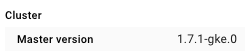
@zquestz, fyi looks like google upgraded the master overnight w/ a custom build. Creating a new ingress appears to work as expected now.
icereval
on 19 Jul 2017
@icereval Did you do anything special to reach this version? I am stuck on 1.7.0
 zonorti
on 19 Jul 2017
zonorti
on 19 Jul 2017
@iMelnik, nothing other than posting in this issue.
icereval
on 19 Jul 2017
@iMelnik I also am still on 1.7.0... @icereval you didn't do anything special for them to upgrade your node? The waiting game continues.
zquestz
on 19 Jul 2017
@zquestz We have a support ticket in for the same issue, and our representative indicated that the GKE team was able to mitigate the problem for clusters at 1.7.0. They still haven't actually performed the mitigation (might be getting a lot of tickets on this?), but perhaps what @icereval reported is the result of it.
 Markbnj
on 19 Jul 2017
Markbnj
on 19 Jul 2017
@Markbnj problem is I don't pay for support right now... and I can't even open a ticket without paying $150 for a problem I didn't cause. Seems for downtime events that are out of my control they should at least allow me to submit an issue. =\
zquestz
on 19 Jul 2017
Is there a reason you absolutely have to deploy on 1.7.0 right now? I tested the upgrade on a dev cluster, ran into this issue, chose not to upgrade my production cluster, and deleted the dev cluster.
numbsafari
on 19 Jul 2017
Also, I agree with @mironov - Google should have pulled the 1.7.0 upgrade option until this was fixed, or labeled it as having a known issue. Even now, you can select it for new clusters and upgrade to it and there is no warning anywhere in the UI.
numbsafari
on 19 Jul 2017
@numbsafari just made the mistake of upgrading and my cluster is big enough that it is a giant PITA to move it all to a new cluster.
zquestz
on 19 Jul 2017
couple hours ago my master node was upgraded to 1.7.1-gke.0 automatically. Ingress works since then. You can check GCP console and pray...
 Kenblair1226
on 20 Jul 2017
Kenblair1226
on 20 Jul 2017
I have been checking constantly... really hoping they get to updating my install soon. @Kenblair1226 did you open a support ticket or contact anyone, or did it just upgrade automatically? Also what zone are you using?
zquestz
on 20 Jul 2017
@zquestz No, I didn't do anything except watching this thread. I don't have Premium Support plan either. I am using asia-east1.
Kenblair1226
on 20 Jul 2017
Version 1.7.1 of GKE is now rolling out to Google Cloud Platform zones. It contains a fix for the problem described in this thread.
You can check the availability of the version in a certain zone with
gcloud container get-server-config --zone us-central1-b
Any ETA on central1-a? Still showing 1.7.0 for me.
zquestz
on 20 Jul 2017
us-east1-b still shows 1.7.0:
```Fetching server config for us-east1-b
defaultClusterVersion: 1.6.4
defaultImageType: COS
validImageTypes:
- CONTAINER_VM
- COS
validMasterVersions: - 1.7.0
- 1.6.7
- 1.6.4
validNodeVersions: - 1.7.0
- 1.6.7
- 1.6.6
- 1.6.4
- 1.5.7
- 1.4.9
```
Out of curiosity, when a global version deployment of this magnitude occurs, what is the cycle time from first zone to last?
 lypht
on 21 Jul 2017
lypht
on 21 Jul 2017
The planned rollout dates for version 1.7.1 are listed in the release notes:
https://cloud.google.com/container-engine/release-notes#july_18_2017
thkoch2001
on 21 Jul 2017
Excellent. Thanks!
lypht
on 21 Jul 2017
Ok, got 1.7.1 master, but it won't let me update my nodes to 1.7.1. Is that expected? I am also noticing that one host is unhealthy and the pods are restarting every 5 minutes. What can I do to resolve this?
zquestz
on 21 Jul 2017
NM, recreated my node pool and got 1.7.1...
zquestz
on 22 Jul 2017
We are still seeing the same problem on GKE with Kubernetes version 1.7.3 :-/
 reneklacan
on 22 Aug 2017
reneklacan
on 22 Aug 2017
@reneklacan maybe a dumb question but are you sure the master version is 1.7.2+ and not just the nodes?
Markbnj
on 22 Aug 2017
@Markbnj Master version on GKE is automatically updated to latest version, so I'm sure it's 1.7.3 (confirmed by cluster detail page) ... Nodes in our case are 1.7.2 (but I don't think that could cause any problems, or am I mistaken?)
reneklacan
on 22 Aug 2017
➜ kubectl version
Client Version: version.Info{Major:"1", Minor:"7", GitVersion:"v1.7.3", GitCommit:"2c2fe6e8278a5db2d15a013987b53968c743f2a1", GitTreeState:"clean", BuildDate:"2017-08-03T07:00:21Z", GoVersion:"go1.8.3", Compiler:"gc", Platform:"darwin/amd64"}
Server Version: version.Info{Major:"1", Minor:"7", GitVersion:"v1.7.3", GitCommit:"2c2fe6e8278a5db2d15a013987b53968c743f2a1", GitTreeState:"clean", BuildDate:"2017-08-03T06:43:48Z", GoVersion:"go1.8.3", Compiler:"gc", Platform:"linux/amd64"}
➜ kubectl describe ingress web-cable
Name:           web-cable
Namespace:      default
Address:
Default backend:    web-cable:80 (10.4.21.103:8080)
Rules:
  Host  Path    Backends
  ----  ----    --------
  * *   web-cable:80 (10.4.21.103:8080)
Annotations:
Events:
  FirstSeen LastSeen    Count   From            SubObjectPath   Type        Reason      Message
  --------- --------    -----   ----            -------------   --------    ------      -------
  1h        9m      18  loadbalancer-controller         Warning     GCE :Quota  googleapi: Error 403: Insufficient Permission, insufficientPermissions
@reneklacan Odd, our masters are also at 1.7.3 and as far as I know we have not seen this issue again. However, the issue only presented itself when initially creating an lb for an ingress, and we have not recreated ours since initially solving the issue with 1.7.2. As far as I know the node version is not involved in this issue.
Markbnj
on 22 Aug 2017
@Markbnj Actually even on our old Ingresses which were created on 1.6.x and are working at the moment I can see the warnings in the events
See top event which started 3 days ago:
Events:
  FirstSeen LastSeen    Count   From            SubObjectPath   Type        Reason      Message
  --------- --------    -----   ----            -------------   --------    ------      -------
  3d        59m     883 loadbalancer-controller         Warning     GCE :Quota  googleapi: Error 403: Insufficient Permission, insufficientPermissions
  50m       50m     1   loadbalancer-controller         Normal      ADD default/web
  50m       40s     6   loadbalancer-controller         Normal      Service     default backend set to web:31779
Can you please check if there's warning on your old ingresses too?
reneklacan
on 22 Aug 2017
@reneklacan No I am not seeing those events on any of our ingresses using the GCE controller in our prod or staging environments.
Markbnj
on 22 Aug 2017
I'm seeing the same issue on a production cluster that we have running 1.6.7. We haven't made any recent updates to our ingress controllers, but are seeing the same GCE :Quota errors and insufficient permission. I hesitate upgrading to 1.7.3 as I don't see there's a guarantee that our ingress controllers come back up. Here's an example log:
LASTSEEN   FIRSTSEEN   COUNT     NAME                                              KIND      SUBOBJECT   TYPE      REASON       SOURCE                                                            MESSAGE
26s        3d          194194    my-redacted-ing-name                               Ingress               Warning   GCE :Quota   loadbalancer-controller                                           googleapi: Error 403: Insufficient Permission, insufficientPermissions
The reason for the high COUNT number is we're using another project which watches and polls for SSL certificates to be updated (thus _something_ must be trying to trigger an update...).
 epd
on 23 Aug 2017
epd
on 23 Aug 2017
I am not seeing this issue even manually deleted my ingress and recreate.
GKE master: 1.7.3, nodes: 1.7.2
Kenblair1226
on 23 Aug 2017
Just following up on this, as of 2 hours ago, my ingress controllers started behaving normally again (?)
LASTSEEN   FIRSTSEEN   COUNT     NAME                                              KIND      SUBOBJECT   TYPE      REASON       SOURCE
3m        2h        18        my-magic-ingress   Ingress             Normal    Service   loadbalancer-controller   default backend set to some-backend:32516
I just checked and issue disappeared for us too.
I was able to recreate ingresses as well and they work as expected.
(Maybe some angel is watching this discussion :D)
reneklacan
on 23 Aug 2017
The specific issue should be resolved. Please open a new issue if this problem arises as the thread here is already quite long.
 bowei
on 11 Oct 2017
bowei
on 11 Oct 2017
Related issues
 natemurthy
·
3Comments
natemurthy
·
3Comments
 jwfang
·
3Comments
jwfang
·
3Comments
 sophaskins
·
3Comments
sophaskins
·
3Comments
 smeruelo
·
3Comments
smeruelo
·
3Comments
 cehoffman
·
3Comments
cehoffman
·
3Comments
Most helpful comment
This might just be the result of a failed upgrade from the issue @nicksardo referenced, but here is where my cluster was breaking down.
Apparently something went awry w/ the cluster upgrade and it removed my GKE Instances from the
k8s-ig-<guid>Instance Group thus disallowing any traffic including health checks to the cluster'sNodePortsand bringing everything offline.Manually forcing/adding the GKE Instances via the command line seems to have resolved the issue.
NOTE: I could not select any instance via the web console interface.