Incubator-superset: Editing Datasource edits the name globally for all charts, not locally for the given chart
Currently when user edits datasource name of the Edit Dataset modal on Chart Explore, it looks like this change is saved globally for all charts / the original datasource gets renamed.
When user edits chart using Change Dataset option on Chart Explore, it only changes dataset locally for the chart.
Expected results
Is this behavior expected? Changing the dataset globally for all charts / actually renaming a dataset (which impacts all charts using this dataset) seems problematic to do on chart explore, when a user who doesn't own the other charts can do this. It is really not clear to the user that it will change for all charts - especially because in the past, this only changed locally for the chart.
Actual results
Renames dataset, so it's easy to break all charts!
Screenshots
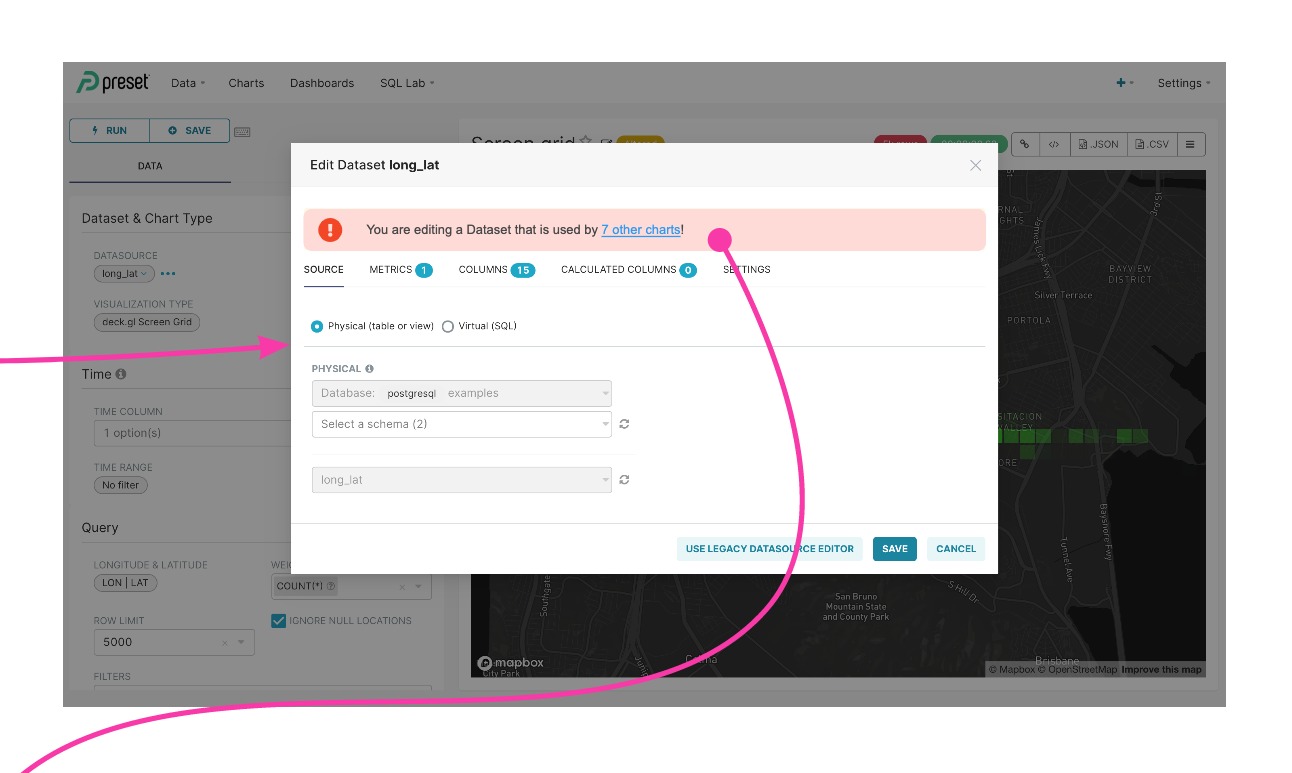
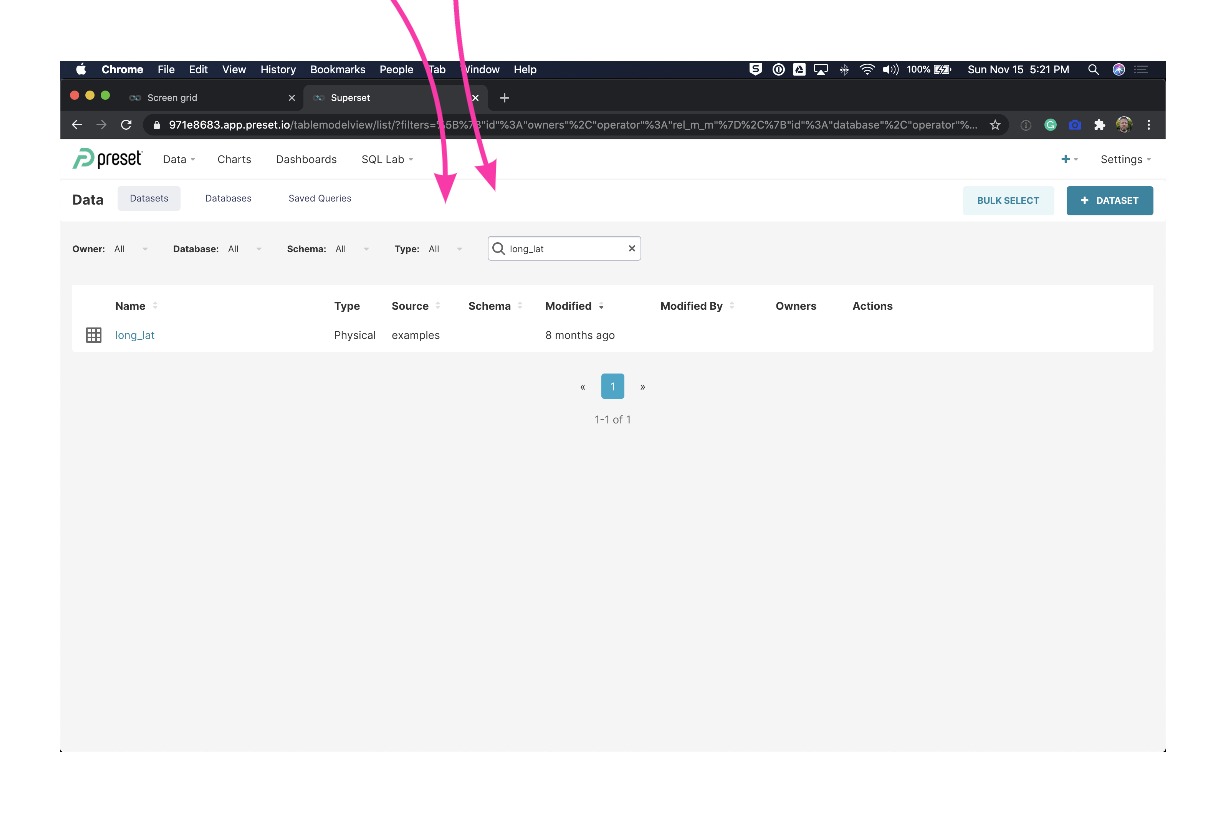
I had two different chars using same dataset (broken). Wanted to change this for one of the charts. It got changed for both charts. (In this case it sounds great, but in most cases, it will unexpectedly break charts of other people).
Two different charts:


This modal changes dataset for both:

How to reproduce the bug
- Go to Chart Explore
- Click on Edit dataset and change dataset
- See that all charts using the old dataset changed to new dataset
Environment
(please complete the following information):
- superset version:
master
Checklist
Make sure these boxes are checked before submitting your issue - thank you!
- [ ] I have checked the superset logs for python stacktraces and included it here as text if there are any.
- [x] I have reproduced the issue with at least the latest released version of superset.
- [x] I have checked the issue tracker for the same issue and I haven't found one similar.
Additional context
Recent discussion: https://github.com/apache/incubator-superset/issues/11190
Recently closed bug: https://github.com/apache/incubator-superset/issues/11380
 zuzana-vej
All 43 comments
Issue-Label Bot is automatically applying the label #bug to this issue, with a confidence of 0.76. Please mark this comment with :thumbsup: or :thumbsdown: to give our bot feedback!
Links: app homepage, dashboard and code for this bot.
![issue-label-bot[bot] picture](https://avatars2.githubusercontent.com/in/27079?v=4&s=40) issue-label-bot[bot]
on 29 Oct 2020
issue-label-bot[bot]
on 29 Oct 2020
Opened this as a potential BUG / DISCUSSION point. If this really is intended behavior - it is quite problematic if you have many users, and we might need to look into some other options how to prevent users from breaking other people's charts.
zuzana-vej
on 29 Oct 2020
problematic indeed... I am seeing the same errors. 😢 @lilykuang please prioritize it.
When user changes dataset of one chart in Explore, it should only affect the local chart. Also, i agree that being able to change a dataset in Edit Dataset modal seems to be a confusing/unnecessary feature while user can actually complete the task by going to Change Dataset.
 junlincc
on 29 Oct 2020
junlincc
on 29 Oct 2020
Wait. This is totally the expected behavior, it's the "Dataset Editor" and there's not one but two alert/warnings clarifying this. Duplicating datasets so that each chart would have its own makes no sense to me, you'd have to define the configuraiton / metrics / calculated dimensions for each chart and wouldn't be able to reuse the work done there.
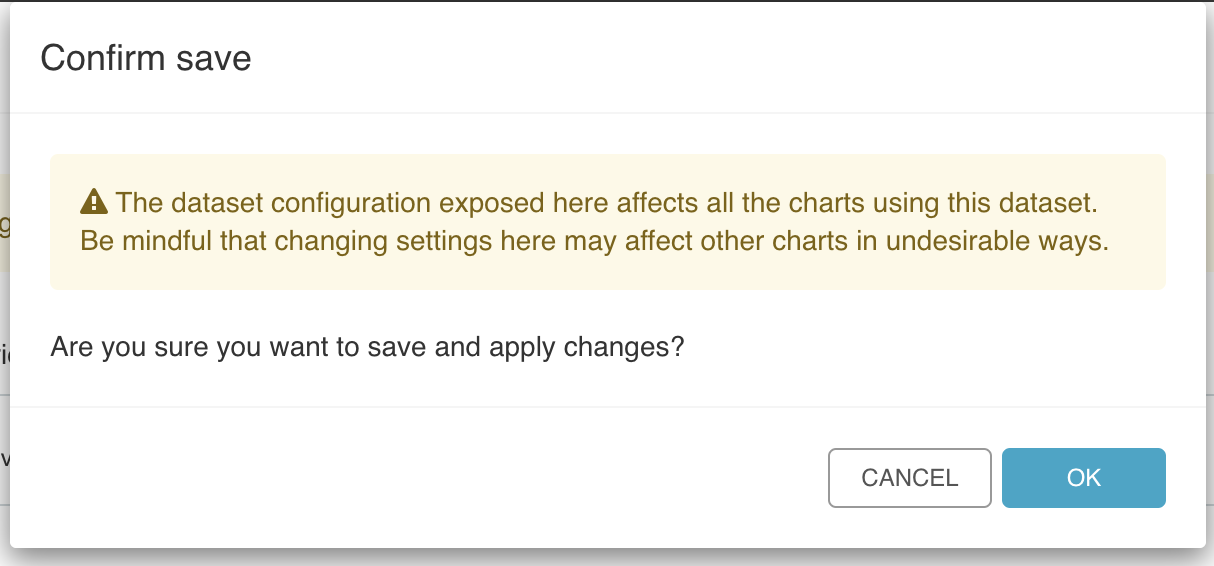
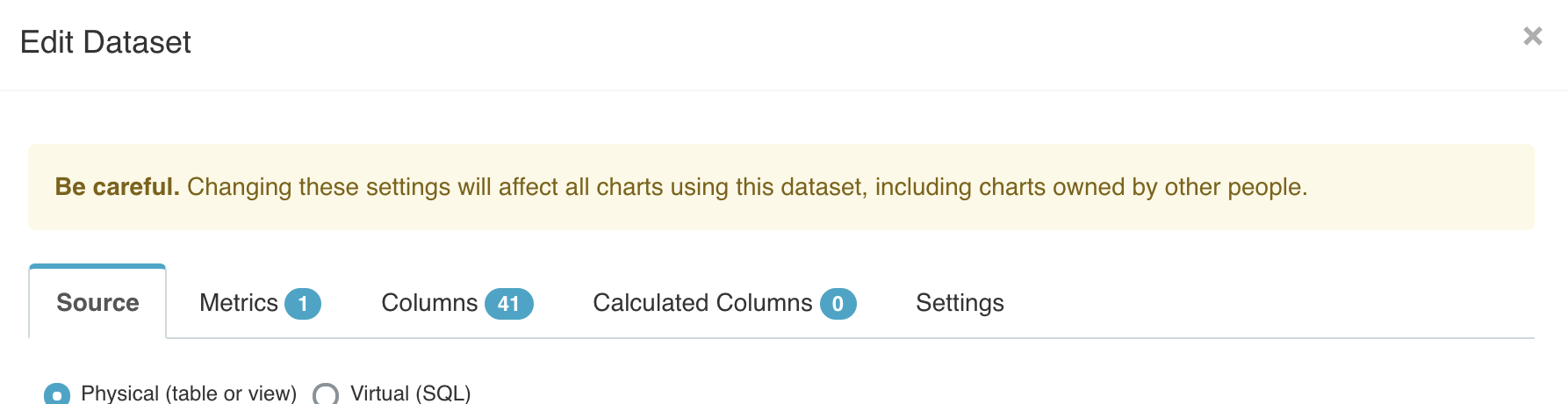
One thing that could help would be to actually list out the list of charts (and perhaps associated owners) that will be affected.
 mistercrunch
on 29 Oct 2020
mistercrunch
on 29 Oct 2020
We actually have an endpoint that responds with how many objects a dataset is connected to, used on the datasets page.
I think the question here is really, should we remove this modal from the explore page and instead redirect to the datasets page?
 nytai
on 29 Oct 2020
nytai
on 29 Oct 2020
I agree @nytai, allowing user to configure the underlying dataset while user is working on a specific chart in Explore does not make sense to me. This action should happens in Datasets. we should either remove this change dataset feature in Edit Dataset, or remove this modal from explore page entirely.
junlincc
on 29 Oct 2020
This shortcut is super useful, you can add new metrics and calculated dimensions without loosing context. @eugeniamz can chime in as a power user.
mistercrunch
on 29 Oct 2020
We should have a clear definition of each module(Data, Explore, Dashboard, SQL lab)'s primary purposes. Shortcuts are great, but they don't necessarily live on the same page. as long as we have clear redirection between modules, then user should be able to stay in the context without getting confused.
The problem i have been seeing in Superset is that user have multiple entry points to complete one task, in some cases, it is convenient, but most of time users get confused. I strongly suggest to remove this modal from Explore, and create a better flow between Datasets and Explore. @mistercrunch
junlincc
on 29 Oct 2020
I strongly suggest that we keep this modal until we create a better flow between Datasets and Explore
mistercrunch
on 29 Oct 2020
sounds good, that's a well defined problem to solve - create a better flow between Datasets and Explore
junlincc
on 29 Oct 2020
In the meantime, we know for sure that regardless of the point of entry (explore or dataset), listing the affected charts on save bellow that alert/warning would be helpful and hard really really hard to disregard/misunderstand.
mistercrunch
on 29 Oct 2020
that's helpful. what about dataset changes affecting other people's charts? setting permission maybe?
junlincc
on 29 Oct 2020
Things that can break charts:
- pointing to another table or schema
- changing or deleting a metric definition
- changing or deleting a calculated dimension
- altering the SQL
- changing settings (this shouldn't break a chart)
mistercrunch
on 29 Oct 2020
For clarity, this task is not yet actionable. @lilykuang please do not work on this until we achieve clarity.
 willbarrett
on 29 Oct 2020
willbarrett
on 29 Oct 2020
We think that the editing metric, calculated columns, etc. isn't THAT problematic. Once in a while, someone deletes some metric and someone else's charts break, but this is really rare. What we think is problematic is specifically the change dataset - the 1st tab - the fact that you can change the table that backs a dataset. And this changes for everyone. For physical datasets this is a very rare scenario, that a physical table gets actually renamed, and it shouldn't be so easy for user to do this change. In terms of virtual dataset - no problem, they are rarely shared among users (or at most shared within a single team). In the past this might have been the existing behavior, but it was in the last tab on that modal, so it wasn't so obvious.
One thing that could help would be to actually list out the list of charts (and perhaps associated owners) that will be affected.
---> agreed
zuzana-vej
on 29 Oct 2020
Sounds like there is a small action item / task here is to surface the impact of the potential changes that could be as simple as # of charts associated with the change & probably the link to the crud view with the search query.
 bkyryliuk
on 30 Oct 2020
bkyryliuk
on 30 Oct 2020
Recently, I have spent a lot of time in this very area, and my opinion is that 1) it is indeed a potentially unintuitive experience, however, 2) it is consistent as is, and after a bit of a learning curve for the user it gets the job done. The warnings are in place to make the user aware of the potential impact. Any change to the current behavior would be arbitrary, and just as confusing for users who seek the opposite type of behavior, so it would only shift the problem, and not solve it. I'd like to do proper user research to discover the overall user flow and make structural changes informed by that.
 benceorlai
on 30 Oct 2020
benceorlai
on 30 Oct 2020
I agree that the behavior is consistent across the entire modal - and there should be a consistency.
We are just trying to surface that is is an issue for larger organizations. It is not a problem if you are the only person who owns charts using specific datasource, or if you don't have production dashboards shared across. As soon as you deploy Superset for a larger group of people where they share the underlying datasets this becomes a problem - one user making change not knowing that it might impact all other charts and other people's charts break (user is used to the calculated columns and metrics, but not to the first tab when currently they think it just changes for the specific chart). Users broke charts 2x since this was moved from last tab to 1st tab of that modal (and there might have been more cases not reported).
zuzana-vej
on 30 Oct 2020
I agree that the behavior is consistent across the entire modal - and there should be a consistency.
We are just trying to surface that is is an issue for larger organizations. It is not a problem if you are the only person who owns charts using specific datasource, or if you don't have production dashboards shared across. As soon as you deploy Superset for a larger group of people where they share the underlying datasets this becomes a problem - one user making change not knowing that it might impact all other charts and other people's charts break (user is used to the calculated columns and metrics, but not to the first tab when currently they think it just changes for the specific chart). Users broke charts 2x since this was moved from last tab to 1st tab of that modal (and there might have been more cases not reported).
Yes, same risks & challenges @ dropbox
bkyryliuk
on 30 Oct 2020
Based on our discussion in meetup, we had a few ideas:
- show all charts that used this dataset
Sourcetab: by default isread-only(view mode). We will show a button or link say "Edit Dataset" to enable the Edit mode, then user can switch dataset for all the charts that used current dataset.
Could we implement above ideas?
cc @zuzana-vej @junlincc @mistercrunch @bkyryliuk
 graceguo-supercat
on 31 Oct 2020
graceguo-supercat
on 31 Oct 2020
At the meetup, we clarified that:
- landing on
Sourcetab is confusing, since the user is likely to want to edit metrics or calculated dimensions Sourcetab is "most descriptive" of the dataset, what it is and where it's pointing to- spoke about maybe point to a different default Tab selected (say metrics)
- Disabling the content of
Sourcetab, showing may a lock icon that can be unlocked with an appropriate message - Eventually (more complicated, probably phase 2, if ever), we could categorize destructive and non-destructive changes and act accordingly. Say adding a metric could not show any warnings, but deleting one would show you warning. Pushing this idea we could even try to see if/which chart is using that metric.
In any case, it's pretty clear that showing the list of associated charts that will/may be affected by the change seems like a positive thing.
mistercrunch
on 1 Nov 2020
Thanks for @mistercrunch better summary. So what is next step? Because current behavior is confusing and risky, hope to see this issue get fixed ASAP.
graceguo-supercat
on 2 Nov 2020
I have created a new epic in the roadmap. I will have Design create some UI mocks so that we can visualize a possible solution
benceorlai
on 2 Nov 2020
Thanks for the notes @mistercrunch , @benceorlai , @graceguo-supercat .
Based on @mistercrunch summary above:
landing on Source tab is confusing, since the user is likely to want to edit metrics or calculated dimensions
Source tab is "most descriptive" of the dataset, what it is and where it's pointing to
spoke about maybe point to a different default Tab selected (say metrics)
.. can we agree to move Source tab before (or after) settings right now?

Disabling the content of Source tab, showing may a lock icon that can be unlocked with an appropriate message
... is this part of the roadmap item as well?
Eventually (more complicated, probably phase 2, if ever), we could categorize destructive and non-destructive changes and act accordingly. Say adding a metric could not show any warnings, but deleting one would show you warning. Pushing this idea we could even try to see if/which chart is using that metric.
...this is part of the roadmap item added by @benceorlai (once some of these better ideas are implemented the source tab can be moved back to be the 1st page if decided so)
zuzana-vej
on 2 Nov 2020
@zuzana-vej this is a bit tricky situation. Until recently when the current UI was implemented, we had two disparate experienced to edit the dataset, depending on where the user came from. Now we have a single experience that can be accessed from both entry points. I am not sure if we know for a fact that when the user clicks on "Edit Dataset" their intent is always to edit the dataset for that single chart. I think different personas would have different intents. I also think that any changes to the user flow (i.e. moving tabs around) would be arbitrary. My suggestion is to focus on making sure that the user makes a fully informed decision when they edit the dataset. This means purposefully creating friction in the flow so that we focus their attention to the impact. What I propose is that I will work with our Designers to come up with different variations for changes and then post them here for everyone to review. Will that work?
benceorlai
on 4 Nov 2020
Generally we don't want user to make the edits here. But I agree that this could differ across all users using Superset across many organizations (likely the smaller want to enable this, while the larger might want to disable this). I understand we need to have solution that works for everyone not just the larger groups. So I think
purposefully creating friction in the flow so that we focus their attention to the impact.
will work.
While we might not be able to do the best case scenario right away (e.g. categorizing potentially destructive / non destructive scenarios), we would like to make some simple change soon so that we eliminate the impact. Either disabling it (temporarily), moving the tab (temporarily) or adding the lock (disabled) which can be unlocked after acknowledging warning. If you can keep us posted we can probably make the first small change right away (within a week or two).
zuzana-vej
on 4 Nov 2020
Hi @zuzana-vej
i have created a wireframe for a potential solution. Please see this Miro board called Improved UX for editing dataset in Explore for the whole experience. The password for the board is super_set

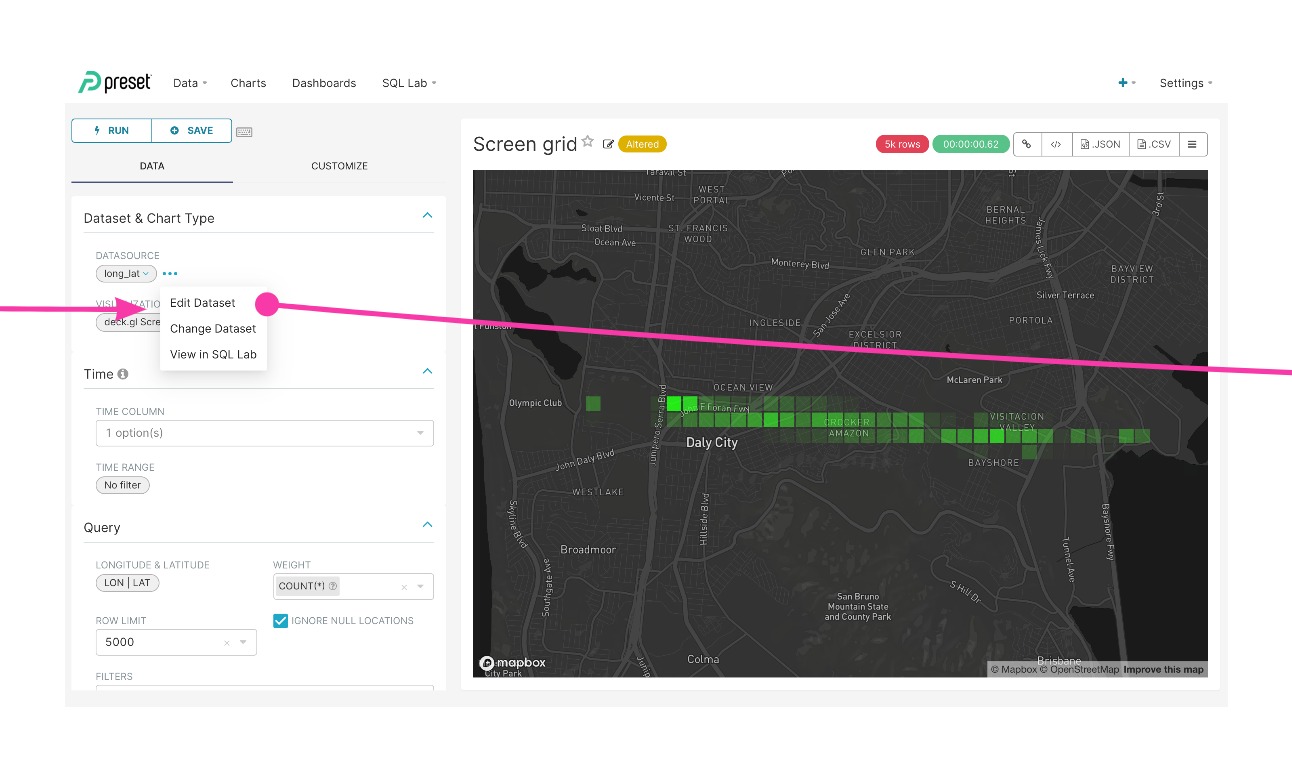
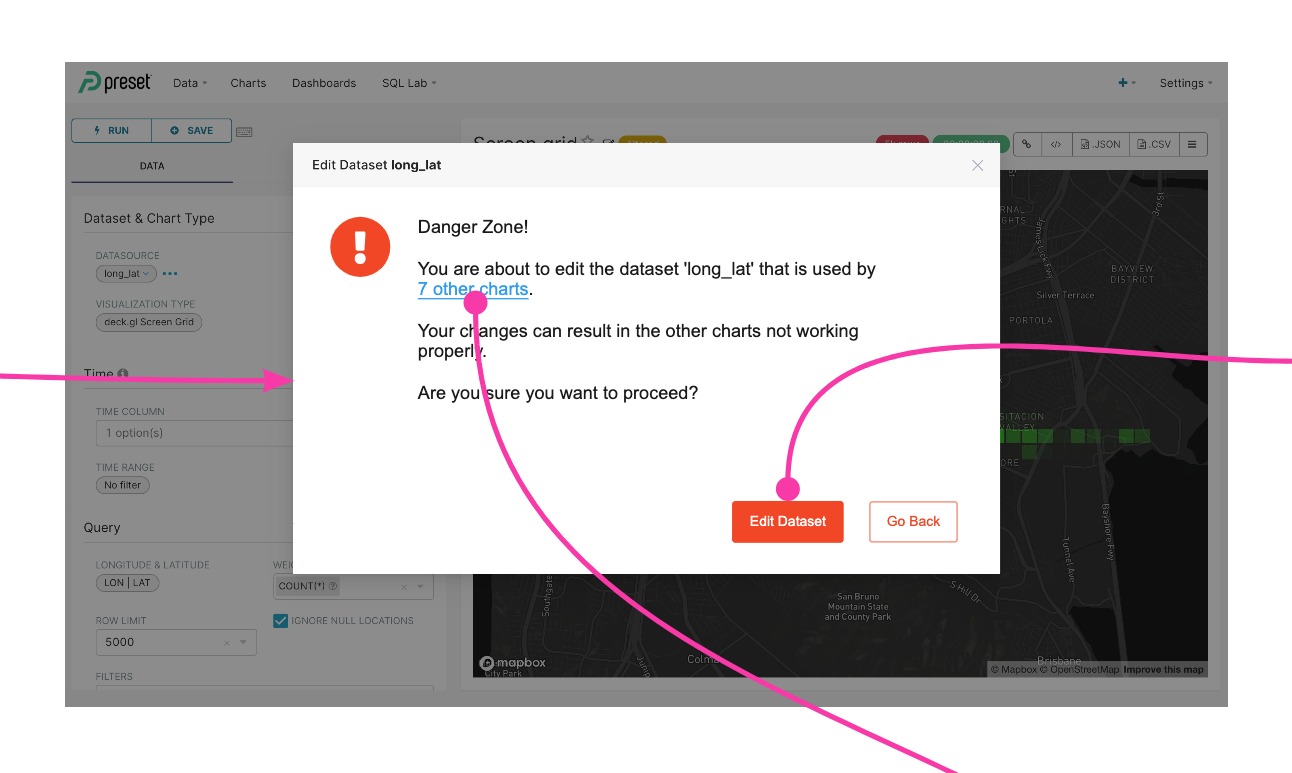
benceorlai
on 16 Nov 2020
Thanks @benceorlai for sharing the proposed designs! I assume these will be used for both editing dataset, as well as in future, for when user is editing metrics, or calculated columns (which still impacts all datasets).
In the meanwhile, @graceguo-supercat has a solution aligned to the discussion from the meetup and some of above notes, specifically only for the data source tab:
_when user open source tab, by default all the table/schema name should be read-only, there will be a padlock, click it to enter edit mode_
The solution are complementary.
zuzana-vej
on 16 Nov 2020
Hi @benceorlai i feel the dataset edit flow will look like this:
- when user open Source tab, by default all the table/schema name should be read-only
- there will be a padlock, click it to enter edit mode
- When user start to edit, your proposal with warning and number of charts shared message will make more sense.
Otherwise, whenever user open dataset editor, even they just want to read dataset info, or change metrics or columns, they will always see huge warnings, and sending extra API to get number of charts using this dataset (unnecessary cost).
graceguo-supercat
on 16 Nov 2020
hey @graceguo-supercat and @zuzana-vej do you have an illustration of your proposed solution? (I will be glad to create wireframes!) i have the following questions:
- There are two entry points to editing a Dataset: 1) from the top menu Data > Datasets 2) from Explore > Edit datset. Would the proposed "locking mechanism" apply to both experiences?
- Editing the table/schema and the fields/metrics is the same user flow: editing the dataset. Based on your description it seems you are thinking of it as two different experiences. Would the locking mechanism apply to both?
- what would be required from the user to unlock the read-only mode?
- I assume that every time the users opens a Dataset for editing, the lock will be in place. I think for users who edit datasets regularly, they may find it annoying to have to unlock the dataset each time? have you considered that side effect?
let me know if you want me to create wireframes, i will be glad to do so
benceorlai
on 16 Nov 2020
1) Yes the proposed "locking mechanism" apply to both entry points.
2) yes, i prefer to have extra protection for editing Source(with table/schema). So only Source tab have read-only mode and padlock.
3) currently datasource owners do not have extra permission. we (airbnb team) are thinking about adding additional constraints, for example only admin role can change schema or table, but no solid decision by now.
4) Once the dataset is created and charts are built on top of it, in our past experience, the need to change metric/columns, is a lot more than the need to change schema/table.
If you feel this read-only layer is reasonable, could you please create a wireframes for this case? I can implement the function pretty soon.
But for edit mode, which has extra warning and new API call, it is not high pri issue for airbnb at this moment, so maybe we could it later?
graceguo-supercat
on 16 Nov 2020
@zuzana-vej and @graceguo-supercat
i have consulted our UX designers on this. they will design a better experience and will create specs with ease of implementation in mind. give us a couple of days to create the design specs!
benceorlai
on 19 Nov 2020
Posting 2 options here. Both general ideas were discussed in this thread. I think option 1 makes most sense and does a better job at addressing the user problem here by providing 2 paths. (1) edit original and make global changes and (2) copy dataset and edit dataset per exploration/chart. Option 2 shows the padlock idea which to me adds unnecessary friction. The problem is that users are accidentally editing the dataset w/o knowing it makes a global change not that the fields are too easy to access and edit. I think if there were some credentials to input (based on certain permissions) after unlocking padlock then the flow could be more effective.
other general changes:
• warning message/copy was tweaked to be more clear, concise and useful
• styling changed to increase visual emphasis
• warning messages are intentionally disruptive to the flow
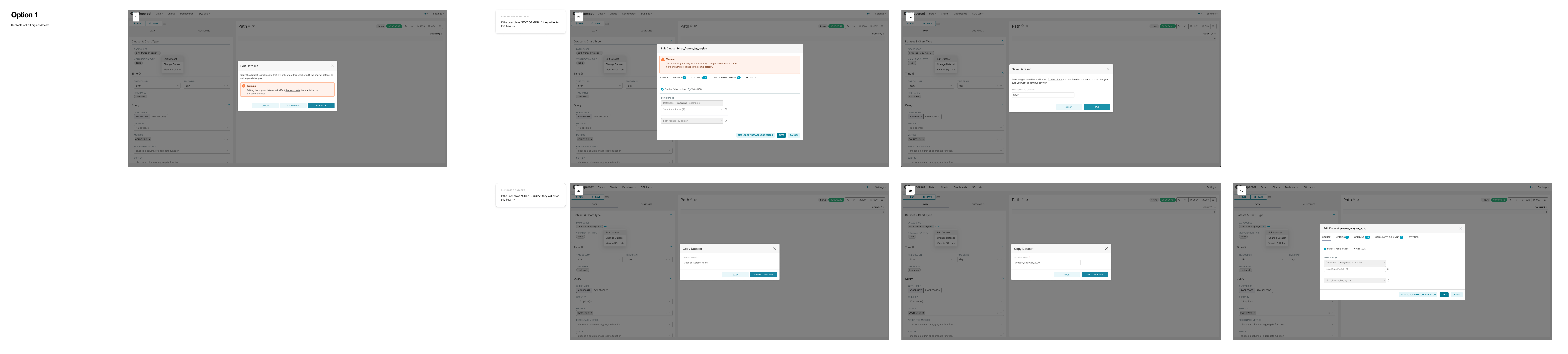

cc @benceorlai @zuzana-vej @graceguo-supercat
 Steejay
on 24 Nov 2020
Steejay
on 24 Nov 2020
_Copy dataset_ function is not available right now, and it is not an idea we discussed in this thread.
I think right now, we should focus on the agreement made in Superset meetup. Please see @mistercrunch summery here: https://github.com/apache/incubator-superset/issues/11478#issuecomment-720125272
graceguo-supercat
on 24 Nov 2020
With option 2, I don't think the "copy dataset" should not be default.
How exactly will the "copy dataset" behave?
The dataset for virtual datasource --> create different virtual datasource (easy)
But how about dataset which is a physical table? Each physical table should exist only once, it's a pointer / reference to a table in database which shares same name. If user wants to "copy" dataset to change the name of dataset used for the chart - what do they actually want to do? Do they just want to change it for the specific chart?
zuzana-vej
on 24 Nov 2020
Correct. Copy dataset is not an idea discussed in this thread but is an idea we discussed at Preset and wanted to share here as something to think about. In re. to changing tab order we think that "Source" qualifies the table most and we should therefore consider positioning it first/keeping as is (@mistercrunch).
The main goal in these designs is to be more clear in the messaging so that users can make informed decisions.
Option 3 (sim to opt 1 but w/o copy dataset functionality).

Steejay
on 24 Nov 2020
We aren't planning to change the source tab order. As a first step, @graceguo-supercat has a draft PR to have the lock and warning message (without number of impacted charts - that can be enhancement).
One thing for option 3 (listing all the charts) which might not work in all cases is if the number of charts is large. For some popular datasets there could be tens of hundreds of charts potentially. So having a count and option to click on that looks best. Additionally it could be good to highlight if those impacted charts are owned by other people, and having the message as "... 5 other charts using this dataset, owned by 2 other owners" or just generically "... 5 other charts using this dataset, some of which are owned by another owner." I think that could really add some importance to the message. If I am the only owner I might go ahead with the change but otherwise I might think twice.
zuzana-vej
on 24 Nov 2020
About option 1, I don't think it's a common need or flow we want to steer towards, plus I think currently it's not allowed to have 2 datasets pointing to the same table (though maybe it should be allowed, but that's another topic). Forking the dataset is not really desirable. Keep in mind that most changes (add a metric or add a calculated dimension) should not be breaking as well.
Option 3 seems alright, and originally was thinking it could show a small table of "name, owners", though now we're a bit in overthinking-it territory.
For the rare case where there are dozens/hundreds of charts, I think scrollbar is ok.
mistercrunch
on 24 Nov 2020
I think PR #11781 is a very good stepping stone to start solving this problem. What Stephen proposed are options to go further with the solution.
The core problem in my opinion is that: the user in Explore wants to modify the dataset to fit their needs for a modified or new visualization. I think the intent can be one of two intents: make permanent changes to the Dataset OR make some ad-hoc changes to test a new visualization. Making the edits harder does not seem to solve the actual user need, it just makes it harder to achieve. The actual solution can include the option to do a "Save as" on the dataset, because that allows the user to make the breaking changes, get the dataset they want AND avoid impacting other users.
Hence our proposal for a duplicate dataset flow (Option 1): "Do you need to test some ad hoc changes in the Dataset?" - "Do it on a personal copy, without the risk of affecting others"
I don't think our proposal is mutually exclusive with Grace's PR #11781, rather it further extends on it, while offers a viable non-breaking alternative flow.
I am aware this solution needs more work and we will be glad to consider it for our roadmap if engineering resources are a concern.
benceorlai
on 24 Nov 2020
11781 solves our immediate need and that's something we feel comfortable with, and I agree they are not exclusive, it's step in the right direction either way. We don't plan at this point to work on the next steps - but I am glad we were aligned this first step is in the right direction for everyone.
I get your point about user intents, and I think we should be very careful if we allow duplicating datasets, even though I see the point - that could be OK for small user base, but with 2500 WAUs and hundreds of data sets, this will cause clutter - many duplicate datasets, resulting in any migrations being possibly much harder, possibly scaling issues, users getting confused if each of their charts uses different dataset they duplicated earlier and forgot, and more. So would love to be part future discussions on this topic if this is to be considered.
zuzana-vej
on 24 Nov 2020
Thanks Zuzana, indeed, #11781 is the quick solution.
there is an interesting side-convo about this here: https://github.com/apache/incubator-superset/pull/11781#issuecomment-733186632, seems like having a View, Edit (and potentially a Duplicate) action would very well disambiguate the UX for the different intents? @Steejay thoughts?
benceorlai
on 24 Nov 2020
I don't think there is a clean way to add a View action in current design. If we just open the same modal (in disabled state) with an additional link, it might become even more confusing. As for adding a Duplicate option, it has much more implications that we need to carefully think of:
- Should we still show the "Changes apply to all charts using this dataset" warning when a datasource is newly duplicated?
- Should we allow the duplication of physical datasource?
- How will this play out for organizations that want a shared set of metrics and columns for the same dataset?
 ktmud
on 25 Nov 2020
ktmud
on 25 Nov 2020
Copy dataset is a new idea that not in Superset before. I think it worth a discussion in meetup or SIP. Here is just some of my questions:
- what is major problem that copy dataset want to resolve, while all current solutions can not? what use case need
copy dataset? - what dataset can be copied?
- what is result of coping a dataset?
- After the dataset being copied, is there any change to the original dataset? how about charts that used original dataset?
- When a dataset has multiple copies, is there anyway to make them sync? otherwise, with so many copies of the similar data, which copy is single version of truth? How do other users and teams to share dataset?
- In what context we should offer
copy datasetoption? Doescopy datasethave to be in Explore view?
graceguo-supercat
on 26 Nov 2020
Related issues
 gbrian
·
32Comments
gbrian
·
32Comments
 rusackas
·
29Comments
rusackas
·
29Comments
 btzo
·
31Comments
btzo
·
31Comments
 ololobus
·
26Comments
ololobus
·
26Comments
 PickLiDan
·
30Comments
PickLiDan
·
30Comments