Incubator-superset: Cannot find the Row-Level Security menu
Yesterday I downloaded and installed Superset following the docker method. When I searched for the row-level security filter entry in the menus I couldn't find it. Searching on the Internet I found this screenshot from the row-level security proposal where I see several menu entries not present in my installation:

Screenshots from my installation:
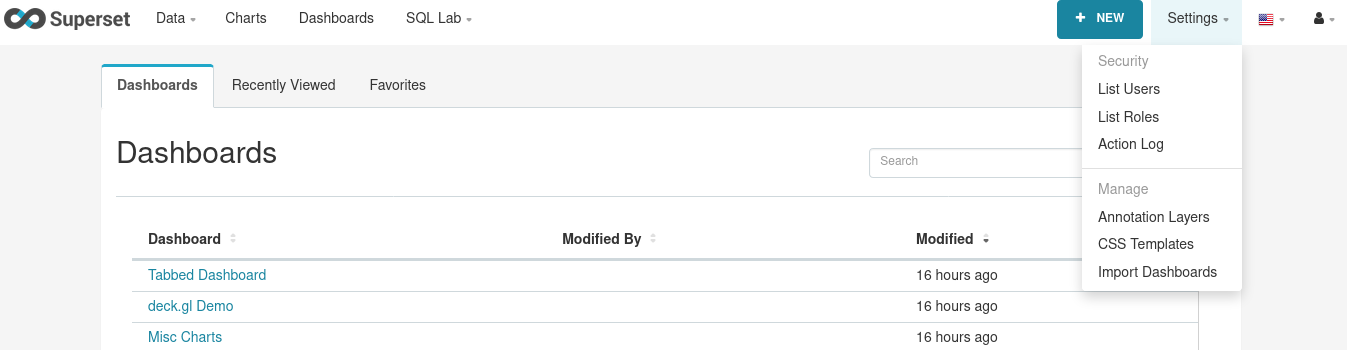
Is there any way to enable these features? What am I doing wrong?
 oggers
All 7 comments
Issue-Label Bot is automatically applying the label #question to this issue, with a confidence of 0.61. Please mark this comment with :thumbsup: or :thumbsdown: to give our bot feedback!
Links: app homepage, dashboard and code for this bot.
![issue-label-bot[bot] picture](https://avatars2.githubusercontent.com/in/27079?v=4&s=40) issue-label-bot[bot]
on 7 Oct 2020
issue-label-bot[bot]
on 7 Oct 2020
Made some progress.
I found the config ENABLE_ROW_LEVEL_SECURITY in config.py. So, I created incubator-superset/superset/superset_config.py (the log has reported that the file was found and loaded) setting this variable to True, but without success, nothing different happens on the interface.
oggers
on 7 Oct 2020
Have you executed superset init after the config change?
 dpgaspar
on 7 Oct 2020
dpgaspar
on 7 Oct 2020
I suppose it was executed when I executed docker-compose up after creating the superset_config.py file
I can see a stopped container called superset_init (the last execution time was when I executed docker-compose up), and its log says that all went ok, so I suppose that it's ok.
oggers
on 7 Oct 2020
I have deleted all containers and reinstalled everything. Result, the same, no Row-Level Security menu entry.
Can anyone confirm that using the default docker installation method the security menu appears complete?
oggers
on 8 Oct 2020
If you're using docker-compose add the config key here: https://github.com/apache/incubator-superset/blob/master/docker/pythonpath_dev/superset_config.py
dpgaspar
on 14 Oct 2020
@dpgaspar Thank you very much, it worked.
I have included my local changes in docker/pythonpath_dev/superset_config._docker.py.
oggers
on 15 Oct 2020
Related issues
 tmccartan
·
3Comments
tmccartan
·
3Comments
 ylkjick532428
·
3Comments
ylkjick532428
·
3Comments
 sashank
·
3Comments
sashank
·
3Comments
 fly-high-bj
·
3Comments
fly-high-bj
·
3Comments
 john-bodley
·
3Comments
john-bodley
·
3Comments
Most helpful comment
Have you executed
superset initafter the config change?