Incubator-superset: Explore PostgreSQL Datasource with JSONB array ERROR
Error in Explore view when the underlining query filters a JSONB array in PostgreSQL that contains integer values.
Workaround
Convert the integer value inside the JSONB array to string
what you expected to happen.
Since the query is working as expected in SQL Lab, we should be able to create a chart utilizing it.
what actually happens.
Screenshots

How to reproduce the bug
1) Create a query in SQL Lab that filters a JSONB array in PostgreSQL, where the value is integer (example below)
2) Create a datasource out of this query
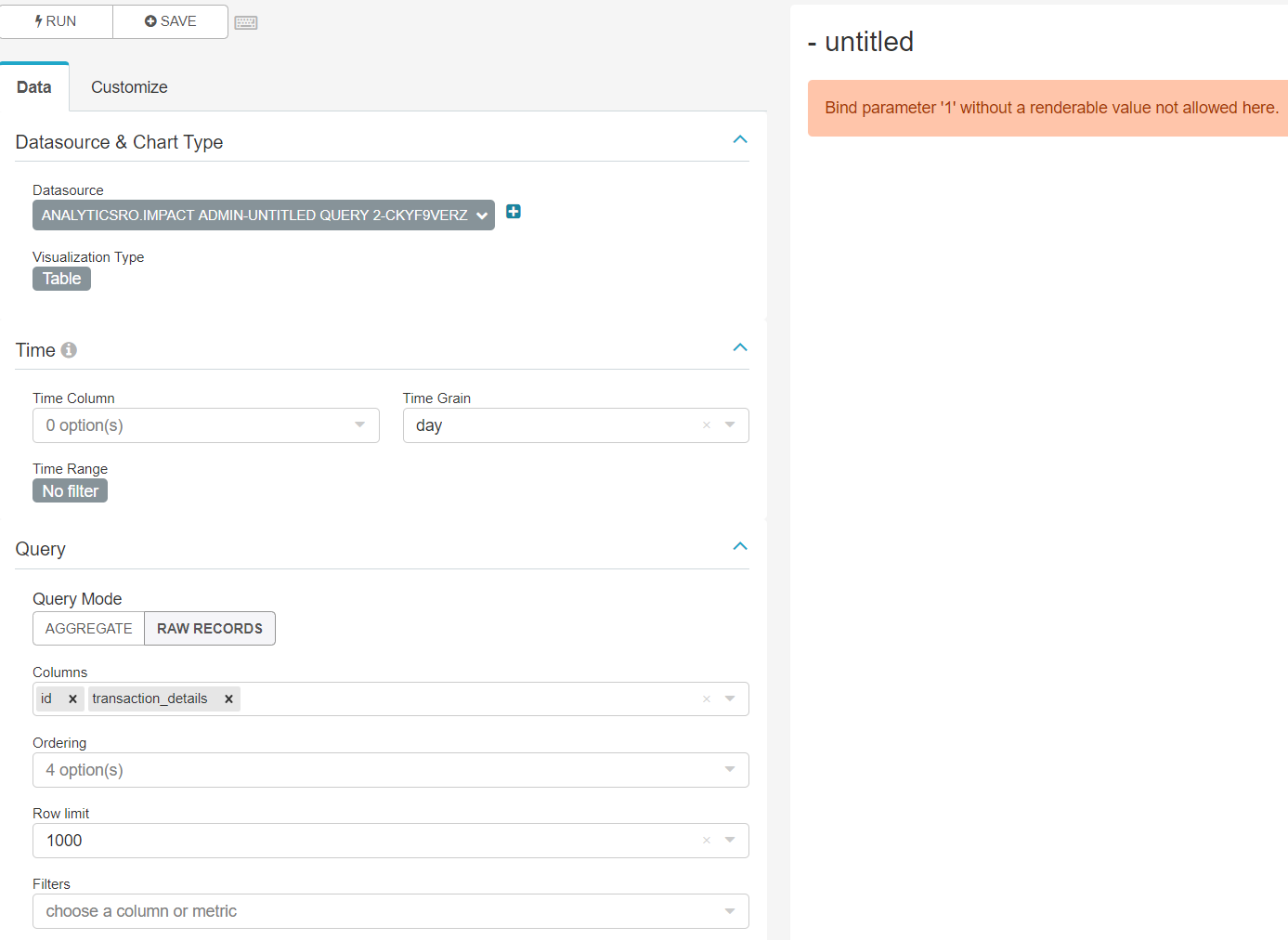
3) Error in Explore view when trying to create a chart
select
*
from jsonb_datasource
WHERE jsonb_datasource.transactions @> '[{"transaction_status":"SUCCESS","transaction_id": 1}]'
Environment
- superset version: 0.37.0rc1
 GiannisDimitriou
All 11 comments
Issue-Label Bot is automatically applying the label #bug to this issue, with a confidence of 0.85. Please mark this comment with :thumbsup: or :thumbsdown: to give our bot feedback!
Links: app homepage, dashboard and code for this bot.
![issue-label-bot[bot] picture](https://avatars2.githubusercontent.com/in/27079?v=4&s=40) issue-label-bot[bot]
on 1 Sep 2020
issue-label-bot[bot]
on 1 Sep 2020
Interesting! @villebro @dpgaspar this looks up your alley. Thank you for the bug report!
 willbarrett
on 2 Sep 2020
willbarrett
on 2 Sep 2020
@GiannisDimitriou I am unable to reproduce the bug on master branch against a Postgres 10.4 database. The query
SELECT *
FROM (SELECT '[{"transaction_status":"SUCCESS","transaction_id": 1}]'::jsonb AS abc) AS x
WHERE x.abc @> '[{"transaction_status":"SUCCESS","transaction_id": 1}]'
renders fine in both SQL Lab and when in Explore view:
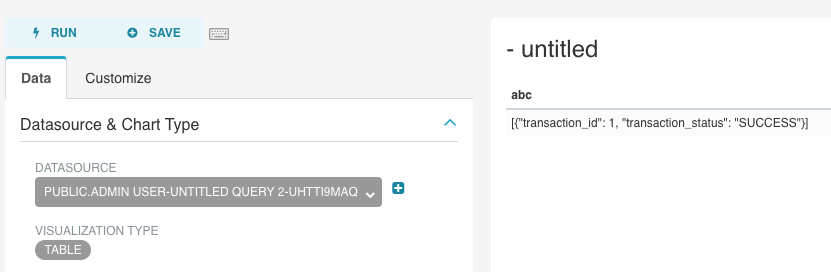
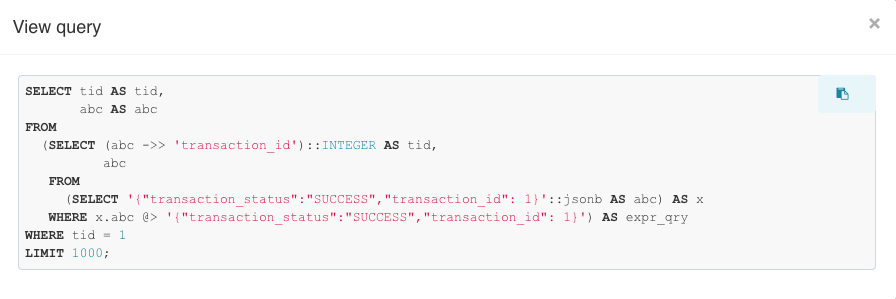
Are there perhaps additional filters that you're trying to apply on JSONB columns? I propose breaking out any fields you need using JSON get operators: https://www.postgresql.org/docs/10/functions-json.html. For example, if your JSONB column contains an object with the key transaction_id, you can easily break that out into a separate column that can then be used as a regular column in your datasource. Example below of how superset renders the query when applying a filter on the (integer cast) value of transaction_id:
 villebro
on 7 Sep 2020
villebro
on 7 Sep 2020
@villebro thanks for trying to reproduce this.
I don't use any additional filters on the JSONB column.
Also the end query is a bit more complicated so exposing the transaction_id on a different column will make things a lot more complicated.
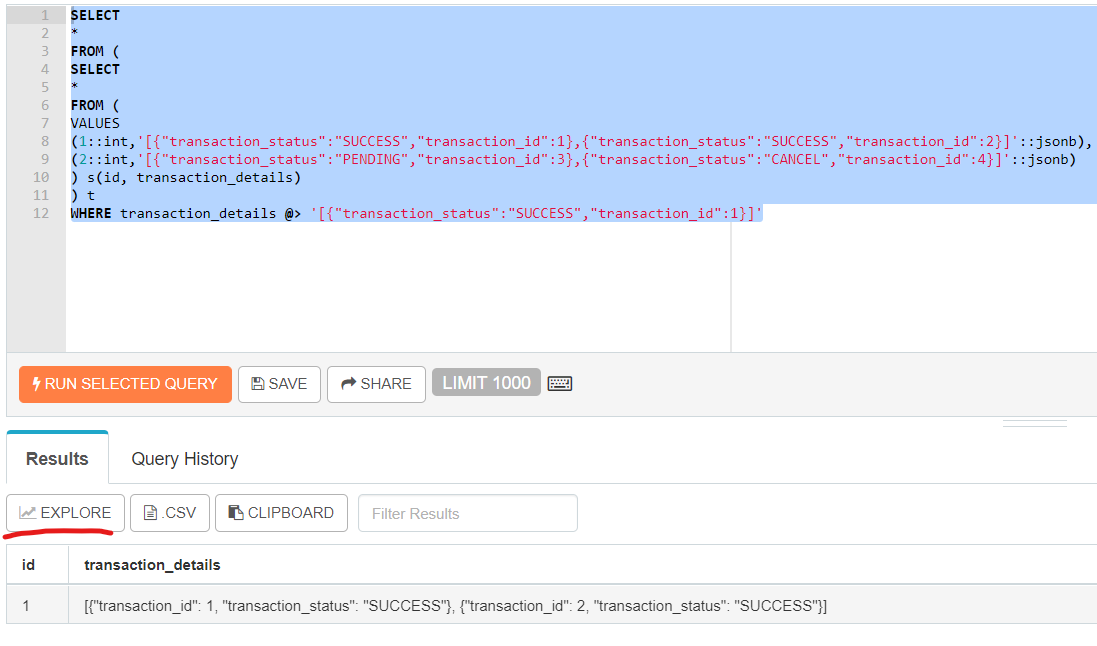
Can you try running the below query in SQL Lab and then press EXPLORE in order to visualise it.
This is what I see following the above steps:
SELECT
*
FROM (
SELECT
*
FROM (
VALUES
(1::int,'[{"transaction_status":"SUCCESS","transaction_id":1},{"transaction_status":"SUCCESS","transaction_id":2}]'::jsonb),
(2::int,'[{"transaction_status":"PENDING","transaction_id":3},{"transaction_status":"CANCEL","transaction_id":4}]'::jsonb)
) s(id, transaction_details)
) t
WHERE transaction_details @> '[{"transaction_status":"SUCCESS","transaction_id":1}]'
GiannisDimitriou
on 7 Sep 2020
Thanks for the detailed reproduction case @GiannisDimitriou. I was able to reproduce the error, will investigate.
villebro
on 7 Sep 2020
This can be solved by putting a space next to the colon character. In addition to making it cleaner JSON, it avoids making SQLAlchemy think it's a bound parameter:
SELECT *
FROM (
SELECT *
FROM (
VALUES (1::int,'[{"transaction_status":"SUCCESS","transaction_id": 1},{"transaction_status":"SUCCESS","transaction_id": 2}]'::jsonb),
(2::int,'[{"transaction_status":"PENDING","transaction_id": 3},{"transaction_status":"CANCEL","transaction_id": 4}]'::jsonb) )
s(id, transaction_details) ) t
WHERE transaction_details @> '[{"transaction_status":"SUCCESS","transaction_id": 1}]'
By adding the space it works as expected but this is a workaround as well.
In real life adding a space after the colon character for any incoming JSON field before storing it in the db or manipulating the JSONB field after ( jsonb_agg() function does not add any spaces), is kinda counter intuitive.
GiannisDimitriou
on 7 Sep 2020
I don't think inserting non-spaced JSON objects in a JSON or JSONB column will cause trouble, it's only the query that needs to have the space. Off the top of my head I can't come up with an easy fix for this, as replacing all colons with \\: might mutate literal strings (e.g. SELECT 'a:b" AS strcol), not to mention SELECT 1::FLOAT AS floatcol, which would be a bigger problem.
If there is a clean way to do this in the context of Sql Alchemy or you can think of a good way to escape JSON in a query, I'd be happy to collaborate on a PR.
villebro
on 7 Sep 2020
After checking PostgreSQL behaviour I see that a space is added automatically after the colon character when using the jsonb_agg function. I haven't check though what is the behaviour when trying to insert a json string explicitly in an json/jsonb column.
So for this example adding the space on the filter clause only, its fine.
Yeah I get your point I will check if there is any way to escape JSON and reply back.
@villebro I don't think inserting non-spaced JSON objects in a JSON or JSONB column will cause trouble, it's only the query that needs to have the space.
In fact the JSON object it self must have a space as well for this to work.
Check this example..same error
SELECT *
FROM (
SELECT *
FROM (
VALUES
(1::int,'[{"transaction_status":"SUCCESS","transaction_id":1},{"transaction_status":"SUCCESS","transaction_id":2}]'::jsonb),
(2::int,'[{"transaction_status":"PENDING","transaction_id":3},{"transaction_status":"CANCEL","transaction_id":4}]'::jsonb) )
s(id, transaction_details) ) t
WHERE transaction_details @> '[{"transaction_status":"SUCCESS","transaction_id": 1}]'
GiannisDimitriou
on 7 Sep 2020
What I'm mostly trying to say is that the JSON data will usually be coming from a table, not a static query as in the example. In that case, the only requirement is that your query has the appropriate spaces in the JSON objects.
villebro
on 7 Sep 2020
Correct, I tried explicitly adding a json string to a jsonb column and the space after the colon is added automatically.
I am closing this issue as resolved.
Thanks for your help @villebro
GiannisDimitriou
on 7 Sep 2020
Related issues
 gbrian
·
3Comments
gbrian
·
3Comments
 thoralf-gutierrez
·
3Comments
thoralf-gutierrez
·
3Comments
 john-bodley
·
3Comments
john-bodley
·
3Comments
 XiaodiKong
·
3Comments
XiaodiKong
·
3Comments
 lenguyenthedat
·
3Comments
lenguyenthedat
·
3Comments