Incubator-superset: Pivot Table Conditional Formatting on Cells - Add Colour to Cells
It would be nice if there was a way to add conditional formatting to individual cells to highlight them a certain color if the value in that cell is in or out of a range etc.
This was being worked on at some point in time on older versions of Superset. #3416
However, it looks like progress stopped. Can someone champion this feature and continue what was already done?
 davidhassan
All 21 comments
Issue-Label Bot is automatically applying the label #enhancement to this issue, with a confidence of 0.80. Please mark this comment with :thumbsup: or :thumbsdown: to give our bot feedback!
Links: app homepage, dashboard and code for this bot.
![issue-label-bot[bot] picture](https://avatars2.githubusercontent.com/in/27079?v=4&s=40) issue-label-bot[bot]
on 17 Sep 2019
issue-label-bot[bot]
on 17 Sep 2019
it s works for upto 0.34 version
 kalimuthu123
on 18 Sep 2019
kalimuthu123
on 18 Sep 2019
How do I use it?
davidhassan
on 18 Sep 2019
Look the pull request for row and column configuration
https://github.com/apache/incubator-superset/pull/4394
Its working fine in all versions upto the current versions
kalimuthu123
on 19 Sep 2019
Need that ! :)
 CoryChaplin
on 19 Sep 2019
CoryChaplin
on 19 Sep 2019
Did this pull request ever make it into the official releases? Are we suppose to just take these extras file and add them to our config?
davidhassan
on 19 Sep 2019
yes row configuration was not merged yet ,u need to configure manually to get these options
kalimuthu123
on 20 Sep 2019
The PR says that will not be merged as it is, it needs to be converted to a plugin before.
CoryChaplin
on 20 Sep 2019
Is someone able to convert these into a plugin? Does this PR help with this? #8222
davidhassan
on 21 Sep 2019
Look the pull request for row and column configuration
4394
Its working fine in all versions upto the current versions
I was looking into this PR and it's seen difficult to apply to the newer version of Superset. @kalimuthu123 do you know how to apply it to release 0.34? Any help will be welcome.
 rc-ontruck
on 19 Nov 2019
rc-ontruck
on 19 Nov 2019
i am intersted to add new features of grand total row and column here
kalimuthu123
on 20 Nov 2019
@kalimuthu123 Have you tested this PR #4394 on versión 0.34? How do you do it?
Best
rc-ontruck
on 20 Nov 2019
I expect the feature!
 WChCh
on 11 Dec 2019
WChCh
on 11 Dec 2019
i also worked column Grand Total feature in this table chart and we have used diferent formulas for the chart @WChCh
you may also use the different library for table chart visualisation such as webdatarocks(free edition),
flexmoster(commercial)
https://www.webdatarocks.com/?r=wdr
it is an excel featured table chart it contains row grand total ,column grand total ,subtotal
aggregate calculations in the chart.have a look into it u wll get ideas
kalimuthu123
on 19 Dec 2019
@kalimuthu123 Have you tested this PR #4394 on versión 0.34? How do you do it?
Best
hi all, not sure if this is still relevant but I was able to apply it into the current dev version 0.999
here is the fork: https://github.com/henry145145/incubator-superset/tree/develop
(make sure pull the develop branch if you are going to clone it, the master branch is not update yet)
Most of the files from https://github.com/apache/incubator-superset/pull/4394/files can be found in the latest version except superset/assets/visualizations/pivot_table.js
I think the visualizations of the pivot table was converted to be a plugin and it was pointing from a node module library (ref: see https://github.com/apache/incubator-superset/pull/6838/files)
Inside superset/assets/node_modules/@superset-ui/legacy-plugin-chart-pivot-table, we will findPivotTable.js which is the new version of pivot_table.js.
However, I was not able to edit files in node_module.
Here is my attempt steps to solve this issue:
In dev version 0.999, superset/assets/src/visualizations/presets/MainPreset.js, it listed all the plugin and you will see
import PivotTableChartPlugin from '@superset-ui/legacy-plugin-chart-pivot-table
so instead of pointing from @superset-ui blah blah, we just need to make it point from a custom plugin folder
import PivotTableChartPlugin from '../PivotTable/PivotTableChartPlugin';
the custom plugin folder was under superset/assets/src/visualizations/. Currently filter box and time table is also from custom plugin folder. We will need to make a custom plugin folder call PivotTable which should look similar to superset/assets/node_modules/@superset-ui/legacy-plugin-chart-pivot-table.Then we can edit the PivotTable.js inside our custom folder
 henry145145
on 13 Jan 2020
henry145145
on 13 Jan 2020
This issue has been automatically marked as stale because it has not had recent activity. It will be closed if no further activity occurs. Thank you for your contributions. For admin, please label this issue .pinned to prevent stale bot from closing the issue.
![stale[bot] picture](https://avatars3.githubusercontent.com/in/1724?v=4&s=40) stale[bot]
on 14 Mar 2020
stale[bot]
on 14 Mar 2020
Hi, is there any news about implementation of this plugin? Thanks!
 zufolo441
on 19 May 2020
zufolo441
on 19 May 2020
would be great if we had that... will help a lot.
 dtaytson
on 26 May 2020
dtaytson
on 26 May 2020
@henry145145, I am able to clone your forked repository and pivot table conditional formatting is working perfectly but it is not working on the latest code of superset.
After your changes superset frontend code moved to different folder superset-frontend and other changes as well. Can you please suggest a way to apply your changes on the latest code? That will be really a great help for the superset opensource community.
 piyush-singhal
on 28 Aug 2020
piyush-singhal
on 28 Aug 2020
@piyush-singhal hi, so yeah the repo I had was very outdated compare the latest version of superset, back then there was not a folder called "superset-frontend".
and it look like "superset-fronted" is the "asset" folder that in the old repo, and I believe that the sub directory of those files are still the same, for example, incubator-superset/superset-frontend/src/visualizations/presets/MainPreset.js is the currently superset location for MainPreset.js where incubator-superset/superset/assets/src/visualizations/presets/MainPreset.js is the old location for MainPreset.js
Hence, in order to apply the changes that in from https://github.com/apache/incubator-superset/issues/3416, you will have to manually find those file and add the custom code and point superset to use the custom code, not the default library.
From my understanding, in MainPreset.js, it control which library your chart is going to use, for example, by default, pivot table type of chart is take from import PivotTableChartPlugin from '@superset-ui/legacy-plugin-chart-pivot-table';, and in order to use the custom code, we are going to point it to a custom plugin. An example would be the TimeTableChart plugin, which is default using a custom one (import TimeTableChartPlugin from '../TimeTable/TimeTableChartPlugin';).
For build the custom plugin, my old repo should have that but I would also recommend take a look at the original pivot table plugin library and use it as a template
https://github.com/apache-superset/superset-ui/tree/master/plugins/legacy-plugin-chart-pivot-table/src
I hope this help
henry145145
on 28 Aug 2020
hi all (I am @henry145145 btw, this is my second account), this is probably outdated but here is an example pull request of how I glue part of the pull request https://github.com/apache/incubator-superset/issues/3416 into branch 0.38
Notice that the example i am using is for Table chart and I did not glue the row configuration. However, I do believe that once you understand the concept, you can glue it into pivot table chart too.
Here is the pull request: https://github.com/LonelyLok/incubator-superset/pull/1
The pull request show a lot of file changes so here are some key points:
- highly recommend read https://superset.apache.org/docs/installation/building-custom-viz-plugins to understand how to use custom ui plug in.
- I grabbed the original table plug in from https://github.com/apache-superset/superset-ui/tree/master/plugins/plugin-chart-table as a template for my "custom" plugin (v0.15.13)
- put those files in a new directory `superset-frontend/src/visualizations/CTable'
- make changes on the
superset-frontend/src/visualizations/presets/MainPreset.jsto use the custom plugin - add
superset-frontend/src/explore/components/controls/ColumnControl.jsx - edit files under CTable directory such as
controlPanel.jsandTableChart.js
Also, my intention of this pull request is just a "beginning guide" of how to implement https://github.com/apache/incubator-superset/issues/3416 into 0.38 branch since it seem like my last two explanation above was outdated and the mapping between old and new superset directory/files are little bit confusing.
I did zero testing on this so there might be some bug so use it at your own risk.
Here is a gif of what it look like (it took some times to load the chart when I recording it):
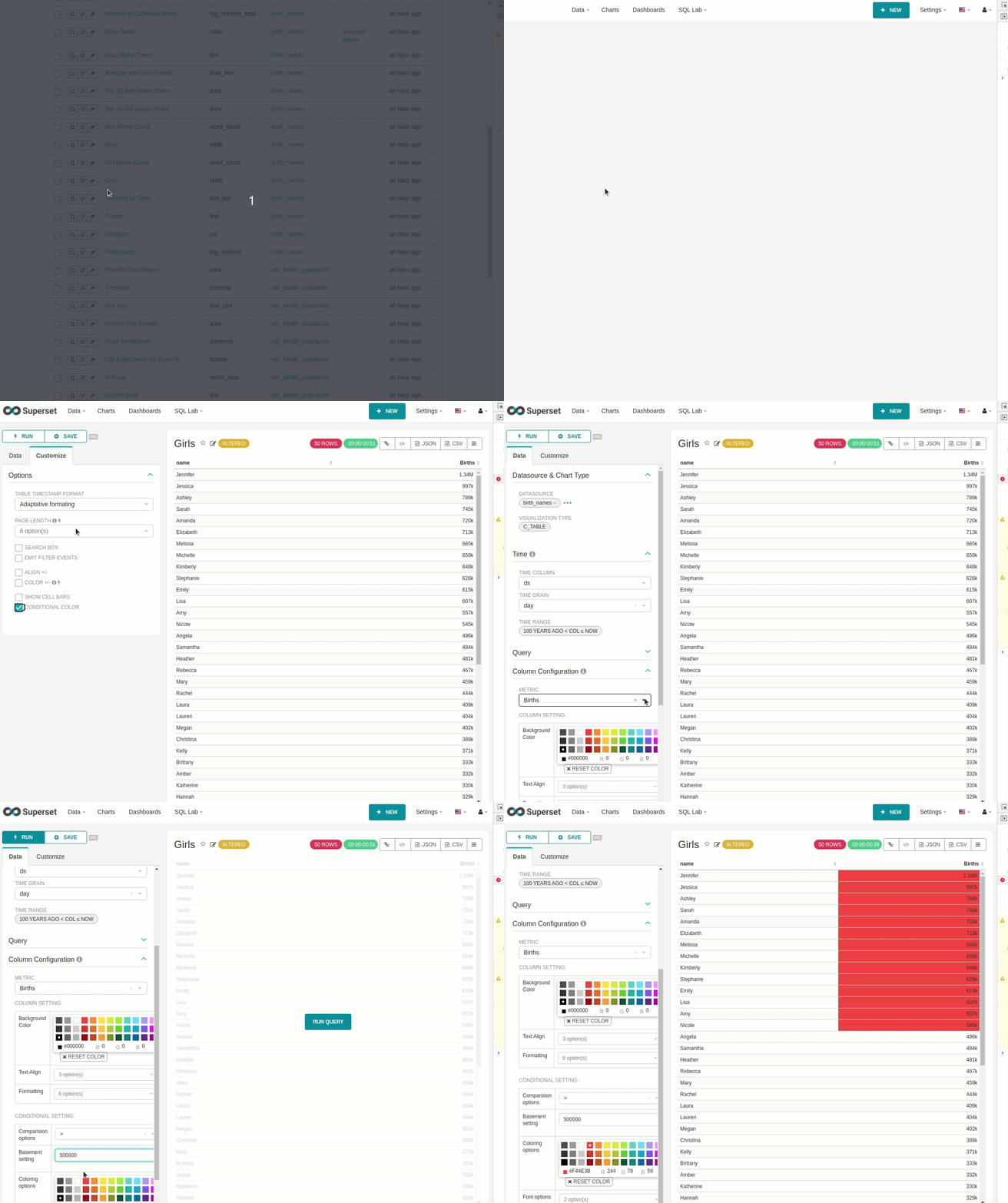
I hope this help. I do hope the conditional formatting feature will eventually land on the official Superset.
 LonelyLok
on 22 Nov 2020
LonelyLok
on 22 Nov 2020
Related issues
kalimuthu123
·
3Comments
 ylkjick532428
·
3Comments
ylkjick532428
·
3Comments
 dinhhuydh
·
3Comments
dinhhuydh
·
3Comments
 joshuacano
·
3Comments
joshuacano
·
3Comments
 amien90
·
3Comments
amien90
·
3Comments
Most helpful comment
Issue-Label Bot is automatically applying the label
#enhancementto this issue, with a confidence of 0.80. Please mark this comment with :thumbsup: or :thumbsdown: to give our bot feedback!Links: app homepage, dashboard and code for this bot.