Incubator-superset: Cannot enable anonymous users to view dashboards
I have a dashboard that I want to share publicly. I followed the related steps from the documentation, also linked in https://github.com/apache/incubator-superset/issues/4102:
https://superset.incubator.apache.org/security.html#public
Specifically, what I did was:
- Set
PUBLIC_ROLE_LIKE_GAMMA = Trueinsuperset_config.py - Added
datasource accesspermissions to thePublicrole, for the datasource from where data in the dashboard is retrieved
Expected results
Anonymous (i.e., not logged in) users shall be able to see the dashboard by opening its URL in a web browser.
Actual results
Anonymous (i.e., not logged in) users are not able to see the dashboard by opening its URL in a web browser: they are redirected to the login page showing an Access Denied error.
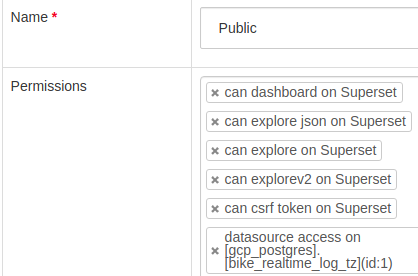
I also tried to add some more permissions to the Public user (see screenshots) and managed to display the dashboard, but not the charts in it. However I don't think it's the right way to do it, it should work as documented.
Screenshots
Access denied error:

Permissions that I tried to add to Public, together with the datasource access:

What I saw after adding such permissions:

Environment
- superset version: built from
master
Checklist
Make sure these boxes are checked before submitting your issue - thank you!
- [x] I have checked the superset logs for python stacktraces and included it here as text if there are any.
- [ ] I have reproduced the issue with at least the latest released version of superset.
- [x] I have checked the issue tracker for the same issue and I haven't found one similar.
 ecamellini
All 15 comments
Issue-Label Bot is automatically applying the label #bug to this issue, with a confidence of 0.63. Please mark this comment with :thumbsup: or :thumbsdown: to give our bot feedback!
Links: app homepage, dashboard and code for this bot.
![issue-label-bot[bot] picture](https://avatars2.githubusercontent.com/in/27079?v=4&s=40) issue-label-bot[bot]
on 24 Jun 2019
issue-label-bot[bot]
on 24 Jun 2019
Hi,
Can you please post a text list with all the permissions included on the Public role?
 dpgaspar
on 26 Jun 2019
dpgaspar
on 26 Jun 2019
@ecamellini In my case,
I could read dashboard with 6 permissions
datasource permission should indicate table
but my version is 0.28.1... may be different from master
reference : https://stackoverflow.com/questions/50295010/is-there-a-way-to-create-read-only-dashboard-in-apache-superset
 yahwang
on 27 Jun 2019
yahwang
on 27 Jun 2019
I think I managed to solve the issue: for PUBLIC_ROLE_LIKE_GAMMA = True to take effect I had to re-launch superset_init.sh, and now Public actually has all the gamma permissions and adding the datasource access is sufficient to make the dashboard visible publicly.
If someone can confirm that this is the right way to do it, I'll update the documentation accordingly.
ecamellini
on 28 Jun 2019
I'm using this config-set for Public access
[can dashboard on Superset, can explorev2 on Superset, can explore json on Superset, can csrf token on Superset, can csv on Superset, menu access on Dashboards, all datasource access on all_datasource_access, all database access on all_database_access, can list on DashboardModelViewAsync, can list on DashboardModelView]
You just need to replace all_database_access and all_datasource_access for the public datasource and database.
 LeonanCarvalho
on 22 Aug 2019
LeonanCarvalho
on 22 Aug 2019
This issue has been automatically marked as stale because it has not had recent activity. It will be closed if no further activity occurs. Thank you for your contributions. For admin, please label this issue .pinned to prevent stale bot from closing the issue.
![stale[bot] picture](https://avatars3.githubusercontent.com/in/1724?v=4&s=40) stale[bot]
on 21 Oct 2019
stale[bot]
on 21 Oct 2019
I followed the instruction in the link mentioned above (https://superset.apache.org/security.html#public) and now the public role is filled with the same permission as the Gamma one plus all the datasource. But still, the system return "Access is Denied"!
 trepmag
on 17 Apr 2020
trepmag
on 17 Apr 2020
@trepmag Did you solve this issue??? I have the very same problem and I don't know how to fix it...
 Porthos81
on 22 May 2020
Porthos81
on 22 May 2020
@trepmag @Porthos81 Same issue here. How did you resolve?
 Green-Angry-Bird
on 28 May 2020
Green-Angry-Bird
on 28 May 2020
@Porthos81 @Green-Angry-Bird if I remember correctly, what worked for me is what I described in this comment above: https://github.com/apache/incubator-superset/issues/7763#issuecomment-506656337
Re-running superset_init.sh after performing the changes described in the issue resulted in the permission change to actually happen.
ecamellini
on 29 May 2020
To follow up on this, I was able to get this working.
I had to enable a bunch of permission on Public role, specifically:
[all datasource access on all_datasource_access, all database access on all_database_access, can explore json on Superset, can explore on Superset, can csrf token on Superset, can dashboard on Superset, can explorev2 on Superset, can fave dashboards on Superset, can fave dashboards by username on Superset, can favstar on Superset, can fave slices on Superset, can show on CssTemplateModelView, can download on CssTemplateModelView, can delete on CssTemplateModelView, can list on CssTemplateModelView, can add on CssTemplateModelView, can edit on CssTemplateModelView, muldelete on CssTemplateModelView, can show on CssTemplateAsyncModelView, can download on CssTemplateAsyncModelView, can delete on CssTemplateAsyncModelView, can list on CssTemplateAsyncModelView, can add on CssTemplateAsyncModelView, can edit on CssTemplateAsyncModelView, muldelete on CssTemplateAsyncModelView, menu access on CSS Templates]
This is a variation on https://github.com/apache/incubator-superset/issues/7763#issuecomment-523949896 but I also fixed the errors that get reported on missing Favourites and missing CSS.
Green-Angry-Bird
on 29 May 2020
Yep, I think you did manually what happens by doing this: https://github.com/apache/incubator-superset/issues/7763#issuecomment-635843718
In the and, this just adds permissions from Gamma to the Public group.
Glad you solved it ;)
ecamellini
on 29 May 2020
@Porthos81 @Green-Angry-Bird I re-runned superset-init as mentioned by @ecamellini and finally the related dashboard/charrt were accessible...
trepmag
on 2 Jun 2020
Hi, can anyone tell me where is superset_init.sh?
I start the superset by
git clone https://github.com/apache/incubator-superset/
cd incubator-superset

docker-compose up
The superset is up.
Then, where should I execute the superset_init.sh?
 tingkai-zhang
on 21 Jun 2020
tingkai-zhang
on 21 Jun 2020
I've got a working version now using the documentation posted above https://superset.apache.org/security.html#public
before executing docker-compose up just edit the file ./docker/pythonpath_dev/superset_config.py as described in the link above
for me the file then looks like
...
DATABASE_DIALECT = get_env_variable("DATABASE_DIALECT")
DATABASE_USER = get_env_variable("DATABASE_USER")
DATABASE_PASSWORD = get_env_variable("DATABASE_PASSWORD")
DATABASE_HOST = get_env_variable("DATABASE_HOST")
DATABASE_PORT = get_env_variable("DATABASE_PORT")
DATABASE_DB = get_env_variable("DATABASE_DB")
PUBLIC_ROLE_LIKE_GAMMA = TrueSQLALCHEMY_DATABASE_URI = "%s://%s:%s@%s:%s/%s" % (
DATABASE_DIALECT,
DATABASE_USER,
DATABASE_PASSWORD,
DATABASE_HOST,
DATABASE_PORT,
DATABASE_DB,
)
...
Then you can fire docker-compose up
And yes, you need to add permissions to the "public" role, otherwise the dashboards are not shown
 romeokienzler
on 13 Aug 2020
romeokienzler
on 13 Aug 2020
Related issues
 gbrian
·
3Comments
gbrian
·
3Comments
 joshuacano
·
3Comments
joshuacano
·
3Comments
 kalimuthu123
·
3Comments
kalimuthu123
·
3Comments
 josephtyler
·
3Comments
josephtyler
·
3Comments
 shyam2794
·
3Comments
shyam2794
·
3Comments
Most helpful comment
I'm using this config-set for Public access
[can dashboard on Superset, can explorev2 on Superset, can explore json on Superset, can csrf token on Superset, can csv on Superset, menu access on Dashboards, all datasource access on all_datasource_access, all database access on all_database_access, can list on DashboardModelViewAsync, can list on DashboardModelView]You just need to replace all_database_access and all_datasource_access for the public datasource and database.