Incubator-superset: docker-compose up fails with "superset_superset_1 exited with code 243"
Make sure these boxes are checked before submitting your issue - thank you!
- [x ] I have checked the superset logs for python stacktraces and included it here as text if there are any.
- [x ] I have reproduced the issue with at least the latest released version of superset.
- [x] I have checked the issue tracker for the same issue and I haven't found one similar.
Superset version
latest git
Expected results
superset starts up without error
Actual results
superset_1 | npm ERR! path /home/superset/superset/assets/node_modules
superset_1 | npm ERR! code EACCES
superset_1 | npm ERR! errno -13
superset_1 | npm ERR! syscall mkdir
superset_1 | npm ERR! Error: EACCES: permission denied, mkdir '/home/superset/superset/assets/node_modules'
superset_1 | npm ERR! { [Error: EACCES: permission denied, mkdir '/home/superset/superset/assets/node_modules']
superset_1 | npm ERR! cause:
superset_1 | npm ERR! { Error: EACCES: permission denied, mkdir '/home/superset/superset/assets/node_modules'
superset_1 | npm ERR! type: 'OperationalError',
superset_1 | npm ERR! '$error': '$error',
superset_1 | npm ERR! cause:
superset_1 | npm ERR! { errno: -13,
superset_1 | npm ERR! code: 'EACCES',
superset_1 | npm ERR! syscall: 'mkdir',
superset_1 | npm ERR! path: '/home/superset/superset/assets/node_modules' },
superset_1 | npm ERR! isOperational: true,
superset_1 | npm ERR! errno: -13,
superset_1 | npm ERR! code: 'EACCES',
superset_1 | npm ERR! syscall: 'mkdir',
superset_1 | npm ERR! path: '/home/superset/superset/assets/node_modules' },
superset_1 | npm ERR! isOperational: true,
superset_1 | npm ERR! stack:
superset_1 | npm ERR! 'Error: EACCES: permission denied, mkdir \'/home/superset/superset/assets/node_modules\'',
superset_1 | npm ERR! type: 'OperationalError',
superset_1 | npm ERR! '$error': '$error',
superset_1 | npm ERR! errno: -13,
superset_1 | npm ERR! code: 'EACCES',
superset_1 | npm ERR! syscall: 'mkdir',
superset_1 | npm ERR! path: '/home/superset/superset/assets/node_modules' }
superset_1 | npm ERR!
superset_1 | npm ERR! The operation was rejected by your operating system.
superset_1 | npm ERR! It is likely you do not have the permissions to access this file as the current user
superset_1 | npm ERR!
superset_1 | npm ERR! If you believe this might be a permissions issue, please double-check the
superset_1 | npm ERR! permissions of the file and its containing directories, or try running
superset_1 | npm ERR! the command again as root/Administrator (though this is not recommended).
superset_1 |
superset_1 | npm ERR! A complete log of this run can be found in:
superset_1 | npm ERR! /home/superset/.npm/_logs/2019-02-15T09_24_16_955Z-debug.log
superset_superset_1 exited with code 243
Steps to reproduce
git clone https://github.com/apache/incubator-superset/
cd incubator-superset/contrib/docker
prefix with SUPERSET_LOAD_EXAMPLES=yes to load examples:
docker-compose run --rm superset ./docker-init.sh
you can run this command everytime you need to start superset now:
docker-compose up
EDIT:
additional infos:
CentOS Linux release 7.6.1810 (Core)
docker version:
Docker version 18.09.2, build 6247962
 unficyp
All 19 comments
same issue
 ickma
on 18 Feb 2019
ickma
on 18 Feb 2019
same issue +1
 wupeiwen
on 20 Feb 2019
wupeiwen
on 20 Feb 2019
The problem occurs only in development mode because the docker-compose.yml file maps a volume /home/superset/superset using the ../../superset path (relative to the contrib/docker).
(...)
version: '3'
services:
  (...)
  superset:
  (...)
  volumes:
    (...)
    # this is needed to communicate with the postgres and redis services
    - ./superset_config.py:/home/superset/superset/superset_config.py
    # this is needed for development, remove with SUPERSET_ENV=production
    - ../../superset:/home/superset/superset
When it gets up, on the container, the volume is mounted with root ownership (or whatever user starts docker-composer), and superset tries to run with its own user superset.
An ugly workaround is to add user: root:root directive to the superset section of services. It states that the user who will run the entrypoint.sh is root -- or the owner of the ../../superset path.
(...)
version: '3'
services:
  (...)
  superset:
  (...)
  user: root:root
  volumes:
    (...)
    # this is needed to communicate with the postgres and redis services
    - ./superset_config.py:/home/superset/superset/superset_config.py
    # this is needed for development, remove with SUPERSET_ENV=production
    - ../../superset:/home/superset/superset
 gchehab
on 20 Feb 2019
gchehab
on 20 Feb 2019
I did replicate this error on Ubuntu, but not in macOS. I've noticed that docker manages the added volumes in slightly different ways in both systems, particularly the ownership of the folders, so I think that this error only happens in Linux. As it only happens on the dev env, and because of the mounted folders setup, chmod 777 on the superset/assets in the host computer, (not necessary in the docker folder) also helps with the issue...
 iaperez
on 22 Feb 2019
iaperez
on 22 Feb 2019
@gchehab I did modified version of of docker-compose/dockerfile/entrypoint that uses same tactic as official postgres image for docker;
Run as root(instead of work) and in docker-entrypoint.sh
1) Do chown/chmod for superset directory before starting the service (for work user)
2) Use gosu (https://github.com/tianon/gosu) to start service for work user
 kakoni
on 26 Feb 2019
kakoni
on 26 Feb 2019
Well, it seems to me that it is a better approach than running superset as root, even if that is the case only on the docker container.
gchehab
on 26 Feb 2019
Ok. Will do a PR for review.
kakoni
on 26 Feb 2019
Dears,
I had the same issue , but editing /root/superset/incubator-superset/contrib/docker/docker-compose.yml to make superset work as production instead of development resolved this issue , just comment the development and un-comment the production lines as below:
SUPERSET_ENV: production
#SUPERSET_ENV: development
 ButeForce
on 27 Feb 2019
ButeForce
on 27 Feb 2019
Hi @ButeForce I tried ur suggestion and this time on doing
docker-compose up didn't throw the 243 error. And shows everything running.
nf _NPROCESSORS_ONLN
superset_1  | + gunicorn --bind 0.0.0.0:8088 --workers 9 --timeout 60 --limit-request-line 0 --limit-request-field_size 0 superset:app
redis_1     | 1:C 11 Mar 18:10:12.905 # Warning: no config file specified, using the default config. In order to specify a config file use redis-server /path/to/redis.conf
redis_1     |                 _._
redis_1     |            _.-``__ ''-._
redis_1     |       _.-``    `.  `_.  ''-._           Redis 3.2.12 (00000000/0) 64 bit
redis_1     |   .-`` .-```.  ```\/    _.,_ ''-._
redis_1     |  (    '      ,       .-`  | `,    )     Running in standalone mode
redis_1     |  |`-._`-...-` __...-.``-._|'` _.-'|     Port: 6379
redis_1     |  |    `-._   `._    /     _.-'    |     PID: 1
redis_1     |   `-._    `-._  `-./  _.-'    _.-'
redis_1     |  |`-._`-._    `-.__.-'    _.-'_.-'|
redis_1     |  |    `-._`-._        _.-'_.-'    |           http://redis.io
redis_1     |   `-._    `-._`-.__.-'_.-'    _.-'
redis_1     |  |`-._`-._    `-.__.-'    _.-'_.-'|
redis_1     |  |    `-._`-._        _.-'_.-'    |
redis_1     |   `-._    `-._`-.__.-'_.-'    _.-'
redis_1     |       `-._    `-.__.-'    _.-'
redis_1     |           `-._        _.-'
redis_1     |               `-.__.-'
redis_1     |
redis_1     | 1:M 11 Mar 18:10:12.907 # WARNING: The TCP backlog setting of 511 cannot be enforced because /proc/sys/net/core/somaxconn is set to the lower value of 128.
redis_1     | 1:M 11 Mar 18:10:12.907 # Server started, Redis version 3.2.12
redis_1     | 1:M 11 Mar 18:10:12.907 # WARNING overcommit_memory is set to 0! Background save may fail under low memory condition. To fix this issue add 'vm.overcommit_memory = 1' to /etc/sysctl.conf and then reboot or run the command 'sysctl vm.overcommit_memory=1' for this to take effect.
redis_1     | 1:M 11 Mar 18:10:12.907 # WARNING you have Transparent Huge Pages (THP) support enabled in your kernel. This will create latency and memory usage issues with Redis. To fix this issue run the command 'echo never > /sys/kernel/mm/transparent_hugepage/enabled' as root, and add it to your /etc/rc.local in order to retain the setting after a reboot. Redis must be restarted after THP is disabled.
redis_1     | 1:M 11 Mar 18:10:12.907 * The server is now ready to accept connections on port 6379
redis_1     | 1:signal-handler (1552329732) Received SIGTERM scheduling shutdown...
redis_1     | 1:M 11 Mar 18:42:12.263 # User requested shutdown...
redis_1     | 1:M 11 Mar 18:42:12.263 * Saving the final RDB snapshot before exiting.
redis_1     | 1:M 11 Mar 18:42:12.273 * DB saved on disk
redis_1     | 1:M 11 Mar 18:42:12.273 # Redis is now ready to exit, bye bye...
redis_1     | 1:C 11 Mar 19:02:54.132 # Warning: no config file specified, using the default config. In order to specify a config file use redis-server /path/to/redis.conf
redis_1     |                 _._
redis_1     |            _.-``__ ''-._
redis_1     |       _.-``    `.  `_.  ''-._           Redis 3.2.12 (00000000/0) 64 bit
redis_1     |   .-`` .-```.  ```\/    _.,_ ''-._
redis_1     |  (    '      ,       .-`  | `,    )     Running in standalone mode
redis_1     |  |`-._`-...-` __...-.``-._|'` _.-'|     Port: 6379
redis_1     |  |    `-._   `._    /     _.-'    |     PID: 1
redis_1     |   `-._    `-._  `-./  _.-'    _.-'
redis_1     |  |`-._`-._    `-.__.-'    _.-'_.-'|
redis_1     |  |    `-._`-._        _.-'_.-'    |           http://redis.io
redis_1     |   `-._    `-._`-.__.-'_.-'    _.-'
redis_1     |  |`-._`-._    `-.__.-'    _.-'_.-'|
redis_1     |  |    `-._`-._        _.-'_.-'    |
redis_1     |   `-._    `-._`-.__.-'_.-'    _.-'
postgres_1  | PostgreSQL init process complete; ready for start up.
postgres_1  |
postgres_1  | 2019-03-11 18:28:47.662 UTC [1] LOG:  listening on IPv4 address "0.0.0.0", port 5432
postgres_1  | 2019-03-11 18:28:47.662 UTC [1] LOG:  listening on IPv6 address "::", port 5432
postgres_1  | 2019-03-11 18:28:47.683 UTC [1] LOG:  listening on Unix socket "/var/run/postgresql/.s.PGSQL.5432"
postgres_1  | 2019-03-11 18:28:47.713 UTC [62] LOG:  database system was shut down at 2019-03-11 18:28:47 UTC
postgres_1  | 2019-03-11 18:28:47.724 UTC [1] LOG:  database system is ready to accept connections
postgres_1  | 2019-03-11 18:42:12.195 UTC [1] LOG:  received smart shutdown request
postgres_1  | 2019-03-11 18:42:12.199 UTC [1] LOG:  worker process: logical replication launcher (PID 68) exited with exit code 1
postgres_1  | 2019-03-11 18:42:12.201 UTC [63] LOG:  shutting down
postgres_1  | 2019-03-11 18:42:12.231 UTC [1] LOG:  database system is shut down
postgres_1  | 2019-03-11 19:02:54.140 UTC [1] LOG:  listening on IPv4 address "0.0.0.0", port 5432
postgres_1  | 2019-03-11 19:02:54.140 UTC [1] LOG:  listening on IPv6 address "::", port 5432
postgres_1  | 2019-03-11 19:02:54.159 UTC [1] LOG:  listening on Unix socket "/var/run/postgresql/.s.PGSQL.5432"
postgres_1  | 2019-03-11 19:02:54.198 UTC [23] LOG:  database system was shut down at 2019-03-11 18:42:12 UTC
postgres_1  | 2019-03-11 19:02:54.218 UTC [1] LOG:  database system is ready to accept connections
postgres_1  | 2019-03-11 19:05:35.612 UTC [37] LOG:  unexpected EOF on client connection with an open transaction
postgres_1  | 2019-03-11 19:05:35.615 UTC [30] LOG:  unexpected EOF on client connection with an open transaction
postgres_1  | 2019-03-11 19:05:35.622 UTC [33] LOG:  unexpected EOF on client connection with an open transaction
postgres_1  | 2019-03-11 19:05:35.622 UTC [31] LOG:  unexpected EOF on client connection with an open transaction
postgres_1  | 2019-03-11 19:05:35.624 UTC [36] LOG:  unexpected EOF on client connection with an open transaction
postgres_1  | 2019-03-11 19:05:35.626 UTC [32] LOG:  unexpected EOF on client connection with an open transaction
postgres_1  | 2019-03-11 19:05:35.627 UTC [39] LOG:  unexpected EOF on client connection with an open transaction
postgres_1  | 2019-03-11 19:05:35.665 UTC [38] LOG:  unexpected EOF on client connection with an open transaction
postgres_1  | 2019-03-11 19:05:35.965 UTC [1] LOG:  received smart shutdown request
postgres_1  | 2019-03-11 19:05:35.972 UTC [1] LOG:  worker process: logical replication launcher (PID 29) exited with exit code 1
postgres_1  | 2019-03-11 19:05:35.973 UTC [24] LOG:  shutting down
postgres_1  | 2019-03-11 19:05:36.038 UTC [1] LOG:  database system is shut down
postgres_1  | 2019-03-11 19:05:49.437 UTC [1] LOG:  listening on IPv4 address "0.0.0.0", port 5432
postgres_1  | 2019-03-11 19:05:49.438 UTC [1] LOG:  listening on IPv6 address "::", port 5432
postgres_1  | 2019-03-11 19:05:49.457 UTC [1] LOG:  listening on Unix socket "/var/run/postgresql/.s.PGSQL.5432"
postgres_1  | 2019-03-11 19:05:49.503 UTC [23] LOG:  database system was shut down at 2019-03-11 19:05:36 UTC
postgres_1  | 2019-03-11 19:05:49.525 UTC [1] LOG:  database system is ready to accept connections
postgres_1  | 2019-03-11 19:06:18.957 UTC [30] ERROR:  duplicate key value violates unique constraint "ab_user_username_key"
postgres_1  | 2019-03-11 19:06:18.957 UTC [30] DETAIL:  Key (username)=(superset) already exists.
postgres_1  | 2019-03-11 19:06:18.957 UTC [30] STATEMENT:  INSERT INTO ab_user (id, first_name, last_name, username, password, active, email, last_login, login_count, fail_login_count, created_on, changed_on, created_by_fk, changed_by_fk) VALUES (nextval('ab_user_id_seq'), 'root', 'root', 'superset', 'pbkdf2:sha256:50000$9QOJttHu$06ee34e8cbaf8f9e987931f6ae2ff4e1eea913136dd5f6fc841d02d00c869893', true, '[email protected]', NULL, NULL, NULL, '2019-03-11T19:06:18.956293'::timestamp, '2019-03-11T19:06:18.956325'::timestamp, NULL, NULL) RETURNING ab_user.id
redis_1     | 1:M 11 Mar 19:05:49.361 # WARNING overcommit_memory is set to 0! Background save may fail under low memory condition. To fix this issue add 'vm.overcommit_memory = 1' to /etc/sysctl.conf and then reboot or run the command 'sysctl vm.overcommit_memory=1' for this to take effect.
redis_1     | 1:M 11 Mar 19:05:49.361 # WARNING you have Transparent Huge Pages (THP) support enabled in your kernel. This will create latency and memory usage issues with Redis. To fix this issue run the command 'echo never > /sys/kernel/mm/transparent_hugepage/enabled' as root, and add it to your /etc/rc.local in order to retain the setting after a reboot. Redis must be restarted after THP is disabled.
redis_1     | 1:M 11 Mar 19:05:49.361 * DB loaded from disk: 0.000 seconds
redis_1     | 1:M 11 Mar 19:05:49.361 * The server is now ready to accept connections on port 6379
superset_1  | [2019-03-11 19:06:50 +0000] [8] [INFO] Starting gunicorn 19.8.0
superset_1  | [2019-03-11 19:06:50 +0000] [8] [INFO] Listening at: http://0.0.0.0:8088 (8)
superset_1  | [2019-03-11 19:06:50 +0000] [8] [INFO] Using worker: sync
superset_1  | [2019-03-11 19:06:50 +0000] [13] [INFO] Booting worker with pid: 13
superset_1  | [2019-03-11 19:06:50 +0000] [14] [INFO] Booting worker with pid: 14
superset_1  | [2019-03-11 19:06:50 +0000] [15] [INFO] Booting worker with pid: 15
superset_1  | [2019-03-11 19:06:50 +0000] [16] [INFO] Booting worker with pid: 16
superset_1  | [2019-03-11 19:06:50 +0000] [18] [INFO] Booting worker with pid: 18
superset_1  | [2019-03-11 19:06:50 +0000] [21] [INFO] Booting worker with pid: 21
superset_1  | [2019-03-11 19:06:50 +0000] [22] [INFO] Booting worker with pid: 22
superset_1  | [2019-03-11 19:06:51 +0000] [23] [INFO] Booting worker with pid: 23
superset_1  | [2019-03-11 19:06:51 +0000] [25] [INFO] Booting worker with pid: 25
But when I try to open the link in browser it doesn't connect.
http://localhost:8088. It does't connect. It works on my mac though without this 243 error.
 trmanish
on 11 Mar 2019
trmanish
on 11 Mar 2019
Ok it connects. However pls see this. I see some issue with UI loading of few features of server Superset.
trmanish
on 11 Mar 2019
This issue has been automatically marked as stale because it has not had recent activity. It will be closed if no further activity occurs. Thank you for your contributions. For admin, please label this issue .pinned to prevent stale bot from closing the issue.
![stale[bot] picture](https://avatars3.githubusercontent.com/in/1724?v=4&s=40) stale[bot]
on 14 May 2019
stale[bot]
on 14 May 2019
Ok it connects. However pls see this. I see some issue with UI loading of few features of server Superset.
7008
How to connect it? I am still struggling with that.
 bwon7
on 17 May 2019
bwon7
on 17 May 2019
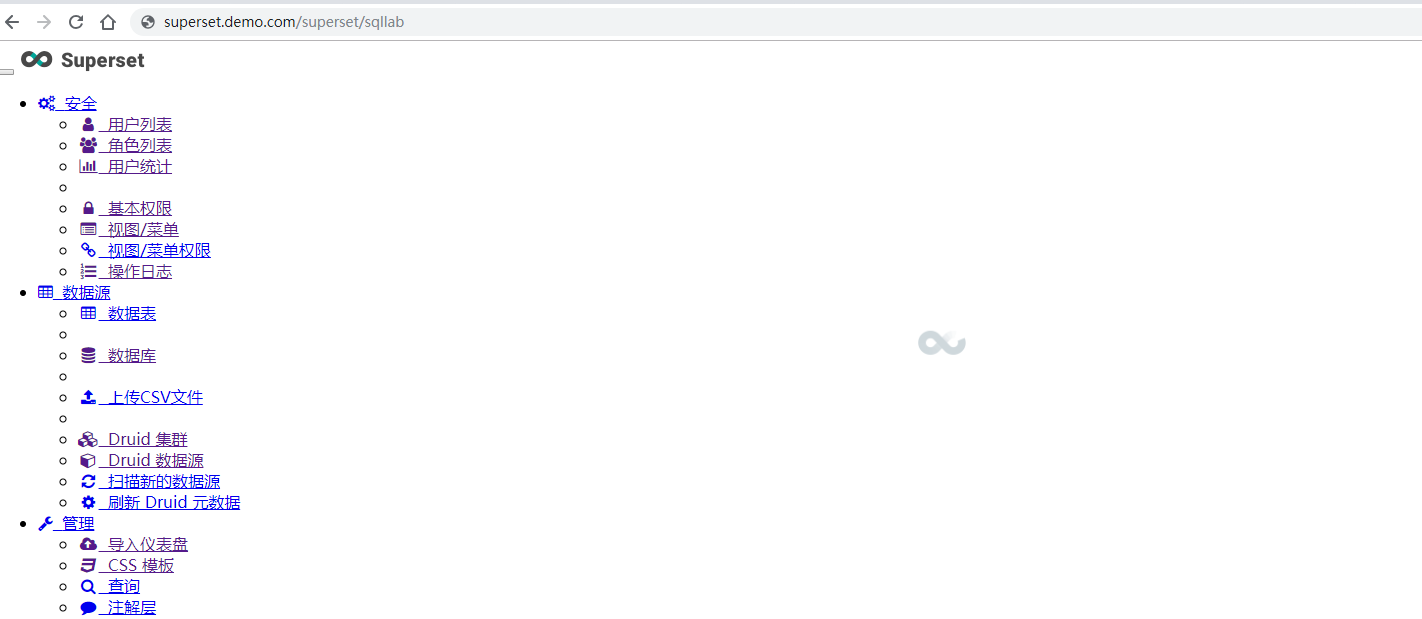
I run superset by using docker-compose on master branch, the welcome page and sqllab is always keep loading.
I only change docker-compose.yml
SUPERSET_ENV: production
      #SUPERSET_ENV: development
How to fix it? There is no error on chrome console
 Ryan-Miao
on 21 May 2019
Ryan-Miao
on 21 May 2019
UI build steps
1.npm run build
2.npm run dev
3.reboot superset
Ryan Miao notifications@github.com 于2019年5月21日周二 上午11:12写道:
[image: image]
https://user-images.githubusercontent.com/11866078/58065627-efddcc00-7bb8-11e9-94da-efe7dfec7ff8.pngI run superset by using docker-compose on master branch, the welcome page
and sqllab is always keep loading.I only change docker-compose.yml
SUPERSET_ENV: production
#SUPERSET_ENV: development
```How to fix it
—
You are receiving this because you commented.
Reply to this email directly, view it on GitHub
https://github.com/apache/incubator-superset/issues/6887?email_source=notifications&email_token=AC27DJS53ZPLAZD25YADQVTPWNSDNA5CNFSM4GXVBRYKYY3PNVWWK3TUL52HS4DFVREXG43VMVBW63LNMVXHJKTDN5WW2ZLOORPWSZGODV2T5XA#issuecomment-494223068,
or mute the thread
https://github.com/notifications/unsubscribe-auth/AC27DJVGSGNOENUNJXRQ2VLPWNSDNANCNFSM4GXVBRYA
.
wupeiwen
on 21 May 2019
UI build steps 1.
npm run build2.npm run dev3.reboot superset Ryan Miao notifications@github.com 于2019年5月21日周二 上午11:12写道:
…
[image: image] https://user-images.githubusercontent.com/11866078/58065627-efddcc00-7bb8-11e9-94da-efe7dfec7ff8.png I run superset by using docker-compose on master branch, the welcome page and sqllab is always keep loading. I only change docker-compose.yml SUPERSET_ENV: production #SUPERSET_ENV: development ``` How to fix it — You are receiving this because you commented. Reply to this email directly, view it on GitHub <#6887?email_source=notifications&email_token=AC27DJS53ZPLAZD25YADQVTPWNSDNA5CNFSM4GXVBRYKYY3PNVWWK3TUL52HS4DFVREXG43VMVBW63LNMVXHJKTDN5WW2ZLOORPWSZGODV2T5XA#issuecomment-494223068>, or mute the thread https://github.com/notifications/unsubscribe-auth/AC27DJVGSGNOENUNJXRQ2VLPWNSDNANCNFSM4GXVBRYA .
Thanks for your reply. I just run
git clone https://github.com/apache/incubator-superset/
cd incubator-superset/contrib/docker
# prefix with SUPERSET_LOAD_EXAMPLES=yes to load examples:
docker-compose run --rm superset ./docker-init.sh
# you can run this command everytime you need to start superset now:
docker-compose up
Which file should I modify? Dockerfile?
Ryan-Miao
on 21 May 2019
If you don't do secondary development, you can use the community version docker image.
wupeiwen
on 22 May 2019
如果不进行二次开发,则可以使用社区版本的docker镜像。
wupeiwen
on 22 May 2019
This issue has been automatically marked as stale because it has not had recent activity. It will be closed if no further activity occurs. Thank you for your contributions. For admin, please label this issue .pinned to prevent stale bot from closing the issue.
stale[bot]
on 21 Jul 2019
UI build steps 1.
npm run build2.npm run dev3.reboot superset Ryan Miao [email protected] 于2019年5月21日周二 上午11:12写道:
…
[image: image] https://user-images.githubusercontent.com/11866078/58065627-efddcc00-7bb8-11e9-94da-efe7dfec7ff8.png I run superset by using docker-compose on master branch, the welcome page and sqllab is always keep loading. I only change docker-compose.yml SUPERSET_ENV: production #SUPERSET_ENV: development ``` How to fix it — You are receiving this because you commented. Reply to this email directly, view it on GitHub <#6887?email_source=notifications&email_token=AC27DJS53ZPLAZD25YADQVTPWNSDNA5CNFSM4GXVBRYKYY3PNVWWK3TUL52HS4DFVREXG43VMVBW63LNMVXHJKTDN5WW2ZLOORPWSZGODV2T5XA#issuecomment-494223068>, or mute the thread https://github.com/notifications/unsubscribe-auth/AC27DJVGSGNOENUNJXRQ2VLPWNSDNANCNFSM4GXVBRYA .Thanks for your reply. I just run
git clone https://github.com/apache/incubator-superset/
cd incubator-superset/contrib/docker
# prefix with SUPERSET_LOAD_EXAMPLES=yes to load examples:
docker-compose run --rm superset ./docker-init.sh
# you can run this command everytime you need to start superset now:
docker-compose up
Which file should I modify? Dockerfile?
docker-compose file
 nabinkhadka
on 3 Aug 2019
nabinkhadka
on 3 Aug 2019
Related issues
 josephtyler
·
3Comments
josephtyler
·
3Comments
 fly-high-bj
·
3Comments
fly-high-bj
·
3Comments
 lenguyenthedat
·
3Comments
lenguyenthedat
·
3Comments
 XiaodiKong
·
3Comments
XiaodiKong
·
3Comments
 tmccartan
·
3Comments
tmccartan
·
3Comments
Most helpful comment
Dears,
I had the same issue , but editing /root/superset/incubator-superset/contrib/docker/docker-compose.yml to make superset work as production instead of development resolved this issue , just comment the development and un-comment the production lines as below:
SUPERSET_ENV: production
#SUPERSET_ENV: development