Incubator-superset: Pie Chart - format number display from .3s to .1s ( or other format )
Make sure these boxes are checked before submitting your issue - thank you!
- [x] I have checked the superset logs for python stacktraces and included it here as text if any
- [x] I have reproduced the issue with at least the latest released version of superset
- [x] I have checked the issue tracker for the same issue and I haven't found one similar
Superset version
{"GIT_SHA": "", "version": "0.21.1"}
Expected results
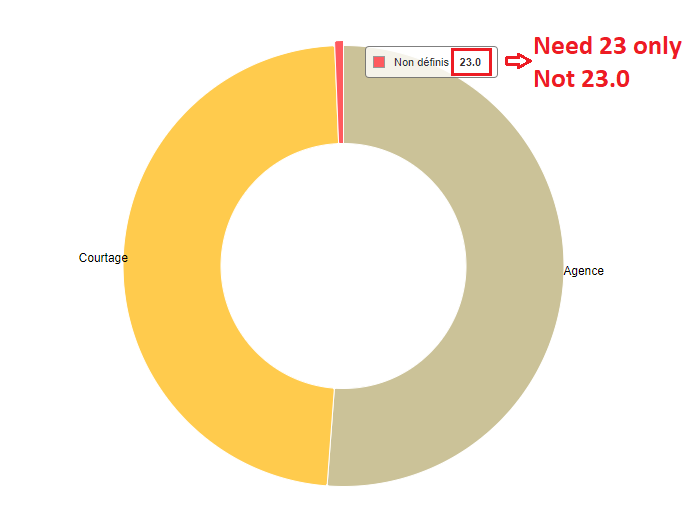
My data are whole integers in my query.
Having decimals does not make sense in this case.
I made search in the source codes and found some formatting in nvd3_vis.js
and a pie chart case.
Steps to reproduce
env/lib/python2.7/site-packages/superset/static/assets/visualizations/nvd3_vis.js
case 'pie':
...
// chart.valueFormat(f);
chart.valueFormat('.1s');
...
else if (fd.pie_label_type === 'key_value') {
//chart.labelType(d => ${d.data.x}: ${d3.format('.3s')(d.data.y)});
chart.labelType(d => ${d.data.x}: ${d3.format('.1s')(d.data.y)});
}
But the pie charts are still displaying the decimals
Do I need to change anything else?
Thanks in adv.
 XavierDeLapeyre
All 6 comments
You have to read the documentation on how to do your own build.
 xrmx
on 14 Feb 2018
xrmx
on 14 Feb 2018
You need to use the development version. Files in the assets folder are managed by webpack. You cannot modify using the production server (or debug server). They are minified and Superset loads it from the dist/ subdir, not from the assets directory
See https://github.com/apache/incubator-superset/blob/master/CONTRIBUTING.md on how to setup.
Maybe an options to .1s can be added in the control defined in assets/javascripts/explore/stores/controls.jsx so it its available for anyone
 raffas
on 14 Feb 2018
raffas
on 14 Feb 2018
@raffas
Thanks for the link and indepth background review.
Basically, all I need to do then is run the command line that compiles the production / optimized js & css
either
$ npm run prod
or
$ npm run dev
or do I have to run yarn first?
from the root of the repository, move to where our JS package.json lives
$ cd superset/assets/
install yarn, a replacement for npm install that is faster and more deterministic
$ npm install -g yarn
run yarn to fetch all the dependencies
$ yarn
Start a web server that manages and updates your assets as you modify them
$ npm run dev
XavierDeLapeyre
on 15 Feb 2018
Yes, you have to run yarn first, then the command. It installs all the dependency... a lot of dependency
But I suggest you to start from a new virtual env with a fresh cloned copy of superset master, either from the official repository or from your forked copy. I'm unsure if the procedure works on superset installed from python package
Note: npm run dev builds all the files that are required, but they are not minified, so some files are about 40M and you you are not on a local lan, you experience some huge delays when you load the various pages.
raffas
on 15 Feb 2018
I recommend using npm run dev-fast, we should make that the default...
 mistercrunch
on 19 Feb 2018
mistercrunch
on 19 Feb 2018
Version 0.28.1 also has this problem pie chart, the d3-format can be configured in metrics of datasource editor, but it does not work.
 wenchma
on 21 Nov 2018
wenchma
on 21 Nov 2018
Related issues
 tmccartan
·
3Comments
tmccartan
·
3Comments
 dinhhuydh
·
3Comments
dinhhuydh
·
3Comments
 thoralf-gutierrez
·
3Comments
thoralf-gutierrez
·
3Comments
 john-bodley
·
3Comments
john-bodley
·
3Comments
 joshuacano
·
3Comments
joshuacano
·
3Comments