Incubator-superset: jdbc+hive in sqlalchemy URI is not working
Make sure these boxes are checked before submitting your issue - thank you!
- [x] I have checked the superset logs for python stacktraces and included it here as text if any
- [x] I have reproduced the issue with at least the latest released version of superset
- [x] I have checked the issue tracker for the same issue and I haven't found one similar
Superset version
0.18.4
Expected results
using jdbc+hive:// in sqlalchemy URI will work
Actual results
superset web server raise an exception:
sqlalchemy.exc.NoSuchModuleError: Can't load plugin: sqlalchemy.dialects:jdbc.hive
Steps to reproduce
pip install -U pyhive- create a new database in superset using
jdbc+hive://prefix, and then press the test button.
More
I've read https://github.com/airbnb/superset/issues/241 to learn that it's a known issue, and @shkr had posted a databricks tutorial that will guide new comers to setup this jdbc+hive connector, but the link within https://github.com/airbnb/superset/issues/241#issuecomment-234010902 is already gone, and I haven't been able to found any related information on https://docs.databricks.com/user-guide/getting-started.html
that's why I'm re-raising this issue, focusing on how to get jdbc+hive:// to work, and hopefully help make the docs more complete and friendly.
 timfeirg
All 17 comments
The error clearly says sqlalchemy does not found the jdbc.hive dialect. Have you installed pyhive?
http://airbnb.io/superset/installation.html#database-dependencies
 xrmx
on 12 Jun 2017
xrmx
on 12 Jun 2017
yes, I have installed pyhive v0.3.0, and hive:// seems to be working correctly, but there's some other issue relating pyhive and its dependencies that I can't get around with, so I'm trying sparksql on superset. @xrmx
timfeirg
on 12 Jun 2017
and note that pyhive probably doesn't come with a sqlalchemy plugin -- the project doesn't even contains the word jdbc
timfeirg
on 12 Jun 2017
So it looks like our documentation is wrong.
@timfeirg can you infer something useful from this? https://github.com/airbnb/superset/issues/241#issuecomment-281168751
@shkr any chance you can clarify this comment please? https://github.com/airbnb/superset/issues/241#issuecomment-234010902
xrmx
on 12 Jun 2017
I see https://github.com/airbnb/superset/issues/241#issuecomment-281168751 suggests using hive:// on a spark thrift server, our SA is compiling spark and setup this thrift server, update later.
timfeirg
on 12 Jun 2017
We use pyhive at Airbnb and haven't experimented with jdbc, but I noticed that the driver/dialect seem backwards in your uri:jdbc+hive:// -> hive+jdbc://
 mistercrunch
on 12 Jun 2017
mistercrunch
on 12 Jun 2017
@mistercrunch there's a typo in the doc then :)
xrmx
on 12 Jun 2017
Just tried hive+jdbc://, superset just raised sqlalchemy.exc.NoSuchModuleError: Can't load plugin: sqlalchemy.dialects:hive.jdbc, ha
Am I missing anything here? @mistercrunch
timfeirg
on 12 Jun 2017
I used impala://127.0.0.1:10000/default to connect a spark thrift server, and it works.
 idreamshen
on 14 Jun 2017
idreamshen
on 14 Jun 2017
I've tried using impala:// on a hive thrift server, sqllab will work fine, but visualization however reveals some issues, I remember if a time column is involved, superset explore view cannot load the time grain selection dropdown, and cannot proceed to rendering.
did visualization work in your setup? @idreamshen
timfeirg
on 14 Jun 2017
visualization works.
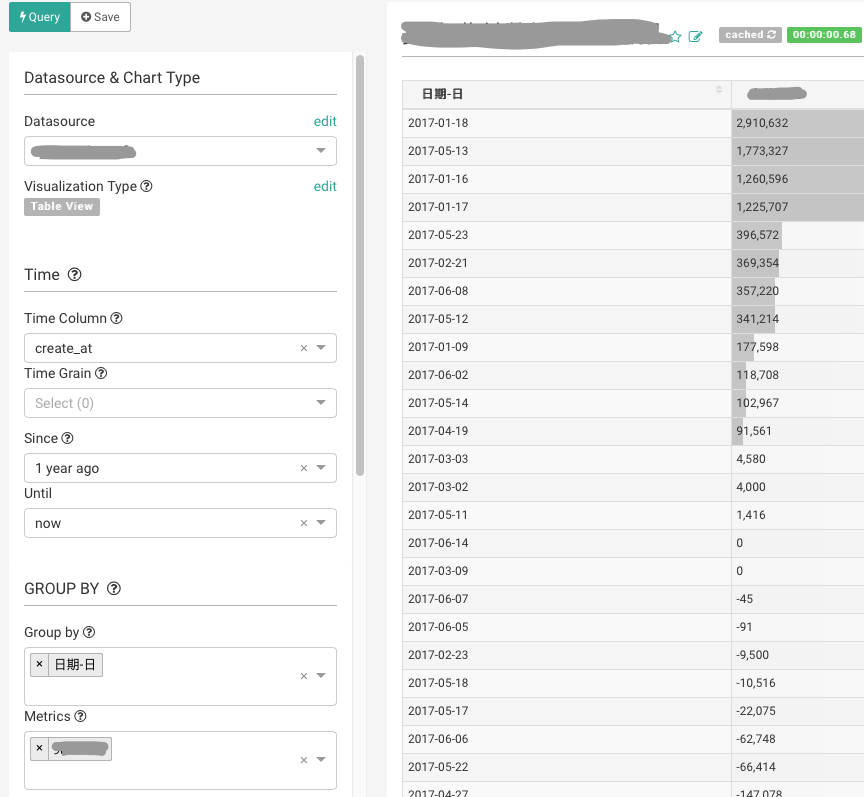
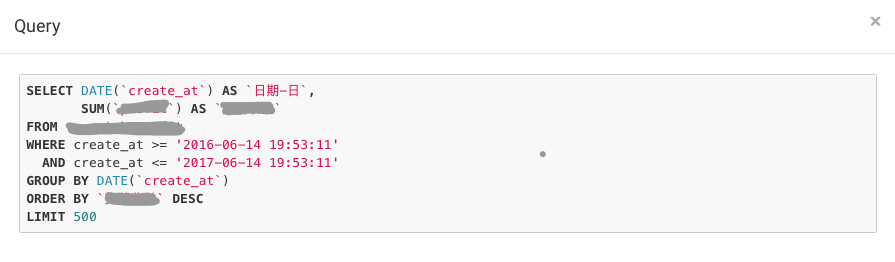
Here is my table column setup.
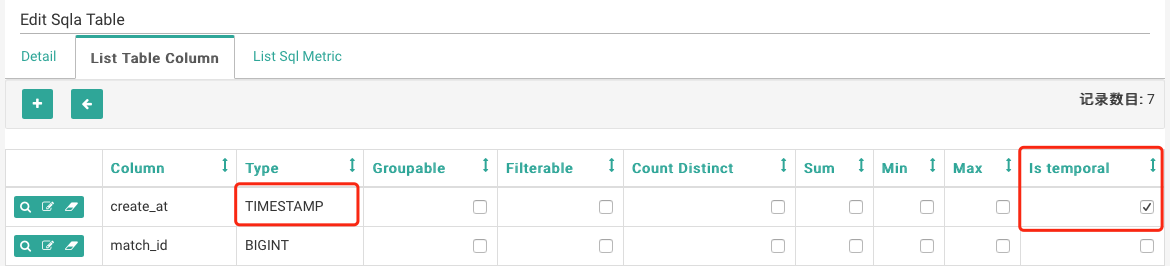
The type of a time column should be TIMESTAMP, and selected the Is temporal
impyla support TIMESTAMP type
https://github.com/cloudera/impyla/blob/master/impala/sqlalchemy.py#L99
_impala_type_to_sqlalchemy_type = {
'BOOLEAN': BOOLEAN,
'TINYINT': TINYINT,
'SMALLINT': SMALLINT,
'INT': INT,
'BIGINT': BIGINT,
'TIMESTAMP': TIMESTAMP,
'FLOAT': FLOAT,
'DOUBLE': DOUBLE,
'STRING': STRING,
'DECIMAL': DECIMAL}
SQLAlchemy URI:
hive://localhost:10000
I solved this problem by follow reference. Hoping can help :-)
https://pypi.python.org/pypi/PyHive
from sqlalchemy import *
from sqlalchemy.engine import create_engine
from sqlalchemy.schema import *

engine = create_engine('hive://localhost:10000/default')
logs = Table('my_awesome_data', MetaData(bind=engine), autoload=True)
print select([func.count('*')], from_obj=logs).scalar()
Requirements
Install using
pip install pyhive[hive] for the Hive interface and
pip install pyhive[presto] for the Presto interface.
pyhive==0.5.0 maybe also raise some error
pip install pythrifthiveapi
comment out getProgressUpdate in site-packages/pyhive/hive.py
 JazzChen
on 21 Sep 2017
JazzChen
on 21 Sep 2017
I have followed @JazzChen solution (except commenting in hive.py) and works perfect for me, thanks!
 rilma
on 29 Nov 2017
rilma
on 29 Nov 2017
@JazzChen , I followed the solution you provided, still have the same issue with Can't load plugin: sqlalchemy.dialects:hive.jdbc
I am using superset version 0.20.5
 savamirkovic
on 5 Dec 2017
savamirkovic
on 5 Dec 2017
@JazzChen I have encountered this problem according to your plan. type object 'TCLIService' has no attribute 'Client'
 0xfcryowbk2ca65z
on 29 Sep 2018
0xfcryowbk2ca65z
on 29 Sep 2018
This issue has been automatically marked as stale because it has not had recent activity. It will be closed if no further activity occurs. Thank you for your contributions.
![stale[bot] picture](https://avatars3.githubusercontent.com/in/1724?v=4&s=40) stale[bot]
on 10 Apr 2019
stale[bot]
on 10 Apr 2019
Hi everyone,
Is there SQLAlchemy dialect support JDBC? I want to connect Apache Ignite database in superset, but I do not known how to type 'SQLAlchemy URI'.
 rangerzhou
on 20 Apr 2020
rangerzhou
on 20 Apr 2020
Related issues
 tmccartan
·
3Comments
tmccartan
·
3Comments
 thoralf-gutierrez
·
3Comments
thoralf-gutierrez
·
3Comments
 lenguyenthedat
·
3Comments
lenguyenthedat
·
3Comments
 kalimuthu123
·
3Comments
kalimuthu123
·
3Comments
 fly-high-bj
·
3Comments
fly-high-bj
·
3Comments
Most helpful comment
SQLAlchemy URI:
hive://localhost:10000
I solved this problem by follow reference. Hoping can help :-)
https://pypi.python.org/pypi/PyHive
Requirements
Install using
pip install pyhive[hive] for the Hive interface and
pip install pyhive[presto] for the Presto interface.
pyhive==0.5.0 maybe also raise some error
pip install pythrifthiveapi
comment out getProgressUpdate in site-packages/pyhive/hive.py