Incubator-echarts: Gauge - Anticlockwise
Version
4.2.1
Steps to reproduce
Create a gauge with the following option
option = {
    series: [
        {
            type: 'gauge',
            detail: {formatter:'{value}%'},
            data: [{value: 50}],
            min:0,
            max:100,
            startAngle:0,
            endAngle:180,
            clockwise:false //anitclockwise
        }
     ]
}

However, setting clockwise to true breaks the axis line.
option = {
    series: [
        {
            type: 'gauge',
            detail: {formatter:'{value}%'},
            data: [{value: 50}],
            min:0,
            max:100,
            startAngle:0,
            endAngle:180,
            clockwise:true
        }
     ]
}

What is expected?
The gauge to be created anticlockwise along with the pointer animation.
What is actually happening?
Both the gauge and pointer animation are clockwise.
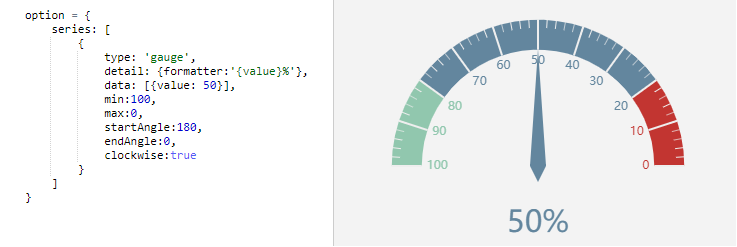
The only way I could make it anticlockwise was by swapping min/max and startAngle/endAngle. But unfortunately, the pointer animation remained clockwise.
option = {
    series: [
        {
            type: 'gauge',
            detail: {formatter:'{value}%'},
            data: [{value: 50}],
            min:100,
            max:0,
            startAngle:180,
            endAngle:0,
            clockwise:true
        }
    ]
}

 MohammadYounes
All 6 comments
Hi! We've received your issue and please be patient to get responded. 🎉
The average response time is expected to be within one day for weekdays.
In the meanwhile, please make sure that you have posted enough image to demo your request. You may also check out the API and chart option to get the answer.
If you don't get helped for a long time (over a week) or have an urgent question to ask, you may also send an email to [email protected] .
If you are interested in the project, you may also subscribe our mail list.
Have a nice day! 🍵
![echarts-bot[bot] picture](https://avatars1.githubusercontent.com/in/20872?v=4&s=40) echarts-bot[bot]
on 22 Aug 2019
echarts-bot[bot]
on 22 Aug 2019
clockwise represents the growth direction of scale values on the gauge
 yufeng04
on 28 Aug 2019
yufeng04
on 28 Aug 2019
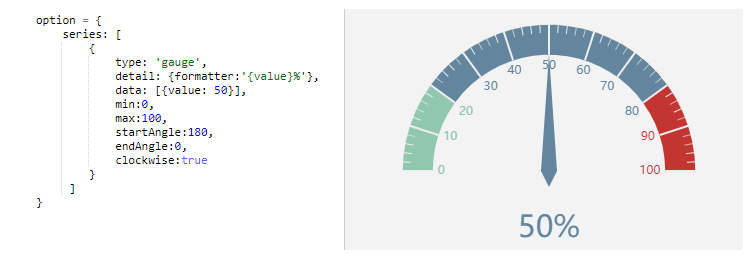
This doesn't seem to be a bug. I think you should use the following code when setting clockwise to be true:
option = {
    series: [
        {
            type: 'gauge',
            detail: {formatter:'{value}%'},
            data: [{value: 50}],
            min:0,
            max:100,
            startAngle:180,
            endAngle:0,
            clockwise:true
        }
     ]
}
 Ovilia
on 29 Aug 2019
Ovilia
on 29 Aug 2019
@Ovilia I need the scale to be anticlockwise.
Your suggested option gives this:
What I need is this:
MohammadYounes
on 29 Aug 2019
I think it's a bug with
option = {
    series: [
        {
            type: 'gauge',
            detail: {formatter:'{value}%'},
            data: [{value: 50}],
            min:0,
            max:100,
            startAngle:0,
            endAngle:180,
            clockwise:false
        }
     ]
}
Hi,
I've found a related issue. The pointer points the proper value but it maintains the clockwise color.

I also toggled min/max and startAngle/endAngle values
 javio2
on 3 Sep 2020
javio2
on 3 Sep 2020
Related issues
 publisherfk
·
3Comments
publisherfk
·
3Comments
 liuqz
·
3Comments
liuqz
·
3Comments
 jarben
·
3Comments
jarben
·
3Comments
 akvaliya
·
3Comments
akvaliya
·
3Comments
 decadef20
·
3Comments
decadef20
·
3Comments
Most helpful comment
Hi,

I've found a related issue. The pointer points the proper value but it maintains the clockwise color.
I also toggled min/max and startAngle/endAngle values