Incubator-echarts: Fix clipPointsByRect()
Version
4.2.1
Reproduction link
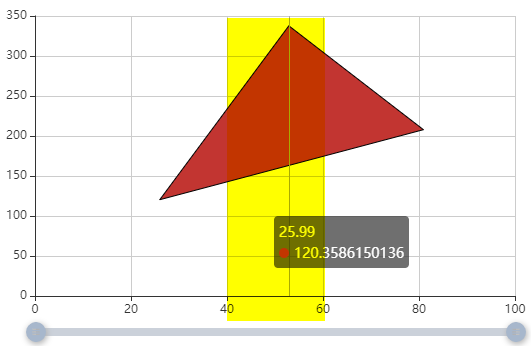
When you do not zoom, you see the full polygon (the yellow area marks the region that we will zoom into):
Steps to reproduce
use a custom series to draw a polygon. when you zoom in, the polygon will be distored (it is not clipped correctly)
In the jsFiddle Example you can press the zoom Part button below the chart. Here is the result, when echarts.graphic.clipPointsByRect is used:
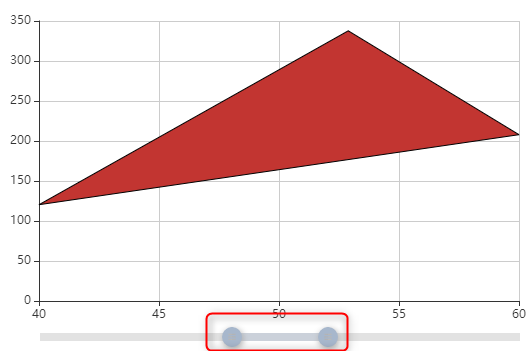
notice the position of the zoom slider. The first data-point in the zoomed view seems to be at x=40 (but is in fact on x=25!)
What is expected?
Clipping a polygon to a rectangle may need to change the ploygon shape (maybe add points).
The zoomed polygon should look like the yellow highlighted area in the first image.
What is actually happening?
the current implementation only changes the x/y coordinates of the existing polygon, but does not change the shape
Full details are also on Stackoverflow: How to avoid polygon distortion when zooming?
Proposed solution:
clipPointsByRect() should use a smarter clipping algorithm e.g. Sutherland-Hodgman algorithm for polygon clipping
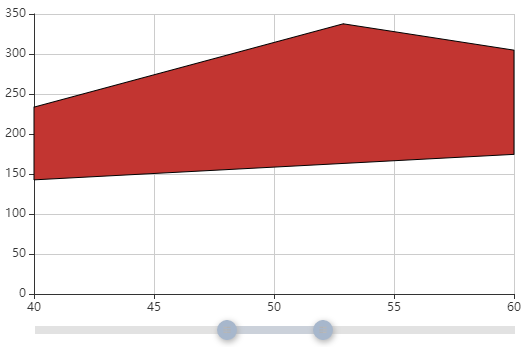
Here is an updated js-fiddle example, that uses the external lineclip library instead of clipPointsByRect(). This shows the correct result:
 tmtron
All 3 comments
Hi! We've received your issue and please be patient to get responded. 🎉
The average response time is expected to be within one day for weekdays.
In the meanwhile, please make sure that you have posted enough image to demo your request. You may also check out the API and chart option to get the answer.
Have a nice day! 🍵
![echarts-bot[bot] picture](https://avatars1.githubusercontent.com/in/20872?v=4&s=40) echarts-bot[bot]
on 5 Apr 2019
echarts-bot[bot]
on 5 Apr 2019
maybe this will be fixed by #11240?
tmtron
on 27 Sep 2019
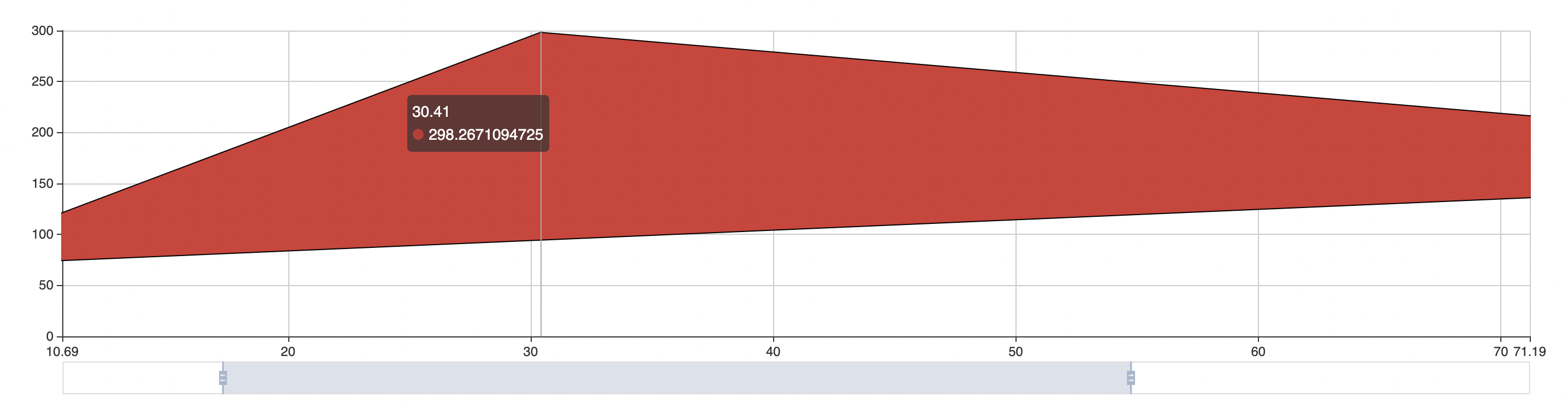
@tmtron Thanks for the detailed advice. And yes, we added a clip option in custom series in the 4.4.0, which will be released in the next week.
It uses canvas clip() API to clip the shape. I think it will fix your issue.
The usage is simple:
series: [{
  type: 'custom',
  clip: true
}]
 pissang
on 28 Sep 2019
pissang
on 28 Sep 2019
Related issues
 771752687
·
3Comments
771752687
·
3Comments
 marine1ly
·
3Comments
marine1ly
·
3Comments
 hanhui
·
3Comments
hanhui
·
3Comments
 Thinkpad93
·
3Comments
Thinkpad93
·
3Comments
 akvaliya
·
3Comments
akvaliya
·
3Comments
Most helpful comment
@tmtron Thanks for the detailed advice. And yes, we added a
clipoption in custom series in the 4.4.0, which will be released in the next week.It uses canvas
clip()API to clip the shape. I think it will fix your issue.The usage is simple: