Incubator-echarts: 请问如何在title上添加图片或者字体图标(在线demo)
我想在title添加个图片或者字体图标,但是参照文档未能实现
文档位置
http://echarts.baidu.com/option.html#title.textStyle.rich
http://echarts.baidu.com/tutorial.html#%E5%AF%8C%E6%96%87%E6%9C%AC%E6%A0%87%E7%AD%BE
这里是我要实现的效果
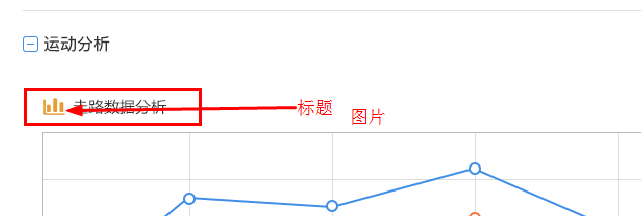
我的代码
代码中未引入图片,但是rich部分未生效
                    title: {
                        text: "走路数据分析",
                        textStyle: {
                            formatter: '{aaa| 走路数据分析}',
                            rich: {
                                aaa: {
                                    backgroundColor: '#f00',
                                    color: '#0f0'
                                },
                                bbb: {
                                    backgroundColor: '#f00',
                                    color: '#00f'
                                }
                            }
                        }
                    },
项目在线demo
http://jsrun.net/HMYKp/edit
 yumengzhong
All 11 comments
我建议你把标题拿到echarts外面,通过HTML来实现。
 cling330
on 12 Sep 2017
cling330
on 12 Sep 2017
遇到同样的问题,在rich里面定义样式不去作用
 zhangya5847
on 18 Oct 2017
zhangya5847
on 18 Oct 2017
@zhangya5847 没那会没找到解决方法,后来没关注了,你可以试试楼上的方法 @cling330
yumengzhong
on 18 Oct 2017
@yumengzhong 谢谢!我要实现单轴散点图,每个轴都有一个title,用html实现的话不能一一对应。
zhangya5847
on 18 Oct 2017
我在title>textStyle>rich里面也是定义了样式,但将其应用于text的时候,并没有识别到富文本标签
 zhaoxbmsdn
on 1 Nov 2017
zhaoxbmsdn
on 1 Nov 2017
样式标签放在 text 中。
    title: {
        text: "{aaa| 走路数据分析}",
        textStyle: {
            rich: {
                aaa: {
                    backgroundColor: '#f00',
                    color: '#0f0'
                },
                bbb: {
                    backgroundColor: '#f00',
                    color: '#00f'
                }
            }
        }
    },
 100pah
on 1 Nov 2017
100pah
on 1 Nov 2017
非常感谢~
我按照echarts配置手册,使用了formatter的格式:
text:'{aaa|走路数据分析aaa}'
已按照你的提示完善-
zhaoxbmsdn
on 1 Nov 2017
谢谢,确实是对的。如果要加上背景图片和设置图片高度。可以这么改:
title: {
    text: "{aaa| 走路数据分析}",
    textStyle: {
        rich: {
            aaa: {
                "backgroundColor":{"image":"xxx/yyy.png"},
                "height":40
            bbb: {
                "backgroundColor":{"image":"xxx/yyy.png"},
                "height":40
            }
        }
    }
},
 kenjican
on 22 May 2018
kenjican
on 22 May 2018
@100pah 你好,textStyle下面如果使用rich的话,文档说width才可以使用,我想让标题栏占满,试了一下不行,这是为什么呢?
title: {
    text: "{aaa| 走路数据分析}",
    textStyle: {
        rich: {
            aaa: {
                "width":"100%",
                "height":40
              }
             }
        }
    }
}
 sowork
on 30 Nov 2018
sowork
on 30 Nov 2018
@sowork
width 100% 目前只是表示“这个文本块的 100%”(在文本块中一些细节的子元素,如图片、分割线中有用),并没表示“可视区域的 100%”。
不太了解您的场景,为何要标题栏占满。
100pah
on 2 Dec 2018
@100pah 我需要将title底部加一个边框,将标题和内容分割,contentWidth 100% 表示“这个文本块的 100%” 我后面理解的差不多是你这个意思,实际上在写的时候发现rich里面的width写100% 是有问题的,100%控制不了contentWidth的占比
下面的width: '100' 字符串的数值会扩充content的宽度,具体是怎么计算的也没细研究
title: {
    text: "{aaa| 走路数据分析}",
    textStyle: {
        rich: {
            aaa: {
                "width":"100",
                "height":40
              }
             }
        }
    }
}
Related issues
 Zendic
·
3Comments
Zendic
·
3Comments
 akvaliya
·
3Comments
akvaliya
·
3Comments
 Thinkpad93
·
3Comments
Thinkpad93
·
3Comments
 decadef20
·
3Comments
decadef20
·
3Comments
 RoxetteI
·
3Comments
RoxetteI
·
3Comments
Most helpful comment
样式标签放在
text中。