Inav: iNav Softserial not working with F4 Omnibus V5.1 Target OmnibusF4V3
Board and Version
F4 Omnibus V5.1
https://www.hobbyrc.co.uk/airbot-omnibus-f4-v5-flight-controller
_Version of INAV used goes here_
1.9.2

When trying to activate CPU Softserial option in configuration, I click on Save and Reboot, and I have the error with com port see pict attached. I was able to do this work before with an F4 Omnibus Pro V2 and this is working with Betaflight following these instructions: https://blog.dronetrest.com/omnibus-f4-flight-controller-guide/#receiver
Blackbox logs/Config (.ZIP) where problem occurs
_Go to CLI, execute dump command copy its output to PasteBin and provide a link to a paste here.
_Upload a zipped blackbox log (if available)_
 chris669
All 67 comments
Softserial on Omnibus F4 with iNav is on the PC8/PC9 pins. Usually small pads named CH5/CH6 (note different from PWM5/6). CH5 = RX, CH6 = TX. Looks like on the V5.1 these pads doesn't exist. The RX is not routed but you should be able to use the TX for telemetry by connecting to this via (you need to remove the solder mask):

 shellixyz
on 23 Mar 2018
shellixyz
on 23 Mar 2018
Thanks, it appears that with Target OMNIBUSF4PRO I can enable the SoftSerial, but I was told that the right target for this board was OMNIBUSF4V3, so it seems the architecture of this board is a PRO??
For the pin (see pict) there is CH6 on the same pin as TX6 and a CH4 with RX6 and a CH2 small pad just bottom of CPU, I know th CLI "resource" command in Betaflight (like resource SERIAL_TX 11 A09) but not in iNav, could you tell me what is the right command to resource for example CH6 on the right pin? Or where can I find this? Thanks.

chris669
on 24 Mar 2018
Indeed I did not think about that. The right target for this board is most likely OMNIBUSF4V3. No soft serial for this target... Resource mapping is not available in iNav you have to modify the target file(s) and build a custom hex.
shellixyz
on 24 Mar 2018
Thanks, but what's strange is that this half supported board is in the sponsorised list of boards Airbot Omnibus AIO F4... https://github.com/iNavFlight/inav/wiki/Supported-boards, we can expect from Airbot that the V5 is just a "bug corrected" board, but it appears that this is not the case :( So with they add an OMNIBUSF4V5 target? Really do not understand why ALL the functionnalities of this board works perfectly with Betaflight and not with iNav. This is a newbie report point of view, do not be offensed :)
chris669
on 26 Mar 2018
What is working with Betaflight but not iNav ? You don't have soft serial on Betaflight with this board unless you remap pins to use with soft serial. Same thing with iNav. The difference is that with Betaflight you can remap pins at run time while you can't with iNav (see this issue for a discussion about this feature: https://github.com/iNavFlight/inav/issues/1145). You can do it but you need to build a custom version.
Why did they remove the CH5/CH6 pads for OmnibusF4 versions >= 3 ? It is only a guess but it might be because they needed one more pin for controlling the UART6 inverter. The pin connected on older versions to the CH5 pad is now used for this.
If you are not using PWM5 or PWM6 you could use one of these pads for the soft serial port. CH2 might be an option too.
shellixyz
on 26 Mar 2018
Thanks
you said: If you are not using PWM5 or PWM6 you could use one of these pads for the soft serial port. CH2 might be an option too.
How to assign Serialsoft to PWM5 for example? CLI command?
chris669
on 27 Mar 2018
You can't. As stated before you need to build a custom binary with the soft serial pin(s) assigned to the one(s) you want. This should work with soft serial on PWM6:
inav_1.9.0_OMNIBUSF4V3.hex.zip
The patch you will need for building your custom version when upgrading:
diff --git a/src/main/target/OMNIBUSF4/target.h b/src/main/target/OMNIBUSF4/target.h
index d3e4f74d..c99ed872 100644
--- a/src/main/target/OMNIBUSF4/target.h
+++ b/src/main/target/OMNIBUSF4/target.h
@@ -135,14 +135,15 @@
#define UART6_RX_PIN PC7
#define UART6_TX_PIN PC6
+#define USE_SOFTSERIAL1
+#define SERIAL_PORT_COUNT 5 //VCP, USART1, USART3, USART6, SOFTSERIAL1
+
#if defined(OMNIBUSF4V3)
-#define SERIAL_PORT_COUNT 4 //VCP, USART1, USART3, USART6
+#define SOFTSERIAL_1_RX_PIN NONE
+#define SOFTSERIAL_1_TX_PIN PA8
#else
-#define USE_SOFTSERIAL1
#define SOFTSERIAL_1_RX_PIN PC8
#define SOFTSERIAL_1_TX_PIN PC9
-
-#define SERIAL_PORT_COUNT 5 //VCP, USART1, USART3, USART6, SOFTSERIAL1
#endif
#define USE_SPI
WOW, I will give a try, thank for your patience...
I confirm it works, get my telemetry on PWM6, thanks very much!
Chris
chris669
on 27 Mar 2018
HI
I am very new to all this,I have an Omnibus F4 V5 and am wondering if its possible to remap the PWM5 and 6 to Softserial ?.
would this require a custom build of INav 1.9.0 ?
If so can someone please help me in how I do this.
THank You
 ST02CMC
on 4 Apr 2018
ST02CMC
on 4 Apr 2018
@ST02CMC If you want to use soft serial for telemetry you can use the file I posted earlier. It make a bidirectional soft serial port available on PWM6.
shellixyz
on 4 Apr 2018
@shellixyz
Thanks for the responce.
I need to use softserial for tx/rx on PWM 5 & 6 as i require both, this is so i can use the switch record function on my runcam.
I take it that will require a custom build doing then ?
ST02CMC
on 4 Apr 2018
@shellixyz, when frsky Fport will be implemented, will not need this patch anymore, will have telemetry through sBus, right?
chris669
on 4 Apr 2018
@ST02CMC Yes you need a custom build, RX is on PWM5 and TX on PWM6: inav_1.9.0_OMNIBUSF4V3.hex.zip
The patch you will need for building your custom version when upgrading:
diff --git a/src/main/target/OMNIBUSF4/target.h b/src/main/target/OMNIBUSF4/target.h
index d3e4f74d..e1d7ae42 100644
--- a/src/main/target/OMNIBUSF4/target.h
+++ b/src/main/target/OMNIBUSF4/target.h
@@ -135,14 +135,15 @@
 #define UART6_RX_PIN            PC7
 #define UART6_TX_PIN            PC6

+#define USE_SOFTSERIAL1
+#define SERIAL_PORT_COUNT       5 //VCP, USART1, USART3, USART6, SOFTSERIAL1
+
 #if defined(OMNIBUSF4V3)
-#define SERIAL_PORT_COUNT       4 //VCP, USART1, USART3, USART6
+#define SOFTSERIAL_1_RX_PIN     PA1
+#define SOFTSERIAL_1_TX_PIN     PA8
 #else
-#define USE_SOFTSERIAL1
 #define SOFTSERIAL_1_RX_PIN     PC8
 #define SOFTSERIAL_1_TX_PIN     PC9
-
-#define SERIAL_PORT_COUNT       5 //VCP, USART1, USART3, USART6, SOFTSERIAL1
 #endif

 #define USE_SPI
@chris669 Yes with FPort only one UART will be enough for the RX and telemetry
shellixyz
on 4 Apr 2018
thanks for quality support
chris669
on 4 Apr 2018
@shellixyz
I thought as much, I started installing the process to be able to make my own builds, but seem to have gotten lost somewhere.
Also, I am not sure which Resource pins i need to remap within the Target.h file, Could you please help with this?
Thanks
Chris
ST02CMC
on 4 Apr 2018
@ST02CMC I already compiled 1.9.0 with the necessary changes you just need to flash the hex file I provided in my previous comment. For next versions apply the patch I provided before building and it should work fine. If you want to make the changes manually SOFTSERIAL_1_RX_PIN needs to be set to PA1 and SOFTSERIAL_1_TX_PIN needs to be set to PA8.
shellixyz
on 4 Apr 2018
@shellixyz
Thank you sorry I did not quite understand you had made the changes already.
again Thank you
ST02CMC
on 5 Apr 2018
@shellixyz :
Hello,
I can not create my own firmware for FC OmnibusF4V3.
Can you help me?
I need to change the following:
A01: MOTOR5 OUT - change to softserial 11 TX, A08: MOTOR6 OUT - change to softserial 11 RX,
B06: FREE - change to softserial 12 TX and A09: FREE - change to softserial 12 RX.
Will you create my own hex file?
Thank you.
 romko1
on 9 Apr 2018
romko1
on 9 Apr 2018
@romko1 I don't think that would work because softserial 1 and 2 RX lines would share the same timer.
shellixyz
on 9 Apr 2018
@shellixyz :That's probably why it does not work. And to change the timer for SOFTSERIAL 1 and 2 RX lines is it possible?
I modified the timer in the target.c file, but I do not know if it's right:
target.c:
if (defined(OMNIBUSF4PRO) || defined(OMNIBUSF4V3)) && !defined(OMNIBUSF4PRO_LEDSTRIPM5)
{ TIM4, IO_TAG(PA1), TIM_Channel_1, 0, IOCFG_AF_PP_PD, GPIO_AF_TIM4, TIM_USE_ANY }, // MOTOR_5 - TX camera control
{ TIM4, IO_TAG(PA8), TIM_Channel_2, 0, IOCFG_AF_PP_PD, GPIO_AF_TIM4, TIM_USE_ANY }, // MOTOR_6 - RX camera control
{ TIM8, IO_TAG(PB6), TIM_Channel_3, 0, IOCFG_AF_PP_PD, GPIO_AF_TIM8, TIM_USE_ANY }, // LED strip - telemetry - smartport
{ TIM8, IO_TAG(PA9), TIM_Channel_4, 0, IOCFG_AF_PP_PD, GPIO_AF_TIM8, TIM_USE_ANY }, // free
else
{ TIM4, IO_TAG(PA1), TIM_Channel_1, 0, IOCFG_AF_PP_PD, GPIO_AF_TIM4, TIM_USE_ANY }, // MOTOR_5
{ TIM4, IO_TAG(PA8), TIM_Channel_2, 0, IOCFG_AF_PP_PD, GPIO_AF_TIM4, TIM_USE_ANY }, // MOTOR_6
{ TIM8, IO_TAG(PB6), TIM_Channel_3, 0, IOCFG_AF_PP_PD, GPIO_AF_TIM8, TIM_USE_ANY }, // LED stip - telemetry - smartport
{ TIM8, IO_TAG(PA9), TIM_Channel_4, 0, IOCFG_AF_PP_PD, GPIO_AF_TIM8, TIM_USE_ANY }, // free
endif
romko1
on 10 Apr 2018
@romko1 It is not possible. You can't use any timer. Timers are bound to pins in hardware. You can see which timer can be used with which pin in the STM32F405 datasheet in the "Alternate function mapping" section. PA8 and PA9 can only use timer 1.
shellixyz
on 10 Apr 2018
@shellixyz :Thanks for the explanation. And is there any opportunity to do it? E.g. in betaflight or cleanflight it works. I think camera control and smartport. Thank you.
romko1
on 10 Apr 2018
@romko1 It is working in this case because Smartport is bidirectional it only uses one pin. So you only need one RX line. Then there is no timer conflict.
This should work for camera control on SS1 (PA1-RX/PA8-TX) and S.Port connected to SS2 (PB6):
inav_1.9.0_OMNIBUSF4V3.hex.zip
diff --git a/src/main/target/OMNIBUSF4/target.c b/src/main/target/OMNIBUSF4/target.c
index 75e10e20..1e8daaaf 100644
--- a/src/main/target/OMNIBUSF4/target.c
+++ b/src/main/target/OMNIBUSF4/target.c
@@ -40,10 +40,10 @@ const timerHardware_t timerHardware[USABLE_TIMER_CHANNEL_COUNT] = {
{ TIM9, IO_TAG(PA3), TIM_Channel_2, 1, IOCFG_AF_PP_PD, GPIO_AF_TIM9, TIM_USE_MC_MOTOR | TIM_USE_FW_SERVO }, // MOTOR_3
{ TIM2, IO_TAG(PA2), TIM_Channel_3, 1, IOCFG_AF_PP_PD, GPIO_AF_TIM2, TIM_USE_MC_MOTOR | TIM_USE_FW_SERVO }, // MOTOR_4
#if (defined(OMNIBUSF4PRO) || defined(OMNIBUSF4V3)) && !defined(OMNIBUSF4PRO_LEDSTRIPM5)
- { TIM5, IO_TAG(PA1), TIM_Channel_2, 1, IOCFG_AF_PP_PD, GPIO_AF_TIM5, TIM_USE_MC_MOTOR | TIM_USE_MC_SERVO | TIM_USE_FW_SERVO }, // MOTOR_5
- { TIM4, IO_TAG(PB6), TIM_Channel_1, 1, IOCFG_AF_PP_PD, GPIO_AF_TIM4, TIM_USE_LED }, // LED strip for F4 V2 / F4-Pro-0X and later
+ { TIM5, IO_TAG(PA1), TIM_Channel_2, 1, IOCFG_AF_PP_PD, GPIO_AF_TIM5, TIM_USE_PWM }, // MOTOR_5
+ { TIM4, IO_TAG(PB6), TIM_Channel_1, 1, IOCFG_AF_PP_PD, GPIO_AF_TIM4, TIM_USE_PWM }, // LED strip for F4 V2 / F4-Pro-0X and later
#else
{ TIM5, IO_TAG(PA1), TIM_Channel_2, 1, IOCFG_AF_PP_PD, GPIO_AF_TIM5, TIM_USE_MC_MOTOR | TIM_USE_MC_SERVO | TIM_USE_FW_SERVO }, // MOTOR_5
#endif
- { TIM1, IO_TAG(PA8), TIM_Channel_1, 1, IOCFG_AF_PP_PD, GPIO_AF_TIM1, TIM_USE_MC_MOTOR | TIM_USE_MC_SERVO | TIM_USE_FW_SERVO }, // MOTOR_6
+ { TIM1, IO_TAG(PA8), TIM_Channel_1, 1, IOCFG_AF_PP_PD, GPIO_AF_TIM1, TIM_USE_PWM }, // MOTOR_6
};
diff --git a/src/main/target/OMNIBUSF4/target.h b/src/main/target/OMNIBUSF4/target.h
index d3e4f74d..050e81c1 100644
--- a/src/main/target/OMNIBUSF4/target.h
+++ b/src/main/target/OMNIBUSF4/target.h
@@ -136,7 +136,16 @@
#define UART6_TX_PIN PC6
#if defined(OMNIBUSF4V3)
-#define SERIAL_PORT_COUNT 4 //VCP, USART1, USART3, USART6
+#define SERIAL_PORT_COUNT 6 //VCP, USART1, USART3, USART6
+
+#define USE_SOFTSERIAL1
+#define SOFTSERIAL_1_RX_PIN PA1
+#define SOFTSERIAL_1_TX_PIN PA8
+
+#define USE_SOFTSERIAL2
+#define SOFTSERIAL_2_RX_PIN NONE
+#define SOFTSERIAL_2_TX_PIN PB6
+
#else
#define USE_SOFTSERIAL1
#define SOFTSERIAL_1_RX_PIN PC8
@shellixyz thank you very much for your help, advices and also for generating the hex file and "providing" target.c files and target.h. I'm probably making some mistakes somewhere, because telemetry did not work in either case
no control camera. (I also switched the pins (TX-RX) to the camera).
Here's my listing resource CLI INAV:
# resource
##IO:
A00: FREE
A01: SOFTSERIAL1 UART RX
A02: MOTOR4 OUT
A03: MOTOR3 OUT
A04: MPU CS
A05: SPI1 SCK
A06: SPI1 MISO
A07: SPI1 MOSI
A08: SOFTSERIAL1 UART TX
A09: FREE
A10: SERIAL1 UART RX
A11: USB IN
A12: USB OUT
A13: FREE
A14: FREE
A15: OSD CS
B00: MOTOR1 OUT
B01: MOTOR2 OUT
B02: FREE
B03: BARO CS
B04: BEEPER OUT
B05: LED1 OUT
B06: SOFTSERIAL2 UART TX/RX
B07: SDCARD IN
B08: FREE
B09: FREE
B10: I2C2 SCL
B11: I2C2 SDA
B12: SDCARD CS
B13: SPI2 SCK
B14: SPI2 MISO
B15: SPI2 MOSI
C00: FREE
C01: FREE
C02: ADC CH2
C03: FREE
C04: MPU EXTI
C05: FREE
C06: FREE
C07: FREE
C08: INVERTER OUT
C09: FREE
C10: SPI3 SCK
C11: SPI3 MISO
C12: SPI3 MOSI
C13: FREE
C14: FREE
C15: FREE
D00: FREE
romko1
on 10 Apr 2018
@romko1 The resource command output looks good. What telemetry are you trying to use ? Smartport ? For the camera control I can't really help I never used it.
shellixyz
on 10 Apr 2018
@shellixyz : Yes, I use smartport (FrSKY) telemetry and in betaflight and cleanflight works when I have this resource set up.
OK, let's leave the camera now, it's not essential to operate the camera, I'm more interested in telemetry.
Smartport: B06: SOFTSERIAL2 UART TX/RX -> TX/RX it is OK?
romko1
on 11 Apr 2018
@romko1 Yes it is. Connect directly the S.Port wire to the LED_STRIP pad. Make sure the LED_STRIP feature is turned OFF and the telemetry_inversion setting is set to ON.
shellixyz
on 11 Apr 2018
@shellixyz : I looked at the dump from the CLI and found this:
set telemetry_switch = OFF
set telemetry_inversion = OFF
set frsky_default_latitude = 0.000
set frsky_default_longitude = 0.000
set frsky_coordinates_format = 0
set frsky_unit = METRIC
set frsky_vfas_precision = 0
set frsky_vfas_cell_voltage = OFF
set hott_alarm_sound_interval = 5
set smartport_uart_unidir = OFF
set smartport_fuel_unit = MAH
Do you recommend me to change only telemetry_inversion -> ON? Thank you.
Of course I have the telemetry (s.port) activated and LED_STRIP deactivated.
romko1
on 11 Apr 2018
@romko1 Yes S.port is inverted async serial you need set telemetry_inversion = ON otherwise it won't work.
shellixyz
on 11 Apr 2018
@shellixyz : yes, yes, yes :)...thank you very much for your help and valuable advice .... it works ... it works telemetry - s.port and my camera control already works.
The camera started working when I set the original values for the 5th and 6th motors in target.c.
Values old (modified):
- { TIM5, IO_TAG(PA1), TIM_Channel_2, 1, IOCFG_AF_PP_PD, GPIO_AF_TIM5, TIM_USE_PWM }, // MOTOR_5
- { TIM1, IO_TAG(PA8), TIM_Channel_1, 1, IOCFG_AF_PP_PD, GPIO_AF_TIM1, TIM_USE_PWM }, // MOTOR_6
And original values:
- { TIM5, IO_TAG(PA1), TIM_Channel_2, 1, IOCFG_AF_PP_PD, GPIO_AF_TIM5, TIM_USE_MC_MOTOR | TIM_USE_MC_SERVO | TIM_USE_FW_SERVO }, // MOTOR_5
- { TIM1, IO_TAG(PA8), TIM_Channel_1, 1, IOCFG_AF_PP_PD, GPIO_AF_TIM1, TIM_USE_MC_MOTOR | TIM_USE_MC_SERVO | TIM_USE_FW_SERVO }, // MOTOR_6
Again many thanks shellixyz.
romko1
on 12 Apr 2018
Great news :+1:. Happy flying !
shellixyz
on 12 Apr 2018
@shellixyz This hex works great on my f4 omnibus to allow frsky s.port on PWM6, now to go try it in the air!
THANKS!
 zector555
on 13 Apr 2018
zector555
on 13 Apr 2018
Hello Everyone.! I'm new to Omnibus f4 v5.1 Board.I flashed the board successfully but,after reboot i can't get connetion to Inav configurator.What should I do to make it works.
Thanks.
 aerorc
on 23 Apr 2018
aerorc
on 23 Apr 2018
@shellixyz :
Could you please make me a custom build with inav 1.9.1
and PWM5 as bidirectional one wire UART for HoTT Telemetry?
The version 1.9.1 works great, but not for the telemetry.
With betaflight I use the softserial on PWM5, so it would be more easy to switch between betaflight
and inav firmware, when the softserial would be always on the same pin.
I could also work with a inav 1.9.1 version with bidirectional one wire UART for HoTT Telemetry on PWM6, if this would make it more easy for you.
 Ralfde
on 25 Apr 2018
Ralfde
on 25 Apr 2018
Im trying to get my head around the custom compiles, and push it one step more. I have s.port on PWM6 (motor 6 on timer 1,1), and not using PWM5 (motor 5 on timer 5,2) from your hex file above.
I want to add servo control on PWM5, to control a camera servo, or camera switch that uses pwm to switch to a chase cam. I think I can do this, because of the different timer. I would like to retain LED use on the LED pin, and do not have the CH5/6 pads.
Can I do this? Would your hex file have pwm/servo control on PWM6 pad from above? With my limited compiling skills, I would need to define the soft serial with: target.h
#define SOFTSERIAL_1_RX_PIN NONE
#define SOFTSERIAL_1_TX_PIN PA8
And define PWM5 for servo: target.c
{ TIM5, IO_TAG(PA1), TIM_Channel_2, 1, IOCFG_AF_PP_PD, GPIO_AF_TIM5, TIM_USE_MC_MOTOR | TIM_USE_MC_SERVO | TIM_USE_FW_SERVO }, // MOTOR_5
I was able to make a custom build now. Software is flashed already and configuration works. Will test it tomorrow, if the telemetry works, too, now.
Ralfde
on 26 Apr 2018
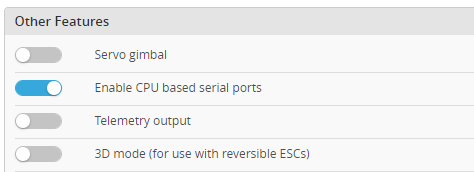
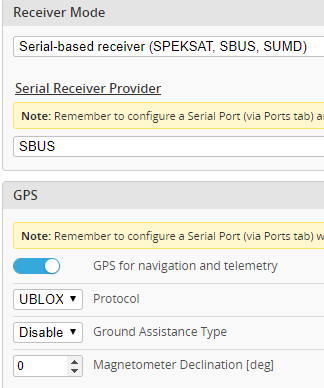
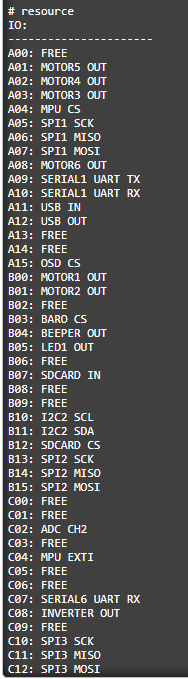
I flashed hex file provided by shellixyz Mar 27 (It make a bidirectional soft serial port available on PWM6.). I use FC sold as omnibus F4V3, INAV configurator 1.9.3. Softserial enabled in configuration, smartport assaigned in ports tab. Receiver SBUS, GPS and Mag works. But i cant see any softserial in CLI to make smartport. Could someone tell me if there is something i missed during configuration? Thanks for any help.


 ivan-pietrzyk
on 3 May 2018
ivan-pietrzyk
on 3 May 2018
I run this hex in my omnibus, and works for me. Make sure you get the right hex, I think there is a couple different ones, when you flash do a full erase.
zector555
on 3 May 2018
@zector555:
Thanks for your answer. I tried flash all of three versions by shellixyz
{soft serial on PWM6}
{RX is on PWM5 and TX on PWM6}
{camera control on SS1 (PA1-RX/PA8-TX) and S.Port connected to SS2 (PB6)}
in last few days probbably 20 times in any flash configuration combination, but i never see softserial in CLI mode. As you can see, in ports tab softserial is visible and configurable, but not in CLI mode. Do you have exactly the same board as i attached? I suppose it is due the board version (or my poor knowledge), but i have not another to compare.
ivan-pietrzyk
on 3 May 2018
Are you configuring for a hexacopter in setup, it looks like 6 motors are set? Try changing to a wing, and see if that frees up the pad. That looks like the same f4 omnibus I have, but so many nockoffs (mine is a nockoff, it's been solid for me).
zector555
on 3 May 2018
I'm trying build a quad. Now i three times tried single wing configuration with some modifications (in mixer section) as you advice, but results are the same. Softserial visible only in Ports tab, not via CLI.
ivan-pietrzyk
on 3 May 2018
Hello my friends, i use airbot f4
Pwm 1-4 is active i use wing in inav.
In pwm 5 i wont use servo for my camera fpv. So i can turn around. But pwm 5 not active.
Uart 1 i use gps
Uart 6 for sbus
Help me please.
 abdul1212
on 4 May 2018
abdul1212
on 4 May 2018
@abdul1212 : You need to modify target.h and target.c files. You will then create your own firmware.
romko1
on 16 May 2018
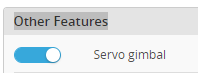
@abdul1212 : Did you set "servo gimbal" feature and servo to dedicated channel ?

ivan-pietrzyk
on 16 May 2018
Servo gimbal is not active.
If no 1 esc motor
2 empty {in diagram wing for second motor}
3 elevator
4 elevator
Can i use no 2 for servo gimbal?
abdul1212
on 16 May 2018
I mean no 2 for servo. So i can use for turn around camera with servo
abdul1212
on 16 May 2018
Maybe without custom firmware. Try to solder wires to tiny pads PWM5 and PWM6. Then activate "servo gimbal" and assign servos. I tried simmiliar configuration with my OMNIBUSF4 and it works at least on one PWM 5 or 6.
ivan-pietrzyk
on 16 May 2018
I have the problem that the Barometer is not working. Tested it on two identical Airbot F4 V5 Flightcontroller. Does anyone have same problems and know how to solve this ?
 veneficusoz
on 4 Jun 2018
veneficusoz
on 4 Jun 2018
For anyone interested. INAV
Custom build, TX on PWM6 for omnibusf4v3 target.
inav_1.9.1_OMNIBUSF4V3.zip
 whydoyouwanttoknow
on 17 Jun 2018
whydoyouwanttoknow
on 17 Jun 2018
Hi, @shellixyz : can you help me make a diff for SOFTSERIAL TX (SA) on PWM6; target OMNIBUSF4V3; 2.0.0 development branch?
I'm probably wrong, thinking I only have to change lines
#define SOFTSERIAL_1_RX_PIN PC6 //shared with UART6_TX
#define SOFTSERIAL_1_TX_PIN PC6 //shared with UART6_TX
in
https://github.com/iNavFlight/inav/blob/development/src/main/target/OMNIBUSF4/target.h#L153-L154
to
#define SOFTSERIAL_1_RX_PIN PA1
#define SOFTSERIAL_1_TX_PIN PA8
Thanks a lot!
 putimir
on 7 Jul 2018
putimir
on 7 Jul 2018
veneficusoz I had the same problem. If you are using a omnibusF4 V5 bought from airbot then the target you should flash is "OmnibusF4V3". I mistakenly flashed the Airbot file and the plain OmnibusF4 file. Both will semi work leaving you thinking various parts of the board are broken.
 TronskiFPV
on 27 Jul 2018
TronskiFPV
on 27 Jul 2018
hi @shellixyz,
Will your patch still work with new INAV 2.0 firmware? Never try this, do I have to use Cygwin program??
diff --git a/src/main/target/OMNIBUSF4/target.h b/src/main/target/OMNIBUSF4/target.h
index d3e4f74d..c99ed872 100644
--- a/src/main/target/OMNIBUSF4/target.h
+++ b/src/main/target/OMNIBUSF4/target.h
@@ -135,14 +135,15 @@
 #define UART6_RX_PIN            PC7
 #define UART6_TX_PIN            PC6

+#define USE_SOFTSERIAL1
+#define SERIAL_PORT_COUNT       5 //VCP, USART1, USART3, USART6, SOFTSERIAL1
+
 #if defined(OMNIBUSF4V3)
-#define SERIAL_PORT_COUNT       4 //VCP, USART1, USART3, USART6
+#define SOFTSERIAL_1_RX_PIN     NONE
+#define SOFTSERIAL_1_TX_PIN     PA8
 #else
-#define USE_SOFTSERIAL1
 #define SOFTSERIAL_1_RX_PIN     PC8
 #define SOFTSERIAL_1_TX_PIN     PC9
-
-#define SERIAL_PORT_COUNT       5 //VCP, USART1, USART3, USART6, SOFTSERIAL1
 #endif

 #define USE_SPI
Thanks, Chris
chris669
on 29 Jul 2018
@shellixyz, I updated my XSR firmware to FPort beta and unable to get telemetry works with INAV V2.0 RC3. I select in configuration.. Receiver mode: Serial Based and FPort. Remote control is working correcty, but unable to discover new sensors...
I typed the following CLI commands:
set serialrx_provider = FPORT
set serialrx_halfduplex = OFF
set serialrx_inverted = ON
My Serial RX is on UART6, do I have to enable Telemetry in Ports? (tried but it crashes...)
Thanks, Chris
chris669
on 31 Jul 2018
@chris669 FPort on an F4 can be tricky. You'll either need to bypass the inverter for both S.Port and S.Bus or use a soft serial to invert the signals. With an F4 you can't invert the signal with the inverted CLI commands. Those only work with F3/F7 processors or soft serial on the F4.
 teckel12
on 31 Jul 2018
teckel12
on 31 Jul 2018
Thanks @teckel12, just have bad news from Airbot: "The s.bus port is just one direction, so you have to use software UART". So do you think the shellixyz's patch he made before for 1.91 could be applied for 2.0 target? still compatible? I'm not good to compile these things with patches, is there a guide out there to add this patch to the OMNIBUSF4V3 target? Thanks, Chris
chris669
on 31 Jul 2018
@chris669 The patch should work with 2.0. Haven't tried it, but from the looks of it, it should work.
teckel12
on 31 Jul 2018
thanks @teckel12, will try to compile this, last time I compiled something was with Visual Studio...
One question, I installed the developpment environment on my PC following these steps: https://github.com/iNavFlight/inav/blob/master/docs/development/Building%20in%20Windows.md
I cloned the environment and now I try to edit the target.h file.
Ok, now the RC4 code is changed.
Original code:
`#define UART6_RX_PIN PC7
define UART6_TX_PIN PC6
if defined(OMNIBUSF4V3)
#define INVERTER_PIN_UART6_RX PC8
#define INVERTER_PIN_UART6_TX PC9
endif
if defined(OMNIBUSF4V3)
define USE_SOFTSERIAL1
define SOFTSERIAL_1_RX_PIN PC6 //shared with UART6_TX
define SOFTSERIAL_1_TX_PIN PC6 //shared with UART6_TX
define SERIAL_PORT_COUNT 5 //VCP, USART1, USART3, USART6, SOFTSERIAL1
else
define USE_SOFTSERIAL1
define SOFTSERIAL_1_RX_PIN PC8
define SOFTSERIAL_1_TX_PIN PC9
define SERIAL_PORT_COUNT 5 //VCP, USART1, USART3, USART6, SOFTSERIAL1
endif`
Code modified with patch:
`#define UART6_RX_PIN PC7
define UART6_TX_PIN PC6
define USE_SOFTSERIAL1
define SERIAL_PORT_COUNT 5 //VCP, USART1, USART3, USART6, SOFTSERIAL1
if defined(OMNIBUSF4V3)
define SOFTSERIAL_1_RX_PIN NONE
define SOFTSERIAL_1_TX_PIN PA8
else
define SOFTSERIAL_1_RX_PIN PC8
define SOFTSERIAL_1_TX_PIN PC9
endif
define USE_SPI`
Will try this tomorrow...
chris669
on 1 Aug 2018
did not worked...
chris669
on 2 Aug 2018
Hello, i have following Problem: I want to use a Unify 5V with SmartAudio V1 on a Omnibus F3 Nano. I cant use it on a hardware UART so I have to use a Softserial. Can someone with Skill can make me a Firmware for the Omnibus Target which replaces the LED Pad with a Softserial?
 gutster
on 5 Aug 2018
gutster
on 5 Aug 2018
I'v also tried FPort and many other things, but without success. Now I need to try a custom build iNav 2.0 build and this thread seems to solve my problem :-)
@shellixyz is it possible to use the LEDSTRIP pad for SmartPort telemetry and the PWM5 and PWM6 pads for another softserial (Runcam Split 2 cam control)?
 course-up
on 30 Sep 2018
course-up
on 30 Sep 2018
The Omnibus F4 platform is too fragmented to get anything working anymore. Version 5.1? What's different than the 4.2, 4.1, 4.0, 3.1, 3.0, 2.0, and 1.0?
I'm sticking with the Pro or maybe jumping to the MATEK F722-STD to try and stop the madness. The F722 has 5 UARTS which can be inverted so it will easily work with FPORT, telemetry, Runcam Split, VTX control, etc.
teckel12
on 30 Sep 2018
It's true, the omnibus FC platform has too many versions and sub-types. But the documentation cover them pretty well - as far as I can say.
Thanks to @shellixyz it was super easy to enable SmartPort telemetry on the LEDSTRIP pin. Now I need to enable a second softserial on PWM5/6 for RunCam control. The diff is already posted in this thread, I expect that this is straight forward.
course-up
on 3 Oct 2018
I can confirm that a custom iNav 2.0.0 build is working with two softserials as described by @shellixyz :
LEDSTRIP: softserial 1 for SmartPort Telemetry
PWM5 & PWM6: softserial 2 for RunCam 2 Split control
course-up
on 15 Oct 2018
Do you have a link for the led soft serial mod? I dont see it in this thread. Thanks.
zector555
on 15 Oct 2018
I've just used the diff published by @shellixyz . The iNav 2.0.0 diff is published at the iNav thread post #22399
course-up
on 15 Oct 2018
Hi, I know this is an old thread but Im looking to use the Omnibus F4 V5 in a quad, Running INav INAV/OMNIBUSF4V3 2.5.1 Jun 16 2020 / 12:32:45 (098a574b3), I Have set up GPS on TX-RX 1 on Uart 1 , and Sbus on Uart 6, wanted to use MavLink on softserial 1 not on the LED pin but on PWM 5 & PWM 6, Anyone able to help please
 mrt0007
on 28 Jun 2020
mrt0007
on 28 Jun 2020
Related issues
 georgekucher
·
52Comments
georgekucher
·
52Comments
 HaukeRa
·
51Comments
HaukeRa
·
51Comments
 Antiheld86
·
67Comments
Antiheld86
·
67Comments
 moggiex
·
46Comments
moggiex
·
46Comments
 DrSensor
·
54Comments
DrSensor
·
54Comments
Most helpful comment
@ST02CMC Yes you need a custom build, RX is on PWM5 and TX on PWM6: inav_1.9.0_OMNIBUSF4V3.hex.zip
The patch you will need for building your custom version when upgrading: