This is a follow to a suggestion that was initially posted in the gallery (part 11). It will be easier to exchange ideas in a separate issue, I think.
Inital post
ImGui Manual is an attempt to make an enjoyable and efficient manual for ImGui.
The idea is to use the reference code in imgui_demo.cpp in order to make an interactive manual.
Below is a screenshot:
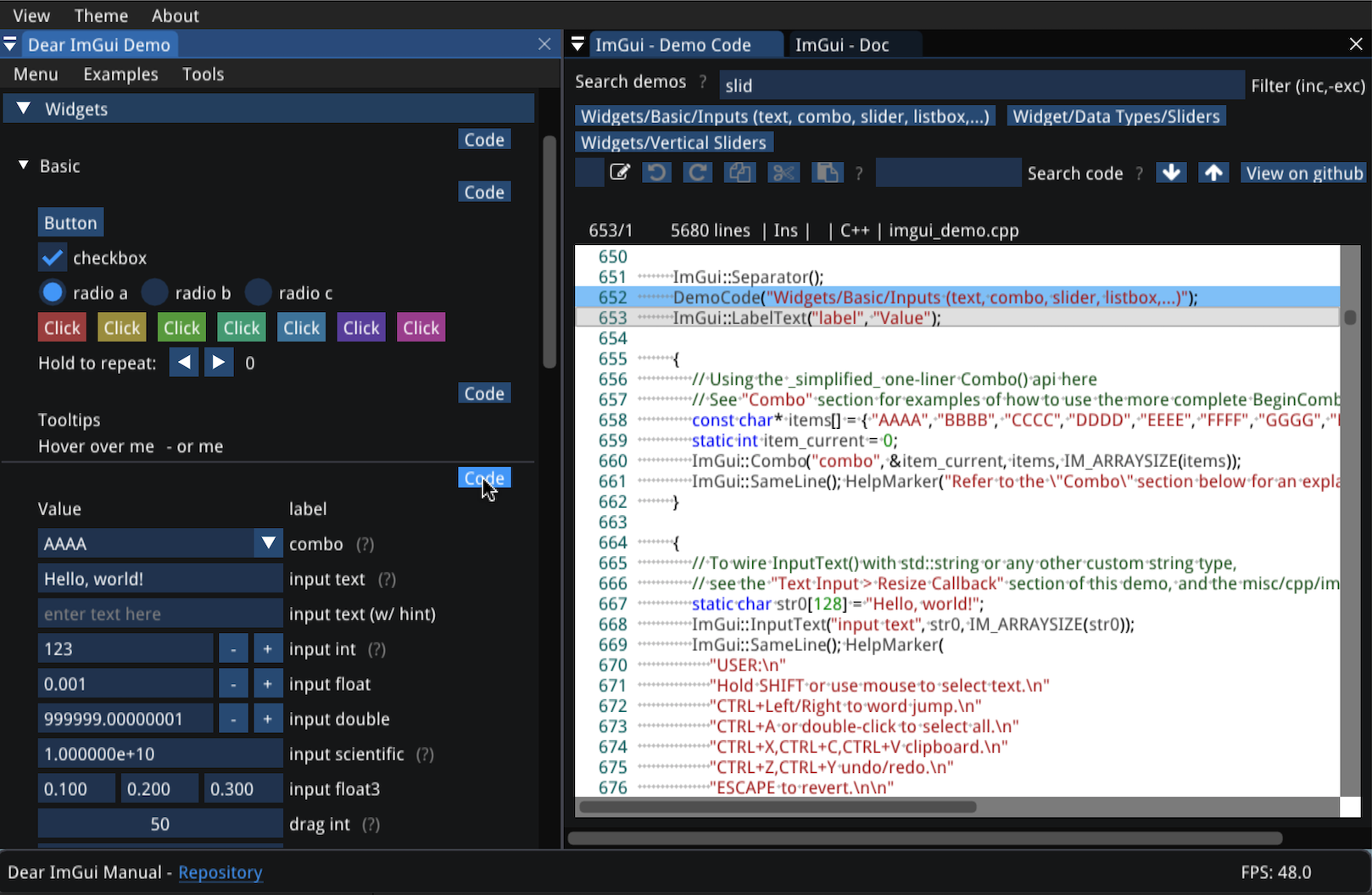
But the best way to discover it is I to use it, since it is online:
The video below gives a quick (2 minutes) introduction:
This is a first implementation, and I am opened to suggestions and modifications if this manual is seen as interesting for the community.
 pthom
pthom
All 6 comments
I have had another idea, which is kinda related. I called it "instant develop", i.e provide newcomers with the possibility to test ImGui without having to install anything: no IDE, no text editor, no library, no compiler. With a simple browser, you can start right away.
You can see it here, on a separate repo.
pthom
on 7 Jul 2020
... I just found the existing discussion at https://github.com/ocornut/imgui/issues/435 (which I had not read before). I hope my proposition can be made on par with what was discussed there.
pthom
on 7 Jul 2020
Update: I have added some code navigation features :
_Hierarchical index of the demos_

_Hierarchical index of imgui.h code sections_

Those indexes are searchable.
_Example: search for code sections related to docking_

_And you can search for more information about anything with a right click_

A short demo video (1'40") of this features: https://www.youtube.com/watch?v=5jHilwGNSmA&feature=youtu.be
pthom
on 19 Jul 2020
hey, thanks a lot for this. really helpful.
just in case it helps in some way:
here in windows and Chrome, copy paste (ctrl+c or gui button neither) doesn't work and I must jump to GitHub link.
 moebiussurfing
on 20 Jul 2020
moebiussurfing
on 20 Jul 2020
hey, thanks a lot for this. really helpful.
just in case it helps in some way:
here in windows and Chrome, copy paste (ctrl+c or gui button neither) doesn't work and I must jump to GitHub link.
Thanks!
Concerning the copy-paste issue, it is a limitation of emscripten apps in a browser. Some workarounds might be possible, but more study is required.
If this is a serious issue for you, you can also build it on your computer:
git clone https://github.com/pthom/imgui_manual.git
Then follow these build instructions
pthom
on 20 Jul 2020
@moebiussurfing : after the last update, you should now be able to copy text from the editor to the clipboard via Ctrl-C or via the Copy button.
pthom
on 29 Jul 2020
Related issues
 BlackWatersInc
·
3Comments
BlackWatersInc
·
3Comments
 KaungZawHtet
·
3Comments
KaungZawHtet
·
3Comments
 bizehao
·
3Comments
bizehao
·
3Comments
 dowit
·
3Comments
dowit
·
3Comments
 namuda
·
3Comments
namuda
·
3Comments
Most helpful comment
@moebiussurfing : after the last update, you should now be able to copy text from the editor to the clipboard via Ctrl-C or via the Copy button.