Imgui: How to customize imgui like Parsec
My question is simple.
How Parsec (https://parsecgaming.com/features/#features) customised imgui that much?
screenshot from imgui releases page down here \/ \/ \/
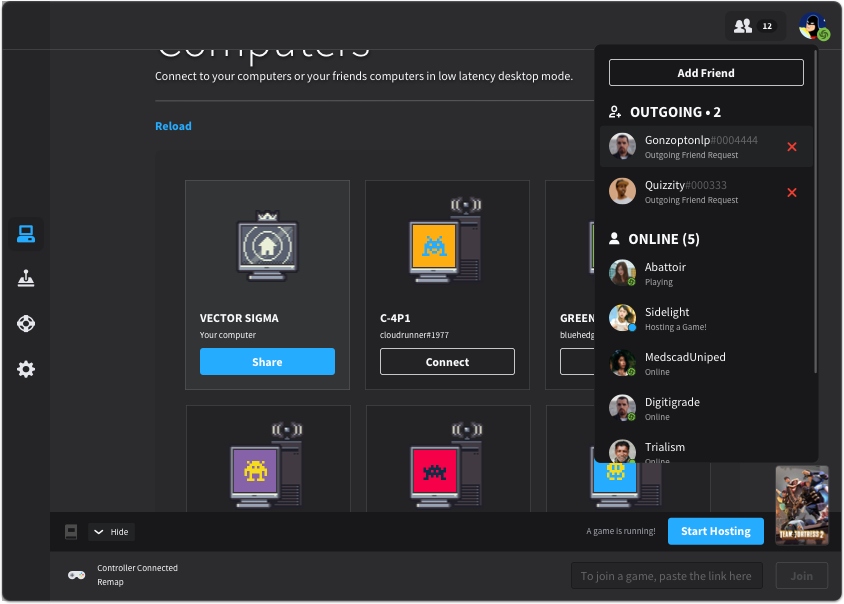
Are they changed imgui source code or done that just by using imgui styles?
 OverShifted
All 6 comments
They are mostly extra custom widget based over imgui_internal.h, i don’t see anything preventing you to do that.
Sent from my fax machine
On 13 Apr 2020, at 13:36, OverShifted notifications@github.com wrote:
My question is simple.
How Parsec (https://parsecgaming.com/features/#features) customised imgui that much?
screenshot from imgui releases page down here \/ \/ \/Are they changed imgui source code or done that just by using imgui styles?
—
You are receiving this because you are subscribed to this thread.
Reply to this email directly, view it on GitHub, or unsubscribe.
 ocornut
on 13 Apr 2020
ocornut
on 13 Apr 2020
I couldn't find any documentation or something about that in the wiki.
Is there any tutorial/doc about custom widgets?
OverShifted
on 13 Apr 2020
There’s none no, and it require some comfortable understanding of both dear imgui and programming to make your way through it.
However, if you dissect that screenshot you’ll find there aren’t that many custom widgets in there:
Using icons, images + varying fonts color and size can already get you half way with having a nice looking application. I reckon this is most of what you see here.
Pushing custom style colors on a per widget basis (to eg change text color in a button) also gives a nicer look easily.
ocornut
on 13 Apr 2020
How can I
Pushing custom style colors on a per widget basis (to eg change text color in a button) also gives a nicer look easily.
?
Like this?
Imgui::Begin("Test");
Imgui::stylesdark();
Imgui::button(....);
Imgui::styleslight();
Imgui::End();
?
will it change just button to black?
OverShifted
on 13 Apr 2020
Yes essentially, however you don't need to change the whole style (that will be too slow).
You can use PushStyleColor(), PushStyleVar() functions then restoring PopStyleColor(), PopStyleVar() to restore the change.
ocornut
on 13 Apr 2020
Oh cool 😀😀
I think I can close the issue.
OverShifted
on 13 Apr 2020
Related issues
 mnemode2
·
3Comments
mnemode2
·
3Comments
 namuda
·
3Comments
namuda
·
3Comments
 Folling
·
3Comments
Folling
·
3Comments
 inflex
·
3Comments
inflex
·
3Comments
 the-lay
·
3Comments
the-lay
·
3Comments
Most helpful comment
Yes essentially, however you don't need to change the whole style (that will be too slow).
You can use PushStyleColor(), PushStyleVar() functions then restoring PopStyleColor(), PopStyleVar() to restore the change.