This thread to discuss the existing Columns() system. They are still a bit confusing at times and not as well supported as other part of the API. Some discussions there:
https://github.com/ocornut/imgui/issues/124
https://github.com/ocornut/imgui/issues/85
 ocornut
All 58 comments
OK, so I see a few problems
- In general we need a better definition of columns (sizing policy). Can maybe introduce a ColumnsHeader api that will handle both the nicer display of a header AND passing on sizing policy. Optionally those can also act as button for sorting, passing the sorting information to the user.
- The usage of Separator() within column needs to be tweaked / clarified. Separator currently span all columns, however they only advance the cursor vertically on the column calling them so it is pretty much inconsistent/buggy (workaround is to call Separator on all columns for now).
- On Dale's last issue from thread #124, due to manually clipping the contents of entries that are laid in columns. The problem with the top line bits disappearing is when we do fast forward with SetCursorPosY() we are already within the first column so we are making that cell very big. As we call NextColumn() the cursor resets itself to the "top". One workaround is to get out of columns first.
          ImGui::Columns(1);
          ImGui::CalcListClipping(items_count, items_height, &display_start, &display_end);
          ImGui::SetCursorPosY(ImGui::GetCursorPosY() + display_start * items_height);
          ImGui::Columns(4);
Note that this particular case is part of an optimisation to skip entries. A normal small-sized columns display wouldn't have to worry about those calls. It's not terribly complicated but all this smell a bit fishy and confusing (it can be hard to "get" why xx or xx happening) which is a sign that an improvement is probably needed eventually. I'll have to think about it for a bit.
- Also consider the feature of user dragging and re-ordering columns. Shouldn't be too hard to get to work, but will also exacerbate those issues of "are we working on the first column or in the whole set ?", enforcing a clearer approach.
ocornut
on 9 Feb 2015
What do you mean by "sizing policy"? Are you referring to setting up the column widths so that the window width isn't split evenly amongst the columns?

vs

That kind of a feature would be really nice to have. Most of the time, I do have some sort of idea of how wide the contents of each column should be, so just having a default to initialize to would suffice for me. If the user changes the widths, would be nice to remember their settings maybe? An issue here though might be the columns could be set so that the total width exceeds the window width. Not sure how you handle this currently. Looks like you just end up trying to make the window bigger?
With regard to the column header, sorting would be awesome. I had already been thinking about coming up with my own implementation using the current operations exposed, but it would have been pretty laborious to make happen. Basically, I would have had an array of indices which holds the display order of the column contents. Something like this https://gist.github.com/Roflraging/64c18e50099488837bf5.


Except, of course, the buttons would just be the top of those columns instead of being actual separate buttons. In any case, this would be really convenient to have since I need to do a lot of manual state maintenance right now to achieve this.
Something I'll need to spend more time thinking about is where the display order should live. This might be something that could live on ImGui side and it wouldn't feel too "retained mode" and be a plus for convenience.
 unpacklo
on 9 Feb 2015
unpacklo
on 9 Feb 2015
Sizing policy: I haven't thought of the details but probably specifying a mixture of "size in pixels", "% of remaining size" (after size in pixels are consumed) and "fill remaining space".
Columns header:
The sorting itself would still be your responsibility.
Your can currently move the buttons to be in place of the column header, and you'll be closer to final functionality (except it wouldn't look exactly as neat as how it should eventually look). Just replace the "Index" text by a button called "Index" that does what you already do. You can add a "v" or "^" characters to the end of the button label to denote the current active sorting, thought that would be a little cheap looking..*
I would personally compact your sample code quite a bit (I am a bit obsessed with code compaction) using ternary, Etc.
Seeing those big list we should also add a mechanism for alternating a subtle background color to increase readability. So much to do!
(*) we'd probably want to feature stock icons later on.
ocornut
on 9 Feb 2015
Would it be possible to also have Tree Items in this?
 emoon
on 10 Feb 2015
emoon
on 10 Feb 2015
That should work already.

ocornut
on 10 Feb 2015
Ah, cool :) Thanks!
emoon
on 10 Feb 2015
I just saw #129 and having a selection feature like that except for columns would be really convenient.
Right now we have some pretty janky stuff to kind of get that functionality by making column contents buttons and we detect when a button is pressed to do something with that row of data.
unpacklo
on 12 Feb 2015
Well in your column header instead of calling Text() you can call Selectable(). You'll still need to do a bit of manual work. An eventual Column Header api will be a little better.
Based on your gist, you can replace
ImGui::Text("Path")
By
if (ImGui::Selectable("Path", comparison == pathCompare))
{
   reverse = (comparison == pathCompare) ? !reverse : false;
   comparison == pathCompare;
}
And you can remove the button and the text at the top, so that's the only thing you'll have.
ocornut
on 12 Feb 2015
Sorry, I should have been more clear.
The actual functionality I'm looking for is being able to select items in the column and have the entire row be indicated as selected across all the columns. So it's more like the ListBox() function but it operates over multiple columns instead of being restricted to just one column:


        const int cols = 5;
        const int rows = 100;
        static char items[cols][rows][32] = {};
        static bool selected[cols][rows] = {};
        static bool needInit = true;

        if (needInit)
        {
            for (int col = 0; col < cols; ++col)
            {
                for (int row = 0; row < rows; ++row)
                {
                    snprintf(items[col][row], sizeof(items[col][row]), "Col %d, Row %d", col + 1, row + 1);
                }
            }

            needInit = false;
        }

        ImGui::Begin("Column row selection");
        ImGui::Columns(cols);

        for (int col = 0; col < cols; ++col)
        {
            ImGui::Text("Col %d", col + 1);
            ImGui::Separator();

            for (int row = 0; row < rows; ++row)
            {
                if (ImGui::Selectable(items[col][row], &selected[col][row]))
                {
                    memset(selected, 0, sizeof(selected));

                    for (int selectedCol = 0; selectedCol < cols; ++selectedCol)
                    {
                        selected[selectedCol][row] = true;
                    }
                }
            }

            ImGui::NextColumn();
        }

        ImGui::Columns(1);
        ImGui::End();
Or is there some easy way to achieve this row selection functionality with the current API that I'm not aware of?
The actual information I'm looking for is to see which item or row index is currently selected. The GUI indication that something is selected is a nice touch which was made easy to do because of #129 selection!
unpacklo
on 15 Feb 2015
I see, you can't exactly do that right at the moment. Only one column will appear "hovered". But your example seems to be a good workaround, and you can simplify it as:
        const int cols = 5;
        const int rows = 100;
        static char items[cols][rows][32] = {};
        static int selected_row = -1;
        static bool needInit = true;

        if (needInit)
        {
            for (int col = 0; col < cols; ++col)
            {
                for (int row = 0; row < rows; ++row)
                {
                    snprintf(items[col][row], sizeof(items[col][row]), "Col %d, Row %d", col + 1, row + 1);
                }
            }

            needInit = false;
        }

        ImGui::Begin("Column row selection");
        ImGui::Columns(cols);

        for (int col = 0; col < cols; ++col)
        {
            ImGui::Text("Col %d", col + 1);
            ImGui::Separator();

            for (int row = 0; row < rows; ++row)
            {
                if (ImGui::Selectable(items[col][row], selected_row == row))
                {
                    selected_row = row;
                }
            }

            ImGui::NextColumn();
        }

        ImGui::Columns(1);
        ImGui::End();
What we can do is make Selectable span all columns, I'll have to see how this is better one. There's a bit of juggling the library may need to do with scissor rectangles.
ocornut
on 15 Feb 2015
One of the annoying parts about the current workaround is coming up with the label for the Selectable. Because the function takes in just a const char* label and doesn't allow for a format string and varargs, I need to prep the label ahead of time in a buffer myself:
for (int i = displayStart; i < displayEnd; ++i)
{
    char buffer[32];
    snprintf(buffer, sizeof(buffer), "%zu", pack.manifest->bytes[i]);

    if (ImGui::Selectable(buffer, i == selected))
    {
        selected = i;
    }
}
When I would really prefer to be able to do something like this:
for (int i = displayStart; i < displayEnd; ++i)
{
    if (ImGui::Selectable(i == selected, "%zu", pack.manifest->bytes[i]))
    {
        selected = i;
    }
}
I work around this currently with my own function to do the format string printing:
static bool ImGuiSelectable(bool selected, int id, const char *format, ...)
{
    char buffer[1024] = {};
    va_list list;
    va_start(list, format);
    vsnprintf(buffer, sizeof(buffer), format, list);
    va_end(list);

    ImGui::PushID(id);
    bool changed = ImGui::Selectable(buffer, selected);
    ImGui::PopID();

    return changed;
}
I provide the id so I can avoid collisions to keep the Selectable working.
unpacklo
on 16 Feb 2015
Hmm yes.. this has nothing to do with columns or the workaround for selectable on columns tho?
The reason I didn't go for a printf style api is because there's a second optional ImVec2 size parameter (default to 0.0f,0.0f = meaning full width, height of text).
Now I could invert the parameter order (the api is very new and if any early adopter used it it won't be too damaging of a change for them) and add two extra variants:
Selectable(bool, const char* fmt, ...)
Selectable(bool_, const char_ fmt, ...)
Selectable(bool, ImVec2, const char* fmt, ...)
Selectable(bool_, ImVec2, const char_ fmt, ...)
It's a bit "meh" but it probably does the job?
ocornut
on 16 Feb 2015
Not sure about that anymore, because Selectable is mimicing the Button/Checkbox apis so inverting the parameter would be a little odd ? I guess TreeNode already follows that pattern though, and the format string are really helpful.
The way I suggest that you can extend the library by declare your own functions in the ImGui namespace (they can be declared/implemented in your own files or imgui_user.*). then you have a consistent syntax from the user's point of view. ImGui::SelectableEx() or whatever fits you best.
ocornut
on 17 Feb 2015
I definitely don't think its necessary to add in my particular case to the API. The basics are there to let people create convenience functions, as I have.
Just thought I'd give you a short update on some of the column work I've been doing recently. I implemented the sorting and selection as was mentioned earlier in this issue and also hacked up the column header thing we talked briefly about.
You can see some of this in action at http://youtu.be/uZEvcTREKFc. The column header is a separate set of columns and the actual content portion is a child with the same number of columns so I can scroll independently. What I had to do was grab out the offsets from the child content columns and set the header offsets to (nearly) the same values. This is why I can resize the child columns but not the header ones (by clicking the borders).
To get the header to line up with the children, I had to basically just hand tweak the offsets so that they line up, due to the fact that the child eats up some of the window space. You can see the tiny separation between the header and contents columns; about one or two pixels.
Through the process of implementing this, I actually didn't come up against any serious pains. Really, just the header part is a total kludge. I end up grabbing the content column offsets every frame, saving them off and then setting the header offsets the next frame. The other thing I do is I initialize the column offsets on the first frame so that each column has a pleasing width to start with, instead of just splitting the window evenly amongst all the columns.
I don't really have any standalone example code that you can compile, but almost everything in my code is based on snippets mentioned earlier. Nevertheless, I'll see if I can rip out the core that can compile and run independently of my own code.
unpacklo
on 21 Feb 2015
Don't worry about the code. I see what you are doing. There's lot to fix and improve, that's a good target to get sorting header + scrolling region done properly within ImGui.
I just realised that scrolling region add another pile of confusion - because they behave in a very specific manner when using (0,0) fill mode and don't declare their size to the parent window in this case, which easily leads to confusing mess when you don't get it right.
Working on various fixes now.
Nice to see it working for you already :)
ocornut
on 22 Feb 2015
I fixed a bug (first one of the 3 above) which should make the pixel alignment correct.
However how are you creating the header section, are you creating them within another subchild ?
I found that to be necessary in order to keep alignment correct when the main window also has a scrollbar. Unfortunately it also means you have to explicitly size the child window because there's no way to automatically size a child window yet (mostly a problem of deciding on the API for that). So it's all a little messy but we're sorting through it little by little. Thanks for trying those things out.
ocornut
on 22 Feb 2015
Tip -
I need to clarify that there are lots of things you can do with SameLine() instead of Columns().
Columns() guarantee clipping and resizing but that's not always needed.
For simple "label -- value" display you can do simple alignment with
ImGui::Text("label");
ImGui::SameLine(column_x);
ImGui::Text("value");
I create the header section just as a separate column call at the top level in the window. Then I do a BeginChild()/EndChild() for the actual contents of each column to get the separate scrolling portion. You can find the code dump of that part here: https://gist.github.com/Roflraging/a7469c63552365671b3d
You can see my functions GetColumnOffsetsFromImGui() (line 114) and SendColumnOffsetsToImGui() (line 53) are basically just used to save off the offsets of the content columns and then set the header column offsets so that they line up with the content columns.
There's also my little hack to get my columns to be initialized with offsets that are sized more sensibly for the actual contents in each column (line 108 to line 112, with initialization values set in lines 45 to 49).
unpacklo
on 23 Feb 2015
c82f909be1bc6ff06291201bfec83bb5e77b9296
c46d5634d43c9f0296d845478c07b04f2c40d339
Fixed an issue when actively dragged column being visually clipped would not release the active state (extension of a more general bug that was fixed recently).
Fixed an issue with feedback loops being created when dragging columns of an auto-resizing window (because columns width are stored as % of total window size. Maybe I will change that). Let me know if this causes any problems.
The contents sizing behaviours of columns is broken (and always was) btw it uses the maximum X cursor position to notify the host window of size, instead of the sum of contents width of all columns. I'll fix that later.
ocornut
on 18 Apr 2015
We need a way to easily extends a the height of column to fill remaining vertical space (or be a fixed size). See past discussions in #170
ocornut
on 1 May 2015
Another issue that was reported to me:
float arr[1] = { 0.6f };
ImGui::Columns(3, 0, true);
for (int i = 0; i < 3; i++)
{
    ImGui::Text("%f", ImGui::GetColumnWidth());
    ImGui::PlotHistogram("Histogram", arr, 1, 0, "Honey", 0.0f, 1.0f, ImVec2(0,80));
    ImGui::NextColumn();
}

Notice that even though GetColumnWidth() return the same value for all three columns they don't look evenly sized. The left-most column uses WindowPadding.x spacing which is not included in the total columns width whereas the other columns uses ItemSpacing.x+1 (the 1 is the column line width) of space which is part of the total column widths.
ocornut
on 3 May 2015
@Roflraging to answer on your request https://github.com/ocornut/imgui/issues/125#issuecomment-74435129
I have added (locally) a variant of Selectable() that cover all columns.
bool SelectableAllColumns()
I think the feature being so explicit and tied to Selectable() makes sense because I can't figure out other cases that would require an all-columns-spaning.
I'm not sure what is the best way to expose it yet, if adding SelectableAllColumns() is ok / overkill. It's basically a flag to the underlying SelectableEx() function. I am concerned that Selectable() has two variants, the bool* variant is actually less useful I in real context I believe, but still useful (it's basically a short helper). So if I add SelectableAllColumns() it would be more consistent to add it with the two variants.
So my intuition is that I could introduce publicly exposed flags to Selectable() but only expose the new flag SpanAllColumns (the existing selectable flags stays private for now). Maybe you'd have an opinion.
ocornut
on 13 Jun 2015
I have added a flags parameter to Selectable()
Those two are exposed
    ImGuiSelectableFlags_DontClosePopups    = 1 << 0,   // Clicking this don't close parent popup window
    ImGuiSelectableFlags_SpanAllColumns     = 1 << 1    // Selectable frame spans all columns (text will still fit in current column)

There's a sde-effect / bug here which is that you cannot access and move the column themselves since the spanning all columns Selectable will take the mouse before the column. It'll work as you hover the lines that don't have such selectable, typically the column header. Not super happy with that now.
I am also considering the possibility of swapping the 'size' and 'flags' parameter. It would break the API for those using the size parameter (not often used) - I guess the damage but be minimal (and obvious to repair).
ocornut
on 14 Jun 2015
Looking nice there! Unfortunately, I won't be able to test this in my own usage for a while since I'm in the middle of large set of changes.
Something I'm wondering about is how the size parameter is interpreted if you specify ImGuiSelectableFlags_SpanAllColumns? Does the width portion of the size get ignored? I actually don't use selectables all that much right now outside of columns, so I don't think it's a specific issue for me, but they seem like parameters that can affect each other in non obvious ways.
unpacklo
on 14 Jun 2015
You're right that isn't well documented - i'll add comments.
In fact the size parameter is not often useful.
size.x = 0.0 : fit all available space, size.x > 0.0 : given width
size.y = 0.0 : label height, size.y > 0.0 : given height
so (0,0) is essentially automatic "width fit to right of window/column", "height from label"
I don't even _remember_ why I added the size parameter to selectable in the first place but it's used by the grid-like example.
in the context of setting SpanAllColumns the width can cover all columns. the parameter basically pop the columns clipping rectangle and pushes it back (similarly to what Separator does and we agreed that an option to decide on that for Separator may be good too)
ocornut
on 14 Jun 2015
I have inverted the two parameters in the prototype. documented in the Api Breaking Changes section.
Haven't found an occurrence of using size on github nor some of the private codebase I have access to so I assume breakable will be minimal.
ocornut
on 15 Jun 2015
This is a rather important change I've just pushed (AA branch only yet) that been meaning to do it since pre-1.0.
Basically Columns were functioning in a way that would create a render call for each visible cell which gets rather heavy. The contents of each column are now appending to different sub-drawlist and merged, so out-of-order submission of every cell of a same column typically gets merged into the same draw call.
Spend a long time to get this running optimally but now satisfied of the result.
Using a lot of columns set will still add extra draw calls but now much less (typically one draw call per visible column. We can do CPU-side clipping but I'm not sure it'll be worth it).
If you are using columns let me know if I haven't broken anything, it is very possible I have.
ocornut
on 8 Jul 2015
Haven't quite done a deep dive yet, but checking through all of our uses of columns, things look good so far.
unpacklo
on 8 Jul 2015
Was curious to try that today

        ImGui::Begin("Splitter test");

        static float w = 200.0f;
        static float h = 300.0f;
        ImGui::PushStyleVar(ImGuiStyleVar_ItemSpacing, ImVec2(0,0));
        ImGui::BeginChild("child1", ImVec2(w, h), true);
        ImGui::EndChild();
        ImGui::SameLine();
        ImGui::InvisibleButton("vsplitter", ImVec2(8.0f,h));
        if (ImGui::IsItemActive())
            w += ImGui::GetIO().MouseDelta.x;
        ImGui::SameLine();
        ImGui::BeginChild("child2", ImVec2(0, h), true);
        ImGui::EndChild();
        ImGui::InvisibleButton("hsplitter", ImVec2(-1,8.0f));
        if (ImGui::IsItemActive())
            h += ImGui::GetIO().MouseDelta.y;
        ImGui::BeginChild("child3", ImVec2(0,0), true);
        ImGui::EndChild();
        ImGui::PopStyleVar();

        ImGui::End();
How to make check clickable when in columns with selectable that spans all columns?

Also, check seems to be larger than a table line. So, a selection rect needs to be higher or use
igPushStyleVarVec(ImGuiStyleVar_FramePadding, ImVec2(0,0)) on Check
Also, how can I make body scrollable without header going into scrollable area? When doing two tables column sizes aren't in sync and slighty offset by default.
 MrSmith33
on 6 Nov 2015
MrSmith33
on 6 Nov 2015
How to make check clickable when in columns with selectable that spans all columns?
There's no nice way at the moment.
You may be able to use this low-level hack, by including imgui_internal.h and calling this right after your call to Selectable(). This may become an official helper once I have sorted out a few things.
    if (GImGui->HoveredId == GImGui->CurrentWindow->DC.LastItemID)
        GImGui->HoveredIdAllowHoveringOthers = true;
    if (GImGui->ActiveId == GImGui->CurrentWindow->DC.LastItemID)
        GImGui->ActiveIdAllowHoveringOthers = true;
Also, check seems to be larger than a table line. So, a selection rect needs to be higher or use
igPushStyleVarVec(ImGuiStyleVar_FramePadding, ImVec2(0,0)) on Check
There's of concept of "table line", Text are smaller than widget by default to increase content density. You can grow the height of your current line by calling AlignFirstTextHeightToWidgets() before the call to Selectable(). Or you can pass in a specific height to Selectable() as well.
Also, how can I make body scrollable without header going into scrollable area? When doing two tables column sizes aren't in sync and slighty offset by default.
This is currently a bit tricky and it is for this sort of thing that this thread exist. It can be done but it should be made easy and automatic.
ocornut
on 6 Nov 2015
Unfortunately I cannot do this hack, because I use D bindings.
When doing two separate columns for header and for content with the same name, they have same column sizes (because they are the same one). But when pushing content to a child another id gets into id chain and columns are not longer shared. Is there a way to make those have same id, and how do I make them the same size?
MrSmith33
on 6 Nov 2015
I'm not sure at the moment, I'd need time to investigate it further. The easier way right now is probably to have two columns set and synchronize the column offsets yourself by calling GetColumnOffset() on the first set and SetColumnOffset() on the second set.
I'd probably need few days or a week of solid work to add missing features to the Column API. Again this is pretty much why this thread exist :)
ocornut
on 6 Nov 2015
@MrSmith33
How to make check clickable when in columns with selectable that spans all columns?
What do you want to happen when you click the Selectable region that's not covered by the Checkbox ?
Why is there a Selectable in the screenshot above? It's not clear what's the use of it as a button.
With the current hack above, both will be activated on the mouse-press.
ocornut
on 27 Nov 2015
Best would be to handle click in check column as check/uncheck, and in all other columns without active elements select a line. I used selectable with span all columns, because it renders selection on full row.
MrSmith33
on 27 Nov 2015
So that workaround would select the row when clicking the checkbox which may be acceptable for you here (but not in all situation).
ocornut
on 27 Nov 2015
I did a fair amount of work with Columns in the past few days, namely related to horizontal cursor positioning within Columns addressing a few bugs. If you use Columns extensively in your app I'd appreciate if you can give a try to the latest version and confirm that nothing has regressed.
ocornut
on 29 Nov 2015
I do use some columns and I've just been updating everything.
It looks great so far :+1:
 Pagghiu
on 1 Dec 2015
Pagghiu
on 1 Dec 2015
Here's an additional idea raised by #699
The problem in that issue is when using a sequence like:
Button(), NextColumn() Text() NextColumn().
The text base-line (+style.FramePadding.y) from Button() isn't passed through the second column, so the Text element is displayed above the label of the button. A workaround is to call AlignFirstTextHeightToWidgets() before Text() as usual.
Now the question is, should be preserved that text-baseline? In NextColumns() we currently do:
window->DC.CurrentLineHeight = 0.0f;
window->DC.CurrentLineTextBaseOffset = 0.0f;
Which could be replaced by
if (current column > 0)
{
  window->DC.CurrentLineHeight = window->DC.PrevLineHeight;
  window->DC.CurrentLineTextBaseOffset = window->DC.PrevLineTextBaseOffset;
}
else
{
  window->DC.CurrentLineHeight = 0.0f;
  window->DC.CurrentLineTextBaseOffset = 0.0f;
}
That solves the simple case above, however it assume that a cell has doesn't have multiple items layed out vertically. A cell with multiple items would transfer the line height and baseline of the last line to the next column, which is incorrect.
So doing Text(), Button() NextColumn(), Text(), NextColumn() the text in the right column would incorrectly be offset.
tl;dr; one solution could be preserve the line height and baseline for the first line of a cell.
ocornut
on 15 Jun 2016
Can combos be allowed to exist in tables without a label?
If somewhere I populate the tab with a combo column like this, using the ### notation and not specifying a visible string I would expect the column ending right after the combo itself:
for (int i = 0; i < 10; i++)
            {
            ...
                sprintf(label2, "###aaa%04d", i);
                ImGui::Combo(label2, &item[i], "aaaa\0bbbb\0cccc\0dddd\0eeee\0\0");

                ImGui::NextColumn();
            ...
            }
but imgui leaves space for a label string in any case:

--R
 RobertoMalatesta
on 29 Nov 2016
RobertoMalatesta
on 29 Nov 2016
Use PushItemWidth(-1) / PopItemWidth() to right-align large widgets.
ocornut
on 29 Nov 2016
When window is resized, should be option to maintain the current column widths vs scaling them.
 aaslane
on 28 Nov 2017
aaslane
on 28 Nov 2017
I have been using imgui to do a lot of data grid work, and it has really worked out well. There are two more items that I would like to see added:
- Ability to set background color of column with a call like ColumnColor()
- Ability to set background color of the current cell with call like CellColor()
Using renderFrame() I was able to get close, but have issues. I am still learning the internals, so need to make some more changes.
In order to properly do CellColor, you really need to add the draw commands and then go back and update the size after you know the cell size (or remember the position where to insert the commands). My cell heights are regular, so I can cheat to make it work.
When doing ColumnColor, the column is being properly colored, but the rect seems to be overlaying the separator that I add between rows. I am not sure how those are getting ordered, need to work thru how the Channels work.
aaslane
on 10 Dec 2017
While this is still early work, I'd like push a beacon of hope to one of the oldest thread here!
I've been working on Tables which will be well-featured V2 reincarnation of Columns (and legacy Columns API will just call into Tables).
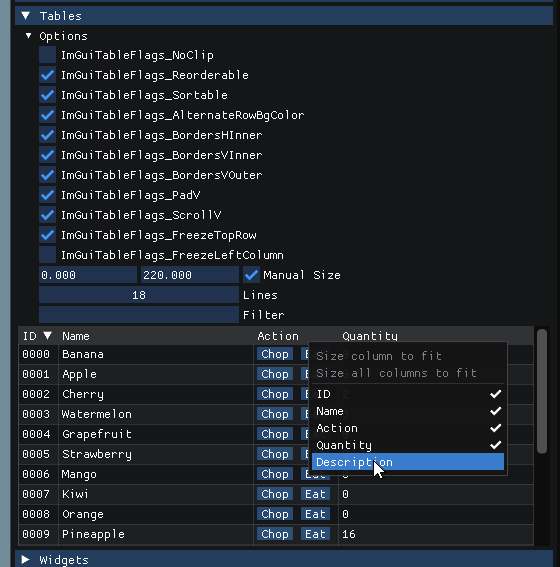
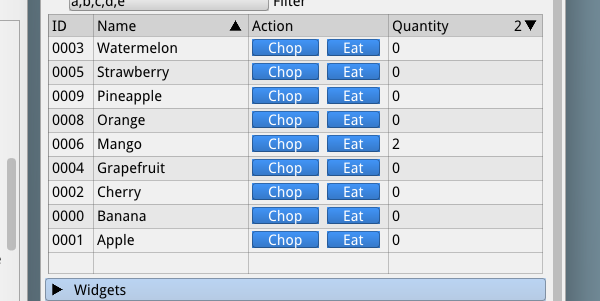
When I've got something a little more robust prone to public feedback I will be opening a new thread.
ocornut
on 24 May 2019
Columns support multiselect?
 izirayd
on 6 Jun 2019
izirayd
on 6 Jun 2019
Columns support multiselect?
Most of it doesn't really have anything to do with columns/tables themselves. But tables will support a way to easily fill a row/cell background.
Quick update, I am still fighting with the mess of handling widely different use cases.
This is showing frozen top/left headers, app interaction with sorting specs, context menu, resizing, reordering.
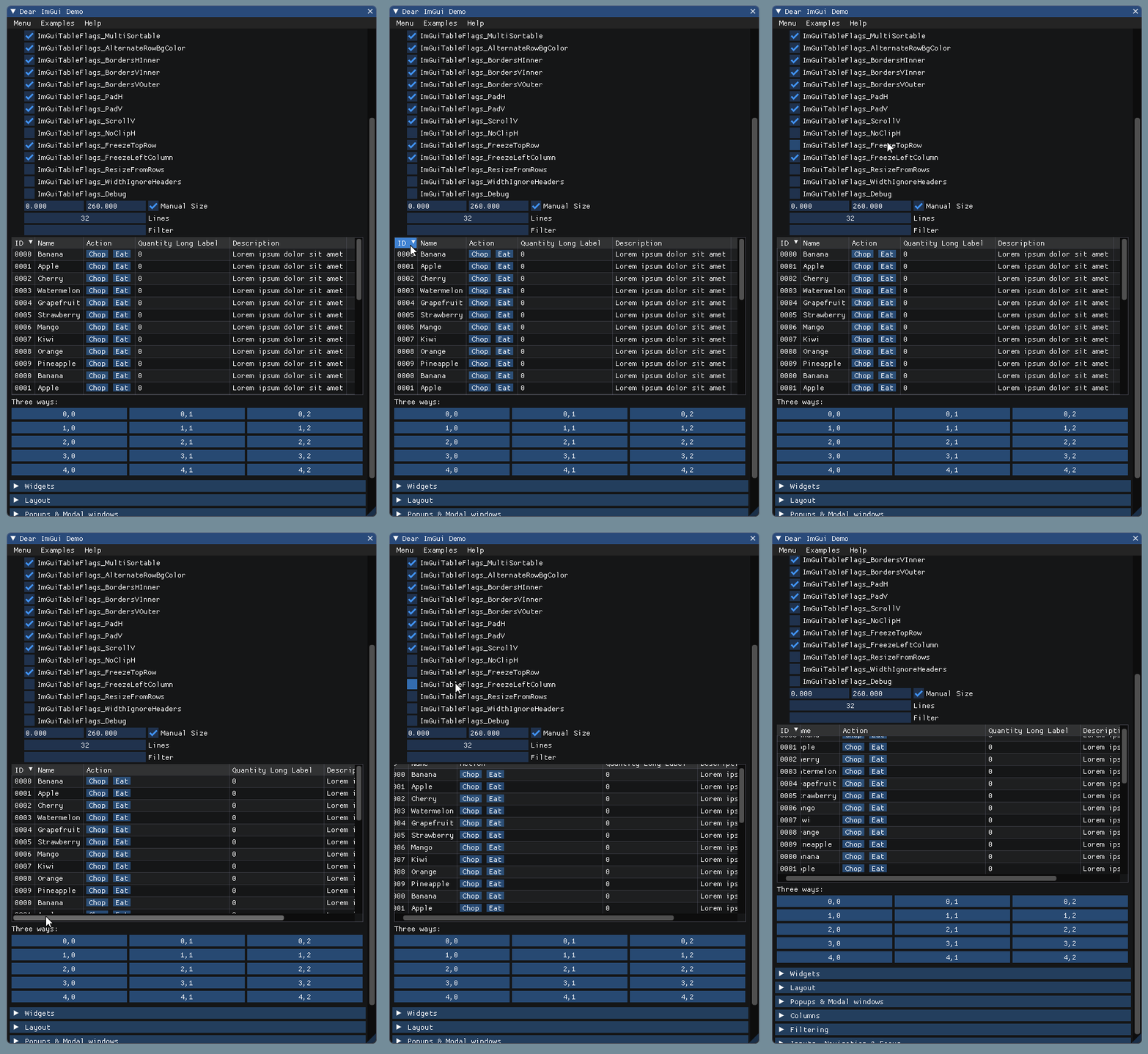
A large amount of work went into finding the right sweet spot to avoid emitting too many draw commands. With no scrolling and no cells content not sticking out their respective column, the final output ends up generally being merged with the parent draw call (so, no extra draw call).
I have disabled my work on smooth re-ordering because it had too many problems (I handled the specific z-reordering of columns, but we also need to render cell/row colors in multiple passes and with specific clipping in order to avoid overlap, since we can't reliably tell what the window background color is.. tl;dr; it's complicated, may ressucitate smooth re-ordering with headers only because I can control their color).
There are lots of intertwined subtleties, for example the design of table headers (which are themselves quite complicated) should make it possible to use custom widgets, here e.g. checkboxes:

ocornut
on 21 Jun 2019
Hi Omar,
looks like you're getting something darn good here.
Maybe *FreezeTopRow and *FreezeTopColumn could be extended into
*FreezeTopRows and *FreezeTopColumns to have a parametric number of columns/rows frozen.
R
(not using imgui nowadays but really really tempted to).
RobertoMalatesta
on 22 Jun 2019
@RobertoMalatesta
could be extended into [...] to have a parametric number of columns/rows frozen.
Yes, internally it works with a counter and it is on my list to see how I could expose it in the API. It's mostly an API an problem. (EDIT Currently encoding values 0 to 3 for each axis into flags, maybe that's enough?)
ocornut
on 23 Jun 2019
(_EDIT_ Currently encoding values 0 to 3 for each axis into flags, maybe that's enough?)
I'm sure someone will come up with a weird use case that needs more, but that doesn't seem all that unreasonable to me. That being said, does it really save all that much memory to not dedicate a byte to each one?
 PathogenDavid
on 25 Jun 2019
PathogenDavid
on 25 Jun 2019
It is not a memory/storage problem but an API problem. Encoding the counter in a small number of bits allow passing them along with the normal flags, rather than allocating extra function arguments for that purpose.
ocornut
on 25 Jun 2019
Ah, that makes sense in my book.
PathogenDavid
on 25 Jun 2019
Either way, when the new version is solid/useful enough I’ll put it on a test branch and open a new topic for people to provide feedback and we will iterate on the API for a while before locking it.
ocornut
on 25 Jun 2019
Hi @ocornut
"when the new version is solid/useful enough I’ll put it on a test branch "
Consider doing it even if incomplete/stillindev
so some of us can give you some (I hope) _constructive_ feedback.
"Currently encoding values 0 to 3 for each axis into flags, maybe that's enough?"
OK. Progressive refinement will do, I think.
Then in future APIs can be kept simple with a 0 default modifiable by an int < numcols/rows.
(and fixed cols/rows could be placed on right/bottom as well, and... <--forget this for now :D).
R
RobertoMalatesta
on 25 Jun 2019
Still working on those forever-coming-soon Tables. Improved the demo. Added first pass of settings persistance today. I've got one major thing I need to fix (which may take a few days) and I think I can start throwing the new API at some early private testers and enlarging that pool ..

ocornut
on 7 Nov 2019
some early private testers
@ocornut Do you accept self candidatures ?
If yes, contact me privately and I'll try to give you a hand.
-R
RobertoMalatesta
on 5 Dec 2019
New Tables API available for early testing: #2957
We will soon be able to close this issue :)
But I am sure there are many things not handled by Tables so will need your feedback there. Thanks!
ocornut
on 30 Dec 2019
Everyone, as per 72de6f336070bb28281b758609f4097a58adf901 I have renamed the INTERNALS flags exposed for imgui_internal's BeginColumns() api. The commits tagged every issue tangentially related to those flags.
Basically
ImGuiColumnsFlags_NoBorderbecomesImGuiOldColumnFlags_NoBorderImGuiColumnsFlags_NoResizebecomesImGuiOldColumnFlags_NoResize,ImGuiColumnsFlags_NoPreserveWidthsbecomesImGuiOldColumnFlags_NoPreserveWidthsImGuiColumnsFlags_NoForceWithinWindowbecomesImGuiOldColumnFlags_NoForceWithinWindowImGuiColumnsFlags_GrowParentContentsSizebecomesImGuiOldColumnFlags_GrowParentContentsSize
Those flags were never public API but given the fact that they were used by some columns users, I have defined redirection enums in imgui_internal.h when IMGUI_DISABLE_OBSOLETE_FUNCTIONS is not defined. Being internals api those old names will likely be obsoleted a little faster than the usual ~2 years.
As you can imagine this is in order to reduce naming confusion with the upcoming Tables api that has lots of columns falgs.
ocornut
on 18 Nov 2020
FYI: This didn't get merged to the docking branch. As a result, it's causing merge conflicts.
 frink
on 27 Nov 2020
frink
on 27 Nov 2020
Related issues
 namuda
·
3Comments
namuda
·
3Comments
 the-lay
·
3Comments
the-lay
·
3Comments
 spaderthomas
·
3Comments
spaderthomas
·
3Comments
 ILoveImgui
·
3Comments
ILoveImgui
·
3Comments
 dowit
·
3Comments
dowit
·
3Comments
Most helpful comment
While this is still early work, I'd like push a beacon of hope to one of the oldest thread here!
I've been working on Tables which will be well-featured V2 reincarnation of Columns (and legacy Columns API will just call into Tables).
When I've got something a little more robust prone to public feedback I will be opening a new thread.