Imgui: Flickering while vertically resizing the host window (Linux)
Version/Branch of Dear ImGui:
Version: 1.75 WIP
Branch: master (tried with docking, too. same results)
Dear ImGui 1.75 WIP (17401)
--------------------------------
sizeof(size_t): 8, sizeof(ImDrawIdx): 2, sizeof(ImDrawVert): 20
define: __cplusplus=201402
define: __linux__
define: __GNUC__=8
--------------------------------
io.BackendPlatformName: imgui_impl_glfw
io.BackendRendererName: imgui_impl_opengl3
io.ConfigFlags: 0x00000000
io.ConfigInputTextCursorBlink
io.ConfigWindowsResizeFromEdges
io.ConfigWindowsMemoryCompactTimer = 60.0f
io.BackendFlags: 0x00000006
 HasMouseCursors
 HasSetMousePos
--------------------------------
io.Fonts: 1 fonts, Flags: 0x00000000, TexSize: 512,64
io.DisplaySize: 1268.00,814.00
io.DisplayFramebufferScale: 1.00,1.00
--------------------------------
style.WindowPadding: 8.00,8.00
style.WindowBorderSize: 1.00
style.FramePadding: 4.00,3.00
style.FrameRounding: 0.00
style.FrameBorderSize: 0.00
style.ItemSpacing: 8.00,4.00
style.ItemInnerSpacing: 4.00,4.00
My Issue/Question:
In the GLFW opengl2/3 examples, the content flickers while resizing the host window.
It only happens for vertical resize. Resizing the width is fine.
Screenshots/Video
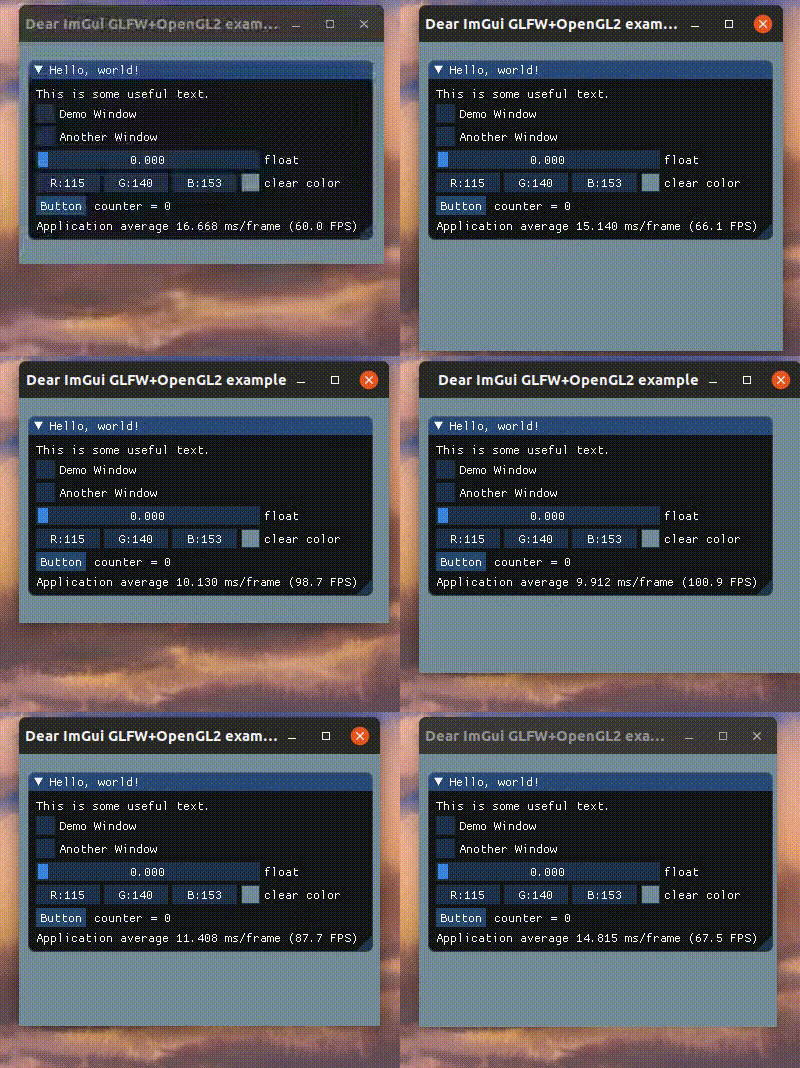
The flickering in the "real world" is much more prominent than what can be seen from the screen capture. Still, you can still notice how the imgui window's vertical offset briefly changes at some point.
Standalone, minimal, complete and verifiable example:
Just build and run example_glfw_opengl3 (or example_glfw_opengl2) without modifications.
 sonicdebris
All 5 comments
By the look of it it looks like maybe it has nothing to do with Dear ImGui, could be a behavior somewhere between your OpenGL driver, your window manager, or how GLFW handle resizing? How do other OpenGL apps perform? How does the SDL+OpenGL perform on the same system?
 ocornut
on 9 Dec 2019
ocornut
on 9 Dec 2019
Some more tests:
- SDL/opengl3 example -> same results.
- run
glxgearsfrom themesa-utilspackage on Ubuntu -> same results
This happens on two different machines, one with ubuntu and the other with manjaro. I guess it's indeed something with the opengl driver.
sonicdebris
on 10 Dec 2019
Closing this as not a Dear ImGui related issue.
If you find a solution to your problem feel free to post it here for later references, as other may stumble on same issue. Thank you!
ocornut
on 10 Dec 2019
Disabling vsync with glfwSwapInterval(0) gets rid of the flickering, but the frame rate skyrockets to hundreds of fps.
To avoid that, I ended up subscribing to glfw's framebuffer resize callback: inside the callback I disable vsync, run the same rendering function that's called in the main loop, and enable vsync again. I don't know much about opengl, and doesn't look like an elegant solution, but here it is anyway (it's just a stripped-down version of the glfw/opengl2 example):
#include "imgui.h"
#include "imgui_impl_glfw.h"
#include "imgui_impl_opengl2.h"
#include <stdio.h>
#include <GLFW/glfw3.h>

void renderScene(GLFWwindow* window, int width, int height) {
    glViewport(0, 0, width, height);
    ImGui_ImplOpenGL2_NewFrame()
    ImGui_ImplGlfw_NewFrame();
    ImGui::NewFrame();
    ImGui::Begin("Hello, world!");
    ImGui::Text("This is some useful text.");
    ImGui::Text("Application average %.3f ms/frame (%.1f FPS)", 1000.0f / ImGui::GetIO().Framerate, ImGui::GetIO().Framerate);
    ImGui::End();
    ImGui::Render();
    glClearColor(0.50f, .0f, 0.90f, 1.0f);
    glClear(GL_COLOR_BUFFER_BIT);
    ImGui_ImplOpenGL2_RenderDrawData(ImGui::GetDrawData());
    glfwSwapBuffers(window);
}

void framebuffer_size_callback(GLFWwindow* window, int width, int height) {
    glfwSwapInterval(0); // disable vsync
    renderScene(window, width, height);
    glfwSwapInterval(1); // re-enable vsync
}

int main(int, char**) {
    if (!glfwInit()) return 1;
    GLFWwindow* window = glfwCreateWindow(1280, 720, "Dear ImGui GLFW+OpenGL2 example", NULL, NULL);
    if (window == NULL)return 1;

    glfwSetFramebufferSizeCallback(window, framebuffer_size_callback);
    glfwMakeContextCurrent(window);

    glfwSwapInterval(1); // vsync normally enabled

    IMGUI_CHECKVERSION();
    ImGui::CreateContext();
    ImGuiIO& io = ImGui::GetIO(); (void)io;
    ImGui::StyleColorsDark();
    ImGui_ImplGlfw_InitForOpenGL(window, true);
    ImGui_ImplOpenGL2_Init();

    while (!glfwWindowShouldClose(window)) {
        glfwPollEvents();
        int display_w, display_h;
    glfwGetFramebufferSize(window, &display_w, &display_h);
        renderScene(window, display_w, display_h);
    }

    ImGui_ImplOpenGL2_Shutdown();
    ImGui_ImplGlfw_Shutdown();
    ImGui::DestroyContext();
    glfwDestroyWindow(window);
    glfwTerminate();
    return 0;
}
That's definitively odd but if it works, good for you :)
Unfortunately it's real hard to say if it will work or will be required depending on drivers configuration...
If that's any consolation, resizing anything using Windows OS decorations tends to exhibit variety of issues too.... Funny thing if you enable multi-viewports and resize using imgui decorations things are smooth..
ocornut
on 10 Dec 2019
Related issues
 Folling
·
3Comments
Folling
·
3Comments
 the-lay
·
3Comments
the-lay
·
3Comments
 inflex
·
3Comments
inflex
·
3Comments
 NPatch
·
3Comments
NPatch
·
3Comments
 DarkLinux
·
3Comments
DarkLinux
·
3Comments