Imgui: I just want a dialog based application
Version/Branch of Dear ImGui:
Version: dear imgui, v1.73
Branch: master
Screenshots/Video
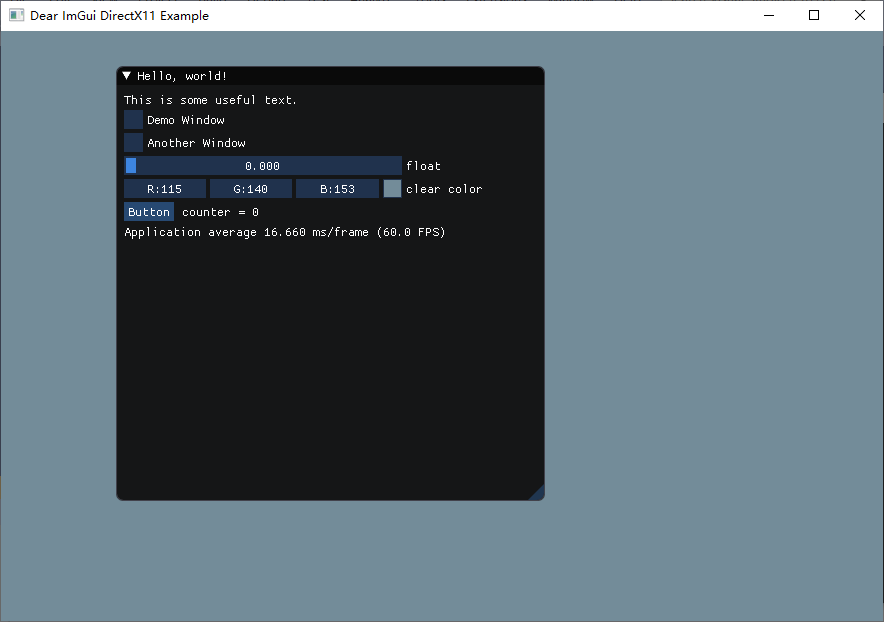
My Issue/Question:
Hi!
I just want a dialog based application(Hello, world!) without backgroud window(Dear ImGui DirectX11 Example) for drawing.
Is that possible? How should I do?
Thanks!
 introcosmo
All 8 comments
You'll have to be a bit clearer.
A dialog based application? So you want your entire appliciation to just be dialogs? As in the warning dialogs you'd get when something wrong happens?
Or do you just want a big background window that covers the entire screen without small windows that you can drag around?
Or do you want an application that contains of different native windows?
 Folling
on 7 Oct 2019
Folling
on 7 Oct 2019
My problem gets clear by uploaded image with title names of dialogs. I tried to seek the api to conceal the background window. But I found nothing.
I am grateful if somebody helps.
introcosmo
on 8 Oct 2019
So you basically want something like this:

A window that fills the entire screen?
Folling
on 8 Oct 2019
Yes it's definitely possible.
You always have at least one OS window (the one with the green background, in your screenshot). And you always need to have one ImGui window. The trick is to maximize that single ImGui window to fill the OS window, like on the screenshot shown by @Folling.
You can use SetNextWindowPos, SetNextWindowSize calls with appropriate arguments before you Begin the ImGui window.
 corentin-plouet
on 8 Oct 2019
corentin-plouet
on 8 Oct 2019
So you basically want something like this:
A window that fills the entire screen?
Yes, How do you implement that? Do as corentin-plouet said with SetNextWindowPos, SetNextWindowSize or someway easier?
Thanks for your reply!
introcosmo
on 8 Oct 2019
If you don't need the menubar you can use ImGui::DockSpaceOverViewPort and then dock the window to that dock-id.
The dockbuilder API is a bit flimsy right now, but you can read about it here:
https://github.com/ocornut/imgui/issues/2109#issuecomment-426204357
Folling
on 8 Oct 2019
SetNextWindowPos(ImVec2(0,0))
SetNextWindowSize(ImGui::GetIO().DisplaySize)
Begin(...)
 ocornut
on 8 Oct 2019
ocornut
on 8 Oct 2019
Please move this to Discord or elsewhere, thank you.
https://discord.gg/NgJ4SEP
I apologize but I am going to have to setup baseline proficiency requirements on opening issues. This place cannot be helping the entire internet learning c++, it's just harming dear imgui development.
ocornut
on 8 Oct 2019
Related issues
 bogdaNNNN1
·
3Comments
bogdaNNNN1
·
3Comments
 GrammarLord
·
3Comments
GrammarLord
·
3Comments
 NPatch
·
3Comments
NPatch
·
3Comments
 ghost
·
3Comments
ocornut
·
3Comments
ghost
·
3Comments
ocornut
·
3Comments
Most helpful comment
Please move this to Discord or elsewhere, thank you.
https://discord.gg/NgJ4SEP
I apologize but I am going to have to setup baseline proficiency requirements on opening issues. This place cannot be helping the entire internet learning c++, it's just harming dear imgui development.