Imgui: AddRect vs. 4x AddLine - 1 pixel width/height difference?
Branch: docking
Config:
Dear ImGui 1.69 (16900)
--------------------------------
sizeof(size_t): 4, sizeof(ImDrawIdx): 2, sizeof(ImDrawVert): 20
define: __cplusplus=199711
define: _WIN32
define: _MSC_VER=1916
define: IMGUI_HAS_VIEWPORT
define: IMGUI_HAS_DOCK
--------------------------------
io.BackendPlatformName: imgui_impl_glfw
io.BackendRendererName: imgui_impl_opengl3
io.ConfigFlags: 0x00000441
 NavEnableKeyboard
 DockingEnable
 ViewportsEnable
io.ConfigViewportsNoDecoration
io.ConfigInputTextCursorBlink
io.ConfigWindowsResizeFromEdges
io.BackendFlags: 0x00001406
 HasMouseCursors
 HasSetMousePos
 PlatformHasViewports
 RendererHasViewports
--------------------------------
io.Fonts: 1 fonts, Flags: 0x00000000, TexSize: 512,64
io.DisplaySize: 1280.00,720.00
io.DisplayFramebufferScale: 1.00,1.00
--------------------------------
style.WindowPadding: 8.00,8.00
style.WindowBorderSize: 1.00
style.FramePadding: 4.00,3.00
style.FrameRounding: 0.00
style.FrameBorderSize: 0.00
style.ItemSpacing: 8.00,4.00
style.ItemInnerSpacing: 4.00,4.00
My Issue/Question:
I need to draw/highlight a region inside an image. This highlight should be pixel-perfect as users need to be able to precisely select an area of an image. There is two simple ways to implement this: AddRect or 4 times AddLine. When implementing this feature, I found out 2 issues that I describe here:
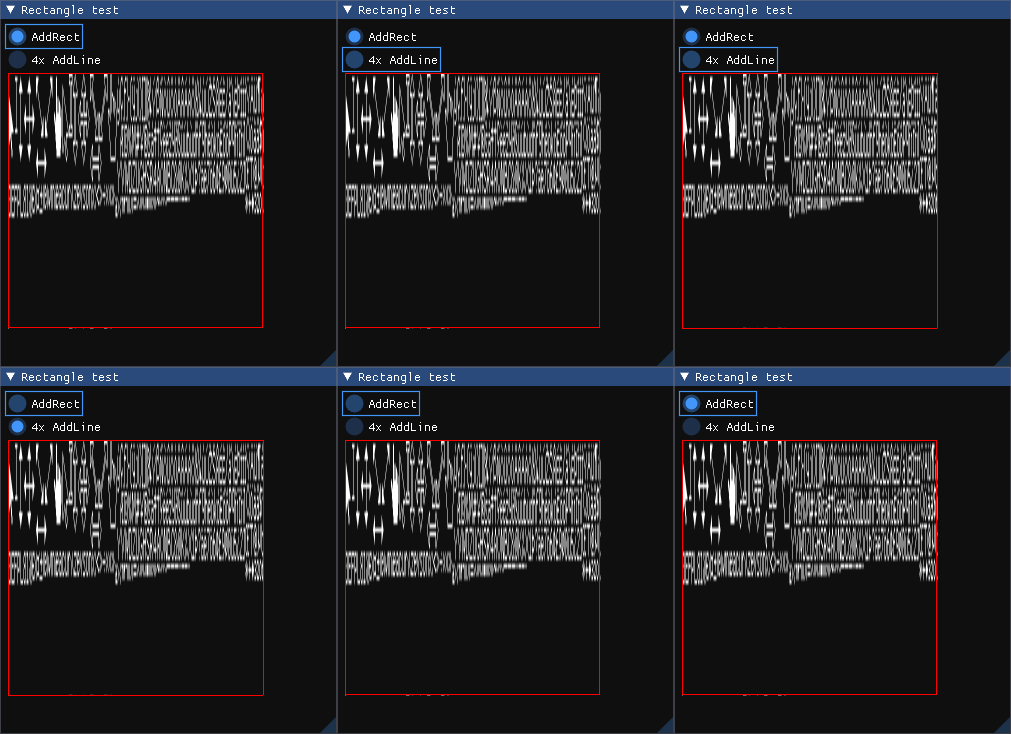
AddRectis 1 pixel off in width & heightFor some reason, when I use
AddRectover anImage, the rectangle is 1 pixel smaller in both
width and height (see the attached .gif, theImageis definitely bigger than the rectangle).According to the API,
AddRectshould take a top-left and bottom-right
corner, which in this case arecursor_posandcursor_pos + 255for anImageof size256.When I call
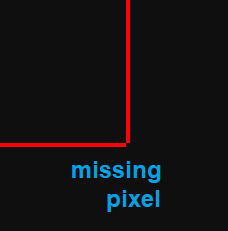
AddLine4 times, I get a correct rectangle......however, 4x
AddLinehave correct size, but 1 pixel is missingSee the second attached picture (or the .gif). This is related to #1646 with a similar issue for
AddRect. For some reason, with antialiasing enabled, the bottom right corner is missing (but in some cases, the upper right corner is missing, so there is not a specific corner).
Screenshots/Video
Standalone, minimal, complete and verifiable example: _(see https://github.com/ocornut/imgui/issues/2261)_
ImGui::Begin("Rectangle test");

static bool use_rectangle = true;
if(ImGui::RadioButton("AddRect", use_rectangle)) { use_rectangle = true; }
if(ImGui::RadioButton("4x AddLine", !use_rectangle)) { use_rectangle = false; }

ImVec2 cursor_pos = ImGui::GetCursorScreenPos();
auto* draw_list = ImGui::GetWindowDrawList();

ImGui::Image(ImGui::GetIO().Fonts->TexID, ImVec2(256, 256));

if(use_rectangle) {
    draw_list->AddRect(cursor_pos, ImVec2(cursor_pos.x + 255.f, cursor_pos.y + 255.f), ImColor(255, 0, 0, 255));
} else {
    draw_list->AddLine(cursor_pos, ImVec2(cursor_pos.x + 255.f, cursor_pos.y), ImColor(255, 0, 0, 255));
    draw_list->AddLine(cursor_pos, ImVec2(cursor_pos.x, cursor_pos.y + 255.f), ImColor(255, 0, 0, 255));
    draw_list->AddLine(ImVec2(cursor_pos.x + 255.f, cursor_pos.y), ImVec2(cursor_pos.x + 255.f, cursor_pos.y + 255.f), ImColor(255, 0, 0, 255));
    draw_list->AddLine(ImVec2(cursor_pos.x, cursor_pos.y + 255.f), ImVec2(cursor_pos.x + 255.f, cursor_pos.y + 255.f), ImColor(255, 0, 0, 255));
}

ImGui::End();
 tomasiser
All 7 comments
I ended up making my own "rect" function out of 4 line draws, to get around this issue.
 JamAndCheese
on 23 Mar 2019
JamAndCheese
on 23 Mar 2019
For some reason, when I use AddRect over an Image, the rectangle is 1 pixel smaller in both
width and height (see the attached .gif, the Image is definitely bigger than the rectangle).
According to the API, AddRect should take a top-left and bottom-right
corner, which in this case are cursor_pos and cursor_pos + 255 for an Image of size 256.
That's correct. So for AddRect() you should pass (cursor_pos, cursor_pos + size) as you expect the bottom-right of the bottom-right pixel to land on +size.
Your rectangle is pixel 1 pixel smaller in both axises because you have removed 1 pixel from each axis.
AddRect((0,0),(16,16)) will cover a 16x16 region, with a 14x14 region inside the border (assuming thickness==1.0f).
I understand there's two ways to "read" the provided explanation (thinking in term of the pixel being hit vs in geometrical term, which AddRect uses).
Unfortunately the later doesn't make as much sense with AddLine which uses the earlier definition (expecting integer coordinates and centering them within the pixel) and in addition it can have the issue you mentioned. It could have been more consistent to require the user to pass coordinates centered within a pixel if they expected a pixel-perfect line. I don't know if there is a change we should/could do on that front, it is a little tricky as we would certainly break user code if we altered those definitions.
Note that it is the AddRect, AddLine function that add offsets so the lower level PathLine, PathRect are not affected.
 ocornut
on 25 Mar 2019
ocornut
on 25 Mar 2019
I understand there's two ways to "read" the provided explanation
Ah, okay, I see. So this is tricky. I expected the upper left and lower right to correspond to the coordinates of the "first" and "last" pixels in the grid that would form the rectangle, like so:
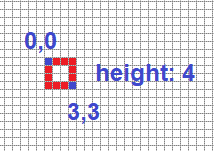
So in this case, a rectangle of size 4,4 would have upper left at 0,0 and lower right at 3,3.
But what you are saying is that for AddRect, the lower right should actually be at 4,4.
In that case, I wonder if we could change the comment for this function in the header file. I think something like a = upper-left coordinate, b = a + size could be more clear?
tomasiser
on 25 Mar 2019
pass coordinates centered within a pixel if they expected a pixel-perfect line
So this means that if I use (x + 0.5f, y + 0.5f), I can avoid the "missing-pixel" behavior? :-)
I don't know if there is a change we should/could do on that front, it is a little tricky as we would certainly break user code if we altered those definitions.
Possibly if there was a set of the same drawing functions but with integer coordinates, then ImGui could add the 0.5f manually when converting to floats. But that would be too much pain to maintain that.
tomasiser
on 25 Mar 2019
So this means that if I use (x + 0.5f, y + 0.5f), I can avoid the "missing-pixel" behavior? :-)
I don't know, give it a try. Getting those functions to render right, with/without AA, and on different back-ends can be tricky.
ocornut
on 25 Mar 2019
on different back-ends can be tricky.
You are right indeed, according to OpenGL FAQ 14.090, exact pixelization of lines may not be possible on different hardware setups.
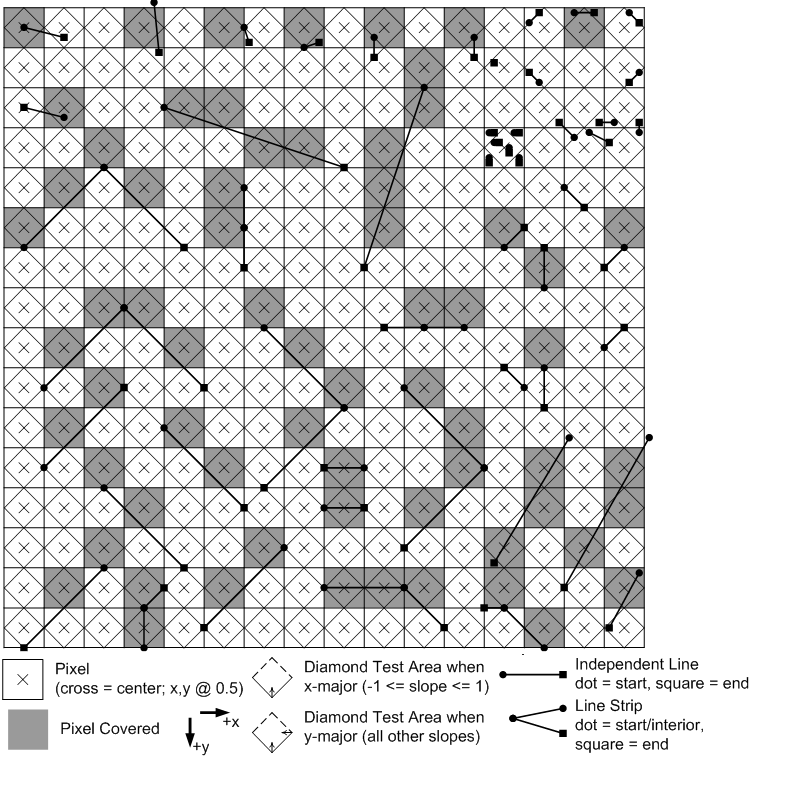
However, OpenGL specifies that lines should be handled using the "diamond exit" rule. It means that we draw all the pixels where the line fully crosses a diamond of the pixels, or where the line begins inside the diamond. However, if a line _ends_ _inside_ a diamond, that pixel is _not_ drawn.
Microsoft has a guide on diamond exits (see picture below). According to the rules, we should always add +1,+1 to the coordinates of the last pixel if we want it to be drawn.
ImGui actually adds +0.5,+0.5 to the beginning and end of AddLine. So the first pixel is drawn because it passes the diamond exit rules, but the last pixel is not drawn because +0.5f,+0.5f is _not sufficient_ to cross the last diamond. So if I add +0.5f,+0.5f to the argument I pass to AddLine, the AddLine itself will add another +0.5f,+0.5f, so it essentially is +1,+1 and the pixel is drawn.
Obviously this is only for OpenGL and other backends such as DirectX may work another way.
tomasiser
on 27 Mar 2019
I understand there's two ways to "read" the provided explanation
Ah, okay, I see. So this is tricky. I expected the upper left and lower right to correspond to the coordinates of the "first" and "last" pixels in the grid that would form the rectangle, like so:
So in this case, a rectangle of size 4,4 would have upper left at 0,0 and lower right at 3,3.
But what you are saying is that for
AddRect, the lower right should actually be at 4,4.In that case, I wonder if we could change the comment for this function in the header file. I think something like
a = upper-left coordinate, b = a + sizecould be more clear?
After changing this line in ImDrawList::AddRect,
https://github.com/ocornut/imgui/blob/403b2d7d59f84ec0e6abfd247b762007dd5dbc54/imgui_draw.cpp#L988
to
PathRect(a + ImVec2(0.5f,0.5f), b + ImVec2(0.51f,0.51f), rounding, rounding_corners_flags);
You will get the expected result.
 zwcloud
on 22 Apr 2019
zwcloud
on 22 Apr 2019
Related issues
 bizehao
·
3Comments
bizehao
·
3Comments
 mkanakis
·
3Comments
mkanakis
·
3Comments
 KaungZawHtet
·
3Comments
KaungZawHtet
·
3Comments
 NPatch
·
3Comments
NPatch
·
3Comments
 GrammarLord
·
3Comments
GrammarLord
·
3Comments
Most helpful comment
You are right indeed, according to OpenGL FAQ 14.090, exact pixelization of lines may not be possible on different hardware setups.
However, OpenGL specifies that lines should be handled using the "diamond exit" rule. It means that we draw all the pixels where the line fully crosses a diamond of the pixels, or where the line begins inside the diamond. However, if a line _ends_ _inside_ a diamond, that pixel is _not_ drawn.
Microsoft has a guide on diamond exits (see picture below). According to the rules, we should always add +1,+1 to the coordinates of the last pixel if we want it to be drawn.
ImGui actually adds +0.5,+0.5 to the beginning and end of
AddLine. So the first pixel is drawn because it passes the diamond exit rules, but the last pixel is not drawn because +0.5f,+0.5f is _not sufficient_ to cross the last diamond. So if I add +0.5f,+0.5f to the argument I pass toAddLine, theAddLineitself will add another +0.5f,+0.5f, so it essentially is +1,+1 and the pixel is drawn.Obviously this is only for OpenGL and other backends such as DirectX may work another way.