Imgui: TreeNode frame bounds miscalculation with horizontal scrolling
Version/Branch of Dear ImGui:
master branch
Back-end file/Renderer/OS:
Back-ends: imgui_impl_glfw.cpp + imgui_impl_opengl3.cpp
OS: Windows 10 64bit
Compiler: MSVC 2017 v15.8.6
My Issue/Question:
When creating a tree with many sub-nodes, inside a child window + horizontal scroll -> the frame (and the text as well) is getting clipped (screenshot attached)
The issue is (what I think) wrong frame bounds calculation. Current code is
Inside ImGui::TreeNodeBehavior frame bounds calculated like this
ImRect frame_bb = ImRect(window->DC.CursorPos, ImVec2(window->Pos.x + GetContentRegionMax().x, window->DC.CursorPos.y + frame_height));
As we "shift" the content, the GetContentRegionMax() returns "shifted".
If I use GetWindowContentRegionWidth() instead, it draws properly.
I know it's wrong to use that function, and you know the code better then me, so I'd appreciate the proper fix for this. 🙇
Screenshots/Video

 iOrange
All 9 comments
This is a tricky issue, ContentsRegion is currently ill-defined and can't be changed easily as lots of internal and user code depends on the current de-facto definition for it. If we fit the actual contents width into that value there will be a feedback loop where various code with output different content size.
I have a few other tasks revolving around sorting this out and introducing a new rectangle value.
The TreeNode/CollapingHeader case is a little easier to solve because the part past the label isn't reported as contents size. However by the "correct" version that you are expecting here, the optional Close Button of a collapsing header would often be out of sight. In other words, CollapsingHeader is not very appropriate within an horizontally scrolling region and you probably should be using TreeNode here..
If I use GetWindowContentRegionWidth() instead, it draws properly.
It's not correct. That width is pretty much == window.Size.x and the current cursor position may be anything (> 0.0f or > CursorStartPos.x)
(PS: However detailed your post is, please provide a minimal repro as requested. Me or anybody who want to be looking at the issue would need one. Thank you.)
 ocornut
on 29 Nov 2018
ocornut
on 29 Nov 2018
I don't understand why you changed the topic name, as I'm using only TreeNodeEx here, not CollapsingHeader.
Here's the code to repro this issue:
ImGui_ImplGlfwGL3_NewFrame();

ImGui::SetNextWindowPos(ImVec2(0, 0), ImGuiCond_FirstUseEver);
ImGui::SetNextWindowSize(ImVec2(static_cast<float>(wndWidth), static_cast<float>(wndHeight)), ImGuiCond_FirstUseEver);

if (ImGui::Begin("Node Debugger", nullptr, ImGuiWindowFlags_NoResize | ImGuiWindowFlags_NoMove | ImGuiWindowFlags_NoCollapse)) {
    ImGui::Columns(2, nullptr, true);
    ImGui::SetColumnWidth(0, 300.0f);

    if (ImGui::BeginChild("SceneTree", ImVec2(0, 0), false, ImGuiWindowFlags_HorizontalScrollbar)) {
        const int numSubNodes = 20;

        for (int i = 0; i < numSubNodes; ++i) {
            ImGui::TreeNodeEx("Some long title to force horizontal scroll", ImGuiTreeNodeFlags_OpenOnArrow | ImGuiTreeNodeFlags_Selected | ImGuiTreeNodeFlags_DefaultOpen);
        }

        for (int i = 0; i < numSubNodes; ++i) {
            ImGui::TreePop();
        }
    }
    ImGui::EndChild();
}
ImGui::End();

ImGui::Render();
Screenshot:

iOrange
on 30 Nov 2018
hello, do you plan to fix this bug?
 irov
on 16 Dec 2018
irov
on 16 Dec 2018
@irov I have hope to fix every bug but I don’t have infinite free energy and cannot provide a schedule on this.
ocornut
on 17 Dec 2018
People say that redbull gives wings ;) Is there a way to speed up this endless process?
irov
on 17 Dec 2018
Is there a way to speed up this endless process?
Yes, fund me or someone to solve it properly, or do it yourself?
I am more than overwhelmed with requests and todos already, I have to prioritize.
The right fix is often trickier than it sounds, if you can live with a workaround you are free to use that in your local branch. I am responsible of making imgui grow and not fall apart and there are lots of thoughts required to make progress through the jungle of possible regressions.
ocornut
on 17 Dec 2018
@iOrange Thanks for your detailed answer by the way! And sorry I haven't got around to it yet. You are right I mistakenly thought you were using CollapsingHeader because this is what the first screenshot looked like to me. The difference shouldn't matter much afaik, it's actually less problematic with a regular TreeNode than with CollapsingHeader because of the bool* version of CollapsingHeader.
This is an open thing to fix.
ocornut
on 17 Dec 2018
This should be no fixed now.
I fully realize that the proposed fix was trivial but for many reasons it wasn't correct. I spent an entire four days (!) reworking some of the subtleties related to the various window rectangles, how they are affected by scrolling and decorations, and planning a transition away from the current ContentsRegionRect which is flawed when using horizontal scrolling. I also needed some of those changes to sanitize some my work on the new Tables.
I don't expect this wider topic to be fully closed but at least the apparent issue with the highlight of tree nodes, which is the initial post here, is fixed. I expect some (minor) issue will arise from the changes I made will be fixed.
Minor note: Contrary to what I have suggested in one of my post above, for a CollapsingHeader with a CloseButton I have currently taken the approach that the CloseButton will stay consistently on the right side of the work area, aka not fully visible if there is an horizontal scrollbar. This was changed in cb7ba60d3f7d691c698c4a7499ed64757664d7b8 before the bulk of the window-rectangles related changes.
In Demo->Layout->Horizontal Scrolling->Show Horizontal Scrolling contents size demo window you can test some of those features.
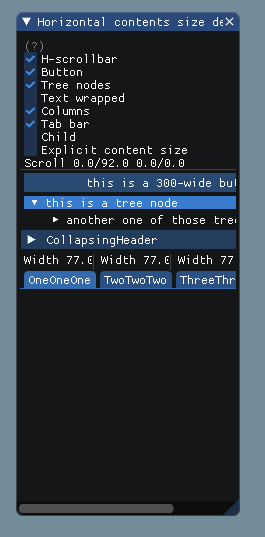
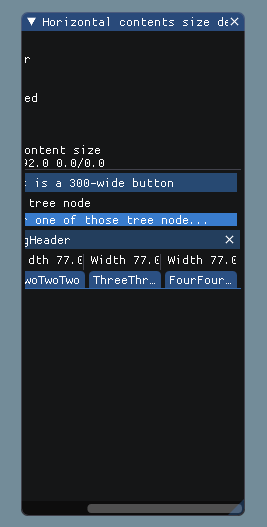
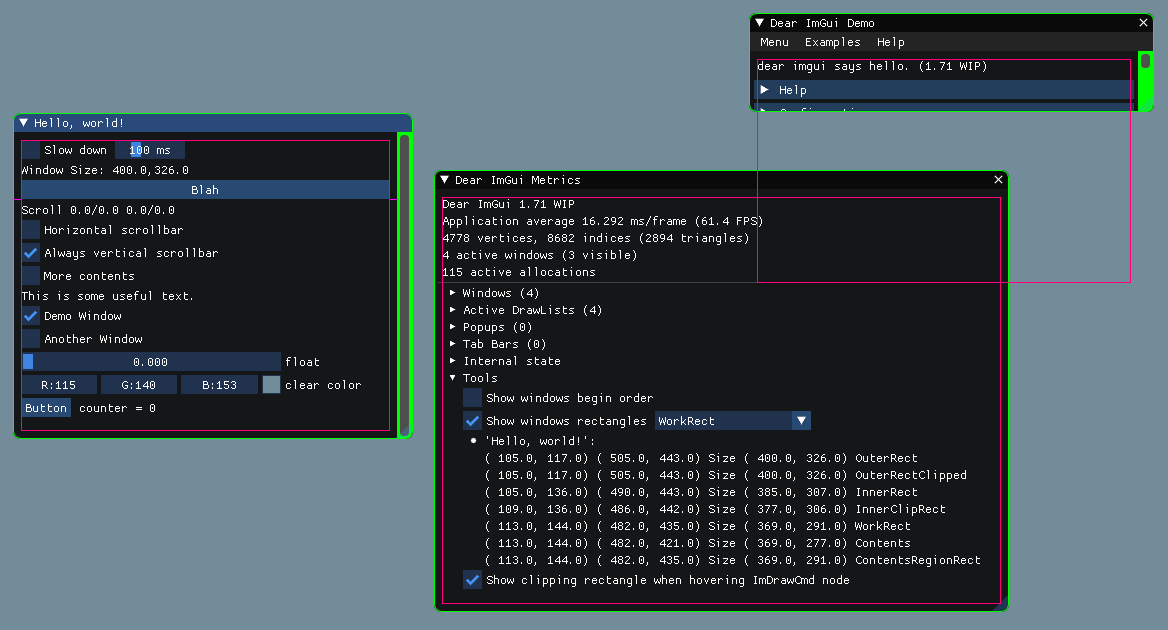
It's also possible in Metrics->Tools->Show window rectangles to visualize some of the underlying data:
ocornut
on 5 Jun 2019
Oh, thanks so much for your time! I appreciate this so much!
iOrange
on 5 Jun 2019
Related issues
 mkanakis
·
3Comments
mkanakis
·
3Comments
 spaderthomas
·
3Comments
spaderthomas
·
3Comments
 bogdaNNNN1
·
3Comments
bogdaNNNN1
·
3Comments
 the-lay
·
3Comments
the-lay
·
3Comments
 BlackWatersInc
·
3Comments
BlackWatersInc
·
3Comments
Most helpful comment
Yes, fund me or someone to solve it properly, or do it yourself?
I am more than overwhelmed with requests and todos already, I have to prioritize.
The right fix is often trickier than it sounds, if you can live with a workaround you are free to use that in your local branch. I am responsible of making imgui grow and not fall apart and there are lots of thoughts required to make progress through the jungle of possible regressions.