Imgui: Pushing colors after creating a widget / 1 frame delay blinking
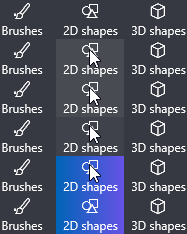
Hello, I am trying to make a button which behaves more or less like a classic Windows GUI toggle button. The problem here is that classic toggle buttons are more complicated than this simple example. Let me explain how a usual toggle button should actually work:
- it has an inactive color,
- when hovered, the color changes to hovered color,
- when clicked (but the click _not released_ yet), the color changes to active color,
- when the click is released above the button, the color changes to toggled color,
- and similarly when untoggling the button.
This should not be that hard to do in ImGui, right? Here is a simple concept:
void CoolToggleButton() {
    static bool isToggled = false;

    int pushedColors = 0;

    if(isToggled) {
        ImGui::PushStyleColor(ImGuiCol_Text, ImVec4(ImColor(255, 255, 255)));
        ImGui::PushStyleColor(ImGuiCol_Button, ImVec4(ImColor(0, 0, 0)));
        ImGui::PushStyleColor(ImGuiCol_ButtonHovered, ImVec4(ImColor(0, 0, 0)));
        ImGui::PushStyleColor(ImGuiCol_ButtonActive, ImVec4(ImColor(0, 0, 0)));
        pushedColors += 4;
    } else {
        ImGui::PushStyleColor(ImGuiCol_Text, ImVec4(ImColor(0, 0, 0)));
        ImGui::PushStyleColor(ImGuiCol_Button, ImVec4(ImColor(255, 255, 255)));
        ImGui::PushStyleColor(ImGuiCol_ButtonHovered, ImVec4(ImColor(200, 200, 200)));
        ImGui::PushStyleColor(ImGuiCol_ButtonActive, ImVec4(ImColor(150, 150, 150)));
        pushedColors += 4;
    }

    if(ImGui::Button("  Toggle Button  ", ImVec2(250, 50))) {
        isToggled = !isToggled;
    }

    ImGui::PopStyleColor(pushedColors);
    ImGui::SameLine(0.f, 0.f);
}
But watch how it actually looks like:

Do you notice the 1 frame delay? The quick blink of gray color before it turns black? Obviously the lower the framerate, the more noticeable this issue is.
It happens because in the code, the isToggled variable is only updated after the button widget is actually created, so the colors that are pushed are 1 frame delayed. However, ImGui is so clever that it actually notices that the button is _not clicked anymore_ at this moment, so it gives it the ButtonHovered light color in the current frame causing the whole button to blink.
One way to fix this would be to somehow push the colors after already creating the button, something like PushStyleColorToPreviousWidget but obviously this is too weird.
How do you suggest to fix this issue? :)
Edit: Here is how it actually _should_ look like (gif from Microsoft Paint 3D user interface):
 tomasiser
All 9 comments
How do you suggest to fix this issue? :)
Implement your own button widget calling ButtonBehavior(), it should be a dozen of lines.
 ocornut
on 20 Oct 2018
ocornut
on 20 Oct 2018
Thanks for pointing me to the right direction, but it looks like with ButtonBehavior I would need to implement things like nav highlight manually. Is it the only reasonable way to do it? Would it be possible to somehow exploit default Button rendering and redrawing just a part of it?
Thanks!
tomasiser
on 20 Oct 2018
Reimplementing a custom version of ButtonEx() - where you can trim some of the fat from - seems like the more reasonable way, far more reasonable than poking into vertex colors after submitting the vertices.
ocornut
on 20 Oct 2018
Yes, so one option I came up with is using a _callback_ instead of a return value. The callback is called _before_ the actual rendering, so I can easily push my color changes in a lambda function and they will be applied in the current frame.
Posting a C++ snippet for others in case they would like to get inspired. I used imgui_internal.h and copy pasted ButtonEx as suggested by @ocornut, except I use a callback instead of a return value.
Thank you, I am closing the issue now!
template <typename Func>
void ButtonEx(const char* label, const ImVec2& size_arg, ImGuiButtonFlags flags, Func onPressed)
{
    ImGuiWindow* window = ImGui::GetCurrentWindow();
    if (window->SkipItems)
        return;

    ImGuiContext& g = *GImGui;
    const ImGuiStyle& style = g.Style;
    const ImGuiID id = window->GetID(label);
    const ImVec2 label_size = ImGui::CalcTextSize(label, NULL, true);

    ImVec2 pos = window->DC.CursorPos;
    if ((flags & ImGuiButtonFlags_AlignTextBaseLine) && style.FramePadding.y < window->DC.CurrentLineTextBaseOffset) // Try to vertically align buttons that are smaller/have no padding so that text baseline matches (bit hacky, since it shouldn't be a flag)
        pos.y += window->DC.CurrentLineTextBaseOffset - style.FramePadding.y;
    ImVec2 size = ImGui::CalcItemSize(size_arg, label_size.x + style.FramePadding.x * 2.0f, label_size.y + style.FramePadding.y * 2.0f);

    const ImRect bb(pos, ImVec2(pos.x + size.x, pos.y + size.y));
    ImGui::ItemSize(bb, style.FramePadding.y);
    if (!ImGui::ItemAdd(bb, id))
        return;

    if (window->DC.ItemFlags & ImGuiItemFlags_ButtonRepeat)
        flags |= ImGuiButtonFlags_Repeat;
    bool hovered, held;
    bool pressed = ImGui::ButtonBehavior(bb, id, &hovered, &held, flags);
    if(pressed) {
        onPressed();
    }

    // Render
    const ImU32 col = ImGui::GetColorU32((hovered && held) ? ImGuiCol_ButtonActive : hovered ? ImGuiCol_ButtonHovered : ImGuiCol_Button);
    ImGui::RenderNavHighlight(bb, id);
    ImGui::RenderFrame(bb.Min, bb.Max, col, true, style.FrameRounding);
    ImGui::RenderTextClipped(ImVec2(bb.Min.x + style.FramePadding.x, bb.Min.y + style.FramePadding.y), ImVec2(bb.Max.x - style.FramePadding.x, bb.Max.y - style.FramePadding.y), label, NULL, &label_size, style.ButtonTextAlign, &bb);

    // Automatically close popups
    //if (pressed && !(flags & ImGuiButtonFlags_DontClosePopups) && (window->Flags & ImGuiWindowFlags_Popup))
    //    CloseCurrentPopup();
}
That’s an odd choice, why don’t you push the colors directly inside the function you created, and give it a proper name? Eg: ToggleButton() and pass its toggle state as a parameter?
ocornut
on 21 Oct 2018
I might end up doing it that way, but imo both options have their pros and cons, e.g.,
Callback requires you to manually push colors which is painful, but using your way I would still need to manually manage the 4th color as ImGui only recognizes 3 colors (normal/hovered/active) but I need 4 of them (normal/hovered/held/toggled).
Callback allows me to do something like:
if (foo.isBar()) { Push Toggled Colors ... }
ButtonEx(..., [&](){
    foo.trySetBar(); // this may fail
    if (foo.isBar()) {
        Push Toggled Colors ... // only toggle the button if trySetBar() was successful
    }
});
But if I used your way, I would get a 1 frame delay again just in reverse (the button would blink as if the toggle was successful even though it was not).
I think the only robust solution here is to actually combine both of them, the callback to actually set if the button should really become toggled, but setting the colors inside the actual button function.
tomasiser
on 21 Oct 2018
You seem to be ignoring the whole point of copying the function which to use whatever color you want without any push/pop action and without any restriction. There’s no lag because you’ll doing the drawing after processing the logic like ButtonEx is doing.
ocornut
on 21 Oct 2018
Ah ok, I see, I was just trying to find a kinda generic solution to this problem.
Thanks for help!
tomasiser
on 21 Oct 2018
Those internals rarely change, but I would like down the line to redesign them in a way that is more friendly/obvious for creating new widgets, and toward making the internal api guaranteed forward compatible. It’ll probably be a good portion of imgui 2.0 to aim for that, once the feature set is better known.
ocornut
on 21 Oct 2018
Related issues
 SlNPacifist
·
3Comments
SlNPacifist
·
3Comments
 NPatch
·
3Comments
NPatch
·
3Comments
 bogdaNNNN1
·
3Comments
bogdaNNNN1
·
3Comments
 spaderthomas
·
3Comments
spaderthomas
·
3Comments
 namuda
·
3Comments
namuda
·
3Comments
Most helpful comment
Those internals rarely change, but I would like down the line to redesign them in a way that is more friendly/obvious for creating new widgets, and toward making the internal api guaranteed forward compatible. It’ll probably be a good portion of imgui 2.0 to aim for that, once the feature set is better known.