Imgui: Docking branch available for testing
I have pushed an experimental 'docking' branch:
https://github.com/ocornut/imgui/tree/docking
Effectively providing a long awaited official solution to the features discussed in #351 and #261.
TL;DR; You can benefit from good portion of docking features with no extra work or API call. Windows can be merged with each others, with or without partitioning the space.
Prefer creating separate New Issues for specific questions/issues, so they can more easily be closed when solved and not clutter this thread (which is already too big)
Please do not report issues without reading the 'Feedback' section of the next post and without reading the 'Contributing' document listed in there. The number of ambiguous, ill-formed questions and incomplete bug reports posted on this entire github is difficult to deal with. Thank you.
GIF _(this is actually a gif from an older version which has some glitches, but you get the gist!)_

Quick demo
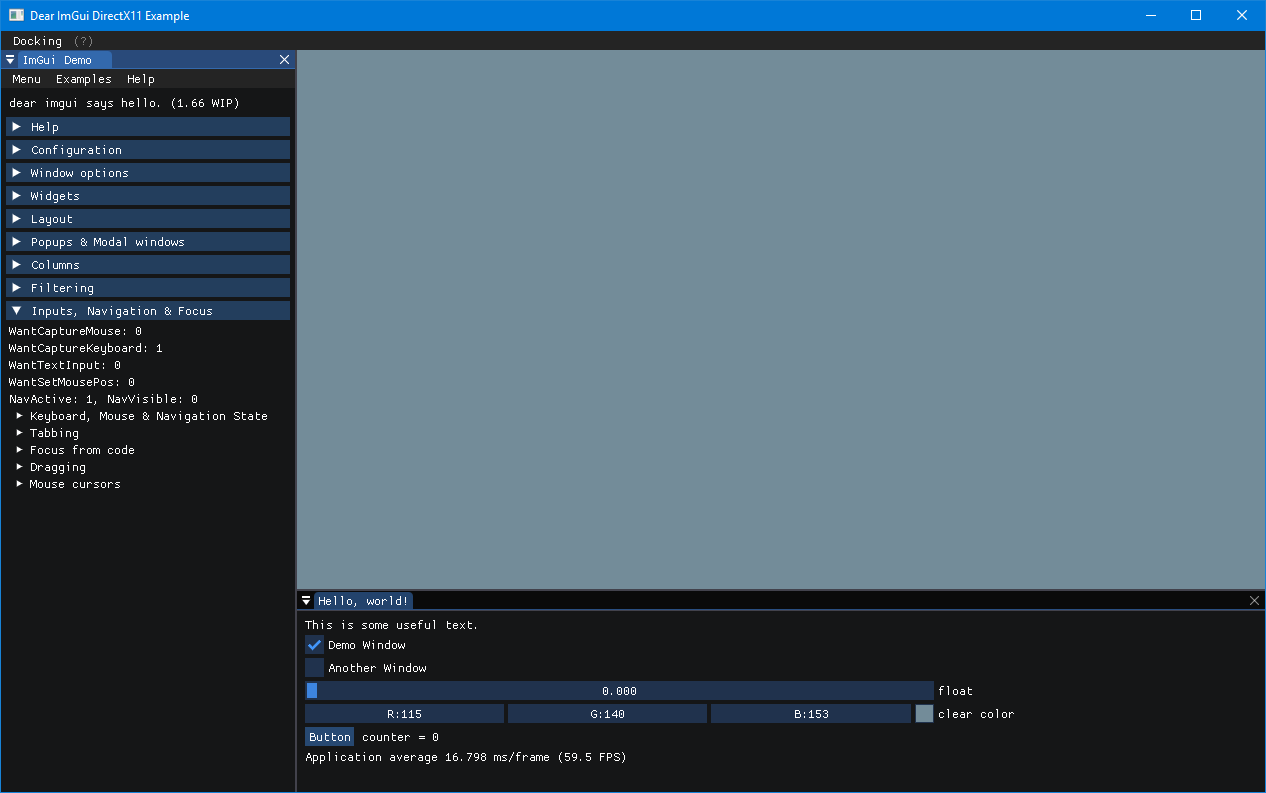
You may checkout docking and build one the example e.g. example_win32_dx11/, example_glfw_opengl3, example_sdl_vulkan to test this. Head to Demo>Configuration to see the global configuration flags. Note that multi-viewports are enabled by default in those demo but only well tested under Windows. If you have issues with them you can disable them via the Demo>Configuration pane or by commenting out the line that sets ImGuiConfigFlags_ViewportsEnable in the main.cpp of your example. Docking is functional without multi-viewports enabled.
 ocornut
All 156 comments
This is my second version of Docking (I developed a V1 during the year which didn't get released, and which I have completely scrapped, then a rebuilt a V2 from stratch. V2 has issues but is already very useful.). The development of this feature has been sponsored by Blizzard Entertainment and supporters on Patreon.
The current branch scheme is docking > viewport > master.
This is because docking is best used with multi-viewport enabled (also a Beta feature) and it is less maintenance for me to follow this arrangement. It is however possible that Docking features may eventually be merged into master _before_ viewport features. Right now I am hoping that both Docking and Viewport would become stable and useful enough to constitute a 1.70 release, but that will depend on your feedback.
The basic design is based on what Visual Studio do. When creating an explicit DockSpace() node, there is a Central Node which is a node that doesn't fold even when empty (when nothing is docked into it). It also uses the remaining/available space.
I'm also working on various features to manipulate dock nodes programmatically allowing to replicate what Unreal Engine is doing (each top-level editor have its own layout, and layout are copied/forked on demand). Some of those features are currently only exposed in imgui_internal.h but will slowly make it into the public API (they currently need a bit of rework).
Preamble
UPDATING
- This is unrelated to the docking branch, but please note that the contents of imgui.cpp files have been massively shuffled in imgui 1.64+1.65. If you have ANY modifications to imgui.cpp and you are updating from a version OLDER than 1.64, please read the release note for 1.64. Otherwise it should be safe and easy to update.
- If you use this branch I would appreciate if you tried to update regularly or semi-regularly so you can provide feedback and help detect regression.
- Some of the API are subject to change, but luckily the majority of stuff here uses no API. If you are not at ease with fixing for minor API changes from time to time, wait until this branch is more stable and come back e.g. a few months.
- If you end up going back and forth between multiple branches, there are a few #define such as IMGUI_HAS_VIEWPORT and IMGUI_HAS_DOCK which you might use to keep user code compiling in multiple branches.
FEEDBACK
- If it works for you, let me know! You can also post screenshot/video in #2265 showcasing your use of the docking system.
- Feedback/issues/bug reports are super welcome. Please be aware that the docking system is (unfortunately) more complex than it looks like and it is easy to convey wrong or misleading information with written words. If you make a report, please be extra careful and thorough with your wording and try to provide detailed information, git hash, pseudo-code, repro, screenshots, copy of .ini file. It's very easy to be unable to understand or reproduce a bug. The order of actions matters. your persistent settings (.ini file) matters, the order of submission of windows and function calls matters, etc. One advice is that if you stumble on an assert/crash, save your callstack and make a copy of your ini file, this will make it easier for you to reproduce and describe your issue.
- Please try to make a Minimal, Complete and Verifiable Example (MCVE) to demonstrate your problem. An ideal submission is code I can paste in one of the example app to reproduce the issue. It can be tedious but it is also very often the more efficient way to understand and communicate issues. If for some reason you can't provide precise information but you have an issue, feel free to post anyway with what you know. Please read Contributing and try to make an effort to describe things properly and be considerate of my workload.
CONFIGURATION
- Set the master enable flag
io.ConfigFlags |= ImGuiConfigFlags_DockingEnable;to enable docking. - Option:
io.ConfigDockingWithShift = true;[current default*] → Dock when holding SHIFT, click anywhere in a window and drop anywhere on another window. Less visually noisy because the docking overlay only appears when holding Shift. Tends to be suitable for applications with loose windows and lots of moving. - or:
io.ConfigDockingWithShift = false;→ Dock without holding SHIFT, drag from title bar, to title bar or drop nodes. Tends to be suitable for applications where the majority of windows will be always docked because moving floating window is rare and therefore the overlay is not visually noisy.
* _the current default is a little unexpected and may be changed in the future. I would recommend that you try it before toggling the option._
DESIRABLE (NOT STRICTLY DOCKING) FEATURES TO ENABLE ALONG WITH DOCKING
_Note: All of this is enabled if you try one of the standard examples e.g. example_win32_directx11/, example_glfw_opengl3/, example_glfw_vulkan/, etc. Those paragraphs are useful if you want to integrate docking in your own application with your own back-end._
1) Mouse cursors
Your back-end needs to honor the resizing mouse cursors (ImGui::GetMouseCursor() returning ImGuiMouseCursor_ResizeNS / ImGuiMouseCursor_ResizeEW). Most default back-ends are honoring this already, but if you have implemented your custom back-end, it would be preferable you add support for this. Without those cursors changes you will have less feedback when hovering the small splitter between docking nodes. See the back-ends in examples/ for reference code. Your back-end needs to set io.BackendFlags |= ImGuiBackendFlags_HasMouseCursors; to notify imgui that this is supported.
2) Resizing windows from their edge.
You'll probably also want to enable io.ConfigResizeWindowsFromEdges = true; to allow resizing windows from their edge, providing a more consistent experience between docked and floating windows. This is not currently enabled by default because of (1). When you hover the edge of a window, the most noticeable feedback is the change of mouse cursor. This will eventually be enabled by default when ImGuiBackendFlags_HasMouseCursors is set by the back-end.
3) Multi-Viewports
The Docking feature obviously works more nicely when multi-viewports are enabled (#1542), allowing you to take take anything outside the boundaries of your main OS window. Though it is not required, and Docking works without multi-viewports. You can play with viewports by compiling most of the examples/ app under Windows (with either viewport or docking branch). Depending on the back-end and/or VM, viewports appears to be broken under Linux, your help would be welcome if you are a Linux user.
For your own application to support multi-viewport, please refer to #1542 + read the comments in imgui.h for ImGuiPlatformIO + read the main.cpp of the examples/ application and the platform and renderer example bindings (e.g. imgui_impl_win32.cpp + imgui_imgui_dx11.cpp).
Please note that IF you enable viewports io.ConfigFlags |= ImGuiConfigFlags_ViewportsEnable; the coordinate system changes to follow your OS natural coordinate system, so e.g. (0,0) will always be the top-left of your primary monitor under Windows, etc. If you are using any absolute coordinates when calling e.g. SetNextWindowPos(), you should use GetMainViewport()->Pos as a base position instead.
If you are interested in enabling multi-viewports, be aware that unlike Docking which requires no changes in the bindings, the integration of Multi-Viewport into your back-end is a little complicated and involved.
_For reference: this is the showing the part that is handled by the multi-viewports feature: taking imgui windows out of your main os window (it is creating new os windows and graphical context on the fly. This is done using a single imgui context, you can drag and drop stuff between windows etc.):_

(if you have any issue related to viewports please post in #1542)
Docking
The core Docking feature requires no new API. Whenever you are moving a window you can merge them into each others and split nodes. When io.ConfigDockingWithShift = true the docking happens when holding SHIFT (see the "Configuration" blurb above).
_Merging windows:_

You can play around with that anywhere in the demo, the merging of windows itself is super useful (even without any of the "splitting" feature usually associated to Docking).
Settings and docking trees are persisting and references are tracked under the hood so when you restore a window it should be where you expect it to be:

There are various useful subtleties and complications associated to the persistence model which are not conveyed in the GIF. I'm not going to detail everything right now, but basically if you have any feedback or issue, please report them (there WILL be issues).
If you have keyboard navigation enabled, you can use CTRL+Tab to cycle through windows with the keyboard:

You can re-order tabs by dragging them horizontal. You can click the button on the upper-left corner to open a menu listing all the tabs by name. You can click and drag this button to undock an entire node when it is docking (so you can redock it elsewhere):

What should persist:
- Docking hierarchy / configuration (note that if a dock node doesn't have active windows it is automatically folded)
- Tab order for each visible dock node
- Merged windows
What doesn't persist on restart:
- Selected tab for each visible dock node: TODO
- Window visibility (this is up to your application to store e.g. the associated bool and execute the code or not).
- Last focused window (this is currently also missing in the
masterbranch, will be added. It's not a big issue)
API
As pointed out above many operation can be done without any API.
(This is not a complete documentation, merely enough to get you started with basic uses. More advanced programmatic manipulation of docking are currently exposed only in imgui_internal.h as ImGui::DockBuilderXXX and will be reworked into a public-facing API)
There is ImGui::DockSpace() call which allows you to create an explicit docking node _within_ an existing window. If you have a full-on editor this is useful to build your main application around a menu-bar etc. Simpler applications will be using docking functions without ever calling DockSpace(). This function comes with one fundamental constraint: anything you dock into an explicit DockSpace() node needs to be submitted after it, so you’ll have to structure your app around that one limitation. It is also generally expected that your dockspaces, if you have any, persist at all time.
DockSpace() create by default a "Central Node" which is a node that doesn't fold/disappear even if no windows are docked into it. There are a few properties associated to this which I'll detail later.
Using some combination of flag ImGuiDockNodeFlags_PassthruCentralNode (WAS ImGuiDockNodeFlags_PassthruDockspace) you can make the central node invisible and inputs pass-thru. See the Demo>Dockspace options for details and this comment.
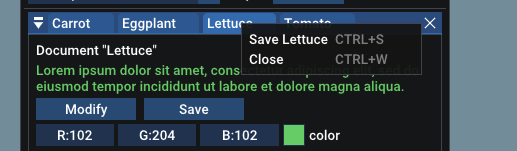
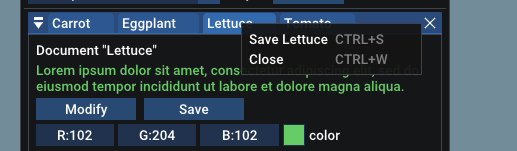
As with regular window, if you call IsItemHovered() or other "Item" function right after your call to Begin(), the title-bar or tab is used as a reference item. You can use this to create context-menu over title bars or tabs:
There is a ImGuiWindowFlags_NoDocking to disable the ability for a window to be involved in docking. Menus, popups etc. are not dockable by default.
The SetNextWindowDockFamily() API, which doesn't have a demo yet, allows you to make some windows dockable into to another set of windows. In particular, if you have multiple dockspace with tools related to a given editor or document, you may want each dockspace to use a unique family so windows from one cannot be docked into the other.
There are 2 new demos:
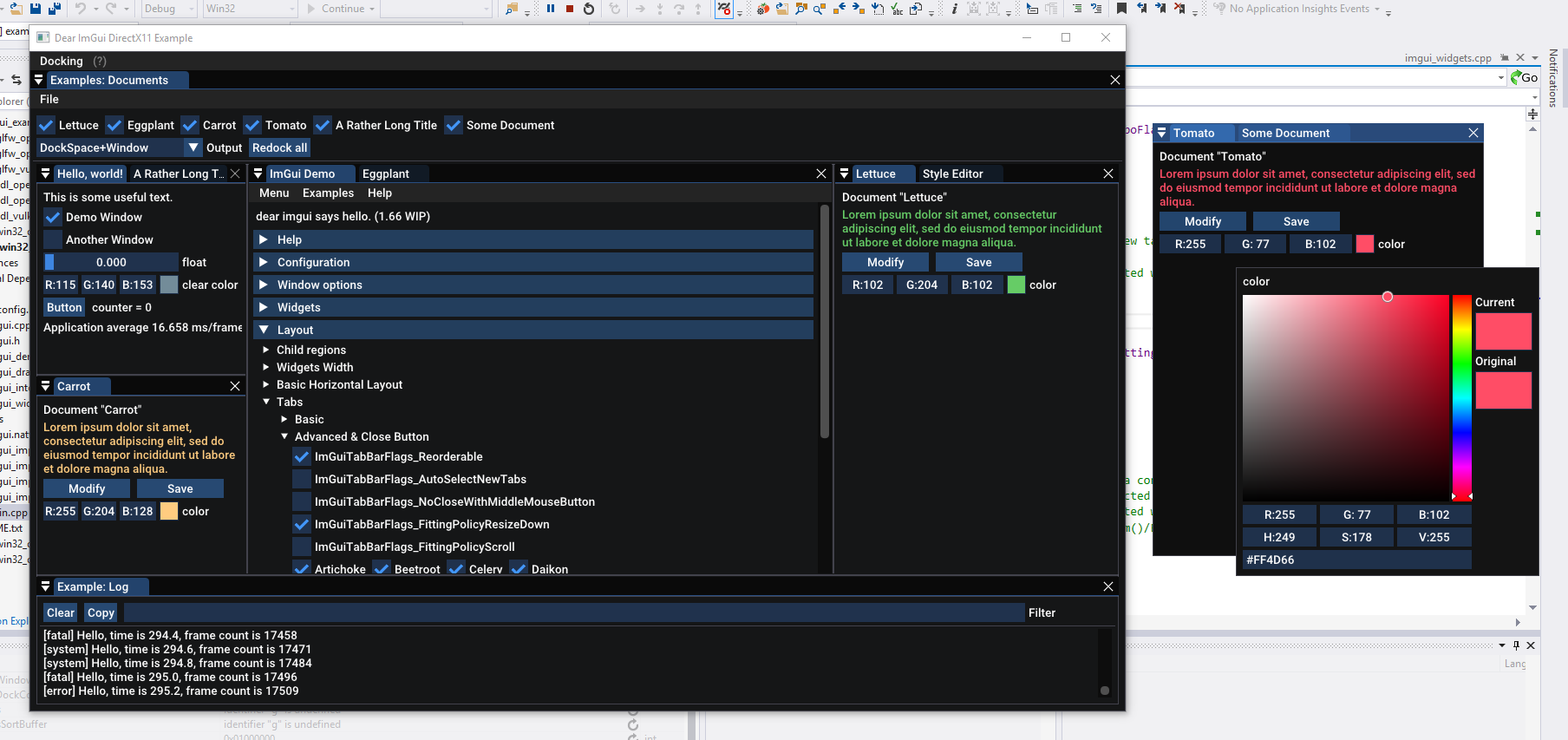
Demo Window → Examples → Documents
Demo Window → Examples → Dockspace
However as pointed above many of the features do not need those demos.
In fact, the “Dockspace” demo is pretty much only a call to DockSpace() + a bunch of comments.
_Picture: This is a dockspace, the upper-right node is the empty document root node_
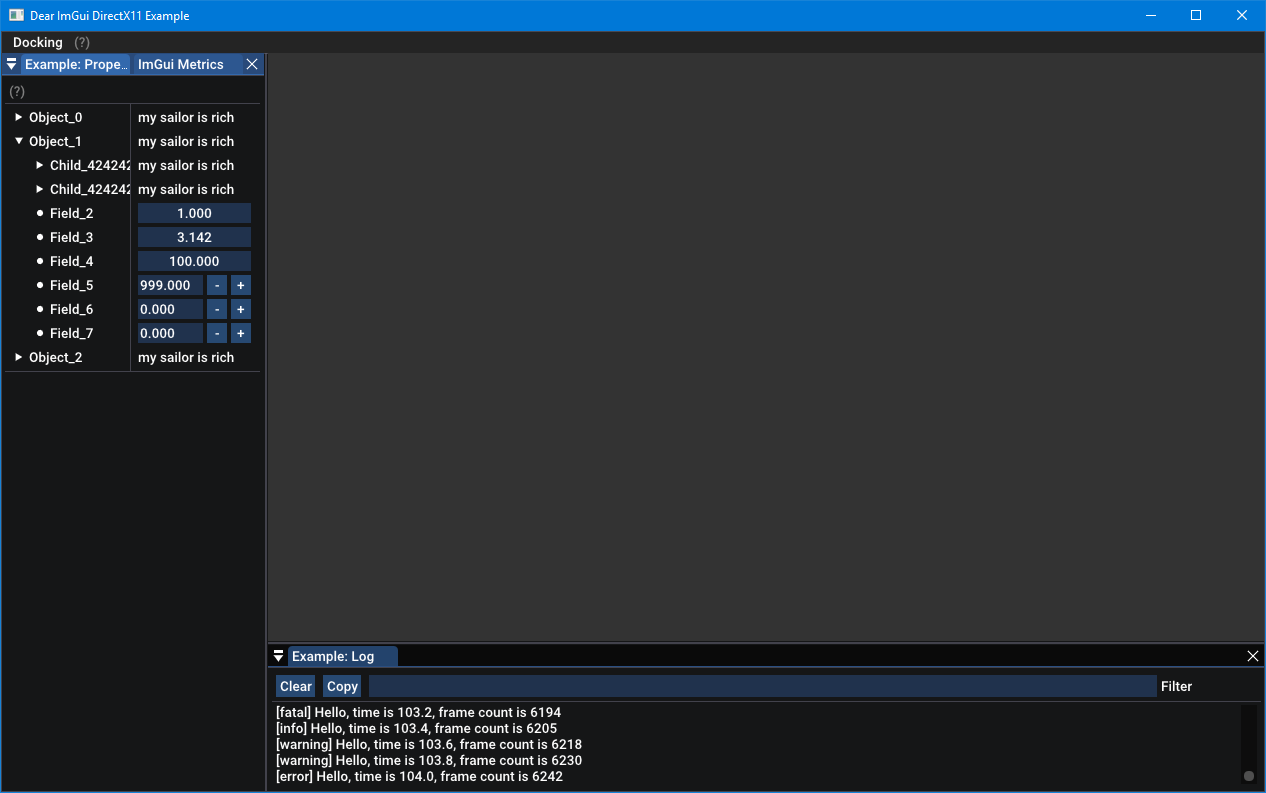
// Docking
// [BETA API] Enable with io.ConfigFlags |= ImGuiConfigFlags_DockingEnable.
// Note: you DO NOT need to call DockSpace() to use most Docking facilities!
// To dock windows: hold SHIFT anywhere while moving windows (if io.ConfigDockingWithShift == true) or drag windows from their title bar (if io.ConfigDockingWithShift = false)
// Use DockSpace() to create an explicit dock node _within_ an existing window. See Docking demo for details.
void DockSpace(ImGuiID id, const ImVec2& size = ImVec2(0, 0), ImGuiDockNodeFlags flags = 0, const ImGuiDockFamily* dock_family = NULL);
void SetNextWindowDockId(ImGuiID dock_id, ImGuiCond cond = 0); // set next window dock id (FIXME-DOCK)
void SetNextWindowDockFamily(const ImGuiDockFamily* dock_family); // set next window user type (docking filters by same user_type)
ImGuiID GetWindowDockId();
bool IsWindowDocked(); // is current window docked into another window?
// Flags for ImGui::DockSpace()
enum ImGuiDockNodeFlags_
{
ImGuiDockNodeFlags_None = 0,
ImGuiDockNodeFlags_KeepAliveOnly = 1 << 0, // Don't display the dockspace node but keep it alive. Windows docked into this dockspace node won't be undocked.
//ImGuiDockNodeFlags_NoCentralNode = 1 << 1, // Disable Central Node (the node which can stay empty)
ImGuiDockNodeFlags_NoDockingInCentralNode = 1 << 2, // Disable docking inside the Central Node, which will be always kept empty. Note: when turned off, existing docked nodes will be preserved.
ImGuiDockNodeFlags_NoSplit = 1 << 3, // Disable splitting the node into smaller nodes. Useful e.g. when embedding dockspaces into a main root one (the root one may have splitting disabled to reduce confusion). Note: when turned off, existing splits will be preserved.
ImGuiDockNodeFlags_NoResize = 1 << 4, // Disable resizing child nodes using the splitter/separators. Useful with programatically setup dockspaces.
ImGuiDockNodeFlags_PassthruCentralNode = 1 << 5, // Enable passthru dockspace: 1) DockSpace() will render a ImGuiCol_WindowBg background covering everything excepted the Central Node when empty. Meaning the host window should probably use SetNextWindowBgAlpha(0.0f) prior to Begin() when using this. 2) When Central Node is empty: let inputs pass-through + won't display a DockingEmptyBg background. See demo for details.
ImGuiDockNodeFlags_AutoHideTabBar = 1 << 6 // Tab bar will automatically hide when there is a single window in the dock node.
};
md5-5570e915d68c7dc5b4ffb154bcce3a4d
if (ImGui::BeginTabBar("blah"))
{
if (ImGui::BeginTabItem("Video"))
{
ImGui::Text("Blah blah");
ImGui::EndTabItem();
}
if (ImGui::BeginTabItem("Audio"))
{
ImGui::EndTabItem();
}
if (ImGui::BeginTabItem("Controls"))
{
ImGui::EndTabItem();
}
ImGui::EndTabBar();
}
md5-9bd024edae1e4344a9b7061251a82e32
bool BeginTabBar(const char* str_id, ImGuiTabBarFlags flags = 0); // create and append into a TabBar
void EndTabBar();
bool BeginTabItem(const char* label, bool* p_open = NULL, ImGuiTabItemFlags = 0);// create a Tab. Returns true if the Tab is selected.
void EndTabItem(); // only call EndTabItem() if BeginTabItem() returns true!
void SetTabItemClosed(const char* tab_or_docked_window_label); // notify TabBar or Docking system of a closed tab/window ahead (useful to reduce visual flicker on reorderable tab bars). For tab-bar: call after BeginTabBar() and before Tab submissions. Otherwise call with a window name.
md5-38fb06eda99e883e7963c502956ed571
// Flags for ImGui::BeginTabBar()
enum ImGuiTabBarFlags_
{
ImGuiTabBarFlags_None = 0,
ImGuiTabBarFlags_Reorderable = 1 << 0, // Allow manually dragging tabs to re-order them + New tabs are appended at the end of list
ImGuiTabBarFlags_AutoSelectNewTabs = 1 << 1, // Automatically select new tabs when they appear
ImGuiTabBarFlags_NoCloseWithMiddleMouseButton = 1 << 2, // Disable behavior of closing tabs (that are submitted with p_open != NULL) with middle mouse button. You can still repro this behavior on user's side with if (IsItemHovered() && IsMouseClicked(2)) *p_open = false.
ImGuiTabBarFlags_NoTabListPopupButton = 1 << 3,
ImGuiTabBarFlags_NoTabListScrollingButtons = 1 << 4,
ImGuiTabBarFlags_FittingPolicyResizeDown = 1 << 5, // Resize tabs when they don't fit
ImGuiTabBarFlags_FittingPolicyScroll = 1 << 6, // Add scroll buttons when tabs don't fit
ImGuiTabBarFlags_FittingPolicyMask_ = ImGuiTabBarFlags_FittingPolicyResizeDown | ImGuiTabBarFlags_FittingPolicyScroll,
ImGuiTabBarFlags_FittingPolicyDefault_ = ImGuiTabBarFlags_FittingPolicyResizeDown
};
// Flags for ImGui::BeginTabItem()
enum ImGuiTabItemFlags_
{
ImGuiTabItemFlags_None = 0,
ImGuiTabItemFlags_UnsavedDocument = 1 << 0, // Append '*' to title without affecting the ID, as a convenience to avoid using the ### operator. Also: tab is selected on closure and closure is deferred by one frame to allow code to undo it without flicker.
ImGuiTabItemFlags_SetSelected = 1 << 1, // Trigger flag to programatically make the tab selected when calling BeginTabItem()
ImGuiTabItemFlags_NoCloseWithMiddleMouseButton = 1 << 2, // Disable behavior of closing tabs (that are submitted with p_open != NULL) with middle mouse button. You can still repro this behavior on user's side with if (IsItemHovered() && IsMouseClicked(2)) *p_open = false.
ImGuiTabItemFlags_NoPushId = 1 << 3 // Don't call PushID(tab->ID)/PopID() on BeginTabItem()/EndTabItem()
};
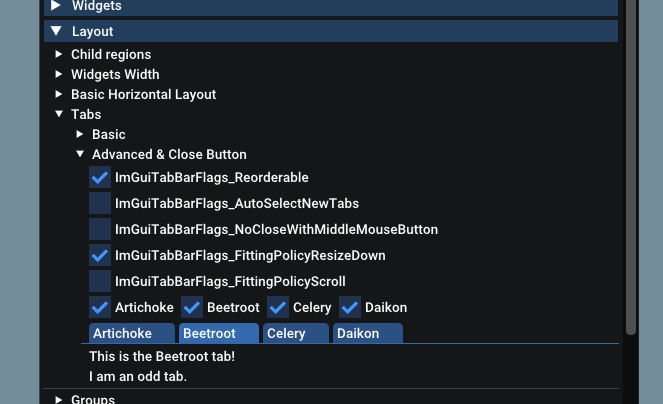
See the demo under Demo->Layout->Tabs
And Demo->Examples Menu->Documents

Standalone tab-bars (not part of the docking system) are not currently saving their order/selected persistently.
TODO
_not an exhaustive list, posted for informative pupose_
- [X] A~ Unreal style document system (requires low-level controls of dockspace serialization fork/copy/delete): this is mostly working but the DockBuilderXXX api are not exposed/finished --> proof of concept demo posted.
- [x] dock: A: it should be possible with dock builder to build a floating node.
- [ ] dock: B: when docking outer, perform size locking on neighbors nodes the same way we do it with splitters, so other nodes are not resized
- [ ] dock: B~ central node resizing behavior incorrect.
- [X] dock: B~ central node ID retrieval API?
- [ ] dock: B: changing title font/style per-window is not supported as dock nodes are created in NewFrame.
- [ ] dock: B- debug full rebuild loses viewport of floating dock nodes
- [ ] dock: B- dock node inside its own viewports creates 1 temporary viewport per window on startup before ditching them (doesn't affect the user nor request platform windows to be created, but unnecessary)
- [ ] dock: B- resize sibling locking behavior may be less desirable if we merged same-axis sibling in a same node level?
- [ ] dock: B- single visible node part of a hidden split hierarchy (OnlyNodeWithWindows != NULL) should show a normal title bar (not a tab bar)
- [X] dock: B~ tidy up tab list popup buttons features (available with manual tab-bar, see ImGuiTabBarFlags_NoTabListPopupButton code, not used by docking nodes)
- [x] dock: B- inconsistent clipping/border 1-pixel issue (trickier to solve that it looks).
- [ ] dock: B- fix/disable auto-resize grip z-order on split host nodes.
- [ ] dock: B- SetNextWindowFocus() doesn't seem to apply if the window is hidden this frame, need repro.
- [ ] dock: B- resizing a dock tree small currently has glitches (overlapping collapse and close button, etc.)
- [ ] dock: B- dpi: look at interaction with the hi-dpi and multi-dpi stuff.
- [ ] dock: B- tab bar: appearing on first frame with a dumb layout would do less harm that not appearing? (when behind dynamic branch) or store titles + render in EndTabBar()
- [ ] dock: B- tab bar: make selected tab always shows its full title?
- [ ] dock: B- tab bar: the order/focus restoring code could be part of TabBar and not DockNode? (#8)
- [ ] dock: B- dockspace: flag to lock the dock tree and/or sizes
- [ ] dock: B- reintroduce collapsing a floating dock node. also collapsing a docked dock node!
- [x] dock: B- allow dragging a non-floating dock node by clicking on the title-bar-looking section (not just the collapse/menu button)
- [ ] dock: B- option to remember undocked window size? (instead of keeping their docked size) (relate to #2104)
- [ ] dock: C- nav: CTRL+TAB highlighting tabs shows the mismatch between focus-stack and tab-order (not visible in VS because it doesn't highlight the tabs)
- [ ] dock B- nav: being able to dock/undock with gamepad controls?
- [ ] dock: C- after a dock/undock, the Scrollbar Status update in Begin() should use an updated e.g. size_y_for_scrollbars to avoid a 1 frame scrollbar flicker.
- [x] dock: A- implicit, invisible per-viewport dockspace to dock to.
- [x] dock: B- DockSpace() border issues
ocornut
on 1 Oct 2018
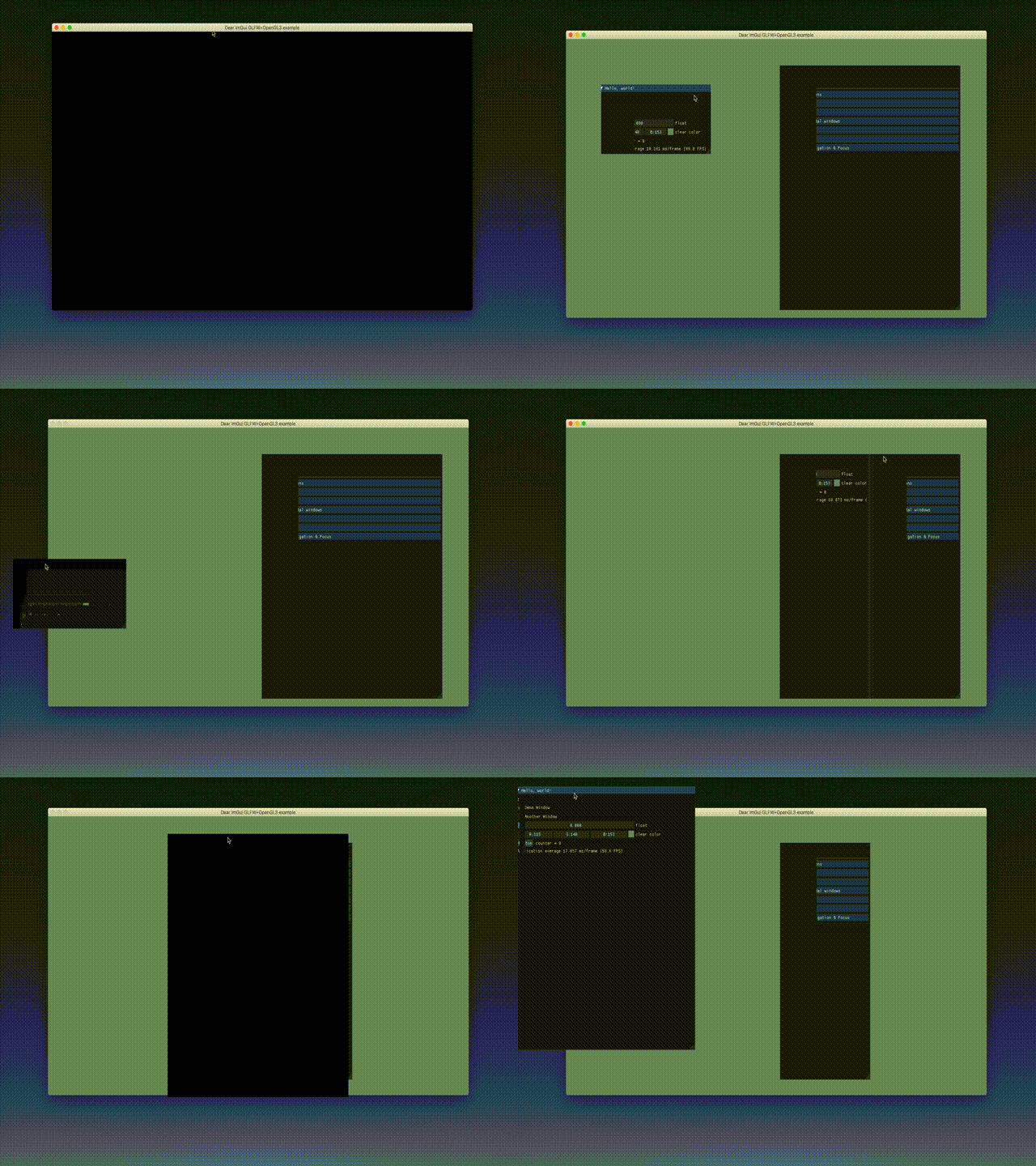
The viewport part does not seem to be working properly on macOS with the glfw_opengl3 example. If I disable ImGuiConfigFlags_ViewportsEnable, the docking works fine. (commit 2cff3f6)
 Ylannl
on 1 Oct 2018
Ylannl
on 1 Oct 2018
@Ylannl Thanks! Anything related to viewport please report in the viewport thread #1542 (**edit: for Mac/Linux please report to #2117). By the look of it, it looks like the clipping rectangles are not projected from the global coordinates space to each window’s space. Will have to inspect but last time I tried the glfw+gl demo on Mac OSX it worked for me. Will try again when I have the chance.
ocornut
on 1 Oct 2018
Hey this is great news! Is there a way to set initial position of the docked window? I am looking to have some kind of default placement of newly opened windows.
 rokups
on 2 Oct 2018
rokups
on 2 Oct 2018
Hey this is great news! Is there a way to set initial position of the docked window? I am looking to have some kind of default placement of newly opened windows.
Same question. Having ability to setup default layout either by default setting or programmatically will be really helpful.
Other than that look awesome. Many Thanks.
 bsviglo
on 2 Oct 2018
bsviglo
on 2 Oct 2018
Hey this is great news! Is there a way to set initial position of the docked window? I am looking to have some kind of default placement of newly opened windows.
All the programmatic stuff are currently hidden in imgui_internal.h so please bear in mind that those API will evolve.
Given dockspace_id (same value passed to DockSpace())
Given dockspace_size (which currently cannot be zero, unlike the one passed to DockSpace()
EDITED Oct 6: Removed ImGuIContext* ctx parameter
EDITED Feb 20: Updated to current internal api
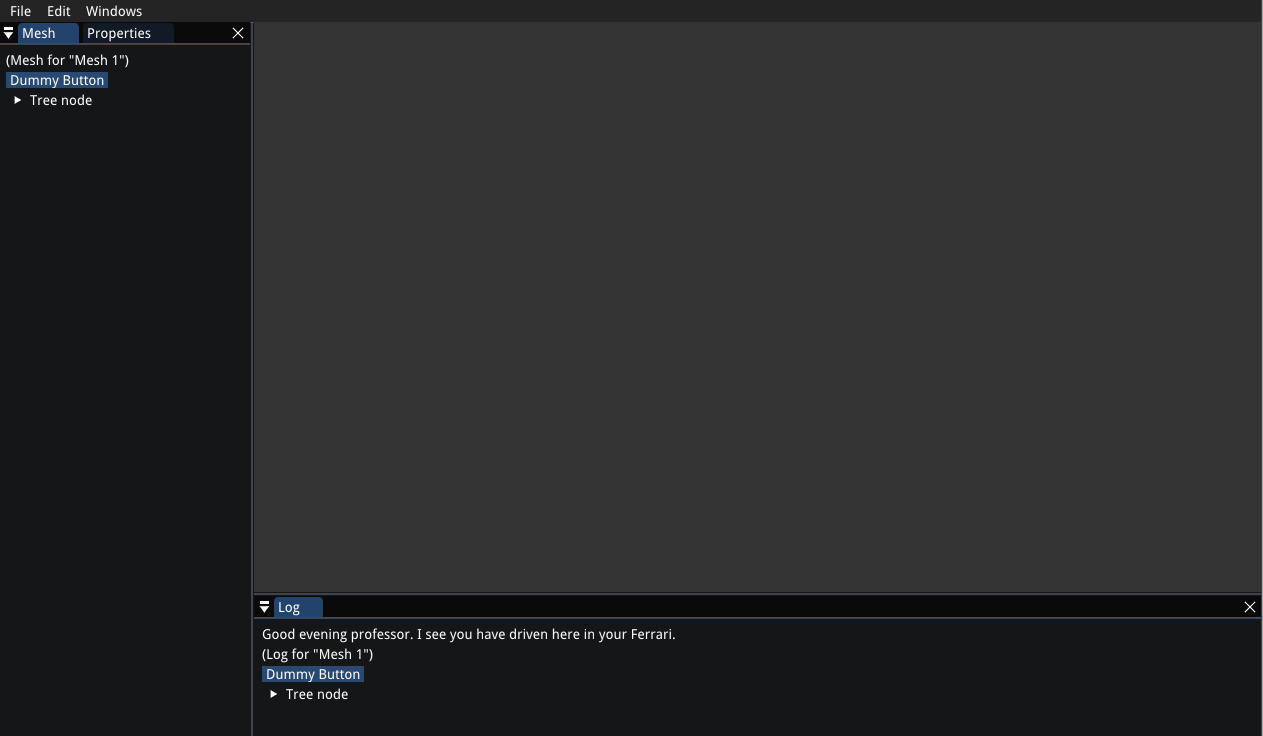
You can create an initial layout, e.g.
ImGui::DockBuilderRemoveNode(dockspace_id); // Clear out existing layout
ImGui::DockBuilderAddNode(dockspace_id, ImGuiDockNodeFlags_Dockspace); // Add empty node
ImGui::DockBuilderSetNodeSize(dockspace_id, dockspace_size);

ImGuiID dock_main_id = dockspace_id; // This variable will track the document node, however we are not using it here as we aren't docking anything into it.
ImGuiID dock_id_prop = ImGui::DockBuilderSplitNode(dock_main_id, ImGuiDir_Left, 0.20f, NULL, &dock_main_id);
ImGuiID dock_id_bottom = ImGui::DockBuilderSplitNode(dock_main_id, ImGuiDir_Down, 0.20f, NULL, &dock_main_id);

ImGui::DockBuilderDockWindow("Log", dock_id_bottom);
ImGui::DockBuilderDockWindow("Properties", dock_id_prop);
ImGui::DockBuilderDockWindow("Mesh", dock_id_prop);
ImGui::DockBuilderDockWindow("Extra", dock_id_prop);
ImGui::DockBuilderFinish(dockspace_id);
In order to only call it once you may use e.g.
if (ImGui::DockBuilderGetNode(dockspace_id) == NULL)
   MyEditor_LayoutPreset();
(Note that I just pushed a fix for DockBuilderSplitNode for a bug I introduced yesterday)
ocornut
on 2 Oct 2018
I've just tested the GLFW + OpenGL3 example (branch docking, commit 2cff3f6) on macOS 10.12 and I have not the problem presented by @Ylannl as shown in the following GIF
@Alzathar Interesting! Do you have a retina screen? I do, perhaps that is related? I'm on macOS 10.14 btw, but also noticed this on the viewport branch on macOS 10.13.
@ocornut Thanks for the great work on ImGui. I'm very exited about these new features! Sorry for posting in the wrong thread.
Ylannl
on 2 Oct 2018
@ocornut creating initial dock layout is clear, but what about setting initial dock placement of new window in already existing layout? Do we have to rebuild entire layout to dock new window into existing layout?
rokups
on 2 Oct 2018
creating initial dock layout is clear, but what about setting initial dock placement of new window in already existing layout? Do we have to rebuild entire layout to dock new window into existing layout?
@rokups You can use DockBuilderDockWindow() or SetNextWindowDockId(). The problem you will have is that you can not easily identify a docking node from an already split state. So the "where" parameter is tricky to define.
If you are building the whole hierarchy you have the ID, otherwise you can use e.g. GetWindowDockId() to get an ID from a window.
Another possibility (which I was using in Docking V1) would be to tag node on creation, and being later able to find a dock node id given the tag, The problem is that node that can merged/split by the user. To be able to track through merge we need node to be able to carry multiple tags.
Take some time to think about the problem and let me know if you have more ideas.
@Alzathar @Ylannl Please move viewport related discussion to the viewport thread.
ocornut
on 2 Oct 2018
Thanks, i got it working easily. Not sure how i missed that. And i hopefully last question: is there a way to set next window dock position to an empty undocked space? I suspect i might need to iterate through ImGuiDockNode* tree but i am not sure how to identify undocked space.

rokups
on 2 Oct 2018
@rokups Do you actually want "an empty undocked space" (there can be only one) or do you want the DocRoot node (which happens to be the only node that can be empty, but it might have other windows docking). What would do do if there's already a window in there?
ocornut
on 2 Oct 2018
I think i want "empty undocked space". I tried SetNextWindowDockId(dockRoot, ..) but it just does not dock window anywhere so that must be wrong. What i want to do is dock window into empty space if there is any, if not - dock window as a tab to the largest docked tab. That second part is already working great.
rokups
on 2 Oct 2018
I tried SetNextWindowDockId(dockRoot, ..) but it just does not dock window anywhere
That's exactly what this function does, dock windows. If you believe you are running into an issue try to build a repro.
I think i want "empty undocked space". [...] What i want to do is dock window into empty space if there is any, if not - dock window as a tab to the largest docked tab.
The DocRoot node (the grey node) is essentially meant to represent that space (If there is an empty node it WILL be the DocRoot node) and it is up to the user to decide where it goes and how big it this. This matches VS behavior, rather than just looking for the "largest docked tab". It also behave differently sizing wise (if you resize your host OS windows you'll find that out).
You should probably either use the DocRoot node (which ID is not possible to query yet, haha) or track the current DockID of the _LATEST_ focused document/tool (up to you how to define document/tool) and use this DockID to dock new windows, I think either would make more sense to the user.
EDIT You should never have to iterate the dock node hierarchy yourself, but we could provide helper functions to find DockID under different criteria: DocRoot node, largest node, last focused node, dock where a given window is hosted, with or without DockFamily filter, etc.
EDIT2: The DocRoot node is now called CentralNode
ocornut
on 2 Oct 2018
great news :D , it works perfectly on windows
Note : for mingw users , you have to add :
define WINVER 0x0601
define _WIN32_WINNT 0x0601
on top of include
this is only to visible the function SetProcessDPIAware
 codz01
on 2 Oct 2018
codz01
on 2 Oct 2018
Note : for mingw users , you have to add :
define WINVER 0x0601
define _WIN32_WINNT 0x0601
on top of include
I think you need to add those defines are program-wide defines if you use Mingw.
ocornut
on 2 Oct 2018
Took a bit of work going through the examples to update my application because I hadn't updated imgui in a while but docking and viewport seems to work just fine on OSX High Sierra (10.13.6) SDL2 + OpenGL2. The only slightly unintuitive bit is that I cannot interact with the translate gizmo if the window is undocked (it just drags the whole window) but that's likely my doing.

 Dingobloo
on 3 Oct 2018
Dingobloo
on 3 Oct 2018
@ocornut i created a small testcase of what i attempted. Please take a look.
static int initialized = 0;
static int new_window = 0;
ImGuiWindowFlags flags = ImGuiWindowFlags_MenuBar;
flags |= ImGuiWindowFlags_NoDocking;
ImGuiViewport* viewport = ImGui::GetMainViewport();
ImGui::SetNextWindowPos(viewport->Pos);
ImGui::SetNextWindowSize(viewport->Size);
ImGui::SetNextWindowViewport(viewport->ID);
ImGui::PushStyleVar(ImGuiStyleVar_WindowRounding, 0.0f);
flags |= ImGuiWindowFlags_NoTitleBar | ImGuiWindowFlags_NoCollapse | ImGuiWindowFlags_NoResize | ImGuiWindowFlags_NoMove;
flags |= ImGuiWindowFlags_NoBringToFrontOnFocus | ImGuiWindowFlags_NoNavFocus;
ImGui::PushStyleVar(ImGuiStyleVar_WindowPadding, ImVec2(0.0f, 0.0f));
ImGui::Begin("DockSpace Demo", 0, flags);
ImGui::PopStyleVar();
if (ImGui::BeginMenuBar())
{
if (initialized == 0)
{
if (ImGui::Button("1. Initialize"))
initialized = 1;
}
if (initialized > 0 && new_window == 0)
{
if (ImGui::Button("2. New Window"))
new_window = 1;
}
ImGui::EndMenuBar();
}
ImGuiIO& io = ImGui::GetIO();
ImGuiID dockspace_id = ImGui::GetID("MyDockspace");
if (initialized == 1)
{
initialized = 2;
ImGuiContext* ctx = ImGui::GetCurrentContext();
ImGui::DockBuilderRemoveNode(ctx, dockspace_id); // Clear out existing layout
ImGui::DockBuilderAddNode(ctx, dockspace_id, ImGui::GetMainViewport()->Size); // Add empty node
ImGuiID dock_main_id = dockspace_id; // This variable will track the document node, however we are not using it here as we aren't docking anything into it.
ImGuiID dock_id_prop = ImGui::DockBuilderSplitNode(ctx, dock_main_id, ImGuiDir_Left, 0.20f, NULL, &dock_main_id);
ImGuiID dock_id_bottom = ImGui::DockBuilderSplitNode(ctx, dock_main_id, ImGuiDir_Down, 0.20f, NULL, &dock_main_id);
ImGui::DockBuilderDockWindow(ctx, "Log", dock_id_bottom);
ImGui::DockBuilderDockWindow(ctx, "Properties", dock_id_prop);
ImGui::DockBuilderFinish(ctx, dockspace_id);
}
ImGui::DockSpace(dockspace_id);
if (initialized == 2)
{
ImGui::Begin("Properties");
ImGui::End();
ImGui::Begin("Log");
ImGui::End();
}
if (new_window == 1)
{
// Should dock window to empty space, instead window is not docked anywhere.
ImGui::SetNextWindowDockId(dockspace_id, ImGuiCond_Once);
ImGui::Begin("New Window");
ImGui::End();
}
ImGui::End();
ImGui::PopStyleVar();
Click buttons in the menu bar to 1. initialize default layout and 2. create new window and dock it into empty space. Window is created but not docked anywhere. Do i do it wrong or is this a bug?
And another question: is there a way to detect presence of this free undocked space?
rokups
on 3 Oct 2018
I want to make a dockspace transparent, while windows docked in it should keep their style. I tried many ways, e.g.
ImGui::SetNextWindowBgAlpha(0);
ImGui::Begin("DockSpace Demo", 0, flags);
ImGuiID dockspace_id = ImGui::GetID("MyDockspace");
ImGui::DockSpace(dockspace_id);
ImGui::End();
however, all I managed to do is that everything became transparent. Is there a way to this?
 nem0
on 3 Oct 2018
nem0
on 3 Oct 2018
I want to make a dockspace transparent, while windows docked in it should keep their style.
I am working on this right now, it should be available during the day.
It also involve passing inputs through.
ocornut
on 3 Oct 2018
the dockspace's scrollbar is visible , is it normal ?

codz01
on 3 Oct 2018
@codz01 Pushed a fix for this. Are your windows transparent? (I don't think it was normally noticeable with the default style).
ocornut
on 3 Oct 2018
thanks.
its transparent by default i think , i just used the default settings
codz01
on 3 Oct 2018
I have renamed what I used to called "Document Root" to "Central Node" (in comments, members, flags) which is clearer to talk about, and more consistent.
EDITED after API changes
I added a couple flag to DockSpace() to allow the creation of dockspace where the central node is transparent and let inputs pass-through (so in this mode, when you hover the central node, io.WantCaptureMouse will stay false, and you can even reach windows behind it).
// Disable docking inside the Central Node, which will be always kept empty.
ImGuiDockNodeFlags_NoDockingInCentralNode = 1 << 4,
// 1) DockSpace() will render a ImGuiCol_WindowBg background covering everything excepted the Central Node when empty. Meaning the host window should probably use SetNextWindowBgAlpha(0.0f) prior to Begin() when using this.
// 2) When Central Node is empty: let inputs pass-through + won't display a DockingEmptyBg background.
ImGuiDockNodeFlags_PassthruDockspace = 1 << 5
So you probably want to use the combined ImGuiDockNodeFlags_PassthruDockspace flag here.
If you do it it's however important that you _disable_ the background of the window hosting the dockspace.
This is how to create an invisible dockspace covering the whole screen:
ImGuiViewport* viewport = ImGui::GetMainViewport();
ImGui::SetNextWindowPos(viewport->Pos);
ImGui::SetNextWindowSize(viewport->Size);
ImGui::SetNextWindowViewport(viewport->ID);
ImGui::SetNextWindowBgAlpha(0.0f);
ImGuiWindowFlags window_flags = ImGuiWindowFlags_MenuBar | ImGuiWindowFlags_NoDocking;
window_flags |= ImGuiWindowFlags_NoTitleBar | ImGuiWindowFlags_NoCollapse | ImGuiWindowFlags_NoResize | ImGuiWindowFlags_NoMove;
window_flags |= ImGuiWindowFlags_NoBringToFrontOnFocus | ImGuiWindowFlags_NoNavFocus;
ImGui::PushStyleVar(ImGuiStyleVar_WindowRounding, 0.0f);
ImGui::PushStyleVar(ImGuiStyleVar_WindowBorderSize, 0.0f);
ImGui::PushStyleVar(ImGuiStyleVar_WindowPadding, ImVec2(0.0f, 0.0f));
ImGui::Begin("DockSpace Demo", p_open, window_flags);
ImGui::PopStyleVar(3);
ImGuiID dockspace_id = ImGui::GetID("MyDockspace");
ImGuiDockNodeFlags dockspace_flags = ImGuiDockNodeFlags_PassthruDockspace;
ImGui::DockSpace(dockspace_id, ImVec2(0.0f, 0.0f), dockspace_flags);
That's a lot of code (could consider creating a helper to do exactly that?)
EDITED: After DockSpaceOverViewport() function which does pretty much that.. the constraint is that you can't use it to create a MenuBar so I'm not so sure about it vs manual code being more flexible.
With this code nothing will initially be visible but you can dock windows on the side of your viewport, etc.
And this is the demo (which adds a menu-bar and allows you to test the different flags):
(cc: @nem0 @damqui)
ocornut
on 3 Oct 2018
Tried it out and it's the nicest DearImGui dock I've seen/used. If I hadn't sworn off docking forever I'd totally use it. Great work.
 JSandusky
on 4 Oct 2018
JSandusky
on 4 Oct 2018
I want restore the window size after undocking a window. https://github.com/ocornut/imgui/issues/2104
 heroboy
on 4 Oct 2018
heroboy
on 4 Oct 2018
I have following layout:

Is there a way to dock "CPU Markers" tab such way that it's only visible when "CPU Profiler" tab is active?
It works like that if I nest Begin End, however that has many other issues if "CPU Markers" is not docked.
nem0
on 4 Oct 2018
Normally you can treat them as regular windows, only Begin the second one if the first one is visible?
The docking should persist so when CPU Markers is not submitted its space will be given to the node on the left.
I’d need a repro to understand because normally there’s no reason that shouldn’t work by default.
ocornut
on 4 Oct 2018
@ocornut If docked like in the image above it works fine, however if I dock it like this:

and activate CPU Markers tab, it starts blinking.
if (ImGui::Begin("CPU Profiler")) {
ImGui::Begin("CPU Markers"); ImGui::End();
}
ImGui::End();
if (ImGui::Begin("CPU Profiler")) {
ImGui::Begin("CPU Markers"); ImGui::End();
}
ImGui::End();
Well that's going to create a visibility loop.
CPU Markers only appears when CPU Profiler is selected, making CPU Profiler unselected, making CPU markers disappears, etc.
Is there a way to dock "CPU Markers" tab such way that it's only visible when "CPU Profiler" tab is active?
A) If you mean "active" = Begin was called, then you can just call both Begin when 1 bool is set (instead of testing the return value of the first Begin call).
B) If you mean "selected" = Tab is currently selected, then you get the visibility loop above.
however that has many other issues if "CPU Markers" is not docked
It's not really "If CPU Markers is not docked", the problem arise only is CPU Markers is docked in the same node as CPU Profiler (it works if it is docked elsewhere). What would you ideally want in this case of them docked together? If you allow both tabs to appears simultaneously in the tab bar, you are contradicting the basic intent of B).
So I think intent A) is preferable and would be a non-issue, but there is perhaps another solution to this problem to be found.
ocornut
on 4 Oct 2018
Background story: I quite often have two pieces of information (in this case CPU Profiler and CPU Markers) that ideally should be displayed together. I can do it in many way, e.g. with Columns. However user can change only width, not order, orientation, or tabify it.
One possible option is something like (Dockspace + DockFamily):

problem is that I can end up with:

nem0
on 4 Oct 2018
Now trying docking without viewport on LuaJIT-imgui.
It is fantastic it doesnt need code modification ( appart from adding ImGuiConfigFlags_DockingEnable)
Great work!!
Still investigating...
When is it expected to be included in master?
 sonoro1234
on 4 Oct 2018
sonoro1234
on 4 Oct 2018
Hello, is possible to resize dockspace by the user?
also seem the auto fit in horizontal scroll is missing?
 ngminteck
on 5 Oct 2018
ngminteck
on 5 Oct 2018
I fell that io.ConfigDockingWithShift = true should prevent the user to detach a window from a dock without pressing shift before. So io.ConfigDockingWithShift = true would be something as "lock docking" unless shift is pressed.
sonoro1234
on 6 Oct 2018
@sonoro1234 This rule may be true in case you do not enable the multi-viewport. When the multi-viewport is enabled (w or w/o the io.ConfigDockingWithShift parameter is set to true), the user might want to undock a window simply by dragging it outside the tab bar to create a new undocked window (like in Firefox, etc.).
Moreover, if you need to press the shift key to unlock a docked window, then the dock "gizmo" will appear instantaneously (because io.ConfigDockingWithShift is set to true). Again, this may not be the expected behavior when the multi-viewport is enabled.
What about another config parameter (e.g. io.ConfigDockingUnlockWithShift) to enable/disable this rule?
 Alzathar
on 6 Oct 2018
Alzathar
on 6 Oct 2018
io.ConfigDockingUnlockWithShift could be a good idea for "lock docking"
When ImGuiConfigFlags_ViewportsEnable in the docking branch I get this assertion
Expression: (g.FrameCount == 0 || g.FrameCount == g.FrameCountPlatformEnded) && "Forgot to call UpdatePlatform
Windows() at the end of the previous frame?"
Any idea why?
sonoro1234
on 6 Oct 2018
When ImGuiConfigFlags_ViewportsEnable in the docking branch I get this assertion
That's not happening in the example app.
Any idea why?
Well, did you "forget to call UpdatePlatformWindows() at the end of the previous frame?"
What is the value of g.FrameCount ? Guys please make some effort providing details when asking questions. I'm working full-time on this and half of this github are incomplete questions addressed to me. It's really tough.
ocornut
on 6 Oct 2018
Yes, I forgot that, sorry.
sonoro1234
on 6 Oct 2018
Hi, is there any plan to bring back the BeginTabBar ImGuiTabBarFlags_SizingPolicyEqual flag which was available in the tabs branch?
 aaronkirkham
on 6 Oct 2018
aaronkirkham
on 6 Oct 2018
I've posted an Emscripten port of the latest 'docking' branch on the following link.
If anyone is interested in trying out the ImGui demo directly in the browser, feel free to check it out:
https://ggerganov.github.io/jekyll/update/2018/02/11/imgui-em.html?branch=docking
 ggerganov
on 6 Oct 2018
ggerganov
on 6 Oct 2018
UpdatePlatform
just call UpdatePlatform()
before imgui render and imgui endframe (), put if the last of the update loop will do i guess
ngminteck
on 6 Oct 2018
@ggerganov: it works very well on the iphone, wow! For the docking branch you may want to enable the master Docking flag by default in there?
ocornut
on 6 Oct 2018
Done!
ggerganov
on 6 Oct 2018
In case anyone bumps into my problem - well here is a solution:
ImGui has two "root dock" concepts actually.
- Root that is parent of all docks, can be obtained by
DockNodeGetRootNode()call inimgui_internal.h. - Root that is supposed to have remaining free space as in my screenshot.
In order to dock a window to existing free space we must find that second root.
// Find empty dockspace
std::function<ImGuiDockNode*(ImGuiDockNode*)> returnTargetDockspace = [&](ImGuiDockNode* dock) -> ImGuiDockNode* {
if (dock == nullptr)
return nullptr;
if (dock->IsDocumentRoot)
return dock;
else if (auto* node = returnTargetDockspace(dock->ChildNodes[0]))
return node;
else if (auto* node = returnTargetDockspace(dock->ChildNodes[1]))
return node;
return nullptr;
};
ImGuiDockNode* dockspaceRoot = ui::DockBuilderGetNode(ui::GetCurrentContext(), dockspaceId);
ImGuiDockNode* currentRoot = returnTargetDockspace(dockspaceRoot);
if (currentRoot->Windows.empty()) // When dockspace has some free space current root will have no windows
ui::SetNextWindowDockId(currentRoot->ID, ImGuiCond_Once);
I have renamed what I used to called "Document Root" to "Central Node" (in comments, members, flags) which is clearer to talk about, and more consistent. [...]
It works fine, however, it causes the input to also pass through the other docked windows.
So, for example, if I have a scene which I can zoom in with the mouse wheel and I'm scrolling through a console window, it will also zoom the scene.
 Adria-F
on 7 Oct 2018
Adria-F
on 7 Oct 2018
@Adria-F
It works fine, however, it causes the input to also pass through the other docked windows.
So, for example, if I have a scene which I can zoom in with the mouse wheel and I'm scrolling through a console window, it will also zoom the scene.
This doesn't happen in the demo. Is your app checking the io.WantMouseCapture flag correctly? Please provide a minimal, complete and verifiable example as instructed by https://github.com/ocornut/imgui/blob/master/.github/CONTRIBUTING.md.
ocornut
on 7 Oct 2018
@ocornut it would be great to have an example of how to do drawing in the central area of the image below.
In particular, should we use use a ImGui window with custom rendering, or have the application draw directly in the back buffer? If we use the latter, are there ImGui functions to get the central area size, framebuffer size, mouse coordinates (wrt that area, not the whole screen)?
 xelatihy
on 8 Oct 2018
xelatihy
on 8 Oct 2018
@ocornut it would be great to have an example of how to do drawing in the central area of the image below.
It'll be cool to have an example how to perform it correctly because input handling in this situation is really tricky.
bsviglo
on 8 Oct 2018
@xelatihy
In particular, should we use use a ImGui window with custom rendering, or have the application draw directly in the back buffer?
If we use the latter, are there ImGui functions to get the central area size, framebuffer size, mouse coordinates (wrt that area, not the whole screen)?
The point of that transparent central idea is mostly useful if you do NOT want to resize the underlying game/render, so you would render your game on the entire screen and imgui over it. Otherwise you can easily dock something into this area and render your game normally inside the imgui window that s docked. Up to you. This is not a problem specific to docking. You can create a window and either render a texture into it (with Image() or draw_list->AddImage()) either add a draw callback (with draw_list->AddCallback()) and draw directly. The later require more careful handling of your rendering state and is generally harder to use.
@bsviglo
input handling in this situation is really tricky.
You haven't answered my question. Is your code using the io.WantCaptureMouse flag correctly? Otherwise, please clarify precisely what is your problem and what is preventing you from achieving what you want. The problem you mentioned above suggest you are not using io.WantCaptureMouse properly.
ocornut
on 8 Oct 2018
@rokups
In case anyone bumps into my problem - well here is a solution:
Your code wouldn't compile at the time you posted it, and even less so now. The terminology for this node is "Central Node". Beware if you are using those internal structures as they are bound to change under your feet from time to time. If you post code make sure you at the last version. What we need is only an API to retrieve the ID of the Central Node indeed.
ocornut
on 8 Oct 2018
@xelatihy
If we use the latter, are there ImGui functions to get the central area size, framebuffer size, mouse coordinates (wrt that area, not the whole screen)?
ImGuiDockNode* ImGui::DockNodeGetCentralNode(ImGuiDockNode* node) {
if (!node)
return nullptr;
if (node->IsCentralNode) {
return node;
}
for (int iChild = 0; iChild<2; iChild++) {
ImGuiDockNode* central_node = DockNodeGetCentralNode(node->ChildNodes[iChild]);
if (central_node)
return central_node;
}
return nullptr;
}
@ocornut
for some usage, I needed to programmatically be able to make a tabbed window selected.
I didn't find something in the API to do this.
I ended up writing this function :
void ImGui::SetTabbedWindowSelected(char* WindowName) {
ImGuiWindow* Window = ImGui::FindWindowByName(WindowName);
if (Window->DockNode && Window->DockNode->TabBar) {
Window->DockNode->TabBar->NextSelectedTabId = Window->ID;
}
}
is this "okay" ?
thanks !
 damqui
on 9 Oct 2018
damqui
on 9 Oct 2018
@damqui
for some usage, I needed to programmatically be able to make a tabbed window selected.
I didn't find something in the API to do this.
As discussed off-line: if you want to _select_ the tab and make the window focused, you can use SetWindowFocus(const char* name). Docked windows are trying to behave the same as normal windows so this should work just as well.
If you are trying to select the tab in its current tab bar (to make it visible) but without taking focus, your function above SetTabbedWindowSelected() will be useful and we could introduce the feature eventually.
ocornut
on 9 Oct 2018
Hi, another tab/docking related question :
In our editor app, we have various ui areas (corresponding to docknodes) (ex : one on the left for file broswer or other game module uis, one on the bottom for log, etc).
In our previous (non-imgui) app, we had hotkeys to hide/show those areas (ex : to switch between "fullscreen view" and "windowed view") : not closing the windows, but just hiding/showing the areas.
How to implement this behaviour ?
I know I can close all windows on the "fullscreen view" command, and it will make docknode disappear (hide), but if I want to open those windows again on the "Editor view" command, I have to keep track of what was closed "in order to hide the area" and what was closed "because the user wanted".
To summarize : is there a way of "hiding" a docknode without closing all its docked windows ?
Thanks !
damqui
on 10 Oct 2018
I know I can close all windows on the "fullscreen view" command, and it will make docknode disappear (hide), but if I want to open those windows again on the "Editor view" command, I have to keep track of what was closed "in order to hide the area" and what was closed "because the user wanted".
To summarize : is there a way of "hiding" a docknode without closing all its docked windows ?
Not really. There is a ImGuiDockNodeFlags_KeepAliveOnly flag to Dockspace() that doesn't display the dockspace without detaching any window docked into it (so they'll be hidden if submitted) however that wouldn't solve your issue if any of your windows are NOT docked into this dockspace (e.g. if they are loose floating windows).
In fact, once you consider the possibility that you have any floating window, your problem is not a docking-specific problem at all.
I have to keep track of what was closed "in order to hide the area" and what was closed "because the user wanted".
That should be trivial, e.g. have a global bool show_tools flag and test this flag before testing the per-window visibility flag..
if (show_tools && show_browser_tool) ImGui::Begin("Browser", &show_browser_tool) ...
The global hotkey will toggle show_tools and closing a window manually will close the window specific flag.. This should be non-problem AFAIK..
ocornut
on 10 Oct 2018
well yes, that's so simple.. ! thanks ! (and sorry)
damqui
on 10 Oct 2018
One problem you will run into with this approach is that you will lose the relative z-order of floating windows compared to each others. If this is important to you please open a separate issue. When using Docking it is less of an issue because most of your windows will be docked anyway.
ocornut
on 10 Oct 2018
Hi Omar, really enjoying the docking feature!
I ran into a problem with using the animated title bars (###) which we use for translating window titles. Changing the display text part appears to have randomish behavior:

To be clear: Using stock imgui, calling Begin() with "Object Properties###somedeterministicid" one frame and "Translated###somedeterministicid" the next
It appears to only update the title bar if a window is docked into the same space as it
 eclbtownsend
on 11 Oct 2018
eclbtownsend
on 11 Oct 2018
@eclbtownsend
I pushed a fix for it! Next time please provide a helper repro to save me time. Here's a repro:
static bool toggle = false;
if (ImGui::IsMouseClicked(2))
toggle = !toggle;
ImGui::Begin(toggle ? "Object Properties###somedeterministicid" : "Translated###somedeterministicid");
ImGui::Text(toggle ? "Object Properties###somedeterministicid" : "Translated###somedeterministicid");
ImGui::End();
The bug would happen on leaf node with a single window (there's a small side-effect/bug in DockNodeUpdate which resets window->DockIsActive, I've added a comment about it too).
ocornut
on 11 Oct 2018
Thank you! WIll provide repros going forward ^^
eclbtownsend
on 11 Oct 2018
Quick bug report: modal windows should have docking disabled (IMO).
At this point the controls were unresponsive and had to restart the app :D

PS: sorry if it has been posted elsewhere already
 r-lyeh
on 12 Oct 2018
r-lyeh
on 12 Oct 2018
@r-lyeh
Quick bug report: modal windows should have docking disabled (IMO).
Correct, nice catch! Fixed in 33994bbf.
@rokups
I forgot to reply to the (older) code you posted in https://github.com/ocornut/imgui/issues/2109#issuecomment-426539279. The reason it is wrong is that you are trying to dock into the root node which has already been split. That's illegal.
ocornut
on 12 Oct 2018
Awesome!
The docking works very well, but I'm having issues wrapping my head around how to correctly define a docking layout by code. I've picked up some stuff from this thread and tried to figure something out, but I've failed :(
Would be nice if I could get a tip or two :)
So, this my function doing all the stuff:
void pms::ProgramManager::drawTestDock()
{
bool open = true;
if (ImGui::DockBuilderGetNode(ImGui::GetID("MyDockspace")) == NULL)
{
ImGuiID dockspace_id = ImGui::GetID("MyDockspace");
ImGuiViewport* viewport = ImGui::GetMainViewport();
ImGui::DockBuilderRemoveNode(dockspace_id); // Clear out existing layout
ImGui::DockBuilderAddNode(dockspace_id, viewport->Size); // Add empty node
ImGuiID dock_main_id = dockspace_id; // This variable will track the document node, however we are not using it here as we aren't docking anything into it.
ImGuiID dock_id_left = ImGui::DockBuilderSplitNode(dock_main_id, ImGuiDir_Left, 0.20f, NULL, &dock_main_id);
ImGuiID dock_id_top = ImGui::DockBuilderSplitNode(dock_main_id, ImGuiDir_Up, 0.80f, NULL, &dock_main_id);
ImGuiID dock_id_right = ImGui::DockBuilderSplitNode(dock_main_id, ImGuiDir_Right, 0.20f, NULL, &dock_main_id);
ImGuiID dock_id_bottom = ImGui::DockBuilderSplitNode(dock_main_id, ImGuiDir_Down, 0.20f, NULL, &dock_main_id);
ImGui::DockBuilderDockWindow("James_1", dock_id_left);
ImGui::DockBuilderDockWindow("James_2", dock_id_top);
ImGui::DockBuilderDockWindow("James_3", dock_id_right);
ImGui::DockBuilderDockWindow("James_4", dock_id_bottom);
ImGui::DockBuilderFinish(dockspace_id);
}
ImGuiWindowFlags window_flags = ImGuiWindowFlags_MenuBar | ImGuiWindowFlags_NoDocking;
ImGuiViewport* viewport = ImGui::GetMainViewport();
ImGui::SetNextWindowPos(viewport->Pos);
ImGui::SetNextWindowSize(viewport->Size);
ImGui::SetNextWindowViewport(viewport->ID);
ImGui::PushStyleVar(ImGuiStyleVar_WindowRounding, 0.0f);
ImGui::PushStyleVar(ImGuiStyleVar_WindowBorderSize, 0.0f);
window_flags |= ImGuiWindowFlags_NoTitleBar | ImGuiWindowFlags_NoCollapse | ImGuiWindowFlags_NoResize | ImGuiWindowFlags_NoMove;
window_flags |= ImGuiWindowFlags_NoBringToFrontOnFocus | ImGuiWindowFlags_NoNavFocus;
ImGui::PushStyleVar(ImGuiStyleVar_WindowPadding, ImVec2(0.0f, 0.0f));
ImGui::Begin("DockSpace Demo", &open, window_flags);
ImGui::PopStyleVar();
ImGui::PopStyleVar(2);
ImGui::PushStyleColor(ImGuiCol_DockingEmptyBg, sf::Color::Red);
ImGuiID dockspace_id = ImGui::GetID("MyDockspace");
ImGui::DockSpace(dockspace_id, ImVec2(0.0f, 0.0f), 0);
ImGui::PopStyleColor();
ImGui::End();
ImGui::Begin("James_1", &open, 0);
ImGui::Text("Text 1");
ImGui::End();
ImGui::Begin("James_2", &open, 0);
ImGui::Text("Text 2");
ImGui::End();
ImGui::Begin("James_3", &open, 0);
ImGui::Text("Text 3");
ImGui::End();
ImGui::Begin("James_4", &open, 0);
ImGui::Text("Text 4");
ImGui::End();
}
Of course there is something off with the code above, I just cannot figure out what :(
This is what I get (All the "forms" are in the upper left corner):

This is what I want to achieve:

Any help would be greatly appreciated :)
 SSBMTonberry
on 15 Oct 2018
SSBMTonberry
on 15 Oct 2018
When you configure the dockspace layout, you still haven't created your window "DockSpace Demo", so you configure a dockspace "MyDockspace" out of the window, not your dockspace "MyDockspace" inside the window.
This should work:
void pms::ProgramManager::drawTestDock()
{
bool open = true;
ImGuiWindowFlags window_flags = ImGuiWindowFlags_MenuBar | ImGuiWindowFlags_NoDocking;
ImGuiViewport* viewport = ImGui::GetMainViewport();
ImGui::SetNextWindowPos(viewport->Pos);
ImGui::SetNextWindowSize(viewport->Size);
ImGui::SetNextWindowViewport(viewport->ID);
ImGui::PushStyleVar(ImGuiStyleVar_WindowRounding, 0.0f);
ImGui::PushStyleVar(ImGuiStyleVar_WindowBorderSize, 0.0f);
window_flags |= ImGuiWindowFlags_NoTitleBar | ImGuiWindowFlags_NoCollapse | ImGuiWindowFlags_NoResize | ImGuiWindowFlags_NoMove;
window_flags |= ImGuiWindowFlags_NoBringToFrontOnFocus | ImGuiWindowFlags_NoNavFocus;
ImGui::PushStyleVar(ImGuiStyleVar_WindowPadding, ImVec2(0.0f, 0.0f));
ImGui::Begin("DockSpace Demo", &open, window_flags);
ImGui::PopStyleVar();
ImGui::PopStyleVar(2);
if (ImGui::DockBuilderGetNode(ImGui::GetID("MyDockspace")) == NULL)
{
ImGuiID dockspace_id = ImGui::GetID("MyDockspace");
ImGuiViewport* viewport = ImGui::GetMainViewport();
ImGui::DockBuilderRemoveNode(dockspace_id); // Clear out existing layout
ImGui::DockBuilderAddNode(dockspace_id, viewport->Size); // Add empty node
ImGuiID dock_main_id = dockspace_id; // This variable will track the document node, however we are not using it here as we aren't docking anything into it.
ImGuiID dock_id_left = ImGui::DockBuilderSplitNode(dock_main_id, ImGuiDir_Left, 0.20f, NULL, &dock_main_id);
ImGuiID dock_id_right = ImGui::DockBuilderSplitNode(dock_main_id, ImGuiDir_Right, 0.20f, NULL, &dock_main_id);
ImGuiID dock_id_bottom = ImGui::DockBuilderSplitNode(dock_main_id, ImGuiDir_Down, 0.20f, NULL, &dock_main_id);
ImGui::DockBuilderDockWindow("James_1", dock_id_left);
ImGui::DockBuilderDockWindow("James_2", dock_main_id);
ImGui::DockBuilderDockWindow("James_3", dock_id_right);
ImGui::DockBuilderDockWindow("James_4", dock_id_bottom);
ImGui::DockBuilderFinish(dockspace_id);
}
ImGui::PushStyleColor(ImGuiCol_DockingEmptyBg, sf::Color::Red);
ImGuiID dockspace_id = ImGui::GetID("MyDockspace");
ImGui::DockSpace(dockspace_id, ImVec2(0.0f, 0.0f), 0);
ImGui::PopStyleColor();
ImGui::End();
ImGui::Begin("James_1", &open, 0);
ImGui::Text("Text 1");
ImGui::End();
ImGui::Begin("James_2", &open, 0);
ImGui::Text("Text 2");
ImGui::End();
ImGui::Begin("James_3", &open, 0);
ImGui::Text("Text 3");
ImGui::End();
ImGui::Begin("James_4", &open, 0);
ImGui::Text("Text 4");
ImGui::End();
}
Moved the conditional dockspace configuration after the window begin and also slightly modified the dockspace config block so there is no empty docking space as on your picture.
 pinam45
on 16 Oct 2018
pinam45
on 16 Oct 2018
@pinam45 : Thank you very much! Worked like a charm! :smile:
SSBMTonberry
on 17 Oct 2018
I was giving imgui some stress test (sorry! :) with most of widgets in the Wiki, and found that the plot widgets from the main imgui demo have lost their avail width after some heaving docking. The plot widgets seem to stick to a very thin width for some reason (check region at top-right-center image):

Ideas?
PS: Other than that the docking branch seems good to go! Congrats :D
r-lyeh
on 20 Oct 2018
After upgrading to the docking branch, window settings don't seem to save to the ini file anymore. Any ideas?
The file only seems to contain one line:
[Docking][Data]
 codecat
on 20 Oct 2018
codecat
on 20 Oct 2018
How to use this to make a spliter view? That is disable user to change the docking layout, and disable showing the top tab bar.
And I think ImGuiWindowFlags_NoDocking should split to ImGuiWindowFlags_NoDockingToAnother and ImGuiWindowFlags_NoBeingDocked
heroboy
on 23 Oct 2018
Two bugs:
- Tweak a color widget on the right side of the screen, so the popup appears like a native/floating window. Then close the app (while the popup is being displayed). Next time you open the app it will crash.
Assertion failed: draw_cmd.ClipRect.x <= draw_cmd.ClipRect.z && draw_cmd.ClipRect.y <= draw_cmd.ClipRect.w, file imgui_draw.cpp, line 420

- Window contents are overlapping docked tab regions sometimes (see 1st and 2nd images). It is not a problem until the overlapping area contains a menu which causes logic hovering to malfunction (see 2nd image). Note: no rendering/logic problems when viewed as regular windows.


edit: highlighted overlap conflicts.
r-lyeh
on 23 Oct 2018
@codecat
After upgrading to the docking branch, window settings don't seem to save to the ini file anymore. Any ideas?
Do some debugger stepping in SaveIniSettingsToMemory() to find what's wrong. I suspect you might be doing something fishy either with the context either with settings.
@r-lyeh
The plot widgets seem to stick to a very thin width for some reason (check region at top-right-center image):
How are the other widgets? That doesn't seem to be a plot widget issue but we cannot see the other widgets in your screenshot.
The imgui_demo.cpp code does:
ImGui::PushItemWidth(ImGui::GetFontSize() * -12)
Which depending on your font may remove more or less space (we should probably have some sort of font helper to retrieve the width of "M" or average width of characters?).

Tweak a color widget on the right side of the screen, so the popup appears like a native/floating window. Then close the app (while the popup is being displayed). Next time you open the app it will crash.
I can't seem to repro this. Do you have a callstack and can you try to make a repro?
Window contents are overlapping docked tab regions sometimes (see 1st and 2nd images). It is not a problem until the overlapping area contains a menu which causes logic hovering to malfunction (see 2nd image). Note: no rendering/logic problems when viewed as regular windows.
Would also need a repro (probably relate to your style setting).
ocornut
on 23 Oct 2018
Ok, looks like it's only saving if the docking flag is set: (I suppose that's intentional for now?)
if (!(g.IO.ConfigFlags & ImGuiConfigFlags_DockingEnable))
return;
@ocornut ah good catches!
- Plots: It is definitely the spacing * -12. It behaves then as intended due to my large font. Btw, I find usually better to measure 'W', whose width may be equal to 'M' in best case (if both left-right sides of W are parallel) or larger in worst case (when both left/right sides are diagonal).
- Menu overlap: It is due to font face or font size definitely. It does not happen with embedded font.
- Palette crash: I will try to repro a case with stack tomorrow; as it is not crashing at the moment in my 2nd pc. (*)
PS: (*) I will edit this post when i recap some more info.
Edit: 2. The problem is: tab caption font face does not match content font face actually, but regular window captions do. Ie, hexeditor & texteditor use the monospaced font, all the other windows use a variable width font. See attached pic. Tab caption is variable width and tab content is monospaced, as opposed to regular windows which use same font uniformly and got aligned. Increasing FramePadding.Y fixes the issue for now.

// repro: configure a very large font at slot #0 then:
ImGui::PushFont(ImGui::GetIO().Fonts->Fonts[1]);
static MemoryEditor mem_edit_1;
char *mem_block = "oh lala"; size_t mem_block_size = strlen(mem_block) + 1;
mem_edit_1.DrawWindow("Memory Editor", mem_block, mem_block_size, 0x0000);
ImGui::PopFont();
@r-lyeh FWIW, "M" is a typographical standard for layout calculations - https://en.wikipedia.org/wiki/Em_(typography)
 meshula
on 23 Oct 2018
meshula
on 23 Oct 2018
@codecat
Ok, looks like it's only saving if the docking flag is set: (I suppose that's intentional for now?)
That's totally a bug, this test was added in the wrong function. Fixed now.
@r-lyeh
It is a little tricky but at the moment Docking doesn't allow altering per-window title bar style. The docking nodes are processed in NewFrame() or DockSpace(). This specific bug is a little curious but it won't work either way: what would happen if you dock two windows with different title font with each others? It's an open problem.
@heroboy
How to use this to make a spliter view? That is disable user to change the docking layout, and disable showing the top tab bar. And I think ImGuiWindowFlags_NoDocking should split to ImGuiWindowFlags_NoDockingToAnother and ImGuiWindowFlags_NoBeingDocked
It's not possible at the moment but I would like to allow it.
It wouldn't use the ImGuiWindowFlags_NoDocking flag, rather then dockspace itself would have something eg. ImGuiDockFlags_Locked so you can't change it's layout, and the window would be docked programmatically at the spot you want.
ocornut
on 24 Oct 2018
It's not possible at the moment but I would like to allow it.
It wouldn't use theImGuiWindowFlags_NoDockingflag, rather then dockspace itself would have something eg.ImGuiDockFlags_Lockedso you can't change it's layout, and the window would be docked programmatically at the spot you want.
This sounds great! Any idea on the timeframe or priority of this feature compared to everything else?
 gwjames
on 1 Nov 2018
gwjames
on 1 Nov 2018
Awesome, very easy to use. but it sames modal popup window is not top most when ImGuiConfigFlags_ViewportsNoMerge flag has been set.
 hilbertdu
on 3 Nov 2018
hilbertdu
on 3 Nov 2018
More feedback,
I am trying to create a dockable toolbar (by creating a window with NoTitlebar flag), however, the toolbar titlebar is always visible no matter what flags I set up. I understand this is a design decision, since the titlebar is needed to drag the docked tabs, but... if we can move regular windows by dragging their contents, why dont we allow to move tabs by dragging contents as well !? :)

PS: maybe to keep things compatible as they currently are we might:
1) If NoTitlebar is set, allow user to move tabs by dragging content only.
2) If NoTitlebar is unset, allow user to move tabs by dragging titlebars only.
r-lyeh
on 6 Nov 2018
It would be a good idea to add a button to hide the tab bar when there is
only 1 tab in it, like in the unreal engine editor
On Tue, Nov 6, 2018 at 11:52 PM r-lyeh notifications@github.com wrote:
More feedback,
I am trying to create a dockable toolbar (by creating a window with
NoTitlebar flag), however, the toolbar titlebar is always visible no matter
what flags I set up. I understand this is a design decision, since the
titlebar is needed to move the docked tabs, but... if we can move windows
by dragging their contents, why dont we allow to drag contents to move tabs
as well !? :)[image: image]
https://user-images.githubusercontent.com/35402248/48065303-9a1c7600-e1ca-11e8-8f61-8ce763cf46f0.png—
You are receiving this because you are subscribed to this thread.
Reply to this email directly, view it on GitHub
https://github.com/ocornut/imgui/issues/2109#issuecomment-436241650, or mute
the thread
https://github.com/notifications/unsubscribe-auth/AGQa7Qsx7qN0uHH5_t5elnY2-qYCNhniks5usYXvgaJpZM4XCbmM
.
 JackMcCallum
on 7 Nov 2018
JackMcCallum
on 7 Nov 2018
For reference, this is what UE4 does:

(upper: the yellow triangle is clickable and expands to bottom image; bottom: the titlebar is right-clickable and then you can click on "hide tab" to show upper image)
r-lyeh
on 7 Nov 2018
Thanks
On Wed, Nov 7, 2018 at 10:25 PM r-lyeh notifications@github.com wrote:
For reference, this is what UE4 does:
[image: image]
https://user-images.githubusercontent.com/35402248/48128809-ea0d4280-e287-11e8-9ce8-0f274d048ada.png(upper: the yellow triangle is clickable and expands to bottom image;
bottom: the titlebar is right-clickable and then you can click on "hide
tab" to show upper image)—
You are receiving this because you are subscribed to this thread.
Reply to this email directly, view it on GitHub
https://github.com/ocornut/imgui/issues/2109#issuecomment-436592778, or mute
the thread
https://github.com/notifications/unsubscribe-auth/AGQa7UaIlxYBxJkOuH0WHc_ICU9_hJDpks5ussMlgaJpZM4XCbmM
.
JackMcCallum
on 7 Nov 2018
I've just implemented this in an older project and I love it! I have hit a small issue and hopefully there's something basic I'm missing?
I'm trying to save various preset layouts to disk as .ini files and load them back at run time to change the dock layout dynamically.
To do this, I'm just saving the imgui.ini file as normal and copying it/creating duplicates. All good - at first run, when the default ini is loaded, dock layouts are loaded correctly and as expected.
However calling ImGui::LoadIniSettingsFromDisk(/ini file/) will place my windows correctly but undock every window. Is there anything extra that needs to be called at this time? I threw together a bare bones test as I wanted to remove any exotic things I may have been doing otherwise to sanity check.
```ImGuiWindowFlags window_flags = ImGuiWindowFlags_MenuBar | ImGuiWindowFlags_NoDocking;
ImGuiViewport* viewport = ImGui::GetMainViewport();
ImGui::SetNextWindowPos(viewport->Pos);
ImGui::SetNextWindowSize(viewport->Size);
ImGui::SetNextWindowViewport(viewport->ID);
window_flags |= ImGuiWindowFlags_NoTitleBar | ImGuiWindowFlags_NoCollapse | ImGuiWindowFlags_NoResize | ImGuiWindowFlags_NoMove;
window_flags |= ImGuiWindowFlags_NoBringToFrontOnFocus | ImGuiWindowFlags_NoNavFocus;
ImGui::Begin("DockSpace Demo", &open, window_flags);
ImGuiID dockspace_id = ImGui::GetID("MyDockspace");
ImGui::DockSpace(dockspace_id, ImVec2(0.0f, 0.0f), 0);
ImGui::End();
ImGui::Begin("Win_1", &open, 0);
ImGui::Text("Text 1");
if (ImGui::Button("Load")) {
ImGui::LoadIniSettingsFromDisk(/*valid file path to a copy of a known working imgui.ini*/);
}
ImGui::End();
ImGui::Begin("Win_2", &open, 0);
ImGui::Text("Text 2");
ImGui::End();
ImGui::Begin("Win_3", &open, 0);
ImGui::Text("Text 3");
ImGui::End();
ImGui::Begin("Win_4", &open, 0);
ImGui::Text("Text 4");
ImGui::End();
```
 ImBored
on 16 Nov 2018
ImBored
on 16 Nov 2018
From the LoadIniSettingsFrom* documentation: call after CreateContext() and before the first call to NewFrame() seems to imply that what you are trying to achieve cannot be done atm.
 ejulien
on 19 Nov 2018
ejulien
on 19 Nov 2018
ah, my bad. I missed that when looking through. Thanks for the reply
ImBored
on 19 Nov 2018
Just a question, but is it possible to "restrict" which docks windows can be attached to?
Dumb example:
Say I want to restrict a few different windows to only being dock-able on the top or the bottom, not the sides.
 moonheart08
on 23 Nov 2018
moonheart08
on 23 Nov 2018
@moonheart08
Just a question, but is it possible to "restrict" which docks windows can be attached to? Dumb example:
Say I want to restrict a few different windows to only being dock-able on the top or the bottom, not the sides.
Sorry this is not supported. Finding it a little odd to be honest, but it wouldn't be impossible to eventually support it through the ImGuiDockFamily mechanism. I personally won't likely work on that.
ocornut
on 23 Nov 2018
From my perspective, it's not a question of restricting by region (top, bottom), but of restricting by utility: Toolbar windows can only dock in the toolbar region; viewport windows in the viewport region, property editors in the property region. In my pre-dock-branch code, I managed this in my docking manager by allowing docks to reject panels. i.e. dragging a viewport into the toolbar was impossible because there was a bool accept_panel(Panel*) callback on the toolbar that would report "nope, I can't accommodate you".
meshula
on 24 Nov 2018
@meshula
restricting by utility:
This is what the SetNextWindowDockFamily/Dockspace/ImGuiDockFamily is trying to provide, but the feature-set and API probably need some further design and work.
Toolbar windows can only dock in the toolbar region; viewport windows in the viewport region, property editors in the property region.
This is a little ambiguous. If there is such thing as a "toolbar region", "viewport region" does it means that you are not allowing the user to create their own overall layout at all?
You can currently use the DockFamily system in two ways:
- Prevent two "incompatible" windows from being merged with each others. You can see the DockFamily ID to a custom value, e.g.
ImHash("TOOLBAR_WINDOW"),ImHash("PROPERTY_WINDOW).
- Create a dockspace to receive a certain type of window.
If what you stated below is actually what you need, you could imagine creating a "locked" dockspace (given a yet missing hypotherical ImGuiDockNodeFlags_LockLayout flag) and in each node create another dockspace means to receive only a certain type of window.
I think the constraints you stated are not actually exactly what you need, but it would be worth exploring this and see how/if the design needs to evolve further.
Similarly I think @moonheart08 request as stated might be a little misleading but if there is a useful user story behind it I am happy to dig into the idea further, just please provide more detailed use cases.
FYI all : there seems to a regression in 760c1d95b984f2b4bc2db6b7487a7e67674f1af5 which affects the Docking branch. The regression is a visible 1 frame flicker when dragging a docking node outside of the main viewport into a new viewport. However, while I could repro it yesterday I can't seem to repro it today, so there is maybe something at the framework/driver/os level that effects the repro. If that happens to you let me know. You may also checkout the previous commit 510f0e505c8014f67335643d3ca929be0e865bbe, if the bug affects you.
ocornut
on 26 Nov 2018
It would be a good idea to add a button to hide the tab bar when there is only 1 tab in it, like in the unreal engine editor …
[...]
For reference, this is what UE4 does:
This has been in my list for a while, added it now:


This is persisting value.
I also experimented with the possibility of automatically enabling tab-bar collapse mode (with or without an explicit flag) but it raises more issues and confusion so I decided against it for now.
ocornut
on 26 Nov 2018
@ImBored
I'm trying to save various preset layouts to disk as .ini files and load them back at run time to change the dock layout dynamically.
To do this, I'm just saving the imgui.ini file as normal and copying it/creating duplicates. All good - at first run, when the default ini is loaded, dock layouts are loaded correctly and as expected.
However calling ImGui::LoadIniSettingsFromDisk(/ini file/) will place my windows correctly but undock every window. Is there anything extra that needs to be called at this time? I threw together a bare bones test as I wanted to remove any exotic things I may have been doing otherwise to sanity check.
To be honest I am surprised you are not hitting a crash or assertion.. Just looking at e.g. LoadIniSettingsFromMemory() it has stuff like:
IM_ASSERT(g.SettingsLoaded == false && g.FrameCount == 0);
Which should assert early on.
This is not supported yet.. There is a very simple workaround which is to kill the imgui context and recreate it (basically call ShutdownContext,CreateContext and maybe some other glue/init stuff). You will lose temporary state such as the open/closed state of tree nodes but it may be good enough for your purpose.
There are DockBuilder* api for manipulating the docking state but I realize there is use for a simple "save layout" / "load layout" system. The problem is that the .ini state is not guaranteed to only contains layout data but I'll probably look into fixing the code to allow mid-reload. Either way you will probably need to perform reload _before_ the NewFrame() call and not in the middle of the frame.
ocornut
on 27 Nov 2018
This is a little ambiguous. If there is such thing as a "toolbar region", "viewport region" does it means that you are not allowing the user to create their own overall layout at all?
Yes, that's right. I'm making little end user applications that have regions that are expected to be the same no matter whose desk you're running at, and "workspace" areas, where they can arrange panels to their liking to support their personal workflows. Whereas I could allow them to drag a color picker panel to fill the main viewport, that's not part of the intended design.
some features to help illustrate -
tab the overall workspace (say between Edit and View modes).
panels that belong to Edit, and panels that belong to View cannot dock in eachother's tabs.
enforce a left/right split of the Edit mode, such that the left split can have any number of docked 3d views (so that a single view can be arranged, or a four view CAD arrangement, or whatever the user likes), and the right split allows a stack of arrangeable panels, suitable to a workflow of the user's design. This would be like the stack of tools zbrush presents.
As near as I can tell, this is achievable already? I'm mostly trying to clarify the use case.
meshula
on 27 Nov 2018
@ImBored
i managed to achieve dynamic layout switching.
see the following example:
you can build different layouts with the following functions and variables
ImGui::DockBuilderSplitNode()
- outId is important (last parameter) and the return value is important;
ImGui::DockBuilderDockWindow()
- here you can use the before obtaines Ids.
bind changeLayout to a key to switch
this version should work but i couldn't test it. But this is how i achieve it
```
bool changeLayout_m = false;
bool currentLayout_m = true;
ImGuiID dockSpaceId_m;
void drawTestDock(){
bool open = true;
const char* dockspaceName;
if (currentLayout_m)
{
dockspaceName = "layout1";
}
else
{
dockspaceName = "layout2";
}
dockSpaceId_m = ImGui::GetID(dockspaceName);
ImGuiViewport* viewport = ImGui::GetMainViewport();
ImGui::SetNextWindowPos(viewport->Pos);
ImGui::SetNextWindowSize(viewport->Size);
ImGui::SetNextWindowViewport(viewport->ID);
ImGuiWindowFlags window_flags = ImGuiWindowFlags_MenuBar;
window_flags |= ImGuiWindowFlags_NoTitleBar | ImGuiWindowFlags_NoCollapse | ImGuiWindowFlags_NoMove;
window_flags |= ImGuiWindowFlags_NoBringToFrontOnFocus | ImGuiWindowFlags_NoNavFocus;
ImGui::Begin("Dock", &open, window_flags);
if (currentLayout_m && changeLayout_m)
{
ImGui::DockBuilderRemoveNode(dockSpaceId_m);
ImGui::DockBuilderAddNode(dockSpaceId_m, viewport->Size);
ImGuiID dock_main_id = dockSpaceId_m;
const ImGuiID james1 = ImGui::DockBuilderSplitNode(dock_main_id, ImGuiDir_Right, 0.35f, NULL, &dock_main_id);
const ImGuiID james3 = ImGui::DockBuilderSplitNode(dock_main_id, ImGuiDir_Down, 0.40f, NULL, &dock_main_id);
ImGui::DockBuilderSplitNode(dock_main_id, ImGuiDir_Left, 0.65f, NULL, &dock_main_id);
ImGui::DockBuilderDockWindow("james2", dock_main_id);
ImGui::DockBuilderDockWindow("james1", james1);
ImGui::DockBuilderDockWindow("james3", james3);
ImGui::DockBuilderFinish(dockSpaceId_m);
}
else
{
ImGui::DockBuilderRemoveNode(dockSpaceId_m); // Clear out existing layout
ImGui::DockBuilderAddNode(dockSpaceId_m, viewport->Size); // Add empty node
ImGuiID dock_main_id = dockSpaceId_m;
ImGuiID james5 = ImGui::DockBuilderSplitNode(dock_main_id, ImGuiDir_Right, 0.4f, NULL, &dock_main_id);
ImGuiID james2 = ImGui::DockBuilderSplitNode(dock_main_id, ImGuiDir_Left, 0.6f, NULL, &dock_main_id);
ImGuiID james6 = ImGui::DockBuilderSplitNode(james5, ImGuiDir_Right, 0.5f, NULL, &james5);
const ImGuiID james3 = ImGui::DockBuilderSplitNode(dock_main_id, ImGuiDir_Down, 0.40f, NULL, &dock_main_id);
const ImGuiID james4 = ImGui::DockBuilderSplitNode(james5, ImGuiDir_Down, 0.5f, NULL, &james5);
const ImGuiID james1 = ImGui::DockBuilderSplitNode(james6, ImGuiDir_Down, 0.5f, NULL, &james6);
ImGui::DockBuilderDockWindow("james2", dock_main_id);
ImGui::DockBuilderDockWindow("james5", james5);
ImGui::DockBuilderDockWindow("james4", james4);
ImGui::DockBuilderDockWindow("james6", james6);
ImGui::DockBuilderDockWindow("james1", james1);
ImGui::DockBuilderDockWindow("james3", james3);
ImGui::DockBuilderFinish(dockSpaceId_m);
}
ImGui::DockSpace(dockSpaceId_m, ImVec2(0.0f, 0.0f), 0);
ImGui::End();
if (currentLayout_m)
{
ImGui::Begin("james1");
ImGui::Text("james1");
ImGui::End();
ImGui::Begin("james2");
ImGui::Text("james2");
ImGui::End();
ImGui::Begin("james3");
ImGui::Text("james3");
ImGui::End();
}
else
{
ImGui::Begin("james1");
ImGui::Text("james1");
ImGui::End();
ImGui::Begin("james2");
ImGui::Text("james2");
ImGui::End();
ImGui::Begin("james3");
ImGui::Text("james3");
ImGui::End();
ImGui::Begin("james4");
ImGui::Text("james4");
ImGui::End();
ImGui::Begin("james5");
ImGui::Text("james5");
ImGui::End();
ImGui::Begin("james6");
ImGui::Text("james6");
ImGui::End();
}
}
 manuliner
on 27 Nov 2018
manuliner
on 27 Nov 2018
@ocornut by the way docking is working fine on windows and in combination with openFrameworks ( multi viewport not tested)
manuliner
on 27 Nov 2018
Main point of my suggustion was to prevent, say, a subwindow with it's own docking point having it's windows dragged to the main one. Say for example i have a UI for some random object in my game, and it has docking support. I dont want them to dock the object's UI somewhere else, but I want to allow joining together various objects into a single tabbed window to save space for the user.
moonheart08
on 27 Nov 2018
@meshula
As near as I can tell, this is achievable already? I'm mostly trying to clarify the use case.
I think you can do some of that with ImGuiDockFamily and by embedding dockspace within each others, + using a (yet non-existing) ImGuiDockNodeFlags_NoLayoutChanges to lock a dockspace. So your top-most layout would be a programmatically created and dockspace.
I would suggest try to toy around with ImGuiDockFamily and see where you get.
@moonheart08 The SetNextWindowDockFamily() and ImGuiDockFamily may help you handle that.
ocornut
on 28 Nov 2018
I also made a change that answers some of the recurrent queries, which is that using SetNextWindowDockID() given a node that is split (e.g. the root node of a dockspace) will now automatically find the central node (or the last focused node for an implicit dockspace).
ocornut
on 28 Nov 2018
Is it possible to do centralization of content in the docked area?

 aCuria
on 29 Nov 2018
aCuria
on 29 Nov 2018
@aCuria
Is it possible to do centralization of content in the docked area?
This is not a docking question, the same would happen with a regular window sized the same.
There's no mechanism for centering whole groups of elements. If you only have a single image you can center it yourself given the window bounds. Please open a new topic for similar question not related to docking, thank you.
ocornut
on 29 Nov 2018
just tested the current docking branch but it crashes this way

this is the assertion message

codz01
on 10 Jan 2019
Thank you @codz01, I added added this assert recently to catch the issue earlier in the pipeline and got sidetracked when I was looking for a repro. You found it :) I have pushed a fix now.
ocornut
on 10 Jan 2019
thanks
codz01
on 10 Jan 2019

lel
 izirayd
on 28 Jan 2019
izirayd
on 28 Jan 2019
Hello,
FYI i have been steadily pushing additions/fixes over time here.
If you use Docking keep the feedback coming (prefer to open new thread for specific bug/request, to avoid making this one thread growing forever).
(1)
One thing I just pushed is I changing some code to make it possible for the (_currently internal and wip_) DockBuilderAddNode() api to create _floating_ docking node which wasn't possible earlier.
e.g.
static bool display = false;
ImGui::Checkbox("Display", &display);
if (ImGui::Button("Redock"))
{
ImGuiID dock_id = ImGui::DockBuilderAddNode(0, ImGuiDockNodeFlags_None);
ImVec2 viewport_pos = ImGui::GetMainViewport()->Pos;
ImGui::DockBuilderSetNodePos(dock_id, ImVec2(viewport_pos.x + 100, viewport_pos.y + 100));
ImGui::DockBuilderSetNodeSize(dock_id, ImVec2(200, 200));
ImGui::DockBuilderDockWindow("AAAA", dock_id);
ImGui::DockBuilderDockWindow("BBBB", dock_id);
ImGui::DockBuilderDockWindow("CCCC", dock_id);
ImGui::DockBuilderFinish(dock_id);
}
if (display)
{
ImGui::Begin("AAAA");
ImGui::Text("This is AAAA");
ImGui::End();
ImGui::Begin("BBBB");
ImGui::Text("This is BBBB");
ImGui::End();
ImGui::Begin("CCCC");
ImGui::Text("This is CCCC");
ImGui::End();
}
If you used DockBuilderAddNode() with dockspace before (unlikely) take note that I have removed the size parameters from it, and you'll need to call it with the ImGuiDockNodeFlags_Dockspace flag. For various reason at the moment a node cannot be split if it doesn't know its size, so if you use DockBuilderAddNode + DockBuilderSplitNode you need to call DockBuilderSetSize in between.
(2)
One of my internal test bed has been trying to reproduce the behavior/model of Unreal Editor.
I'm posting an experiment patch to example_win31_directx11/main.cpp (main library not affected) for those interested in exploring some advanced functionalities but this is super raw and as-is.
This may be de-facto a good reference for advanced uses of ImGuiWindowClass or the DockBuilderXXX API (which is super in flux at the moment).
Here's a screenshot:

What it is doing, super roughly:
- Top level documents are meant to represent a given editor type, and each editor will have its own visibility set and layout (so when you edit a SCENE you get different layout than editing a MESH).
- Two editors of the same type in the same location (same tab bar) with share their layout, so you can go back and forth between two tabs editing e.g. two meshes and share the layout. Once you extract an editor, the layout is forked so it can be tweaked.
- Within a top level editor various tools can be created/docked. Visibility of floating (undocked) tools is linked to the parent top level editor being focused. So if you have a Scene editor and a Mesh editor open, only the floating palette for the selected editor are visible.
- Editors can be docked with each others but tools can only be docked within their parent editor.
ocornut
on 31 Jan 2019
@ocornut Hey, so what u think about make poll windows for ImGui_ImplGlfw_CreateWindow. It`s
it solves the problem with VAO, cuz we can make for all context VAO.
It will also fix a micro lag when creating a window.
izirayd
on 31 Jan 2019
@oriongame I don’t understand what you are saying, and it doesn’t seem related to Docking. If related to Viewport please discuss in the appropriate issue or create a new issue with more details.
ocornut
on 31 Jan 2019
Hey there,
I have been trying to use DockBuilderSplitNode but no matter how i apply it my application always crashes, is there any chance to get a updated sample on split layouts? I couldn't find any in the demos.
Thanks.
EDIT:
Figured it out, i was passing the wrong parameters to DockBuilderSplitNode, works perfectly now :)
 Highflex
on 9 Feb 2019
Highflex
on 9 Feb 2019
I've been trying out the docking branch on my app, its working well.
One issue I've encountered is with the behaviour of docked window resize, when resizing the app's main window.
Sometimes the splitter between docked windows will adjust in proportion to the original split.
But sometimes, the splitter will stay at an absolute position during resize (and hence the % split between the two windows will change).
I've attached a gif to illustrate.
It shows that the splitter between top/bottom windows behaves nicely, the proportional split is maintained during app resize.
But for the splitter between left/right windows, the left-side windows do not change width, instead the right-side window increases its share of the available app width.
Is there some way I can control this, so the proportional split is also maintained during app-resize?
Do I need to do the node splitting differently?
(I use the DockBuilder app to set the initial config)

 hartcw
on 15 Feb 2019
hartcw
on 15 Feb 2019
@hartcw
Sometimes the splitter between docked windows will adjust in proportion to the original split.
But sometimes, the splitter will stay at an absolute position during resize (and hence the % split between the two windows will change).
The central node of a dockspace will try to use remaining size, and the non-central nodes will be distributed over their relative size.
We may need to implement ImGuiDockNodeFlags_NoCentralNode to disable the central node here.
Or we can rework the system to not have a central node at all, and instead rely on per-node flag (e.g. what currently is the central node could be a node with a specifc sizing policy and a dont-delete-when-empty policy).
(Additionally you seem you have a refreshing glitch when resizing from the OS window border)
ocornut
on 15 Feb 2019
@ocornut
So if the central window is taking the extra width when resizing, why does it also take the extra height?
Instead, the heights are staying proportional with the window at the bottom.
hartcw
on 15 Feb 2019
So if the central window is taking the extra width when resizing, why does it also take the extra height?
Instead, the heights are staying proportional with the window at the bottom.
Hmm, it is possible there is another issue. Could you open a New Issue with a repro for it, so the issue can be isolated? Thanks!
ocornut
on 15 Feb 2019
Thanks @ocornut , I opened a new issue #2350
I've attached a new gif to that issue, I think it illustrates the problem better.
hartcw
on 15 Feb 2019
Is it possible yet to lock a window so it cannot be undocked?
 mrPalomar
on 27 Mar 2019
mrPalomar
on 27 Mar 2019
Apologies if this isn't the place to ask - but does anyone have an implementation of this working with bgfx as a backend that I could crib off of? I have the basic imgui working, but finding the right places to put the swap chain rebuilds and viewport destruction isn't readily apparent.
 eddieparker
on 10 Apr 2019
eddieparker
on 10 Apr 2019
@eddieparker You seem to be making a request about Multi-viewports which are unrelated to Docking save from the fact they are hosted in the same branch. Please git in the correct thread not a docking thread. If anything you could be also asking in the bgfx repo instead.
ocornut
on 10 Apr 2019
I have a question, do you think it would be beneficial to have the WindowClass stored inside the NextWindowData of the imgui context (and the windows themselves) be a pointer instead? Currently I'm writing a system to allow end users to rearrange the windows in a dockspace and save that to the file system, and need to pass a derived class to the SetNextWindowClass() function. However because the context doesn't store it as a pointer, all my extra data is chopped off.
I'm pretty sure this was the intention when adding that, so it would be great if it actually worked that way.
 almic
on 18 May 2019
almic
on 18 May 2019
@almic Again, best to open a new topic! The quick answer is that we almost never hold on user pointers in dear imgui, but understanding better what you are trying to do may lead to a better answer or solution.
ocornut
on 18 May 2019
Hi-
I've been playing around with the Docking Branch. Is DockSpace() supposed to be used within any window juste created? I'm asking the question since I tried to have one top window handle "on first call" for other windows opening by docking them directly under itself in its DockSpace. This works until I collapsed my top window (DockSpace owner window) and all docked windows go floating...
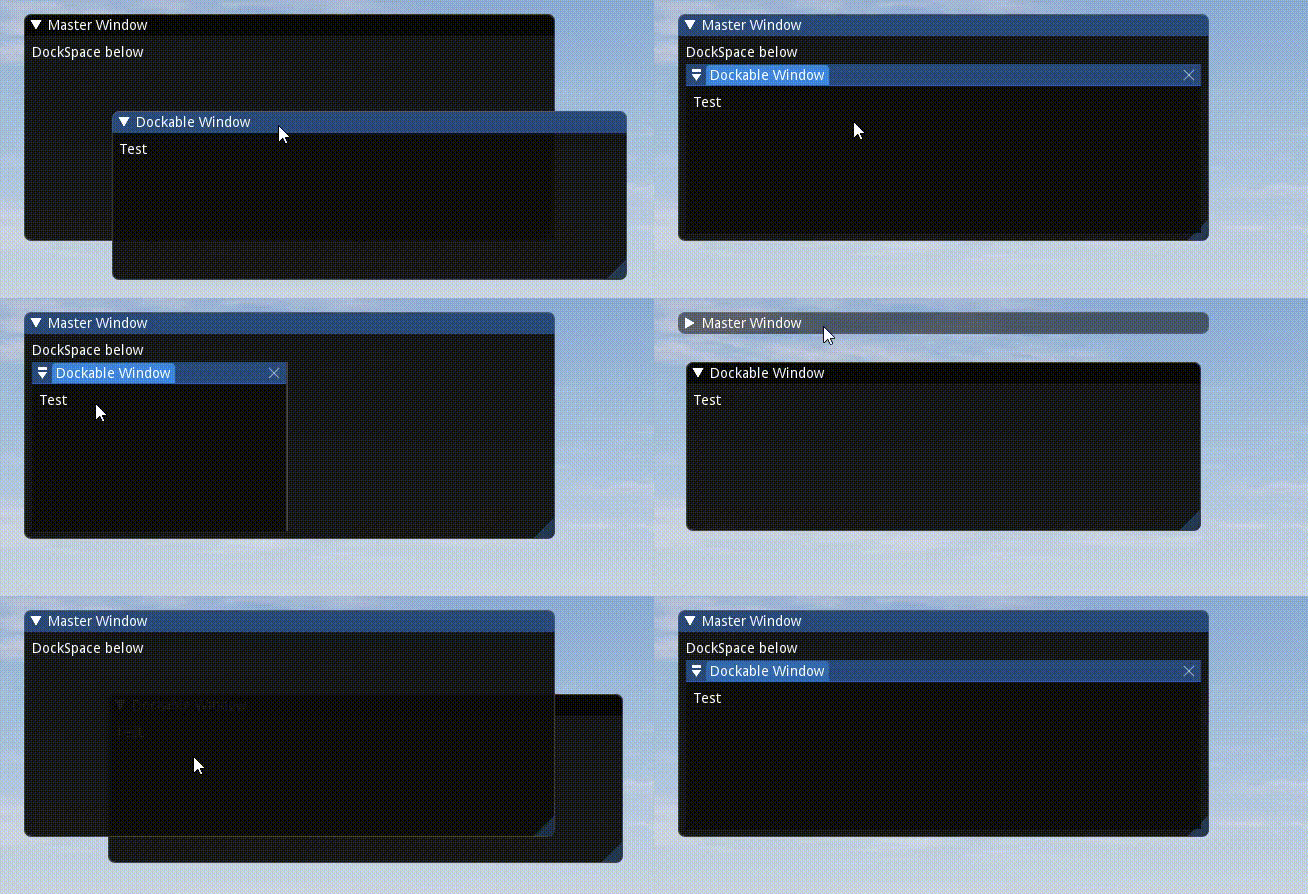
Maybe there's another way to declare a docking region within a window? But if that's a real code issue, I'd be more than pleased to open a new topic about it.
Thanks
 BeachCoder76
on 29 May 2019
BeachCoder76
on 29 May 2019
@BeachCoder76 I don't understand all of your message.
I think what is happening here is that you are doing an early-out when the Master Window is collapsed, which is a common pattern. However in the case of a DockSpace you will need to keep it "alive" otherwise its windows will get undocked. Typically you would submit the dockspace even if Begin() returned false.
I will add more commentary in the ShowExampleAppDockSpace() demo to explain this.
Note that you can also call DockSpace() with the ImGuiDockNodeFlags_KeepAliveOnly to keep it alive.
(For further issues, please open a separate issue and tag this one.)
ocornut
on 29 May 2019
Sorry about that, I thought I'd keep it as simple as possible without a new topic. I should probably followed my first instinct and submit one instead. I did test your suggestion and it works but it was counter-intuitive to me .. I might still open a Topic on this as I've never read anything about this and it's good info for all coders. Unless you disagree :)
BeachCoder76
on 30 May 2019
I noticed that windows are dockable by default. Does it make sense though? Usually in applications that support docking we have a tight selection of dockable widgets and rest of windows (message boxes, file dialogs, options dialogs) are not dockable. Maybe it would make sense to have opt-in dockable windows instead of opt-out?
rokups
on 4 Jun 2019
I noticed that windows are dockable by default. Does it make sense though? Usually in applications that support docking we have a tight selection of dockable widgets and rest of windows (message boxes, file dialogs, options dialogs) are not dockable. Maybe it would make sense to have opt-in dockable windows instead of opt-out?
I disagree. I think the docking feature is much more powerful when this is available by default. Making it opt-in would put a severe entry bar to maximimize the use of merging windows.
It's already always off for popups, modals, tooltips, menus.
ocornut
on 4 Jun 2019
Work on Docking is still ongoing and I've been regularly pushing fixes and small improvement.
If you have specific bug report/request please prefer opening a new github issue.
I pushed a change to allow undocking a whole node (vs a single window) by dragging from the empty space in tab bar / title bar. This is in line with most people expectation and previously was only possible by draggong from the "collapse button" / "docking menu" button which wasn't well understood.
However if the dock node is part of a moveable, floating hierarchy, dragging from the tab bar will still move the whole hierarchy otherwise we can not move those windows (unless they have OS decoration) enabled. You can still undock whole node that are part of a floating hierarchy by dragging from the "docking menu" menu.
ocornut
on 17 Jul 2019
Hey! I'm testing this branch and it's going fine so far; however, I haven't managed to make imgui save the state of the docked windows. Calling SaveIniSettingsToDisk manually seems to make imgui remember the positions of the windows but not how they were docked to each other.
Am I missing something or this is a missing feature? If it's in the TODO list, can I help to implement this?
 Aborres
on 21 Jul 2019
Aborres
on 21 Jul 2019
@Aborres Saving should be supported.
A possible issue is that you may be enabling docking _after_ loading the .ini file and that information will be discarded on load. First check your .ini file to rule that out or not.
Otherwise please provide a Minimal, Complete and Reprodudice example (https://stackoverflow.com/help/minimal-reproducible-example) and create a new issue for it. Thank you!.
ocornut
on 21 Jul 2019
@ocornut You were right that was the problem, sorry about that.
Apart from that it was quite easy to integrate (awesome). I've found an issue with aligned combo menus and I am having a constant crash when switching to a specific tab but I believe these are my fault.
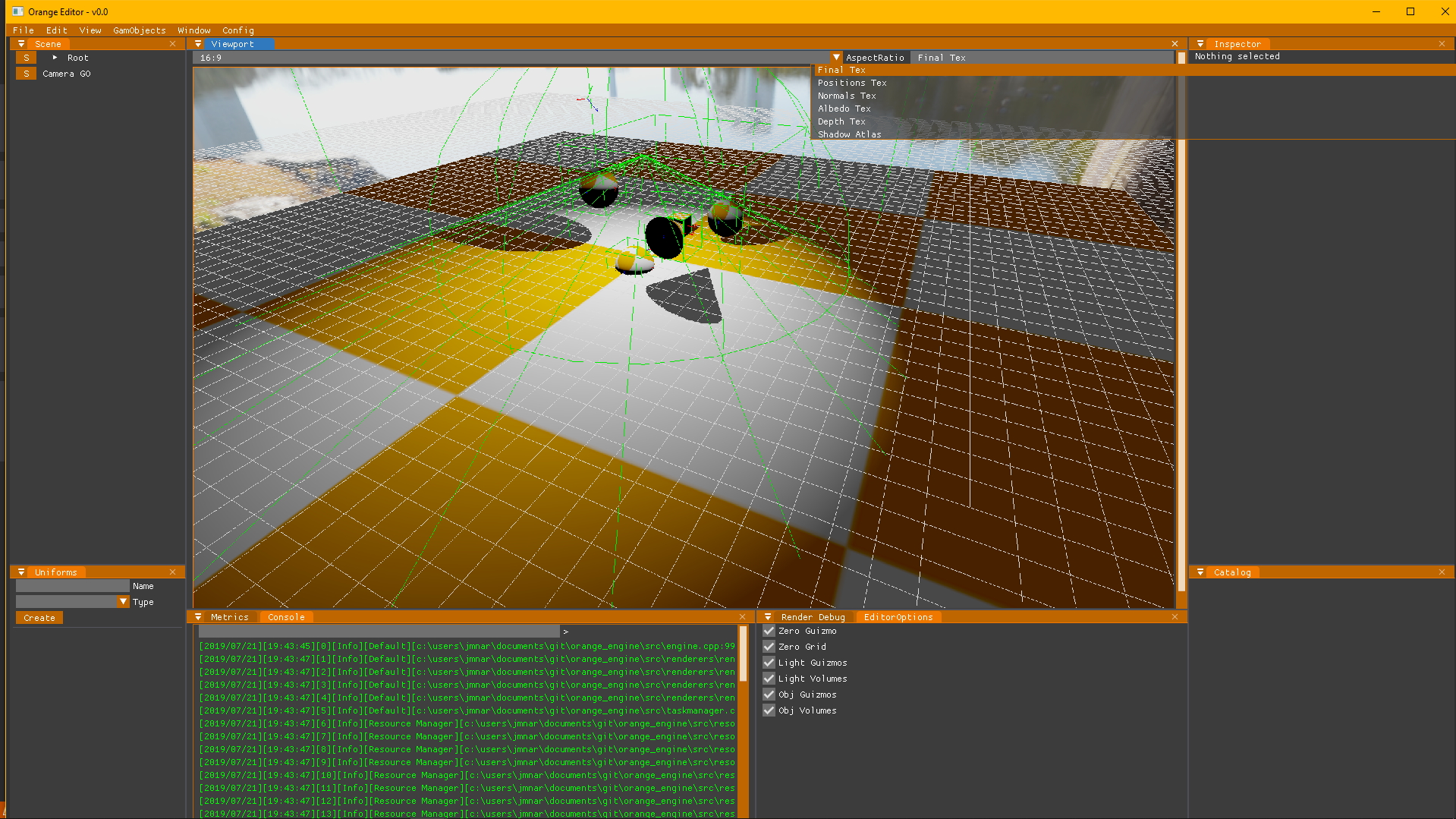
Aborres
on 21 Jul 2019
I've found an issue with aligned combo menus and I am having a constant crash when switching to a specific tab but I believe these are my fault.
Please open New Issue for anything you have to report, with a repro. Thank you.
ocornut
on 21 Jul 2019
Hi, I would like to achive result like @rokups, but it doesn't seems to work like expected. Probably I'm doing something wrong, but I don't know what.
I'm trying to achive this:

I've got this:

auto dockingEnabled = true;
const auto windowFlags = ImGuiWindowFlags_MenuBar |
ImGuiWindowFlags_NoDocking |
ImGuiWindowFlags_NoTitleBar |
ImGuiWindowFlags_NoCollapse |
ImGuiWindowFlags_NoResize |
ImGuiWindowFlags_NoMove |
ImGuiWindowFlags_NoBringToFrontOnFocus |
ImGuiWindowFlags_NoNavFocus |
ImGuiWindowFlags_NoBackground;
const auto dockspaceFlags = ImGuiDockNodeFlags_PassthruCentralNode;
const auto viewport = ImGui::GetMainViewport();
ImGui::SetNextWindowPos(viewport->Pos);
ImGui::SetNextWindowSize(viewport->Size);
ImGui::SetNextWindowViewport(viewport->ID);
ImGui::PushStyleVar(ImGuiStyleVar_WindowRounding, 0.0f);
ImGui::PushStyleVar(ImGuiStyleVar_WindowBorderSize, 0.0f);
ImGui::PushStyleVar(ImGuiStyleVar_WindowPadding, ImVec2(0.0f, 0.0f));
ImGui::Begin("MainDockspaceArea", &IsDockingEnabled, windowFlags);
ImGui::PopStyleVar(3);
DrawMenuBar();
auto mainDockspaceId = ImGui::GetID("MainDockspaceArea");
ImGui::DockSpace(mainDockspaceId, ImVec2(0.0f, 0.0f), dockspaceFlags);
static auto firstTime = true;
if (firstTime)
{
firstTime = false;
ImGui::DockBuilderRemoveNode(mainDockspaceId);
ImGui::DockBuilderAddNode(mainDockspaceId, dockspaceFlags);
ImGui::DockBuilderSetNodeSize(mainDockspaceId, viewport->Size);
auto dockIdProp = ImGui::DockBuilderSplitNode(mainDockspaceId, ImGuiDir_Right, 0.20f, nullptr, &mainDockspaceId);
auto dockIdBottom = ImGui::DockBuilderSplitNode(mainDockspaceId, ImGuiDir_Down, 0.20f, nullptr, &mainDockspaceId);
ImGui::DockBuilderDockWindow("Systems browser", dockIdProp);
ImGui::DockBuilderFinish(mainDockspaceId);
}
ImGui::End();
 bilek993
on 22 Jul 2019
bilek993
on 22 Jul 2019
@bilek993 When calling DockBuilderAddNode() you need to pass the ImGuiDockNodeFlags_DockSpace flag otherwise you won't have a default "central node" which can stay empty.
REMINDER TO EVERYONE USING ImGui::DockBuilderXXX this is a Beta api and it has been changing. If you have issues with it check the posts, git log and comments here.
PLEASE OPEN NEW ISSUES WHEN YOU HAVE AN ISSUE WITH DOCKING. THIS THREAD IS TOO CROWDED.
ocornut
on 22 Jul 2019
Hi!
I started playing around with the docking branch and ran into an assert here:
https://github.com/ocornut/imgui/blob/13f00331dacbfc6ff14e41fc359c4234100fa6b9/imgui_widgets.cpp#L7187
You can reproduce this by just using the DockSpace example in the demo window, make a vertical split, then start moving one split to the side, when a TabItem gets to 0 width, it crashes.
I tried adding an early return instead of an assert and that worked.
Is there any workaround for this without changing the imgui code?

 Husenap
on 22 Sep 2019
Husenap
on 22 Sep 2019
Thank you @Husenap for reporting this bug. The issue was introduced by a856c67 and I have now pushed the fix in 80b3ab7.
(In the future you can open a new thread for Docking related issues/questions)
ocornut
on 22 Sep 2019
Thank you @Husenap for reporting this bug. The issue was introduced by a856c67 and I have now pushed the fix in 80b3ab7.
Thank you so much for the quick fix!
(In the future you can open a new thread for Docking related issues/questions)
Noted ^^
Husenap
on 22 Sep 2019
@ocornut without any commitment, what is the ETA for this branch? Weeks? Months? Years? I’m starting to use it (through a binding) and I’d love to understand how much to engineer my build system through several layers of bindings and libraries to use this branch (I need several local forks/patches). I don’t want to waste much time on it if the branch is landing “soon”.
 rasky
on 3 Dec 2019
rasky
on 3 Dec 2019
@ocornut I'm testing the docking feature quite a lot lately and have to say it's great!
One question though - what would be the best way to save & restore the layout of all the windows and their dockings? (sort of the info that is stored in the *.ini file). I need multiple layouts that could be toggled between.
 hateom
on 10 Dec 2019
hateom
on 10 Dec 2019
@hateom There's no easy way right now, supposedly the internal/wip DockBuilder API was meant to do things like that for for saving existing templates something closer to loading partial .ini data would be more useful. It's all unfortunately more complicated than just saving/loaded .ini data, but for simple apps I will work on making it possible to reload .ini data while imgui is running (currently it's not possible). Current workaround is to shutdown and recreate imgui context (which is surprisingly non intrusive but you'll lose tree node open/close state and focus order).
For further questions best to open new threads.
ocornut
on 10 Dec 2019
How do I get started with dock panels?
Nice work team ImGui I got to start donating again.
 edselmalasig
on 10 Mar 2020
edselmalasig
on 10 Mar 2020
How do I get started with dock panels?
Nice work team ImGui I got to start donating again.
manuliner
on 11 Mar 2020
Hello is there a way to use the DockerBuilder functions, like the split function with FirstUseEver flag? Can't seem to find one... I want to build an initial layout that can be re-arranged and it will persist on restart.
Thank you.
 mastergog1
on 30 Mar 2020
mastergog1
on 30 Mar 2020
Hello @Lin20,
Are you properly testing the return value of BeginTabBar() ?
Otherwise, please open a new issue with a copy & pastable repro ideally, thank you!
ocornut
on 4 Apr 2020
@hsimyu Please open a new issue with the same info (and then you can delete the message here), it's easier to maintain at this point. Thanks!
(PS: Note that the
ShowMetricsWindow()has many similar infos as the one you are displaying in your debug windows.)
@ocornut
OK, I opened #3111 and deleted my message here, Thanks!
(And also, thanks for telling me ShowMetricsWindow(). It is more useful than my simplistic debug windows 🙏 )
 hsimyu
on 9 Apr 2020
hsimyu
on 9 Apr 2020
I've pushed some changes making it now possible to call LoadIniSettingsFromDisk() / LoadIniSettingsFromMemory() at runtime _before_ NewFrame(). In particular, this is related to docking as I've managed to make it works to reload docking information from .ini data and thus this could perhaps be used to setup some initial state. Up to experiment...
https://github.com/ocornut/imgui/issues/2573#issuecomment-625512092
In addition, the Metrics windows now has some extra Settings infos and tools:

ocornut
on 8 May 2020
I upgraded from ~1.75 WIP to the current 1.77 WIP and docked windows are no longer drag-able from their title-bar tab. Did a default setting change somewhere, or is this a bug?
 epezent
on 16 May 2020
epezent
on 16 May 2020
@epezent I confirmed there's a very bug on docking right now, see #3243, looking at it now.
ocornut
on 18 May 2020
Hey,
I've just started toying around with this branch 👍
I've noticed that when we attempt to dock a collapsed window, it will just crash at:
void ImGui::Scrollbar(ImGuiAxis axis)
{
ImGuiContext& g = *GImGui;
ImGuiWindow* window = g.CurrentWindow;
const ImGuiID id = GetScrollbarID(window, axis);
KeepAliveID(id);
// Calculate scrollbar bounding box
const ImRect outer_rect = window->Rect();
const ImRect inner_rect = window->InnerRect;
const float border_size = window->WindowBorderSize;
const float scrollbar_size = window->ScrollbarSizes[axis ^ 1];
IM_ASSERT(scrollbar_size > 0.0f);
// ...
}
Is this a known issue? If not, a possible quick fix would be preventing collapsed windows from docking. Possibly, we can also fix it the other way around and expand the window before docking it. Not sure of what would be the most intuitive behavior though.
 dolphineye
on 27 May 2020
dolphineye
on 27 May 2020
Hey @dolphineye. I am unable to reproduce this crash. Could you specify exact commit of docking branch you tested, exact steps to reproduce the issue (to the most minor detail), example you tested this on (including backend, graphics api, platform).
rokups
on 27 May 2020
Hey @dolphineye. I am unable to reproduce this crash. Could you specify exact commit of docking branch you tested, exact steps to reproduce the issue (to the most minor detail), example you tested this on (including backend, graphics api, platform).
Hey Rokups, thanks for your feedback. After investigating, it turned out there was a defect in. my ImGUI integration, which caused the issue. So this is on me :)
dolphineye
on 27 May 2020
Hey there, I was curious whether there is already support to customize the distance between docked windows. For comparison you can see the following Unity screenshot that has some significant free space between the windows which makes it slightly "lighter":

The current behavior of imgui is more dense in contrast.

It'd be nice to be able to configure that distance which is the splitter thickness.
 ChristianIvicevic
on 31 May 2020
ChristianIvicevic
on 31 May 2020
Quick update: Even though my C++ is a bit rusty I found the IMGUI_DOCK_SPLITTER_SIZE variable in imgui.cpp and it does exactly what I was looking for. I definitely propose that this becomes an actual style variable at some point. In the meantime and for testing purposes I changed its value and rebuild cimgui and Imgui.NET so I can use the customized version in my PoC playground.
ChristianIvicevic
on 31 May 2020
How can I use this with Vcpkg and Cmake?
 nauq302
on 13 Aug 2020
nauq302
on 13 Aug 2020
Dear ImGui does not impose (or provide support for) any particular build system. From the readme:
No specific build process is required. You can add the .cpp files to your existing project.
 PathogenDavid
on 13 Aug 2020
PathogenDavid
on 13 Aug 2020
How could I dock visible window and undock it sometime later?
 1aam2am1
on 28 Sep 2020
1aam2am1
on 28 Sep 2020
Como faço para começar a usar os painéis de encaixe?
Bom trabalho, equipe ImGui. Eu tenho que começar a doar novamente.
usa isto
ImGuiViewport* viewport = ImGui::GetMainViewport();
ImGui::SetNextWindowPos(viewport->Pos);
ImGui::SetNextWindowSize(viewport->Size);
ImGui::SetNextWindowViewport(viewport->ID);
ImGui::SetNextWindowBgAlpha(0.0f);
ImGuiWindowFlags window_flags = ImGuiWindowFlags_MenuBar | ImGuiWindowFlags_NoDocking;
window_flags |= ImGuiWindowFlags_NoTitleBar | ImGuiWindowFlags_NoCollapse | ImGuiWindowFlags_NoResize | ImGuiWindowFlags_NoMove;
window_flags |= ImGuiWindowFlags_NoBringToFrontOnFocus | ImGuiWindowFlags_NoNavFocus;
ImGui::PushStyleVar(ImGuiStyleVar_WindowRounding, 0.0f);
ImGui::PushStyleVar(ImGuiStyleVar_WindowBorderSize, 0.0f);
ImGui::PushStyleVar(ImGuiStyleVar_WindowPadding, ImVec2(0.0f, 0.0f));
ImGui::Begin("DockSpace Demo", p_open, window_flags);
ImGui::PopStyleVar(3);
ImGuiID dockspace_id = ImGui::GetID("MyDockspace");
ImGuiDockNodeFlags dockspace_flags = ImGuiDockNodeFlags_PassthruCentralNode;
ImGui::DockSpace(dockspace_id, ImVec2(0.0f, 0.0f), dockspace_flags);
 FilipePpereira
on 28 Sep 2020
FilipePpereira
on 28 Sep 2020
Flag:
ImGui::GetStyle().WindowMenuButtonPosition = ImGuiDir_None;
Creates visible artifacts as it displays Hide Bar menu but don't move cursor for drawing tabs.
1aam2am1
on 30 Sep 2020
@1aam2am1 Please open a separate issue with screenshots/gifs and details, thank you.
ocornut
on 30 Sep 2020
The docking implementation looks great! Will this eventually be merged to master, or is it planned to remain as a parallel implementation, with users choosing which version to work with? (I see the docking branch is up to date with master, but many commits ahead ...)

 BBI-YggyKing
on 2 Nov 2020
BBI-YggyKing
on 2 Nov 2020
@cailuming
Note the request at the top of this issue:
Prefer creating separate New Issues for specific questions/issues, so they can more easily be closed when solved and not clutter this thread (which is already too big)
I'm not sure exactly what you're asking for and it'd probably help if you elaborated on the problem you're trying to solve. My gut says you could maybe use a combination of IsWindowDocked, GetWindowDockID, and IsWindowFocused to get what you need.
PathogenDavid
on 9 Nov 2020
Will this eventually be merged to master
@bbi-yggy I can't speak for Omar, but there's an item on the todo list to merge it into master.
PathogenDavid
on 9 Nov 2020
Please read David’s message and create a new issue and remove duplicate messages here. Github doesn’t handle large threads well.
You can use IsWindowFocused() to tell if a window is focused, and the Begin() return value.
ocornut
on 9 Nov 2020
In order to only call it once you may use e.g.
if (ImGui::DockBuilderGetNode(dockspace_id) == NULL)
   MyEditor_LayoutPreset();
Hey,
I just setup a DockSpace in my app to have a nice window layout and it works fine. While now trying to set a default layout, your sample code works with one caveat: This example returns NULL / a valid node independent of whether I have a previously changed layout (in the imgui.ini) so each time I start my app the layout gets reset.
I'd like to only use my setup routine if the imgui.ini doesn't contain the [Docking][Data] section. Is there a native way to check this or would I need to check this manually by looking at the ini data myself?
Kind regards and thank you for making ImGui,
Ingmar
 irieger
on 10 Jan 2021
irieger
on 10 Jan 2021
@irieger Please take note of the notice at the top of this issue:
Prefer creating separate New Issues for specific questions/issues, so they can more easily be closed when solved and not clutter this thread (which is already too big)
Please do not report issues without reading the 'Feedback' section of the next post and without reading the 'Contributing' document listed in there. The number of ambiguous, ill-formed questions and incomplete bug reports posted on this entire github is difficult to deal with. Thank you.
PathogenDavid
on 10 Jan 2021
Related issues
 bogdaNNNN1
·
3Comments
bogdaNNNN1
·
3Comments
 inflex
·
3Comments
inflex
·
3Comments
 mnemode2
·
3Comments
mnemode2
·
3Comments
 Folling
·
3Comments
Folling
·
3Comments
 KaungZawHtet
·
3Comments
KaungZawHtet
·
3Comments
Most helpful comment
All the programmatic stuff are currently hidden in
imgui_internal.hso please bear in mind that those API will evolve.Given
dockspace_id(same value passed toDockSpace())Given
dockspace_size(which currently cannot be zero, unlike the one passed toDockSpace()EDITED Oct 6: Removed ImGuIContext* ctx parameter
EDITED Feb 20: Updated to current internal api
You can create an initial layout, e.g.
In order to only call it once you may use e.g.
(Note that I just pushed a fix for DockBuilderSplitNode for a bug I introduced yesterday)