With 1.62 I would like to draw some buttons with SameLine between them until the window width is reached in order to begin a new line.
I can get window width with GetWindowWidth. How do I get where is current button position in order to do SameLine or not?
 sonoro1234
All 12 comments
GetCursorPos()
 ocornut
on 29 Jul 2018
ocornut
on 29 Jul 2018
for i,v in ipairs(self.imguimodals) do
if (ig.Button(v.name)) then curr_notmodal = i end
pos = ig.GetCursorPos()
ig.SameLine(0,1)
print(pos.x)
end
always outputs the same value
sonoro1234
on 29 Jul 2018
I see, sorry. You may need to use GetItemRectMin/GetItemRectMax + add style.ItemSpacing.x to compute the expected position.
(This pattern should be supported automatically but with the current signature of ItemAdd/ItemSize it isn’t possible for them to modify the current position. So it’ll require breaking the most common internal.h api to support it. Will do it at some point)
ocornut
on 29 Jul 2018
local wwidth = ig.GetWindowWidth()
local pos = ig.GetCursorPos()
local posini = pos
for i,v in ipairs(self.imguimodals) do
if (ig.Button(v.name)) then curr_notmodal = i end
pos = pos + ig.GetItemRectSize()
if pos.x < wwidth then
ig.SameLine(0,1)
else
pos = posini
end
end
this is the pattern working for me
Althought last button in line is partially out!!!
sonoro1234
on 29 Jul 2018
This kind of task needs sample/documentation
sonoro1234
on 29 Jul 2018
this is the pattern working for me
Althought last button in line is partially out!!!
Well the code is wrong for two reasons:
- It is missing
style.ItemSpacing.x - Maybe use
GetContentRegionAvailWidth()instead ofGetWindowWidth()since your starting X position is WindowPadding.x and the end X position is Width-WindowPadding.x as well.
ocornut
on 29 Jul 2018
May be that GetItemRectSize() with GetContentRegionAvailWidth() already takes in account for style.ItemSpacing?
The cause of "last button partially out" is that we are getting pos after the Button is already posted so that the first button which has pos > wwidth is posted after SameLine. Solution would be to know pos before Button.
sonoro1234
on 30 Jul 2018
Solution would be to know pos before Button.
GetCursorPos() ?
edit If you are in doubt about any value you should visualize it with the ImDrawList api.
I'm not sure I understand your message, but I have added an extra demo.
// Manually wrapping (we should eventually provide this as an automatic layout feature, but for now you can do it manually)
ImVec2 button_sz(40, 40);
ImGui::Text("Manually wrapping:");
ImGuiStyle& style = ImGui::GetStyle();
int buttons_count = 20;
float window_visible_x2 = ImGui::GetWindowPos().x + ImGui::GetWindowContentRegionMax().x;
for (int n = 0; n < buttons_count; n++)
{
ImGui::PushID(n);
ImGui::Button("Box", button_sz);
float last_button_x2 = ImGui::GetItemRectMax().x;
float next_button_x2 = last_button_x2 + style.ItemSpacing.x + button_sz.x; // Expected position if next button was on same line
if (n + 1 < buttons_count && next_button_x2 < window_visible_x2)
ImGui::SameLine();
ImGui::PopID();
}
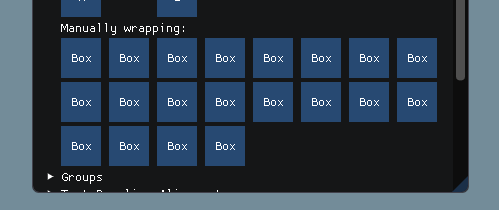
This is made a little confusing because GetWindowContentRegionMax() is in local window space.. someday will need to refactor all this and use absolute positions everywhere :/
ocornut
on 30 Jul 2018
The problem in my use case is that button size is not known before it is posted as it depends on its label
sonoro1234
on 30 Jul 2018
Then you can calculate its size in advance with CalcTextSize(label) + style.FramePadding * 2.
ocornut
on 30 Jul 2018
Could you please ensemble all the code for that?
sonoro1234
on 30 Jul 2018
local window_visible_x2 = ig.GetWindowPos().x + ig.GetWindowContentRegionMax().x
local last_button_x2 = 0
for i,v in ipairs(self.imguimodals) do
    local button_szx = ig.CalcTextSize(v.name).x + 2*style.FramePadding.x
    local next_button_x2 = last_button_x2 + style.ItemSpacing.x + button_szx;
    if next_button_x2 < window_visible_x2 then ig.SameLine(0,1) end
    if (ig.Button(v.name)) then curr_notmodal = i end
    last_button_x2 = ig.GetItemRectMax().x;
end
this is working
sonoro1234
on 30 Jul 2018
Related issues
 dowit
·
3Comments
dowit
·
3Comments
 namuda
·
3Comments
namuda
·
3Comments
 ghost
·
3Comments
ghost
·
3Comments
 mkanakis
·
3Comments
mkanakis
·
3Comments
 noche-x
·
3Comments
noche-x
·
3Comments
Most helpful comment
this is working