can imgui widgets be rendered on a 3d quad in 3-space? I was wondering if i can use imgui in VR? is it possible to do that currently? is there a roadmap to have this? or a recommendation to look at any of imgui derived projects or any other projects that can do this?
 siddharthcmdz
All 12 comments
Hello,
Dear ImGui gives you a bunch of 2d vertices (think of it as 2d meshes), it's easy to render in any way you see fit, so you can render them in a 3d world as long as you can provide the correct input (e.g. virtual mouse using your headset controls, gamepad controls, mouse control if appropriate for development). Some people render it flat, some people render it in a 3D space they can control.
See for example what @temcgraw has been doing:
https://www.youtube.com/watch?v=nlwfn4HJw5E
https://github.com/temcgraw/ImguiVR
-Omar
 ocornut
on 17 Feb 2018
ocornut
on 17 Feb 2018
awesome! thanks for the pointers omar! appreciate the response
siddharthcmdz
on 18 Feb 2018
@ocornut Any more specifics where I can see this in use?
 iKlsR
on 6 Jul 2018
iKlsR
on 6 Jul 2018
Is there an efficient way to add some extrusion to the geometry of Imgui? I have a 3D imgui window rendering in VR, and I’d like to add some thickness to certain elements, and make certain objects pop out in the 3rd dimension.
 n8vm
on 26 Jul 2018
n8vm
on 26 Jul 2018
@iKlsR There's a video linked above.
@n8vm it's a little difficult since we don't have much information/semantic per vertex.
However, for each ImDrawList the first draw call will be the window background + title + outline, and you may offset the subsequent draw calls a little to give the impression that widgets are over the window. The problem you'll have is filling the gap between both layer, but if that gap is sufficiently small you may get away with it and give a slight 3d effect to it.
ocornut
on 26 Jul 2018
@n8vm @iKlsR
Any of you guys managed such a thing ? Would u share your experiences ?
 sariug
on 18 Apr 2019
sariug
on 18 Apr 2019
@sariug Nope, I was at the time looking for a UI to use for VR inside Oculus. Would have been too much work to get going not to mention dealing with input and such and our tech was built on Qt already. Ended up using QML (which uses opengl as the backend) with the underlying framebuffer being sent to a texture and used that to great success. For most interactions I can just raycast the object (in most cases a plane) and map the hit position to 2d coords to interact with the QML widgets.
iKlsR
on 18 Apr 2019
@iKlsR I need something simple(not like in this video: https://www.youtube.com/watch?v=lGJtdOdJIqI) just to control some input and output. I have it on 2D with SLD2. Hopefully, will take it to 3D level next week and hoping its not gonna give me headaches.
sariug
on 18 Apr 2019
@sariug I managed using Imgui in VR for a bit, although since then I’ve moved on to using Vulkan and haven’t had time to integrate imgui yet.
I ran into a couple challenges, but it wasn’t too difficult to get working.
you’ll need to have two renderpasses, the first which renders imgui to a texture, and the second which renders the texture to a panel in VR.
In VR , you don’t have a mouse cursor, so you need to tell imgui to render one for you. Then you’ll need to highjack imgui mouse controls to instead be controllable using a ray plane intersection location (using a laser pointer in vr). Typing is even more challenging, but can also be done using the OpenVR keyboard.
n8vm
on 18 Apr 2019
I know since I last looked into this, imgui added controller style inputs in addition to cursor inputs. I’ve been meaning to try that out instead/in addition to the laser pointer style method, by instead swiping and clicking the trackpad
n8vm
on 18 Apr 2019
Stumbled on this today, for extra references:
https://github.com/elvissteinjr/DesktopPlus
Video http://www.elvissteinjr.net/dplus/demo_v2_1_showcase.mp4

ocornut
on 16 Jun 2020
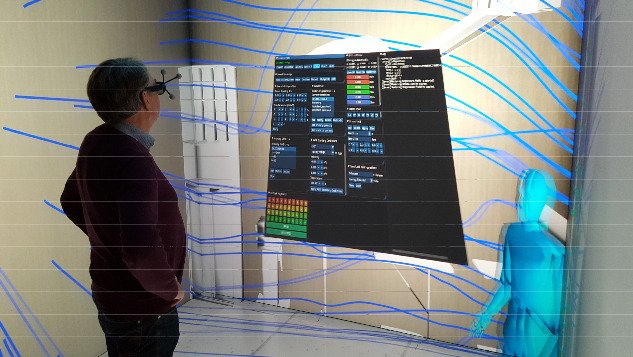
It made it to my thesis last year in CAVE mixed reality environment :
Code(Partly):
https://github.com/sariug/mpfluid_cave_frontend
sariug
on 16 Jun 2020
Related issues
 ILoveImgui
·
3Comments
ILoveImgui
·
3Comments
 NPatch
·
3Comments
NPatch
·
3Comments
 inflex
·
3Comments
inflex
·
3Comments
 the-lay
·
3Comments
the-lay
·
3Comments
 namuda
·
3Comments
namuda
·
3Comments
Most helpful comment
Stumbled on this today, for extra references:
https://github.com/elvissteinjr/DesktopPlus
Video http://www.elvissteinjr.net/dplus/demo_v2_1_showcase.mp4