Imgui: Multi-viewports / virtual viewports
*EDIT*
**Please prefer creating new issues (and referring to this one with a #1542 marker) when reporting bugs or asking questions. This thread is currently too big to be useful.
October 2020: Wiki page: https://github.com/ocornut/imgui/wiki/Multi-Viewports
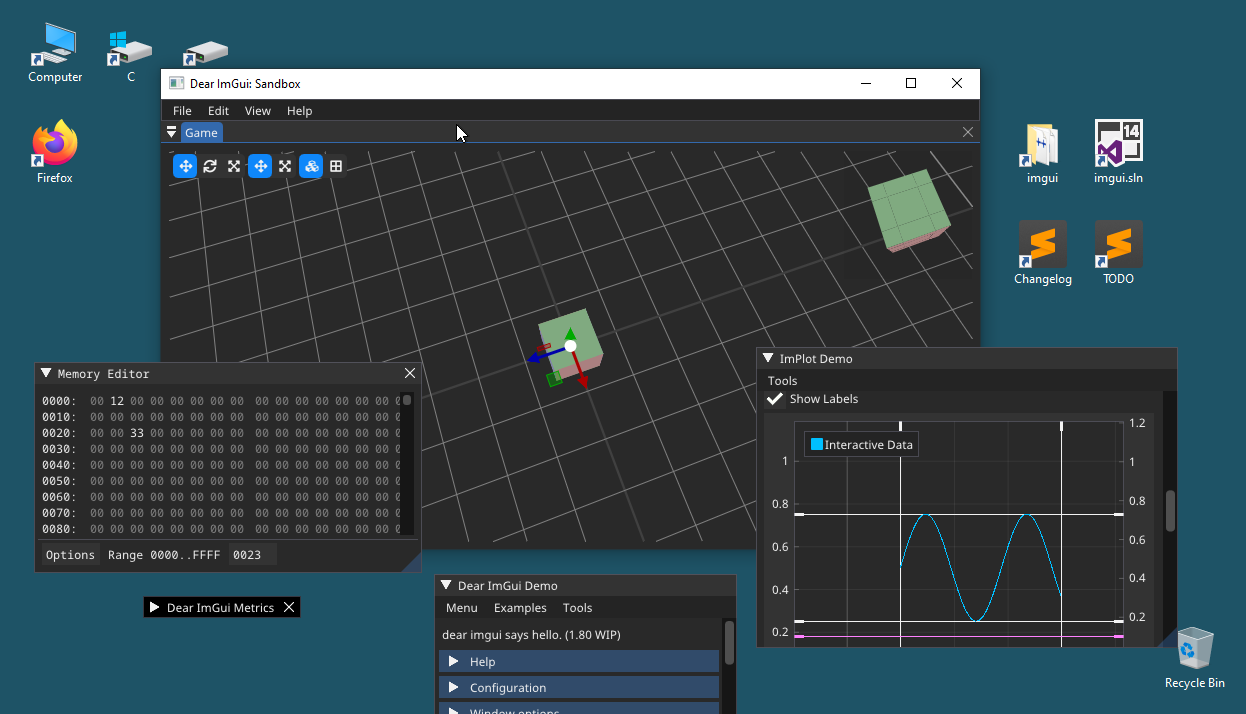
IF YOU SUBMIT/DISCUSS AN ISSUE RELATED TO MULTI_VIEWPORTS:
- Always state which imgui_impl_xxx platform and renderer back-end files you are using.
- If you are using imgui_impl_glfw.cpp, state which version of GLFW you are using. If you are using imgui_impl_sdl2.cpp, state which version of SDL2 you are using, etc.
- Always state your OS type, OS version, window manager and extensions (in the case of Unix systems).
- If the issue happens in your own application, always also tests in the examples/ application and state if you have the same problem with those applications.
- Make sure to check how the main.cpp of the examples/ application is currently setup for the viewport branch.
- Never state "there is a crash/assert" without providing an associated callstack and details.
January 2019: Viewport and Docking branches have been merged to simplify maintainance. Use the 'docking' branch to test multi-viewports.
December 2019: See Glossary: https://github.com/ocornut/imgui/wiki/Glossary#multi-viewports-terms
January 2020: If you want to implement multi-viewports in your custom engine, the easiest path is to read the comment around ImGuiPlatformIO along with the bottom sections of e.g. imgui_impl_glfw+imgui_impl_opengl3 to learn from it.
For Linux/Mac specific issues please post in #2117.
Creating this thread to discuss and tag commits related to an upcoming feature.
It somehow relates to Docking (#2109) in the sense that current work on docking created growing expectations to get this working. But it's also mostly separate code, and for various reasons I think this will probably go in master before Docking. It will need testing and feedback.
If you follow the Docking thread you may have seen this already:
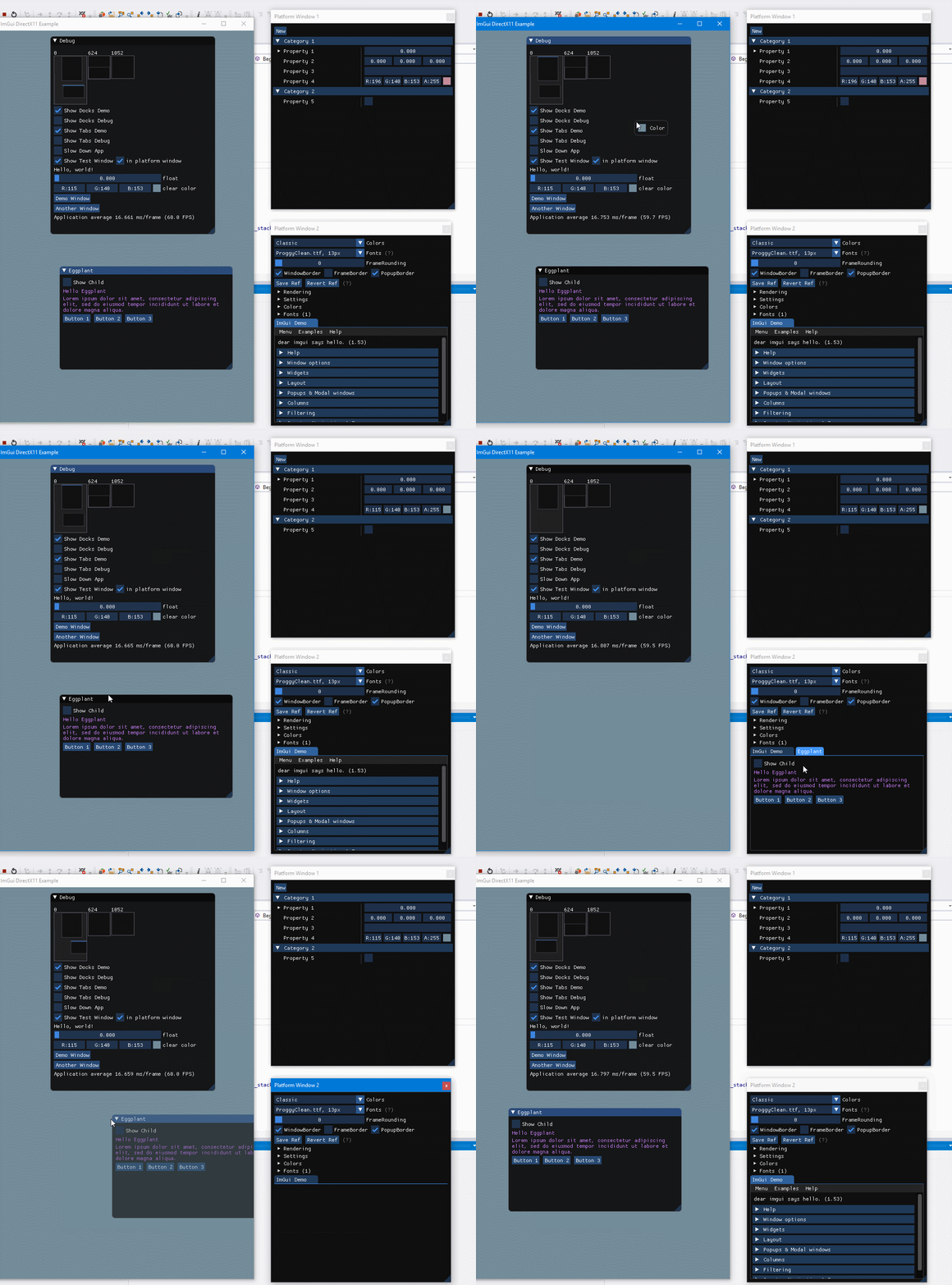
And more recently I improved transition and it's somewhat magical:

What happens here essentially if that the code creates borderless (undecorated) windows with a dedicated DirectX/OpenGL context on the fly, create imgui viewport to cover this os window, and move the window there..
Basically it consist in two parts:
- dear imgui will support a new concept called "viewport". A single imgui context can drive multiple virtualized regions, as shown in those GIF. Using a single context makes sharing state natural (things like settings, tree nodes state or cross windows drag and drop). There are still various problems to solve related to persistence, mouse position, etc. but overall it's not a crazily complex feature.
- To support this feature the backend code (imgui_impl_xxxx files) needs to be reworked obviously. It puts additional complexity on that code and not all engine will support it. That part needs to be both optional and as out of the way possible. I suspect we will need to iterate on that a lot, both to get the functionalities right, and because I worry a lot about the imgui first-time user experience and impression, and the additional complexity is very undesirable there.
I suspect I may end up re-factoring a lot of the examples/ code.
If you are interested I will be looking for feedback and early adopters, hopefully starting in January some of this can be in a branch.
 ocornut
All 123 comments
This is pure magic @ocornut 🥇
 Pagghiu
on 8 Jan 2018
Pagghiu
on 8 Jan 2018
wow !
If you need people for tests (mostly Linux), I'm volunteer.
 ebachard
on 8 Jan 2018
ebachard
on 8 Jan 2018
Sign me up Ocornut, I'll gladly beta-test, and happy to provide feedback.
 JaapSuter
on 9 Jan 2018
JaapSuter
on 9 Jan 2018
I would be interested in testing it on Windows, and more specifically trying to port it on OSX to see if there are some limitations on this platform
 itamago
on 10 Jan 2018
itamago
on 10 Jan 2018
Pants change inbound. This is awesome.
 JSandusky
on 12 Jan 2018
JSandusky
on 12 Jan 2018
Just wanted to chime in and say this looks amazing. I’m in the planning stages for a green-field project and I’m considering being an early adopter for this. One constraint that we have, though, is that it must work in OS X. I would happily contribute where I can, but I have zero experience in this area. Could someone give me a “scientific wild guess” on the feasibility of making this work on OS X? Thanks!
 gerryhernandez
on 3 Feb 2018
gerryhernandez
on 3 Feb 2018
I have a GLFW backend with a few OS specific tweaks (currently implemented for Win32 only). I think we’ll aim to support OS X at minimum in the GLFW example, maybe also SDL if it has the functions we need.
EDIT edited for clarity.
ocornut
on 4 Feb 2018
Looking forward to the branch. I don't mind adopting early; my application isn't anything critical and I'll be able to tolerate bugs, frequent refactors, etc.
gerryhernandez
on 5 Feb 2018
I knew you were a wizard.
 eigenbom
on 8 Feb 2018
eigenbom
on 8 Feb 2018
I have pushed an early branch here:
https://github.com/ocornut/imgui/tree/viewport
I consider this experimental at this point, at this is a feature planned for 1.70 (probably along with docking/tabs) but if you are curious you may check it out. Feedback of early adopters will help improve this. I do not recommend merging this in your master work branch, but if you are time to spare to try to integrate it with your setup in a branch of your project, then you can throw your feedback at me it'll be useful.
The examples/ are being refactored to separate the platform code (win32, sdl, gflw) from the renderer code (directx 9 to 12, opengl, vulkan etc.). The idea is that we can combine them more easily, reuse code more easily, and hopefully easier to understand. We will also be able to more easily add new ones. See the files in the root folder: https://github.com/ocornut/imgui/tree/viewport/examples
The viewport feature is enabled through an optional interface that the platform and renderer back-end needs to provide. The aim of this interface is to allow imgui to create native windows and render into them.
The addition of multi-viewport however puts more burden to the back-end. It's completely optional and I tried to keep the extra features at the bottom of the files, but this complexity still shows a little to the first-time reader/user of example code. In particular providing imgui with the mouse position is a little more involved. Will keep improving that however I can.
None of the api/specs are locked. The reason I'm pushing this very early in its lifetime is to accumulate feedback. I expect most fields/flags to be renamed or rearranged at some point.
If you are running Windows and want to try it quickly, you can compile and run the Win32+DirectX11 or GLFW+OpenGL3 example. You should be able to drag windows this way:

- This will become generally more useful when Docking/Tabs will be merged. Two those features complement each others very well.
Some known issues
- [x] Issues with multiple DPI mouse coordinates. (important, urgent)
- [ ] Issues with multiple DPI and rendering (need to provide a way to scale for imgui on a per viewport basis)
- [ ] Issues with multi-screen and persistence of position/size (it's currently possible to "lose" a window at a desktop coordinate that's not visible.
- [x] Usage of the GetOverlayDrawList() is not bound to a specific viewport and may lead to user primitives displaying in the wrong viewport because the coordinate system is continuous. Haven't designed a solution yet but there much be something. Note: the software mouse cursor (io.MouseDrawCursor) uses this facility.
- [ ] Tooltips and popups have various issues. May add flags to specify their policy (e.g. always use an extra os window), but even before that there are a few things to improve.
- [ ] Occasional flickering (at least with my Win32+DX11 back-end). Weirdly enough when I use my GIF capturing tools I get flickering on the transition..
- [X] No multi-viewport renderer support for OpenGL2 (easy)
- [ ] No multi-viewport renderer support for DX9 (easy)
- [x] No multi-viewport renderer support for DX10 (easy)
- [ ] No multi-viewport renderer support for DX12 (help welcome #301)
- [ ] No multi-viewport renderer support for Vulkan (help welcome)
- [x] GLFW: mouse cursor don't appear when hovering items on another viewport. > now works with GLFW 3.3 wip,
- [ ] GLFW: windowing support has hacks for Win32. Need to replicate them for other platforms, or find workaround within GLFW features, or submit patches to GLFW.
- [x] SDL: clicking and dragging a previously unfocused viewport doesn't move the window properly. > now works with SDL 2.0.5
- [ ] SDL: windowing support has hacks for Win32. Need to replicate them for other platforms, or find workaround within SDL features, or submit patches to SDL.
- [ ] Apple: With the new architecture of examples/ it would be nice to provide a native back-end for Mac.
- [x] Drag and drop assert while dragging on alt-tab (IM_ASSERT(IsMousePosValid()).
- [x] Modal window darkening/whitening should affect all viewports.
- [ ] The documentation are not up to date.
- [x] The Makefile and batch files are not up to date.
- [x] IME position is incorrect.
- [ ] Decorated OS windows resizing extend the hoverable region a little - how to do the same?
- [x] Potential mouse coordinates overlap or viewport mismatch issues: io.MouseDoubleClicked[] in NewFrame, MouseDragMaxDistanceAbs code in NewFrame(), GetMouseDragDelta, uses of NavCalcPreferredMousePos() without a viewport, BeginMenu() using io.MousePos+io.MouseDelta. > not applicable anymore with the coordinates change introduced 2018-04-18
ocornut
on 28 Feb 2018
Hi, professional unrealistic expectation setter [and potential future tester] here with 3 displays each running at a different DPI (1x, 1.75x and 2x) - what happens when I have my main app window on Display A and:
- drag a window out (still on display A)
- drag out a bit farther (now on display B - Windows notifies me of DPI change and provided a new suggested size, fwiw)
- keep dragging even farther (now on display C)
- release
?
 sherief
on 1 Mar 2018
sherief
on 1 Mar 2018
The target is that whatever happens with normal apps should happen the same way with our system. Right now it's probably pretty broken, I haven't looked at DPI stuff much yet. But I just purchased a 4K screen for that purpose. So pretty soon I'll be able to experience this first hand :)
Out of curiosity in your example, is there any difference of behavior between the A>B transition and the B>C transition? Do the three displays bring any issue that I can't reproduce with 2 displays?
ocornut
on 1 Mar 2018
Tried it out ... it's pretty awesome.
- The vanishing drag/drop cursor indicator was far more jarring than I had expected to be
- That assert in imgui.cpp line #5912 is mean (alt-tab while dragging)
All in all looks pretty promising, I'll be thrilled to be able to tell WPF to go piss with this.
JSandusky
on 1 Mar 2018
Thanks @JSandusky, will look into both those things (adding them to my list).
For the drag and drop tool-tip, we may end up enabling by default the behavior that tool-tips can always create their own context. I haven't made much measurement and although I think multiple contexts are cheap and very well handled by modern drivers, their _creation_ might not be as much.
PS: Please always specify with back-ends you are using and repro, because different back-ends may have different issues e.g. in term of figuring out mouse coordinates in the virtual imgui space, etc. Here your issue repro with Win32 back-end but not the same way with GLFW back-end.
ocornut
on 1 Mar 2018
The transition between any two display should be the same. I only use three displays so I can keep a cheap one (1080p) at 1x so I can test the three major DPI scenarios:
- 1x DPI
- fractional DPI (1.75x in my case)
- integer DPI (2x)
macOS doesn't support fractional DPI, but Windows does.
sherief
on 2 Mar 2018
I tried. I find sometime the menu would render at the main window right top position.
The IME position is not correctly set when ImWindow is not in main os window.
 heroboy
on 2 Mar 2018
heroboy
on 2 Mar 2018
I tried. I find sometime the menu would render at the main window right top position.
Can you clarify? I don't understand.
The IME position is not correctly set when ImWindow is not in main os window.
Correct. Will fix that.
ocornut
on 2 Mar 2018
@ocornut

Sometimes. And when it occurs, the context menu is ok.
heroboy
on 2 Mar 2018
hi @ocornut, I guess you should call SetNextWindowViewport in BeginMenu
if (ImGui::BeginMenuBar())
{
  ImGui::SetNextWindowViewport(ImGui::GetCurrentWindow()->ViewportId);
  if (ImGui::BeginMenu("Test"))
  {
    ImGui::MenuItem("abcde");
    ImGui::EndMenu();
  }
  ImGui::EndMenuBar();
}
hi @ocornut, I guess you should call SetNextWindowViewport in BeginMenu
Thanks for the report above. This needs to be done automatically and not require the user to do it so for such trivial use case. I am aware they are issues with viewport selections for popups (it's listed in the bug list above). The matter is a little more complex that you'd expect because multiple policies are desirable, moveable popups may need to remember their position, menus wants to inherit parent viewport in most cases but in some cases when not fitting may want to create their own viewports, etc. edit I'll try to push a quick fix however because it is such a glaring bug at the moment.
ocornut
on 7 Mar 2018

When I drag "ImGui Demo" window, "Debug" window is dragged with it
 nem0
on 7 Mar 2018
nem0
on 7 Mar 2018
When I drag "ImGui Demo" window, "Debug" window is dragged with it
In the absence of a docking solution which allow merging any window into another (by adding a tab bar), I thought it was a good idea to allow one window to host another.
I agree it's a little weird - my use case was to create dummy empty window that can be used to host other windows. May be better off just disabling this "feature" for now, since it's just too unusual.
ocornut
on 7 Mar 2018
@heroboy Pushed some fixes for the menus.
@nem0 I disabled this behavior for now.
ocornut
on 7 Mar 2018
Hi, our project was rendered in DX9, so I am wondering when the multi-viewport function would be supported in DX9 version? Or could you give me some hint? Since I was seen it in your undo list with "easy“ commented:)
 leavesmaple
on 13 Mar 2018
leavesmaple
on 13 Mar 2018
@leavesmaple I might decide to not write the DX9 code myself. Supporting DX9 has the unfortunate cost that it bring a lots of bad crowd to those pages. If you wrote a DX9 renderer it should be indeed fairly straightforward to add the missing glue code.
ocornut
on 13 Mar 2018
That's all right. I will try to investigate your DX10 code and write a DX9 version. Thanks for your great multi-viewport function~
leavesmaple
on 13 Mar 2018
Please bear in mind the Platform API is experimental and the actual integration and required entry points will change over the next few weeks/months until this is stabilized.
ocornut
on 13 Mar 2018
Been wrestling with a few things related to positioning of popup/tooltips, basically the aim is to allow things like that:

What's not evident from the shot is that the back-end can also optionally provide monitor boundaries to imgui so we can make tooltip or popup not straddle monitor by default (even if the user is free to move popups themselves).
It kind of work in my copy but the code has been messy, still need to rework quite a few things... consider the joyful fact that moving an OS window may affect its DPI and therefore may affect the size of its contents and invalidate nicely aligned positions.. I expect to be head down in that stuff for a while. Viewports+DPI+Docking are the new eternal Navigation branch :)
And from my other branch (recorded march 18), nothing really new but this thread needs a little hope in the form of gif files :)

ocornut
on 11 Apr 2018
On Win32: Is that floating tooltip another window with its own HWND etc.?
sherief
on 12 Apr 2018
On Win32: Is that floating tooltip another window with its own HWND etc.?
Yes.
In the case of tooltips we also can still render the main window/rendering context if the bounds are fitting. All those features will probably be enabled with a bunch of configuration flags, and if necessary I imagine we can rework the back-ends to keep a simple cache of hidden window.
ocornut
on 12 Apr 2018
Sorry for the amount of spam/commits in this thread, I messed up with pushing some temporary branches which re-added references from old commits into the thread. When this feature becomes a little more stable I'll probably recreate an empty thread.
EDIT Asked Github support and they were kind enough to run a git gc, removing duplicate of now unreferenced commits in a few threads :)
ocornut
on 19 Apr 2018
I pushed a bunch of changes to the experimental Viewport branch in the past few days, they should be much better now (if you want to try the demos under Windows again!).
- Tooltips, drag and drop preview, popups and menus can display outside of windows and it all seems to works pretty well apart from transparency continuity issues.
- Many tweaks, fixes, and made the code generally saner and simpler
There's still a long way to go especially for DPI handling, but aside from DPI issues the viewports are becoming fairly usable now!
ocornut
on 20 Apr 2018
Can you elaborate a bit on DPI issues?
sherief
on 21 Apr 2018
I might have missed it, but are there any functions for setting the available rect?
Specifically for stopping pop-ups from going into the task-bar area.
JSandusky
on 21 Apr 2018
@sherief Some of the DPI issues will be discussed in #1676 when I have more details. For now some popups/tooltips appearing will probably glitch for one frame as some code that position the window are not predicting DPI correctly. DPI depends on position/window rectangle, position may depends on size, size depends on DPI ... Auto-resizing windows dragged across monitor will also probably glitch, and I couldn't get rescaling of windows to happen around the mouse cursor correctly (I'll try again now that code has been improved/simplified).
@JSandusky There's none and you are right this is become more problematic with automatic placement of tooltips and popups. The placement uses the GetPlatformIO().Monitors array so in theory we could just adjust those rectangles.
in imgui_impl_win32.cpp replacing the ImGui_ImplWin32_UpdateMonitors_EnumFunc function to use GetMonitorInfo() seems to do the job:
static BOOL CALLBACK ImGui_ImplWin32_UpdateMonitors_EnumFunc(HMONITOR monitor, HDC, LPRECT p_rect, LPARAM)
{
    RECT rect = *p_rect;
    MONITORINFO monitor_info = { 0 };
    monitor_info.cbSize = sizeof(MONITORINFO);
    if (GetMonitorInfo(monitor, &monitor_info))
        rect = monitor_info.rcWork;
    ImGuiPlatformMonitor imgui_monitor;
    imgui_monitor.Pos = ImVec2((float)rect.left, (float)rect.top);
    imgui_monitor.Size = ImVec2((float)(rect.right - rect.left), (float)(rect.bottom - rect.top));
    imgui_monitor.DpiScale = ImGui_ImplWin32_GetDpiScaleForMonitor(monitor);
    ImGui::GetPlatformIO().Monitors.push_back(imgui_monitor);
    return TRUE;
}
The problem is that it's more difficult t get this information with high-level API, e.g. GLFW doesn't seem to expose it. SDL has SDL_GetDisplayUsableBounds() to use instead of SDL_GetDisplayBounds() which provide exactly this information. Will probably request it to GLFW. Without this information we probably shouldn't enable the feature by default.
ocornut
on 22 Apr 2018
@heroboy IME positioning has been fixed (currently only support Win32 back-end and GLFW under Win32. SDL IME support seemingly was always broken because SDL has its own IME implementation which requires custom rendering).
@JSandusky I have added monitor work area support and data in all 3 major platform back-ends. Added more general support for per-monitor clamping. Also fixed bug with certain type popup placement which didn't honor the limits properly. (There were 2 different issues affecting popups so it's always good to provide specific example because a seemingly super-generic issue may actually be affected by certain code paths only.)
ocornut
on 24 Apr 2018
This is really coming together.
I was thrilled when I turned on resizing by window edge and it actually worked.
JSandusky
on 25 Apr 2018
Any plans for daisy-chaining fonts to deal with DPI?
Fighting off blurry fonts is an issue (using one monitor 1080p @ 96dpi with another 1080p @ 180dpi, on win32 backend). Scaling is not really cutting it and a lot of the DPI info appears to be hidden away so I can't just Push/Pop fonts to get around it.
I'm considering tracking TTF sources and recooking them again as needed for DPI, then chaining them with the reference font. Looks like a PITA ATM.
Any means to grab monitors and their DPIs ahead of time so I can add appropriate fonts as well as query that info later per window to make the appropriate font pushes?
JSandusky
on 6 May 2018
@jsandusky there’s currently a callback in the PlatformIO structure that allow you to swap the fonts/style on a DPI change, until the fonts are properly either daisy chained either something else. With the current system you can easily cache/bake one font atlas or set of font per DpiScale and swap during the callbacm.
Note that this probably a temporary solution. Any feedback welcome.
Each viewport has a DpiScale field and the PlatformIO layer also register monitors with their own DPI info.
ocornut
on 6 May 2018
Swapping out the FontAtlas' worked plenty well enough. Disabled DPI font scaling in the platform config, built up an atlas for each encountered DPI, and did the following in the OnChangeViewport callback:
extern std::map<float, ImFontAtlas*> fontTables_;
auto found = fontTables_[viewport->DpiScale];
ImGui::GetIO().Fonts = found;
ImGui::SetCurrentFont(found->Fonts[0]);
@JSandusky This is the correct way for now! You could also restore your style and call ImGuiStyle::ScaleAllSizes(viewport->DpiScale), but you'd be losing stack-based manipulation of your style. My work ahead for DPI (also see #1676) will be to make both of those operations unnecessary as currently where's losing some flexibility.
I added comments to clarify the purpose of those flags, as as you found out ImGuiConfigFlags_DpiEnableScaleFonts is currently a bad/low-quality workaround that defeat much of the point of DPI. Be mindful this branch is moving ground!
Also note that you'll currently get more OnChangedViewport calls than expected in some situation because of how we handle the window stack. If the implicit Debug window is on monitor with DPI A and all your other windows are on DPI B you'll get a call _both_ on the Begin() and End() of your _all_ floating windows, and it's wasted because it's unlikely that you'll be appending to the Debug between a call to End() and the next call to Begin(). This same situation can happen with any other window pushed in the stack but it's more likely to happen often with the implicit Debug window.
ocornut
on 7 May 2018
Branch of Dear ImGui:
viewport (1cafdb5b46a366d566e4f430e8b093b5c2bd1352)
Back-end/Renderer/OS:
GLFW/OpenGL3/Linux + tiling window-manager (i3)
opengl3_example
My Observations
So, as promised I took a stab at the viewport branch.
Several issues surfaced, and I wanted to report them.
Consequences of using a tiling window manager [caveat1]
I'm using a tiling window-manager. That means, whenever a new window is created it's moved according to the rules supplied by the user. By default for me, that's "resize and fit between the other windows"

This is more of a "me problem", but for documentations sake, adding glfwWindowHint(GLFW_RESIZABLE, GLFW_FALSE); after the other window hints keeps the window floating, so for me this is a solution. There might be other ways to set hints for the window manager, not sure if that's the one.
Grabbing a window [caveat2]
With linux, there's usually the option to hold [alt] and drag a window. That's nice for me; i don't have to aim for the window title bar and use that.
When moving a window like this, ImGui will not detect tat the window is back in the original frame and render it as usual. This also is a blocking operation: as long as the window is moving, the render loop is stuck and cannot continue.
Linux window-managers also allow resizing with [alt] + [drag right mouse], which works fine (except when disabling window resizing like above).
Dragging a window outside [caveat3]
When I drag a window out of the original one, a new one is created as expected. After the new window was created my mouse (obviously?) stops dragging, I have to release the mouse button and drag again. Might be another problem with me and my window manager
Jittering windows [bug1]
After dragging the window outside, the window position jitters erratically. The amount of offset varies greatly and I am unsure what causes it.
Same for tooltips
FPS drop [bug2]
As soon as tooltips or windows appear outside of the normal application, FPS halve.
the visuals
Since github won't accept a webm w/ 300 kb and a gif clocks in at 5MB, here's a youtube link, with annotations in captions.
https://www.youtube.com/watch?v=e_PEHcUdUuI&t=8s
 einsweniger
on 16 May 2018
einsweniger
on 16 May 2018
@einsweniger Thanks for posting this and the amount of details, this is very useful.
> Consequences of using a tiling window manager [caveat1]
I'm not sure to understand where/what is the bug exactly. Is the extracted imgui window resizing according to your WM rules? I would expect your WM to trigger a position/resize and imgui should handle them. However, the other issues you have (the focus issue in caveat3 and the jittering bug1) are very likely to affect this. So I would suggest to first wait until those later issues are fixed. If after that your custom WM rules are not applied we can flag this as a bug.
> Grabbing a window [caveat2]
When moving a window like this, ImGui will not detect tat the window is back in the original frame
Should have fixed this now (just pushed the commit).
This also is a blocking operation: as long as the window is moving, the render loop is stuck and cannot continue.
That's not really something imgui can do something for. At the application level it may be possible to interact with the window manager in a way that allows refreshing (it's possible under Windows but rather cumbersome).
> Dragging a window outside [caveat3]
(A) There's a hint ImGuiViewportFlags_NoFocusOnAppearing that the back-end is supposed to honor by not focusing newly window. Unfortunately GLFW doesn't allow implementing this at the moment. I have implemented a Win32-specific hack in the code as a work-around.
A change in GLFW has been discussed and requested in https://github.com/glfw/glfw/issues/1179 and https://github.com/glfw/glfw/issues/1189 *
_(* there are a few other changes GLFW would need in order to fully support the current design of Dear ImGui Viewports, respectively issues 989, 1189, 1236 (also 427 is desirable for dear imgui but not strictly required for viewports). I have pushed for all of them on the GLFW issue tracker, and @dougbinks said he may be able to help as they are using dear imgui on their project. If you feel like helping to move any of them forward on the GLFW side it would be helpful. Ideally they would all be included in GLFW 3.3 but it is currently a little far out of my scope/ability to push them more than I have, and I don't have all the OS that GLFW supports.)_
(B) The reason the focus stealing is problematic is that the mouse inputs reported by GLFW are also conditioned by the focus. If a mouse button is held on Window A and a Window B is created and focused, GLFW stops reporting the held mouse button in neither Window A or Window B.
Here's a log to demonstrate what happens in GLFW
// Initial click in Window A
MouseButtonCallback(window=0x04B92190, button=0, action=GLFW_PRESS)

// pollable state:
glfwGetMouseButton(window 0x04B92190 [0], 0) = 1

[...]
// Window B is created and stole the focus, we receive:
MouseButtonCallback(window=0x04B92190, button=0, action=GLFW_RELEASE)

// pollable state:
glfwGetMouseButton(window 0x04B92190 [0], 0) = 0
glfwGetMouseButton(window 0x0ED0B9C8 [1], 0) = 0

// At this point even though the mouse button is held we don't know about it..

// We still get a Release event:
MouseButtonCallback(window=0x04B92190, button=0, action=GLFW_RELEASE)
It would also be possible to make a change in GLFW to allow obtaining mouse inputs at the time the new window is created, though I imagine this would be a harder change to justify as the side effects for the end-user would be larger, and it looks like we have an upcoming solution for (A) already.
> Absolutely positioned elements [caveat4]
This is a documentation bug sort of, the coordinate system is changed if you enable multi-viewports and will break hard-coded values passed to e.g. SetNextWindowPos(). The API BREAKING CHANGE section currently has this paragraph:
When multi-viewports are enabled, all positions will be in your natural OS coordinates space. It means that:
- reference to hard-coded positions such as in SetNextWindowPos(ImVec2(0,0)) are probably not what you want anymore. You may use GetMainViewport()->Pos to offset hard-coded positions, e.g. SetNextWindowPos(GetMainViewport()->Pos)
- likewise io.MousePos and GetMousePos() will use OS coordinates coordinates. If you query mouse positions to interact with non-imgui coordinates you will need to offset them, e.g. subtract GetWindowViewport()->Pos.
> Jittering windows [bug1]
I don't know what's causing this, but I'm seen a similar issue with a someone trying to implement viewports with native Cocoa. What your monitor DPI like?
I have two suggestions, if you can help investigating this.
Suggestion 1: could you try to comment the two lines in this function in imgui_impl_glfw.cpp ?
static void ImGui_ImplGlfw_WindowPosCallback(GLFWwindow* window, int, int)
{
    if (ImGuiViewport* viewport = ImGui::FindViewportByPlatformHandle(window))
        viewport->PlatformRequestMove = true;
}
This will disable the ability for the OS window manager to affect the position of the imgui window (so movement will always be driven by imgui and yout WM alt-drag won't work anymore). This is in order to check if there is some sort of feedback loop with the OS/WM.
Suggestion 2: in imgui_impl_glfw.cpp ImGui_ImplGlfw_UpdateMousePosAndButtons(), find the code that does:
double mouse_x, mouse_y;
glfwGetCursorPos(window, &mouse_x, &mouse_y);
io.MousePos = ImVec2((float)mouse_x + viewport->Pos.x, (float)mouse_y + viewport->Pos.y);
And replace it with:
int window_x, window_y;
glfwGetWindowPos(window, &window_x, &window_y);
double mouse_x, mouse_y;
glfwGetCursorPos(window, &mouse_x, &mouse_y);
io.MousePos = ImVec2((float)(mouse_x + window_x), (float)(mouse_y + window_y));
In theory imgui knowledge of the window position should be correct in viewport->Pos. If it doesn't this code will make a difference and I'd be interested in knowing if that's the code for you.
> FPS drop [bug2]
As soon as tooltips or windows appear outside of the normal application, FPS halve.
I presume what is happening is that the code is waiting for vsync for every window and somehow the vsync wait are accumulating. It's very confusing to me what the glfwSwapInterval(XX) value means in the context of multiple window and I presume some of it is down to the driver. This seemed to behave differently on the Windows I tried it on.
Could you try a few things such as:
In ImGui_ImplGlfw_SwapBuffers() add a call to glfwSwapInterval(0) before glfwSwapBuffers(), and in main.cpp add glfwSwapInterval(1) before glfwSwapBuffers() ? So only the last call to glfwSwapBuffers() will presumably use vsync as a synchronization mechanism.
(Of course, you could also run the application with no vsync and control the framerate yourself, but I'm interest in feedback about how SwapInterval settings behave on system systems/drivers)
While you are at it, you may also experiment with swap intervals and multi-viewports and see how to get the render perfectly synchronized.
To do this you can render 2 rectangles in absolute position from 2 different imgui windows, then drag one window outside so it becomes a different platform window:
ImGui::Begin("Window A");
ImGui::GetOverlayDrawList()->AddRectFilled(ImVec2(300, 300), ImVec2(600, 600), IM_COL32(255, 0, 0, 255));
ImGui::End();
ImGui::Begin("Window B");
ImGui::GetOverlayDrawList()->AddRectFilled(ImVec2(300, 300), ImVec2(600, 600), IM_COL32(0, 255, 0, 255));
ImGui::End();
It'll look like this:

Now you can drag Window B quickly and see if the rectangles stays perfectly aligned with each others.
EDIT Best to try with combinations of either 1 secondary viewport and 1 main viewport, and 2 secondary viewports.
Thanks.
ocornut
on 16 May 2018
> Consequences of using a tiling window manager [caveat1]
nah, this is not an issue; just something I thought to be worth mentioning. Most people that use a tiling WM know what they are doing and how to fix it.
> Grabbing a window [caveat2]
Works for me, and the blocking is not as harsh anymore. Previously, as long as the window kept moving the app was blocked, now there's just little lags. :D
(skipping [caveat3], I can't add anything to that)
> Absolutely positioned elements [caveat4]
This is missing from my previous comment, I removed it because I thought it was just me using it in a wrong way. Turns out I was right, must have glossed over the breaking changes
> Jittering windows [bug1]
disable the ability for the OS window manager to affect the position of the imgui window
jup, fixes that. dragging still "works" in so far that imgui and my WM are racing against each other for the window position: window flickers between where Dear ImGui placed it and where the WM wants to have it. Dear ImGui wins in the end.
Suggestion 2
works fine!
> FPS drop [bug2]
It's very confusing to me what the glfwSwapInterval(XX) value means in the context of multiple window and I presume some of it is down to the driver.
I find the glfwSwapInterval confusing in general, documentation remarks contain:
swap interval extensions used by GLFW do not allow the swap interval to be reset to zero once it has been set to a non-zero value.
So I assume toggling between the values might not always work. This might be the most annoying part to maintain for different vendor/hardware/platform combinations :D
And yes, for each window that is dragged outside the main application, draw times multiply.
First of all, i've disabled vsync (by default) completely on my system. (could have thought of that sooner.)
When disabling vsync within the app completely (.5 ms/frame) there is some barely noticeable shift of the green parts, as expected. That works incredibly good.
Returning to the worst case (vsync everywhere, horrible draw times). The green parts are out of sync, badly. Even worse than the screen shot can reproduce, all edges are jagged. The screen shot also shows another instance of Window B that should not be there at all.
Toggling vsync through an ImGui::Checkbox works fine, aside from the previous worries that you cannot reset the swap interval to zero.
The results are here: https://imgur.com/a/xehGE34 (imgur > youtube )
top to bottom: vsync everywhere, vsync in main only (disabled in imgui_impl_glfw), and completely disabled.
I'm now going to turn vsync per default back on and will report back if I find something interesting.
edit: so far nothing interesting, another thing i've noticed (but is expected): with vsync enabled only in main windows drawn outside of the main app have noticeable tearing.
edit2: the worst tearing occurs when resizing a window, the green parts jump pretty bad.
einsweniger
on 17 May 2018
jumping windows
might not be a bug, but the behaviour of my WM: https://imgur.com/a/w9U1uSV
when a new window is created and it's bounding box would extend outside of the current viewport, the window is created and moved to the center of the screen.
This is expected behaviour (at least for me), as all windows that "float" are created in the middle of the screen. ("float" -> window is not fit into the tiling of the workspace but can draw above other windows and move without constraints)
einsweniger
on 17 May 2018
The problem is that it's more difficult t get this information with high-level API, e.g. GLFW doesn't seem to expose it.
@ocornut
http://www.glfw.org/docs/3.3/group__monitor.html#gafc1bb972a921ad5b3bd5d63a95fc2d52
seems to provide monitor with and height in screen coordinates
 sonoro1234
on 18 Jun 2018
sonoro1234
on 18 Jun 2018
@sonoro1234 it provide monitor information but not work area information (which may be smaller than monitor area). There’s an open issue for it on GLFW github.
ocornut
on 18 Jun 2018
if i move with window with main window, i am have microlag, smoothness is lost. In realese and debug build.
 izirayd
on 30 Jun 2018
izirayd
on 30 Jun 2018
I have the "FPS drop" issue as well, but in Windows on a hybrid graphics laptop (discrete NVIDIA + integrated Intel card).
Both graphics cards works just fine in the D3D11 example. For the OpenGL example (and Vulkan, using both GLFW and SDL) there is a 1 frame stutter when moving an internal window outside the main window followed by the frame rate dropping to "vsync divided by number of viewports", i.e. 1 viewports results in 60 FPS, 2 viewports 30 FPS, and 3 viewports 20 FPS.
This only happens when using the discrete NVIDIA card. The Intel card is nice and smooth, not even a stutter).
As suggested by @ocornut, appending
if (g_ClientApi == GlfwClientApi_OpenGL)
{
    glfwMakeContextCurrent(data->Window);
    glfwSwapInterval(0);
}
to ImGui_ImplGlfw_CreateWindow makes the FPS stable after the creation of new viewports, but there's still a 1 frame stutter when they're created.
Everything is perfectly synchronized when doing the "rendering 2 absolute rectangles" thing mentioned earlier when moving any of the internal windows around as long as the FPS is stable.
 vassvik
on 25 Aug 2018
vassvik
on 25 Aug 2018
Hey @ocornut, I gave a try to this branch and tried to get it to work with the Gtk+ backend from #2032.
Unfortunately, because of how Gtk+ manages the OpenGL contexts, we don't get any sharing from the main one in which the GL3 shaders are created.
So trying to draw in the viewport fails because of unknown objects.
I don't know if you're planning on addressing this or whether that's out of scope.
 djdeath
on 2 Sep 2018
djdeath
on 2 Sep 2018
I have investigated the stutter reported in the the post above and it seems to be reproducible on Pascal-based NVIDIA GPUs for the OpenGL and Vulkan examples (using both SDL and GLFW). I have asked multiple people to test, on both discrete and hybrid GPUs, and they get the same behavior. This behavior doesn't exist with the D3D examples.
To summarize there is a 1-frame stutter when an internal window moves outside the main window and a new viewport is created. There is no more stuttering until the view window is moved inside the main window again and released, repeating the exercise.
vassvik
on 2 Sep 2018
yep i have 1050
izirayd
on 3 Sep 2018
I tried the viewport branch (SHA1 b974fffea033149ffe53b4107f632b4ebb95b708) on Debian 9.3 amd64 and XFCE and a old Nvidia graphic card. I also noticed windows are jittering when we move them outside the main window.
I can reproduce a crash on the application example_glfw_opengl3 by clicking on it everywhere and shaking it with the mouse outside the main window. The ideal condition to produce the crash is:
- the "Hello, World" windows is outisde the main win.
- I click on "clear color" and quickly click again on the "Hello, World" to hide the panel color. If the crash does not appear, click several time alternatively on the color panel and the hello world win.
- using valgrind on the application will help crashing faster.
I used backward to catch the stack calls when segfault occurs. To do this I just copied pasted backward.cpp and backward.hpp in the directory example_glfw_opengl3 and I modified its Makefile:
- add backward.cpp in SOURCES
- add gcc flags
-O2 -g -DBACKWARD_HAS_DW=1 - add linker flags
-ldw - like said in backward.cpp, you probably have to install:
apt-get install libdw-dev
I also call valgrind on the application, this helps to produce the error:
valgrind --leak-check=full ./example_glfw_opengl3
Here is the backward log:
Stack trace (most recent call last):
#6    Object "", at 0xffffffffffffffff, in
#5    Object "/imgui/examples/example_glfw_opengl3/example_glfw_opengl3", at 0x563528dee9a9, in _start
#4    Source "../csu/libc-start.c", line 291, in __libc_start_main [0x7fef3c0e62e0]
#3    Source "/imgui/examples/example_glfw_opengl3/main.cpp", line 125, in main [0x563528dee5e2]
        122:         // Start the Dear ImGui frame
        123:         ImGui_ImplOpenGL3_NewFrame();
        124:         ImGui_ImplGlfw_NewFrame();
      > 125:         ImGui::NewFrame();
        126:
        127:         // 1. Show the big demo window (Most of the sample code is in ImGui::ShowDemoWindow()! You can browse its code to learn more about Dear ImGui!).
        128:         if (show_demo_window)
#2    Source "../../imgui.cpp", line 3259, in NewFrame [0x563528e17e40]
       3256:     g.TooltipOverrideCount = 0;
       3257:     g.WindowsActiveCount = 0;
       3258:
      >3259:     UpdateViewports();
       3260:
       3261:     // Setup current font, and draw list shared data
       3262:     // FIXME-VIEWPORT: the concept of a single ClipRectFullscreen is not ideal!
#1    Source "../../imgui.cpp", line 7193, in UpdateViewports [0x563528e17751]
       7190:             // Apply Position and Size (from Platform Window to ImGui) if requested.
       7191:             // We do it early in the frame instead of waiting for UpdatePlatformWindows() to avoid a frame of lag when moving/resizing using OS facilities.
       7192:             if (viewport->PlatformRequestMove)
      >7193:                 viewport->Pos = g.PlatformIO.Platform_GetWindowPos(viewport);
       7194:             if (viewport->PlatformRequestResize)
       7195:                 viewport->Size = g.PlatformIO.Platform_GetWindowSize(viewport);
#0    Source "../imgui_impl_glfw.cpp", line 476, in ImGui_ImplGlfw_GetWindowPos [0x563528df4802]
        473: {
        474:     ImGuiViewportDataGlfw* data = (ImGuiViewportDataGlfw*)viewport->PlatformUserData;
        475:     int x = 0, y = 0;
      > 476:     glfwGetWindowPos(data->Window, &x, &y);
        477:     return ImVec2((float)x, (float)y);
        478: }
Segmentation fault (Address not mapped to object [(nil)])
Erreur de segmentation
Backward adds color in its log, but they cannot be displayed in this issue. So see the > mark (125, 3259, 7193, 476)
 Lecrapouille
on 8 Sep 2018
Lecrapouille
on 8 Sep 2018
@ocornut The GLFW3+OpenGL3 example works awfully on Linux (commit b974fffea033149ffe53b4107f632b4ebb95b708):

 ice1000
on 8 Sep 2018
ice1000
on 8 Sep 2018
The gif is of a bad bad bad quality, try this video @ocornut https://youtu.be/-GDX9rqbqGk
ice1000
on 8 Sep 2018
@ice1000 looool your window is jerking off x100 times stronger than mine (I forget to say I used GLFW3+OpenGL3). Thanks for making the video. Have you succeeded moving the "hello, world !" window outside and clicking on the "clear color" and clicking back on the window until a segfault occurs ?
Lecrapouille
on 8 Sep 2018
@Lecrapouille I can't control the window :sweat_smile: it lose control when moving out
ice1000
on 8 Sep 2018
https://youtu.be/JAx0F4uBlHQ
With SDL I get a y-axis difference, which is quite bad.
ice1000
on 8 Sep 2018
My engine supports multiple windows, is this feature compatible with more than one window?
In the code I see reference about a main viewport and I'm not sure if i can create and link a viewport when I create a new window
 morgoth990
on 15 Sep 2018
morgoth990
on 15 Sep 2018
My engine supports multiple windows, is this feature compatible with more than one window?
In the code I see reference about a main viewport and I'm not sure if i can create and link a viewport when I create a new window
It's missing at the moment but shouldn't be too hard to hard this feature. I suppose you'd need to create a viewport flagged as a "hosting viewport" where windows can be moved into it.
ocornut
on 15 Sep 2018
My engine supports multiple windows, is this feature compatible with more than one window?
In the code I see reference about a main viewport and I'm not sure if i can create and link a viewport when I create a new windowIt's missing at the moment but shouldn't be too hard to hard this feature. I suppose you'd need to create a viewport flagged as a "hosting viewport" where windows can be moved into it.
With few changes in ImGui.cpp is working very well (small changes to manage viewports with null window), now I'm waiting for the docking update :D
morgoth990
on 17 Sep 2018
@morgoth990
With few changes in ImGui.cpp is working very well (small changes to manage viewports with null window), now I'm waiting for the docking update :D
A well-thought pull-request detailing use cases and edges cases would always be appreciated.
ocornut
on 17 Sep 2018
The native viewports are very jittery for me on Linux with the i3 window manager. I also can't seem to find a way to configure i3 to detect the runtime-created windows as floating at the moment. I see that they are set as undecorated through GLFW, but ideally there would be window manager hints set like
_NET_WM_WINDOW_TYPE = _NET_WM_WINDOW_TYPE_MENU
or similar to make them detectable for window managers (see https://specifications.freedesktop.org/wm-spec/1.3/ar01s05.html). I guess though that it's hard to set these platform-specific flags through GLFW, it seems that GLFW only sets WINDOW_TYPE_NORMAL and isn't configurable there: https://github.com/glfw/glfw/blob/master/src/x11_window.c#L707
 s-ol
on 23 Sep 2018
s-ol
on 23 Sep 2018
@s-ol I don’t know where the jitteryness comes from, it’s a common report that needs to be investigated. It would be super valuable if you could dig into that option and see if there is a way it would make sense for eg GLFW to expose it. I already have 3 requests lined up for GLFW that would reallly help this if it was integrated in GLFW 3.3. Otherwise maybe we can access platform-specific code in imgui_impl_glfw.cpp and somehow set it ourself, this is what I am currently doing with win32-specific workarounds.
ocornut
on 23 Sep 2018
@ocornut:
sounds good. It can definitely be done in platform code using xlib or whatever.
For the GLFW feature do you have some sort of process to group these issues as imgui-related or should I just go ahead and open an issue there? It seems similar features have been accepted in the past, e.g. glfw/glfw#893 for specifying WM_CLASS hints.
It seems that GLFW has a way to specify platform-specific options like that and from the file I linked above it seems like it would be rather trivial to expose the option there so it can be set as a small platform switch rather than stepping on GLFWs foot and talking to X11 directly.
As for jitter, perhaps there should be a super-simplified demo without avrual imgui code to see if this is somehow a problem with the imgui event handling or perhaps a GLFW limitation.
s-ol
on 23 Sep 2018
After apt install libvulkan1 mesa-vulkan-drivers vulkan-utils nvidia-396 (I'm not sure if it's related) and re-compile the glfw examples in the newest viewport branch, I get
λ> ./example_glfw_opengl3
Glfw Error 65543: GLX: Failed to create context: BadValue (integer parameter out of range for operation)
@s-ol
For the GLFW feature do you have some sort of process to group these issues as imgui-related or should I just go ahead and open an issue there?
No specific process, it's not like GLFW is working for the specific interest of dear imgui so we have to argue the case for each feature rather neutrally, though it helps to convey a clear use case. For reference the links to the 3 requests I mentioned is at the bottom of this page: https://github.com/ocornut/imgui/wiki/Help-Wanted
First of all, do your intended fix actually fixes the Viewport system on your X11/WM ?
It seems that GLFW has a way to specify platform-specific options like that and from the file I linked above it seems like it would be rather trivial to expose the option there so it can be set as a small platform switch rather than stepping on GLFWs foot and talking to X11 directly
That's really up to us to decide if it is in GLFW's best interest to make that change in GLFW or not. It is also totally fine to add X11 specific code under #ifdef in imgui_impl_glfw.cpp (assuming it doesn't break the build on some obscure variety of platform/configuration), feel free to provide the fix or make a PR in there.
For the particular thing to mention, it seems that the glfwInitHint() you linked to isn't the right mechanism, as glfwInitHint() is a GLFW-wide flag. I think we shall be looking at a platform specific glfwWindowHint() (there are already GLFW_OPENGL_xxx hints) e.g. GLFW_X11_WINDOW_TYPE_xxx. The minutia of designing this for wide usefulness requires some work, it may be easier to just stick the code we need in imgui_impl_glfw.cpp.
@ice1000
After apt install libvulkan1 mesa-vulkan-drivers vulkan-utils nvidia-396 (I'm not sure if it's related) and re-compile the glfw examples in the newest viewport branch, I get
This is probably an issue on your or GLFW end, could you clarify if it is also the case in the master branch, or not then digging for more details would be helpful..
ocornut
on 26 Sep 2018
This is probably an issue on your or GLFW end, could you clarify if it is also the case in the master branch, or not then digging for more details would be helpful..
I restarted my laptop and it works again. Sorry for bothering.
ice1000
on 27 Sep 2018
it works again
I mean, the error no longer present. But the windows are still jumpy (as the video I uploaded before)
ice1000
on 27 Sep 2018
Just so you know - turning compositor off makes window jumping go away on linux.
 rokups
on 2 Oct 2018
rokups
on 2 Oct 2018
Just so you know - turning compositor off makes window jumping go away on linux.
it doesn't for me - I run compton and i3 and when I kill compton nothing changes with the stutter (window alpha is lost as expected though).
s-ol
on 2 Oct 2018
Ah ok. This happens for me on plasma 5.13.
rokups
on 2 Oct 2018
To answer to Ylannl's comment in the correct thread.
I've just tested the GLFW + OpenGL3 example (branch docking, commit 2cff3f6) on macOS 10.12 and I have not the problem presented by @Ylannl as shown in the following GIF

The test was done on a MBA Late-2013 (non-retina display).
 Alzathar
on 2 Oct 2018
Alzathar
on 2 Oct 2018

Unselect viewport flag causes the window to move.
Docking branch, Ubuntu 16.04, GLFW3+OGL3 backend.
ice1000
on 2 Oct 2018
I can reproduce the same behaviour under macOS 10.12 (branch docking, example_glfw_opengl3).
Alzathar
on 2 Oct 2018
To answer to Ylannl's comment in the correct thread.
And this is what happens on my 2017 MBP with Retina display.

Today I was also able to test it on my iMac without retina display. This works fine, just like @Alzathar.
 Ylannl
on 3 Oct 2018
Ylannl
on 3 Oct 2018
It is a problem with the reprojection/scale of clipping rectangles in the renderer.
ocornut
on 3 Oct 2018
Hello,
My simple test :
Linux Intel (x86_64 + lot of ram), Linux Mint 18.3 (customized 4.15.18 kernel for uvc 1.5 compatibility), OpenGL
glxinfo -B returns :
````
name of display: :0.0
display: :0 screen: 0
direct rendering: Yes
Extended renderer info (GLX_MESA_query_renderer):
Vendor: Intel Open Source Technology Center (0x8086)
Device: Mesa DRI Intel(R) UHD Graphics 620 (Kabylake GT2) (0x5917)
Version: 18.2.1
Accelerated: yes
Video memory: 3072MB
Unified memory: yes
Preferred profile: core (0x1)
Max core profile version: 4.5
Max compat profile version: 3.0
Max GLES1 profile version: 1.1
Max GLES[23] profile version: 3.2
OpenGL vendor string: Intel Open Source Technology Center
OpenGL renderer string: Mesa DRI Intel(R) UHD Graphics 620 (Kabylake GT2)
OpenGL core profile version string: 4.5 (Core Profile) Mesa 18.2.1
OpenGL core profile shading language version string: 4.50
OpenGL core profile context flags: (none)
OpenGL core profile profile mask: core profile
OpenGL version string: 3.0 Mesa 18.2.1
OpenGL shading language version string: 1.30
OpenGL context flags: (none)
OpenGL ES profile version string: OpenGL ES 3.2 Mesa 18.2.1
OpenGL ES profile shading language version string: OpenGL ES GLSL ES 3.20
````
viewport checkout : git clone -b viewport https://gitub.com/ocornut/imgui multi_context
Tested example_sdl_opengl3 , only the time to test the viewport :
- build is ok, no warning, no issue ;
- nothing seems to be broken with usual use : one window, testing all ImGui features (widgets, plot, whatever)
Basic test with the viewport:
- the viewport seems to work (wow !!) : e.g. drag a window outside of the main window woks : the window is accesible,
- all the menues of the "outside ImGui window" work, and one can drag the window back in th main SDL window ;
Other test :
- drag 2 or 3 windows out of the main window works
Some little issues i have seen :
- All windows seems to be drawn in overlay mode. Means when several applications are open, any " outside of the main ImGui SDL Window " will overlap the other applications windows
- flickering : when several ImGui windows are present, with at least one outside of the main window, moving one of them causes important flickering of the moved one (the flickering diseppears one or two seconds after releasing the mouse button)
That's all for the moment, because the real life hit me, and I must stop for today. Please tell me if you need some specific test. I'll try to continue testing this feature (and understand how to use it correctly) asap.
Thanks again for your incredible work !
P.S. : got a simple screenshot, but I wasn't sure it was a good idea to add it there. Just tell me.
ebachard
on 4 Oct 2018
@ebachard @rokups and anyone else testing Linux in the future: it would be very useful to know what desktop environment (e.g. gnome, kde) or which window manager and compositor you are using, as those are the components that are most likely to cause problems (and unfortunately also the most variable).
@ocornut
First of all, do your intended fix actually fixes the Viewport system on your X11/WM ?
unfortunately it's not that simple. On Linux the window manager is responsible for decorating windows (with title bars, borders etc.) and to handle all behaviour and user interaction. Many 'power users' install non-standard window managers that automatically arrange and resize windows that are resizeable to fit them into a user-defined layout etc.
Now with i3 for example, the stock configuration doesn't handle any of the generic 'clues' windows can give (like the one GLFW sets for "don't decorate window") - this kind of configuration is supposed to be done by the user. Unfortunately i3 also doesn't let users look at this specific flag, which is a bummer.
That's why I proposed to set additional flags (the _NET_WM_WINDOW_TYPE) that are available , appropriate and standardized so that i3 users can set up a configuration that honors an imgui-app's request not to tile windows.
I also tested awesomewm but the situation is the same, as per the default configuration neither the existing GLFW flag nor the _NET_WM_WINDOW_TYPE flag trigger a default-to-floating behaviour that would be desireable. I am not an awesomewm user and don't know whether there is another flag that would trigger it out of the box, but I know for sure that with the window type set the configuration would be straightforward.
GNOME on ArchLinux: window movement stutters but dragging in and out works. When dragging windows out of an existing context the drag-and-drop motion is broken when the window is spawned/cursor touches the edge of the source window.
(for all thee choices: Gnome, gnome classic, gnome on Xorg)
Openbox: same results.
s-ol
on 4 Oct 2018
@s-ol : You are right, I forgot to mention important things. Thank you.
To add more information:
- Linux Intel x86_64
- SDL2
- OpenGL 3
- Desktop environment is gnome desktop environment
I'm mainly using the first (and worse case apparently) : Mate session + Compiz + some 3D effects + associated compositor + graph. acceleration cause several little issues:
- flickering : occurs sometimes when an ImGui window is dragged outside of the main SDL window
- overlay for windows out of the mai SDL window, as explained above.
Using Mate tweak, I did some other tests:
case : Mutter + graphical acceleration:
-- a strange effect when dragging an ImGui window outside of the SDL main window : the borderless ImGui window is closed, then redrawn
-- using an external monitor, there is flickering, and the borderrless window seems to lose its origin, and cannot be put back inside the main SDL window easely ;
-- no more overlay issue, select (click) another window puts it on top, as expected. All ImGui Windows appear on top on the main SDL window in this case ;
-- remains some flickering (but not systematic, sort of a sync issue) ;
-- works using external monitor (wow !), and in this last case, popup windows appear on top of the parent window (very normal imho).case : Marco + GPU compositor (Compton):
case : Metacity + GPU compositor (Compton):
-- no more overlay issue, select (click) another window puts it on top, as expected. All ImGui Windows appear on top on the main SDL window in this case.
-- remains some flickering (but not systematic, sort of a sync issue).
-- works using external monitor (wow !), and in this last case, popup windows appear on top of the parent window (very normal imho)As summary : SDL2 + OpenGL3 + Gnome desktop environment + Metacity + Compton GPU compositor seems to be the most reliable Linux configuration on my machine (probably other work better, but I can't test them all). So far, it seems to work very well. Congratulations !
ebachard
on 4 Oct 2018
Okay, I just tried the SDL backend as well and that one works super smoothly - even with i3!
The drag-stutter is completely gone and i3 leaves the windows alone and floating when they are spawned, even with the stock (empty) configuration.
EDIT: with awesomewm the windows also spawn as floating, but dragging them causes severe visual glitches. The transition in/out of the parent window also breaks dragging behaviour.
Comparing the xprop output:
_NET_WM_USER_TIME(CARDINAL) = 2159926
WM_STATE(WM_STATE):
        window state: Normal
        icon window: 0x0
_NET_WM_NAME(UTF8_STRING) = "ImGui Demo"
WM_NAME(STRING) = "ImGui Demo"
XdndAware(ATOM) = BITMAP
WM_PROTOCOLS(ATOM): protocols  WM_DELETE_WINDOW, WM_TAKE_FOCUS, _NET_WM_PING
_NET_WM_BYPASS_COMPOSITOR(CARDINAL) = 1
_NET_WM_WINDOW_TYPE(ATOM) = _NET_WM_WINDOW_TYPE_NORMAL
WM_LOCALE_NAME(STRING) = "C"
WM_CLASS(STRING) = "example_sdl_opengl3", "example_sdl_opengl3"
WM_HINTS(WM_HINTS):
        Client accepts input or input focus: True
        window id # of group leader: 0x1be2632f
WM_NORMAL_HINTS(WM_SIZE_HINTS):
        user specified location: 128, 68
        program specified minimum size: 1218 by 19
        program specified maximum size: 1218 by 19
_MOTIF_WM_HINTS(_MOTIF_WM_HINTS) = 0x2, 0x0, 0x0, 0x0, 0x0
to the GLFW xprop output:
WM_STATE(WM_STATE):
        window state: Normal
        icon window: 0x0
_NET_WM_ICON_NAME(UTF8_STRING) = "Hello, world!"
_NET_WM_NAME(UTF8_STRING) = "Hello, world!"
WM_LOCALE_NAME(STRING) = "C"
WM_CLIENT_MACHINE(STRING) = "socke"
WM_ICON_NAME(STRING) = "Hello, world!"
WM_NAME(STRING) = "Hello, world!"
XdndAware(ATOM) = BITMAP
WM_CLASS(STRING) = "No Title Yet", "No Title Yet"
WM_NORMAL_HINTS(WM_SIZE_HINTS):
        program specified location: 0, 0
        window gravity: Static
WM_HINTS(WM_HINTS):
        Initial state is Normal State.
_NET_WM_WINDOW_TYPE(ATOM) = _NET_WM_WINDOW_TYPE_NORMAL
WM_PROTOCOLS(ATOM): protocols  WM_DELETE_WINDOW, _NET_WM_PING
_MOTIF_WM_HINTS(_MOTIF_WM_HINTS) = 0x2, 0x6e771970, 0x0, 0x0, 0x6e771970
I assume that either the _MOTIF_WM_HINTS or the _NET_WM_BYPASS_COMPOSITOR setting are responsible for the automatic floating support. I unfortunately cannot find any documentation on how to parse the _MOTIF_WM_HINTS settings to try and make sense of this.
EDIT: nope, seems to be neither of those. I patched GLFW to set _MOTIF_WM_HINTS and nothing changes, and from a bit of googling it seems that the compositor flag is only related to speeding up fullscreen rendering. The next best candidate I guess is the WM_HINTS group property (window id of group leader)? Or maybe its just the fact that the 'program specified' min/max sizes are set, and so i3 doesn't "dare" to force the window into another size by default?
Regarding the flickering I also made this little test to prove that i3, compton etc are not directly interfering with glfwSetWindowPos, this window position animation works very smoothly:

The question is of course how this interacts with mouse dragging.
s-ol
on 4 Oct 2018
SHA1 407822e6a59c6f40be6fb1c0e57baff8dc386204 I still have the segfaut when clicking alternatively on the "clear color" and the "hello world window" on the example_glfw_opengl3 with Debian + amd64
Lecrapouille
on 4 Oct 2018
Linux+ gnome +glfw3 + OpenGL3 : with some conditions, got the same crash as @Lecrapouille , fully reproductible (using whatever Compiz or Metacity + Compton).
Using Metacity + Compton + SDL instead of glfw3 : no crash
Using Compiz + SDL2 + OpenGL3 : got the crash again
Shall I file a new issue or put the information there?
ebachard
on 4 Oct 2018
Hello i have problem, i am using opengl3 with win32
when i enable view port in the demo under configuration , it assert failed in
imgui.cpp line 3241
IM_ASSERT(g.PlatformIO.Platform_CreateWindow != NULL && "Platform init didn't install handlers?");
what does Platform init didn't install handlers? mean?
 ngminteck
on 5 Oct 2018
ngminteck
on 5 Oct 2018
what does Platform init didn't install handlers? mean?
See the provided imgui_impl_win32.cpp code.
ocornut
on 5 Oct 2018
Everyone: let's move the Linux/Mac specific discussion to #2117 so we can keep this topic on the general features/issues that are mostly common to all platforms, else this is going to take over the topic :) I'll keep reading and try to help if I can, even though I don't use Linux myself.
(In my wildest dreams your message above would be moved to #2117 but github doesn't have a moving feature! Feel free to repost there if it means we can delete them here.)
ocornut
on 5 Oct 2018

Hello manage to fix the crash, however when i drag my window outside the of console window, the render stay inside, but outside will be black window, any ideas to fix this?
ngminteck
on 5 Oct 2018
@ngminteck
Hello manage to fix the crash, however when i drag my window outside the of console window, the render stay inside, but outside will be black window, any ideas to fix this?
Do the example app work on your machine?
@sonoro1234
With the docking branch viewport enabled, LuaJIT imgui with glfw and opengl3
What does LuaJIT has to do with it? Does the example_glfw_opengl3 app work on your machine, if it does what is the difference between the example app and your app which appears buggy?
ocornut
on 6 Oct 2018
@ngminteck
Hello manage to fix the crash, however when i drag my window outside the of console window, the render stay inside, but outside will be black window, any ideas to fix this?
Do the example app work on your machine?
@sonoro1234
With the docking branch viewport enabled, LuaJIT imgui with glfw and opengl3
What does LuaJIT has to do with it? Does the example_glfw_opengl3 app work on your machine, if it does what is the difference between the example app and your app which appears buggy?
The example apps work fine , i am using imgui_win32 with imgui_opengl3, i copy some of glfw opengl3 code and dsome of directx11 code
ngminteck
on 6 Oct 2018
Now: Windows 7 imgui glfw opengl3 sample (docking branch viewport enabled):
GLFW version 3.2.1 (latest master today)

sonoro1234
on 6 Oct 2018
the same happens after last commit (black window) but also this

And after closing application also got a system hang!!
I like alot docking branch
I also find viewport behaviour quite impresive but I am not sure what is this useful for.
glfw was from repo last and gave me SIGSEGV even in standard glfw sample
Thread 1 (Thread 6120.0xb80):
#0  0x00000000 in ?? ()
#1  0x76a062fa in gapfnScSendMessage () from C:\Windows\syswow64\user32.dll
#2  0x001b0268 in ?? ()
#3  0x76a06d3a in USER32!GetThreadDesktop () from C:\Windows\syswow64\user32.dll
#4  0x6bdedb00 in disableCursor () at C:\luaGL\gitsources\LuaJIT-GLFW\GLFW\src\win32_window.c:295
#5  0x76a06de8 in USER32!GetThreadDesktop () from C:\Windows\syswow64\user32.dll
#6  0x00000000 in ?? ()
(gdb)
but not with older glfw https://github.com/glfw/glfw/tree/0be4f3f75aebd9d24583ee86590a38e741db0904
in which there is no SIGSEGV but the same drawing problem
sonoro1234
on 10 Oct 2018
Viewport behavior is useful for the same reason docking is useful - in most applications you can undock windows from the main window to outside of the window. For example, to put on a different monitor or something.
 codecat
on 10 Oct 2018
codecat
on 10 Oct 2018
@sonoro1234 I may be wrong (correct me in this case) but your ?? means you did not compiled with -g retry compiling with -O2 -g -fno-omit-frame-pointer this can give informations to gdb.
Lecrapouille
on 10 Oct 2018
I used cmake with RelWithDebInfo. I dont know the flags it sets.
They seem to be
C_FLAGS = -O2 -g -DNDEBUG -Wall
Also tried to locate commit
see: https://github.com/glfw/glfw/issues/1351
sonoro1234
on 11 Oct 2018
https://github.com/ocornut/imgui/issues/1542#issuecomment-428574676
does not happen in sdl_opengl3 (althought I feel is not very responsive to user interaction)
Seems that black window and flickering are glfw related?
sonoro1234
on 11 Oct 2018
In reference to
https://github.com/ocornut/imgui/issues/1542#issuecomment-428574676
Now glfw last master dont crash but the issue (black window and flicker) remains
sonoro1234
on 23 Oct 2018
Hi, @ocornut ! I tried to use the viewport branch and found a few strange things:
- It seems, absolute positions don't correctly work with viewports. I took the project "example_win32_directx11" and added the next line "ImGui::SetNextWindowPos(ImVec2(100.0f, 100.0f));" before the window "Hello, world!" and I got the next result:

- How Can I use a few ImGuiContexts? If I try to use in the next way, I'll get a crash IM_ASSERT((g.FrameCount == 0 || g.FrameCount == g.FrameCountPlatformEnded) && "Forgot to call UpdatePlatformWindows() in main loop after EndFrame()? Check examples/ applications for reference.");
ImGui::SetCurrentContext(ctx1);
ImGui::NewFrame();
// some code;
ImGui::SetCurrentContext(ctx2);
ImGui::NewFrame(); //-- crash here.

if (io.ConfigFlags & ImGuiConfigFlags_ViewportsEnable)
{
     ImGui::UpdatePlatformWindows();
     ImGui::RenderPlatformWindowsDefault();
}

Present();
 obfuscate
on 12 Nov 2018
obfuscate
on 12 Nov 2018
@obfuscate Hello,
1) As documented in API Breaking Changes, with multi-viewport the coordinate system needs to matches your desktop coordinate system. You can use GetMainViewport()->Pos as a base position hee.
2) Well, did you "Forget to call UpdatePlatformWindows() in main loop after EndFrame()?" :) for said ImGuiContext? The function needs to be called for every context that has multi-viewport enabled. Your pseudo-code looks correct but there's often a mismatch between pseudo-code and real code. Why do you need multi-contexts? Multi-viewports is a way to alleviate that need.
ocornut
on 12 Nov 2018
You can use
GetMainViewport()->Posas a base position hee
It works, thanks :)
- Yeah, you was right, my pseudo-code was different from the real code. Now, it seems, it works fine.
What about contexts, you might be right, we should drop redundant contexts and use only the default.
obfuscate
on 13 Nov 2018
Everyone: if you are using a custom binding, this entry point has been added to support window minimization:
bool (*Platform_GetWindowMinimized)(ImGuiViewport* vp);
Window minimization is often only available when enabling OS decorations so this is not an urgent change to make. In particular, if the bindings doesn't support ImGuiBackendFlags_HasMouseHoveredViewport (which is _not easy_ to support when using any high-level library) then Platform_GetWindowMinimized() is useful so we can handle minimization without losing window pos/size.
ocornut
on 23 Nov 2018
What is a correct way to resize entire viewport of this branch? So far im using just imgui the old way (no native windows etc). If i resize window everything works fine. However if i close and reopen my application this happens:

Custom size is restored when application opens. Do i have to update imgui with new window size somehow? All i do now is update ImGui::GetIO().DisplaySize and recalculate projection matrix based on new resolution. Is there anything else?
rokups
on 14 Dec 2018
@rokups I don't understand your post, it's all rather ambiguous.
io.DisplaySize is how you specify the main viewport size every frame. In your screenshot it looks like your ImFontAtlas data doesn't match the texture uploaded to GPU. I think you can open a new issue if you can
explain/narrow down your issue with a repro.
ocornut
on 14 Dec 2018
What im asking is does viewport branch need me to do anything extra after main viewport gets resized?
rokups
on 14 Dec 2018
What im asking is does viewport branch need me to do anything extra after main viewport gets resized?
I don't think so - not that I am aware of unless there's an issue. I think it should not matter whether you have ImGuiConfigFlags_ViewportsEnable set or not, but it would be best to clarify if you have that.
ocornut
on 14 Dec 2018
I do not have ImGuiConfigFlags_ViewportsEnable. And i managed to fix this. Reallocating font texture when window is resized prevents corruption on restart. This will do. Should you have any suspicions about why this is necessary - please do share them. Sorry for a bit of offtopic here (in my defense i thought issue was related to viewports), but at this point making new issue seems to be no better than a message here :)
rokups
on 18 Dec 2018
Afaik the provided renderers don’t need to recreate textures when resized. I wouldn’t mind seeing a clearer outline of your code (in a new topic) if you feel like it, but most likely there was a problem in your code in the first place - are you using one of the example renderer, as is?
New issues are better for me because we can close them when the specific problem is understood, whereas as part of those general topic which are likely to be viewed many more times, it clutters the conversation for a long time. It can be hard to know ahead and your initial message was perfecty fine.
ocornut
on 18 Dec 2018
The help wanted page says that Linux testing for this is desired - is this still the case?
 pixelherodev
on 30 Dec 2018
pixelherodev
on 30 Dec 2018
FYI I have closed the 'viewport' branch and moving that work in 'docking'.
So the two maintained branches are master and docking, the later contains both multi-viewports and docking/merging features. This is to simplify my maintainance going forward.
I hope we can merge those into master in 1.70 (even marked as "beta").
ocornut
on 22 Jan 2019
Thanks for the information. I've been planning on testing the docking
branch for a while anyways
pixelherodev
on 22 Jan 2019
@pixelherodev I wasn't answering to your message in particular, but update the top post of the Viewport-related thread to mention the same thing.
Linux help/devs are always helpful see #2117.
ocornut
on 22 Jan 2019
Is there an example which has the first gif (multiple window) implemented in dx11? i looked at the examples and found only the second gif (virtual viewport) working for dx11.
 anooprthomas
on 31 Jan 2019
anooprthomas
on 31 Jan 2019
For the multi window example, I have one window running dx12, and another window running vulkan in the same application. would it be possible to move the imgui window from one window to another in this case?
anooprthomas
on 31 Jan 2019
Is there an example which has the first gif (multiple window) implemented in dx11? i looked at the examples and found only the second gif (virtual viewport) working for dx11.
They are essentially the same. You can control OS window decoration with the io.ConfigXXX flags.
For the multi window example, I have one window running dx12, and another window running vulkan in the same application. would it be possible to move the imgui window from one window to another in this case?
The question doesn't make entire sense, you don't move an imgui window "from one window to another", in the multi-viewport model there is currently one main hosting viewport (created by your application) and other viewports are created by the back-end. There isn't more than one hosting viewport.
ocornut
on 1 Feb 2019
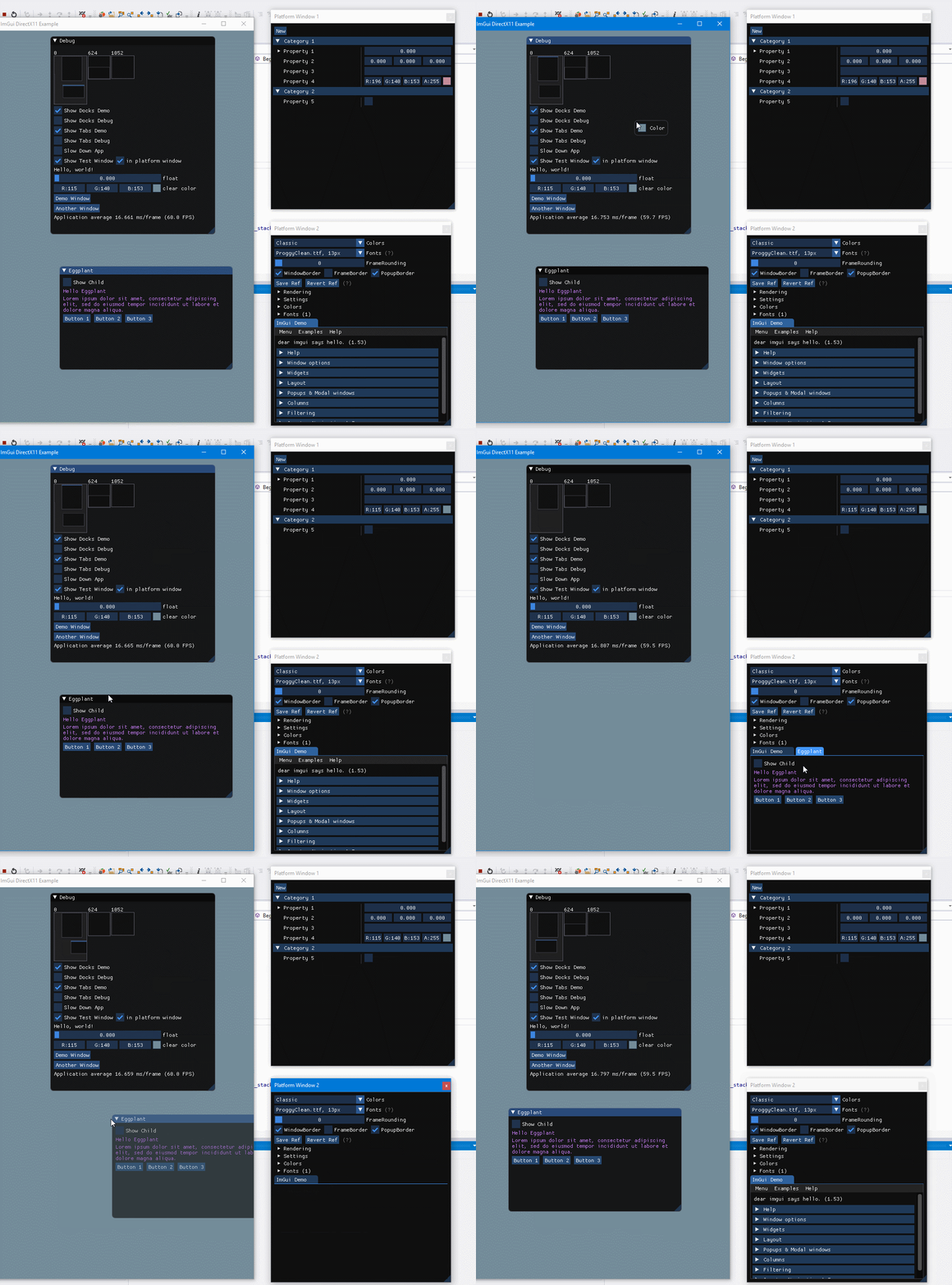
Thanks for the reply, The concept of a main host window with additional viewports makes sense and is pretty cool! In this gif (copied from above), it seems like the platform windows 1 & 2 are added by the user and not automatically. Can you confirm if that is true? If so, can you let me know if there's an example project that demonstrates this? I'd like to create a host window and a child window manually and move imgui windows between them like this gif.
anooprthomas
on 8 Feb 2019
in the multi-viewport model there is currently one main hosting viewport
I'm currently in the process of integrating the docking+viewports branch into a thing but i think this is becoming an issue.
So far I've been using a master-less multi-window concept and for my use-case this is perfect, but of course the concept of a "master-viewport" gets in the way.
(this is for a scientific application with a custom SDL2-based backend; you can never have enough windows to display stuff, and windows are created and destroyed on multiple screens based on what a user is doing. Upgrading this from a 2016 ImGui was remarkably easy but adding the new stuff in is a bit of a headache.)
So it would be nice to be able to notify ImGui of an external viewport/system-window creation so that newly created windows can add add their viewport to the pool (and remove on destruction).
This would also eliminate the need for a master-viewport that's created on init -- offload responsibility to register system windows as viewports to the user, and treat all viewports equal.
(I hope i'm not talking nonsense and have overlooked the functions to do this, haven't completely sifted through the implementation yet)
EDIT: So basically same issue as the comment above. Just N+1 windows instead of just 2 :)
 fgenesis
on 8 Feb 2019
fgenesis
on 8 Feb 2019
Support for multi-viewports in the DX12 back-end was kindly added by @obfuscate (now all pushed to docking branch). There's still a small glitch when merging a window back into the main viewport (fix welcome) but it appears to be mostly usable :)
ocornut
on 18 Oct 2019
Everyone:
I have been working on a Glossary and in particular tried to draft a section explaining the different terms associated to the Multi-viewport feature:
https://github.com/ocornut/imgui/wiki/Glossary#multi-viewports-terms
I have no doubt this can be improved further but in the meanwhile it may help some to understand what's going on and formulate better new issues.
ocornut
on 9 Dec 2019
Why is a main viewport needed?
Without it then it would make it easier to init ImGui with no viewports then create them as required, for example having a start with an open/select project dialog, then editor application
It seems like this might also potentially make for nicer integration, at the moment it appears there is special casing around the main viewport
EDIT: Found the answer (common usage and backwards compatibility)
 ReDucTor
on 5 Jan 2020
ReDucTor
on 5 Jan 2020
Project was primarily created as a solution to write debugging tools for games. Games traditionally are a single-window applications so it was natural for Dear ImGui to render it's windows into game's main window. This may look strange in the context of native OS viewports, however it is important part of legacy that can not be just dropped. After all we probably will not be using native viewports half of the time if not more.
rokups
on 5 Jan 2020
@ReDucTor You are absolutely right that we should aim to make the concept of the "main viewport" optional. I don't have any exact path toward it but it should be made possible eventually for exactly the reason you mention.
Also see Glossary for some details https://github.com/ocornut/imgui/wiki/Glossary
ocornut
on 6 Jan 2020
Useful update for some: 75de34e281141f851f7e5f9f6a923573167bc0f0 adds a concept of "work area" on a per-viewport basis. This is mainly used for menu bars (or status bars) to help declare the space they need in a standard way, so function like DockspaceOverViewport() can automatically avoid the main menu-bar.
There's a viewport->GetWorkPos() and viewport->GetWorkSize() analogous to the terminlogy used by monitor. A typical use would be to use this instead of regular Pos to position items that shouldn't be occluded by the menu bar.
ocornut
on 27 Feb 2020
I have added a bunch of comments around the ImGuiPlatformIO to clarify how the multi-viewport system works. Here's a copy of most of those comments (as of today):
//-----------------------------------------------------------------------------
// [BETA] Platform interface for multi-viewport support
//-----------------------------------------------------------------------------
// (Optional) This is completely optional, for advanced users!
// If you are new to Dear ImGui and trying to integrate it into your engine, you can probably ignore this for now.
//
// This feature allows you to seamlessly drag Dear ImGui windows outside of your application viewport.
// This is achieved by creating new Platform/OS windows on the fly, and rendering into them.
// Dear ImGui manages the viewport structures, and the back-end create and maintain one Platform/OS window for each of those viewports.
//
// See Glossary https://github.com/ocornut/imgui/wiki/Glossary for details about some of the terminology.
// See Thread https://github.com/ocornut/imgui/issues/1542 for gifs, news and questions about this evolving feature.
//
// About the coordinates system:
// - When multi-viewports are enabled, all Dear ImGui coordinates become absolute coordinates (same as OS coordinates!)
// - So e.g. ImGui::SetNextWindowPos(ImVec2(0,0)) will position a window relative to your primary monitor!
// - If you want to position windows relative to your main application viewport, use ImGui::GetMainViewport()->Pos as a base position.
//
// Steps to use multi-viewports in your application, when using a default back-end from the examples/ folder:
// - Application:  Enable feature with 'io.ConfigFlags |= ImGuiConfigFlags_ViewportsEnable'.
// - Back-end:     The back-end initialization will setup all necessary ImGuiPlatformIO's functions and update monitors info every frame.
// - Application:  In your main loop, call ImGui::UpdatePlatformWindows(), ImGui::RenderPlatformWindowsDefault() after EndFrame() or Render().
// - Application:  Fix absolute coordinates used in ImGui::SetWindowPos() or ImGui::SetNextWindowPos() calls.
//
// Steps to use multi-viewports in your application, when using a custom back-end:
// - Important:    THIS IS NOT EASY TO DO and comes with many subtleties not described here!
//                 It's also an experimental feature, so some of the requirements may evolve.
//                 Consider using default back-ends if you can. Either way, carefully follow and refer to examples/ back-ends for details.
// - Application:  Enable feature with 'io.ConfigFlags |= ImGuiConfigFlags_ViewportsEnable'.
// - Back-end:     Hook ImGuiPlatformIO's Platform_* and Renderer_* callbacks (see below).
//                 Set 'io.BackendFlags |= ImGuiBackendFlags_PlatformHasViewports' and 'io.BackendFlags |= ImGuiBackendFlags_PlatformHasViewports'.
//                 Update ImGuiPlatformIO's Monitors list every frame.
//                 Update MousePos every frame, in absolute coordinates.
// - Application:  In your main loop, call ImGui::UpdatePlatformWindows(), ImGui::RenderPlatformWindowsDefault() after EndFrame() or Render().
//                 You may skip calling RenderPlatformWindowsDefault() if its API is not convenient for your needs. Read comments below.
// - Application:  Fix absolute coordinates used in ImGui::SetWindowPos() or ImGui::SetNextWindowPos() calls.
//
// About ImGui::RenderPlatformWindowsDefault():
// - This function is a mostly a _helper_ for the common-most cases, and to facilitate using default back-ends.
// - You can check its simple source code to understand what it does.
//   It basically iterates secondary viewports and call 4 functions that are setup in ImGuiPlatformIO, if available:
//     Platform_RenderWindow(), Renderer_RenderWindow(), Platform_SwapBuffers(), Renderer_SwapBuffers()
//   Those functions pointers exists only for the benefit of RenderPlatformWindowsDefault().
// - If you have very specific rendering needs (e.g. flipping multiple swap-chain simultaneously, unusual sync/threading issues, etc.),
//   you may be tempted to ignore RenderPlatformWindowsDefault() and write customized code to perform your renderingg.
//   You may decide to setup the platform_io's *RenderWindow and *SwapBuffers pointers and call your functions through those pointers,
//   or you may decide to never setup those pointers and call your code directly. They are a convenience, not an obligatory interface.
//-----------------------------------------------------------------------------

// (Optional) Access via ImGui::GetPlatformIO()
struct ImGuiPlatformIO
{
    //------------------------------------------------------------------
    // Input - Back-end interface/functions + Monitor List
    //------------------------------------------------------------------

    // (Optional) Platform functions (e.g. Win32, GLFW, SDL2)
    // For reference, the second column shows which function are generally calling the Platform Functions:
    //   N = ImGui::NewFrame()                        ~ beginning of the dear imgui frame: read info from platform/OS windows (latest size/position)
    //   F = ImGui::Begin(), ImGui::EndFrame()        ~ during the dear imgui frame
    //   U = ImGui::UpdatePlatformWindows()           ~ after the dear imgui frame: create and update all platform/OS windows
    //   R = ImGui::RenderPlatformWindowsDefault()    ~ render
    //   D = ImGui::DestroyPlatformWindows()          ~ shutdown
    // The general idea is that NewFrame() we will read the current Platform/OS state, and UpdatePlatformWindows() will write to it.
    //
    // The functions are designed so we can mix and match 2 imgui_impl_xxxx files, one for the Platform (~window/input handling), one for Renderer.
    // Custom engine back-ends will often provide both Platform and Renderer interfaces and so may not need to use all functions.
    // Platform functions are typically called before their Renderer counterpart, apart from Destroy which are called the other way.

    // Platform function --------------------------------------------------- Called by -----
    void    (*Platform_CreateWindow)(ImGuiViewport* vp);                    // . . U . .  // Create a new platform window for the given viewport
    void    (*Platform_DestroyWindow)(ImGuiViewport* vp);                   // N . U . D  //
    void    (*Platform_ShowWindow)(ImGuiViewport* vp);                      // . . U . .  // Newly created windows are initially hidden so SetWindowPos/Size/Title can be called on them before showing the window
    void    (*Platform_SetWindowPos)(ImGuiViewport* vp, ImVec2 pos);        // . . U . .  // Set platform window position (given the upper-left corner of client area)
    ImVec2  (*Platform_GetWindowPos)(ImGuiViewport* vp);                    // N . . . .  //
    void    (*Platform_SetWindowSize)(ImGuiViewport* vp, ImVec2 size);      // . . U . .  // Set platform window client area size (ignoring OS decorations such as OS title bar etc.)
    ImVec2  (*Platform_GetWindowSize)(ImGuiViewport* vp);                   // N . . . .  // Get platform window client area size
    void    (*Platform_SetWindowFocus)(ImGuiViewport* vp);                  // N . . . .  // Move window to front and set input focus
    bool    (*Platform_GetWindowFocus)(ImGuiViewport* vp);                  // . . U . .  //
    bool    (*Platform_GetWindowMinimized)(ImGuiViewport* vp);              // N . . . .  // Get platform window minimized state. When minimized, we generally won't attempt to get/set size and contents will be culled more easily
    void    (*Platform_SetWindowTitle)(ImGuiViewport* vp, const char* str); // . . U . .  // Set platform window title (given an UTF-8 string)
    void    (*Platform_SetWindowAlpha)(ImGuiViewport* vp, float alpha);     // . . U . .  // (Optional) Setup window transparency
    void    (*Platform_UpdateWindow)(ImGuiViewport* vp);                    // . . U . .  // (Optional) Called by UpdatePlatformWindows(). Optional hook to allow the platform back-end from doing general book-keeping every frame.
    void    (*Platform_RenderWindow)(ImGuiViewport* vp, void* render_arg);  // . . . R .  // (Optional) Main rendering (platform side! This is often unused, or just setting a "current" context for OpenGL bindings). 'render_arg' is the value passed to RenderPlatformWindowsDefault().
    void    (*Platform_SwapBuffers)(ImGuiViewport* vp, void* render_arg);   // . . . R .  // (Optional) Call Present/SwapBuffers (platform side! This is often unused!). 'render_arg' is the value passed to RenderPlatformWindowsDefault().
    float   (*Platform_GetWindowDpiScale)(ImGuiViewport* vp);               // N . . . .  // (Optional) [BETA] FIXME-DPI: DPI handling: Return DPI scale for this viewport. 1.0f = 96 DPI.
    void    (*Platform_OnChangedViewport)(ImGuiViewport* vp);               // . F . . .  // (Optional) [BETA] FIXME-DPI: DPI handling: Called during Begin() every time the viewport we are outputting into changes, so back-end has a chance to swap fonts to adjust style.
    void    (*Platform_SetImeInputPos)(ImGuiViewport* vp, ImVec2 pos);      // . F . . .  // (Optional) Set IME (Input Method Editor, e.g. for Asian languages) input position, so text preview appears over the imgui input box. FIXME: The call timing of this is inconsistent because we want to support without multi-viewports.
    int     (*Platform_CreateVkSurface)(ImGuiViewport* vp, ImU64 vk_inst, const void* vk_allocators, ImU64* out_vk_surface); // (Optional) For a Vulkan Renderer to call into Platform code (since the surface creation needs to tie them both).

    // (Optional) Renderer functions (e.g. DirectX, OpenGL, Vulkan)
    void    (*Renderer_CreateWindow)(ImGuiViewport* vp);                    // . . U . .  // Create swap chain, frame buffers etc. (called after Platform_CreateWindow)
    void    (*Renderer_DestroyWindow)(ImGuiViewport* vp);                   // N . U . D  // Destroy swap chain, frame buffers etc. (called before Platform_DestroyWindow)
    void    (*Renderer_SetWindowSize)(ImGuiViewport* vp, ImVec2 size);      // . . U . .  // Resize swap chain, frame buffers etc. (called after Platform_SetWindowSize)
    void    (*Renderer_RenderWindow)(ImGuiViewport* vp, void* render_arg);  // . . . R .  // (Optional) Clear framebuffer, setup render target, then render the viewport->DrawData. 'render_arg' is the value passed to RenderPlatformWindowsDefault().
    void    (*Renderer_SwapBuffers)(ImGuiViewport* vp, void* render_arg);   // . . . R .  // (Optional) Call Present/SwapBuffers. 'render_arg' is the value passed to RenderPlatformWindowsDefault().
(EDIT A previous version of this message mentioned a api breaking change of renaming the UpdatePlatformWindows, RenderPlatformWindowsDefault, DestroyPlatformWindows functions. This renaming has been reverted shortly after, as I am reevaluating a better solution.)
ocornut
on 6 Mar 2020
Addendum for those reading this in e-mail:
The previous post initially mentioned a api breaking change of renaming the UpdatePlatformWindows, RenderPlatformWindowsDefault, DestroyPlatformWindows functions. This renaming has been reverted shortly after, as I am currently reevaluating a better solution. So right now there's zero breaking change.
Previous post was updated to reflect this, and the bunch of comments are still there.
ocornut
on 6 Mar 2020
Related issues
 KaungZawHtet
·
3Comments
KaungZawHtet
·
3Comments
 BlackWatersInc
·
3Comments
BlackWatersInc
·
3Comments
 mkanakis
·
3Comments
mkanakis
·
3Comments
 spaderthomas
·
3Comments
spaderthomas
·
3Comments
 Folling
·
3Comments
Folling
·
3Comments
Most helpful comment
I have pushed an early branch here:
https://github.com/ocornut/imgui/tree/viewport
I consider this experimental at this point, at this is a feature planned for 1.70 (probably along with docking/tabs) but if you are curious you may check it out. Feedback of early adopters will help improve this. I do not recommend merging this in your master work branch, but if you are time to spare to try to integrate it with your setup in a branch of your project, then you can throw your feedback at me it'll be useful.
The examples/ are being refactored to separate the platform code (win32, sdl, gflw) from the renderer code (directx 9 to 12, opengl, vulkan etc.). The idea is that we can combine them more easily, reuse code more easily, and hopefully easier to understand. We will also be able to more easily add new ones. See the files in the root folder: https://github.com/ocornut/imgui/tree/viewport/examples
The viewport feature is enabled through an optional interface that the platform and renderer back-end needs to provide. The aim of this interface is to allow imgui to create native windows and render into them.
The addition of multi-viewport however puts more burden to the back-end. It's completely optional and I tried to keep the extra features at the bottom of the files, but this complexity still shows a little to the first-time reader/user of example code. In particular providing imgui with the mouse position is a little more involved. Will keep improving that however I can.
None of the api/specs are locked. The reason I'm pushing this very early in its lifetime is to accumulate feedback. I expect most fields/flags to be renamed or rearranged at some point.
If you are running Windows and want to try it quickly, you can compile and run the Win32+DirectX11 or GLFW+OpenGL3 example. You should be able to drag windows this way:
Some known issues