Does anyone know what would be the best approach to render drop shadow behind the windows?
 wajsic
All 16 comments
It's not supported at the moment but here's a few ideas.
The most simple / basic approach would be to draw a transparent rounded rectangle under the window shape. You can hardcore this in Begin() fairly easily. But without a gradient within the shadow it won't look very good.
Adding a gradient would look better but requires more work setting up the vertices.
There's also the question that you may not want the shadow to actually draw behind the window because that is a waste of fill-rate, and solving this (especially as anti-aliased rounded borders are involved) makes the geometry more complex to create.
 ocornut
on 17 Sep 2017
ocornut
on 17 Sep 2017
I have been playing exactly with shadows lately 😃
I am focusing on fast and easy shadows for non-rounded rectangles (for now).
I am trying to avoid using shaders or other fancy techniques for ease of integration into existing imgui based projects.
A few approaches that I have been trying:
1) Generating a texture
2) Generating vertices adaptively where the shadow signal is changing a lot, so mainly at the corners
3) Generating a regular grid of triangles at the corners and color their vertices accordingly
You can see all of them here:

Approach 1) is great but you need to handle textures and generate a new one every time you need a different combination of sigma (shadow kernel) and rectangle size. And probably you will need to merge them inside the main font texture to avoid too many draw calls. You're also wasting some fill rate as pointed out by Omar. You can get really nice looking shadow with very small texture (even 32x32 is great). You could potentially generate only a single corner and re-use it everywhere playing with UV coordinates to even lower down the memory usage.
You could also "adapt" a generated texture for a given sigma to rectangles with different width and height but this requires some work in generating geometry and uv coordinates accordingly.
Approach 2) is probably the best so far, for a small shadow you can do very good approximation with about ~23 triangles for each rectangle with shadow. It's also very easy to implement and you have zero fill rate waste. For a larger sigma you need more triangles, potentially even double them but should be ok with most triangle budgets unless you plan to shadow everything in your UI.
This is great and makes it easy to also support rectangle with rounded corners.
Approach 3) looks great but wastes too many triangles, approach 2) can do the same with a lot less.
If you need a formula to generate the correct shadow for a rounded rectangle, you could take a look at http://madebyevan.com/shaders/fast-rounded-rectangle-shadows/
Beware, there's a typo in the formulas referenced in this article!
I have been wasting at least 1 hour trying to figure out what was wrong with my code before figuring this out ;)
// License: CC0 (http://creativecommons.org/publicdomain/zero/1.0/)

// This approximates the error function, needed for the gaussian integral
vec4 erf(vec4 x) {
  vec4 s = sign(x), a = abs(x);
  x = 1.0 + (0.278393 + (0.230389 + 0.078108 * (a * a)) * a) * a;
  x *= x;
  return s - s / (x * x);
}

// Return the mask for the shadow of a box from lower to upper
float boxShadow(vec2 lower, vec2 upper, vec2 point, float sigma) {
  vec4 query = vec4(point - lower, upper - point);
  vec4 integral = 0.5 + 0.5 * erf(query * (sqrt(0.5) / sigma));
  return (integral.z - integral.x) * (integral.w - integral.y);
}
The line
float boxShadow(vec2 lower, vec2 upper, vec2 point, float sigma) {
  vec4 query = vec4(point - lower, upper - point);
//...
}
should really be
float boxShadow(vec2 lower, vec2 upper, vec2 point, float sigma) {
  vec4 query = vec4(point - lower, point - upper);
//...
}
 Pagghiu
on 17 Sep 2017
Pagghiu
on 17 Sep 2017
Thank you for taking your time for such an exhaustive explanation. I had in mind a lot of ideas but all of them included shaders which I'm trying to avoid for the reasons you said. This post pointed me into the right direction.
wajsic
on 17 Sep 2017
Thanks @Pagghiu for looking into this, amazing stuff.
2) is definitively the way to go here. If we allow for arbitrary 2d offsets for the shadow then picking vertices without overlapping the parent shape is a little more work - if you come up with a helper function to handle it I'm happy to add that to the Styling options (my own drop-shadow git stash got nowhere as far as where yours is). If it's simpler to just support a zero ShadowOffset and fully outward spread it's already a step forward to have it.
I see you have a [ ] Linear Spread checkbox. Wouldn't a simple distance + power curve give good enough results compared to that function you linked above?
ocornut
on 17 Sep 2017
Thanks Omar, sure, if I will try to find time to cleanup it a little bit and share.
The linear checkbox activates a linear approximation of the shadow falloff, and it's indistinguishable from the "correct" one for small sigmas. For bigger sigma, the linear approximation is not good, the results are clearly banded and clamped incorrectly.
The box shadow formula is a power formula, as it's the Taylor expansion of the erf error function (https://en.wikipedia.org/wiki/Error_function). One could drop a few terms to save some multiplications of course or approximate it in many ways, even with bezier curves or splines (example http://stereopsis.com/shadowrect/), but I don't think it will be a big impact for a few vertices.
I have not been focusing on fine optimisation yet because I have been trying to figure out the best approach with constraints I have been giving myself.
ShadowOffset is easy to support, you just offset the sampling coordinate to feed into the boxShadow function. To avoid wasting triangles one should generate also triangles/vertices asymmetrically to be more dense in the direction of the shadowOffset and yes, that would be a little more complex to handle but still possible.
Pagghiu
on 17 Sep 2017
I have not been able to spend additional time cleaning and optimising the shadow mesh generation, or adding other features like generation for rounded boxes but as I've been promising, here is the code.
There's a self contained sample in the opengl2_example folder
https://github.com/Pagghiu/imgui/tree/2017-09-box-shadow


Hope this is useful to someone!
Pagghiu
on 27 Sep 2017
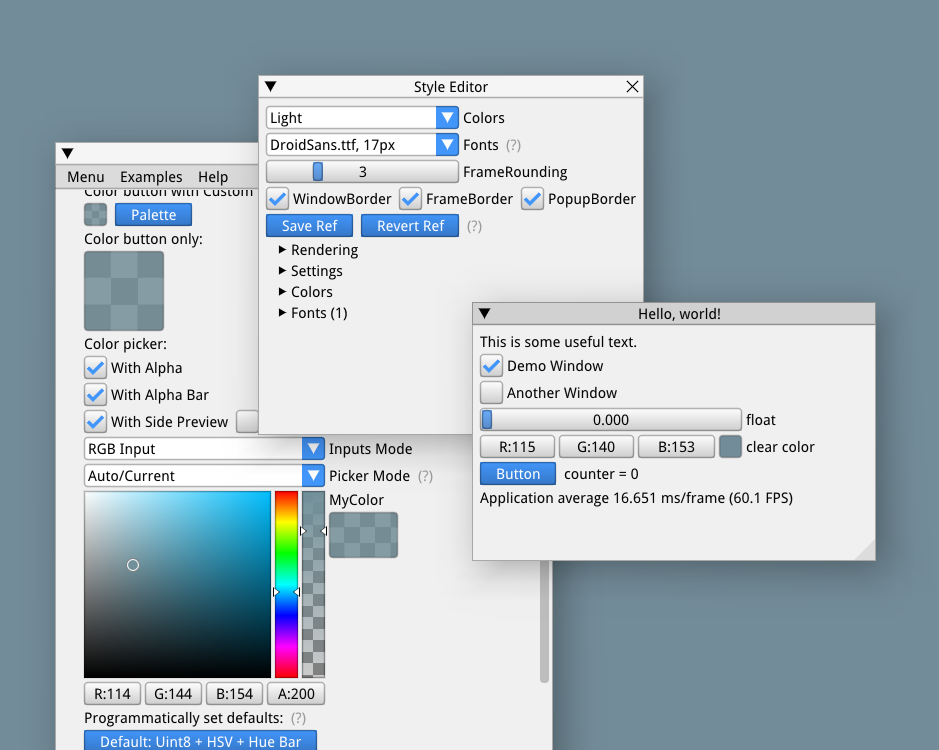
Toying around with styling and tried your shadows.. they look great with the a right settings and white theme.
ocornut
on 17 Aug 2018
Beautiful shot, it looks quite similar to native macOS windows shadowing.
I hope this makes its way inside the master someday! 😄
Pagghiu
on 17 Aug 2018
It will definitively, this is still an early draft and I would like to focus on finishing Docking/Viewport before moving to new pastures, then steer the internals to make those changes possible (refactor the Render functions, etc.).
ocornut
on 17 Aug 2018
+1 for shadows in master!
 rg-net
on 10 Dec 2018
rg-net
on 10 Dec 2018
Pushed a branch with work by @ShironekoBen on a different approach for shadows.
When experimenting we found earlier approach had too many edge cases (thin or small shapes) and the thing was redesigned around baking data in atlas texture:
https://github.com/ocornut/imgui/commits/features/shadows
(A)
First commit d2676ada5556d0c2ffea42d90c5dbf4097d11b07 has most of that shadow code as-is.
This time also support shadows behind rounded windows (which required an unusually large and complex amount of polygon clipping code... kudos to Ben for coping with that, kind of made me want to obsolete rounded windows...).
(B)
Here's the catch: baking in texture means changing some shadow settings during runtime requires an update/re-upload of the texture. That alone can get very hairy to support properly in back-ends. Third commit bb8a3cb10f0ffbae2242198e62e2f8956199cb5c in the branch has to some code doing just that. This code when it reaches maturity will be useful as a building block for dynamic font atlas. Current code I would say is experimental and doesn't constitute how the final back-end API should look like.
[edit] If we limit the amount of real-time tweaking or limit the scope of (B) or leave it to the app to reload, we can commit most of (A) ahead of time. Doing the full version of (B) will allow for dynami tweaking of shadow settings and be the building block for other features.
Shots
Previous "hacked style" with those shadows (replicating screenshots above)

With regular "Light" style as-is from master (same shadows, just a less sexy style)

There's probably more work to provide here. The irony is that this may over time become somehow less useful for apps transitioning to use more of the platform/multi-viewport feature. However one of the aim for this is to also provide a low-level ImDrawList API which can be also used for custom widgets.
ocornut
on 3 Jun 2020
Noticed the window shadows feature branch is gone (https://github.com/ocornut/imgui/commits/features/shadows is a dead link now), and the changes have not been pulled into master.
Any news on this feature? Has it been dropped?
 camplowell
on 17 Jul 2020
camplowell
on 17 Jul 2020
@camplowell We've been working on this, I only removed it from public repo to avoid pushing to two locations as I forgot I mentioned it here. Pushed again now.
ocornut
on 17 Jul 2020
Note that Demo>Examples>Custom Rendering demonstrates some of it including new primitives:

We're still working on the API, but the ImDrawShadowFlags_CutOutShapeBackground shape allows cutting out a hole inside the shadows to avoid filling pixels twice. See the left-most rounded rectangle showing background color behind: the shadows triangles are clipped.

ocornut
on 17 Jul 2020
that's seriously beautiful 😃
Pagghiu
on 17 Jul 2020
Makes you want the docking/viewport thing to be done already!!!
 frink
on 1 Nov 2020
frink
on 1 Nov 2020
Related issues
 NPatch
·
3Comments
NPatch
·
3Comments
 dowit
·
3Comments
dowit
·
3Comments
 mnemode2
·
3Comments
mnemode2
·
3Comments
 the-lay
·
3Comments
the-lay
·
3Comments
 SlNPacifist
·
3Comments
SlNPacifist
·
3Comments
Most helpful comment
Toying around with styling and tried your shadows.. they look great with the a right settings and white theme.