http://i.imgur.com/v3oSMok.gifv
Correct )
 or75
or75
All 32 comments
Please describe your issue in detail including steps to reproduce and solutions you tried already. Also attach screenshots here at github. Thank you.
 aggsol
on 9 Jun 2017
aggsol
on 9 Jun 2017
1) Open in demo app -> (Widgets Header)
2) Open Word Wrapping
3) Open Selectables
4) Open Selectables -> In Columns
5) Open Selectables -> Grid
6) Open Filtered Text Input
7) Open Multi-Line Text Input
8) Scroll, it's all

directx9_example - bug
directx11_example - bug
opengl_example - Works because no "Selectables -> In Columns"
opengl2_example - bug
opengl3_example - bug
Tested on:
OS: win10 x64 pro (1703 15063.332)
Video card: gtx 1050
or75
on 10 Jun 2017
That's super strange. I couldn't repro it here.
Do you get the bug with the precompiled binaries?
http://www.miracleworld.net/imgui/binaries/imgui-demo-binaries-20161113.zip
 ocornut
on 10 Jun 2017
ocornut
on 10 Jun 2017
Yes, it's the same here.
or75
on 10 Jun 2017
Must be buggy drivers?
 paulsapps
on 10 Jun 2017
paulsapps
on 10 Jun 2017
Perhaps, yes, but why it happens with some widgets only when they are open ?
Word Wrapping,
Selectables -> In Columnsm,
Selectables -> Grid,
Filtered Text Input,
Multi-Line Text Input
or75
on 10 Jun 2017
What are your OS and graphics cards?
There are more vertices now.
You can try opening the Metrics window to browse the generated vertices, and see if there is a visible problem with the vertex being created?
ocornut
on 12 Jun 2017
OS: win10 x64 pro (1703 15063.332)
Graphics card: gtx 1050
(Directx9-11) -> Something incomprehensible in general:
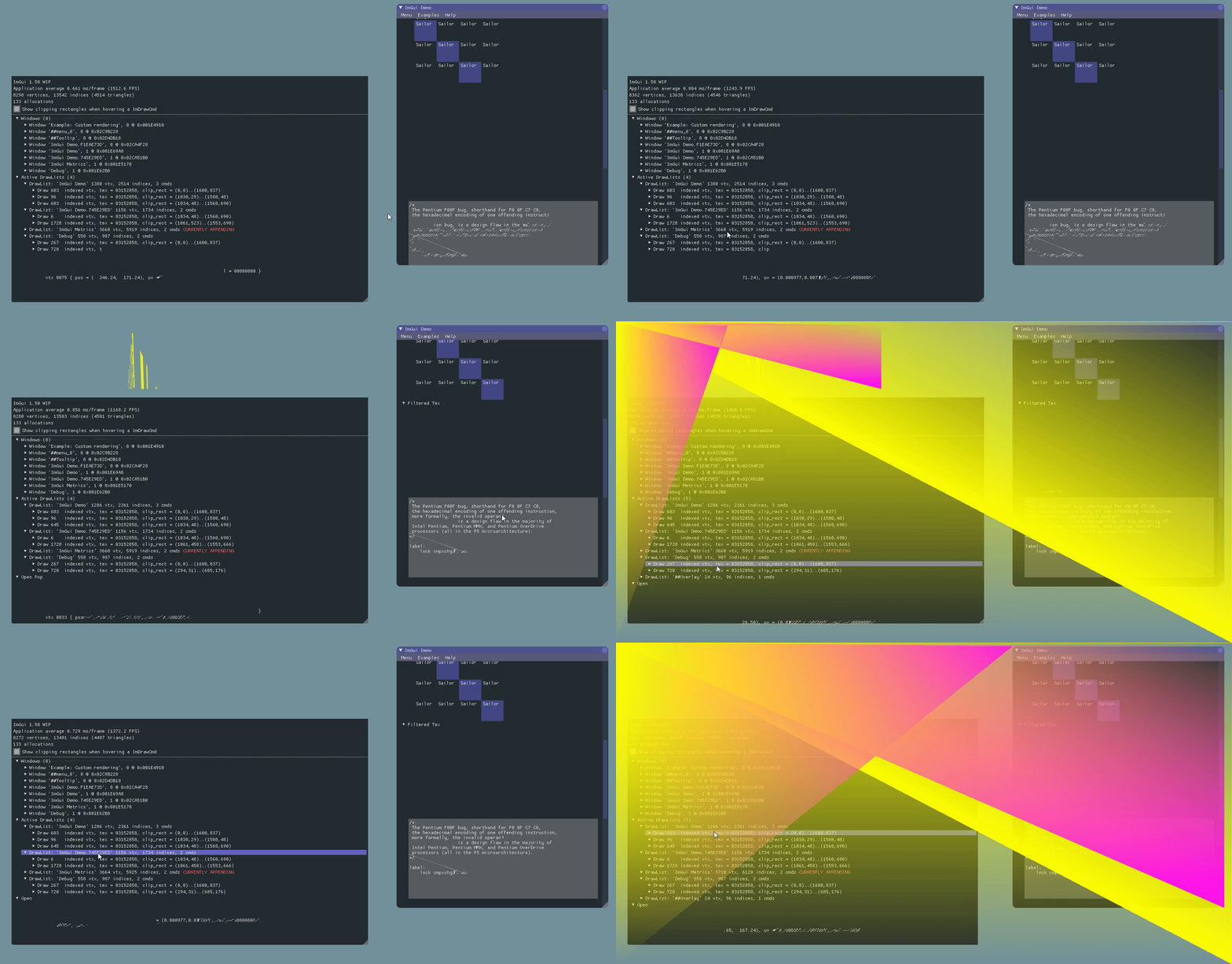
(Opengl2-3) -> (Only the vertices disappear here)

or75
on 13 Jun 2017
Do you have any issues in other 3D apps? That direct3d screen looks a bit like issues with overclocking/overheating.
 dpethes
on 13 Jun 2017
dpethes
on 13 Jun 2017
I agree, looks like it might be some sort of hardware damage? Do games etc work OK?
paulsapps
on 13 Jun 2017
Everything works fine (Games,App,Etc)
or75
on 14 Jun 2017
The metrics window looks good so the bug isn't in imgui core (but however unlikely, might be something in the examples app).
The render loop are using scissoring which is rather infrequently used by apps. What happen if you disable scissor enable from the examples renderers?
I wonder if some of your installed software could be hooking into the DX/OGL rendering API and doing something funky as well?
ocornut
on 14 Jun 2017
I have the same issue as well while scrolling ImGui Demo window.
gtx970, Windows 10 x64
 dmitryhryppa
on 2 Jul 2017
dmitryhryppa
on 2 Jul 2017
@or75 @dmitryhryppa Could you try all the precompiled binaries package to confirm that it once worked (a while ago) and got broken sometimes? http://www.miracleworld.net/imgui/binaries/
Thanks!
ocornut
on 2 Jul 2017
@ocornut ,
imgui-demo-binaries-20160410 <-- working fine
imgui-demo-binaries-20161113 <-- issue exist here
Latest build contains "In columns" section inside "Selectables", whereas previous build does not contains it.
So, looks like "In columns" conflicting with some another example components.
Hope it helps.
dmitryhryppa
on 3 Jul 2017
@dmitryhryppa Yes, that is right.
@ocornut @dmitryhryppa
- Word Wrapping
- Selectables -> In Columnsm
- Selectables -> Grid,
- Filtered Text Input
- Multi-Line Text Input
If something is closed from this list, everything is fine :)
or75
on 3 Jul 2017
I was able to reproduce this too while I was converting the ImDrawVert struct to one that was compatible with the Cocos2D-X renderer. I cannot see any graphical glitches running the examples alone, but I can see them through the Cocos2D-X renderer.
There seems to be a very slight memory corruption in the vertex buffer and can be seen by changing the ImDrawVert to the following:
#define IMGUI_OVERRIDE_DRAWVERT_STRUCT_LAYOUT \
struct ImDrawVert \
{ \
ImVec2 pos; \
float z = 1000.f; \
ImU32 col; \
ImVec2 uv; \
};
One would expect z here to always be 1000.f, but turns out it's not:
Z is: 0
Z is: 0
Z is: 3.87324e-38
Z is: 3.87324e-38
Z is: 2.24208e-43
Z is: 2.60603e-38
Z is: 7.21133e-26
Z is: 0
Z is: 3.64338e-43
Z is: 0
Z is: 3.58732e-43
Z is: 2.602e-38
Z is: 0
Z is: 1.56945e-43
Z is: 1.56945e-43
Z is: 1.56945e-43
Z is: 1.56945e-43
I tested that using the OpenGL 2 example in Arch Linux, and this test can be found here: https://github.com/Rubonnek/imgui/commit/aa1e159537eb7bc514220900d63677f0e4e75846
I just tried the same with the OpenGL 3 example, and I see z changing values too.
 Rubonnek
on 13 Jul 2017
Rubonnek
on 13 Jul 2017
@Rubonnek ImDrawVert does not support additional data, just reordering.
Vertex buffer is represented using ImVector<ImDrawVert>. ImVector::reserve() allocate memory and keep it uninitialized. Therefore every field which is not filled by ImGui will contain random trash. __I had to deal with this error and I chose to always initialize allocated memory to zero.__ You can examine changes there.
Alternative approaches (which failed):
- Adding default constructor to
ImDrawVertdoes not work becauseImVectorworks only with POD types and does not call constructors. - Modifying
ImDrawList:: PrimWriteVtxto initialize extra data inImDrawVertworks in theory. However, text rendering and a few other primitives does not use this function and access vertex buffer to batch data generation.
 thedmd
on 13 Jul 2017
thedmd
on 13 Jul 2017
Running with valgrind will catch corruptions. I don't think this is a corruption, just uninitialized memory as thedmd said.
paulsapps
on 13 Jul 2017
@thedmd @paulsapps Thanks a lot for the information!
Rubonnek
on 13 Jul 2017
The code intentionally avoid initializing memory or calling constructor because imgui doesn't rely on any of those for maximum perf.
I think we could change the ImDrawList code specifically for the purpose of calling either memset or the constructor after calling reserve() or resize(), and that only if ImDrawVtx is defined and its sizeof() is != sizeof of the default ImDrawVtx.
ocornut
on 14 Jul 2017
You can also use std::is_trivially_default_constructible from #include
 ratchetfreak
on 14 Jul 2017
ratchetfreak
on 14 Jul 2017
This quick and hack should do the trick. Remember to include <type_traits>.
inline void reserve(int new_capacity)
{
constexpr auto should_clear_memory = std::is_same<T, ImDrawVert>::value
&& sizeof(ImDrawVert) != 20;
if (new_capacity <= Capacity) return;
const size_t new_capacity_bytes = (size_t)new_capacity * sizeof(value_type);
const size_t size_bytes = (size_t)Size * sizeof(value_type);
T* new_data = (value_type*)ImGui::MemAlloc(new_capacity_bytes);
if (Data)
{
memcpy(new_data, Data, size_bytes);
if (should_clear_memory)
memset(new_data + Size, 0, new_capacity_bytes - size_bytes);
}
else if (should_clear_memory)
memset(new_data, 0, new_capacity_bytes);
ImGui::MemFree(Data);
Data = new_data;
Capacity = new_capacity;
}
I think ImGui is using C++98, so probably can't use this.
paulsapps
on 14 Jul 2017
ImGui does not this that snippet. If @ocornut decide it may benefit an library, appropriate solution can be found.
It is a quick & dirty hack, and quick & dirty hacks are using any tool that gets the job done. They do not care to put label 'hot' on Starbucks coffee cup. : )
thedmd
on 15 Jul 2017
Moved that discussion to #1231
ocornut
on 15 Jul 2017
The problem is not yet solved in the last build (imgui-demo-binaries-20170723) all the same. (Even on Vulkan).
This problem still exists even on a laptop with (Intel HD Graphics 500).
or75
on 29 Jul 2017
@or75 Have you tried updating your graphics driver?
(btw #1231 has nothing to do with your problem, it was a different issue that @Rubonnek brought to this thread)
ocornut
on 29 Jul 2017
@ocornut I have everything updated (I do not know why such a problem).
I'll try to do something with the driver settings, if something happens, I'll tell you :)
or75
on 29 Jul 2017
I am having the same issue with imgui-demo-binaries-20171013.
Interestingly it only seems to happen for me, when I expand "Filtered Text Input", can expand pretty much everything else, so maybe the problem is somehow related to that.
Edit: Seems to be related to ImGuiInputTextFlags_Password still investigating with Debugger.
Edit2: Seems to be related to PushFont / PopFont somehow.
Computer Information:
Manufacturer: LENOVO
Model: 90B6000AGE
Form Factor: Desktop
No Touch Input Detected
Processor Information:
CPU Vendor: GenuineIntel
CPU Brand: Intel(R) Core(TM) i7-4790 CPU @ 3.60GHz
CPU Family: 0x6
CPU Model: 0x3c
CPU Stepping: 0x3
CPU Type: 0x0
Speed: 3592 Mhz
8 logical processors
4 physical processors
HyperThreading: Supported
FCMOV: Supported
SSE2: Supported
SSE3: Supported
SSSE3: Supported
SSE4a: Unsupported
SSE41: Supported
SSE42: Supported
AES: Supported
AVX: Supported
CMPXCHG16B: Supported
LAHF/SAHF: Supported
PrefetchW: Supported
Operating System Version:
Windows 10 (64 bit)
NTFS: Supported
Crypto Provider Codes: Supported 311 0x0 0x0 0x0
Video Card:
Driver: NVIDIA GeForce GTX 745
DirectX Driver Name: nvd3dum.dll
Driver Version: 21.21.13.7688
DirectX Driver Version: 21.21.13.7688
Driver Date: 2 10 2017
OpenGL Version: 4.5
Desktop Color Depth: 32 bits per pixel
Monitor Refresh Rate: 60 Hz
DirectX Card: NVIDIA GeForce GTX 745
VendorID: 0x10de
DeviceID: 0x1382
Revision: 0xa2
Number of Monitors: 1
Number of Logical Video Cards: 1
No SLI or Crossfire Detected
Primary Display Resolution: 1920 x 1080
Desktop Resolution: 1920 x 1080
Primary Display Size: 18.78" x 10.55" (21.54" diag)
47.7cm x 26.8cm (54.7cm diag)
Primary Bus: PCI Express 16x
Primary VRAM: 2047 MB
Supported MSAA Modes: 2x 4x 8x
Sound card:
Audio device: Lautsprecher (Realtek High Defi
Memory:
RAM: 8140 Mb
I know the GPU driver is not the most recent, but was pretty satisfied with that one so far.
 dtugend
on 15 Oct 2017
dtugend
on 15 Oct 2017
There seems to be something wrong with the merging logic in UpdateTextureID:
https://github.com/ocornut/imgui/blob/09f6f564d91ae061bfe35763c8e738e9f7255774/imgui_draw.cpp#L225
I suppose curr_cmd->ElemCount == 0 && is missing there, because compare with the logic in UpdateClipRect:
https://github.com/ocornut/imgui/blob/09f6f564d91ae061bfe35763c8e738e9f7255774/imgui_draw.cpp#L206
Confirmed it's the merging logic by detouring the UpdateTextureID in the debugger to always use AddDrawCmd() branch of the if.
Edit: Also tested the Windows build of the pull request bellow, with fixed code issue doesn't seem to be reproducable anymore.
dtugend
on 15 Oct 2017
WOW, really amazing and weird bug! I managed to reproduce it now, it was there all along! Sorry @or75!
It required a very specific combination of nodes opened and a specific clipping configuration:
edit minor edits.
Word Wrapping
Selectables -> In Columns
Filtered Text Input
+ enough stuff below to be able to scroll exactly until the first two are not possible.
The code in Word-Wrapping render a custom rectangle by appending manually to the ImDrawList without testing for visibility, so those vertices are always appended into the draw list.
The columns code using the ImDrawList channel splitting API which in
ChannelsMerge()callsAddDrawCmd(), that itself is an error, it should callUpdateClipRect(). By calling AddDrawCmd it would always add a new command after merging. But in this case the Columns have no borders, and when the contents is out of screen the entire columns set produces zero vertices. So previously it would add an unnecessary extra draw command into the stream.The Password input text demo calls PushFont() as you pointed out, which calls
UpdateClipRect()to give it a chance to either add a new draw command or merge them.
So what happened with that specific configuration and scrolling is that the word-wrapping demo code adds vertices, then the fully clipped columns adds a extraneous draw command, which then gets filled with the vertices below the columns area. So at this point in the draw list there are TWO draw commands with exactly the same clipping rectangle and texture, which shouldn't happen. And because it wasn't meant to ever happen the code in UpdateClipRect() essentially tries to apply the merge that was only supposed to happen when the second command is empty.
Note that if the Columns weren't clipped it wouldn't happen because there would be different draw command in-between for the columns contents, so merging wouldn't trigger. Also if the Word-Wrapping code wasn't submitting vertices regardless of its visibility there would haven't been two consecutive draw commands with the same clipping rectangle.
So, there are two fixes here:
- I fixed ChannelMerge() from creating a new command w/ commit: https://github.com/ocornut/imgui/commit/e32569dd5aa008448b10d9be11e5193502f5368b
- Your fix in #1368 is also correct.
Either of those fix will make the issue go away.
Because AddDrawCmd() is exposed to the user your fix and the similar test in curr_cmd->ElemCount == 0 are necessary and correct. If AddDrawCmd() wasn't exposed technically wouldn't be required, but it's saner and more logical to just test for that.
We are also reducing the number of draw calls when columns are fully clipped.
Thank you @or75 , thank you @ripieces ! And thanks @dmitryhryppa, @paulsapps, @aggsol , @dpethes.
ocornut
on 15 Oct 2017
Related issues
 GrammarLord
·
3Comments
GrammarLord
·
3Comments
 ILoveImgui
·
3Comments
ILoveImgui
·
3Comments
 the-lay
·
3Comments
the-lay
·
3Comments
 BlackWatersInc
·
3Comments
BlackWatersInc
·
3Comments
 SlNPacifist
·
3Comments
SlNPacifist
·
3Comments
Most helpful comment
WOW, really amazing and weird bug! I managed to reproduce it now, it was there all along! Sorry @or75!
It required a very specific combination of nodes opened and a specific clipping configuration:
edit minor edits.
The code in Word-Wrapping render a custom rectangle by appending manually to the ImDrawList without testing for visibility, so those vertices are always appended into the draw list.
The columns code using the ImDrawList channel splitting API which in
ChannelsMerge()callsAddDrawCmd(), that itself is an error, it should callUpdateClipRect(). By calling AddDrawCmd it would always add a new command after merging. But in this case the Columns have no borders, and when the contents is out of screen the entire columns set produces zero vertices. So previously it would add an unnecessary extra draw command into the stream.The Password input text demo calls PushFont() as you pointed out, which calls
UpdateClipRect()to give it a chance to either add a new draw command or merge them.So what happened with that specific configuration and scrolling is that the word-wrapping demo code adds vertices, then the fully clipped columns adds a extraneous draw command, which then gets filled with the vertices below the columns area. So at this point in the draw list there are TWO draw commands with exactly the same clipping rectangle and texture, which shouldn't happen. And because it wasn't meant to ever happen the code in
UpdateClipRect()essentially tries to apply the merge that was only supposed to happen when the second command is empty.Note that if the Columns weren't clipped it wouldn't happen because there would be different draw command in-between for the columns contents, so merging wouldn't trigger. Also if the Word-Wrapping code wasn't submitting vertices regardless of its visibility there would haven't been two consecutive draw commands with the same clipping rectangle.
So, there are two fixes here:
Either of those fix will make the issue go away.
Because
AddDrawCmd()is exposed to the user your fix and the similar test incurr_cmd->ElemCount == 0are necessary and correct. IfAddDrawCmd()wasn't exposed technically wouldn't be required, but it's saner and more logical to just test for that.We are also reducing the number of draw calls when columns are fully clipped.
Thank you @or75 , thank you @ripieces ! And thanks @dmitryhryppa, @paulsapps, @aggsol , @dpethes.