Imgui: Gallery: Post your screenshots / code here (PART 4)
This is Part 4. I am splitting issues to reduce loading times and locked the old ones.
Screenshots Part 1 #123
Screenshots Part 2 #539
Screenshots Part 3 #772
Screenshots Part 4 #973
Screenshots Part 5 #1269
Screenshots Part 6 #1607
Screenshots Part 7 #1902
Screenshots Part 8 #2265
Screenshots Part 9 #2529
Screenshots Part 10 #2847
Screenshots Part 11 #3075
Screenshots Part 12 #3488
Also see: Software using dear imgui (you can help complete the list!)
You can post your screenshots here!
 ocornut
All 68 comments

Nothing complicated or particularly fancy; just a functional editor UI for a game engine I'm building with .NET Core.
 mellinoe
on 21 Jan 2017
mellinoe
on 21 Jan 2017
Working on a client/launcher UI retro design.


 ExtasyHosting
on 23 Jan 2017
ExtasyHosting
on 23 Jan 2017
@ExtasyHosting Very nice design. The mix between pixel and smooth fonts is great.
Would you mind sharing the ImGui style you are using ? I would like to implement the opposite one (white-on-black instead of black-on-one). Good job :)
 itamago
on 25 Jan 2017
itamago
on 25 Jan 2017
ImGUI graph for plotting the time (x) vs position (y) of a player in Boundless as they walk through a portal. Everything left of the green line is the source world on the right is the destination world. You can see the server position and client position (which is predictive so a few frames ahead to reduce latency). The aim of the graph is to show that the transition is completely smooth.

This helped us visualize the problems with transitioning from one server to another seamlessly which were:
- src and dst server update ticks are out of sync
- latency between src and dst server can be different
Which we can now adjust for these (by moving the destination world position by the players velocity multiplied by the time they are out) and see that the transition is smooth.
 davidfooks
on 30 Jan 2017
davidfooks
on 30 Jan 2017
c++ Game engine and editor. https://github.com/volcoma/EtherealEngine

 volcoma
on 30 Jan 2017
volcoma
on 30 Jan 2017
Electric Eye testing tool made and used at NetFlix

ocornut
on 31 Jan 2017
Here are some screenshots of how we're using dear imgui in Overgrowth:


 David20321
on 2 Feb 2017
David20321
on 2 Feb 2017
Simplified excel-like spreadsheet using imgui!

 Pagghiu
on 12 Feb 2017
Pagghiu
on 12 Feb 2017
Simplified excel-like spreadsheet using imgui!
This is very cool slash weird slash amazing slash worrying - but why? :)
ocornut
on 12 Feb 2017
Ahah, well first of all bridging unrelated technologies is one of my best ability ! :P
Seriously, on one of our software that powers a laser measurement device, we have the need for a way to "combine" multiple results from different measurements using some formulas only known at runtime.
The first obvious solution was integrating a scripting language but this still requires end users to do some sort of "programming", that scares most of our user base.
So I said "I just need a simple expression parser", I have tried to look for existing libraries in stb / imgui style and I have found tinyexpr on github.
When doing some tests with the library the indecent idea came into my mind "can I really be doing a kind of excel using this thing?".
Everyone knows excel, so everyone will be able to use our result combine module!
After two hours of hacking I got the first proof of concept, and then I simply added a few fancier features in the following days (dependency tracking, range variables etc ).
The imgui code is incredibly short ( for now). I am just using columns with buttons displaying the formatted output of the formula and when a cell is active, i draw an inputtext instead of the button.
I will send maybe a shot when this Frankenstein gets integrated in the main software ;)
Pagghiu
on 13 Feb 2017
one bit of extra functionality as expressions get longer, put the intputtext with the formula at the top (just like excel). Then if you press F2 you set focus on the input text.
 ratchetfreak
on 13 Feb 2017
ratchetfreak
on 13 Feb 2017
Using ImGUI for interface for apple ][ emulator. Used for windows for 6502 debugger. Still a work in progress ,but it's coming along:
https://github.com/allender/apple2emu

 allender
on 15 Feb 2017
allender
on 15 Feb 2017
I'm dying to not being able to post pictures of the use of ImGui at work :(
itamago
on 16 Feb 2017
I'm porting a tool i made from C# WinForms to C++. The tool is pretty close to completion right now and I'm using ImGui because it's the easiest lightweight UI library i found.

 Admicos
on 20 Feb 2017
Admicos
on 20 Feb 2017
i'm using imgui to build a home automation dashboard with raspberry pi. Using SDL to draw on fb makes this starts up very quickly (compare to Xorg). It also makes development very easy: the same code can run in Windowed mode on PC and native FB fullscreen mode on RPi.

 itszero
on 21 Feb 2017
itszero
on 21 Feb 2017
Currently building a 2D framework / GameEngine (as a little Sunday project) and am currently implementing some debug- / editor tools

Using a mixture of ImGui (obv.) and RTTR and have the little beasty on the right implemented (so far...) with just a few lines of code in next to no time!
 Alia5
on 23 Feb 2017
Alia5
on 23 Feb 2017
@r-lyeh, last year you posted an UI mockup for an asset library/manager, and I was wondering which font you were using for text ?
Link here : link
Thanks !
itamago
on 26 Feb 2017
@itamago, very likely DejaVuSans/16.f (or DroidSans/18.f :)
 r-lyeh-archived
on 26 Feb 2017
r-lyeh-archived
on 26 Feb 2017
@ExtasyHosting How did you do such a nice a title in windows?
 colesnicov
on 26 Feb 2017
colesnicov
on 26 Feb 2017
my unity-like game engine editor
https://github.com/yushroom/FishEngine

 yushroom
on 27 Feb 2017
yushroom
on 27 Feb 2017
My Guild Wars 2 overlay (named BGDM) with DPS meter, compass and more.
Notable are the implementation of column sorting, a hackable plain-text-version-compass and using the slider control as an on/off button.

 Bhagawan69
on 28 Feb 2017
Bhagawan69
on 28 Feb 2017
I've made a (very basic) image editor for Dear ImGui, with no dependencies (based on stb_image.h, stb_image_write.h, stb_image_resize.h and some other optional plugins to load/save other image formats).

 Flix01
on 1 Mar 2017
Flix01
on 1 Mar 2017
I created a component for file selection, folder selection and save the file:

colesnicov
on 6 Mar 2017
very nice , better than native os dialog system :)
 codz01
on 6 Mar 2017
codz01
on 6 Mar 2017
@codz01
Yeah, it looks pretty. But it has a few details:
- Only linux (I use my own implementation for working with file systems)
- Can not yet make a new folder (It is easy to implement)
- You can not show hidden files (da easy to implement)
- The code is still a bit "dirty"
colesnicov
on 6 Mar 2017
In case you were wondering how does Dear ImGui based app feels like, you have one more example!
We have just released the CADRays application: https://www.opencascade.com/content/cadrays

 hb3p8
on 10 Mar 2017
hb3p8
on 10 Mar 2017
Some screens :)

project selection screen...

dark bluish theme...

stingray engine like theme...
 edin-purkovic
on 15 Mar 2017
edin-purkovic
on 15 Mar 2017
@edin-p very good , this engine is open source?
 zhouxs1023
on 15 Mar 2017
zhouxs1023
on 15 Mar 2017
@zhouxs1023 Thank you! Not at the moment...
edin-purkovic
on 15 Mar 2017
@edin-p , wow , better than Qt
codz01
on 15 Mar 2017
@codz01, Qt is huge, because contains lots of features not only for gui
 Wohlstand
on 15 Mar 2017
Wohlstand
on 15 Mar 2017
Got inspired by Stingray too :D Fully working asset browser (still WIPWIPWIPWIPWIPWIP: todo listview).

 luckyycode
on 21 Mar 2017
luckyycode
on 21 Mar 2017
graph based noise tool https://github.com/mgerhardy/engine

 mgerhardy
on 22 Mar 2017
mgerhardy
on 22 Mar 2017
This thread is gorgeous. Inspiration overflows. I really want to commit some project now.
 Schmel924
on 23 Mar 2017
Schmel924
on 23 Mar 2017
I feel like posting this screenshot from my project goxel because I used a nice trick to group inputs together into a frame with rounded border:

It work by using the channel split feature to render a stencil mask before the items.
 guillaumechereau
on 31 Mar 2017
guillaumechereau
on 31 Mar 2017
@guillaumechereau i don't think rotated text is a good idea, i'd prefer to see icons :p
 RUSshy
on 1 Apr 2017
RUSshy
on 1 Apr 2017
@RUSshy I think, is a good idea. :)
colesnicov
on 2 Apr 2017
I created simple spline curve editor

 Akira-Hayasaka
on 14 Apr 2017
Akira-Hayasaka
on 14 Apr 2017
I made a overview of all textures uploaded to the GPU via OpenGL

 ThisDrunkDane
on 16 Apr 2017
ThisDrunkDane
on 16 Apr 2017
Cool. Here's the one I am using (I didn't write it, someone at Pastagames did):

PS: In your OpenGL Info window You can use SmallButton() at the end of text lines.
ocornut
on 16 Apr 2017
Ahh nice! I have another system that's seperate from OpenGL that takes care of all the extra info you have there. It also handles shaders, and will soon handle opengl programs (parsing meta information and generate the program), sound and more. Basically all assets. I want to use the filter thing too but waiting for cimgui to update with it.

ThisDrunkDane
on 16 Apr 2017
Small clip (at 5fps due to GIF constraints) of my sprite editor.

And a full-size screenshot with some onion skins visible too:

 johanwendin
on 18 Apr 2017
johanwendin
on 18 Apr 2017
Special K Modding System (NieR: Automata plug-in)

I do a lot of graphics engine mods for games, usually requiring the end-user to make edits to complicated INI files. Having an in-game UI to configure this stuff is a lifesaver and my users love it 😄
 Kaldaien
on 19 Apr 2017
Kaldaien
on 19 Apr 2017
Few pictures from Graceful Explosion Machine (now available on Switch https://www.youtube.com/watch?v=Zu9QyThTpXo)
With quote from Mobeen:
The “graceful editor machine” is actually less of an editor and more of a viewer app. The levels are designed and decorated in Tiled, and we use this tool to view them in-game and ensure that everything was setup correctly.
00 - This is the first tutorial level loaded. Under “File”, the file select dropdown is automatically populated from the in-game level database.
01 - Another level
02 - In the game, the level geometry can morph between phases. In Tiled we draw these level sections into separate layers. In the viewer, under “Layers”, we can quickly toggle between layers or show the animated transition.
03 - Finally, the “Preview Layer” shows the collision mask. Since we draw the geometry independently from the “decoration” (the tile art) we wanted a quick way to confirm that they line up correctly!
On the whole this is actually a pretty basic use of imgui, but I almost think that’s the best way to show it off. Of course, imgui can make these elaborate and powerful GUIs, but I think its real strength is its ability to make quick/simple GUIs effortlessly to solve small but important problems in your workflow.


ocornut
on 26 Apr 2017
We used dear imgui in our 64 KB intro to edit parameters on the fly:

 seece
on 29 Apr 2017
seece
on 29 Apr 2017
gpuvis (GPU Trace Visualizer)
https://github.com/mikesart/gpuvis

Stagemaster
http://blog.cityboundsim.com/introducing-stagemaster/

ocornut
on 6 May 2017
Some screens of imgui use in development of Below (http://www.whatliesbelow.com/)
Object state editing and lua table viewing/editing

Foliage Editing / Debugging / Performance Tracking

Simple Debug Map For Generated World

In Game CPU Profiler

Level Editing / Object Placement
Also using: https://github.com/CedricGuillemet/ImGuizmo

Wind Configuration

We used it for countless other things, but that is probably enough screens for now :)
Thanks for the great library!
 bryanmcconkey
on 12 May 2017
bryanmcconkey
on 12 May 2017
Some old college project I redid recently just for fun and because I want to get some nice things in my portfolio, it's based around this paper https://www.cg.tuwien.ac.at/research/publications/2007/bruckner-2007-STF/
The style transfer function UI (this is 1D though) done with dear imgui.


I have more stuff using imgui on my profile.
 jose-villegas
on 16 May 2017
jose-villegas
on 16 May 2017
I've been a nutter and nearly wrapped up a QT QPainter (vanilla, not GL) backend. Caused some minor mauling to ImDrawCmd, List, and ImFont - so that I could render with QPainter's routines for cleaner renders (drawing through triangles was aliased something fierce).

HDPI comes along for free (sort-of) with living in QT and embedding QWidgets into it is cake (minus the caching and state psychosis involved). Goodbye giant ball of signal-slots-worms.
Just need to deal with those pesky tooltips/popups and cursors.
 JSandusky
on 18 May 2017
JSandusky
on 18 May 2017
not sure if you @ocornut know about this, or if it was featured here, but the development team of Deus Ex: Mankind divided (Eidos) used ImGui too!
https://eidosmontreal.com/en/news/deferred-next-gen-culling-and-rendering-for-dawn-engine
 citruslee
on 23 May 2017
citruslee
on 23 May 2017
Our remote-imgui interface running on an embedded sensor and shown on two of our "imgui-browser" remoting viewers, one running on a windows Panel PC (the big screen on top) and the second running on a Robot Teach pendant in lower right (linux with realtime kernel OS), all in sync of course.
I am sorry for the reflections on the screen, I will have some better photos anytime soon ;)
The software here is our robotic guidance product used to find the maze location in 6DOF and guide a pin through it with 0.1mm of error.
I have tried doing my best to compress the Gif file...


Pagghiu
on 24 May 2017
Our debug/layout interface for Seaquence is pretty simple compared to the tools many of you are developing, but here's a screenshot:

 notlion
on 14 Jun 2017
notlion
on 14 Jun 2017
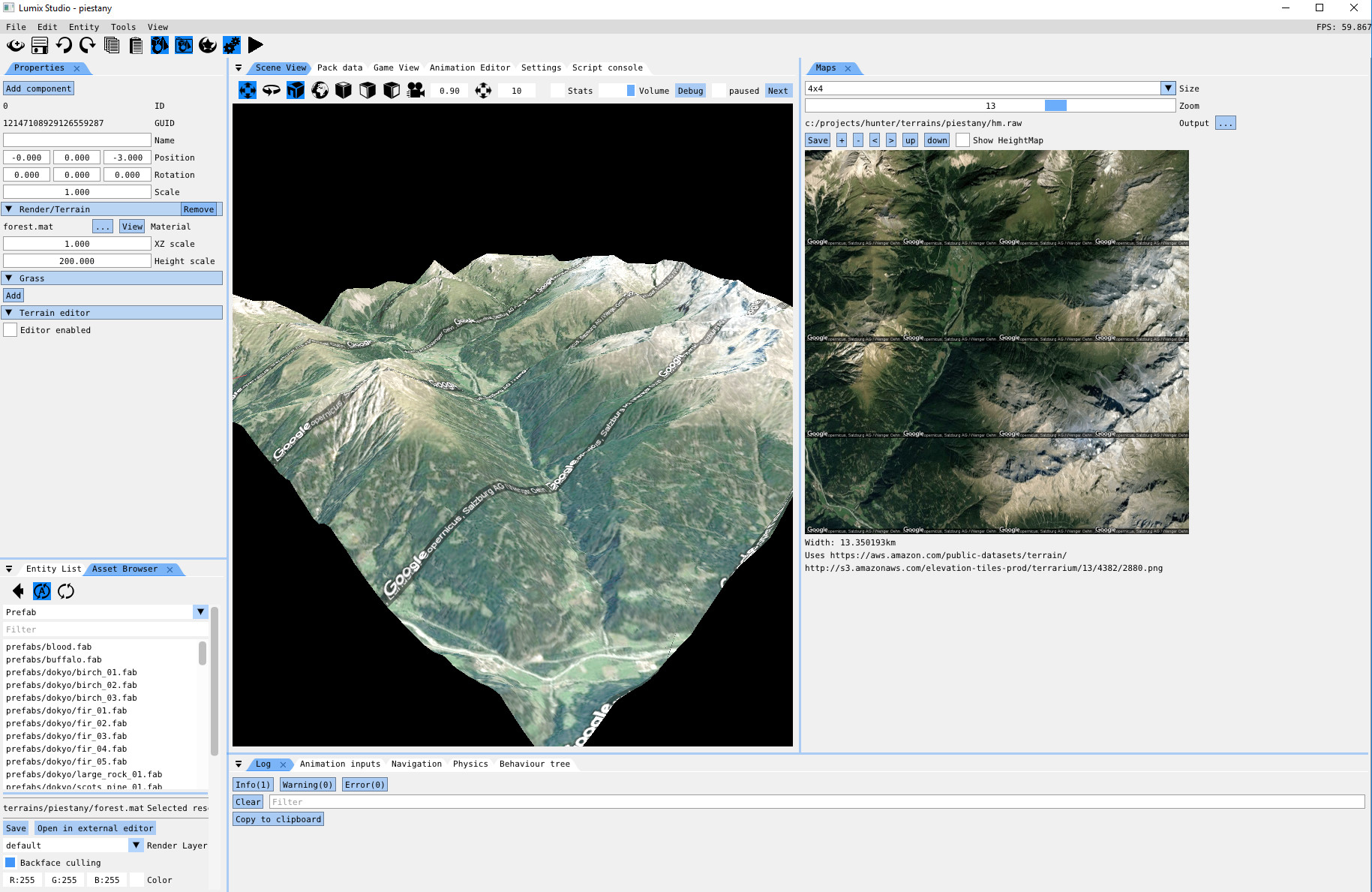
Google Maps
 nem0
on 15 Jun 2017
nem0
on 15 Jun 2017
ImGui (via QPainter, software - not GL) inside of QT actually being used (right-most "Properties" window). Certainly lightened the inertia and tedium of UI heavy programming in QT's mess.

Popup in action extending outside of "airspace" of the IMGUI window:

Even ImGui popups mostly work. Was a fun project even though it has been canned for switching over to WPF.
JSandusky
on 16 Jun 2017
Hello Omar, it's been a while!
Enjoyed your games, and enjoy imgui even more :)
Well another profiler I guess:

Cheers!
 arnaud-jamin
on 4 Jul 2017
arnaud-jamin
on 4 Jul 2017

Debug helper/browser bits of my engine. All of the rendering is done using ImGui's ImDrawList - the subtitles use FontStash.
 paulsapps
on 6 Jul 2017
paulsapps
on 6 Jul 2017
Courtesy of @septag
https://github.com/septag/termite

ocornut
on 17 Jul 2017
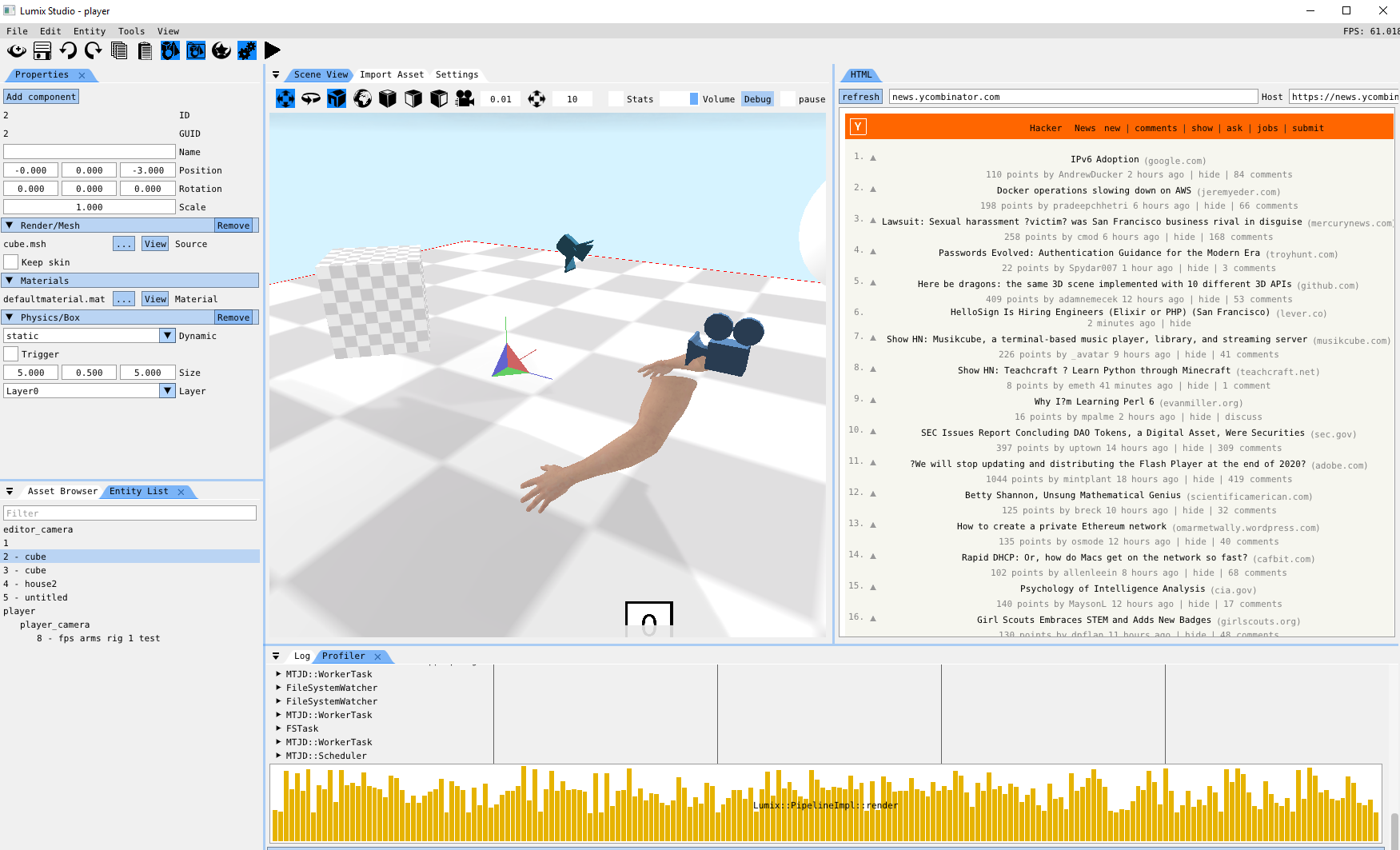
html + css rendering in imgui
nem0
on 26 Jul 2017
@nem0 can this thing also show some pictures? This is beautiful
Pagghiu
on 26 Jul 2017
@Pagghiu yes, the "Y" in the top left corner of the wepage is actually an image
nem0
on 26 Jul 2017
@nem0 you are a wizard 👍
I assume that your work in progress on this item is at https://github.com/nem0/lumixengine_html
Very nice!
Pagghiu
on 26 Jul 2017
@Pagghiu credit should go mostly to https://github.com/litehtml/litehtml, it handles the hard part.
nem0
on 26 Jul 2017
Started working on a simple colorizing text editor. While it is still in a very early stage, some functions are working now. Uses vanilla ImGui and STL.


 BalazsJako
on 5 Aug 2017
BalazsJako
on 5 Aug 2017
@BalazsJako
Started working on a simple colorizing text editor
Very nice! Hope this can become a standalone widget/extension :)
ocornut
on 6 Aug 2017
This is Part 4. I am splitting issues to reduce loading times and locked the old ones.
Screenshots Part 1 #123
Screenshots Part 2 #539
Screenshots Part 3 #772
Screenshots Part 4 #973
Screenshots Part 5 #1269
Screenshots Part 6 #1607
Screenshots Part 7 #1902
Screenshots Part 8 #2265
Screenshots Part 9 #2529
Also see: Software using dear imgui (you can help complete the list!)
ocornut
on 6 Aug 2017
Simplified excel-like spreadsheet using imgui!
Ciao @Pagghiu, this looks really nice. Can I ask if you ever got around to open sourcing it?
 mgodf
on 11 Sep 2020
mgodf
on 11 Sep 2020
@ocornut can use github discussions for next part? better to react to certain post by creating threads imo, idk if it is globally available tought, might need to request activation or something
RUSshy
on 11 Sep 2020
Simplified excel-like spreadsheet using imgui!
Ciao @Pagghiu, this looks really nice. Can I ask if you ever got around to open sourcing it?
Ciao @mgodf, thanks.
Unfortunately I've not been able to open source it because it's mixed with some proprietary code and I've never been able to find time to "extract" the sample for it to be a pure dear imgui application.
I remember that back then I was able to get a basic working draft with relatively low effort (4-5 hours of work) by using the https://github.com/codeplea/tinyexpr library. With some additional time I've been modifying the parser to include "group functions" (SUM / STDDEV etc) and a cyclic check to avoid infinite loops in the evaluation.
Pagghiu
on 11 Sep 2020
Related issues
 namuda
·
3Comments
namuda
·
3Comments
 mnemode2
·
3Comments
mnemode2
·
3Comments
 bizehao
·
3Comments
bizehao
·
3Comments
 Folling
·
3Comments
Folling
·
3Comments
 KaungZawHtet
·
3Comments
KaungZawHtet
·
3Comments
Most helpful comment
Here are some screenshots of how we're using dear imgui in Overgrowth: