Imgui: [Request]How can I add Tabs/Tables like this
http://i.imgur.com/KVESKdL.png

_MOD_ Attachment fairy.
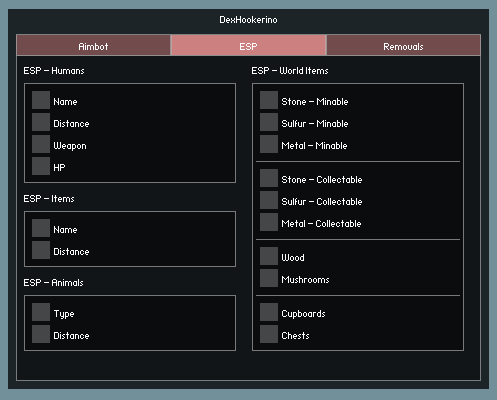
This menu was made with IMGUI, I would like to know how could I create tabs like these ( AIMBOT/ESP/REMOVALS) tabs , anyone could please help me?
Thanks.
 OdayHajYehia
All 14 comments
They are just regular buttons.
Draw different content under based on whichever button was last pressed.
(PS: Please don't use imgur but post images directly using github attachment facility)
 ocornut
on 4 Oct 2016
ocornut
on 4 Oct 2016
Yeah, I tried to do it with regular buttons but I can't make it like that.. Like to show content once the button get pressed but it just keeps crashing whenever I press it ingame
OdayHajYehia
on 4 Oct 2016
Then first describe the crash you are having!
ocornut
on 4 Oct 2016
Im using normal `ImGui::Begin( charenc( "testt" ), &Vars.Menu.Opened, ImVec2( 240, 150 ), 0.9f, ImGuiWindowFlags_NoResize | ImGuiWindowFlags_NoCollapse );
{
ImGui::Checkbox( charenc( "test settings" ), &Vars.Menu.test );
ImGui::Checkbox(charenc("test2 settings"), &Vars.Menu.test2);
ImGui::Checkbox( charenc( "test3 settings" ), &Vars.Menu.test3 );
ImGui::Checkbox( charenc( "test4 settings" ), &Vars.Menu.test4);
ImGui::Spacing();
ImGui::Columns( 2, charenc( "##config-settings" ), false );
if( ImGui::Button( charenc( "Save Options" ), ImVec2( 93.f, 20.f ) ) ) Config->Save();
ImGui::NextColumn();
if( ImGui::Button( charenc( "Load Options" ), ImVec2( 93.f, 20.f ) ) ) Config->Load();
ImGui::Columns( 1 );
}
ImGui::End(); //End main window`
This is what im using now which currently works %100 ingame with no crashes and when I like press a checkbox it opens a new window which is alright, but when I change that to buttons and make them be on top like of the picture I've previewed before each time I press on the button the game crashes, so I think im doing it wrong thats why I need help with it I guess, Could you do me a little preview of button to show content under it? thanks.
OdayHajYehia
on 4 Oct 2016
U could at least provide code that compiles & reproduces your crash man..
 paulsapps
on 4 Oct 2016
paulsapps
on 4 Oct 2016
Could you do me a little preview of button to show content under it? thanks.
if (ImGui::Button("Pane 1")) m_CurrentPane = 1;
if (ImGui::Button("Pane 2")) m_CurrentPane = 2;
...
ImGui::Separator();
if (m_CurrentPane == 1)
{
// draw stuff
}
But yes, if you are talking about a crash please first report the actual crash with a repro if you want us to help you!
ocornut
on 6 Oct 2016
`
ImGui::Begin( charenc( "menu1" ), &Vars.Menu.Opened, ImVec2( 200, 450 ), 0.9f, ImGuiWindowFlags_NoCollapse );
{
ImGui::Spacing();
ImGui::Columns(4, charenc("##1-settings"), false);
if (ImGui::Button("Settings1")) count = 1;
ImGui::NextColumn();
if (ImGui::Button("Settings2")) count= 2;
ImGui::NextColumn();
if (ImGui::Button("Settings3")) count = 3;
ImGui::NextColumn();
if (ImGui::Button("Settings4")) count= 4;
ImGui::Columns( 1 );
ImGui::Separator();
if (count == 1) {
// my stuff
}
if(count==2)
{
// stuff 2
}
ImGui::Separator();
ImGui::Spacing();
ImGui::Spacing();
ImGui::Spacing();
ImGui::Spacing();
ImGui::Spacing();
ImGui::Columns( 2, charenc( "##config-settings" ), false );
if( ImGui::Button( charenc( "Save Options" ), ImVec2( 93.f, 20.f ) ) ) Config->Save();
ImGui::NextColumn();
if( ImGui::Button( charenc( "Load Options" ), ImVec2( 93.f, 20.f ) ) ) Config->Load();
ImGui::Columns( 1 );
}
ImGui::End(); //End main window
`
this is what I did before, just like you previewed aswell , it used to crash me when i pressed the button now when i actually press it window shows and dissappears o.0
OdayHajYehia
on 6 Oct 2016
Can you at least say where it is crashing?
I don't think any of this code would ever crash imgui. The crash could be in whatever charenc is or the Config->.. code or accessing Vars. You are not telling where it is crashing so we can't guess.
ocornut
on 6 Oct 2016
Its not crashing me ingame anymore , its just whenever I press it nothing happens the drawing just shows for sec and then dissappears
OdayHajYehia
on 6 Oct 2016
It doesn't look like a bug in imgui but in your code.
ocornut
on 6 Oct 2016
There is no problem when I do it with checkboxes , only with buttons this problem appears though.. Any ideas what is causing this?
OdayHajYehia
on 6 Oct 2016
Please provide an actual repro.
ocornut
on 7 Oct 2016
Closing in the absence of an explanation/repro of supposed crash. That sorts of pattern generally works perfectly, so problem is likely in your code and we can't debug your code without seeing it.
As for the outer frame they'd typically be drawn manually using the ImDrawList API.
ocornut
on 6 Nov 2016
namespace ImGui {
    struct TabsDesc {
        __int32 lableCount;
        float lableWidth;
        __int32 currentidx;

    };

    struct Tabs {
        TabsDesc* tbd;
        ImGuiID ID;
        __int32 selectedIdx;
    };

    static   ImVector<Tabs*> CacheTabs;
    static   Tabs* CurTabs;
    inline void BeginTabs(const char* name, int lablesCount, float tabwidth = 0) {
        //Find exists Tabs
        Tabs* exsisttbs = NULL;
        ImGuiID id = ImHash(name, 0);
        for (int i = 0; i < CacheTabs.Size; i++) {
            if (CacheTabs[i]->ID == id) {
                exsisttbs = CacheTabs[i];
            }
        }

        if (exsisttbs == NULL) {
            Tabs* tbs = (Tabs*)ImGui::MemAlloc(sizeof(Tabs));
            tbs->selectedIdx = 0;
            tbs->ID = id;
            CacheTabs.insert(CacheTabs.begin(), tbs);
            CurTabs = tbs;
        }
        else
        {
            CurTabs = exsisttbs;
        }

        TabsDesc* tbd = (TabsDesc*)ImGui::MemAlloc(sizeof(TabsDesc));
        tbd->lableCount = lablesCount;
        tbd->currentidx = 0;
        ImVec2 windowSize = ImGui::GetWindowSize();
        tbd->lableWidth = windowSize.x / lablesCount;
        CurTabs->tbd = tbd;
    }

    inline void EndTabs() {
        MemFree(CurTabs->tbd);
        CurTabs = NULL;

    }

    inline bool AddTab(const char* label, const char* tooltip)
    {
        TabsDesc* tbs = CurTabs->tbd;
        ImGuiStyle& style = ImGui::GetStyle();
        ImVec2 itemSpacing = style.ItemSpacing;
        ImVec4 color = style.Colors[ImGuiCol_Button];
        ImVec4 colorActive = style.Colors[ImGuiCol_ButtonActive];
        ImVec4 colorHover = style.Colors[ImGuiCol_ButtonHovered];
        style.ItemSpacing.x = 0;

        if (tbs->currentidx > 0)
            ImGui::SameLine();

        // push the style
        if (tbs->currentidx == CurTabs->selectedIdx)
        {
            style.Colors[ImGuiCol_Button] = colorActive;
            style.Colors[ImGuiCol_ButtonActive] = colorActive;
            style.Colors[ImGuiCol_ButtonHovered] = colorActive;
        }
        else
        {
            style.Colors[ImGuiCol_Button] = color;
            style.Colors[ImGuiCol_ButtonActive] = colorActive;
            style.Colors[ImGuiCol_ButtonHovered] = colorHover;
        }

        // Draw the button
        if (ImGui::Button(label, ImVec2(tbs->lableWidth, 0))) {
            CurTabs->selectedIdx = tbs->currentidx;
        }

        if (ImGui::IsItemHovered())
        {
            ImGui::BeginTooltip();
            ImGui::Text("%s", tooltip);
            ImGui::EndTooltip();
        }

        // Restore the style
        style.Colors[ImGuiCol_Button] = color;
        style.Colors[ImGuiCol_ButtonActive] = colorActive;
        style.Colors[ImGuiCol_ButtonHovered] = colorHover;
        style.ItemSpacing = itemSpacing;

        tbs->currentidx++;
        return CurTabs->selectedIdx == tbs->currentidx;
    }
}
How to Use.......
ImGui::BeginTabs("Tabs1",3);
    if (ImGui::AddTab( "Tab1", "Tab1")) {
//Child Window 1?

    }

    if (ImGui::AddTab("Tab2", "Tab2")) {
//Child Window 2?
    }

    if (ImGui::AddTab("Tab3", "Tab3")) {
//Child Window 3?
    }
    ImGui::EndTabs();

//Pages...
    ImGui::BeginChild("Chiild Title Bar Menu", ImVec2(ImGui::GetWindowSize().x - (style.WindowPadding.x * 2), 200), true, ImGuiWindowFlags_Modal); /* ImGuiWindowFlags_NoMove | ImGuiWindowFlags_NoBringToFrontOnFocus | ImGuiWindowFlags_NoFocusOnAppearing |
                                                                                                ImGuiWindowFlags_NoResize | ImGuiWindowFlags_NoSavedSettings | ImGuiWindowFlags_NoCollapse | ImGuiWindowFlags_ShowBorders |
                                                                                                ImGuiWindowFlags_Modal);/**/ //| ImGuiWindowFlags_Popup |  );
    ImRect rect3 = ImGui::GetCurrentWindow()->TitleBarRect();
    ImGui::Text("%.1f x %.2f y %.3f width  %.4f height", rect3.Min.x, rect3.Min.y, rect3.Max.x, rect3.Max.y);
    auto tmppos = ImGui::GetMousePos();
    ImGui::Text("%.1f x %.2f y", tmppos.x, tmppos.y);

    ImGui::EndChild();
thats some problems,butmaybe its will be easy to do help like this.
 sgf
on 24 Jun 2017
sgf
on 24 Jun 2017
Related issues
 KaungZawHtet
·
3Comments
KaungZawHtet
·
3Comments
 mkanakis
·
3Comments
mkanakis
·
3Comments
 ghost
·
3Comments
ghost
·
3Comments
 DarkLinux
·
3Comments
ocornut
·
3Comments
DarkLinux
·
3Comments
ocornut
·
3Comments
Most helpful comment
How to Use.......
thats some problems,butmaybe its will be easy to do help like this.