Imgui: Selected ImGui::Button & Change Color
Hello,
I don't know if it's a Issue or a coding issue by myself.
Following this Code:
ImGui::Begin(charenc("test"), &Vars.Menu.Opened, ImVec2(1000, 720), 0.8f, ImGuiWindowFlags_ShowBorders | ImGuiWindowFlags_NoResize | ImGuiWindowFlags_NoCollapse | ImGuiWindowFlags_ShowBorders);
{
        ImGui::Columns(3, charenc("##c1"), false);
        if (ImGui::Button(charenc("test1"), ImVec2(325, 25))) Vars.Menu.openmethod = 0;
        ImGui::NextColumn();
        if (ImGui::Button(charenc("test2"), ImVec2(325, 25))) Vars.Menu.openmethod = 1;
        ImGui::NextColumn();
        if (ImGui::Button(charenc("test3"), ImVec2(325, 25))) Vars.Menu.openmethod = 2;
        ImGui::Columns(3);
if (Vars.Menu.openmethod == 0)
{
etc...
My openmethod is declared as int.
When i push the button "test1" is this button in my opinion active, why is this button color not changed as defined in:
style.Colors[ImGuiCol_Button] = ImVec4(0.85f, 0.85f, 0.85f, 1.f);
style.Colors[ImGuiCol_ButtonHovered] = ImVec4(0.85f, 0.85f, 0.85f, 1.f);
style.Colors[ImGuiCol_ButtonActive] = ImVec4(1.00f, 0.00f, 0.00f, 1.f);
Is there any option to change the button only from test 1 when i clicked on him?
All other buttons should be still in normal color.
Warm regards.
 CReCT
CReCT
All 15 comments
Hello,
I am sorry I don't understand your question.
Also what is charenc() ?
 ocornut
on 14 Aug 2016
ocornut
on 14 Aug 2016
When i push a button, i would like that this button changing the Color. For example:
Button Color is green... i click on it... then this Color is red.
And i would like that only this one button color is changing.
charenc is just my encryption.
CReCT
on 14 Aug 2016
PushStyleCol() / Button() / PopStyleCol() is probably what you want.
charenc is just my encryption.
???
ocornut
on 14 Aug 2016
fixed! Thank you very much.
CReCT
on 15 Aug 2016
is there a button callback function to do something when the button is pressed?
 MuUusta
on 7 Mar 2019
MuUusta
on 7 Mar 2019
is there a button callback function to do something when the button is pressed?
Callbacks are the opposite of how dear imgui works. Every button return true when pressed. Check out the demo code.
ocornut
on 7 Mar 2019
Thnx a lot for your reply, I have done as you asked me to do, the demo code is a great reference.
i also have to mention that error i came across while surfing (ImGui) examples:
which is "Assertion Failed ImGui g.IO>DeltaTime >= 0.0f"
what i did is adding the following condition before passing current time to io.DeltaTime
if( ( (current_time - g_Time) / 1000.0f) != 0)
i don't know if this is an appropriate approach to solve this error.
MuUusta
on 11 Mar 2019
i also have to mention that error i came across while surfing (ImGui) examples:
Please specify exactly which example, which OS and which version. Thank you.
ocornut
on 11 Mar 2019
Example: example_freeglut_opengl2
CPP File: imgui_impl_freeglut.cpp
Function: ImGui_ImplFreeGLUT_NewFrame()
OS: Linux/Ubuntu 16
I am not quite sure about the version that you are asking about but in our case its openGL2 the only thing related to versions here.
MuUusta
on 11 Mar 2019
@FullStackDevoloper This is fixed as part of #2430
ocornut
on 26 Mar 2019
I don't really understand how it works...
my code
    if (ImGui::Button("rage", ImVec2(50, 30))) page = 0; ImGui::SameLine(0, 0);
i want the button to be a color and when i press it to change the color and then again back to the default color, how should i do that?
 PINKColorful
on 6 Oct 2019
PINKColorful
on 6 Oct 2019
@PINKColorful
Hello. This snippet can help you. color is your default color of type ImVec4.
Updated : by the way, everything was explained earlier. Read attentively.
static bool pressed = true;

if (pressed)
    ImGui::PushStyleColor(ImGuiCol_Button, color);
else
    ImGui::PushStyleColor(ImGuiCol_Button, ImVec4{0.2f, 0.3f, 0.4f, 1.0f});
bool temp = ImGui::Button(buttonName);

if (temp == true)
{
   pressed = 1 - pressed;
}

ImGui::PopStyleColor(1);
 LuridHound
on 29 Dec 2019
LuridHound
on 29 Dec 2019
I'm also having this problem.
@Solisuom I think what @PINKColorful is looking for is the press event, rather than the click event. That is, for the button to be coloured during press-and-hold, rather than after it has been releasaed.
At the moment, it seems ImGui::Button() is returning false until you release, which means you can't tell whether it is currently pressed or not.
I found that you can achieve this using the IsItemActive() function, along these lines.
enum SmartButtonState {
    None = 0,
    Hovered,
    Pressed,
    Released,
    DoubleClicked // Not yet implemented
};

static SmartButtonState SmartButton(const char* label, ImVec2 size = {0, 0}) {
    bool released = ImGui::Button(label, size);

    // Order of these are important
    if (released) return SmartButtonState::Released;
    if (ImGui::IsItemActive()) return SmartButtonState::Pressed;
    if (ImGui::IsItemHovered()) return SmartButtonState::Hovered;
    return SmartButtonState::None;
}
The important bits being to color not just the button itself, but also when it's hovered and pressed, else your custom color would get overridden by those. You may want to give those a different color too, to indicate whether hovering is happening or not.

Used like this.
void drawButtons() {
    ImGui::Begin("Buttons", nullptr);
    {
        static const auto size = ImVec2(150, 40);
        static const ImVec4 pressColor { 0.5f, 0, 0, 1.0f };
        static const ImVec4 releaseColor { 0, 0.5f, 0, 1.0f };
        static ImVec4 currentColor = releaseColor;

        ImGui::PushStyleColor(ImGuiCol_Button, currentColor);
        ImGui::PushStyleColor(ImGuiCol_ButtonActive, currentColor);
        ImGui::PushStyleColor(ImGuiCol_ButtonHovered, currentColor);
        auto state = SmartButton("Press Me", size);
        ImGui::PopStyleColor(3);

        if (state == SmartButtonState::Pressed) {
            currentColor = pressColor;
        }
        else if (state == SmartButtonState::Released) {
            currentColor = releaseColor;
        }

        ImGui::SameLine();
        if (SmartButton("Green", size) == SmartButtonState::Released) {
            printf("Clicked\n");
        }

        ImGui::SameLine();
        SmartButton("Blue", size);
    }
    ImGui::End();
}
With 3 caveats.
- Detecting double-click would involve keeping track of time, there may already be something for that in ImGui I haven't yet checked.
- Clicking and dragging out of the button isn't able to detect a release event.
- Only one event type is supported at a time; e.g. the button may be both pressed & hovered, or only pressed but not hovered.
Here's an example of (2) and (3).

You could probably leverage IsItemHovered in combination with IsItemActive to detect when that happens, and either emit Released or a custom type, e.g. Exited.
 alanjfs
on 31 Dec 2019
alanjfs
on 31 Dec 2019
To create custom behavior with regards to coloring the button, you can copy the contents of ButtonEx() into a new function in your own file (don't need to modify imgui.cpp).
Otherwise for anything else as you pointed you can use the IsItemXXX functions there's everything you need. I feel like your SmartButton() function is only making things harder to use and less flexible. You can call ImGui:Button() followed by e.g. ImGui::IsItemActive() to get the held state. Those concepts are recurrent and consistent accross the library.
ocornut
on 2 Jan 2020
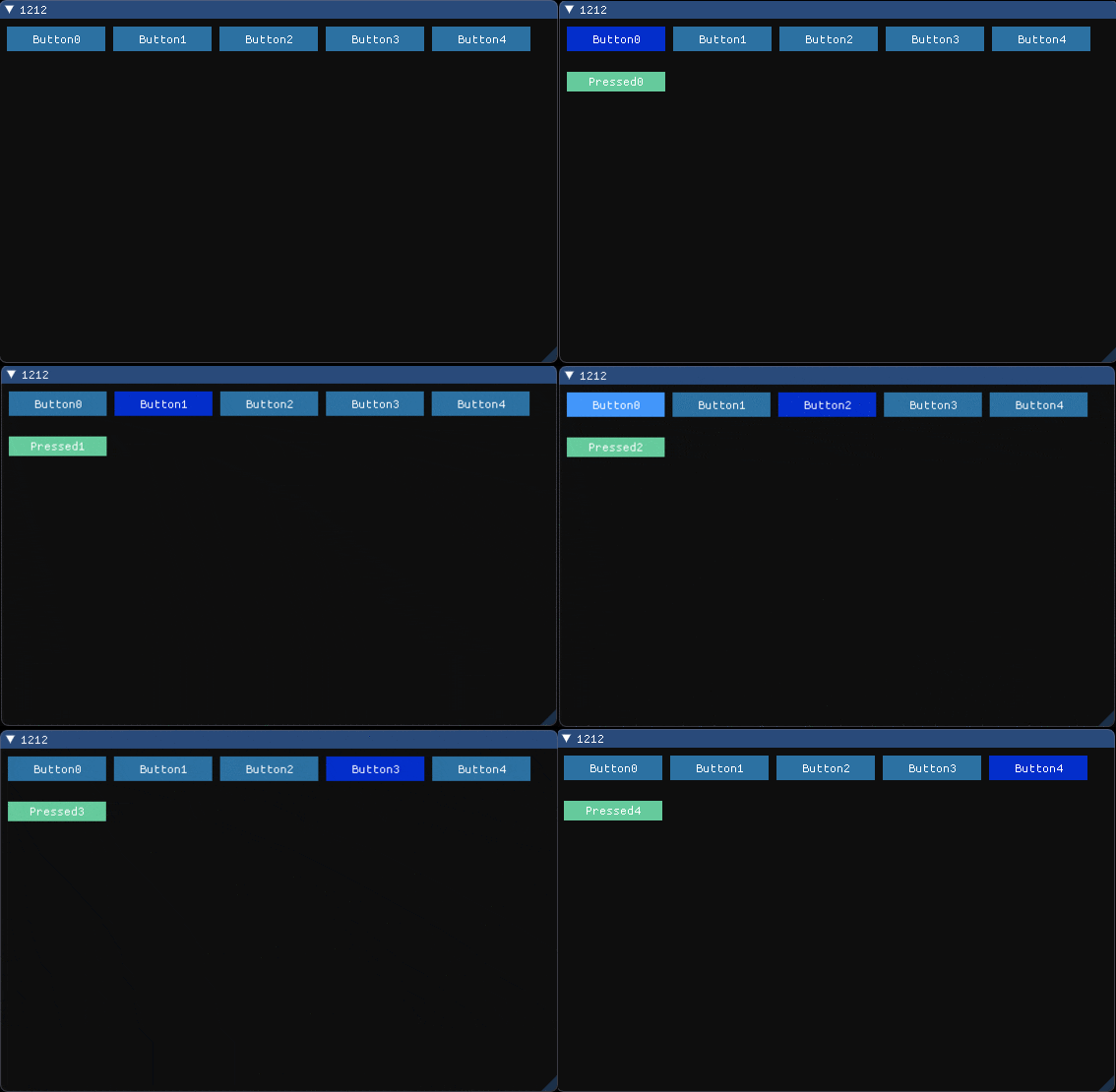
#define MAX_TAB_SIZE    5
bool btn_press[MAX_TAB_SIZE] = { false, false, false, false, false };
void DrawButton()
{
    ImGui::Begin("1212");
    static const ImVec4 pressColor{ 0.0f, 0.217f, 1.0f, 0.784f };
    static const ImVec4 releaseColor{ 0.202f, 0.549f, 0.798f, 0.784f };
    static const ImVec4 nextColor{ 0.492f, 0.995f, 0.765f, 0.784f };
    static const ImVec2 size{ 100, 25 };
    static const ImVec2 size2{ 100, 20 };
    int index01;
    for ( index01 = 0; index01 < MAX_TAB_SIZE; index01++ )
    {
        if( index01 > 0 ) ImGui::SameLine();
        if ( btn_press[index01] )
            ImGui::PushStyleColor( ImGuiCol_Button, pressColor );
        else
            ImGui::PushStyleColor( ImGuiCol_Button, releaseColor );
        if ( ImGui::Button( std::string("Button" ).append(std::to_string(index01)).c_str(), size ) )
        {
            for (int j = 0; j < MAX_TAB_SIZE; j++)
                btn_press[j] = false;
            btn_press[index01] = true;
        }
    }
    ImGui::PushStyleColor( ImGuiCol_Button, nextColor );
    for ( index01 = 0; index01 < MAX_TAB_SIZE; index01++ )
    {
        if ( btn_press[index01] )
        {
            ImGui::TextDisabled("");
            if ( ImGui::Button( std::string("Pressed" ).append(std::to_string(index01)).c_str(), size2 ) )
            {
            }
        }
    }
}
 DOSexample
on 23 Jan 2020
DOSexample
on 23 Jan 2020
Related issues
 Folling
·
3Comments
Folling
·
3Comments
 GrammarLord
·
3Comments
GrammarLord
·
3Comments
 dowit
·
3Comments
dowit
·
3Comments
 ghost
·
3Comments
ghost
·
3Comments
 mnemode2
·
3Comments
mnemode2
·
3Comments
Most helpful comment
PushStyleCol() / Button() / PopStyleCol() is probably what you want.
???