[ADMIN] EDIT: There is now an official docking branch. See #2109 for details.
I'd like to see if somebody is interested in a Mini Dock Panel Layout: I implemented a very basic one a few months ago (I still have to port my code to the new version of ImGui).
This is an old screenshot of what it looked:

Basically it just supports one docked window per side, with a "hover" window (when the mouse hovers the buttons that are not active), with no animation and no drag and drop at all, and no re-arrangeable buttons and windows.
This is very limited compared to a "full featured" dock panel implementation but it's better than nothing and is OK for my needs (although it's currently just a proof of the concept not tested for real usage).
 Flix01
All 96 comments
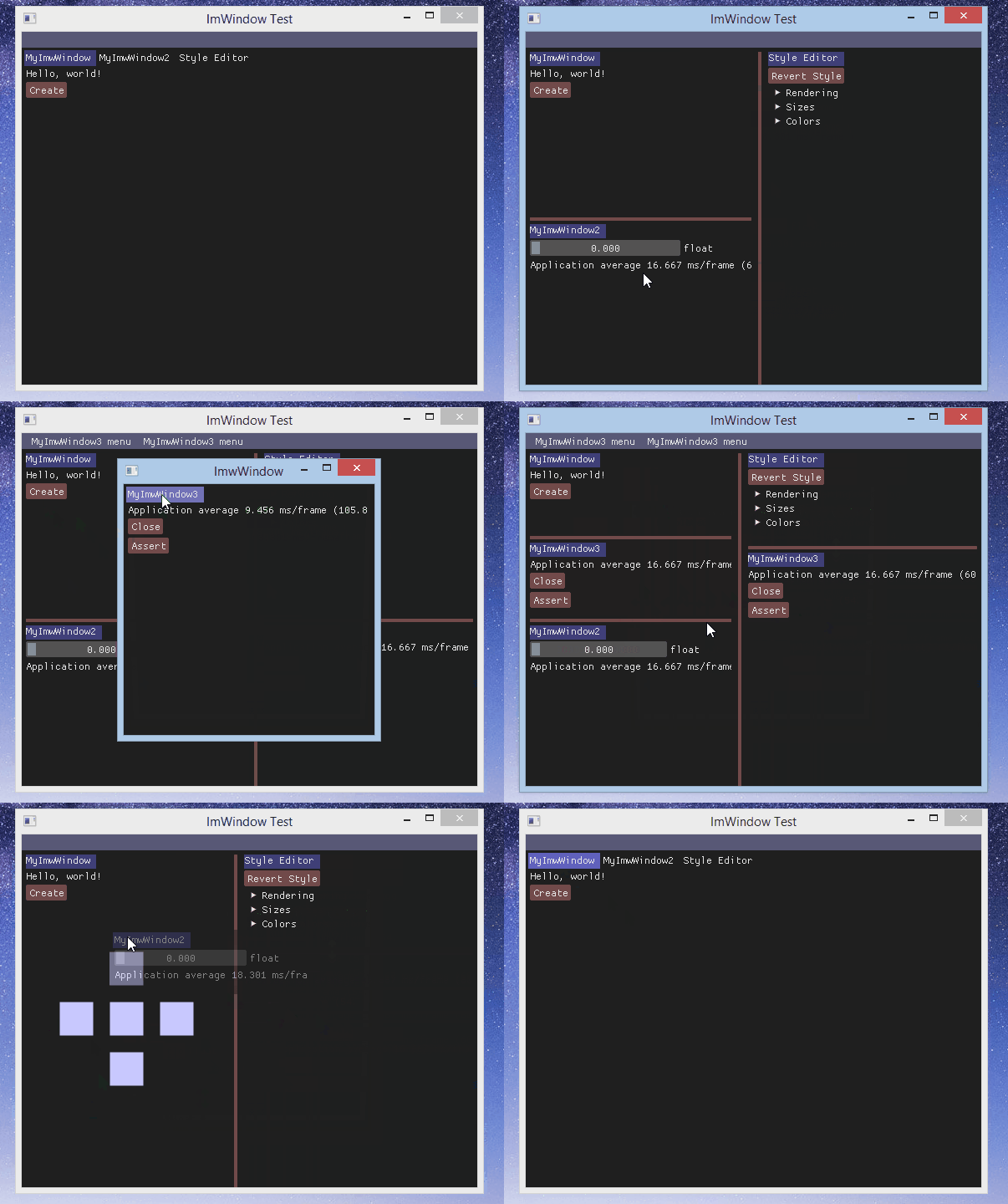
I start to create mine too, but it's more like an small window framework who used ImGui than an extensions for ImGui.
And thanks Omar for created an easy and powerful gui lib ;)
 thennequin
on 27 Sep 2015
thennequin
on 27 Sep 2015
@thennequin that looks awesome! ;)
 extrawurst
on 27 Sep 2015
extrawurst
on 27 Sep 2015
@thennequin thats really great .
 codz01
on 27 Sep 2015
codz01
on 27 Sep 2015
Hands down: @thennequn that's much better than mine!
Flix01
on 27 Sep 2015
@thennequin this is great stuff!
 Pagghiu
on 27 Sep 2015
Pagghiu
on 27 Sep 2015
Really cool. Thibault's code is here:
https://github.com/thennequin/ImWindow
 ocornut
on 27 Sep 2015
ocornut
on 27 Sep 2015
@thennequin I'd be curious to hear about what you've learned / think about the current architecture you've developed. It looks interesting and I'd eventually want to incorporate some form of docking into ImGui. Do you think some aspect of it could be adapted to be included in the core library? How could ImGui evolve to support that sort of extension more naturally?
ocornut
on 27 Sep 2015
Thanks everybody.
@ocornut I wanted to make one simple way to create windows for easily create editors for the company where I work. Actually, the scene editor of our engine (it's PlayAll, maybe you've heard about this at Darkworks :) ) is based on old technologies and it's slow and very hard to evolve, so we want to recreate it from scratch.
We are searching for a good alternative for implementing new features easily but during our research we couldn't find a good and light alternative to our old version of wxWidgets used in our scene editor.
Last year i learnt to use Unity and make custom tools, it was easy to make new windows just by instancing class who inherited from Editor class, it's just perfect for our needs.
So my current architecture is probably based on the ImGui of Unity.
At first i created a new widget for wxWidgets for use wxAUI (docking system of wxWidgets) but this attempt had many problems so i started to create this library from scratch and your samples.
My goal is to use your library without modifications, so i won't search a way to include dock system directly in ImGui. I don't know where to start, but if you want to include dock system, i think you can look at the class ImwContainer.
thennequin
on 27 Sep 2015
Just to say that I added my _worse_ implementation (the first screenshot of this thread) here: https://github.com/Flix01/imgui, together with other (mostly outdated and non-functional) ImGui "addon widgets".
[Edit:] [Live Demo Here](https://rawgit.com/Flix01/imgui/imgui_with_addons/examples/addons_examples/html/main2.html) (proof-of-the-concept test demo of my mini imgui panel manager, with a custom font).
I also made a wiki page of my addon branch here: Addons Wiki .
Flix01
on 3 Oct 2015
@Flix01 Thanks! always useful to have more example/reference code available.
@thennequin Branimir has reworked your code here (haven't looked at it in details yet myself)
imgui_wm.cpp / .h in this folder:
https://github.com/bkaradzic/bgfx/tree/master/3rdparty/ocornut-imgui
- Made it single compile unit .h/.cpp file.
- Fixed internals to use ImGui utility functions and macros instead of custom ones
- Made input and window handling use data passed to ImGui::IO structure.
I heard of PlayAll (it is a french middleware partly developed by Darkworks) but never seen it. Did we met at Darkworks? I only spent sometimes like 9 weeks there in the summer of 2008, so I don't recall everyone :)
I don't know when I'll be able to tackle docking but it's very good to have those different attempts working.
ocornut
on 5 Oct 2015
@ocornut Indeed, he reduced my lib into a pair of files. That's pretty cool, but i will still continue to use my multi files structure for a possible growth.
I worked at Darkworks at that time but we couldn't meet each other because there were over a hundred people at the company, it's impossible to get to know everyone.
Branimir use only one RenderWindow. So when he docked a WIndow ouside of his RenderWindow, he lost it because he didn't recreate a new RenderWindow, It can be a future feature for my lib to restrict the number of RenderWindow.
thennequin
on 8 Oct 2015
Just to say that I'm doing something like @thennequin (I'm on Linux, I cannot use his code!) using imgui only.
It's still W.I.P. and I don't know if it will work across different imgui windows. [Edit:] it works, see updated gif.
However here is a preliminary animated .gif:

P.S. Some buttons shaped like tab labels would be useful...
Happy new year to all imgui users (and to the developer) !
Flix01
on 31 Dec 2015
It seems pretty cool :)
thennequin
on 1 Jan 2016
@thennequin : thanks.
However my preliminary tests show that I cannot make "tab buttons" fly from an ImGui::Window to another... :(.
Never mind... I was thinking of using this kind of layout only in the "central window" (e.g. "document window") of my "Mini Dock Panel Layout".
[EDIT] flying tabs work now.
Flix01
on 1 Jan 2016
Also see LumixEngine code by @nem0 https://github.com/nem0/lumixengine

IMGUI_API bool BeginDock(const char* label, bool* opened = nullptr);
IMGUI_API void EndDock();
https://github.com/nem0/LumixEngine/blob/master/src/studio_lib/imgui/imgui_user.inl
Looks like a fairly small amount of code and it could be ported/redesigned to work in ImGui code perhaps.
_EDIT_ I'd suggest experimenting with the idea of making this an extension e.g ImGuiDock.cpp
ocornut
on 2 Jan 2016
Yes, lumixengine's dock seems better than mine, for a lot of reasons:
- tab buttons are shaped like tab labels.
- tab buttons can become imgui floating Windows.
- code looks very compact.
- it seems to be a "pure imgui" solution (mine too, but @thennequin's depends on the Windows OS AFAICS).
- As far as I can see, it has load/save support.
So I guess it's better to use @mem0's code as a reference for a future ImGuiDock system.
Flix01
on 2 Jan 2016
Also the way I did my docking system was to have it fully outside of the ImGui code and just doing SetWindowNextPos/Size. In my cases it makes it much easier as I have no divergences with the core ImGui code which is preferable imo.
 emoon
on 2 Jan 2016
emoon
on 2 Jan 2016
@Flix01
it seems to be a "pure imgui" solution (mine too, but @thennequin's depends on the Windows OS AFAICS).
I plan to support os windows too and keep the "pure imgui" interface too, using concept similar to io::RenderDrawListsFn
As far as I can see, it has load/save support.
It uses my own structures for saving and Lua for loading, but it should not take more than 10 minutes to rewrite it. However I do not know about any way/interface to connect to imgui's save/load at the moment and I would prefer pure imgui save/load.
code looks very compact
it's still far from finished, has some known bugs and missing features
 nem0
on 2 Jan 2016
nem0
on 2 Jan 2016
Looks great but you can't drag outside the confines of the window it seems.
@thennequin's can.
On Sat, 2 Jan 2016 at 08:13 Mikulas Florek [email protected] wrote:
@Flix01 https://github.com/Flix01
it seems to be a "pure imgui" solution (mine too, but @thennequin
https://github.com/thennequin's depends on the Windows OS AFAICS).
I plan to support os windows too and keep the "pure imgui" interface too,
using concept similar to io::RenderDrawListsFnAs far as I can see, it has load/save support.
It uses my own structures for saving and Lua for loading, but it should
not take more than 10 minutes to rewrite it. However I do not know about
any way/interface to connect to imgui's save/load at the moment and I would
prefer pure imgui save/load.—
Reply to this email directly or view it on GitHub
https://github.com/ocornut/imgui/issues/351#issuecomment-168389868.
 Cthutu
on 2 Jan 2016
Cthutu
on 2 Jan 2016
Looks great but you can't drag outside the confines of the window it seems. @thennequin's can.
I don't know, I've never tried.
However I've managed to do it with my code (see the updated animated .gif above).
Still, lumixengine's solution is much better than mine.
I guess I'll stop developing mine, maybe making a gist and/or adding it to my imgui branch.
For now this is what I got (and what I need).
If I'll find time in the future (or I'll need something more complete), I know where to look at (= lumixengine's dock system).
[EDIT] Added gist: https://gist.github.com/Flix01/2cdf1db8d936100628c0
[EDIT] Added to my imgui branch and to the central window of the Live Demo Here : press the last button on the top to show it (and it should be straight-forward to turn one of the "lateral windows" into an ImGui::TabWindow, so that it can exchange content with the central window).
[EDIT] Added some changes in the tab label look and serialization, but only in my branch here ATM: https://github.com/Flix01/imgui/wiki/ImGui-Addons-Branch-Home.
Flix01
on 3 Jan 2016
@ocornut I refactored it a bit and now it's a standalone file and the code style should be closer to imgui's style. There is still custom save/load.
nem0
on 4 Jan 2016
Thanks a lot, looking great. I don't know when I'll have time to look at it myself (maybe this week-end?) in the meanwhile I suppose you'll find more things to fix/improve :)
ocornut
on 4 Jan 2016
hey @nem0 great work indeed. pretty cute :D
@ocornut,
as a start, and similar to what we did with colorpicker, here you have a more polished version, which should compile out-of-the-box: msvc friendly now, serialization disabled (for now), and overloaded operators for imvec2 are not required anymore.
https://gist.github.com/r-lyeh/a4ff6019062a8c9b402a
to use it just switch from Begin()/End() to BeginDock()/EndDock() as nem0's suggested in #123
 r-lyeh-archived
on 18 Jan 2016
r-lyeh-archived
on 18 Jan 2016
is the internal load/save .ini API exposed anywhere? it would be nice to bypass the serialization there
r-lyeh-archived
on 18 Jan 2016
Thanks! Serialization API isn't exposed yet, the system is really primitive right now.
I haven't looked at the docking data structures yet. Might want to expose INI but there's probably some serious work to be done there even more so if we expect the end-user to use it. We could improve and expose minimal no-warantee-given stuff in imgui_internal.h if it makes sense and that probably would be easier as a first step. Or perhaps the docking data could be stored in a manner that minimize the requirement, e.g. just add a "ParentWindowName" field that is saved in .ini and the rest is sort of implicit from pos-size?
But I haven't really considered the problem in details. There was a request https://github.com/ocornut/imgui/issues/437 and we might want to move some of the discussion there, personally I wanted to avoid the issue as long as possible but I realise it would be a sort of requirement for docking!
ocornut
on 18 Jan 2016
Thanks r-lyeh for sharing this source code.
I started to look at it. It works pretty well !
I see two minor issues, and maybe you have ideas to fix them :
- The flag ImGuiWindowFlags_ShowBorders is not used when the windows are docked. But when they are floating, it is correctly used.
- When detecting if a window is focused, the result is irrelevant because all the docked windows are children of a single window (###DockPanel), so a new function should exist (something like ImGui::IsDockFocused).
Thanks for your help.
 itamago
on 14 Mar 2016
itamago
on 14 Mar 2016
When detecting if a window is focused, the result is irrelevant because all the docked windows are children of a single window (###DockPanel), so a new function should exist (something like ImGui::IsDockFocused).
I haven't been able to look at the docking code yet, but if you refer to IsWindowFocused() it differenciate child windows, so if you call that within the Begin/End block it should work and not give you false positive due to the parent.
The 3 available functions are
bool IsWindowFocused();                // is current window focused
bool IsRootWindowFocused();            // is current root window focused (top parent window in case of child windows)
bool IsRootWindowOrAnyChildFocused();  // is current root window or any of its child (including current window) focused
We could iterate and perhaps adjust on those. Ideally we shouldn't need a new function or we could make existing functions dock-aware if that made sense. Not against pushng minor dock-related features upstream to help
ocornut
on 21 Mar 2016
Ya i know, i can implement it myself or find someone who has already done it like the LumixEngine one, but i cant imagine a case where someone wouldnt want that feature to be built in. It makes imgui so much easier to use and layout. Trying to build good tools without docking and tabs is just a pain in the ass. P.S: I love imgui regardless :+1:
@volcoma Obviously docks are desirable. I just haven't had time to look seriously at the existing work provided in those thread and see if it can be turned it into either a core feature either a add-one-file feature. For now you can look at the existing work made by people in this thread. Creating a new thread wont make it happen faster :)
I wouldn't want this in because it bloats the library. It's of course @ocornut that gets to decide this but I rather keep code like this outside of imgui and try to keep the base clean.
@emoon My gut impression that that the basic docking code is fairly small and would be fair candidate for core. But I would like to look into and experiment with the idea of it being optional 2 files module (one .h one .cpp). Perhaps it means that core library adds 10% features/data structure so that an external file can implement the rest. I just don't know yet.
I've started work on this, but I've done a hybrid approach, where the tabs are controlled by the Win32 API and the contents are created using ImGui. I don't think ImGui could do a proper tab and docking facility since those features interact outside the OpenGL context. For example, imagine dragging a tab from one frame to another monitor (on a multi-monitor setup). You'd want to create a new frame to contain the dragged tab and it's contents. What about creating a tool window from a tab like you would in Visual Studio? The only solution ImGui could do is something that was locked inside a single window. The multi-frame/multi-window management would need to be done outside ImGui. If you're happy with that then fine, but you couldn't do a Visual Studio-style docking environment. Either way, it could be a library that can sit on top of ImGui - it doesn't have to be integrated itself.
Although core ImGui can't provide direct interactions with OS windows and graphic context, we can ideally strive to make the core docking/tabs API (if there is a core docking/tabs API) open and pluggable enough that this becomes a possibility for the end-user.
ocornut
on 3 May 2016
Having some features being optional (maybe controllable using defines?) would work indeed. I'm just worried about trying to add everyones pet feature in to the library.
emoon
on 4 May 2016
I am also for keeping docking external, or at the very least, an add-on.
Pagghiu
on 10 May 2016
I've had separate ImGui instances for each window in my docking framework but I am seeing problems with that. So I am considering using the same ImGui instance for all windows. One problem is that when I open a popup menu in one window and click in the other, the popup menu doesn't disappear like it would if I clicked outside the menu in the original window.
Cthutu
on 10 May 2016
Lumix Engine style docking panels would be of substantial use for me. That is the one killer feature that holds back ImGui from being an all-around application suite UI for me. Would love to have easy access to this functionality either built-in, or in a separate "addons" file/directory or something like that.
 malamanteau
on 12 May 2016
malamanteau
on 12 May 2016
I recently integrated the dock UI from Lumix Engine in my project, but had to make a few alterations to make it play better with ImGui's windowed system.
I should say first that I think that the Lumix Engine dock UI code is rather confusing and deserves a rewrite. Half of the time I was not entirely sure what I was doing, and I didn't make the code any better, just worse ;)
The Lumix Engine dock is hardcoded to embed itself on ImGui's desktop, which is not a real context for ImGui, and so the dock workspace can't be properly layouted. To get it working with ImWindows (I use a fullscreen borderless window for the ImGui Desktop too, with a regular menu bar rather than a main menu bar) and to get a few other new features, I made a few changes.
https://bitbucket.org/duangle/liminal/src/tip/src/liminal/imgui_dock.cpp
https://bitbucket.org/duangle/liminal/src/tip/include/liminal/imgui_dock.h
- All docks are defined within
BeginWorkspace/EndWorkspace.BeginWorkspaceopens a child frame and temporarily stores the workspace's available layout size and position. All docks are then created within that child frame. I'm actually not sure a child window is really required. - I removed the save/load functionality as it tied into Lumix Engine and Lua specifics. Imo there should be a system agnostic interface here.
- the
Slotenumerator has been turned into a publicImGuiDockSlotenumerator, and a functionSetNextDock()allows to hint the default docking style for the next newly created dock, relative to the last created/activated dock, in lieu of a save/load functionality. - By default, the dock UI creates all docks as floating windows, which is the least practical default state. I changed it to create docks as additional tabs for the last created dock.
- Some changes had to be made to the computation of offsets in
DockContext::splits()andDockContext::getDockedRect()to make the layout aware of a client area offset. DockContext::beginPanel()andDockContext::endPanel()have been removed, as they create top level windows that are ultimately not required at all.
Think that's the gist of it. As said, I think this needs to be rewritten for better modularization, update flow (which is very blurry in this implementation), code documentation and API.
 paniq
on 17 May 2016
paniq
on 17 May 2016
I seen similar issues with various docking system made for imgui so I'm doing my own instead so I can have all the features I want in it.
emoon
on 17 May 2016
@paniq When I undock a window and then I click on a workspace, the undocked window gets behind the workspace and there is no way to get it back
Lumix Engine dock UI code is rather confusing and deserves a rewrite
I am not going to rewrite it since it's exactly the solution I want, but I am happy to help to get it to imgui
nem0
on 17 May 2016
@paniq Got this integrated easily, nicely done!
The only issue I have run across sofar is that if I have a horizontal splitter, dragging it will move the window
 ratzlaff
on 20 May 2016
ratzlaff
on 20 May 2016
This is an awesome feature!
@paniq @ratzlaff Could you post a short working example of how to create a set of tabbed/docking windows? I haven't been successful in implementing the code you have on BitBucket.
 adcox
on 23 Jun 2016
adcox
on 23 Jun 2016
Never mind, I figured it out. I made a few modifications (renamed workspace to dockspace, for example) and integrated the code into the ImGui namespace. I also included an example use case in the opengl_example main.cpp file.
I'm planning on using this functionality for a project, so I'd be happy to help implement it further; I haven't spent enough time with ImGui to know you would like that done, but feel free to pass on some instructions.
Here's an updated fork (new branch)
adcox
on 25 Jun 2016
@adcox Yup! thats the short working example I have on my end as well.
ratzlaff
on 27 Jun 2016
@adcox works great! I've got one question though, how do you get the current size of a dock? I'm using one dock with an ImImage as my viewport so I need to get the size in order to update the Projection.
 diharaw
on 16 Aug 2016
diharaw
on 16 Aug 2016
@diharaw You can use ImGui::GetWindowSize() to retrieve the size of the dock. If you subtract the padding ( ImGui::GetStyle().WindowPadding and .FramePadding), I think you'll get the size of the usable area within the dock.
adcox
on 19 Aug 2016
We probably need some helpers to calculate window rect from client rect and vice-versa, given current style.
ocornut
on 19 Aug 2016
After i fix some bugs and clean up the code i will release my docking code. Supports undocking and dockig to a platform window and more initial layout/dock sizing control..

 edin-purkovic
on 31 Aug 2016
edin-purkovic
on 31 Aug 2016
That looks great edin-p! Do you have an idea when you plan to release your source code?
Cthutu
on 31 Aug 2016
Thank you.. Because I work on this in my free time and there is a lot of fixing to do.. probably next week or even later..
edin-purkovic
on 31 Aug 2016
I totally understand. Just asking for planning reasons and I definitely
won't hold you to your plan. I've started similar using a hybrid
win32/imgui approach but it's only 50% completed.
On Wed, Aug 31, 2016 at 14:58, Edin Purkovic [email protected]
wrote:
Thank you.. Because I work on this in my free time and there is a lot of
fixing to do.. probably next week or even later..—
You are receiving this because you commented.
Reply to this email directly, view it on GitHub
https://github.com/ocornut/imgui/issues/351#issuecomment-243865516, or mute
the thread
https://github.com/notifications/unsubscribe-auth/AAVRxgDl8ffs6mBt7mI4xKQF2hiOofwaks5qlc7fgaJpZM4GEUn1
.
Cthutu
on 31 Aug 2016
Amazing man! I've always wanted to do it but never had the time. Also your theme is pretty dope. Would be great if you can share it too.
 volcoma
on 31 Aug 2016
volcoma
on 31 Aug 2016
@edin-p Looks great, if that has a dock layout save/load capability that would rock. Also nice theme!
 quadraxas
on 1 Sep 2016
quadraxas
on 1 Sep 2016
You can post themes in #707. Would be amazing to nail docking in a way that works for most and can be made an official extension. Whether for @nem0 solutions or for @edin-p if there are things we could add in the core library to help let me know. In particular for saving docking information within the imgui.ini file, I don't mind extending the current saved data (which is very primitive right now) in some way that would be useful, storing a parent window name/id, etc. It's mostly a question of designing it well.
ocornut
on 1 Sep 2016
@Cthutu I will try to release it as soon as possible, i do too use win32 for platform windows to undock, there is no other way but that can be disabled/commented out (all the platform code is wrapped in GuiWindow class and in docking code its called only on two places so easy to remove) and it works just fine without any additional modifying then it becomes pure imgui but without the ability to undock... still fine for layout.. also you can wrap SDL or any other similar lib in GuiWindow so it can become multi platform without pain..
@volcoma Thanks, there is no theme really xD only colors are ImVec4(.25, .25, .25, 1) for docks/child windows and tab buttons and everything else is alpha 0 with the ClearColor vec4(.12, .12, .12, 1.0f) of my window...
@quadraxas Not yet but gonna add that too, i will need it as well..
@ocornut It's no really 'imguish', i do use std::function for lambda calls with captures to draw dock content which can be more 'immediate' if you update the function every frame (not sure how fast is that) or std::function can be converted to function pointers but then it wont be immediate at all but will work with compilers without c++11 features.. and I don't resubmit docks every frame.. " can make that work but it would only make it more difficult to work on code..
And one quick question.. after I redock from platform window to another imgui won't recognize first click.. first I thought my window doesn't have focus but that's not the case, ImGui::GetIO().MouseDown[0] = true; gets called.. And if i hover over buttons it changes color so mouse pos works.. any ideas where to look? Anyone had that problem before?
edin-purkovic
on 1 Sep 2016
@edin-p Are you processing your window input events prior to ImGui::NewFrame? Are you switching imgui contexts between platform windows - if so, maybe you need to copy some stuff from the previous context? Maybe its something in that area. Cant really help more without peeking into the code
volcoma
on 1 Sep 2016
Fixed it, just few more to fix and it will be ready for release..
edin-purkovic
on 1 Sep 2016
@edin-p any progress on this? Do you need any help?
volcoma
on 6 Sep 2016
I haven't done much, had very little time to work on it and when I do, I work on the engine, not the docking code.. but I did fix few things and right now there are 3 major bugs which I have to chase down but it won't be a problem i guess.. every one of them is when undocking to a platform window.. after i fix those 3 I will release the code as it is so everyone else should style it and make it good looking if they want, I will too, but sometimes later, only feature I'm going to add right now is saving layout..
I will need opinion on that what to save/load? Should i save undocked platform windows? Or maybe only the main window/s like Unity does (if I remember correctly)?
edin-purkovic
on 8 Sep 2016
So unity seems to save undocked platform windows also(just tested it). If you need any help fixing the bugs contact me :+1:. I am curently working on an engine and editor and im deep into the shit
volcoma
on 8 Sep 2016
Here is stripped down version of my docking code, I guess its working.. I know it's ugly, will add all the missing features later, can't find time to work on it so i released it like this.. Not really useful in this state.
https://github.com/edin-p/ImGuiDock
edin-purkovic
on 14 Sep 2016
@edin-p actually it is pretty decent. Give yourself a little credit man :+1: The only thing stopping me from using it right away is the missing undocking /redocking even without any platform window support
volcoma
on 14 Sep 2016
Thanks @edin-p!
 sgraham
on 14 Sep 2016
sgraham
on 14 Sep 2016
@nem0 is there any way to set the initial size of a dock?
diharaw
on 14 Feb 2017
@diharaw I've just added it https://github.com/nem0/LumixEngine/commit/e657ab2fafa3991bbfa386764c245f2a1333f660
nem0
on 14 Feb 2017
hey @nem0, I think I found a bug:

Fixed with:
- case Slot_Top: return ImRect(rect.Min, rect.Min + ImVec2(rect.Max.x, half_size.y));
+ case Slot_Top: return ImRect(rect.Min, rect.Min + ImVec2(rect.Max.x - rect.Min.x, half_size.y));
PS: Some feedback. It would be great if you could drop a floating tab into the upper docked tabs as well, so it behaves exactly like dropping into Slot_Tab/central mode.
r-lyeh-archived
on 15 Apr 2017
Hi all! I'm making my own GUI for one of my programs, and I thought I would implement my own docking system. You can find the code in (https://github.com/aoterodelaroza/imgui-goodies). Example:

You can open docks, containers, and root cotnainers. Docks are just like normal windows except they attach to the other two. Containers are like browser windows where docks are tabs. Docks and containers can be attached to root containers, which split depending on the edge you use to drop them. Docks can be detached by their tab, and containers have a small grip on the bottom left corner to lift them from a root container (unless they are called with the NoLift flag). Besides the whole attaching thing, all three behave like normal windows: you can move, collapse, resize, auto-resize, and close them. SetNextWindowPos and similar functions also work. The API is also very similar - you use BeginDock()/EndDock() to open a dock instead of a window. The usual window flag behavior is also implemented so you can have, for instance, a NoResize, NoBringToFrontOnFocus, transparent root container that spans the whole window as the "background" of your GUI. If you try it out, let me know how it goes! :)
 aoterodelaroza
on 7 Aug 2017
aoterodelaroza
on 7 Aug 2017
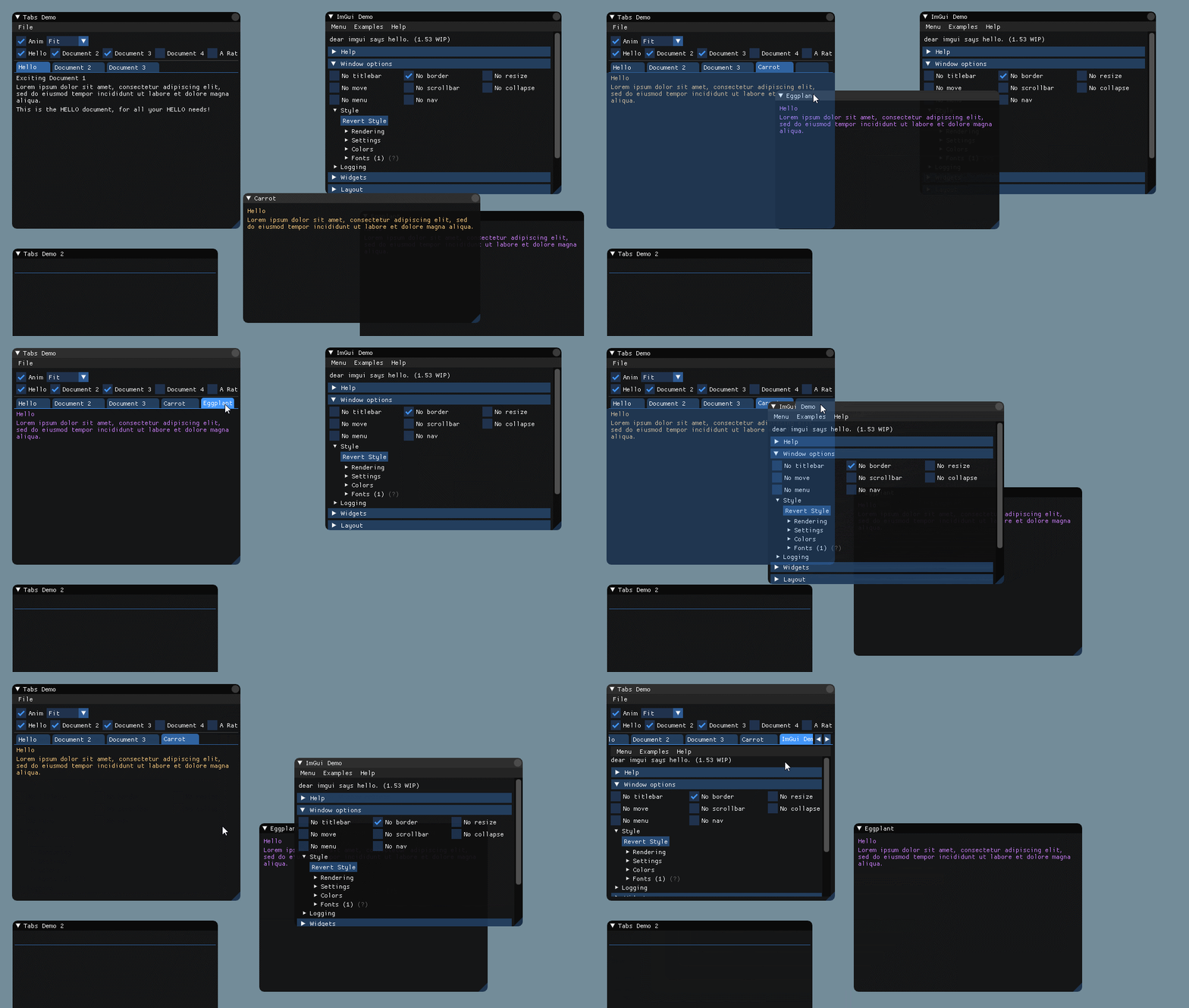
For the records, as I haven't posted on this topic before, this is what I am now working on.
No ETA, there are still lots of unsolved problems but should be before end of 2017.
ocornut
on 2 Nov 2017
Looking good so far. Any plans (or maybe there's already a way) to support a 'global' dock rather than docking within a free-floating window?
 jrdmellow
on 14 Nov 2017
jrdmellow
on 14 Nov 2017
Suggestion: global dock (or "dockspace" in Nem0's implementation) could be just the area under the main menu bar.
r-lyeh-archived
on 14 Nov 2017
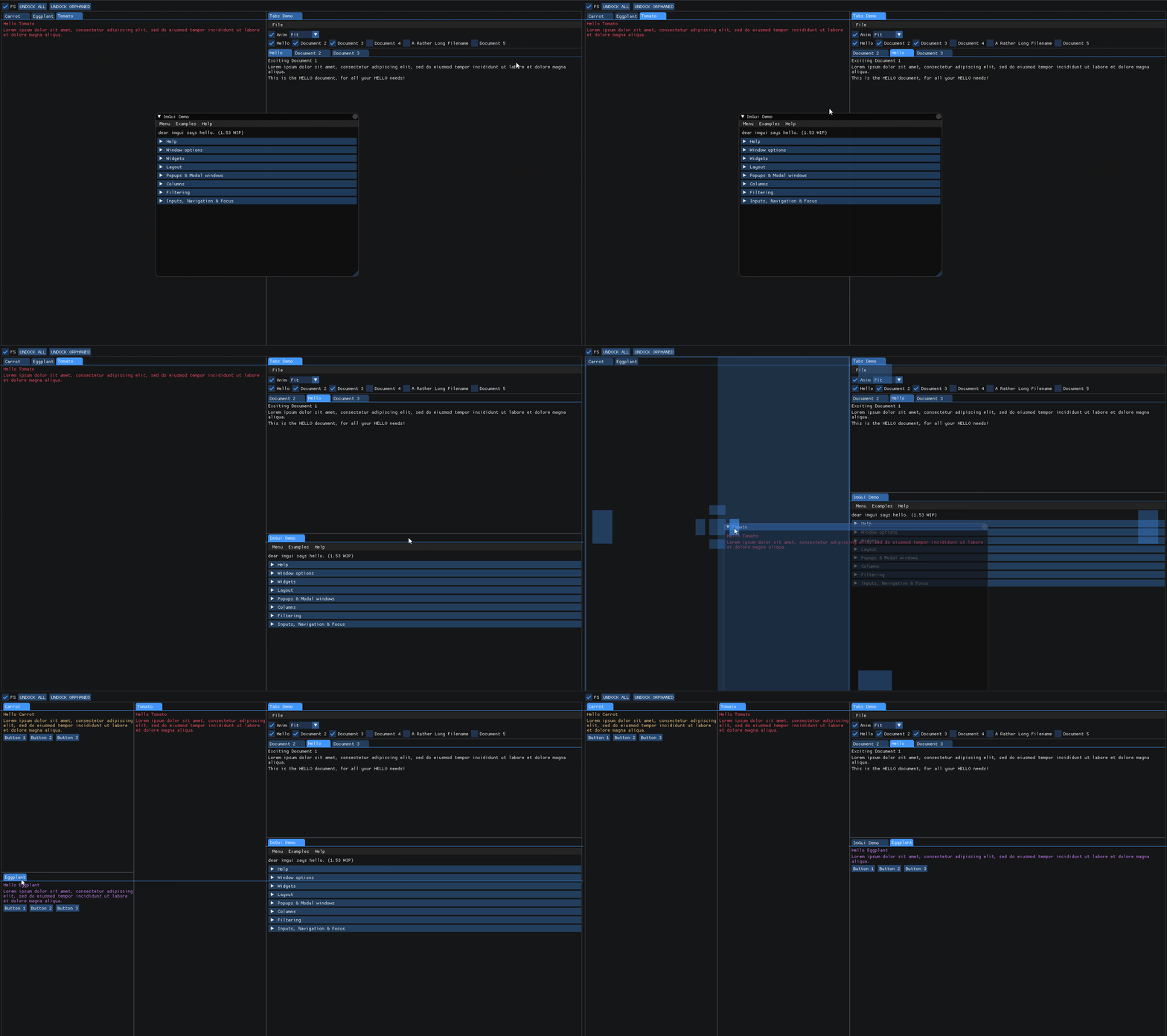
Docking GIF (low framerate, sorry!)
There are still quite a couple of missing features, glitches (some visible here), and bigger issues to fix but hopefully within a few weeks it'll end up in a branch for testing..
ocornut
on 24 Nov 2017
Yes! This is fantastic. I am super interested in testing this! :)
jrdmellow
on 24 Nov 2017
@ocornut What's the status on this? Is it ready for a public branch yet? :)
 jiri
on 19 Dec 2017
jiri
on 19 Dec 2017
No ETA sorry. Current code works decently but i’m quite unhappy with the code complexity and quality. I’ll be pushing for a few tricky features first before deciding what is the next step, perhaps some refactor is desirable.
Even if I move it to a public branch soonish I don’t expect the code to go in the master branch before at least 1-2 months.
ocornut
on 19 Dec 2017
I started working on virtual viewports, which are not directly related to docking, but it simplify a lot of things will dealing with multiple OS windows, something which will be desirable for docking.
Proof of concept:
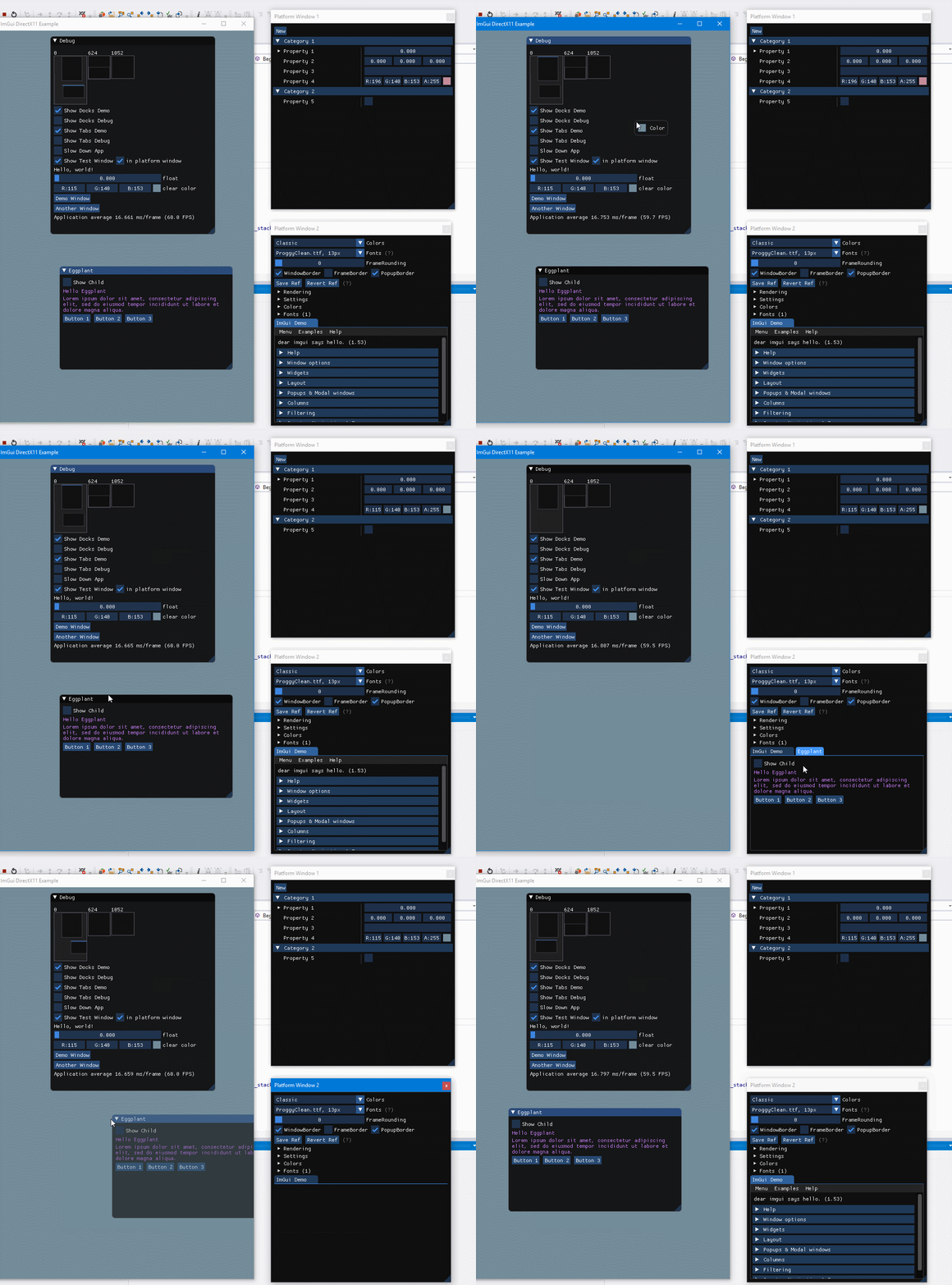
Very happy with the direction this is taking now, the virtual viewport thing is rather simpler and super useful.
ocornut
on 28 Dec 2017
yes, yes, yes :D. I'm so glad you found a way.
volcoma
on 28 Dec 2017
I got impatient to wait when this feature is released, so I've implemented my own dockspace version :P
https://youtu.be/6QZ1sFn1BuQ
I've decided to share it in case if someone finds it helpful.
The source code is there:
https://github.com/gsage/engine/blob/master/PlugIns/ImGUI/Common/include/ImGuiDockspace.h
https://github.com/gsage/engine/blob/master/PlugIns/ImGUI/Common/src/ImGuiDockspace.cpp
It has 2 external deps, which are easy to get rid of if you want.
One is sole, which is used for guid generation. It's only one header, so you can either copy it to your project or get rid of that and use ctime or something else what can help you to generate unique names.
Another is logger (easylogging++). Same thing, very easy to get rid of all logs in this file.
It's a bit similar to Lumix implementation and uses some small bits of code from it.
 Unix4ever
on 3 Jan 2018
Unix4ever
on 3 Jan 2018
Thx to the @nem0, @paniq @adcox 's distribute of imgui_dock, I've added the function of load/save to the imgui_dock(but not auto saving).
https://github.com/BentleyBlanks/imguiDock
It seems the Lumix Engine have done a quite intelligible work just save the dock's property to a Lua file, so I was just translate it to a .ini file named imgui_dock.ini.(you can modify the format if your want)
 BentleyBlanks
on 6 Jan 2018
BentleyBlanks
on 6 Jan 2018
@BentleyBlanks FYI imgui_internal.h now exposes a way to store additional settings in the imgui.ini file,
See the code in ImGui::Initialize() for reference:
    // Add .ini handle for ImGuiWindow type
    ImGuiSettingsHandler ini_handler;
    ini_handler.TypeName = "Window";
    ini_handler.TypeHash = ImHash("Window", 0, 0);
    ini_handler.ReadOpenFn = SettingsHandlerWindow_ReadOpen;
    ini_handler.ReadLineFn = SettingsHandlerWindow_ReadLine;
    ini_handler.WriteAllFn = SettingsHandlerWindow_WriteAll;
    g.SettingsHandlers.push_front(ini_handler);
Your system could register its own type there. The setup isi quite low-level and not full-featured but it's probably enough.
ocornut
on 6 Jan 2018
@ocornut is there a way i can test the seeprate window tabbing here:
https://github.com/ocornut/imgui/issues/351#issuecomment-354348675
it isn't in your tab branch i believe.
 mario-132
on 4 Feb 2018
mario-132
on 4 Feb 2018
@ocornut is there a way i can test the seeprate window tabbing here:
It's too early to be shared, sorry.
ocornut
on 4 Feb 2018
@ocornut Done! The property of imgui_dock could auto save/load to the imgui.ini, it's not as hard as I thought.
BentleyBlanks
on 4 Feb 2018
@ocornut Okay, i will wait. ;)
mario-132
on 4 Feb 2018
@BentleyBlanks Thats amazing!
Just tested out your add on and it seems to work really well!
Found one bug, the vertical bar which allows to resize docks up and down has a bug, it does move them up and down, but it moves the window with it:
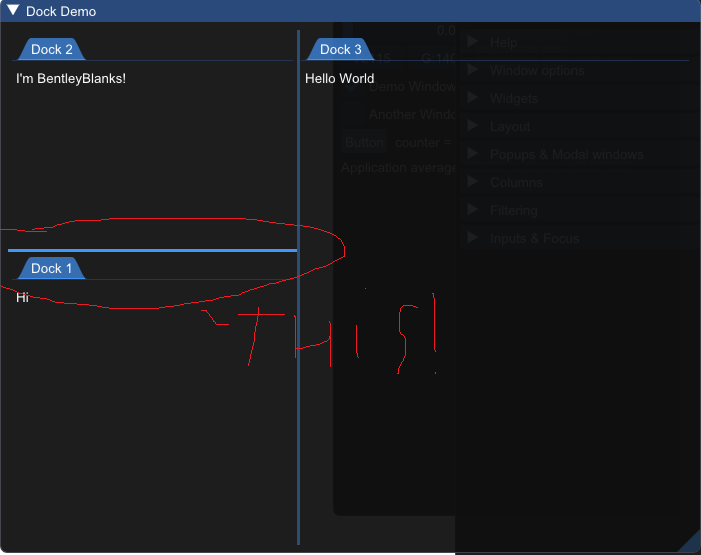
The horizontal move bar is fine.
mario-132
on 4 Feb 2018
@Tim4135
i am using flix01 docking unit , it works pretty well with no bugs , at least so far!
https://github.com/Flix01/imgui/tree/2015-10-Addons/addons/imguidock
codz01
on 5 Feb 2018
@Tim4135 Fixed the bug when drag the bar but the window moved.(Thx to @lonelyWaiting)
BentleyBlanks
on 7 Feb 2018
Looking forward to this next milestone :3
 JackMcCallum
on 26 Mar 2018
JackMcCallum
on 26 Mar 2018
@ocornut wow, amazing work! Can you share separate window docking, please?
 LawlietRyuzaki
on 23 Apr 2018
LawlietRyuzaki
on 23 Apr 2018
@LawlietRyuzaki Part of the work in is #1542, docking itself isn't public. Now that Multi-Viewport are becoming more usable I may be able to get back to work on Docking.
ocornut
on 23 Apr 2018
@ocornut Is there an easy way to integrate the docking system from LumixEngine into the multi-viewport system? What need to change in imgui_dock? Thank you.
LawlietRyuzaki
on 23 Apr 2018
I'm not using the LumixEngine docking system so I don't know. I guess you'll have to try by yourself because AFAIK nobody has been trying to combine them.
ocornut
on 23 Apr 2018
I tried, it was not straightforward, but also not impossible. I did not have time to finish it and I also don't want to use API that is not yet final.
nem0
on 23 Apr 2018
Looking forward to these docking and viewports features!
On Tue, Apr 24, 2018 at 5:37 AM, Mikulas Florek notifications@github.com
wrote:
I tried, it was not straightforward, but also not impossible. I did not
have time to finish it and I also don't want to use API that is not yet
final.—
You are receiving this because you are subscribed to this thread.
Reply to this email directly, view it on GitHub
https://github.com/ocornut/imgui/issues/351#issuecomment-383696635, or mute
the thread
https://github.com/notifications/unsubscribe-auth/AGQa7ZWyhj1Y1oTaCpahRNuZzVME59LCks5tri1pgaJpZM4GEUn1
.
JackMcCallum
on 24 Apr 2018
@LawlietRyuzaki I use one of the variants of the Lumix dock (vassvik/imgui_docking_minimal), notes should be close - but may include stuff that's no longer an issue in the Lumix code.
Getting it working with the Viewports stuff was:
- Changing the dock slots drawing to use the overlay draw list instead of a bogus window (dropping the clipping)
- Dock slot and the getDockedRect don't honor the assigned area
- getDockedRect was doing a mismatch of size vs position based rects, adding max to min is not correct, unsure why it wasn't screaming obvious before
- The dockspace rect given might as well be ignored, had to fix that so border dock slots draw in the right area,
ImRect(ImVec2(0,0), GetIO().DisplaySize)is not OK
- Coordinates look like their in flux, seem to work in client-space right now, didn't bother to check for sure
- Ditching the phantom-painting of the dragged status for treating it like a floating window except with a 0.2 alpha override.
- Cheating to set the ImGuiContext::MovingWindow when status is status_dragged, otherwise it's hit-or-miss on whether an undocked window can promote into a platform window or not, which is super bad if you drag it off window, it'll get lost
Windows that are external viewports obviously ignore the alpha-override, haven't looked into if enabling the compositor on the hwnds for those is viable (it's at least doable on windows, might be too much pain to be worth it though).
Edit: There was already stuff for viewport transparency, two liner change to pass the next window BgAlpha onto the viewport alpha.
 JSandusky
on 28 Apr 2018
JSandusky
on 28 Apr 2018
I'd be interested in seeing your exact diff, out of curiosity. While I hope people will want to switch to the future docking system, it's a perfect study case and I'd still like it to be solvable perfectly without touching imgui.cpp.
Changing the dock slots drawing to use the overlay draw list instead of a bogus window (dropping the clipping)
In one of my test I've been trying to work with multiple overlays so they can span multiple windows, but that needs to be perfectly synchronized (it easily exhibit issues where viewports are not refreshed/vsync together). One similar use case is that in the viewport branch io.MouseDrawCursor = true can draw a cursor straddling multiple rendering contexts. Without synchronized vsync you can see shearing when the software cursor straddles viewport.
Coordinates look like their in flux, seem to work in client-space right now, didn't bother to check for sure
Yes I updated the coordinate systems recently in the Viewport branch, basically all imgui positions are now mapping to your natural OS positions (so e.g. on Windows, (0,0) is always the upper-left of the primary monitor). This simplified many things compared the previously virtualized multi-viewport positioning. As a result however, SetNextWindowPos(ImVec2(0,0)) with absolute values are likely not what you want, you can currently use SetNextWindowPos(GetMainViewport()->Pos) (tho remember all those API in in flux). Along with reading back from GetMousePos() being in the same coordinate systems, this will be the only breakage with enabling viewports. And with this approach there will be no change for viewport-unaware application, since the "main viewport" position will stay an untouched (0,0) in those apps.
Edit: There was already stuff for viewport transparency, two liner change to pass the next window BgAlpha onto the viewport alpha.
I'm still working on that, the problem I have is that full-viewport alpha will never be equivalent to the same factor applied on every color so there are annoying discontinuities when transitioning from embedded to separate viewport. Perhaps on Windows 10 we could optional offer support for per-pixel transparency, if you want to experiment with getting this working (my earlier experiments with it failed to get it working).
ocornut
on 28 Apr 2018
The files can be found in this mashup of the viewport branch into MonoGame that I did the other day, basically monkey-tosses the Win32 DX11 demo into a Windows Forms program. I have a copy of the specific clean sources I used so I can toss a diff up of what I actually changed for viewport purposes somewhat soon-ish.
imgui_dock.h/.cpp has the dock specific stuff I had to do in order to make it work, I did not tackle docking in multiple windows - not something I care for other than as docking tabs.
Wouldn't take any of the changes in there too seriously, monkey tossing poo really to force things to work.
JSandusky
on 28 Apr 2018
A bit of an update on Docking, I'm currently working on a V2 (which I restarted from scratch recently) and will start sharing an early branch with selected people in the upcoming weeks, then move it to a public branch to receive move feedback.
GIF from a few weeks ago:


When it is a little more ready-er I will create a new thread and close this one.
ocornut
on 16 Aug 2018
@ocornut That is really nice you have there! Is there any way I could join the beta program and be early tester? ;)
I have been waiting so long for that.
 dev0-1
on 22 Aug 2018
dev0-1
on 22 Aug 2018
@dev0-1 Yes probably, send me an e-mail. It'll be my focus of the next few weeks to move this into a branch.
ocornut
on 22 Aug 2018
@ocornut Sure, but what is your email address? The one in the readme?
dev0-1
on 22 Aug 2018
_FOR IMMEDIATE RELEASE_
_Paris, France: After what seems like forever, just as @ocornut drew his last breath he pushed a WIP 'docking' branch in #2109 and managed to close the old thread #351. The general population of docking enthusiasts are encouraged to scrutinize and report on this effort in #2109._
ocornut
on 1 Oct 2018
Related issues
 DarkLinux
·
3Comments
DarkLinux
·
3Comments
 inflex
·
3Comments
inflex
·
3Comments
 mkanakis
·
3Comments
ocornut
·
3Comments
mkanakis
·
3Comments
ocornut
·
3Comments
 bogdaNNNN1
·
3Comments
bogdaNNNN1
·
3Comments
Most helpful comment
I started working on virtual viewports, which are not directly related to docking, but it simplify a lot of things will dealing with multiple OS windows, something which will be desirable for docking.
Proof of concept:

Very happy with the direction this is taking now, the virtual viewport thing is rather simpler and super useful.