(ADMIN EDIT): COLOR PICKING TOOLS ARE NOW INCLUDED IN IMGUI. From version 1.51 (Aug 2017), ColorEdit3/ColorEdit4 wll allow you to open a picker by clicking on the colored square. Also added right-mouse click to open option. And you can call ColorPicker4 functions to directly embed a picker with custom options in your app. Read the release note and check the demo code.
I've implemented advanced color picker, maybe somebody find this useful:

    void ImDrawList::AddTriangleFilledMultiColor(const ImVec2& a, const ImVec2& b, const ImVec2& c, ImU32 col_a, ImU32 col_b, ImU32 col_c)
    {
        if (((col_a | col_b | col_c) >> 24) == 0)
            return;

        const ImVec2 uv = GImGui->FontTexUvWhitePixel;
        PrimReserve(3, 3);
        PrimWriteIdx((ImDrawIdx)(_VtxCurrentIdx)); PrimWriteIdx((ImDrawIdx)(_VtxCurrentIdx + 1)); PrimWriteIdx((ImDrawIdx)(_VtxCurrentIdx + 2));
        PrimWriteVtx(a, uv, col_a);
        PrimWriteVtx(b, uv, col_b);
        PrimWriteVtx(c, uv, col_c);
    }

    bool ColorPicker(const char* label, ImColor* color)
    {
        static const float HUE_PICKER_WIDTH = 20.0f;
        static const float CROSSHAIR_SIZE = 7.0f;
        static const ImVec2 SV_PICKER_SIZE = ImVec2(200, 200);

        bool value_changed = false;

        ImDrawList* draw_list = ImGui::GetWindowDrawList();

        ImVec2 picker_pos = ImGui::GetCursorScreenPos();

        ImColor colors[] = {ImColor(255, 0, 0),
            ImColor(255, 255, 0),
            ImColor(0, 255, 0),
            ImColor(0, 255, 255),
            ImColor(0, 0, 255),
            ImColor(255, 0, 255),
            ImColor(255, 0, 0)};

        for (int i = 0; i < 6; ++i)
        {
            draw_list->AddRectFilledMultiColor(
                ImVec2(picker_pos.x + SV_PICKER_SIZE.x + 10, picker_pos.y + i * (SV_PICKER_SIZE.y / 6)),
                ImVec2(picker_pos.x + SV_PICKER_SIZE.x + 10 + HUE_PICKER_WIDTH,
                    picker_pos.y + (i + 1) * (SV_PICKER_SIZE.y / 6)),
                colors[i],
                colors[i],
                colors[i + 1],
                colors[i + 1]);
        }

        float hue, saturation, value;
        ImGui::ColorConvertRGBtoHSV(
            color->Value.x, color->Value.y, color->Value.z, hue, saturation, value);
        auto hue_color = ImColor::HSV(hue, 1, 1);

        draw_list->AddLine(
            ImVec2(picker_pos.x + SV_PICKER_SIZE.x + 8, picker_pos.y + hue * SV_PICKER_SIZE.y),
            ImVec2(picker_pos.x + SV_PICKER_SIZE.x + 12 + HUE_PICKER_WIDTH,
                picker_pos.y + hue * SV_PICKER_SIZE.y),
            ImColor(255, 255, 255));

        draw_list->AddTriangleFilledMultiColor(picker_pos,
            ImVec2(picker_pos.x + SV_PICKER_SIZE.x, picker_pos.y + SV_PICKER_SIZE.y),
            ImVec2(picker_pos.x, picker_pos.y + SV_PICKER_SIZE.y),
            ImColor(0, 0, 0),
            hue_color,
            ImColor(255, 255, 255));

        float x = saturation * value;
        ImVec2 p(picker_pos.x + x * SV_PICKER_SIZE.x, picker_pos.y + value * SV_PICKER_SIZE.y);
        draw_list->AddLine(ImVec2(p.x - CROSSHAIR_SIZE, p.y), ImVec2(p.x - 2, p.y), ImColor(255, 255, 255));
        draw_list->AddLine(ImVec2(p.x + CROSSHAIR_SIZE, p.y), ImVec2(p.x + 2, p.y), ImColor(255, 255, 255));
        draw_list->AddLine(ImVec2(p.x, p.y + CROSSHAIR_SIZE), ImVec2(p.x, p.y + 2), ImColor(255, 255, 255));
        draw_list->AddLine(ImVec2(p.x, p.y - CROSSHAIR_SIZE), ImVec2(p.x, p.y - 2), ImColor(255, 255, 255));

        ImGui::InvisibleButton("saturation_value_selector", SV_PICKER_SIZE);
        if (ImGui::IsItemHovered())
        {
            ImVec2 mouse_pos_in_canvas = ImVec2(
                ImGui::GetIO().MousePos.x - picker_pos.x, ImGui::GetIO().MousePos.y - picker_pos.y);
            if (ImGui::GetIO().MouseDown[0])
            {
                mouse_pos_in_canvas.x =
                    ImMin(mouse_pos_in_canvas.x, mouse_pos_in_canvas.y);

                value = mouse_pos_in_canvas.y / SV_PICKER_SIZE.y;
                saturation = value == 0 ? 0 : (mouse_pos_in_canvas.x / SV_PICKER_SIZE.x) / value;
                value_changed = true;
            }
        }

        ImGui::SetCursorScreenPos(ImVec2(picker_pos.x + SV_PICKER_SIZE.x + 10, picker_pos.y));
        ImGui::InvisibleButton("hue_selector", ImVec2(HUE_PICKER_WIDTH, SV_PICKER_SIZE.y));

        if (ImGui::IsItemHovered())
        {
            if (ImGui::GetIO().MouseDown[0])
            {
                hue = ((ImGui::GetIO().MousePos.y - picker_pos.y) / SV_PICKER_SIZE.y);
                value_changed = true;
            }
        }

        *color = ImColor::HSV(hue, saturation, value);
        return value_changed | ImGui::ColorEdit3(label, &color->Value.x);
    }
 nem0
nem0
All 105 comments
Thanks. Really useful!
I've been meaning to add a proper color picker by default in ImGui but haven't got around to do one with a proper feature set.
There's this one:
https://twitter.com/ApoorvaJ/status/644452534917009408

From https://github.com/ApoorvaJ/Papaya
There's this one

https://github.com/benoitjacquier/imgui
We could probably combine some of those.
Micko's old imgui using nanovg also have a better color picker:

That I wanted to replicate but haven't got around to do it yet.
 ocornut
on 22 Sep 2015
ocornut
on 22 Sep 2015
I thought I'd seen a task for this somewhere, however I was not able to find it again.
If I understand Papaya uses specific shader for the color picker. In general it is not possible to do the picker as in the first and second example with default shader or without runtime generated texture or huge amount of polygons. Mikko's solution is possible, it's basically the same as mine, only the hue selector has different shape
nem0
on 22 Sep 2015
The second one didn't use a huge amount of polygon asap, it's using multiple layers with transparency. Unfortunately the code itself is pretty huge and unbearable for what it does so I'll probably prefer to start from your base. At least we could improve it and ship it as an Example first before it gets stable enough to be promoted as an API thing.
ocornut
on 23 Sep 2015
These are awesome, thanks for posting. I particularly like the last one you posted @ocornut, might work on trying to implement one. If I get one done I'll post it for people.
 WearyWanderer
on 23 Sep 2015
WearyWanderer
on 23 Sep 2015
Hey guys,
I merged @nem0's and @benoitjacquier's code.
The resulting snippet not as big as @benoitjacquier's, but still embeddable, standalone and does not require a new primitive (ImDrawList::AddTriangleFilledMultiColor) anymore.

I have improved the color picker to capture out-of-bounds hovers as well, as featured in the video below.
// [src] https://github.com/ocornut/imgui/issues/346

#include <imgui.h>

bool ColorPicker(const char* label, float col[3])
{
    static const float HUE_PICKER_WIDTH = 20.0f;
    static const float CROSSHAIR_SIZE = 7.0f;
    static const ImVec2 SV_PICKER_SIZE = ImVec2(200, 200);

    ImColor color(col[0], col[1], col[2]);
    bool value_changed = false;

    ImDrawList* draw_list = ImGui::GetWindowDrawList();

    ImVec2 picker_pos = ImGui::GetCursorScreenPos();

    ImColor colors[] = { ImColor(255, 0, 0),
        ImColor(255, 255, 0),
        ImColor(0, 255, 0),
        ImColor(0, 255, 255),
        ImColor(0, 0, 255),
        ImColor(255, 0, 255),
        ImColor(255, 0, 0) };

    for (int i = 0; i < 6; ++i)
    {
        draw_list->AddRectFilledMultiColor(
            ImVec2(picker_pos.x + SV_PICKER_SIZE.x + 10, picker_pos.y + i * (SV_PICKER_SIZE.y / 6)),
            ImVec2(picker_pos.x + SV_PICKER_SIZE.x + 10 + HUE_PICKER_WIDTH,
            picker_pos.y + (i + 1) * (SV_PICKER_SIZE.y / 6)),
            colors[i],
            colors[i],
            colors[i + 1],
            colors[i + 1]);
    }

    float hue, saturation, value;
    ImGui::ColorConvertRGBtoHSV(
        color.Value.x, color.Value.y, color.Value.z, hue, saturation, value);

    draw_list->AddLine(
        ImVec2(picker_pos.x + SV_PICKER_SIZE.x + 8, picker_pos.y + hue * SV_PICKER_SIZE.y),
        ImVec2(picker_pos.x + SV_PICKER_SIZE.x + 12 + HUE_PICKER_WIDTH, picker_pos.y + hue * SV_PICKER_SIZE.y),
        ImColor(255, 255, 255));

    {
        const int step = 5;
        ImVec2 pos = ImVec2(0, 0);

        ImVec4 c00(1, 1, 1, 1);
        ImVec4 c10(1, 1, 1, 1);
        ImVec4 c01(1, 1, 1, 1);
        ImVec4 c11(1, 1, 1, 1);
        for (int y = 0; y < step; y++) {
            for (int x = 0; x < step; x++) {
                float s0 = (float)x / (float)step;
                float s1 = (float)(x + 1) / (float)step;
                float v0 = 1.0 - (float)(y) / (float)step;
                float v1 = 1.0 - (float)(y + 1) / (float)step;

                ImGui::ColorConvertHSVtoRGB(hue, s0, v0, c00.x, c00.y, c00.z);
                ImGui::ColorConvertHSVtoRGB(hue, s1, v0, c10.x, c10.y, c10.z);
                ImGui::ColorConvertHSVtoRGB(hue, s0, v1, c01.x, c01.y, c01.z);
                ImGui::ColorConvertHSVtoRGB(hue, s1, v1, c11.x, c11.y, c11.z);

                draw_list->AddRectFilledMultiColor(
                    ImVec2(picker_pos.x + pos.x, picker_pos.y + pos.y),
                    ImVec2(picker_pos.x + pos.x + SV_PICKER_SIZE.x / step, picker_pos.y + pos.y + SV_PICKER_SIZE.y / step),
                    ImGui::ColorConvertFloat4ToU32(c00),
                    ImGui::ColorConvertFloat4ToU32(c10),
                    ImGui::ColorConvertFloat4ToU32(c11),
                    ImGui::ColorConvertFloat4ToU32(c01));

                pos.x += SV_PICKER_SIZE.x / step;
            }
            pos.x = 0;
            pos.y += SV_PICKER_SIZE.y / step;
        }
    }

    float x = saturation * SV_PICKER_SIZE.x;
    float y = (1 -value) * SV_PICKER_SIZE.y;
    ImVec2 p(picker_pos.x + x, picker_pos.y + y);
    draw_list->AddLine(ImVec2(p.x - CROSSHAIR_SIZE, p.y), ImVec2(p.x - 2, p.y), ImColor(255, 255, 255));
    draw_list->AddLine(ImVec2(p.x + CROSSHAIR_SIZE, p.y), ImVec2(p.x + 2, p.y), ImColor(255, 255, 255));
    draw_list->AddLine(ImVec2(p.x, p.y + CROSSHAIR_SIZE), ImVec2(p.x, p.y + 2), ImColor(255, 255, 255));
    draw_list->AddLine(ImVec2(p.x, p.y - CROSSHAIR_SIZE), ImVec2(p.x, p.y - 2), ImColor(255, 255, 255));

    ImGui::InvisibleButton("saturation_value_selector", SV_PICKER_SIZE);

    if (ImGui::IsItemActive() && ImGui::GetIO().MouseDown[0])
    {
        ImVec2 mouse_pos_in_canvas = ImVec2(
            ImGui::GetIO().MousePos.x - picker_pos.x, ImGui::GetIO().MousePos.y - picker_pos.y);

        /**/ if( mouse_pos_in_canvas.x <                     0 ) mouse_pos_in_canvas.x = 0;
        else if( mouse_pos_in_canvas.x >= SV_PICKER_SIZE.x - 1 ) mouse_pos_in_canvas.x = SV_PICKER_SIZE.x - 1;

        /**/ if( mouse_pos_in_canvas.y <                     0 ) mouse_pos_in_canvas.y = 0;
        else if( mouse_pos_in_canvas.y >= SV_PICKER_SIZE.y - 1 ) mouse_pos_in_canvas.y = SV_PICKER_SIZE.y - 1;

        value = 1 - (mouse_pos_in_canvas.y / (SV_PICKER_SIZE.y - 1));
        saturation = mouse_pos_in_canvas.x / (SV_PICKER_SIZE.x - 1);
        value_changed = true;
    }

    ImGui::SetCursorScreenPos(ImVec2(picker_pos.x + SV_PICKER_SIZE.x + 10, picker_pos.y));
    ImGui::InvisibleButton("hue_selector", ImVec2(HUE_PICKER_WIDTH, SV_PICKER_SIZE.y));

    if( (ImGui::IsItemHovered()||ImGui::IsItemActive()) && ImGui::GetIO().MouseDown[0])
    {
        ImVec2 mouse_pos_in_canvas = ImVec2(
            ImGui::GetIO().MousePos.x - picker_pos.x, ImGui::GetIO().MousePos.y - picker_pos.y);

        /* Previous horizontal bar will represent hue=1 (bottom) as hue=0 (top). Since both colors are red, we clamp at (-2, above edge) to avoid visual continuities */
        /**/ if( mouse_pos_in_canvas.y <                     0 ) mouse_pos_in_canvas.y = 0;
        else if( mouse_pos_in_canvas.y >= SV_PICKER_SIZE.y - 2 ) mouse_pos_in_canvas.y = SV_PICKER_SIZE.y - 2;

        hue = mouse_pos_in_canvas.y / (SV_PICKER_SIZE.y - 1 );
        value_changed = true;
    }

    color = ImColor::HSV(hue > 0 ? hue : 1e-6, saturation > 0 ? saturation : 1e-6, value > 0 ? value : 1e-6);
    col[0] = color.Value.x;
    col[1] = color.Value.y;
    col[2] = color.Value.z;
    return value_changed | ImGui::ColorEdit3(label, col);
}
 r-lyeh-archived
on 15 Jan 2016
r-lyeh-archived
on 15 Jan 2016
:+1:
is the SV picker exact?
nem0
on 15 Jan 2016
should be. it would be nice to have a H,S,V triad below those R,G,B numbers to debug & confirm
r-lyeh-archived
on 15 Jan 2016
Superb! My small feedback from looking at the video is that you could align the R/G/B+Square at the bottom to be the same width as the main frame, e.g. using PushItemWidth(), and perhaps in this context it would make more sense to not have a label visible and save the horizontal space all together.
Ideally it would be able to interact with the default ColorEdit3/4() widget as well:
- perhaps ColorEdit3/4 can be expanded with a small button and show the full thing.
- or clicking on the colored square open a popup with this picker :)
I'm sorry I've got so much to catch on with ImGui, been working often 7 days a week already and finding it tough to sit down (though I've made notable progress on a few branch of work, but not color picker, so thanks all for posting your stuff here!).
ocornut
on 15 Jan 2016
I mean this
                ImGui::ColorConvertHSVtoRGB(hue, s0, v0, c00.x, c00.y, c00.z);
                ImGui::ColorConvertHSVtoRGB(hue, s1, v0, c10.x, c10.y, c10.z);
                ImGui::ColorConvertHSVtoRGB(hue, s0, v1, c01.x, c01.y, c01.z);
                ImGui::ColorConvertHSVtoRGB(hue, s1, v1, c11.x, c11.y, c11.z);

                draw_list->AddRectFilledMultiColor(
                    ImVec2(picker_pos.x + pos.x, picker_pos.y + pos.y),
                    ImVec2(picker_pos.x + pos.x + SV_PICKER_SIZE.x / step, picker_pos.y + pos.y + SV_PICKER_SIZE.y / step),
                    ImGui::ColorConvertFloat4ToU32(c00),
                    ImGui::ColorConvertFloat4ToU32(c10),
                    ImGui::ColorConvertFloat4ToU32(c11),
                    ImGui::ColorConvertFloat4ToU32(c01));
Interpolating HSV in RGB space - the difference is very visible when the big square is made from only two triangles
nem0
on 15 Jan 2016
@nem0
Ah yup, it is not _that_ exact. I also experienced that while building the widget before.
@benoitjacquier "fixed" the canvas picker by rendering many small squares (step size=5 px wide, customizable in src), which I found an elegant workaround considering the limitations.
I think it is overall smooth enough, though. I cannot spot very big issues when zooming, so it is ok for me as it is :)

@ocornut
yep that would be cool. I think another sidebar going from black to white to define alpha would be a nice addition as well.
r-lyeh-archived
on 15 Jan 2016
Another simple way (2 drawcalls), draw one quad with horizontal gradient from white to hue color and an other quad over the first with vertical gradient from black to transparant black.
const ImU32 c_oColorBlack = ImGui::ColorConvertFloat4ToU32(ImVec4(0.f,0.f,0.f,1.f));
const ImU32 c_oColorBlackTransparent = ImGui::ColorConvertFloat4ToU32(ImVec4(0.f,0.f,0.f,0.f));
const ImU32 c_oColorWhite = ImGui::ColorConvertFloat4ToU32(ImVec4(1.f,1.f,1.f,1.f));

ImVec4 cHueValue(1, 1, 1, 1);
ImGui::ColorConvertHSVtoRGB(hue, 1, 1, cHueValue.x, cHueValue.y, cHueValue.z);
ImU32 oHueColor = ImGui::ColorConvertFloat4ToU32(cHueValue);

ImVec2 oSaturationAreaMin /*= ImGui::GetItemRectMin()*/;
ImVec2 oSaturationAreaMax /*= ImGui::GetItemRectMax()*/;

pDrawList->AddRectFilledMultiColor(
    oSaturationAreaMin,
    oSaturationAreaMax,
    c_oColorWhite,
    oHueColor,
    oHueColor,
    c_oColorWhite
    );

pDrawList->AddRectFilledMultiColor(
    oSaturationAreaMin,
    oSaturationAreaMax,
    c_oColorBlackTransparent,
    c_oColorBlackTransparent,
    c_oColorBlack,
    c_oColorBlack
    );
 thennequin
on 15 Jan 2016
thennequin
on 15 Jan 2016
aha very cool :) will try asap
i am fixing the align issues and adding an alpha bar as well.
r-lyeh-archived
on 15 Jan 2016
ok, v2
thanks for the suggestions guys

// [src] https://github.com/ocornut/imgui/issues/346
// v2

#include <imgui.h>

static bool ColorPicker( float *col, bool alphabar )
{
    const int    EDGE_SIZE = 200; // = int( ImGui::GetWindowWidth() * 0.75f );
    const ImVec2 SV_PICKER_SIZE = ImVec2(EDGE_SIZE, EDGE_SIZE);
    const float  SPACING = ImGui::GetStyle().ItemInnerSpacing.x;
    const float  HUE_PICKER_WIDTH = 20.f;
    const float  CROSSHAIR_SIZE = 7.0f;

    ImColor color(col[0], col[1], col[2]);
    bool value_changed = false;

    ImDrawList* draw_list = ImGui::GetWindowDrawList();

    // setup

    ImVec2 picker_pos = ImGui::GetCursorScreenPos();

    float hue, saturation, value;
    ImGui::ColorConvertRGBtoHSV(
        color.Value.x, color.Value.y, color.Value.z, hue, saturation, value);

    // draw hue bar

    ImColor colors[] = { ImColor(255, 0, 0),
        ImColor(255, 255, 0),
        ImColor(0, 255, 0),
        ImColor(0, 255, 255),
        ImColor(0, 0, 255),
        ImColor(255, 0, 255),
        ImColor(255, 0, 0) };

    for (int i = 0; i < 6; ++i)
    {
        draw_list->AddRectFilledMultiColor(
            ImVec2(picker_pos.x + SV_PICKER_SIZE.x + SPACING, picker_pos.y + i * (SV_PICKER_SIZE.y / 6)),
            ImVec2(picker_pos.x + SV_PICKER_SIZE.x + SPACING + HUE_PICKER_WIDTH,
            picker_pos.y + (i + 1) * (SV_PICKER_SIZE.y / 6)),
            colors[i],
            colors[i],
            colors[i + 1],
            colors[i + 1]);
    }

    draw_list->AddLine(
        ImVec2(picker_pos.x + SV_PICKER_SIZE.x + SPACING - 2, picker_pos.y + hue * SV_PICKER_SIZE.y),
        ImVec2(picker_pos.x + SV_PICKER_SIZE.x + SPACING + 2 + HUE_PICKER_WIDTH, picker_pos.y + hue * SV_PICKER_SIZE.y),
        ImColor(255, 255, 255));

    // draw alpha bar

    if( alphabar ) {
        float alpha = col[3];

        draw_list->AddRectFilledMultiColor(
            ImVec2(picker_pos.x + SV_PICKER_SIZE.x + 2*SPACING + HUE_PICKER_WIDTH, picker_pos.y),
            ImVec2(picker_pos.x + SV_PICKER_SIZE.x + 2*SPACING + 2*HUE_PICKER_WIDTH, picker_pos.y + SV_PICKER_SIZE.y),
            ImColor(0, 0, 0), ImColor(0, 0, 0), ImColor(255, 255, 255), ImColor(255, 255, 255) );

        draw_list->AddLine(
            ImVec2(picker_pos.x + SV_PICKER_SIZE.x + 2*(SPACING - 2) + HUE_PICKER_WIDTH, picker_pos.y + alpha * SV_PICKER_SIZE.y),
            ImVec2(picker_pos.x + SV_PICKER_SIZE.x + 2*(SPACING + 2) + 2*HUE_PICKER_WIDTH, picker_pos.y + alpha * SV_PICKER_SIZE.y),
            ImColor(255.f - alpha, 255.f, 255.f));
    }

    // draw color matrix

    {
        const ImU32 c_oColorBlack = ImGui::ColorConvertFloat4ToU32(ImVec4(0.f,0.f,0.f,1.f));
        const ImU32 c_oColorBlackTransparent = ImGui::ColorConvertFloat4ToU32(ImVec4(0.f,0.f,0.f,0.f));
        const ImU32 c_oColorWhite = ImGui::ColorConvertFloat4ToU32(ImVec4(1.f,1.f,1.f,1.f));

        ImVec4 cHueValue(1, 1, 1, 1);
        ImGui::ColorConvertHSVtoRGB(hue, 1, 1, cHueValue.x, cHueValue.y, cHueValue.z);
        ImU32 oHueColor = ImGui::ColorConvertFloat4ToU32(cHueValue);

        draw_list->AddRectFilledMultiColor(
            ImVec2(picker_pos.x, picker_pos.y),
            ImVec2(picker_pos.x + SV_PICKER_SIZE.x, picker_pos.y + SV_PICKER_SIZE.y),
            c_oColorWhite,
            oHueColor,
            oHueColor,
            c_oColorWhite
            );

        draw_list->AddRectFilledMultiColor(
            ImVec2(picker_pos.x, picker_pos.y),
            ImVec2(picker_pos.x + SV_PICKER_SIZE.x, picker_pos.y + SV_PICKER_SIZE.y),
            c_oColorBlackTransparent,
            c_oColorBlackTransparent,
            c_oColorBlack,
            c_oColorBlack
            );
    }

    // draw cross-hair

    float x = saturation * SV_PICKER_SIZE.x;
    float y = (1 -value) * SV_PICKER_SIZE.y;
    ImVec2 p(picker_pos.x + x, picker_pos.y + y);
    draw_list->AddLine(ImVec2(p.x - CROSSHAIR_SIZE, p.y), ImVec2(p.x - 2, p.y), ImColor(255, 255, 255));
    draw_list->AddLine(ImVec2(p.x + CROSSHAIR_SIZE, p.y), ImVec2(p.x + 2, p.y), ImColor(255, 255, 255));
    draw_list->AddLine(ImVec2(p.x, p.y + CROSSHAIR_SIZE), ImVec2(p.x, p.y + 2), ImColor(255, 255, 255));
    draw_list->AddLine(ImVec2(p.x, p.y - CROSSHAIR_SIZE), ImVec2(p.x, p.y - 2), ImColor(255, 255, 255));

    // color matrix logic

    ImGui::InvisibleButton("saturation_value_selector", SV_PICKER_SIZE);

    if (ImGui::IsItemActive() && ImGui::GetIO().MouseDown[0])
    {
        ImVec2 mouse_pos_in_canvas = ImVec2(
            ImGui::GetIO().MousePos.x - picker_pos.x, ImGui::GetIO().MousePos.y - picker_pos.y);

        /**/ if( mouse_pos_in_canvas.x <                     0 ) mouse_pos_in_canvas.x = 0;
        else if( mouse_pos_in_canvas.x >= SV_PICKER_SIZE.x - 1 ) mouse_pos_in_canvas.x = SV_PICKER_SIZE.x - 1;

        /**/ if( mouse_pos_in_canvas.y <                     0 ) mouse_pos_in_canvas.y = 0;
        else if( mouse_pos_in_canvas.y >= SV_PICKER_SIZE.y - 1 ) mouse_pos_in_canvas.y = SV_PICKER_SIZE.y - 1;

        value = 1 - (mouse_pos_in_canvas.y / (SV_PICKER_SIZE.y - 1));
        saturation = mouse_pos_in_canvas.x / (SV_PICKER_SIZE.x - 1);
        value_changed = true;
    }

    // hue bar logic

    ImGui::SetCursorScreenPos(ImVec2(picker_pos.x + SPACING + SV_PICKER_SIZE.x, picker_pos.y));
    ImGui::InvisibleButton("hue_selector", ImVec2(HUE_PICKER_WIDTH, SV_PICKER_SIZE.y));

    if( ImGui::GetIO().MouseDown[0] && (ImGui::IsItemHovered() || ImGui::IsItemActive()) )
    {
        ImVec2 mouse_pos_in_canvas = ImVec2(
            ImGui::GetIO().MousePos.x - picker_pos.x, ImGui::GetIO().MousePos.y - picker_pos.y);

        /**/ if( mouse_pos_in_canvas.y <                     0 ) mouse_pos_in_canvas.y = 0;
        else if( mouse_pos_in_canvas.y >= SV_PICKER_SIZE.y - 1 ) mouse_pos_in_canvas.y = SV_PICKER_SIZE.y - 1;

        hue = mouse_pos_in_canvas.y / (SV_PICKER_SIZE.y - 1 );
        value_changed = true;
    }

    // alpha bar logic

    if( alphabar ) {

    ImGui::SetCursorScreenPos(ImVec2(picker_pos.x + SPACING * 2 + HUE_PICKER_WIDTH + SV_PICKER_SIZE.x, picker_pos.y));
    ImGui::InvisibleButton("alpha_selector", ImVec2(HUE_PICKER_WIDTH, SV_PICKER_SIZE.y));

    if( ImGui::GetIO().MouseDown[0] && (ImGui::IsItemHovered() || ImGui::IsItemActive()) )
    {
        ImVec2 mouse_pos_in_canvas = ImVec2(
            ImGui::GetIO().MousePos.x - picker_pos.x, ImGui::GetIO().MousePos.y - picker_pos.y);

        /**/ if( mouse_pos_in_canvas.y <                     0 ) mouse_pos_in_canvas.y = 0;
        else if( mouse_pos_in_canvas.y >= SV_PICKER_SIZE.y - 1 ) mouse_pos_in_canvas.y = SV_PICKER_SIZE.y - 1;

        float alpha = mouse_pos_in_canvas.y / (SV_PICKER_SIZE.y - 1 );
        col[3] = alpha;
        value_changed = true;
    }

    }

    // R,G,B or H,S,V color editor

    color = ImColor::HSV(hue >= 1 ? hue - 10 * 1e-6 : hue, saturation > 0 ? saturation : 10*1e-6, value > 0 ? value : 1e-6);
    col[0] = color.Value.x;
    col[1] = color.Value.y;
    col[2] = color.Value.z;

    bool widget_used;
    ImGui::PushItemWidth( ( alphabar ? SPACING + HUE_PICKER_WIDTH : 0 ) +
        SV_PICKER_SIZE.x + SPACING + HUE_PICKER_WIDTH - 2*ImGui::GetStyle().FramePadding.x );
    widget_used = alphabar ? ImGui::ColorEdit4("", col) : ImGui::ColorEdit3("", col);
    ImGui::PopItemWidth();

    // try to cancel hue wrap (after ColorEdit), if any
    {
        float new_hue, new_sat, new_val;
        ImGui::ColorConvertRGBtoHSV( col[0], col[1], col[2], new_hue, new_sat, new_val );
        if( new_hue <= 0 && hue > 0 ) {
            if( new_val <= 0 && value != new_val ) {
                color = ImColor::HSV(hue, saturation, new_val <= 0 ? value * 0.5f : new_val );
                col[0] = color.Value.x;
                col[1] = color.Value.y;
                col[2] = color.Value.z;
            }
            else
            if( new_sat <= 0 ) {
                color = ImColor::HSV(hue, new_sat <= 0 ? saturation * 0.5f : new_sat, new_val );
                col[0] = color.Value.x;
                col[1] = color.Value.y;
                col[2] = color.Value.z;
            }
        }
    }

    return value_changed | widget_used;
}

bool ColorPicker3( float col[3] ) {
    return ColorPicker( col, false );
}

bool ColorPicker4( float col[4] ) {
    return ColorPicker( col, true );
}
thanks to all of you, that is going to be useful!
 brucelane
on 16 Jan 2016
brucelane
on 16 Jan 2016
@r-lyeh Nice, can we freely use your code?
nem0
on 16 Jan 2016
I'm looking at simplifying the code and making it match ImGui coding style.
v2.1 (-50 lines, bit faster)
https://gist.github.com/ocornut/9a55357df27d73cb8b34
ocornut
on 16 Jan 2016
@nem0: sure, my contribs are public domain : ) there is that thennequin's snippet in it too
@ocornut: :+1:
r-lyeh-archived
on 16 Jan 2016
Normally I'd be inclined to make that stuff optional and a separate file, but I think it would make more sense here to include a basic color picker in core imgui for all to us by default?
ocornut
on 16 Jan 2016
Update again
https://gist.github.com/ocornut/9a55357df27d73cb8b34
AFAIK all those:
if (ImGui::IsItemActive() && io.MouseDown[0])
if (io.MouseDown[0] && (ImGui::IsItemHovered() || ImGui::IsItemActive()))
Can be remplaced by if ImGui::isItemActive()
Any reason you added the mouse button check?
I have removed some of the use of ImColor helpers but that's mainly because I'm rather unhappy about this helper, if you want to emit a U32 bits it'd do a back and forth to float which is really a waste of cpu. The color helpers are quite a sorry state right now and needs some cleanup.
How about adding an ImColor32 that also provide the same service but provide an ImU32 storage? It may be confusing, seeing ImColor in the first place is here to bridge the gap between usage of the float4 or the u32 (the later are used by the low-level api).
_EDIT_ Using a macro IMCOL32() for now. May add it to imgui.h or imgui_internal.h
ocornut
on 16 Jan 2016
ah, because I messed it up. I dont know the full API at all :) first baby steps on your lib, sorry.
On the other hand, since most of us are using the lib as a GUI/interface toolkit I guess a color picker is mandatory to have :) We're all making editors with it anyways.
r-lyeh-archived
on 16 Jan 2016
the color round trip conversion seems the next avoidable step indeed
r-lyeh-archived
on 16 Jan 2016
I would also like to handle inputs fully because doing any drawing to remove one frame of lack of visual update.
ocornut
on 16 Jan 2016
Off-topic: Can the bottom-right color button width be retrieved by checking style? The fact that the hue/alpha bars do not align perfectly on both sides with the color button is getting me out of my nerves xD
r-lyeh-archived
on 16 Jan 2016
Off-topic: Can the bottom-right color button width be retrieved by checking style? The fact that the hue/alpha bars do not align perfectly on both sides with the color button is getting me out of my nerves xD
There's a bunch of small issues with size which I've having fixing locally recently. Right now the width passed to PushItemWidth() doesn't result in consistent result. Working on this separately but I wouldn't worry too much right now (and I know it is super frustrating!).
ocornut
on 16 Jan 2016
I mean, current hue color width is 20.f. I suspect the color button width is around 22.f in my theme. I would like to retrieve this 22.f programatically. Therefore, I would set 22 as the hue bar width before rendering the widget, and it would fit perfectly (I guess this width is the only variable missing because inner spacing is already present in formulae).
The other solution/workaround would be to edit ColorEditX and render the color button on the left, and the RGB/HSV/#hex input boxes on the right :) And forget about retrieving sizes :smiley:
r-lyeh-archived
on 16 Jan 2016
I have updated the gist
https://gist.github.com/ocornut/9a55357df27d73cb8b34

Above commit fixes the issue I was referring to with PushItemWidth(). Exact alignment here if we want the color button to align with the picking bar is a little nasty, the color button uses (FontSize+FramePadding.y*2) for size so I'm using that. However I'm not super happy with ColorButton() in the first place, it's API should probably be fixed.
Now I am trying to figure out the relationship between ColorEdit and ColorPicker, how both can be used together and separately. It is easy to turn the colorbutton of ColorEdit into a picker popup. In the case of using a popup it may make sense to expose RGB and HSV and HEX together.
ocornut
on 23 Jan 2016
What about ColorEdit4( float*, show_alpha, show_picker ); ?
If show_picker = true, draw a triangle on top of button color to toggle color picker logic/rendering. If enabled, it should be displayed after the color edit widget and before the next one (ie, bottom).
r-lyeh-archived
on 23 Jan 2016
The current snippet is misaligned on my build. Do I need to update the repo as well?

r-lyeh-archived
on 23 Jan 2016
Yes I made minor breaking changes to imgui.cpp i've been wanting to do for a while.
Been adding various flags to ColorEdit functions right now. I'm out but i'll try to resume that work together.
Basically showing the picker in a popup when clicking on the color.
ocornut
on 23 Jan 2016
:+1:
r-lyeh-archived
on 25 Jan 2016
I made a first pass in a branch.


ColorEdit
- Integrated picker within ColorEdit3/ColorEdit4 - calls picker when clicking on colored squared
- Added a context menu in ColorEdit3/ColorEdit4 to change the color mode
- Refactored ColorEdit functions with a bunch of flags (below).
- Can be used as a color button only with ImGuiColorEditFlags_NoSliders
- Took old a rather bold approach of removing the last default parameter of ColorEdit4()
bool show_alpha=trueand replacing it with flags. Many bool parameters in the library ended up being a mistake, I remember reading about this exact same thing in API design articles and made similar mistakes. In this particular instance I could have kept the bool parameter but it would have been a drag. Since this is was a very rarely used parameter (because there is a ColorEdit3) in a relatively uncommon function, I removed it and including it in the flag set.. and for whose which compiler won't warn of bool->int conversion I took an extra step of supporting dodgy-silent compatibility by making the Alpha flag = 0x01. So for the few people who used ColorEdit4() which an explicit show_alpha=xxx it will either still work and be fine either warn/error.
ColorPicker
- Added ColorPicker3/ColorPicker4
- Can be opened as a popup from ColorEdit or be called as an independent inline widget. It uses the default ItemWidth mechanism to specify width.
- Support flags: optional alpha, sliders for RGB/HSV/HEX can be selectively disabled
Inline with ImGui::ColorPicker4("color", (float*)&clear_color, ImGuiColorEditFlags_NoSliders);

// Enumeration for ColorEdit3() / ColorEdit4() / ColorPicker3() / ColorPicker4()
enum ImGuiColorEditFlags_
{
    ImGuiColorEditFlags_Alpha           = 1 << 0,   // ColorEdit/ColorPicker: show/edit Alpha component. Must be 0x01 for compatibility with old API taking bool
    ImGuiColorEditFlags_RGB             = 1 << 1,   // ColorEdit: Choose one among RGB/HSV/HEX. User can still use the options menu to change. ColorPicker: Choose any combination or RGB/HSX/HEX.
    ImGuiColorEditFlags_HSV             = 1 << 2,
    ImGuiColorEditFlags_HEX             = 1 << 3,
    ImGuiColorEditFlags_NoPicker        = 1 << 4,   // ColorEdit: Disable picker when clicking on colored square
    ImGuiColorEditFlags_NoOptions       = 1 << 5,   // ColorEdit: Disable toggling options menu when right-clicking colored square
    ImGuiColorEditFlags_NoColorSquare   = 1 << 6,   // ColorEdit: Disable colored square
    ImGuiColorEditFlags_NoSliders       = 1 << 7,   // ColorPicker: Disable RGB/HSV/HEX sliders
    ImGuiColorEditFlags_ModeMask_       = ImGuiColorEditFlags_RGB|ImGuiColorEditFlags_HSV|ImGuiColorEditFlags_HEX
};
Some remaining issues to work on: (probably more to come)
- I am not showing a preview of the color in the picker. Haven't decided where to put it yet. When opened from a ColorEdit the preview shows in the ColorEdit so it's ok in many cases but there isn't a strict guarantee that the popup won't override that preview.
- ColorEdit now uses right-click context menu on the colored square to switch from RGB/HSV/HEX. It is a little slower to use and has the risk of not being noticed. I have mixed feelings about changing the edit mode per-instance. Perhaps it should be global? May add a comment in the tooltip to request right-click? Any other idea? Perhaps I could add a small ".." button next to the colored square to make it more obvious?
- The contextual menu in ColorEdit shows options in English.

This is actually sort of a problem. ImGui uses english for the code in imgui_demo.cpp but none of the core imgui code has visible English sentences. I don't know how to solve that.
ocornut
on 21 Feb 2016
not showing a preview of the color in the picker
what about the background for the #66b20080 hexcode?
uses right-click context menu + tooltip
What if the color button...
1) uses left-button to show/hide the popup
2) has the hovering tooltip as suggested
3) has the ".." text printed inside the color button (no i18n issues with that :)
contextual menu in ColorEdit shows options in English
Two routes:
1) Discard the Edit as... text and use RGB/HSV/Hex only. as they'll be probably the same in most if not all languages.
2) Provide a i18n/L10n interface in the same way that we tweak colors. For me it would be something like...
enum ImGuiLang {
IMGUI_LANG_EDIT_AS_RGB,
IMGUI_LANG_EDIT_AS_HSV,
//...
};
ImGui &lang = ImGui::GetLang();
lang[ IMGUI_LANG_EDIT_AS_RGB ] = "Editar como RGB"; // ES-es
lang[ IMGUI_LANG_EDIT_AS_HSV ] = "Editar como HSV"; // ES-es
// ...
@ocornut good job
RGB/HSV/HEX
does this contex menu need to be in the core? Users can do it manually anyway.
nem0
on 22 Feb 2016
Where did all this go in imgui version 1.50?
ColorPicker3/4 are missing and ColorEdit3/4 are buggy, can't be edited.
 DubbleClick
on 13 Jun 2016
DubbleClick
on 13 Jun 2016
ColorPickers aren't merged (they are in a branch) because design isn't locked.
ColorEdit should work, what is the problem? Can't you drag the values?
ocornut
on 14 Jun 2016
Oh, couldn't find that branch.
As for ColorEdit3/4 in the 1.50 version, I couldn't replace the values. Ctrl + left click would work to select one, however any numbers entered would just straight away be reset to 0 again.
Not sure whether that was just a temporary bug, as my main objective were Color Pickers.
Anyway I took the code from version 1.48 and merged and edited it into the 1.50 version, which works well except for an issue when multiple ColorEdits have the same name.
DubbleClick
on 15 Jun 2016
ImGui has a problem in general when multiple items have the same name, which is why the ###ID system exists
 ratchetfreak
on 15 Jun 2016
ratchetfreak
on 15 Jun 2016
@DubbleClick
Oh, couldn't find that branch.
Look at the list of branches.
As for ColorEdit3/4 in the 1.50 version, I couldn't replace the values.
I just tested master again, and it seems to all work. Perhaps you aren't using it correctly and aren't retaining your value. Please provide a repro/failing code in another thread.
Anyway I took the code from version 1.48 and merged and edited it into the 1.50 version
Not sure which "code from version 1.48" you are referring to?
ImGui has a problem in general when multiple items have the same name, which is why the ###ID system exists
It's not a "problem" it is essential and core to how the system was designed, @DubbleClick please read the FAQ.
ocornut
on 15 Jun 2016
I just tested master again, and it seems to all work. Perhaps you aren't using it correctly and aren't retaining your value.
Perhaps, I didn't care to see what's wrong since ColorEdit wasn't really what I'm looking for anyways.
Not sure which "code from version 1.48" you are referring to?
https://github.com/ocornut/imgui/blob/9e817a7c38ba72def5fde244a9695eb4985e1bcd/imgui.cpp
ImGui has a problem in general when multiple items have the same name, which is why the ###ID system exists
I first used a version before ID scoping was added. Thanks for the FAQ link.
DubbleClick
on 15 Jun 2016
Interestingly, only the commit to the branch that I've marked as linked to this issue are linked here, but the branch is roughly being kept up to date. The 1.48 just happen to be version at the time I made that commit linked above. (just updated the branch right now to be in sync with master).
I first used a version before ID scoping was added. Thanks for the FAQ link.
That's unrelated, the small commit above was definitively a bug in my early implementation of ColorPicker(). All widgets in ImGui have a ID which is derived from the id-stack + their label which itself can contain additional ID information. The short version is that if you want to have two widgets with the same name next to each others you need to push something on the ID stack or differentiate their ID with the ## marker within the label.
You can merge the branch if you want or borrow some other code from this thread. However note that the branch is unfinished and I still expect to redo and maybe break a few API flags, hence why it is still in a branch.
ocornut
on 15 Jun 2016
Hi all ! I need to drive a dozen of HSV light bulbs (Lifx) and I didn't find a way with the color picker code above... Dunno if it's me but the HSV values returned were wrong. I compared with http://colorizer.org/, they never matched...
So I hacked this one, which seems to works, not very DRY but multiple instances allowed and size fixed (200 px width).
There's a bug that prevents labels 'H', 'S', 'B', to be displayed at the right of the sliders. Might be related with cursor coordinates but, for now, they are not displayed. Who knows where they are ;-)
https://gist.github.com/cgimenez/ba5111b8231afa2578c85f0bfcfdf8cf
Any improvement, optimization, idea welcome !
 cgimenez
on 28 Jul 2016
cgimenez
on 28 Jul 2016
@cgimenez The code here (and in the branch) always takes inputs as RGB/RGBA and transform/expose as RGB+HSV on the fly. Maybe you expected is to read HSVA?
Could you post a picture of your widget?
ocornut
on 28 Jul 2016

Input is RGB ? Ok... I misunderstood the widget so ;-) I thought it needed to be fed with HSV... My bad. But being HSV in & HSV out (with RGB for screen) is easier to me
cgimenez
on 28 Jul 2016
Dropping an idea here.
Something that was bothering me was the fact that e.g. ColorEdit4() would call the color picker, which render the possibility of creating a custom color picker less practical.
The way I'm thinking of solving this is by providing an (entirely optional) function pointer to allow for color picker override. Those (rare) function pointers (each carrying an api/semantic) would make it easier to have complex widget XX uses complex widget YY, etc. and reduce the need to have a color picker supporting every bell and whistle.
ocornut
on 12 Nov 2016
Hi,
I was wondering if there are any plan to merge the color picker into the main branch? I've tried it out and it looks like it's working great. Providing a callback for an optional color picker function also seems like a reasonable approach to me.
I just have a minor suggestion regarding the current color square of the ColorEdit functions: I would suggest adding a frame of a different color (similar to the checkbox). Otherwise, when the picked color is black, or a dark grey, it becomes impossible to distinguish it from the background, which is a bit unfortunate.
 jdumas
on 28 Jun 2017
jdumas
on 28 Jun 2017
Hello Jerémie, yes I very much plan to return back to that this summer (I barely touched imgui for a year aside from navigation stuff), and color picker will be an early thing to merge. The branch has been kept up to date this year so it should be mergeable in the meanwhile.
Frame: the problem is that it would look out of place in many situations. I also agree it'd be useful. I'll look at enforcing a BorderCol in there.
ocornut
on 28 Jun 2017
Cool! Looking forward to it then.
For the frame, why would it look more out of place than the frame of the current CheckBox() for example?
jdumas
on 28 Jun 2017
I was thinking of a border (which are off by default), if it's a regular Frame color it may be more in place.
ocornut
on 28 Jun 2017
Made a few commits on the ColorEdit, ColorPicker, ColorButton functions, it's becoming pretty good and flexible imho.

I'm working (not committed) on tweaking the layout to show current vs reference color, except the Reference Color can only work in certain contexts (e.g. backing up reference color when opening Popup is possible, but not when using an inline color picker):

I'm considering just removing the ALPHA bar (or at least having it off by default). It doesn't actually feel really important/useful. What do you think? Perhaps it could requires an extra flag to enable.

ocornut
on 22 Jul 2017
I'm using the alpha bar very very frequently. But I could always make a copy of the current one if need be. If at all possible leave the functionality in, enable with an extra flag if you must but please leave it in. :)
 johanwendin
on 23 Jul 2017
johanwendin
on 23 Jul 2017
@johanwendin It's still there with the ImGuiColorEditFlags_AlphaBar flag I made it off by default for now (but could change it to be the opposite if enough people agree).
Out of curiosity what is your layout/setup? I was thinking it didn't add extra useful information compared to what's available in the regular Alpha DragFloat() below (unless that's disabled with your layout?). Whereas the Hue bar needs a visual cue, Alpha is merely linear value.
ocornut
on 23 Jul 2017
Added ImGuiColorEditFlags_Float which displays and edit color fields as float in the 0.0..1.0. With this flag on there should be no round-trip going through an integer.

Also added this option in the context menu:

ocornut
on 23 Jul 2017
I'm considering just removing the ALPHA bar (or at least having it off by default). It doesn't actually feel really important/useful. What do you think? Perhaps it could requires an extra flag to enable.
I feel that the alpha bar should be ON by default when you call ImGui::ColorPicker4(), and OFF when you call ImGui::ColorPicker3(). Or maybe I'm missing something here?
jdumas
on 24 Jul 2017
So, what may be unclear here is that if you call ColorEdit4() or ColorPicker4() you will by default always have the sliders/drags and those already have the Alpha in, this is why I feel the Alpha Bar is a duplicate.
ocornut
on 24 Jul 2017
@ocornut I use it like this:

I'm not sure the default had visible alpha or not, or if I added that myself a while back. Been away from this code for far too long. :)
In my pixel editor I have a checkbox to flag whether it's premultiplied alpha or not with visuals to match:

As long as I can keep the alpha slider with flags I'm happy. Although I'm a proponent of keeping the defaults "the same as they were", i.e. a flag to disable.
It's more intuitive to drag those sliders than the ones below. (imho)
johanwendin
on 24 Jul 2017
@johanwendin
I have a checkbox to flag whether it's premultiplied alpha or not with visuals to match:
What do you mean "with visuals to match", how does the checkbox affect anything in the color picker itself? Isn't that a priority for the purpose of your engine/material?
Although I'm a proponent of keeping the defaults "the same as they were", i.e. a flag to disable.
There's no really "same as they were" as this is a new feature and everything is in beta branch for the reason it's not locked down. That's just to say, we can take decision without worrying about that part at least :)
I'm now looking at displaying an Alpha Grid as well, will post an update.
The AlphaBar is definitively still available, but I find it a little odd to make it the default.
ocornut
on 26 Jul 2017
@omar I've rewritten the GUI code to use premultiplied alpha internally, so without that checkbox the RGB gets divided by alpha but with it checked it leaves the values as is. The visuals I'm referring to in this case is the color square - not the gradient box. Sorry if that wasn't clear :)
johanwendin
on 27 Jul 2017
I've rewritten the GUI code to use premultiplied alpha internally
Without that checkbox the RGB gets divided by alpha
I don't understand (and I understand how pre-multiplied alpha works and why it is better) how your color picker can apply pre-mul alpha and keep exposing non pre-mul values as shown in your picture, since it is a potentially lossy or destructive operation. Your screenshot shows Alpha 0.0 based on this you shouldn't be able to go back from a pre-mul color to the non-pre-mul color. Or do you mean your own code somewhere in the pipeline pre-multiply the color? In which case this has nothing to do with the color picker?
Can you elaborate? By "rewritten the GUI code" you mean the imgui code? What is the point of changing it to use premul alpha for imgui side? Do you have a patch for it?
ocornut
on 27 Jul 2017
@omar my own code does the pre-multiply, and it doesn't really have anything to do with the color picker. I just looked through the code and I'm confusing two different issues. Sorry.
I have my own copy that does what I want, so none of my worries apply to ImGui. Carry on :)
johanwendin
on 27 Jul 2017
and it doesn't really have anything to do with the color picker.
Ok well that's good then :)
I have my own copy that does what I want, so none of my worries apply to ImGui. Carry on :)
But my goal is to make the official Color Edit/Picker tools useful and modular for as many case as possible so you don't need to use your own picker, this is also why we are discussing this here.
Right now one thing I haven't solved is _if_ you are opening the color picker as a popup from a ColorEdit widget, currently you won't easily be able to append your own stuff (e.g. Your "Additive" checkbox) in that popup. It's not clear from your screenshot if the picker shown is a popup emitted from ColorEdit4(), or a popup emitted from your own code. If it's not you won't have issue using the new picker inside a popup and appending extra stuff below it.
PS: My github login is @ocornut, someone else is getting notifications for this (sorry, other Omar!)
ocornut
on 27 Jul 2017
Here's current APIs
bool ColorEdit3(const char* label, float col[3], ImGuiColorEditFlags flags = 0);     // 3-4 components color edition. click on colored squared to open a color picker, right-click for options. Hint: 'float col[3]' function argument is same as 'float* col'. You can pass address of first element out of a contiguous structure, e.g. &myvector.x
bool ColorEdit4(const char* label, float col[4], ImGuiColorEditFlags flags = 0);
bool ColorPicker3(const char* label, float col[3], ImGuiColorEditFlags flags = 0);
bool ColorPicker4(const char* label, float col[4], ImGuiColorEditFlags flags = 0);
bool ColorButton(const char* desc_id, const ImVec4& col, ImGuiColorEditFlags flags = 0, ImVec2 size = ImVec2(0,0));  // display a colored square/button, hover for details, return true when pressed.
There's a specific/subtle reason ColorButton doesn't take a pointer to float but a ImVec4() is that it is more likely to be called with r-value (hardcoded or code-computed colors), whereas ColorEdit/ColorPicker by definition are to modify existing data (l-value). It's probably a bit odd at first glance. Down the line other API taking r-value colors should allow packed ImU32 colors too.
Here's the current set of option
// Enumeration for ColorEdit3() / ColorEdit4() / ColorPicker3() / ColorPicker4() / ColorButton()
enum ImGuiColorEditFlags_
{
    ImGuiColorEditFlags_RGB             = 1 << 0,   // ColorEdit: Default to one among RGB/HSV/HEX. User can still use the options menu to change. ColorPicker: Choose any combination or RGB/HSV/HEX.
    ImGuiColorEditFlags_HSV             = 1 << 1,   // "
    ImGuiColorEditFlags_HEX             = 1 << 2,   // "
    ImGuiColorEditFlags_Float           = 1 << 3,   // ColorEdit, ColorPicker, ColorButton: display values formatted as 0.0f..1.0f floats instead of 0..255 integers. No round-trip of value via integers.
    ImGuiColorEditFlags_AlphaBar        = 1 << 4,   // ColorEdit, ColorPicker: show vertical alpha bar/gradient in picker.
    ImGuiColorEditFlags_AlphaPreview    = 1 << 5,   // ColorEdit, ColorPicker, ColorButton: display preview as a transparent color over a checkerboard, instead of opaque.
    ImGuiColorEditFlags_AlphaPreviewHalf= 1 << 6,   // ColorEdit, ColorPicker, ColorButton: display half opaque / half checkerboard
    ImGuiColorEditFlags_NoAlpha         = 1 << 7,   // ColorEdit, ColorPicker, ColorButton: completely ignore Alpha component (read 3 components).
    ImGuiColorEditFlags_NoPicker        = 1 << 8,   // ColorEdit: disable picker when clicking on colored square.
    ImGuiColorEditFlags_NoOptions       = 1 << 9,   // ColorEdit: disable toggling options menu when right-clicking on colored square.
    ImGuiColorEditFlags_NoColorSquare   = 1 << 10,  // ColorEdit, ColorPicker: disable colored square.
    ImGuiColorEditFlags_NoInputs        = 1 << 12,  // ColorEdit, ColorPicker: disable inputs sliders/text widgets, show only the colored square.
    ImGuiColorEditFlags_NoTooltip       = 1 << 13,  // ColorEdit, ColorButton: disable tooltip when hovering the colored square.
    ImGuiColorEditFlags_NoLabel         = 1 << 14,  // ColorEdit, ColorPicker: disable display of inline text label (the label is still used in tooltip and picker).
    ImGuiColorEditFlags_ModeMask_       = ImGuiColorEditFlags_RGB|ImGuiColorEditFlags_HSV|ImGuiColorEditFlags_HEX,
    ImGuiColorEditFlags_StoredMask_     = ImGuiColorEditFlags_RGB|ImGuiColorEditFlags_HSV|ImGuiColorEditFlags_HEX|ImGuiColorEditFlags_Float
};
The small color square can preview alpha in different manners, e.g.:

More demo variations:

Context-menu (not sure with the fact that options/override are stored per-widget. maybe the id/key for that storage could be per based on parent scope?

Not done with a few things (e.g. especially the colored preview square placement and layout in non-oneliner configuration, inline vs popup picker - images above shows some inconsistent experiments).
ocornut
on 27 Jul 2017
@ocornut sorry about the wrong name-tag. Not much is going well lately. :)
Mine has no popup at all, it's visible as in the screenshots at all times. (the color square isn't a button there, just a filled rect with a checkerboard background)
johanwendin
on 27 Jul 2017
I have no idea what's going on here, but LGTM.
 omar
on 28 Jul 2017
omar
on 28 Jul 2017
Everything LGTUs cos' sun is always shining on ImGui's world : we've been freed from retained GUIs that frightened us since we were children. We do remember the mid-eighties and the resources managed UI system of mac OS is still haunting us. For years we have been trying to find a way out without solution, but now we can have beautiful stuff up and running in no time. We all CAN code UIs. We have no fear, this is divine ;-)
cgimenez
on 28 Jul 2017
I think it is near ready to be merged into Master.
Everyone interested in the color picker: I would appreciate if you could check out this branch or merge it into your copy and experiment with it. You can play around in the demo window in Widgets->Color/Picker Widgets.
If you already had a color picker in place: is this is satisfactory as a stock replacement (= are you happy to ditch your own color picker?). Answering that would be very useful.
I am going to rename ImGuiColorEditFlags_NoColorSquare to something more persistent with some of the other options, maybe it'll become ImGuiColorEditFlags_NoPreview or ImGuiColorEditFlags_NoSmallPreview. (But I'm off now so will think about it tomorrow).
I changed the options storage to be keyed by window ID, so changing a single ColorEdit4() from RGB to HSV in the context menu would change all of them which make much more sense.
(Rambling/notes below:)
There's still some confusion/problem remaining with those options: how to behave when explicit RGB/HSV/HEX mode are provided as flags in code, and the NoOptions flag isn't set. Should we block those menus from the context menu? Should we ignore the last context menu setting (it makes sense but remove some flexibility, especially as there are other options)? Should be we override the passed mode with the last context-menu setting (which could feel like we are ignoring a parameter?).
ocornut
on 29 Jul 2017
@ocornut I found only a very small issue:

cursors are invisible against white background.
What do you think about adding something like

I would replace my color picker with the imgui's version.
nem0
on 29 Jul 2017
Will look at the cursor. Not sure what is more suitable, even the Border color may not be suitable everywhere (eg i don't think border color would work well with current default theme).
For the palette: it's probably better if you add it yourself over/next to the picker. If you called the picker and made the popup yourself it is trivial (you should need to calculate the starting position yourself).
If you called it from ColorEdit4() maybe call that without the colored button and then add a colored button yourself, so you can have control over the popup?
I would replace my color picker with the imgui's version
My question then is: even without the palette selection, why wouldn't you replace it right now?
ocornut
on 29 Jul 2017
I miss nothing else. I would use your version and add the last used colors (palette).
nem0
on 29 Jul 2017
I'll try to add a custom palette in the demo. Do you drag'n drop to add to the palette?
ocornut
on 29 Jul 2017
Nope, it's the last used colors, so it's automatically added. It's useful when I'm setting several different properties in a row to the same value.
nem0
on 29 Jul 2017
You can actually also use the (optional) reference color for that, except the currently hardcoded string "Original" is misleading.
ocornut
on 29 Jul 2017
About extending a color picker with custom imgui code... would it be possible to do something like following?
if( ImGui::ColorPicker4("my picker", rgba, 0) ) {
    ImGui::Button("this button is after picker, inside popup"); ImGui::SameLine();
    ImGui::Button("another one");
}
ImGui::End();
ColorPicker4() doesn't create a popup, its a widget you can use anywhere (so, compose your own popup)
ColorEdit4() is the one creating a popup. You can use ColorButton() and create your popup. Or You can split into ColorEdit4() + ColorButton(). I'll try that, maybe some sizing issues to be solved to align that easily.
ocornut
on 29 Jul 2017
- I have made the vertical bar cursors uses white+black arrows
- And within the color matrix itself I am now using a circle which previews the colors, it seems much nicer.

ocornut
on 30 Jul 2017
Added a custom picker popup example:

Example code:
ImGui::Text("Color button with Custom Picker Popup:");
static bool saved_palette_inited = false;
static ImVec4 saved_palette[32];
static ImVec4 backup_color;
if (!saved_palette_inited)
    for (int n = 0; n < IM_ARRAYSIZE(saved_palette); n++)
        ImGui::ColorConvertHSVtoRGB(n / 31.0f, 0.8f, 0.8f, saved_palette[n].x, saved_palette[n].y, saved_palette[n].z);
bool open_popup = ImGui::ColorButton("MyColor##3b", color, alpha_preview_flags);
ImGui::SameLine();
open_popup |= ImGui::Button("Palette");
if (open_popup)
{
    ImGui::OpenPopup("mypicker");
    backup_color = color;
}
if (ImGui::BeginPopup("mypicker"))
{
    // FIXME: Adding a drag and drop example here would be perfect!
    ImGui::Text("MY FANCY COLOR PICKER!");
    ImGui::Separator();
    ImGui::ColorPicker4("##picker", (float*)&color, alpha_preview_flags | ImGuiColorEditFlags_NoSidePreview | ImGuiColorEditFlags_NoColorSquare);
    ImGui::SameLine();
    ImGui::BeginGroup();
    ImGui::Text("Current");
    ImGui::ColorButton("##current", color, ImGuiColorEditFlags_NoPicker | ImGuiColorEditFlags_AlphaBar | ImGuiColorEditFlags_AlphaPreview, ImVec2(60,40));
    ImGui::Text("Previous");
    if (ImGui::ColorButton("##previous", backup_color, ImGuiColorEditFlags_NoPicker | ImGuiColorEditFlags_AlphaPreview, ImVec2(60,40)))
        color = backup_color;
    ImGui::Separator();
    ImGui::Text("Palette");
    for (int n = 0; n < IM_ARRAYSIZE(saved_palette); n++)
    {
        ImGui::PushID(n);
        if ((n % 8) != 0)
            ImGui::SameLine(0.0f, ImGui::GetStyle().ItemSpacing.y);
        if (ImGui::ColorButton("##palette", saved_palette[n], ImGuiColorEditFlags_NoPicker | ImGuiColorEditFlags_NoTooltip, ImVec2(20,20)))
            color = ImVec4(saved_palette[n].x, saved_palette[n].y, saved_palette[n].z, color.w); // Preserve alpha!
        ImGui::PopID();
    }
    ImGui::EndGroup();
    ImGui::EndPopup();
}
Massive tagging (sorry!) of interested parties for feedback before merging to Master.
@jdumas @johanwendin @nem0 @benoitjacquier @ApoorvaJ @WearyWanderer @r-lyeh @thennequin @DubbleClick @cgimenez
One thing to understand is that the three main functions ColorEdit4, ColorPicker4 ColorButton, with those millions flags are designed so you may be able to ignore/hide bits and reassemble something custom if it makes sense for your application. But the default should be good enough for many user (e.g. just call ColorEdit4 exactly as done before and you can click on the small square to get a picker).
Check the demo window + code under Widgets->Color/Picker Widgets to play around and get a feel of the various options.
Edit to clarify, the palette here is part of the demo for building a custom popup use of a base picker and adding your own stuff.

API:
bool ColorButton(const char* desc_id, const ImVec4& col, ImGuiColorEditFlags flags = 0, ImVec2 size = ImVec2(0,0));  // display a colored square/button, hover for details, return true when pressed.
bool ColorEdit3(const char* label, float col[3], ImGuiColorEditFlags flags = 0);     // 3-4 components color edition. click on colored squared to open a color picker, right-click for options. Hint: 'float col[3]' function argument is same as 'float* col'. You can pass address of first element out of a contiguous structure, e.g. &myvector.x
bool ColorEdit4(const char* label, float col[4], ImGuiColorEditFlags flags = 0);
bool ColorPicker3(const char* label, float col[3], ImGuiColorEditFlags flags = 0);
bool ColorPicker4(const char* label, float col[4], ImGuiColorEditFlags flags = 0, const float* ref_col = NULL);
Flags: (edited)
// Enumeration for ColorEdit3() / ColorEdit4() / ColorPicker3() / ColorPicker4() / ColorButton()
enum ImGuiColorEditFlags_
{
    ImGuiColorEditFlags_RGB             = 1 << 1,   // ColorEdit: default to one among RGB/HSV/HEX. User can still use the options menu to change. ColorPicker: Choose any combination or RGB/HSV/HEX.
    ImGuiColorEditFlags_HSV             = 1 << 2,   // "
    ImGuiColorEditFlags_HEX             = 1 << 3,   // "
    ImGuiColorEditFlags_Float           = 1 << 4,   // ColorEdit, ColorPicker, ColorButton: display values formatted as 0.0f..1.0f floats instead of 0..255 integers. No round-trip of value via integers.
    ImGuiColorEditFlags_HDR             = 1 << 5,   // ColorEdit: disable 0.0f..1.0f limits (note: you probably want to use ImGuiColorEditFlags_Float flag as well).
    ImGuiColorEditFlags_AlphaBar        = 1 << 6,   // ColorEdit, ColorPicker: show vertical alpha bar/gradient in picker.
    ImGuiColorEditFlags_AlphaPreview    = 1 << 7,   // ColorEdit, ColorPicker, ColorButton: display preview as a transparent color over a checkerboard, instead of opaque.
    ImGuiColorEditFlags_AlphaPreviewHalf= 1 << 8,   // ColorEdit, ColorPicker, ColorButton: display half opaque / half checkerboard, instead of opaque.
    ImGuiColorEditFlags_NoAlpha         = 1 << 9,   // ColorEdit, ColorPicker, ColorButton: completely ignore Alpha component (read 3 components from the input pointer).
    ImGuiColorEditFlags_NoPicker        = 1 << 10,   // ColorEdit: disable picker when clicking on colored square.
    ImGuiColorEditFlags_NoOptions       = 1 << 11,  // ColorEdit: disable toggling options menu when right-clicking on inputs/small preview.
    ImGuiColorEditFlags_NoSmallPreview  = 1 << 12,  // ColorEdit, ColorPicker: disable colored square preview next to the inputs. (e.g. to show only the inputs)
    ImGuiColorEditFlags_NoInputs        = 1 << 13,  // ColorEdit, ColorPicker: disable inputs sliders/text widgets (e.g. to show only the small preview colored square).
    ImGuiColorEditFlags_NoTooltip       = 1 << 14,  // ColorEdit, ColorPicker, ColorButton: disable tooltip when hovering the preview.
    ImGuiColorEditFlags_NoLabel         = 1 << 15,  // ColorEdit, ColorPicker: disable display of inline text label (the label is still forwarded to the tooltip and picker).
    ImGuiColorEditFlags_NoSidePreview   = 1 << 16,  // ColorPicker: disable bigger color preview on right side of the picker, use small colored square preview instead.
    ImGuiColorEditFlags_ModeMask_       = ImGuiColorEditFlags_RGB|ImGuiColorEditFlags_HSV|ImGuiColorEditFlags_HEX,
    ImGuiColorEditFlags_StoredMask_     = ImGuiColorEditFlags_RGB|ImGuiColorEditFlags_HSV|ImGuiColorEditFlags_HEX|ImGuiColorEditFlags_Float
};
I checked it out, built it with 2017 community and it works really well.
You even got the "click on reference color to return to it". Well done!
It's Just missing the color wheel from Micko now. ;) ;) (just kidding)
johanwendin
on 30 Jul 2017
A) alpha bar
I tried changing the alpha bar to show a checkerboard with the color overlayed:

I think looks nicer - but somehow feels imprecise to look at? I'm not sure what's best.
B)
It's Just missing the color wheel from Micko now. ;) ;) (just kidding)
Well, at the very least it would be nice if it was easy for user to plug in new features without forking imgui!
C) HDR
cupe_cupe on twitter says he'd need an HDR color picker.
main feedback: We need HDR color pickers, and we need lots of them on screen in non-modal way. Will show you ours when I get home.
circle for hue+saturation, vertical slider for multiplier (0 to 10000 or so). both are relative, so dragging with modifier is 1/10 delta
there's a little indicator on the circle to show current hue+sat. But you don't have to grab it, just start dragging anywhere on circle
Ours doesn't even display the current color as a colored box or similar, because what matters is its effect that can be seen realtime anyway
I'm not exactly sure how that specific interface would look like, but interesting in hearing feedback from people who use HDR.
e.g. Add an ImGuiColorEditFlags_HDR flag which could
1) lift all the clamping/limits (currently you can already ctrl+click to set values outside the ranges)
2) scale the picker Y axis according to current brightness?
3) perhaps default to _Float display?
4) somehow display colors in a way that shows the "falloff" color. is there's any standard on how to display that color? scale the hdr color vector so that isn't max component is 1.0 ?
If you have any references about HDR picker I'll take them, I don't know much about colors.
HDR picking related links:
https://docs.unity3d.com/Manual/HDRColorPicker.html (Unity's HDR picker)
https://www.filterforge.com/features/version2/hdr-support.html
D) Other interesting picker related links for future work:
http://help.lightmap.co.uk/hdrlightstudio5/reference_color_picker.html
https://help.thefoundry.co.uk/modo/901/content/help/pages/modo_interface/viewports/utility/color_picker.html
ocornut
on 30 Jul 2017
@dariomanesku @bkaradzic Do you mind if I clone/rewrite that old color wheel and relicence as MIT? (bgfx is BSD-2). Did it have any issues / things you would prefer to be changed?
https://github.com/bkaradzic/bgfx/commit/5084649832edadbc35b4454516fabc88eb8c4004
https://github.com/bkaradzic/bgfx/blob/5084649832edadbc35b4454516fabc88eb8c4004/examples/common/imgui/imgui.cpp
https://github.com/bkaradzic/bgfx/blob/5084649832edadbc35b4454516fabc88eb8c4004/examples/20-nanovg/nanovg.cpp
(One bottleneck here is that we don't have nanovg-style Paint system for coloring over arbitrary shape (here a gradient over the 6 arcs). I have a basic patch to add a similar feature to ImDrawList::AddConvexPolyFilled, but perhaps we can just get away and render the circle with thick segment. The basic linear-gradient paint is simple but if we start going into that direction of adding that to ImDrawList I will probably want to design it further)
ocornut
on 31 Jul 2017
One bottleneck here is that we don't have nanovg-style Paint system for coloring over arbitrary shape (here a gradient over the 6 arcs).
Solved my problem by painting over the vertex colors after submitting the arcs, making it easy to draft a vertex color painting API without having to expose it in ImDrawList.
I've got the basic rendering working locally (but no inputs yet):

ocornut
on 31 Jul 2017
@dariomanesku @bkaradzic Do you mind if I clone/rewrite that old color wheel and relicence as MIT? (bgfx is BSD-2).
If you ask me, feel free to take it. I wrote intput/output for that color wheel back in the day on top of nanovg. Right now I'm using Dear Imgui and I would love to have it there, so :+1:
 dariomanesku
on 31 Jul 2017
dariomanesku
on 31 Jul 2017
Pushed a first version of alternate color picker (which you can check in the demo window because I haven't exposed the buttons and/or context menu to change mode yet). Based on @dariomanesku one. Spent an absurd number of hours trying to compact this but it is still a good 150+ lines with the geometry/paint helpers involved (ImTriangleContainsPoint, ImTriangleBarycentricCoords, PaintVertsLinearGradientKeepAlpha). I'm emitting vertices directly for the two layers of the triangles to avoid anti-aliasing + a border above it. Once I add flags to ImDrawList to control the rendering more precisely that code can be simplified a little.

ocornut
on 31 Jul 2017
What's it with the green pixels all over?
DubbleClick
on 31 Jul 2017
@DubbleClick
What's it with the green pixels all over?
It's an artefact in the GIF file, because of the amount of colors and hue changes my GIF compressor messed up.
ocornut
on 31 Jul 2017
Will there be just one version in the end or both?
nem0
on 31 Jul 2017
Both. I'm still figuring out the details of interfaces to select/override in code vs. select/override at user level, and maybe an api call to set the default until that sort of thing is saved in an .ini file.
@nem0 do you see an issue with embedding both?
PS: The clarify, the combo box here is part of the demo, I don't expect people to stick a combo box. It'll be a context menu or miniature icon.
ocornut
on 31 Jul 2017
That's awesome work @ocornut ! I can't check it out until this week, but I'll give it a whirl when I come back.
jdumas
on 31 Jul 2017
Aww so cute :)
r-lyeh-archived
on 31 Jul 2017
There is one already: https://github.com/bkaradzic/bgfx/blob/master/3rdparty/ocornut-imgui/widgets/color_wheel.inl
 bkaradzic
on 31 Jul 2017
bkaradzic
on 31 Jul 2017
There is one already: https://github.com/bkaradzic/bgfx/blob/master/3rdparty/ocornut-imgui/widgets/color_wheel.inl
Yes it is basically same base, but cleaned up, turned the useful stuff into shared helpers, optimized (the circle rendering is super costly in your link), fixed a few issues (this one is always round-trip write back to original value even without interaction), and it'll be in master soon :)
You'll be able to repro your ColorWheel() function by calling ColorPicker4 with a few flags (ImGuiColorEditFlags_NoInputs | ImGuiColorEditFlags_NoSidePreview).
ocornut
on 1 Aug 2017
That's awesome! :) 👍
bkaradzic
on 1 Aug 2017
damn these are beautiful you always make working with imgui a pleasure :smiley:
 offlineJ
on 2 Aug 2017
offlineJ
on 2 Aug 2017
I have done another pass at tidying how the persistent options would be specified/stored, and made it that right-clicking on the picker part opens a context menu allowing to:
- Select the Picker Type (with a preview of what they look like)
- Enable the Alpha Bar if it hasn't been selected

Added the SetColorEditOptions() which allows to
- Specify the default at boot time for user-changeable options (e.g. if you want HSV, and another type of picker)
- Enforce some default options such as
_AlphaBaror_HDRwhich having to pass it to the widgets everytime.
Passing one of the user-changeable option such as ImGuiColorEditFlags_RGB to a ColorEdit4/ColorPicker4 force that mode and disable the corresponding option menu for the widget.
Which of either picker do you think should be the default default (in case of not calling SetColorEditOptions) ?
ocornut
on 8 Aug 2017
By the way I think this is ready to merge into Master so I will proceed. There will probably be some things to change/tweaks prior to 1.51 but it'll get more testing and feedback if it's in Master.
ocornut
on 8 Aug 2017
Which of either picker do you think should be the default default (in case of not calling SetColorEditOptions) ?
The square one in my opinion, it's more commonly found on the internet. It would be nice if it was able to specify whether the little preview rectangle should show the alpha (with the transparency squares) or the filled colour (so alpha set to 255 for the preview). It could be extremely hard to tell the colour with a low alpha otherwise.
DubbleClick
on 8 Aug 2017
It would be nice if it was able to specify whether the little preview rectangle should show the alpha (with the transparency squares) or the filled colour (so alpha set to 255 for the preview). It could be extremely hard to tell the colour with a low alpha otherwise.
It's already the case, you have 3 different options (no alpha, alpha, half of each)
ocornut
on 8 Aug 2017
Sorry haven't been following this before. Have you already discussed if this belongs in core imgui.h rather than a separate file of 'batteries-included' widgets or something.
 RickLamb
on 8 Aug 2017
RickLamb
on 8 Aug 2017
It's already the case, you have 3 different options (no alpha, alpha, half of each)
Then there's nothing else I could wish for
DubbleClick
on 8 Aug 2017
Sorry haven't been following this before. Have you already discussed if this belongs in core imgui.h rather than a separate file of 'batteries-included' widgets or something.
Well, I just merged it to master! :)
Right now we don't have a mechanism to split thing easily considering that ColorEdit4 is already an existing/legacy entry point of imgui.
Depending on how imgui evolves I'm not against either splitting it into more files and/or splitting out more stuff. Right now the color-picker branch I think added about 300-400 lines and that includes many improvements to the old ColorEdit4 as well.
ocornut
on 8 Aug 2017
Closing the color picker topic (exactly 100 messages :)
Some ideas for later:
- Better support for HDR: Right now I think our RGB-HSV roundtrip doesn't play well with unbounded values.
- Potentially ColorButton could render HDR with a gradient showing the falloff
- Would like to reorganize the code to allow for adding custom color pickers, but in the meanwhile if someone needs to use a really custom picker they can use
ColorButton()and create their own popup.
For reference, here's code for a HDR friendly "always-relative" picker suggested by cupe_cupe
https://twitter.com/cupe_cupe/status/891755433714700289
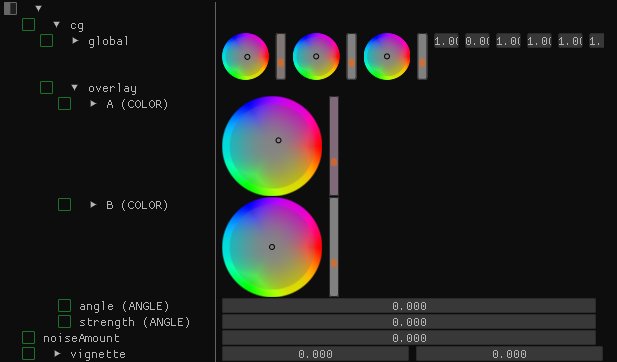
// color editor for 3 or 4 component colors
bool drawColorSelector(const char* label, float height, float* r, float* g, float* b, float* a = nullptr) {
    ImGui::PushID(label);

    ImVec2 buttonStart = ImGui::GetCursorScreenPos();

    ImGui::Image((void*)g_wheelTexture, ImVec2(height,height), ImVec2(0,0), ImVec2(1,1));
    ImGui::SetCursorScreenPos(buttonStart);
    ImGui::InvisibleButton(label, ImVec2(height,height)); ImGui::SameLine();

    vec3 rgb = vec3(max(0.f,*r),max(0.f,*g),max(0.f,*b));
    vec3 hsv = rgb_to_hsv(degamma(rgb));

    float h = hsv.r;
    float s = hsv.g;
    float v = hsv.b;

    vec2 onCircle = vec2(cos(h*TAU), sin(h*TAU)) * s;

    ImGui::GetWindowDrawList()->AddCircle(vec2(buttonStart) + vec2(height,height)*0.5f + onCircle * height * 0.5f, 3.0f, ImColor(0,0,0));

    bool changed = false;
    if (ImGui::IsItemActive() && ImGui::IsMouseDragging(0)) {
        float speed = 0.015f;
        if (ImGui::GetIO().KeyShift) {
            speed *= 0.1f;
        }
        onCircle += vec2(ImGui::GetMouseDragDelta() * speed);
        ImGui::ResetMouseDragDelta();
        s = min(1.0f, length(onCircle));
        if (s == 0.0f) {
            h = 0.0f;
        } else {
            h = atan2f(onCircle.y, onCircle.x) / TAU;
            if (h < 0) {
                h += 1.0f;
            }
        }
        changed = true;
    }
    ImVec4 c = vec4(hsv_to_rgb(h,s,0.5f), 1.0f);
    ImGui::PushStyleColor(ImGuiCol_FrameBg, c);
    changed |= ImGui::VSliderFloat("##v",ImVec2(10,height),&v, 0.0f, 10.0f, "",2.0f);
    ImGui::PopStyleColor();

    ImGui::SameLine();

    if (changed) {
        rgb = gamma(hsv_to_rgb(vec3(h,s,v)));
        *r = rgb.r;
        *g = rgb.g;
        *b = rgb.b;
    }


    if (a) {
        ImGui::VSliderFloat("##a",ImVec2(10,height),a, -10.0f, 10.0f, "",1.5f); ImGui::SameLine();
    }

    ImGui::PopID();
    return changed;
}
The main issue with it is that it relies on a texture (which is easy to render with code, but using polygons doesn't cut it). Currently the font atlas can in theory be Alpha-only so we'd either need to lift this limitation (or e.g: have a different set of available feature depending on if we render the atlas as Alpha-only or RGBA). Or, if that picker is shipped as a separate extension, which would be a healthier direction to go to, it could embed the code to create the texture and it's up to the user to upload it.
I'm starting to consider "repo number 2" which would hold optional extensions and helpers such as Docking, Memory Editor or that sort of Color Picker.
ocornut
on 9 Aug 2017
I'm starting to consider "repo number 2" which would hold optional extensions and helpers such as Docking, Memory Editor or that sort of Color Picker.
Does it need to be in a different repo? A folder named plugins/ would be fine imho.
jdumas
on 9 Aug 2017
syntax error: identifier ImGuiColorEditFlags when i paste it in imgui.h
 lolnobody
on 12 Nov 2017
lolnobody
on 12 Nov 2017
syntax error: identifier ImGuiColorEditFlags when i paste it in imgui.h
- This is not how you report an error.
- The color picker is now included in imgui by default so you don't need to use any of the code provided here.
ocornut
on 12 Nov 2017
One reason why the triangle in the beginning of this thread was done how it was one https://twitter.com/omigamedev/status/932277181962735616, should I open a new issue?
nem0
on 20 Nov 2017
@nem0 a PR or new issue would be ideal, yes. Thanks!
ocornut
on 20 Nov 2017
Related issues
 bizehao
·
3Comments
bizehao
·
3Comments
 SlNPacifist
·
3Comments
SlNPacifist
·
3Comments
 inflex
·
3Comments
inflex
·
3Comments
 DarkLinux
·
3Comments
DarkLinux
·
3Comments
 namuda
·
3Comments
namuda
·
3Comments
Most helpful comment
Does it need to be in a different repo? A folder named
plugins/would be fine imho.