Hi,
So I'm thinking of using ImGui for doing a basic node graph that can be used to edit materials. There are lots of programs that does this but for example:
http://keenleveldesign.com/pimp/protools/shaderfusion/ShaderFusionReleasePromo/shaderfusion01.jpg
I wonder how one would go about doing something similar with ImGui. Having separate windows for each box is likely (?) the best approach as it would allow the user to move them around and what not.
I guess adding some custom stuff for doing the connections + lines as well shouldn't be too hard but I just wanted your thoughts about it.
Cheers!
 emoon
emoon
All 120 comments
EDITED 2019
Listing relevant links posted the thread. Dig in the thread for details!
https://github.com/thedmd/imgui-node-editor
https://github.com/rokups/ImNodes
https://github.com/Nelarius/imnodes
https://github.com/Flix01/imgui/tree/imgui_with_addons
https://github.com/DCubix/Twist
http://carlivan.com/engine-tools/visual-scripting
http://carlivan.com/engine-tools/blueprints/
https://gist.github.com/ChemiaAion/0b93553b06beac9fd3824cfeb989d50e
https://gist.github.com/spacechase0/e2ff2c4820726d62074ec0d3708d61c3
https://github.com/CedricGuillemet/Imogen
https://galloscript.itch.io/texgraph
(Original 2015 answer)
You can start with actual ImGui Windows but as you dig into connections and more features they will likely get in your way? It may be more awkward to restrict them within a given spot, etc. One benefit is that they will handle overlapping for you.
Creating your own mini-window not too hard:
- do your drawing via the drawlist API
- perhaps push a clipping rectangle
- use InvisibleButton() + IsItemActive() (or MouseClickedPos and GetMouseDragDelta) to handle moving.
If you can avoid overlapping it'll be simpler. If you can't the next easiest thing would probably be to handle ordering/sorting them yourself.
 ocornut
on 24 Aug 2015
ocornut
on 24 Aug 2015
Thanks for the reply. That seems reasonable. I think I will just go for non-overlapping as this is mostly for a prototype so that should be fine.
emoon
on 24 Aug 2015
Here's a proof of concept demo. It's quite incomplete but shows that it is possible.
You'll need to update to latest because I have fixed a bug with the ImDrawList / channel API. Drawing channels are very convenient to allow out-of-order rendering (here we draw the node background after the nodes are filled with contents).
I'm declaring some ImVec2 operators to make the code simpler. If you have your own math types with conversions via IM_VEC2_CLASS_EXTRA you are probably better off using them.
Sort of work but I'm not very happy with it because it wasn't that trivial to pull off (3 hours including bugfix) and I had to dodge a few non-obvious trap. I'll probably keep massaging that code.
I'll move the hermite curve rendering to new drawing API. Do you know of a good non-stupid reference for API that handle various types of curves? (bezier, hermite, catmull rom. etc.). They are easy to implement but I wonder if there's a way of ordering parameters that's more standard or obvious. An API to handle multiple points should be available so that thick splines can have their end connecting nicely.

ocornut
on 25 Aug 2015
:+1: thanks! :)
emoon
on 25 Aug 2015
Yeah I have been thinking about what curves to actually use for the lines. I thought about just using b-spline or something similar but I have no idea what "real" editors are using.
emoon
on 25 Aug 2015
Hi,
Rectangular links could also be a (simpler) possibility.
i.e. https://youtu.be/KvExDzISYUc?t=9s
 NocturnDragon
on 25 Aug 2015
NocturnDragon
on 25 Aug 2015
@ocornut nice!! :+1: @NocturnDragon what algorithm does the rect layouts use? I notice it somehow seems to avoid overlapping itself?
 paulsapps
on 25 Aug 2015
paulsapps
on 25 Aug 2015
I'm not sure those node/graph should or will be a concept of core ImGui by the way. It's more of an example code.
My intuition is the real value will be to keep massaging and improving the lower-level stuff so that it becomes more easier and natural to create this sort of thing from scratch.
ocornut
on 25 Aug 2015
Do you know of a good non-stupid reference for API that handle various types of curves? (bezier, hermite, catmull rom. etc.).
I asked the creator of Fog framework who has a lot of experience with vector libraries (Cairo, AGG, etc.) and he told me, that in Fog (and also it's successor Blend 2D) he supports only quad and cubic Bezier curves, because it's enough (and it's much easier to translate these into any other curve needed e.g. by the rendering engine). He also told me, that e.g. Cairo supports only cubic curves.
So, in the name of simplicity, feel free to take a look at the API of Bezier curves in Fog.
 dumblob
on 25 Aug 2015
dumblob
on 25 Aug 2015
https://github.com/ocornut/imgui/issues/306#issuecomment-134672020
Fully agree that this shouldn't be part of core ImGui but an interesting use-case to support with the API itself as you say.
emoon
on 25 Aug 2015
Small comment. I tested your prototype and when dragging the color values it seems to always reset back to default. I haven't investigated yet but just wanted to let you know.
emoon
on 25 Aug 2015
Yeah they are just dummy values, didn't want to clutter the example with too much things.
ImGui::SliderFloat("##value", &node->Value, 0.0f, 1.0f, "Alpha %.2f");
float dummy_color[3] = { node->Pos.x / ImGui::GetWindowWidth(), node->Pos.y / ImGui::GetWindowHeight(), fmodf((float)node->ID * 0.5f, 1.0f) };
ImGui::ColorEdit3("##color", &dummy_color[0]);
If you aren't in a hurry I'll keep working on that in the future, add the linkage, move curves rendering to the main api and generally simplify / clean up / clarify where I can.
ocornut
on 25 Aug 2015
Not in a major hurry no so great stuff here :) I also think it's good in general to have a example that "bends" the regular use-case a bit.
emoon
on 25 Aug 2015
Add yeah I agree that general curve rendering would fit good in the API, and getting linkage in the example would be great of course.
emoon
on 25 Aug 2015
Awesome work! :+1:
Rectangular links could also be a (simpler) possibility.
+1 for rectangular and 45 degree angle links. I find them way more readable than curves/spaghetti stuff. :)
 bkaradzic
on 26 Aug 2015
bkaradzic
on 26 Aug 2015
Any plans to switch to nanovg renderer? )
 bagobor
on 27 Aug 2015
bagobor
on 27 Aug 2015
ImGui already does anti-aliased text and lines so I'm not sure why that would be needed?
emoon
on 27 Aug 2015
Probably not because NanoVG is rather runtime heavy for the performance we are aiming for. But as emoon say is there is a specific reason/feature you would want it? Also please open a new topic for that. Thanks!
ocornut
on 27 Aug 2015
Just to say that I'm also developing my own version based on the code posted by Omar.
It's still w.i.p., but at least the node types are not hard-coded.

My code is here: https://github.com/Flix01/imgui/tree/imgui_with_addons
And a live test is here (you have to click on a button to start it): Demo.
 Flix01
on 26 Oct 2015
Flix01
on 26 Oct 2015
Just thought i'd say I love the background.
How'd you do that (add a background that is).
 adam4813
on 26 Oct 2015
adam4813
on 26 Oct 2015
@Flix01 Awesome! :+1:
bkaradzic
on 26 Oct 2015
Adam: they are just lines. You can just draw shapes or images and that's a background done..
ocornut
on 26 Oct 2015
@Flix01 @ocornut Is possible an example of Zoom In/Back / Resize effect to the complete viewport/window of the nodes ? and relative mouse displacement based in the zoom level
 Hevedy
on 29 Oct 2015
Hevedy
on 29 Oct 2015
@Hevedy Partially using:
ImGui::GetIO().FontAllowUserScaling = true;
CTRL+mouse wheel should increase the font size and the node sizes, but their position stays the same.
Flix01
on 29 Oct 2015
I've just implemented a basic node copy/paste functionality.
However there are some problems with the popup menus: if I right-click on a node and then right-click on another without closing the first menu, a (wrong) menu appears in the position of the old one. It should close the old one and open the correct menu on the new node instead... I don't know how to fix it.
You can check the live test linked above, that keeps updating too (even if it does not support serialization).
[Edit] I discovered that the problem is composed by two sub-issues:
1) the popup menu position is wrong. I've managed to solve this using PushID()/PopID() guards around it.
2) the popup menu is wrong (the "add node" menu appears instead of the "Node Copy/Paste/Delete"). This happens because while one menu is open, another node in the node graph window can't receive the "mouse hover state" (probably because the focus goes to the open popup window): so the editor thinks that the user has clicked on an empty space and not on a node, and incorrectly shows him the "add node" menu.
I don't know how to fix this: is it possible at least to detect if a popup menu is currently being displayed ?
If so, I could prevent another menu to open, and the click could probably just cause the first menu to close.
[Edit] No matter: I think I can add a custom variable to detect if a menu is being displayed.
Flix01
on 29 Oct 2015
@Hevedy I've added proper zoom. It's still WIP ATM, but if you have Firefox you can test it using CTRL+mouse wheel in the test demo above.
Flix01
on 2 Nov 2015

Hello, I am currently using Imgui to create decision trees for my school game project, and this is the WIP (which is due next week). I am really interested in making the zooming (CTRL + MW) and I read through @Flix01 's code, however I only found a part whereby it commented "fixes zooming a bit", I read the code and I couldnt understand how the zooming is done. Is it possible to explain on how the zooming is done? Is it just zooming the font size as what @Flix01 previously mentioned?
Thank you.
 irenekaea
on 25 Nov 2015
irenekaea
on 25 Nov 2015
Irene, one issue you'll be running into is that ImGui currently render fonts into a texture when you create the font atlas and so those have a fixed resolution. So zooming is possible but the zooming quality will be quite poor. If you want to zoom the font you should add a secondary font using a smoother font that has anti-aliasing (e.g. Arial), render it in higher size (e.g. 30) and then scale it down using e.g. SetWindowFontScale(). It isn't a very well supported path and will probably be a little awkward, but it should work.
I haven't looked at Flix01's code so I can't help on the other details yet.
ocornut
on 25 Nov 2015
@ocornut Thank you for the quick response, I will go and try it out! :smile:
irenekaea
on 25 Nov 2015
I haven't looked at Flix01's code so I can't help on the other details yet.
Nope, of course I didn't mind having bad quality fonts while zooming.
The main problem was that by applying the default ImGui zooming functionality with:
ImGui::GetIO().FontAllowUserScaling = true;
alone, not all the parts of the nodes zoom properly.
So basically in my code I had to zoom everything else: node widths, connection circles, the control point distance of Bezier lines, and so on, and I used "currentFontWindowScale" (referenced by the comment "Fixes zooming a bit") as a scale factor.
However it's still not perfect: now if you change the zoom level and then create a node, the node position is wrong for example.
Flix01
on 26 Nov 2015
Oh i see.. thanks for the reply :smile:
irenekaea
on 27 Nov 2015
@Flix01 I found out that if you inverse your scale on the position when you create a new node the position will be correct because when you render you will scale it back. I managed to implement zooming in my game editor :)
irenekaea
on 21 Jan 2016
Pictures or gifs please! :)
ocornut
on 21 Jan 2016

irenekaea
on 21 Jan 2016
Thanks!
You could adjust the tangeant according to the direction of the side they come from to look nicer.
(sorry to intrude with unwanted advice, but if I might bring a bit of game experience here, beware of using too much logic-with-box-and-wires! It is an attractive prospect but often a false economy to create big systems when writing the corresponding code could be so much easier and flexible. Ask yourself the question if raw code wouldn't just be faster :)
ocornut
on 21 Jan 2016
@ocornut thanks for the advice! Hmm as our editor is make for designer (he do not know how to code), so we would like to give him an editor that allows him to build the game logic without coding. Currently the game editor will output a file such that the game itself will create the decision tree using the file so its not as lag, as for now :)
irenekaea
on 21 Jan 2016
Yes but you are creating a system that isn't necessarily easier to use than coding, it's just coding with boxes and wire. Not very easy to use, and spending lot of coding energy to create this system. Perhaps it'd be faster if you coded what the designer wanted! Or if the designer learns to code! I don't know, it's just an idea :) I don't know the scope or features of your game or technology. But I've seen and myself created so many of those do-everything systems which many times ends up becoming do-nothing-well-systems. There is room for that sort of tool, but always reevaluate the cost and benefits while you are making it.
ocornut
on 21 Jan 2016
@ocornut definitely not doing this in the working world for game, but if we help him code then he couldn't get the grades! Hahaha.
irenekaea
on 21 Jan 2016
Actually, done right, IMHO, this "blueprint" way of doing things can
produce better results. Reactive programming is more intuitive with boxes
and wires. Ubisoft's The Division uses a new engine called Snowdrop that
utilises this with great results. Unreal Engine does too. I find that C++
is terrible for doing non-engine things.
http://www.polygon.com/2014/3/19/5524924/the-division-video-snowdrop-game-engine
On Thu, 21 Jan 2016 at 13:28 Irene [email protected] wrote:
@ocornut https://github.com/ocornut definitely not doing this in the
working world for game, but if we help him code then he couldn't get the
grades! Hahaha.—
Reply to this email directly or view it on GitHub
https://github.com/ocornut/imgui/issues/306#issuecomment-173665135.
 Cthutu
on 21 Jan 2016
Cthutu
on 21 Jan 2016
How many nodes can it handle before it gets too laggy?
paulsapps
on 21 Jan 2016
We'll have to disagree :) I'm hearing horror stories about blueprints, they are hard to debug, they don't scale. I'm not sure an "Add" box with three connections is more intuitive or more manageable in the long run than "+" operator in line of code. Blueprints are more accessible but I don't think the results are great. If you work in a small team get your designer to learn some basic programming, or pair them with someone who does. It will do better for your designer and better for your game. Plug in some nice scripting languages and they can do stuff more more easily and not be enslaved to awkward limitations. You don't have to use C++ for everything, you can use many other high-levels languages for that (though I wrote the gameplay of Tearaway all in C++).
That said there is a room for blueprints, but it's also a common trap to make tools to avoid taking a design decision.
ocornut
on 21 Jan 2016
Disagree with you there Ocornut. Blueprint is by all means a scripting language (UnrealScript/Kismet) so to recommend an additional scripting language seems silly. Blueprint if abused can lead to some horrid performance but if you treat it as designed - A logic scripting language for actors it's completely valid and allows for very rapid development from both artists and programmers.
Debugging is not hard, add a breakpoint and view the variables in Editor or in Visual Studio, you can't get much easier than that.
Scale - If that's an issue, you are using blueprint incorrectly.
Note: If you do want a scripting launage in Unreal - UnrealJS by ncSoft is a V8 powered javascript implementation that binds directly into Unreals Reflection system.
 paultech
on 21 Jan 2016
paultech
on 21 Jan 2016
You have to set the right granularity for the nodes. Too low -> too
complex, too laggy, too high -> less flexible. Nodes could probably be
compiled to a byte-code that's interpreted in the same way Lua is.
On Thu, 21 Jan 2016 at 14:33 omar [email protected] wrote:
I'm hearing horror stories about blueprints, they are hard to debug, they
don't scale. I'm not sure an "Add" box with three connections is more
intuitive or more manageable in the long run than "+" operator in line of
code. Blueprints are more accessible but I don't think the results are
great. If you work in a small team get your designer to learn some basic
programming, or pair them with someone who does. Plug in some nice
scripting languages and they can do much more more easily. You don't have
to use C++ for everything, you can use many other high-levels languages for
that (though I wrote the gameplay of Tearaway all in C++).—
Reply to this email directly or view it on GitHub
https://github.com/ocornut/imgui/issues/306#issuecomment-173684196.
Cthutu
on 21 Jan 2016
I think it's just people being lazy and they would get better output with a scripting language :)
ocornut
on 21 Jan 2016
It is a scripting language :)
- We kind of derailed this issue, I'll stop here. The zooming looks great on that!
paultech
on 21 Jan 2016
There are some techniques that are not easily done in scripting languages
and so get looked over. I refer to reactive techniques, instead of
imperative ones.
On Thu, 21 Jan 2016 at 14:42 paultech [email protected] wrote:
It is a scripting language :)
—
Reply to this email directly or view it on GitHub
https://github.com/ocornut/imgui/issues/306#issuecomment-173686636.
Cthutu
on 21 Jan 2016
Seems like a debate was going on while I'm away. I guess everything have their pros and cons, thanks guys for the info! Anyway, @paulsapps, currently our game have around 250 nodes, 100 plus game objects, running at 50fps for a slow comp.
irenekaea
on 22 Jan 2016
I noticed even simple node graph with spaghetti connectors are less readable than node graphs with L shaped connectors. Image above has only 10 connectors and this has 20+:

bkaradzic
on 22 Jan 2016
@irenekaea
I found out that if you inverse your scale on the position when you create a new node the position will be correct because when you render you will scale it back. I managed to implement zooming in my game editor :)
Thanks. I'm not sure why I didn't manage to fix it...
P.S: if you put node connectors on the top and on the bottom, you can probably add the "Bezier control point" on the Y axis, so that the vertical connections look more "vertical" at their edges.
@paulsapps
How many nodes can it handle before it gets too laggy?
Not many I guess. "Closing" the nodes helps.
I don't know whether "offscreen nodes" are clamped by default by ImGui or not...
Flix01
on 22 Jan 2016
I don't know whether "offscreen nodes" are clamped by default by ImGui or not...
The ImGui:: widgets perform coarse clipping, but anything in the ImDrawList API doesn't.
Either way it would be in your interest to do coarse clipping yourself, since you are probably calling dozens of functions per node. Even when clipping ImGui needs to calculate the layout, which is minor but adds up if you have thousands of calls.
ocornut
on 22 Jan 2016
Thanks
Flix01
on 22 Jan 2016
Just to say that I've added manual node culling (the links are still not culled, but it's better than nothing).
However zooming is still buggy (if you change the zoom level and then create a node, the node position is wrong).
Another problem with my zooming is that I'm using
ImGui::GetIO().FontAllowUserScaling = true;
but this seems to zoom from the window origin, not from the mouse position.
So it should be better to always use
ImGui::GetIO().FontAllowUserScaling = false;
and manually rewrite all the zooming code.
In short: my zooming code is still buggy.
Flix01
on 25 Jan 2016
When you create a node, the position that should be store in the node should be (current position / current font scale). That should work, currently my zooming works fine and the position is correct.
irenekaea
on 25 Jan 2016
@irenekaea
Thanks. It should be fixed now. The problem was that I had to scale the position in the popup-menu code (for some reasons it didn't work when I did it in the addNode(...) method).
I tried also to center zooming around the mouse position: I thought I did it, but then I discovered that it currently works only until I shift the window...
I think I'll fix it someday.
So I think I can keep on using:
ImGui::GetIO().FontAllowUserScaling = true;
for zooming, instead of rewriting the zooming code manually like I wanted to do in my last post :).
Thanks for your tip!
[EDIT:] Fixed all zooming issues: now I don't use ImGui::GetIO().FontAllowUserScaling anymore and zooming always happens around the scrolled center of the window (I guess this is what the user expects).
Now I can consider my NodeGraphEditor finished (unless I discover further bugs...).
If you have Firefox (or a similar capable browser), you can test my updated code here (you have to click on a button to start it): Demo.
Flix01
on 25 Jan 2016
Intro: https://www.youtube.com/watch?v=RV4xUTmgHBU
MIDI / Audio: https://www.youtube.com/watch?v=0HhX1rctz9Y
Space Invaders: https://www.youtube.com/watch?v=TZ3Fqm5koOY
Pong: https://www.youtube.com/watch?v=v8k1J_MPo48
Qube: https://www.youtube.com/watch?v=pKOwlFfJHgU
Matrix III: https://www.youtube.com/watch?v=T7dohzkfpb0
Procedural graphics: https://www.youtube.com/watch?v=786k1W-kDsg
Gesture recognition: https://www.youtube.com/watch?v=FEmE4LeTqPU
 richardassar
on 16 Apr 2016
richardassar
on 16 Apr 2016
Really cool stuff Richard (although I would debate the idea of programming a Space Invaders with nodes! :).
Did you evolve the proof of concept code in way that would be interesting to reuse? Did it require some major rework to scale to that level of actual use, or did copy-pasting-hacking do the job well enough? Is the software available? I could a link and some shots/video alongside future releases. Thanks!
ocornut
on 16 Apr 2016
hi, I'm looking forward to have nodes in my app, is there a plan to integrate this in imgui? or sample source code to get started?
 brucelane
on 16 Apr 2016
brucelane
on 16 Apr 2016
@brucelane All the sample source code are linked in this thread. I'm not sure what part of it makes sense to integrate in core imgui yet, as it connect tightly with our own data structures.
ocornut
on 16 Apr 2016
thank you, I wiil dive into the code soon!
brucelane
on 16 Apr 2016
Thanks @ocornut :-)
I appreciate the feedback. Perhaps a live debate is in order ;)
I built the compiler on top of what was already present in @Flix01's fork. No changes were made to ImGui core other than increasing the drawlist size and a few convenience functions (e.g. listbox for ImVector) so no need for me to submit pull requests.
I hacked things in where necessary around the framework @Flix01 had laid down, however the compiler and run-time/debugging support code can be easily decoupled from this.
A lot of UI/rendering work and changes to the serialisation code, among other things, was necessary. The development of the compiler and supporting systems was pretty involved, a solo project comprising about 6 weeks of work.
Fast compilation and fast execution were key goals. I'm constructing LLVM-IR and compiling just-in-time, so can patch functions and data live. Execution is not performed by simply walking an expression tree. I run with (optional) optimisation passes to gain speed, as in Clang's -O3, especially important for tight and/or nested loops (unrolling and auto-vectorisation come for free).
The videos do not demonstrate all of the features I've added but I'll be making more footage available soon. A quick list of the main features is:
- Visualisation of active control and data flow paths
- Data flow graphing
- Execution profiling
- Custom structs
- Audio programming (ALSA audio and MIDI in/out)
- Mouse gestures for quick input
- Other things I have forgotten
The next step is to incorporate KernelGEN / Pollyhedral for transparent GPU acceleration. This would enable physics simulation, GPU-accelerated DSP, machine learning (think Google's TensorFlow).
I'm looking to add shader support also and in the same effort make some aspects of the compiler "programmable" to allow for a multitude of representations.
I've a lot more video footage and ideas, for one it would be nice to have real-time collaboration like flowhub.io - worth considering but not an immediate priority. Adding more complex OOP idioms (inheritence, templates, exceptions, lambdas) is a near-term goal.
Also, for fun I want to try various backends (z80, Atmega, ARM, etc.) so I run generated code on a Gameboy classic, for a laugh. I've a GBA and EZFLASH cart lying around so this is definitely on the cards.
The project is aimed at finding my next games industry role, whatever that may be - currently an ongoing effort. I'm also considering this as the foundation for a start-up company with the aim of competing against MaxMSP and Vuo, or to license the technology to large game studios bent on sticking to their bespoke engines and behemoth code-bases which they continue to over-invest in whilst they simultaneously waste their time staring at compiler progress bars - destroying all passion and creativity ;-)
For now the project will remain closed source and once I've secured a job/company/whatever I will consider releasing it for free to build a community.
richardassar
on 16 Apr 2016
https://github.com/Evil-Spirit/AnandamideAPI
https://www.youtube.com/playlist?list=PLqmaFsEpxcUUgcmjs-EN4xG8_cWeB7sG1

 Evil-Spirit
on 26 May 2016
Evil-Spirit
on 26 May 2016
@Evil-Spirit It seems your thing is Qt based... Topic here is "Node Graph with ImGui" not with Qt.
bkaradzic
on 26 May 2016
Just to say that in the "Pull requests" section here https://github.com/ocornut/imgui/pull/746, @thedmd posted this awesome animated gif:

showing his own implementation with multiple selections, link selection and other amazing features!
Just thought it was better to link his gif here...
Flix01
on 17 Aug 2016
Made some updates to my version. Added multiple node selection (with CTRL+LMB or by mouse rectangle selection), node renaming (by double clicking on its name) and link hovering (by holding down SHIFT).

Not as clean as @thedmd's, but this is what I got...
Flix01
on 22 Sep 2016
I think nodebox has (had?) a node system where you could customise the way connections were drawn, maybe this could too ?
That way people building stuff with it can choose how straight or curvey / whatever the wires are.
 stuaxo
on 19 Aug 2017
stuaxo
on 19 Aug 2017
FYI here's some code someone sent me to compute the distance to a bezier, which is useful if you want your node editor to be able to click/select the curves:
float GetClosestPointToCubicBezier(int iterations, float fx, float fy, float start, float end, int slices, const ImVec2 & P0, const ImVec2 & P1, const ImVec2 & P2, const ImVec2 & P3)
{
    if (iterations <= 0)
        return (start + end) / 2;

    float tick = (end - start) / float(slices);
    float best = 0;
    float bestDistance = FLT_MAX;
    float t = start;

    while (t <= end)
    {
        // B(t) = (1-t)**3 p0 + 3(1 - t)**2 t P1 + 3(1-t)t**2 P2 + t**3 P3
        float x = (1-t)*(1-t)*(1-t)*P0.x + 3*(1-t)*(1-t)*t*P1.x + 3*(1-t)*t*t*P2.x + t*t*t*P3.x;
        float y = (1-t)*(1-t)*(1-t)*P0.y + 3*(1-t)*(1-t)*t*P1.y + 3*(1-t)*t*t*P2.y + t*t*t*P3.y;
        float dx = x - fx;
        float dy = y - fy;
        float currentDistance = dx*dx + dy*dy;
        if (currentDistance < bestDistance)
        {
            bestDistance = currentDistance;
            best = t;
        }
        t += tick;
    }

    return GetClosestPointToCubicBezier(iterations - 1, fx, fy, Max<float>(best - tick, 0.0), Min<float>(best + tick, 1.0), slices, P0, P1, P2, P3);
}

ImVec2 GetClosestPointToCubicBezier(const ImVec2 & pos, const ImVec2 & P0, const ImVec2 & P1, const ImVec2 & P2, const ImVec2 & P3, int slices, int iterations)
{
    float t = GetClosestPointToCubicBezier(iterations, pos.x, pos.y, 0.0, 1.0, slices, P0, P1, P2, P3);
    float x = (1-t)*(1-t)*(1-t)*P0.x + 3*(1-t)*(1-t)*t*P1.x + 3*(1-t)*t*t*P2.x + t*t*t*P3.x;
    float y = (1-t)*(1-t)*(1-t)*P0.y + 3*(1-t)*(1-t)*t*P1.y + 3*(1-t)*t*t*P2.y + t*t*t*P3.y;
    return ImVec2(x,y);
}
EDIT
The author suggested
"default values that worked ok for me: slices = 4, iterations = 5"
"with iterations = 7" you start getting something precise.
Usage would differ if you need it to _display_ a point on the bezier or just to select the bezier.
And you'd probably want to at least do a bounding box test earlier.
May integrate that sort of function as a math helper in imgui_internal.h api, I haven't tried to use this code however.
And if you think you have a better solution that brute-forcing feel free to post them!
ocornut
on 7 Dec 2017
Thanks Omar :)
On 7 December 2017 at 15:45, omar notifications@github.com wrote:
FYI here's some code someone sent me to compute the distance to a bezier,
which is useful if you want your node editor to be able to click/select the
curves:float GetClosestPointToCubicBezier(int iterations, float fx, float fy, float start, float end, int slices, const ImVec2 & P0, const ImVec2 & P1, const ImVec2 & P2, const ImVec2 & P3)
{
if (iterations <= 0)
return (start + end) / 2;float tick = (end - start) / float(slices);
float best = 0;
float bestDistance = FLT_MAX;
float t = start;while (t <= end)
{
// B(t) = (1-t)3 p0 + 3(1 - t)2 t P1 + 3(1-t)t2 P2 + t3 P3
float x = (1-t)(1-t)(1-t)P0.x + 3(1-t)(1-t)tP1.x + 3(1-t)ttP2.x + tttP3.x;
float y = (1-t)(1-t)(1-t)P0.y + 3(1-t)(1-t)tP1.y + 3(1-t)ttP2.y + tttP3.y;
float dx = x - fx;
float dy = y - fy;
float currentDistance = dxdx + dydy;
if (currentDistance < bestDistance)
{
bestDistance = currentDistance;
best = t;
}
t += tick;
}return GetClosestPointToCubicBezier(iterations - 1, fx, fy, Max
(best - tick, 0.0), Min (best + tick, 1.0), slices, P0, P1, P2, P3);
}ImVec2 GetClosestPointToCubicBezier(const ImVec2 & pos, const ImVec2 & P0, const ImVec2 & P1, const ImVec2 & P2, const ImVec2 & P3, int slices, int iterations)
{
float t = GetClosestPointToCubicBezier(iterations, pos.x, pos.y, 0.0, 1.0, slices, P0, P1, P2, P3);
float x = (1-t)(1-t)(1-t)P0.x + 3(1-t)(1-t)tP1.x + 3(1-t)ttP2.x + tttP3.x;
float y = (1-t)(1-t)(1-t)P0.y + 3(1-t)(1-t)tP1.y + 3(1-t)ttP2.y + tttP3.y;
return ImVec2(x,y);
}May integrate that sort of function as a math helper in imgui_internal.h
api, I haven't tried to use this code however.
You'd probably want to at least do a bounding box test earlier.
And if you think you have a better solution that brute-forcing feel free
to post them!—
You are receiving this because you commented.
Reply to this email directly, view it on GitHub
https://github.com/ocornut/imgui/issues/306#issuecomment-349987502, or mute
the thread
https://github.com/notifications/unsubscribe-auth/AA1ALGW4PYmVQwitfM6lMLeI0jJHGrxzks5s9_oFgaJpZM4FxJYk
.
richardassar
on 7 Dec 2017
Note : this solution works for any order of bezier curves, by changing the formulas at both lines : "float x=..." and "float y=..."
Note2 : for quadratic bezier, there is a solution without brute-forcing http://blog.gludion.com/2009/08/distance-to-quadratic-bezier-curve.html
 itamago
on 7 Dec 2017
itamago
on 7 Dec 2017
@ocornut: thanks!
I'm already using my own code to do that (I use it only to delete single links when SHIFT is pressed, like in the .gif above).
Basically I use GetSquaredDistanceToBezierCurve(...) here, and I already perform a bounding box test earlier here; so I don't know if that code is actually faster... but it's always good to have an alternative :smiley:.
Flix01
on 7 Dec 2017
I just want to let you know code for Node Editor was just published on github:
See: imgui-node-editor
Edit: Fixed url

 thedmd
on 10 Dec 2017
thedmd
on 10 Dec 2017
the url is not good but I found it
thank you!
brucelane
on 10 Dec 2017
Here's the right URL... https://github.com/thedmd/imgui-node-editor
Thanks @thedmd!
ocornut
on 10 Dec 2017
just tryed it, compiles fine, runs fine, it's fantastic! thank you very much @thedmd ! I am losing myself in javascript these days, can't wait to be back to this!
brucelane
on 11 Dec 2017
I took what @emoon and @ocornut prototyped here and did this mockup for further play.
It uses a little of modern C++ features but these could be easily removed/replaced.
https://gist.github.com/ChemiaAion/0b93553b06beac9fd3824cfeb989d50e

Legend:
Mouse left-button: selection (shift/ctrl modifiers) and dragging, collapsing on double click, new connections;
Mouse right-button: new nodes (pop-up), canvas movement;
Mouse wheel-button: canvas movement/zooming (wheel-pressed/shift/ctrl modifiers);
For now: connections could be single selected and dragged only (by left-button);
Test-it:
static ImGui::Nodes nodes_;
(...)
ImGui::Begin("Nodes");
nodes_.ProcessNodes();
ImGui::End();
(...)
 ChemistAion
on 25 Jan 2018
ChemistAion
on 25 Jan 2018
Another node graph editor here
http://carlivan.com/engine-tools/visual-scripting/
http://carlivan.com/engine-tools/blueprints/
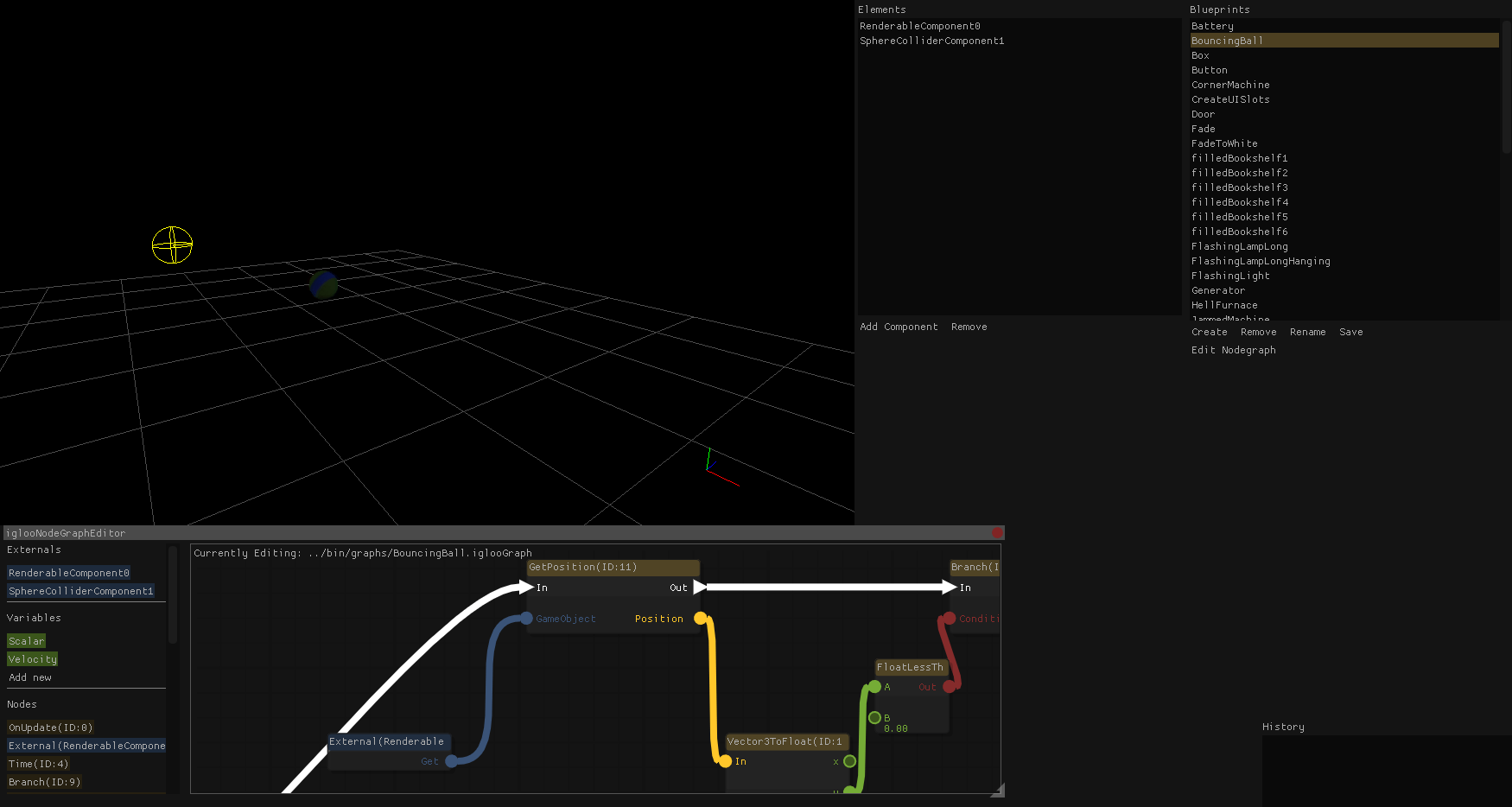
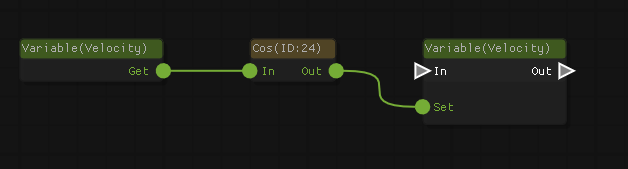
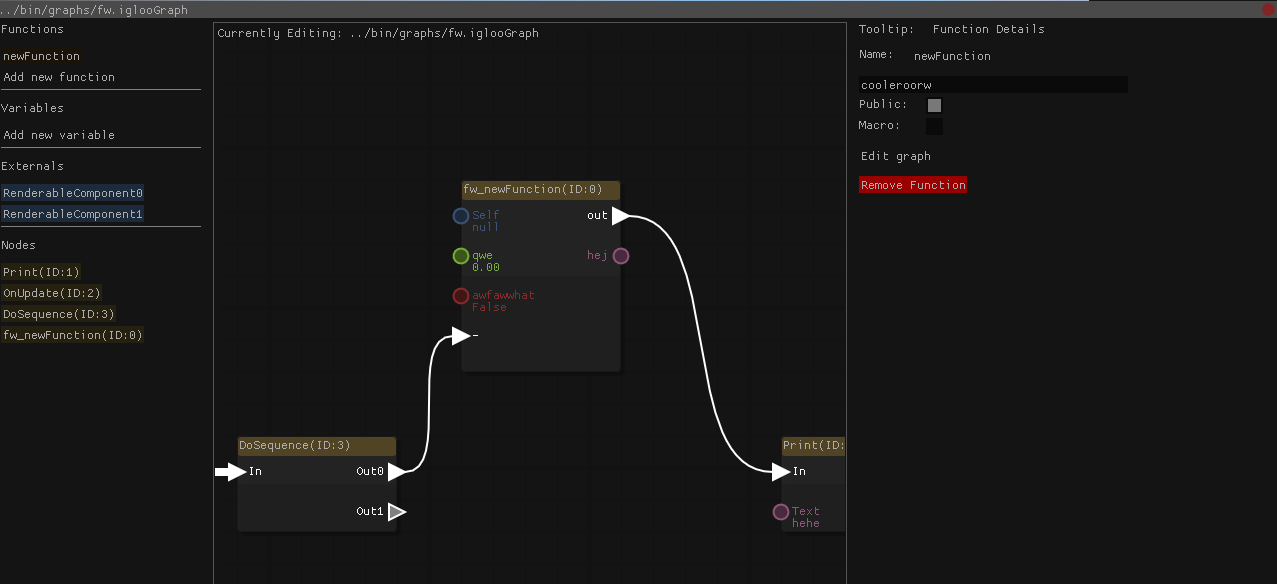
ocornut
on 11 Apr 2018
Nice, this internal development? No source code will be provided?
 ArnCarveris
on 11 Apr 2018
ArnCarveris
on 11 Apr 2018
is there anyone who give me and example of zooming function that enable mousewheel to zoom in and out at it's position?
 zahirzohair
on 17 Apr 2018
zahirzohair
on 17 Apr 2018
@zahirzohair: check mine gist (linked above on Jan-25): lines 255-302.
ChemistAion
on 17 Apr 2018
@ChemiaAion thank you very much for that fast reply. i got the idea and it works.
zahirzohair
on 17 Apr 2018
Using @ocornut 's code.
The only problem I have is zooming and overlapping nodes.
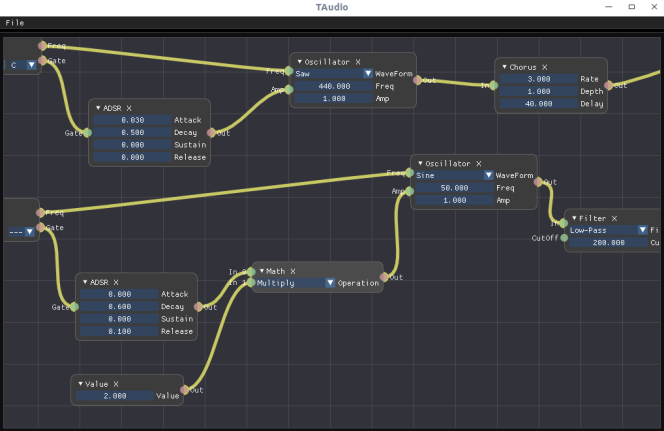
Here's the repo https://github.com/DCubix/Twist
 DCubix
on 23 Aug 2018
DCubix
on 23 Aug 2018
@ChemiaAion Thanks for posting your gist! Since I didn't see a license in your files, I wanted to confirm that they are free for personal and commercial use. Please advise. Thank you!
 matt-trost
on 30 Aug 2018
matt-trost
on 30 Aug 2018
@matt-trost: you are welcome to do whatever you like with it, it's free/public domain;
Please also consider this one (same license aproach), completely refactored, much cleaner version than the prototype: https://gist.github.com/ChemiaAion/0cd64b71711d81661344af040c142c1c
Most of "the fetures" are there: zoom, select, pan, node IO snap, custom node drawing etc.
Deleting and node self-collapsing should be done/bit-corrected, but it is nothing serious, can be easilly done.
Usage:
static ImGui::ImGuiNodes nodes_;
(...)
ImGui::Begin("Nodes II");
nodes_.Update();
nodes_.ProcessNodes();
nodes_.ProcessContextMenu();
ImGui::End();
(...)

ChemistAion
on 30 Aug 2018
Many thanks @ChemiaAion ! I'll check out the new version too.
matt-trost
on 30 Aug 2018
Here's one I did a few months ago. It needs std::any. (Sample code included too.)

It's still got a few small bugs, but I'm pretty happy with it.
I read through @ChemiaAion's to get started since I wasn't sure how to start making an ImGui widget, but I ended up with something pretty different. One main thing is I need to be able to reuse the node graph for different types of graphs in one program, so hard coding the node types wouldn't work for me.
 spacechase0
on 17 Nov 2018
spacechase0
on 17 Nov 2018
If anyone's interested I've forked @ChemiaAion's node editor and added some features:
- fix compiler issues
- multiple connections
- hover connections
- delete connections on double click
- put connectors slightly on the edge
https://gist.github.com/sphaero/5042d4ef83b451455eb93afbca0fe080
 sphaero
on 13 Dec 2018
sphaero
on 13 Dec 2018
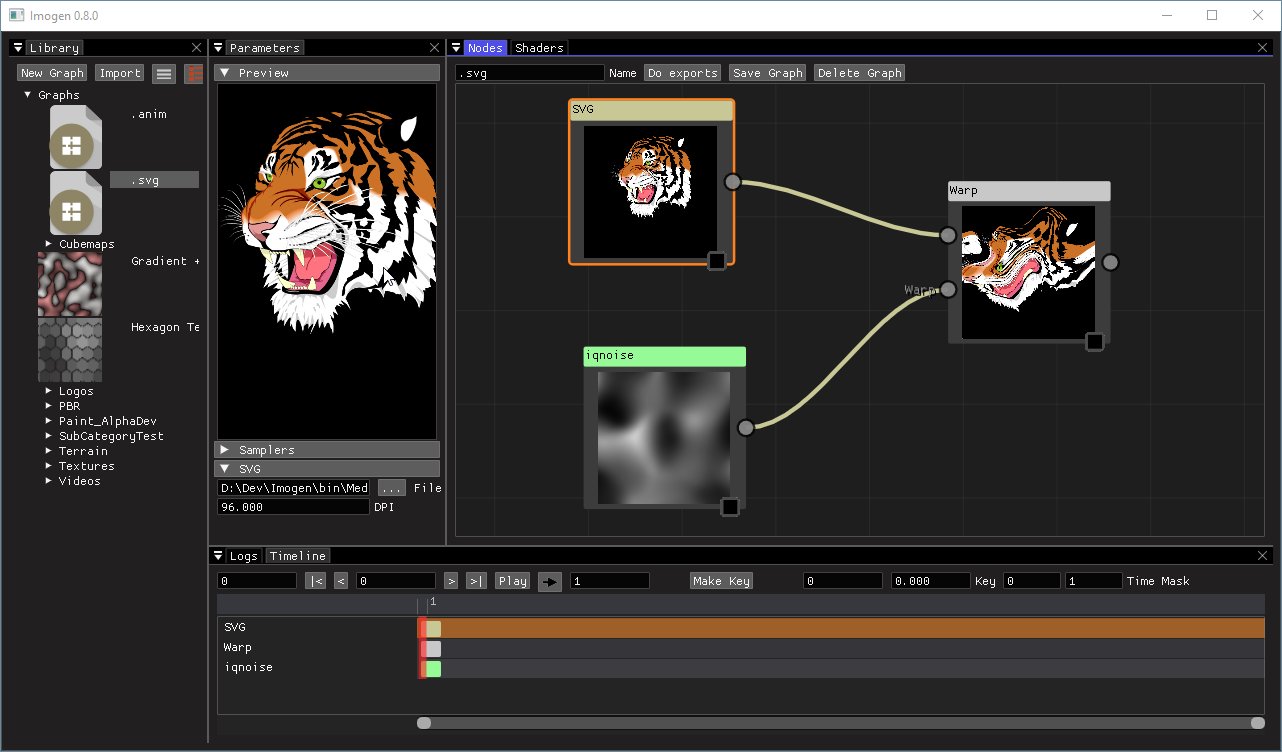
This thread is super old but as it seems to be one of the primary resources for this, let me mention two open-source apps which may be good references:
Imogen
https://github.com/CedricGuillemet/Imogen
TexGraph
https://galloscript.itch.io/texgraph
https://github.com/galloscript/TexGraph-Public
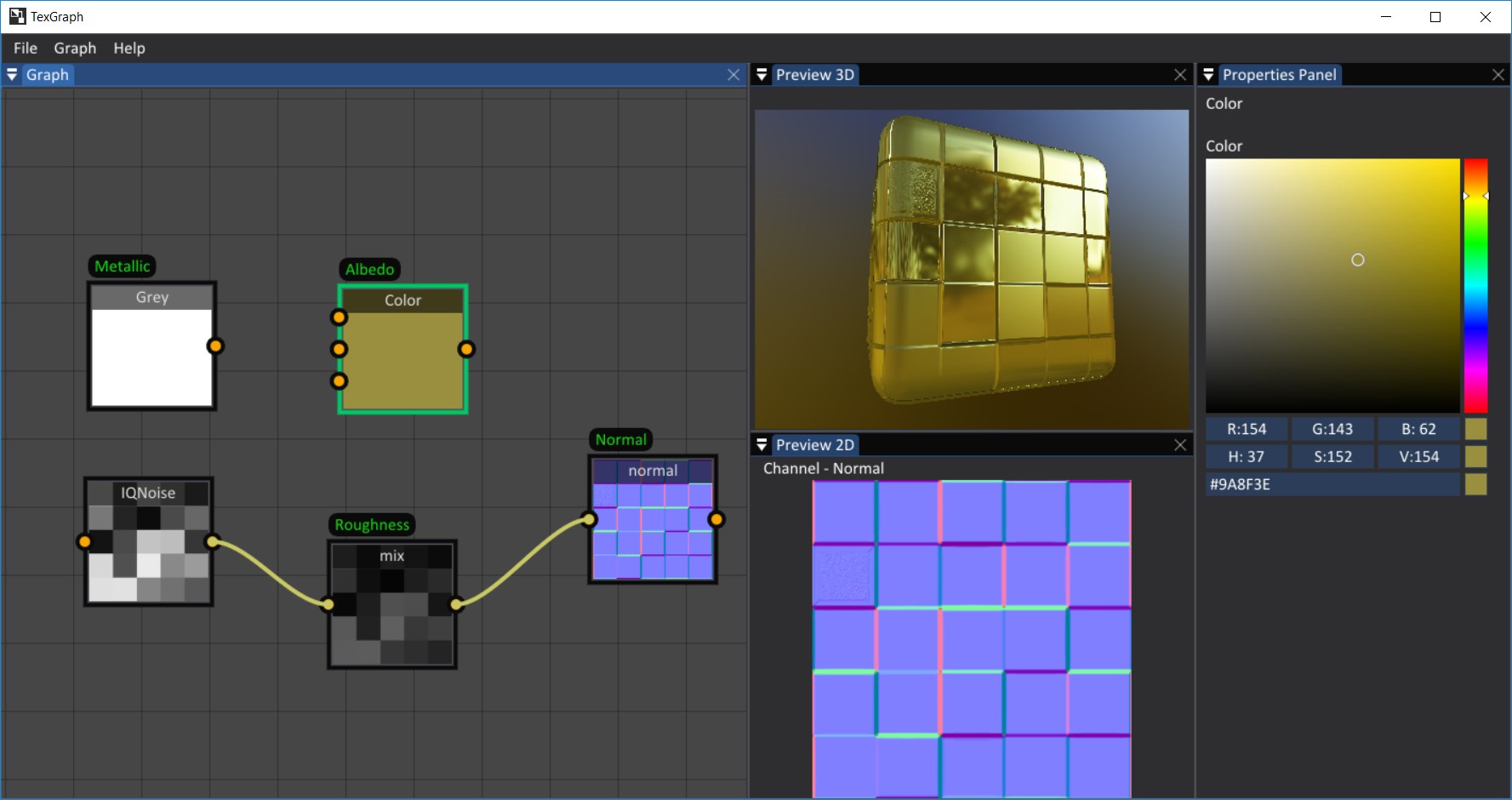
ocornut
on 14 Jan 2019
Hey @ocornut After checking most editors mentioned here. Do you have any pointers to designing Node editor widgets with a more ImGui-like api?
I'm thinking, in pseudo code:
BeginNodeGroup(name, id, size, ....)

for node in nodes:
    Node(name, id, inputs, outputs)
EndNodeGroup();
Ideally a NodeGroup could be nested.
I'm not sure what would be the best approach where to store relevant node data, ie positions.
Any widgets I could cherrypick from?
sphaero
on 23 Apr 2019
Hello Arnaud,
I haven't tried working on a node editor seriously and wouldn't be able to answer this question. My contribution is merely the proof of concept I made in a few hours which is at the top of the thread, there's probably much better stuff out there.
ocornut
on 23 Apr 2019
Hey @sphaero is license of your version still public domain?
 rokups
on 12 May 2019
rokups
on 12 May 2019
I usually put everything under MPLv2. A new iteration will be. For now its the same as @ChemiaAion. I would be interested in seeing improvements though!
sphaero
on 14 May 2019
Looks like MPL is compatible with MIT, thats great. I cleaned up some code duplication and did some other cleanups. FIxed rendering of curves when nodes are collapsed too.
https://gist.github.com/rokups/533bdf6bf1126e6e8ebcd779aa5d4b64
P.S. my changes are also public domain. I will add a note to those files eventually.
rokups
on 14 May 2019
@ocornut: Perhaps it's the time to start to think about NodeGraph as a next native big-feature?
In humble behalf of this amazing #306 community ;) I would say that the general feature-list and behaviour (as a starting point of course) of its internal logic/state-machine is pretty much known and IMHO defined by now.
@ocornut: What do you think (in terms of roadmap schedule)? What you will need from us to make it happend?
ChemistAion
on 14 May 2019
My two cents would be that this belongs in a separate repository, like https://github.com/ocornut/imgui_club for instance.
 nicolasnoble
on 14 May 2019
nicolasnoble
on 14 May 2019
I would say that the general feature-list and behaviour (as a starting point of course) of its internal logic/state-machine is pretty much known and IMHO defined by now.
I would give a strong "no" to those statement.
Defining the data structures and "what we are editing" in a node graph editor is probably too high-level and too hard to define to be within the scope of dear imgui, but we could probably provide a more elaborate example in imgui_demo.cpp down the line.
It'also s low priority for me as I have plenty of other things on my plate and big users seem content with writing their own (which to be honest I think is the reasonable path).
I think it's probably even too big and hard to scope for imgui_club but could be a separate project anyone could setup and maintain and I would very much welcome if people wanted to maintain such project (arguably some of the things linked here and on the wiki falls in this category)
However, I would want to add to imgui anything that can directly or indirectly support and facilitate the creation of such node editors so it becomes an ever easier task. So anything specifically detailed to aid that work I would consider.
ocornut
on 15 May 2019
I think it's probably even too big and hard to scope for imgui_club but could be a separate project anyone could setup and maintain and I would very much welcome if people wanted to maintain such project (arguably some of the things linked here and on the wiki falls in this category)
Then it might be time to start talking about a github organization to hold imgui-related projects and repositories :-) Having bits of code here and there scattered across issues or personal repositories might work for a smaller-scoped project, but with the current scope of imgui, I'd say visibility for these bits of code might start becoming crucial for their growth and maintainability.
nicolasnoble
on 15 May 2019
What would be beneficial is some sort guidance how to structure the code. I come across very different approaches ranging from very object oriented to very procedural. For example, I really like something like this: https://rfc.zeromq.org/spec:21/CLASS/ (as an example, it's not specifically suited for this)
I personally like the ImGui API and would like to build a Node Editor in a similar style. For a NodeEditor it would be simple as long as the node data is separated from the UI which most current ones don't.
sphaero
on 15 May 2019
Here's a proof of concept demo. It's quite incomplete but shows that it is possible.
You'll need to update to latest because I have fixed a bug with the ImDrawList / channel API. Drawing channels are very convenient to allow out-of-order rendering (here we draw the node background after the nodes are filled with contents).I'm declaring some ImVec2 operators to make the code simpler. If you have your own math types with conversions via IM_VEC2_CLASS_EXTRA you are probably better off using them.
Sort of work but I'm not very happy with it because it wasn't that trivial to pull off (3 hours including bugfix) and I had to dodge a few non-obvious trap. I'll probably keep massaging that code.
I'll move the hermite curve rendering to new drawing API. Do you know of a good non-stupid reference for API that handle various types of curves? (bezier, hermite, catmull rom. etc.). They are easy to implement but I wonder if there's a way of ordering parameters that's more standard or obvious. An API to handle multiple points should be available so that thick splines can have their end connecting nicely.
I am new to c++. I have a stupid question. After download the source code. How can I run it?
I use VS2017 open and run it. It is OK but nothing appear.

 taklct
on 17 May 2019
taklct
on 17 May 2019
What would be beneficial is some sort guidance how to structure the code.
@sphaero i am considering following approach:
if (ImGui::Begin("Nodes III"))
{
    // We probably need to keep some state, like positions of nodes/slots for rendering connections.
    static ImNodes nodes;

    if (nodes.BeginCanvas())
    {
        for (auto& node : nodes)
        {
            if (nodes.BeginNode(node.id, node.title))
            {
                // Input slots
                for (auto& slot : node.inputs)
                {
                    // Input node can have only one connection. We pass other end of connection here and curve will
                    // be rendered. If connection does not exist then other_node_id and other_slot_id are 0, they
                    // will be set when .Slot() returns true.
                    if (nodes.Slot(Input, slot.id, slot.title, slot.type_id, &slot.other_node_id, &slot.other_slot_id))
                    {
                        // Slot was connected.
                    }
                }

                // Custom widgets can be rendered in the middle of node
                ImGui::DragFloat4(...);

                // Output slots. These must come after custom widgets
                for (auto& slot : node.outputs)
                {
                    // Output does not care about existing connections as it can connect to many of them.
                    ImGuiID node_id = 0;    // Other node id
                    ImGuiID slot_id = 0;    // Other slot id
                    if (nodes.Slot(Output, slot.id, slot.title, slot.type_id, &node_id, &slot_id))
                    {
                        // Slot was connected. Store connection between this slot and slot of returned node to
                        auto input_slot = nodes.find(node_id).inputs.find(slot_id);
                        input_slot.other_node_id = node.id;
                        input_slot.other_slot_id = slot.id;
                    }
                }

                nodes.EndNode();
            }
        }
    }
    nodes.EndCanvas();
}
ImGui::End();
I made my approach to the topic in a similar way. Every frame user need to commit all live nodes, then all live connections. In that order. After this is done, there is an API to give feedback to the user about various state changes.
thedmd
on 21 May 2019
@rokups that looks like my thoughts as well. There's a separation from the UI and the nodes. The question remains what would be the best ImGui-like approach to storing state of the nodes.
sphaero
on 22 May 2019
@thedmd what stopped me from going further with your version is the fact you are using a modified ImGui.
sphaero
on 22 May 2019
@sphaero Understood. I will look into dropping local modifications. ImGui gained new skills making this possible since time I made an editor.
thedmd
on 22 May 2019
This is my take on node graph implementation: https://github.com/rokups/ImNodes (MIT)
Still a very basic one, but has all the needed building blocks.
- Supports custom user widgets inside node
- 100% accurate connection hovering detection
- Uses imgui style colors and therefore is customizable
- Immediate-mode API [sample]

rokups
on 24 May 2019
@rokups Well that looks clean, both code and preview :+1:
ArnCarveris
on 24 May 2019
@rokups Wow it looks stateless, I'm right?
ArnCarveris
on 24 May 2019
There is some runtime state, can not avoid that. It is well-hidden though. Only state exposed to the user is state that user should serialize. Does that fit into description of "stateless"? :)
rokups
on 24 May 2019
@rokups Well, I can't see any node or connection that is copied into the internal state.
ArnCarveris
on 24 May 2019
Oh no its not. Only internal state is this. Some things suck though. I do not quite like identifying nodes by void* id. That breaks when nodes are copied because those ids are stored in connections as well. But maybe it can be improved.
rokups
on 24 May 2019
Nice @rokups looks very promising! :+1:
sphaero
on 24 May 2019

 nem0
on 28 Jun 2019
nem0
on 28 Jun 2019
I want you all let know that imgui-node-editor now has no external dependencies beside vanilla ImGui, please see readme for more details. Feedback is appreciated!
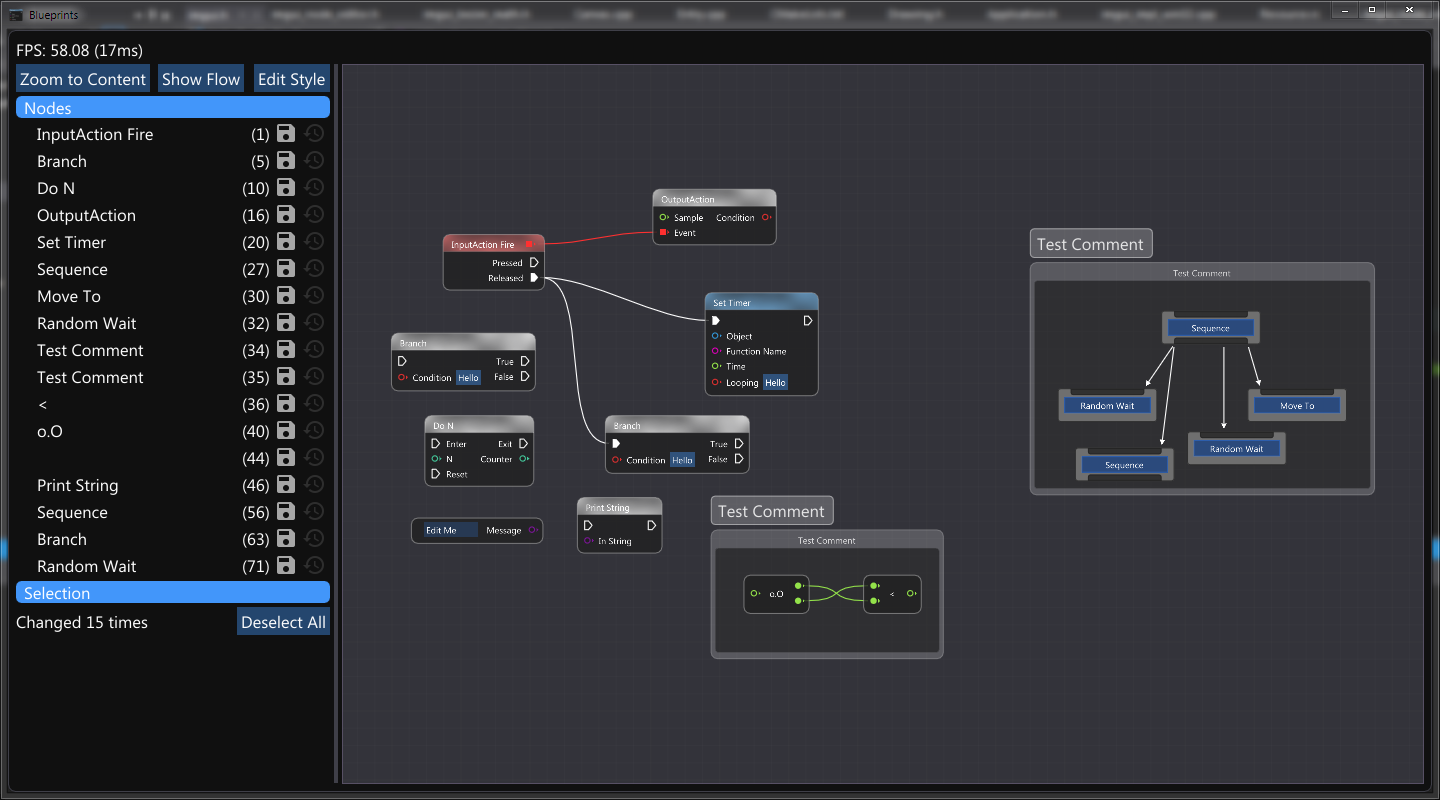
thedmd
on 2 Jul 2019
Cube/block voxel terrain generator using ImNodes written by @rokups. I'm using the Urho3D graphics engine with voxel volumes and voxel surface generation code I wrote.

 Teknologicus
on 3 Sep 2019
Teknologicus
on 3 Sep 2019
Might as well share (yet another) node editor that I've been writing: https://github.com/Nelarius/imnodes
It's not particularly feature rich at the moment, but I'm adding things to it as the need arises in one of my own projects. Imnodes has an ImGui-inspired API and I recently added color themes that match with ImGui, so it should integrate nicely 😄

Classic style never gets old 🙂

 Nelarius
on 13 Sep 2019
Nelarius
on 13 Sep 2019
Hi there,
I am doing a node ImGUI wrapper around my own UI-less graph editor (all c#), and I have this problem (I guess a newbie's nightmare): I used @ocornut 's code as an exit point, added scaling -> and here is the problem: when I do the scaling, the node's invisible button BG is scaling more than the node's items. I guess it is related to the fact that the size of the entire node is known after the contents are rendered. So my questions is: how to deal with this situation? How to make a child group get the parent group's size, which is unknown at the time of creation?
 enquel
on 6 Nov 2019
enquel
on 6 Nov 2019
Everyone using/writing node editors, @rokups has now added helpers functions in imgui_internal.h which may be of use to hover/interact with curves with the mouse:
ImVec2 ImBezierCalc(const ImVec2& p1, const ImVec2& p2, const ImVec2& p3, const ImVec2& p4, float t);                                         // Cubic Bezier
ImVec2 ImBezierClosestPoint(const ImVec2& p1, const ImVec2& p2, const ImVec2& p3, const ImVec2& p4, const ImVec2& p, int num_segments);       // For curves with explicit number of segments
ImVec2 ImBezierClosestPointCasteljau(const ImVec2& p1, const ImVec2& p2, const ImVec2& p3, const ImVec2& p4, const ImVec2& p, float tess_tol);// For auto-tessellated curves you can use tess_tol = style.CurveTessellationTol
Hello, Thanks for all beautiful solutions in this issue.
I'd like to add my node graph editor solution to the list, used in Mosaic. More screenshots in the screenshots 12 topic.

While similar to the ones linked here, it's a GUI-only solution, completely detached from any graph engine.
Source code is available here :
- Mosaic version (currently used in Mosic)
- Development version (some small differences, more flexible API)
 Daandelange
on 10 Oct 2020
Daandelange
on 10 Oct 2020
I have two examples of compute graphs using Nelarius/imnodes and rokups/ImNodes in LuaJIT-ImGui:
with Nelarius/imnodes

with rokups/ImNodes

The main goal was to achieve a simple user interface: Just define node types and call editor
imnodes usage: https://github.com/sonoro1234/LuaJIT-ImGui/blob/master/examples/imnodes_graph_sample.lua#L435
ImNodes usage: https://github.com/sonoro1234/LuaJIT-ImGui/blob/master/examples/cimnodes_r_graph_sample.lua#L378
 sonoro1234
on 2 Nov 2020
sonoro1234
on 2 Nov 2020
@sonoro1234 amazing example! Which do you prefer between imnodes and ImNodes?
 flamendless
on 11 Nov 2020
flamendless
on 11 Nov 2020
@sonoro1234 amazing example! Which do you prefer between imnodes and ImNodes?
https://github.com/rokups/ImNodes/issues/21#issuecomment-724657397
sonoro1234
on 11 Nov 2020
Port to ImGui.NET on the way:

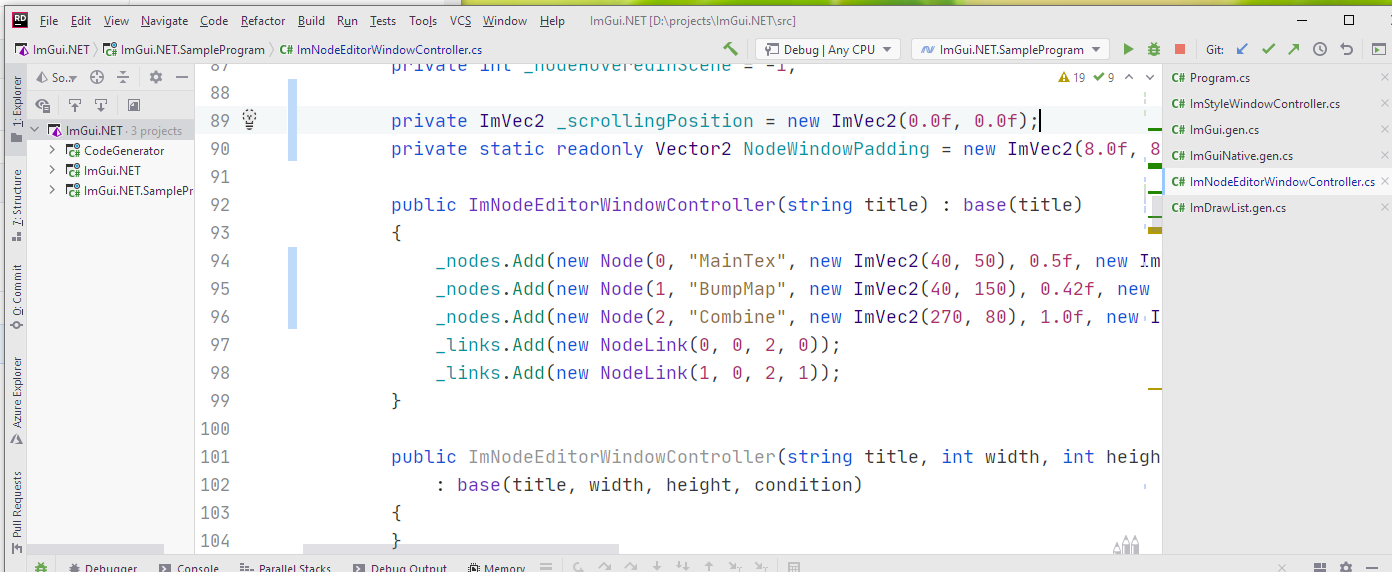
 richardlalancette
on 15 Nov 2020
richardlalancette
on 15 Nov 2020
Related issues
 GrammarLord
·
3Comments
GrammarLord
·
3Comments
 KaungZawHtet
·
3Comments
KaungZawHtet
·
3Comments
 BlackWatersInc
·
3Comments
BlackWatersInc
·
3Comments
 ILoveImgui
·
3Comments
ILoveImgui
·
3Comments
 ghost
·
3Comments
ghost
·
3Comments
Most helpful comment
Intro: https://www.youtube.com/watch?v=RV4xUTmgHBU
MIDI / Audio: https://www.youtube.com/watch?v=0HhX1rctz9Y
Space Invaders: https://www.youtube.com/watch?v=TZ3Fqm5koOY
Pong: https://www.youtube.com/watch?v=v8k1J_MPo48
Qube: https://www.youtube.com/watch?v=pKOwlFfJHgU
Matrix III: https://www.youtube.com/watch?v=T7dohzkfpb0
Procedural graphics: https://www.youtube.com/watch?v=786k1W-kDsg
Gesture recognition: https://www.youtube.com/watch?v=FEmE4LeTqPU