Imgbrd-grabber: Improvement of tab navigation
Is your feature request related to a problem? Please describe
- When having 50+ tabs open, its is difficult to access the last or first tabs.
- In the same scenario, accessing the downloads tab and then returning could become quite hard.
- The floating navigation buttons obstruct view.
Describe the solution you'd like
- Add go to last and first buttons along side the already implemented tab navigation buttons.
- Add a shortcut in the file or view menus to go to the downloads tab directly.
- Add a single step back button in downloads tab to return to the previous tab.
- Make the tab navigation icons non-floating and embed them along side the add new tab button in the fixed area.
 brazenvoid
All 14 comments
How about a button that makes a menu pop up, where you could click on which tab to focus on? (Any tab, not just "Download")
I think Firefox used to have a "List all tabs" button, like this one:
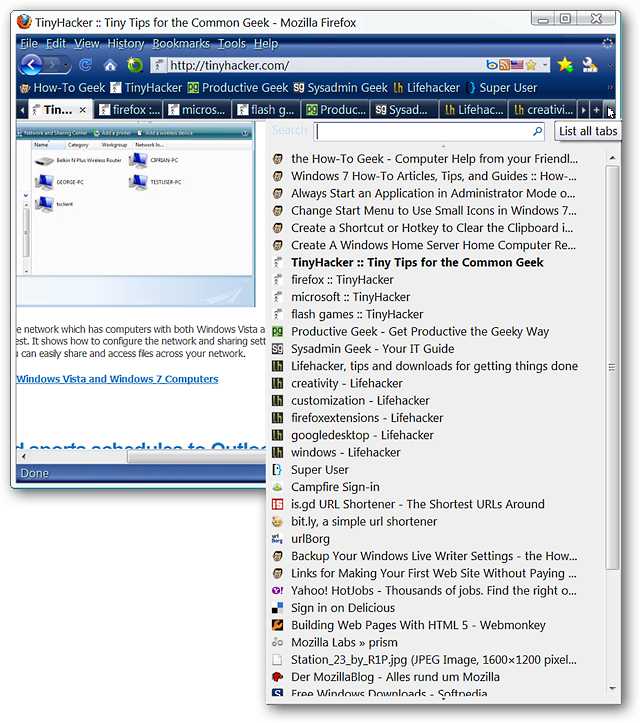
(Reference image is from Akemi Iwaya from howtogeek.com https://www.howtogeek.com/howto/11821/add-a-search-box-to-the-drop-down-tab-list-in-firefox/)
This article features an addon that adds search and scroll bars to make the list easier to use, because the original "List All Tabs" was not scrollable. This would make tabs in the middle of hundreds of them easier to access, too.
 SemifKnight
on 11 Sep 2018
SemifKnight
on 11 Sep 2018
@SemifKnight I guess it can be an added feature to make navigation easier.
I mentioned Downloads tab because it is one of the fixed tabs. Same as downloads, there can be a shortcut for the log or favorites too.
Because I am a developer myself, I try to suggest only those features which can be easier and faster to develop for Jack. I tend to avoid features which may take longer and thus will be pushed to the next major/minor version.
Out of the 4 enhancements I suggested, only no 3 will require a mild development effort.
brazenvoid
on 11 Sep 2018
Work in progress (mainly an implementation of issue #1094, which is also what @SemifKnight suggested), the number corresponds to the tab count (maybe this count shouldn't include the fixed tabs?):
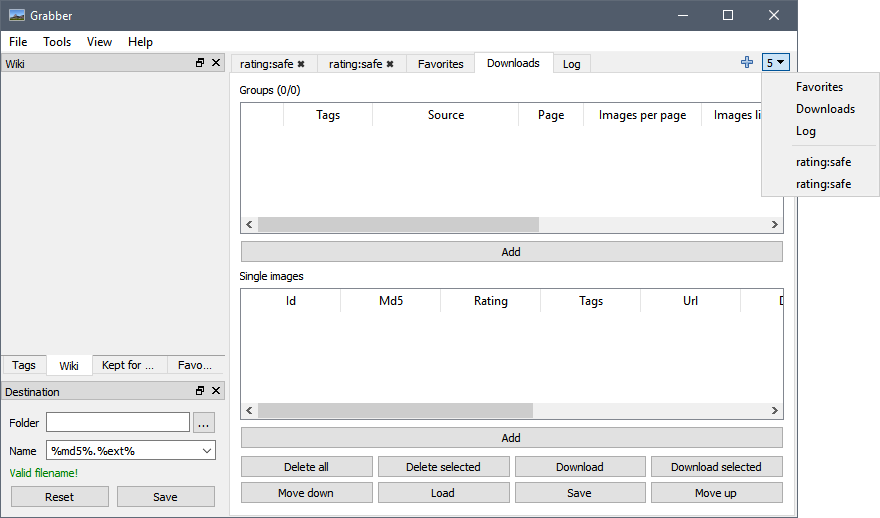
I feel it solves the original problem (and replaces points 1 and 2, maybe even 3 but that's questionable) without requiring too many buttons while also being more convenient for the user than arbitrary jump positions. What's your opinion @brazenvoid?
Make the tab navigation icons non-floating and embed them along side the add new tab button in the fixed area.
This can be done, however those are currently the scroll buttons provided by Qt. Therefore, before replacing them by custom-made ones, I'll have to check how this plays on Linux and MacOS as they might have different styles.
 Bionus
on 11 Sep 2018
Bionus
on 11 Sep 2018
- I also think that fixed tabs should not be part of the count. Not showing the count at all, could also be good enough. Who would care for a tab count when one can see the list?
- This solution indeed resolves points 1 & 2.
- Point 3 is disputed because the transition from any tab to a fixed one and back will still have latency inversely proportional to the index position of the unfixed tab.
- If the menu can also scroll through the tabs then handling many tabs would be slightly better. The scroll will make the navigation faster than the click to go to next tab thing but one will still have to scroll and search for the desired tab.
- Ultimate solution could be a tab search box with active search function and matching results showing as links beneath in an overlayed result box... I don't know whether you understood but its like the address bar of a browser which shows results as you type...
brazenvoid
on 11 Sep 2018
Point 3 is disputed because the transition from any tab to a fixed one and back will still have latency inversely proportional to the index position of the unfixed tab.
Indeed. I'll add a button besides the "+" button that appears after a "jump" (i.e. after this tab selector is used), and when clicked brings you back to the previous tab.
If the menu can also scroll through the tabs then handling many tabs would be slightly better. The scroll will make the navigation faster than the click to go to next tab thing but one will still have to scroll and search for the desired tab.
It's a normal OS menu, so (at least on Windows) it supports scrolling as well as the Page Up, Page Down, Begin, and End buttons. Typing the beginning of the tab name also focuses it. It can even use columns instead of scrolling if so set-up.
Ultimate solution could be a tab search box with active search function and matching results showing as links beneath in an overlayed result box... I don't know whether you understood but its like the address bar of a browser which shows results as you type...
Indeed, but I have a feeling the work & support to gain ratio would not be great. 😅
Bionus
on 11 Sep 2018
Maybe you could add something in that menu so you could easely close a lot of unwanted tabs when you do ctrl + click or something for example
 MrAndre96
on 12 Sep 2018
MrAndre96
on 12 Sep 2018
Two more suggestions:
- Can you also make it so that tabs do not get duplicated, instead the control switches to the tab with same search parameters? Perhaps this can be made optional. Then perhaps a kill duplicate tabs action could also be added.
- Sorting of tabs
brazenvoid
on 27 Sep 2018
Maybe you could add something in that menu so you could easely close a lot of unwanted tabs when you do ctrl + click or something for example
Done. Middle click will now close tabs in the dropdown.
Can you also make it so that tabs do not get duplicated, instead the control switches to the tab with same search parameters? Perhaps this can be made optional. Then perhaps a kill duplicate tabs action could also be added.
I don't see how this would be done, given you have to open a tab, enter your query, and select your sources / page number to be able to see if another tab already exists. Then, after you've done all this, the program would close your tab and bring you to another one, which doesn't feel very user-friendly.
Sorting of tabs
In what order? Alphabetically?
Bionus
on 29 Sep 2018
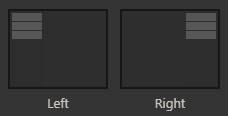
It'd be nice to have the option to stack tabs either horizontally, as you currently have it, or vertically, like in the web browser Vivaldi.
 flameboii
on 30 Sep 2018
flameboii
on 30 Sep 2018
@flameboii moved to #1438.
Everyone for additional suggestions about tab navigation, please create independent issues so that they can be better individually tracked 😄
Bionus
on 30 Sep 2018
Can you also make it so that tabs do not get duplicated, instead the control switches to the tab with same search parameters? Perhaps this can be made optional. Then perhaps a kill duplicate tabs action could also be added.
I don't see how this would be done, given you have to open a tab, enter your query, and select your sources / page number to be able to see if another tab already exists. Then, after you've done all this, the program would close your tab and bring you to another one, which doesn't feel very user-friendly.
No, it will not check page numbers. Just the main searched tags. About the behavior, one thing will remain same that is an initial tab will not be opened at all till the search is done. Afterwards, there can be some variations after a match is found;
- Open the existing tab.
- Open the existing tab and position it at the place where the new tab would have been placed.
- Show a confirmation prompt giving choice to the user, like: There is already a tab with this search combination, would you like to switch to it?
Sorting of tabs
In what order? Alphabetically?
Yes, alphabetically. Currently, I have about 403 tabs open so searching/navigation would be easier with it. Also after a crash, the order gets changed, every time.
brazenvoid
on 30 Sep 2018
A bug has come around with the earlier implementation, I don't know what caused this but now my tab list is always like so:
brazenvoid
on 30 Sep 2018
@Bionus The above issue is till there in the release.
brazenvoid
on 1 Oct 2018
@brazenvoid moved to #1447
Bionus
on 1 Oct 2018
Related issues
 Greko5
·
4Comments
Greko5
·
4Comments
 maskkulin
·
7Comments
maskkulin
·
7Comments
 angaratosurion
·
8Comments
angaratosurion
·
8Comments
 TheGho7t
·
4Comments
TheGho7t
·
4Comments
 gabrielcesar16
·
4Comments
gabrielcesar16
·
4Comments