Imagesharp: bmp written is not supported by Chrome or Firefox
Prerequisites
- [x] I have written a descriptive issue title
- [x] I have verified that I am running the latest version of ImageSharp
- [x] I have verified if the problem exist in both
DEBUGandRELEASEmode - [x] I have searched open and closed issues to ensure it has not already been reported
Description
When saving image as bmp it can not be seen with Chrome or Firefox, however it can be read by MS Paint.
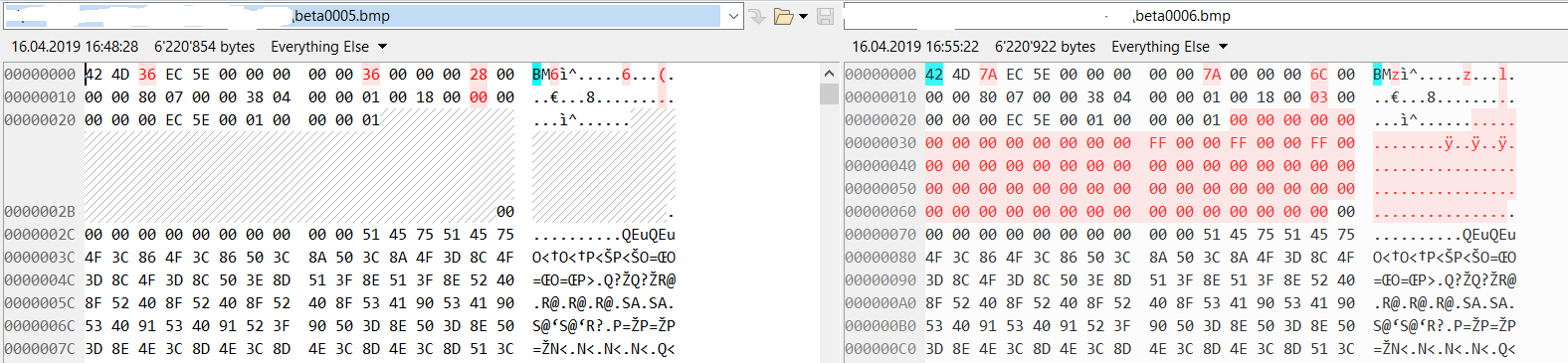
This started to happen with 1.0.0-beta0006 when i compare the produced image with one from 1.0.0-beta0005 i can see that the bmp header is different....
Steps to Reproduce
c#
using (var image = Image.Load<Rgb24>(mem))
{
    // issue here
    image.SaveAsBmp(fullMem);
}
System Configuration
Seen under Windows and Linux
- ImageSharp version: 1.0.0-beta0006
- Other ImageSharp packages and versions:
- Environment (Operating system, version and so on):
- .NET Framework version:
- Additional information:
 pammann-work
All 9 comments
pammann-work
on 16 Apr 2019
Odd. V4 bitmaps should be supported. @brianpopow do you have any insight here?
http://entropymine.com/jason/bmpsuite/bmpsuite/html/bmpsuite.html
 JimBobSquarePants
on 17 Apr 2019
JimBobSquarePants
on 17 Apr 2019
we have indeed changed the bitmap header in beta0006 to V4 to support bitmaps with transparency. As @JimBobSquarePants said, chrome and firefox should support those.
I checked the imagesharp bitmap encoder and at first glance i can not spot an error.
I was thinking maybe we should write V3 bitmap header as default and keep writing V4 headers as optional. I will look further into this the next days.
 brianpopow
on 17 Apr 2019
brianpopow
on 17 Apr 2019
Thanks @brianpopow appreciate it! That sounds like a sensible plan.
JimBobSquarePants
on 18 Apr 2019
update: gimp can also not read the image produced with beta006, it complains with:
"Unrecognized or invalid BMP compression format."
pammann-work
on 18 Apr 2019
the problem is the incorrect 0x03, when i change it to 0x00 it works and i can load it into gimp and Chrome.

pammann-work
on 18 Apr 2019
issue comes most probably from BmpEncoderCore.cs / Line 131: "Compression = BmpCompression.BitFields".
Why is BitFields here used, aren't the pixels anyway stored in memory byte by byte, thus "Compression = BmpCompression.RGB" should do the trick.
pammann-work
on 18 Apr 2019
The v4 header does not seem to be the issue here. It seems to be combination of V4 header + 24 bits per pixel + Bitfields compression which chrome and firefox does not like. Bitfields with 32 bits per pixel does work with chrome, firefox and irfanview.
@pammann-work: as i said in my first post. The intention for using V4 header (with Bitfields) was to support transparency, but in your case with 24 bpp, there is no transparency anyway. Your hack for changing from bitfields (0x03) to no compression (0x00) works, because we use 8 bit per color channel with bitfields. This is essentially the same as uncompressed (without transparency).
I wanted to change the bitmap header to default to V3, which implies no compression. V3 headers should be supported by almost all decoders.
brianpopow
on 18 Apr 2019
Fixed with #889
JimBobSquarePants
on 1 May 2019
Related issues
 agoretsky
·
4Comments
agoretsky
·
4Comments
 DAGA86
·
3Comments
JimBobSquarePants
·
3Comments
DAGA86
·
3Comments
JimBobSquarePants
·
3Comments
 nullpainter
·
3Comments
nullpainter
·
3Comments
 xakep139
·
4Comments
xakep139
·
4Comments
Most helpful comment
we have indeed changed the bitmap header in beta0006 to V4 to support bitmaps with transparency. As @JimBobSquarePants said, chrome and firefox should support those.
I checked the imagesharp bitmap encoder and at first glance i can not spot an error.
I was thinking maybe we should write V3 bitmap header as default and keep writing V4 headers as optional. I will look further into this the next days.