Imagesharp: Saving JPEG Quality defaults to below 5 - ignoring default of 75
Prerequisites
- [x] I have written a descriptive issue title
- [x] I have verified that I am running the latest version of ImageSharp
- [x] I have verified if the problem exist in both
DEBUGandRELEASEmode - [x] I have searched open and closed issues to ensure it has not already been reported
Description
Saving certain Jpeg images without defining the JpegEnconder quality defaults to a quality below 5.
There's a few jpeg I've seem with this behavior, can't pin point an common trait. Examples further below.
Steps to Reproduce
using (var img = Image.Load("original.jpg"))
{
    using (FileStream outImage = File.Create("result.jpg"))
    {
        img.SaveAsJpeg(outImage);
    }
}
Results:

With Quality at 50:
using (var img = Image.Load("original.jpg"))
{
    using (FileStream outImage = File.Create("result.jpg"))
    {
        img.SaveAsJpeg(outImage, new JpegEncoder { Quality = 50 } );
    }
}
Results:

As you can see quality 50 produces a higher quality image.
Here are 3 examples images:
quality-loss-example.zip
I've managed to track it down to SixLabors.ImageSharp.Formats.Jpeg.Components.Decoder.QualityEvaluator#EstimateQuality method.
'Normal' jpeg this method returns a 75 default quality. My example images the method returns 3 or 2.

System Configuration
- ImageSharp version: 1.0.0-beta0006
- Environment (Operating system, version and so on): Windows 10 pro -Windows Server 2016
- .NET Framework version: .Net Core 2.1
 Marcel0024
All 9 comments
Going down the rabbit hole, it seems ImageSharp does a wrong quality estimation based on the Quantization Table. The estimation is based on a formula of ImageMagick.
Further digging i found this paper:
Determining JPEG Image Standard Quality Factor from the Quantization Tables
The code provided in the paper is what JpegSnoop uses to determine the quality factor. JpegSnoop gives me a 98.25 approx quality factor on the same image i used above
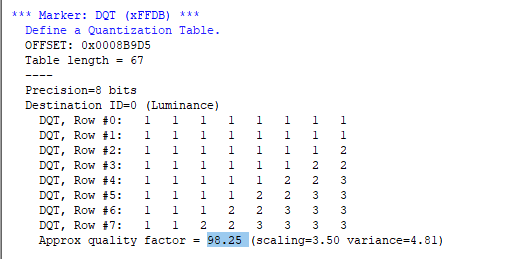
I got a 3 in ImageSharp (while the quality is clearly high)
The paper is also mention the method used in ImageMagick is fairly inaccurate
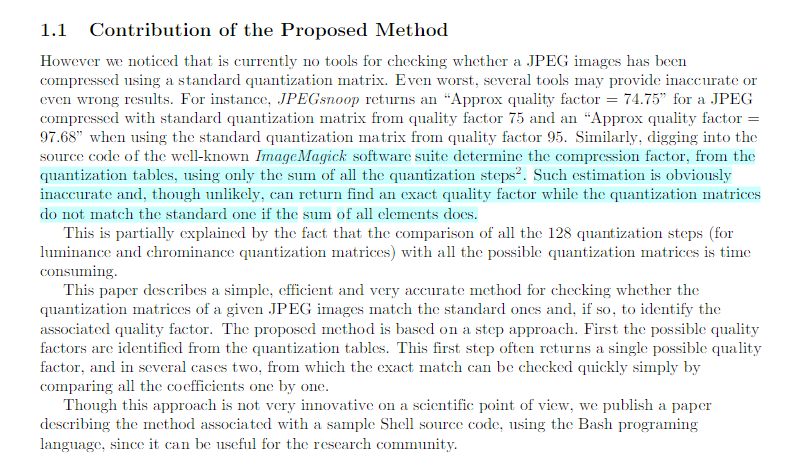
Is this where my problem lies? Is it worth further investigation?
Edit:
Using ImageMagick directly produces these qualities:

Is it just wrongly implemented in ImageSharp?
Marcel0024
on 9 Mar 2019
We based ours on ImageMagick but I did the port and don’t read C well at all. I’ve most likely messed it up so please have a look if you can.
 JimBobSquarePants
on 9 Mar 2019
JimBobSquarePants
on 9 Mar 2019
I can take a look at this when I am back home in two weeks. Might be possible we made some changes in ImageMagick since this was added to ImageSharp.
 dlemstra
on 9 Mar 2019
dlemstra
on 9 Mar 2019
@dlemstra Just compared the current master source to the point in time source i ported from. It's identical so I must have missed something.
JimBobSquarePants
on 15 Mar 2019
I've compared the code to the ImageMagick one. All the logic and table seems the same.
The quality here is set to 3, and then it always keeps hitting continue on line 109, until it exits the method with quality 3.
The only thing i don't understand is ImageMagic's version of the quality variable here what does quantval do? its not a c syntax no? does it only get the value at that position like its translated in c#?
Marcel0024
on 15 Mar 2019
There is a difference in the code. The sum does not check if the quantum tables are null. But that does not seem to be the case here.
dlemstra
on 15 Mar 2019
@dlemstra Good spot! That should simply mean we're adding a bunch of zeros we don't need to but I've just realized Block8x8F doesn't implement IEquatable<T> so we might be getting issues there.
@Marcel0024 By my understanding they are simply the tables themselves.
jpeg_info->quant_tbl_ptrs[0]->quantval[53] is the 53rd index of the first quantization table.
JimBobSquarePants
on 15 Mar 2019
@dlemstra Confirmed. Test example1.jpg now returns 99. I'll push a fix.
JimBobSquarePants
on 15 Mar 2019
Nice!
Marcel0024
on 15 Mar 2019
Related issues
JimBobSquarePants
·
60Comments
 aloisdeniel
·
41Comments
aloisdeniel
·
41Comments
 KuroThing
·
55Comments
KuroThing
·
55Comments
 GeorgePlotnikov
·
31Comments
JimBobSquarePants
·
36Comments
GeorgePlotnikov
·
31Comments
JimBobSquarePants
·
36Comments
Most helpful comment
I can take a look at this when I am back home in two weeks. Might be possible we made some changes in ImageMagick since this was added to ImageSharp.