Imagesharp: Image width and image height are getting mixed up
I'm using SixLabors.ImageSharp.Drawing (1.0.0-beta0005) using ASP .NET core MVC 2.1 on Windows 10.

I'm uploading the attached image using a IFormFile. Loading the image to ImageSharp using:
Image
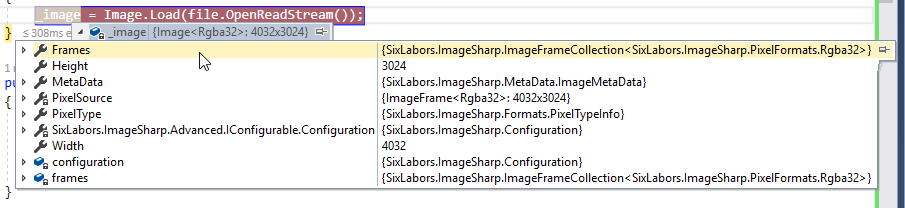
The image width and height are mixed up (see screenshot). Tis happens with all portrait pictures taken with my Nikon D90 SLR camera.
 roelgeusens
All 2 comments
@roelgeusens: The picture has actually a width of 4032 and a height of 3024, so imagesharp shows it correctly to you. The image also contains EXIF informations which hold the orientation information. Most Image viewing programs automatically rotate the image by the EXIF information.
If you want to auto rotate the image by EXIF information with ImageSharp, use the following:
image.Mutate(img => img.AutoOrient());
 brianpopow
on 15 Dec 2018
brianpopow
on 15 Dec 2018
A reminder that I should add AutoOrient to our FAQ TODO list in #411.
 antonfirsov
on 15 Dec 2018
antonfirsov
on 15 Dec 2018
Related issues
 JimBobSquarePants
·
36Comments
JimBobSquarePants
·
36Comments
 peter-bozovic
·
47Comments
JimBobSquarePants
·
60Comments
peter-bozovic
·
47Comments
JimBobSquarePants
·
60Comments
 KuroThing
·
55Comments
KuroThing
·
55Comments
 MaddoScientisto
·
28Comments
MaddoScientisto
·
28Comments
Most helpful comment
@roelgeusens: The picture has actually a width of 4032 and a height of 3024, so imagesharp shows it correctly to you. The image also contains EXIF informations which hold the orientation information. Most Image viewing programs automatically rotate the image by the EXIF information.
If you want to auto rotate the image by EXIF information with ImageSharp, use the following:
image.Mutate(img => img.AutoOrient());