Imagesharp: Memory usage always increasing when resizing over and over
Prerequisites
- [x] I have written a descriptive issue title
- [x] I have verified that I am running the latest version of ImageSharp
- [ ] I have verified if the problem exist in both
DEBUGandRELEASEmode - [x] I have searched open and closed issues to ensure it has not already been reported
Description
Running image sharp on multiple images causes memory to increase up to 1.5 GB
Steps to Reproduce
I have the following code that is hosted in an AWS lambda.
        // This is a member function of my PictureProvider class
        public void Resize(Stream sourceStream, string target, int newWidth, int newHeight)
        {
            using (var image = Image.Load(sourceStream))
            using (var outputFile = File.OpenWrite(target))
            {
                image.Mutate(ctx => ctx.Resize(newWidth, newHeight));
                image.SaveAsJpeg(outputFile);
            }
        }
This code has been used since this morning in production by our web site where our users upload their own image that can range from 1500x1500 to 6000x6000 in JPEG and PNG format.
When I look at the AWS lambda execution logs, I see the following:
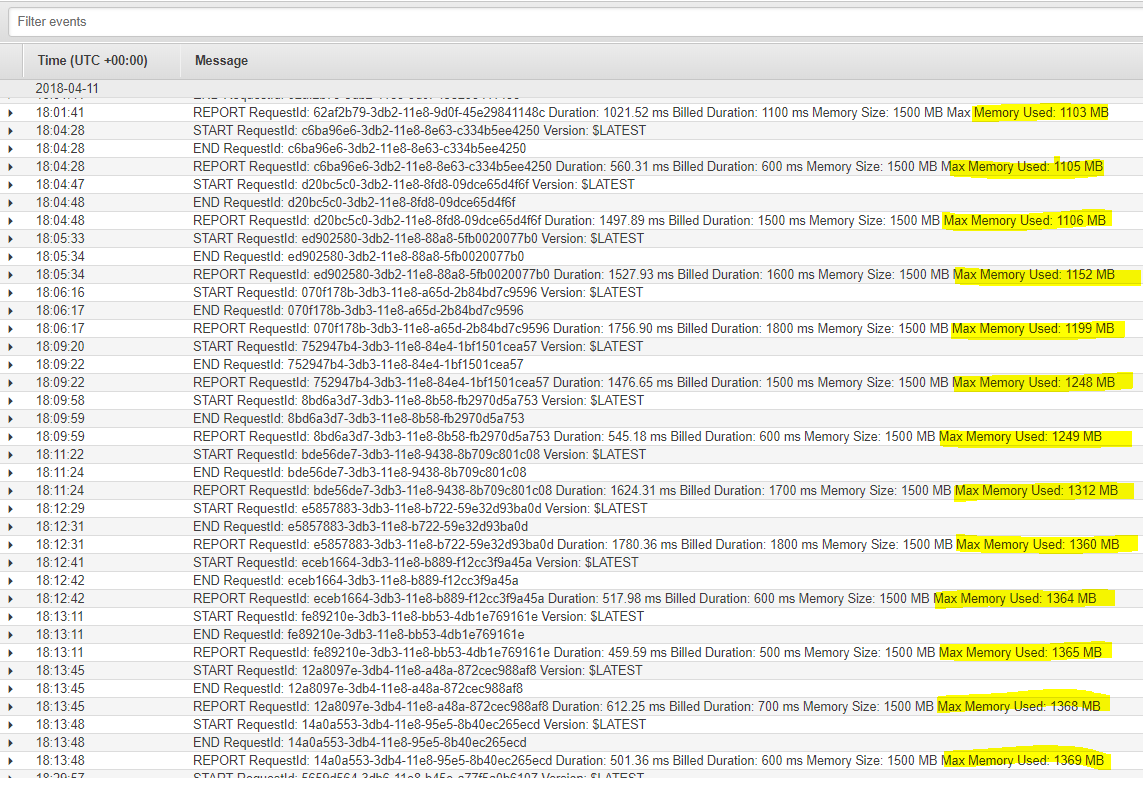
As you can see the memory consumed by the lambda only keeps on increasing... until it reaches the 1500 MB that I allocated to the lambda. At this point the lambda dies and AWS instantiates a new fresh container for the lambda.
Here's what I intent to do: I will try to replace the default memory manager by the SimpleGcMemoryManager which is not supposed to pool memory as indicated here. Let me know if you have any other suggestion.
System Configuration
- ImageSharp version:1.0.0-beta0003
- Environment (Operating system, version and so on): AWS lambda running on dotnet core 2.0 on linux
- .NET Framework version: netcoreapp2.0
 mabead
All 16 comments
On my Windows computer (thus not inside of an AWS lambda), I created a console program that loads/resize/save as jpeg a bunch of random images coming from our users. Here's the memory consumption that Visual Studio reports.

So maybe memory is not leaking. Maybe my lambda dies out-of-memory because ImageSharp sometimes peaks to 3 GB of RAM and my lambda is limited to 1.5 GB! I will let you know how it goes with the SimpleGcMemoryManager.
FYI: here's my console program.
using System;
using System.IO;
using System.Linq;
using SixLabors.ImageSharp;
using SixLabors.ImageSharp.Processing;
using SixLabors.ImageSharp.Processing.Transforms;

namespace ImageSharpLeak
{
    class Program
    {
        static void Main(string[] args)
        {
            var directories = Directory.EnumerateDirectories(@"f:\prod-ok").ToList();

            var directoryIndex = 0;

            foreach (var directory in directories)
            {
                Console.WriteLine(directoryIndex);
                directoryIndex += 1;

                var imagesInDirectory = Directory.GetFiles(directory);

                foreach (var imageName in imagesInDirectory)
                {
                    var temporaryFile = Path.GetTempFileName();

                    try
                    {
                        using (var imageStream = File.OpenRead(imageName))
                        using (var image = Image.Load(imageStream))
                        using (var outputFile = File.OpenWrite(temporaryFile))
                        {
                            image.Mutate(ctx => ctx.Resize(640, 640));
                            image.SaveAsJpeg(outputFile);
                        }
                    }
                    finally
                    {
                        if (File.Exists(temporaryFile))
                        {
                            File.Delete(temporaryFile);
                        }
                    }
                }
            }
        }
    }
}
GC is prone to LOH fragmentation issues, so I'm afraid using SimpleGcMemoryManager could be even more vulnerable to OOM.
We need to utilize MMF to support these memory constrained scaling approaches tbh.
What is the resize request frequency in yoir production environment? What are the most typical image dimensions?
 antonfirsov
on 12 Apr 2018
antonfirsov
on 12 Apr 2018
@antonfirsov I won't affirm yet that SimpleGcMemoryManager solved the problem but I can say that in 14 hours I didn't have an out of memory problem. Given it was night time in Americas, this is not very reliable yet. I'll let you know how it works today.
Resize frequency:
The only metrics that I have are for the last ~20 hours where I had 1070 resize operations. See this graph for more details.

Typical dimensions:
I checked 4542 original images (this is a subset of all our production images) and they are in 514 different dimensions. So that's a lot of unique dimensions! Here are the top ones:
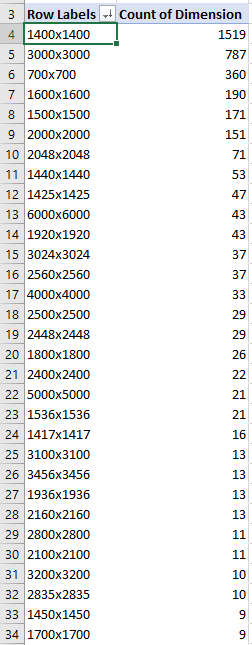
Here's the full data: dimensions.xlsx
These images are typically resized to:
- 480x480
- 320x320
- 360x360
- 72x72
- 960x960
- 640x640
- 150x150
I don't have metrics on how often these resize dimensions are used.
mabead
on 12 Apr 2018
@mabead this is a very useful usage information! I really appreciate it, thanks!
antonfirsov
on 12 Apr 2018
@antonfirsov We now have done about a total of 1700 resize. There were no out of memory error since I moved to SimpleGcMemoryManager.
mabead
on 12 Apr 2018
@mabead it's most likely because your'e processing requests infrequently. Good to know this!
antonfirsov
on 12 Apr 2018
With SimpleGCManager there's no fragmentation issues as long as retained memory is unreferenced and can be released by the GC.
I think for server environments the problem is handling multiple requests simultaneously. It's probably fine to receive a 6000x6000 images from time to time, the problem probably happens when you receive several big images at the same time.
For such scenarios I would suggest:
- use SimpleGCManager
- Preload the image header to retrieve image size without actually loading the image, and treat small and big images with different rules:
- for small images, do the image processing in the request itself. Multiple requests can be processes concurrently.
- for large images, use a FIFO queue to process only one large image at a time. If the queue of large images is not empty, make the small image requests to wait. This way, the request to process the large image will probably have all the memory available for itself.
 vpenades
on 13 Apr 2018
vpenades
on 13 Apr 2018
Thanks for the advice @vpenades. In my case, each resize request is made in an AWS lambda function call. Therefore, it is not possible to have concurrent executions within the same "memory context". When I have multiple users that request an image resize at the exact same time, AWS will spawn multiple lambda containers that each have their own dedicated memory.
mabead
on 14 Apr 2018
@mabead we too had the similar issue on a resource constraint server (4GB memory running 3 apps using ImageSharp) and usually the memory usage for each app is about 1GB or so, we are using ImageSharp to only perform image resizing like you.
You mentioned SimpleGCManager, what is it? Would you give me some links so I can take a further look and see if we should use it. Thanks.
 LiangZugeng
on 10 May 2018
LiangZugeng
on 10 May 2018
@LiangZugeng
Let me know if it helps!
antonfirsov
on 10 May 2018
If we could somehow remove the requirement of the large intermediate Vector4 buffer for resizing that would take a lot of pressure off also.
Original inspiration for the resize algorithm manages to avoid it.
http://www.realtimerendering.com/resources/GraphicsGems/gemsiii/filter_rcg.c
 JimBobSquarePants
on 11 May 2018
JimBobSquarePants
on 11 May 2018
In my humble opinion, imagesharp should ship with SimpleCGManager by default.
Right now it ships with a pool based manager, which is fast, but pooled based implementations require tight control of your environment and knowledge of what's happening under the hood. If you're a beginner or you're in a rush, you'll probably deploy without realizing these aspects, and then you begin having out of mem exceptions in production.
Keep in mind that not all the people that has this problem come here to ask; some will think Imagesharp is unreliable and skip it.
I think it's better to be complained about the library being slow, and point to how make it run fast, than to make it fast from the beginning and be complained about crashes.
vpenades
on 11 May 2018
Closing. Should be fixed now with #888
JimBobSquarePants
on 26 Apr 2019
CC @antonfirsov
Concurrency would lead to pool exhaustion and allocation which is expected IMO. Just want a second opinion.
EDIT. Weird... Comment above has disappeared.
Original message
@JimBobSquarePants I believe that I am facing the same issue running my performance tests.
the results are doubled for 100 concurrent users with 50 loops.
imagesharp
This is the code
```c#
public byte[] AddWatermark(string base64)
{
using var image = SixLabors.ImageSharp.Image.Load(Convert.FromBase64String(base64.Split(',')[1]));
using (var logo = SixLabors.ImageSharp.Image.Load(Convert.FromBase64String(_watermarkImageBase64)))
{
this._logger.LogDebug($"Calculating watermark dimensions for image with W:{image.Width} H:{image.Height}");
var worh = image.Width > image.Height;
var coff = worh
? image.Width * 0.1 / Math.Min(logo.Width, logo.Height)
: image.Height * 0.4 / Math.Max(logo.Width, logo.Height);this._logger.LogDebug("Coff: " + coff); var size = new Size((int)(logo.Width * coff), (int)(logo.Height * coff)); var location = new Point((image.Width - size.Width) / 2, (image.Height - size.Height) / 2 - 20); // Resize the logo logo.Mutate(i => { i.Resize(size); i.Rotate(-20f); }); image.Mutate(i => i.DrawImage(logo, location, PixelColorBlendingMode.Normal, 0.5f)); } return Convert.FromBase64String(image.ToBase64String(JpegFormat.Instance).Split(',')[1]); }```
I am using Version 1.1 of ImageSharp
JimBobSquarePants
on 13 Oct 2020
Yes, nothing unexpected. The memory being retained by the pools has an upper limit, which is configurable, if really necessary.
For the OP of the comment above, and other people landing in this discussion:
https://docs.sixlabors.com/articles/imagesharp/memorymanagement.html
antonfirsov
on 13 Oct 2020
Thanks mate. 👍
JimBobSquarePants
on 13 Oct 2020
Related issues
JimBobSquarePants
·
3Comments
 devedse
·
3Comments
devedse
·
3Comments
 xakep139
·
3Comments
xakep139
·
3Comments
 FelixLeChat
·
3Comments
vpenades
·
4Comments
FelixLeChat
·
3Comments
vpenades
·
4Comments