Imagesharp: Image.Load() on PNG sometimes results in NULL return, no exception
I have PNG files that when used with Image.Load() return a NULL with no indication of what the error or issue might be.
Example PNG images:
image1.png
image2.png
Using ImageSharp nightly dev NuGet (also tried stable/release which has same issue)
<PackageReference Include="SixLabors.ImageSharp" Version="1.0.0-dev000642" />
Code I'm using:
using SixLabors.ImageSharp;
using SixLabors.ImageSharp.Formats;

public IActionResult UpdateReportBranding([FromForm] IFormFile file)
{
   var ms = new MemoryStream();
   file.OpenReadStream().CopyTo(ms);
   IImageDecoder decoder = new SixLabors.ImageSharp.Formats.Png.PngDecoder();
   var image = Image.Load(ms, decoder);
   if (image == null) << IS NULL HERE
   {
       ModelState.AddModelError("File", "Image was unable to load and may not be properly formatted.");
       return BadRequest();
   }
 justintubbs
All 20 comments
Hi @justintubbs
As with #440 I cannot access the images to investigate them. Could you please allow access.
Cheers
James
 JimBobSquarePants
on 20 Jan 2018
JimBobSquarePants
on 20 Jan 2018
This will happen when there is no data chunk in the file. I think this PR will fix the issue: #442. We can add a unit test once we can access those images.
 dlemstra
on 20 Jan 2018
dlemstra
on 20 Jan 2018
Is anyone else having issues getting to these photos? I can view them in multiple browsers, even in Incognito/Private browsing mode
justintubbs
on 21 Jan 2018
Getting 403 Forbidden here. My guess is you have some form of IP address filtering on them.
 tocsoft
on 21 Jan 2018
tocsoft
on 21 Jan 2018
I'm even getting it when just navigating to http://justintubbs.com/
tocsoft
on 21 Jan 2018
justintubbs
on 21 Jan 2018

justintubbs
on 21 Jan 2018
I'm just using Windows "Snipping Tool" and saving as PNG or JPG format here...you should be able to replicate yourself.
justintubbs
on 21 Jan 2018
I'm unable to replicate this using the current repository codebase with any of your posted images nor with any new images generated using the Window Snipping Tool in either format. Would you be able to test against that code locally?
I'm using:
- Windows 10 Version 1709 (OS Build 16299.192)
- Snipping Tool 10.0.16299
JimBobSquarePants
on 21 Jan 2018
I'll try to put an example together to see what is going on. Since I'm using .NET Core 2.0 to upload a file, it might be different than loading a file from disk.
justintubbs
on 22 Jan 2018
Oh hey, just butting in again with some [potentially helpful] info. I can report the following:
- I was able to download the files linked in the original issue
- The files attached later appear to be re-encoded versions of those images
- Both the original and the re-encoded files load fine in 1.0.0-beta0002.
@justintubbs Looking at your example code, it appears you simply forgot to reset the stream position to 0 before attempting to load the image. I reckon an exception should be thrown by the decoder there, but the images themselves are fine, and the decoder handles them fine if it can find them
 saucecontrol
on 25 Jan 2018
saucecontrol
on 25 Jan 2018
@saucecontrol Thanks for that! I couldn't see the wood for the trees there.
@justintubbs The way you are loading the images is unconventional. Normally you would use Image<TPixel>.Load(Stream). That method attempts to identify the correct codec to use and will throw an exception if it cannot do so.
We've already opened #442 that will add throwing an exception if there is not data contained within the png and we can ensure all other decoders do similar with appropriate messaging.
JimBobSquarePants
on 25 Jan 2018
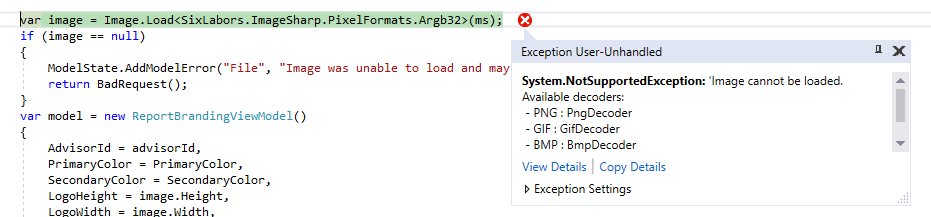
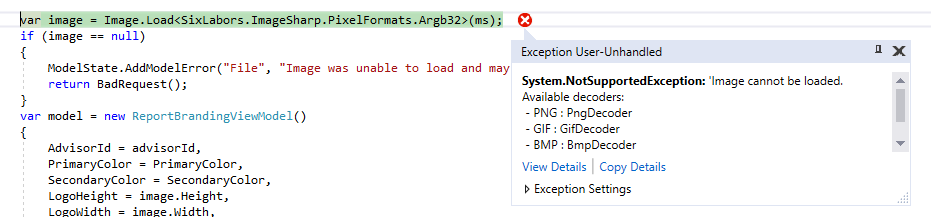
@JimBobSquarePants I tried changing my code implementation to not specify a decoder when using Image.Load():
justintubbs
on 25 Jan 2018
@saucecontrol Your post was helpful, as I checked the ms MemoryStream in the above error and saw that it's Position == Length.
In all the .NET Core examples of uploading files, nobody is telling people to rewind the MemoryStream using .Seek():
https://docs.microsoft.com/en-us/aspnet/core/mvc/models/file-uploads
https://docs.microsoft.com/en-us/aspnet/core/tutorials/razor-pages/uploading-files#add-a-helper-method-to-upload-files
Problem is solved though. Perhaps ImageSharp could warn if the Stream being Loaded has Position == Length?
justintubbs
on 25 Jan 2018
Checking if Position == Length sounds like a good plan to aid developers. But we will need to check if we can use those properties. Not sure what we need to check for that though.
dlemstra
on 25 Jan 2018
No one in those examples is copying one stream to another. If you copy to a memory stream it's gonna be at the length position in copy completion. I'm not sure why you are not using the filestream directly.
We can check if the position is equal to the length and throw there but nothing more.
JimBobSquarePants
on 25 Jan 2018
We can add hints and remarks in docs, and maybe in exception messages when we fail to recognize the header.
 antonfirsov
on 25 Jan 2018
antonfirsov
on 25 Jan 2018
Thanks all, appreciate the quick feedback and responses. (Apologies for creating the issue...)
justintubbs
on 25 Jan 2018
Och, no need for an apology at all! It's taught us that we need to make our error messages more developer friendly and add that check. 😄
JimBobSquarePants
on 26 Jan 2018
Related issues
 jarroda
·
3Comments
jarroda
·
3Comments
 nullpainter
·
3Comments
nullpainter
·
3Comments
 DAGA86
·
3Comments
DAGA86
·
3Comments
 vad3x
·
4Comments
vad3x
·
4Comments
 Sergio0694
·
3Comments
Sergio0694
·
3Comments