Imagesharp: Load existing PNG from filesystem and access image pixels
Description
I am writing a .net core 2 class library. I would like to load a png from the filesystem (the name of the file is specified in the UI). I would then like to have access to the individual pixels of the image.
However, the Image object does not have a Load method associated with it?
From API documentation on github
// Image.Load(string path) is a shortcut for our default type. Other pixel formats use Image.Load<TPixel>(string path))
using (Image<Rgba32> image = Image.Load("foo.jpg"))
{
    image.Mutate(x => x
         .Resize(image.Width / 2, image.Height / 2)
         .Grayscale());
    image.Save("bar.jpg"); // automatic encoder selected based on extension.
}
Steps to Reproduce
My Code:

System Configuration
- ImageSharp version:
RevStackCore-ImageSharp (0.9.0) - Environment (Operating system, version and so on):
Windows 7, Visual Studio 2017 15.5.1 - .NET Framework version:
.Net core 2 - Additional information:
 asterixorobelix
All 6 comments
Your not using our package.. you are using a package some third-party uploaded without our permission. Make sure your using the SixLabors.ImageSharp package.
 tocsoft
on 29 Dec 2017
tocsoft
on 29 Dec 2017
Thanks @tocsoft
I am reasonably sure that I am using the official package. The url below:
https://sixlabors.com/blog/announcing-imagesharp-beta-1/
points directly to this github repository.
The nuget package which I downloaded mentions JimBobSquarePants (James Jackson-South) @JimBobSquarePants as the Author(s). See attached.
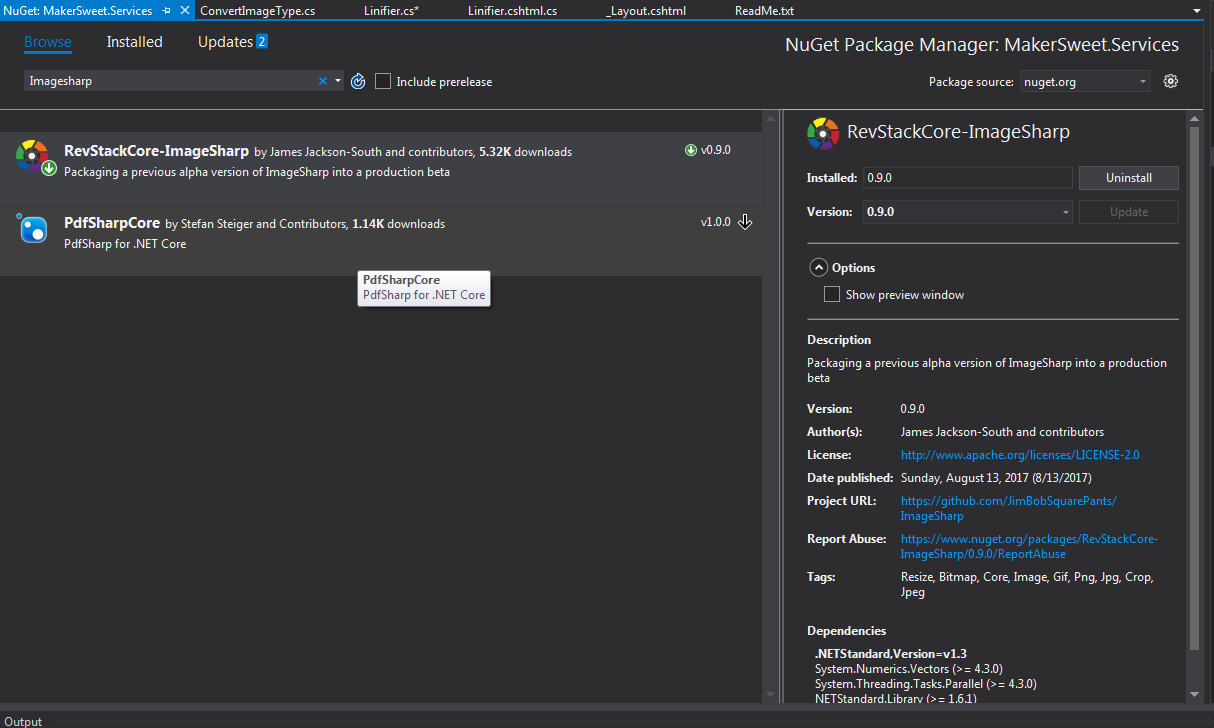
Nuget has no other packages named ImageSharp. Am I using the wrong package?
asterixorobelix
on 29 Dec 2017
Nope that is not the office package like I said the official package is SixLabors.ImageSharp https://www.nuget.org/packages/SixLabors.ImageSharp your need to make sure you tick the Include preview checkbox as we are still in beta at the moment thus have yet to produce a fist full release.
The one you have found is a package a third-party unofficially released without our consent without the pre-release tag causing confusion for many people. We have tried without much success to have it de-listed.
tocsoft
on 29 Dec 2017
Thank you - possibly, the contents of this issue should be placed on the Readme.md of this github repository in order to prevent more confusion.
asterixorobelix
on 29 Dec 2017
Nuget really need to fix this. I'll nag again.
 JimBobSquarePants
on 29 Dec 2017
JimBobSquarePants
on 29 Dec 2017
@tachyon1337 looks like you are the maintainer of the package in question. We have regular issues because people are downloading your package by mistake. (See: #425 #422)
It was an early & unstable version of our library. Since then, we improved our implementation a lot, and our API went under a significant change. Keeping the alpha package online is really unprofessional, and it hurts everyone.
Is it possible to take it down for the best of the users? We already tried to reach you using official channels AFAIK.
 antonfirsov
on 22 Jan 2018
antonfirsov
on 22 Jan 2018
Related issues
 devedse
·
3Comments
devedse
·
3Comments
 Inumedia
·
3Comments
Inumedia
·
3Comments
 olivif
·
3Comments
olivif
·
3Comments
 artem-avanesov
·
3Comments
artem-avanesov
·
3Comments
 nullpainter
·
3Comments
nullpainter
·
3Comments
Most helpful comment
@tachyon1337 looks like you are the maintainer of the package in question. We have regular issues because people are downloading your package by mistake. (See: #425 #422)
It was an early & unstable version of our library. Since then, we improved our implementation a lot, and our API went under a significant change. Keeping the alpha package online is really unprofessional, and it hurts everyone.
Is it possible to take it down for the best of the users? We already tried to reach you using official channels AFAIK.