Imagemagick: Have a default Unicode font
Yes, users following http://www.imagemagick.org/Usage/text/#unicode can add great-looking text, no matter what the character set is.
But that got me thinking: we know that the program has default fonts for ASCII.
Okay, well why not also for unicode?
I mean if the user can enter ABC and the program can make the text ABC just fine, well why not the same for 中文?
Yes, if the user is just relying on the default then he'll just have to accept whatever style it is going to be in. But at least there will be a default.
And no, the user is probably not going to be entering latin1 anymore. Therefore utf8 can be assumed if not noted otherwise by a command line switch.
Think of GIMP. Does it require the user to specify a Unicode font before 中文 can show up correctly?
Or, the browser or app that I I am using to type in this bug report. Does it require me to especially tell it what Unicode font I want to use before being able to enter/render any 中文?
What I'm saying, is there always is a default available, just like there has been one for plain ASCII.
 jidanni
All 12 comments
Do you know of a good Unicode compatible font that is generally available across platforms (Linux / Mac OS X / Windows)? Alternatively, do you know a Unicode font in the public domain that we could distribute with ImageMagick? We currently default to Helvetica simply due to its wide availability across platforms.
 urban-warrior
on 2 Dec 2020
urban-warrior
on 2 Dec 2020
All I know is just probe the user's computer running down a list of
fonts found until one is found that contains the character he typed.
It would be better than nothing, and if the user isn't happy, he should
simply use the -font favorite_font argument.
Otherwise ImageMagick is just frozen in some state where it knows about
only characters invented before 199x or something.
https://en.wikipedia.org/wiki/UTF-8#History
jidanni
on 2 Dec 2020
Scanning for a font is time consuming and error bound. Unicode is not the only encoding a user may want, they may want AppleRoman, BIG5, SJIScode, etc. Instead the user can specify their preferred font on the command-line. This issue is about the default configuration, ImageMagick provides a method to modify the default with the -font option. One solution may be to permit the user to set the default font for their environment in the ImageMagick policy.xml file.
urban-warrior
on 2 Dec 2020
I'm talking to you from the former land of big5.
Things have changed.
Mostly just a few old government message systems still use that.
jidanni
on 2 Dec 2020
After a bit of more research, there are so many fonts to choose from in different languages, styles, encodings, and with different distribution licenses. There is no one font panacea. It looks like ImageMagick will continue to require the user to specify the appropriate font for their specific use case.
urban-warrior
on 2 Dec 2020
I swear this is what I see when starting GIMP with no profile,
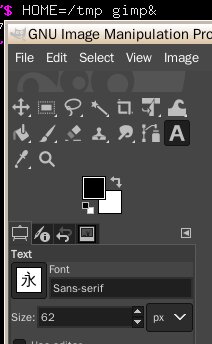
Yup, a genuine 永 character.
Admission,
$ locale
LANG=zh_TW.UTF-8
LANGUAGE=en_US:en
LC_CTYPE=zh_TW.UTF-8
LC_NUMERIC="zh_TW.UTF-8"
LC_TIME="zh_TW.UTF-8"
LC_COLLATE=C
LC_MONETARY="zh_TW.UTF-8"
LC_MESSAGES=C
LC_PAPER="zh_TW.UTF-8"
LC_NAME="zh_TW.UTF-8"
LC_ADDRESS="zh_TW.UTF-8"
LC_TELEPHONE="zh_TW.UTF-8"
LC_MEASUREMENT="zh_TW.UTF-8"
LC_IDENTIFICATION="zh_TW.UTF-8"
LC_ALL=
might be influencing it.
Indeed!
$ LC_ALL=C HOME=/tmp gimp
causes the "永" to become "Aa".
Anyway, so there you have it.
All you need to do it borrow the GIMP implementation,
and you'll be all set for the next century, emojis* and all!
(*not tested)
By the way, ImageMagick currently just lets missing characters silently cause embarrassing holes in text. These should raise errors.
jidanni
on 2 Dec 2020
This command works for us:
convert -size 200x200 xc:white -font arial-unicode.ttf -annotate +80+80 '中文?' text.png
urban-warrior
on 2 Dec 2020
All these -font ... examples are not portable.
Many users will encounter
unable to read font ... @ warning/annotate.c/RenderType/940.
errors and have to hunt the fonts down on their individual systems.
I really can't think of any program these days that still has no
default...
If you think about it, it is really Euro-centric.
Not fair from CJK users point of view.
CJK still seen as some experimental add-on.
If ImageMagick was enhanced so that just
convert -size 200x200 xc:white -annotate +80+80 '中文?' text.png
would work, like GIMP, then such examples would all be portable.
If the user doesn't even have a single CJK font installed, only then can one blame the user.
jidanni
on 2 Dec 2020
I think putting it in the policy.xml file is a good idea.
 fmw42
on 2 Dec 2020
fmw42
on 2 Dec 2020
As mentioned, we default to Helvetica simply because its widely available. If you can point to another widely available font that supports CJK as well as Arabic, Armenian, Hebrew, and other languages, let us know and we will default to that font. If you can find a font that meets this requirement and is freely distribute-able, we'll include it in the ImageMagick source distribution. Otherwise, ImageMagick is open source. Feel free to submit a pull request that addresses this issue. Be sure to confirm your solution is cross-platform across Linux/Mac OS X/Windows. The extended ImageMagick community will be quite grateful for your contribution.
urban-warrior
on 2 Dec 2020
I think putting it in the policy.xml file is a good idea.
Agreed. We will have a patch within a day or two to support a default system font as follows:
<policy domain="system" name="font" value="/path/to/unicode-font.ttf"/>'
urban-warrior
on 2 Dec 2020
One other thought would be that when it is blank (or some other means) default to the system default font. That way in can still support the system default as well as whatever the user wants for default. Perhaps value="system" or value=""
fmw42
on 2 Dec 2020
Related issues
 juliansd
·
6Comments
juliansd
·
6Comments
 Naville
·
5Comments
Naville
·
5Comments
 2ji3150
·
7Comments
2ji3150
·
7Comments
 yoya
·
4Comments
yoya
·
4Comments
 jeroen
·
6Comments
jeroen
·
6Comments