Imagemagick: Error processing certain jpg metadata (7.0.8-15 and above)
Prerequisites
- [X] I have written a descriptive issue title
- [X] I have verified that I am using the latest version of ImageMagick
- [X] I have searched open and closed issues to ensure it has not already been reported
Description
Between versions 7.0.8-14 and 7.0.8-15 I think a bug developed when processing the metadata of some jpg files. When I run identify on the image I get this:
$ magick identify ~/Desktop/magick_broken_img.jpg
identify: CorruptImageProfile `xmp' @ warning/profile.c/SetImageProfileInternal/1746.
identify: memory allocation failed `/Users/.../Desktop/magick_broken_img.jpg' @ error/jpeg.c/ReadProfile/803.
identify: Improper call to JPEG library in state 201 `/Users/.../Desktop/magick_broken_img.jpg' @ error/jpeg.c/JPEGErrorHandler/333.
but it seems to process fine when I run it on version 7.0.8-14.
Steps to Reproduce
Run magick identify on this image:

System Configuration
It has occurred for me both on Mac and Ubuntu
- ImageMagick version: 7.0.8-15 & 7.0.8-16
- Environment (Operating system, version and so on): macOS Mojave 10.14.1
- Additional information: Let me know if you need any other information. Sorry if this has been reported already, but I couldn't find anything that matched this. Thanks!
 jsfeldman
All 12 comments
Thanks for the problem report. We can reproduce it and will have a patch to fix it in GIT master branch @ https://github.com/ImageMagick/ImageMagick later today. The patch will be available in the beta releases of ImageMagick @ https://www.imagemagick.org/download/beta/ by sometime tomorrow.
 urban-warrior
on 15 Dec 2018
urban-warrior
on 15 Dec 2018
this bug is still exsit in Magick.NET-Q8-AnyCPU 7.11.0
 284794507
on 12 Feb 2019
284794507
on 12 Feb 2019
Faced the same issue in ImageMagick 7.0.9-22 Q16 x86_64 2020-02-06
mogrify: CorruptImageProfile 'xmp' @ warning/profile.c/SetImageProfileInternal/1704.
 zaharcelac
on 6 Feb 2020
zaharcelac
on 6 Feb 2020
Seeing this in
ImageMagick 7.0.10-4 Q16 x86_64 2020-03-30
identify: CorruptImageProfile `xmp' @ warning/profile.c/SetImageProfileInternal/1884.
 hbakkercg
on 31 Mar 2020
hbakkercg
on 31 Mar 2020
Why is this closed? Also seeing the error:
convert: CorruptImageProfile `xmp' @ warning/profile.c/SetImageProfileInternal/1884
 nshoes
on 22 May 2020
nshoes
on 22 May 2020
Why is this closed? Also seeing the error:
convert: CorruptImageProfile `xmp' @ warning/profile.c/SetImageProfileInternal/1884
Also see the same error
 alexey-samoylov
on 24 May 2020
alexey-samoylov
on 24 May 2020
We're using the latest release of ImageMagick, 7.0.10-14 and the image and profile is read without complaint. Post a link to your image if if throws the warning and we'll try to reproduce the problem.
urban-warrior
on 24 May 2020
Got same error, use ImageMagick: 7.0.10-14 and try to call this command convert -units pixelsperinch -density 72x72 test-convert/multi-pages.pdf -append -quality 80 test-convert/multi-pages-1.jpeg
convert: CorruptImageProfile `xmp' @ warning/profile.c/SetImageProfileInternal/1888
 aiooly
on 29 May 2020
aiooly
on 29 May 2020
And where can we find test-convert/multi-pages.pdf @aiooly ? We cannot reproduce this issue with the image in this issue and none of the other comments provide us with another test image.
 dlemstra
on 30 May 2020
dlemstra
on 30 May 2020
I also have this error using the Magick++ CPP API:
Version: ImageMagick 7.0.10-17 Q16 x86_64 2020-06-19
Error in XCODE: (MacOS Catalina)
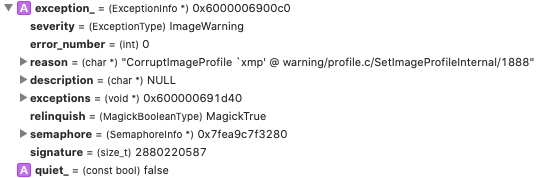
Image used:

Same solution compiled on Windows with VS2019 does seem to work?
 potterpg
on 27 Jul 2020
potterpg
on 27 Jul 2020
I'm using ImageMagick 7.0.10-34 Q16 2020-10-08 on Windows 10.0.19041.572, and I get the CorruptImageProfile error only when performing batch operations on a folder of images, such as:
identify *.jpg
But not when I run identify individually for each image.
I also get the error when I run the following as part of a batch file:
magick mogrify -quality 60 -resize "1024x1024>" -path R:\1024\ *.jpg
Sorry I can't post the images, as they are NSFW and copyrighted. If you know how I can get them to you for testing without posting them here, I'd be happy to send them.
 Tom2112
on 20 Oct 2020
Tom2112
on 20 Oct 2020
My email is on my profile. Please send a link to a download instead of individual images.
dlemstra
on 21 Oct 2020
Related issues
 juliansd
·
6Comments
juliansd
·
6Comments
 cogitas3d
·
5Comments
cogitas3d
·
5Comments
 Naville
·
5Comments
Naville
·
5Comments
 rosa
·
3Comments
rosa
·
3Comments
 RMPnet-UK
·
5Comments
RMPnet-UK
·
5Comments
Most helpful comment
Seeing this in
ImageMagick 7.0.10-4 Q16 x86_64 2020-03-30
identify: CorruptImageProfile `xmp' @ warning/profile.c/SetImageProfileInternal/1884.