Imageai: RuntimeError: The Session graph is empty. Add operations to the graph before calling run()
keras==2.3.1 and tensorflow==2.0.0
can somebody help me ?
Please !
 Krishnarohith10
All 13 comments
# Build a graph.
a = tf.constant(5.0)
b = tf.constant(6.0)
c = a * b

# Launch the graph in a session.
sess = tf.compat.v1.Session()

# Evaluate the tensor `c`.
print(sess.run(c))
This above code is taken from Tensorflow Core r2.0 Document
But the above code when it is run, then we get this error
RuntimeError: The Session graph is empty. Add operations to the graph before calling run()
The thing is
- The tensorflow core r2.0 have enabled eager execution by default so doesn't need to write tf.compat.v1.Session() and use .run() function
If we want to use tf.compat.v1.Session() then we need to do thi
tf.compat.v1.disable_eager_execution() in the starting of algorithm. Now we can use tf.compat.v1.Session() and .run() function. - Tensorflow core r2.0 have enabled eager execution by default. so, without changing it
we just have to change our code
    # Launch the graph in a session.
    with tf.compat.v1.Session() as ses:

        # Build a graph.
        a = tf.constant(5.0)
        b = tf.constant(6.0)
        c = a * b

        # Evaluate the tensor `c`.
        print(ses.run(c))
This gives the output without any errors
And one more thing to make eager execution enable in case then remember it has to be called in the startup of the algorithm
For more please go through documentation
If any issues please feel free to ask.
By the way i am just a beginner in tensorflow and keras.
Thank You !
Krishnarohith10
on 5 Nov 2019
Running the tensor flow session after disabling eager_execution as stated above still finding the same bug.
Tensoflow - 2.0.0 Keras - 2.3.1
Enbironment Kaggle
 HARIKABANDARU
on 8 Dec 2019
HARIKABANDARU
on 8 Dec 2019
@Krishnarohith10 The resolution helped me.
Thanks for sharing
 haricoolharan
on 11 Dec 2019
haricoolharan
on 11 Dec 2019
@HARIKABANDARU

Here's my implementation of the above issue. I have had it done using Kaggle Notebook. It is working. If not, can you post your code?
Krishnarohith10
on 11 Dec 2019
@Krishnarohith10
I worked for me for small data set.
The only issue i faced was when I ran with large dataset it throws session graph empty error.
HARIKABANDARU
on 25 Dec 2019
Okay. Did you try first method? Using tf.compact.v1.disable_eager_execution(), you can now use tf.session() with .run(). Which I hope it works and hope you are familiar with.
And I didn't try this on large datasets so, I will let you now when I did.
Krishnarohith10
on 26 Dec 2019
Hi @Krishnarohith10 , I tried following your approach, but still having the issue.
RuntimeError: The Session graph is empty. Add operations to the graph before calling run().
Please suggest on how to fix this.
Here is my code
`import tensorflow as tf
hello_constant = tf.constant('Hello World!')
hello_constant
tf.compat.v1.disable_eager_execution()
sess = tf.compat.v1.Session()
print(sess.run(hello_constant))`

 pushkarravi
on 2 Jan 2020
pushkarravi
on 2 Jan 2020

Please try move In [3] command to In [2] that is after importing tensorflow.
OR
You can use this method:

Krishnarohith10
on 3 Jan 2020
Please try move In [3] command to In [2] that is after importing tensorflow.
OR
You can use this method:
@Krishnarohith10 .. it works. Thank you so much
pushkarravi
on 3 Jan 2020
it worked for me too
 marcelotavaress
on 7 Jan 2020
marcelotavaress
on 7 Jan 2020

 Renuga-DataScience
on 13 Jul 2020
Renuga-DataScience
on 13 Jul 2020
worked out perfectly
Renuga-DataScience
on 13 Jul 2020
@HARIKABANDARU and also to everyone,
Good Morning or Good Afternoon or Good Evening or Good Night (respective to your time zones)
Straight to the point,
tensorflow=2.0.0 keras=2.2.4-tf, The tf.Session() is used for Tensorflow=1.x, we been using tf.Session() in Tensorfow=2.0, What a dumb, not that we can't use but we have a option, and in this I will Explain it all well.
See with upto tensorflow=1.x, we have to use tf.Session() that what makes your code to run and give us output cause there is this tf.executing_eagerly()-->False in tensorflow=1.x version. Have a look:
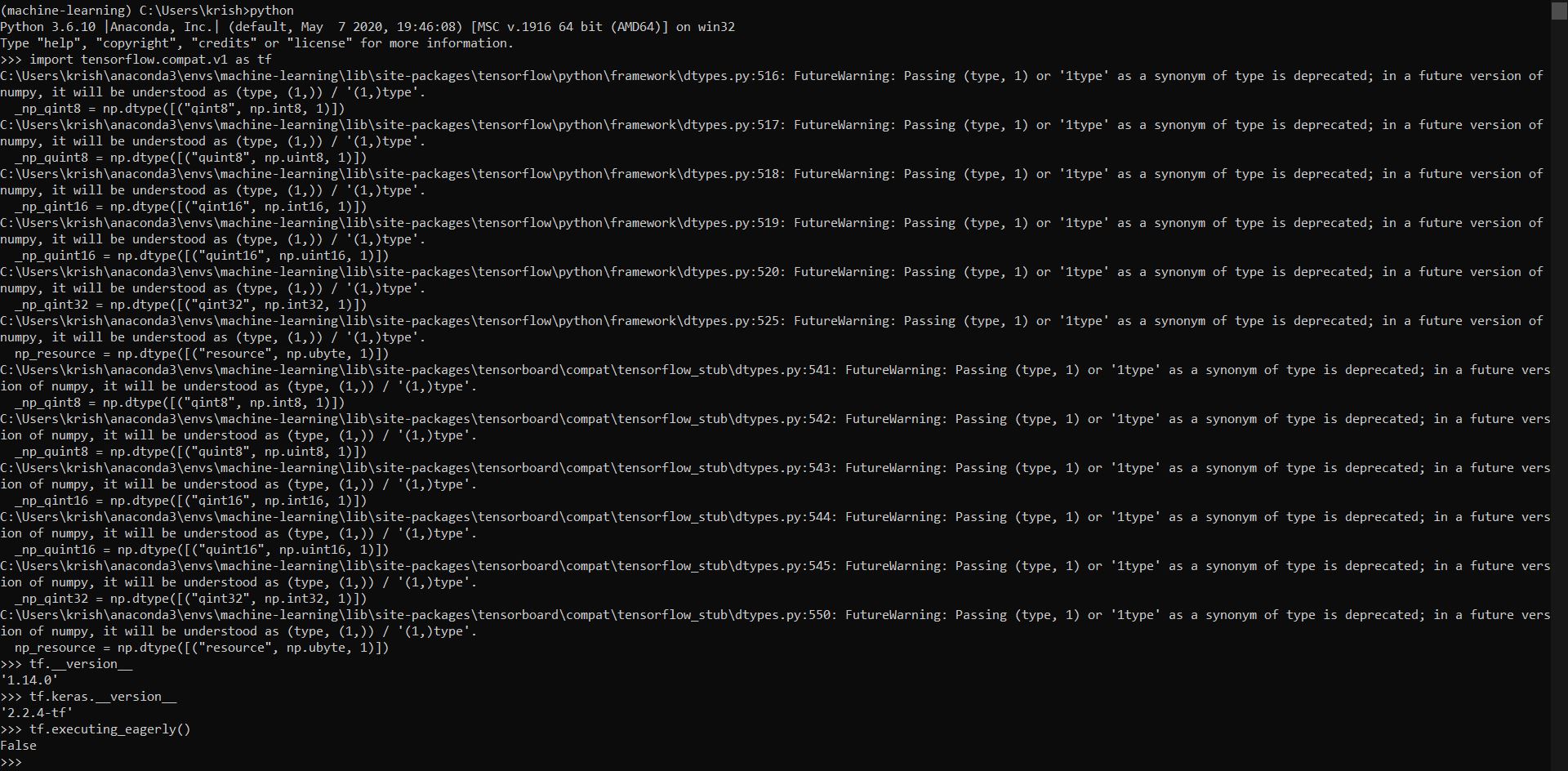
Ignore those messages those are because of the version of tensorflow, since we're using old version and also there been a lot changes to that version.
Now Unlike tensorflow=1.x, tensorflow=2.x has tf.executing_eagerly()-->True which means we no need to use tf.Session(), tf.Session() is only meant for if tf.executing_eagerly()-->False, which in case of tensorflow=1.x, but as tensorflow=2.x is True for tf.executing_eagerly(), we don't need to use it. We can surely omit that statement and can do your coding or projects. Have a look:

and if we want the result or value of your output variable we can access it by using .numpy()

Here it is! That's all I wanted to say, and everyone please update your working libraries like tensorflow or anyother librabries to the latest version so that we don't wanna stay behind the world, do we? And I myself with the latest versions of machine-learning and deep-learning libraries working on few projects, because I wanted to work or get a job in this A.I domain. This is a little background of me to you. I been dealing with this libraries pretty much years till now, still even I got few issues which can't solve but anyways. If any queries please don't hesitate to ask regarding tensorflow, please! And @HARIKABANDARU Please try just doing this with your project or If you give me data or If it available online then I can tell test it myself and tell you the results if not you can try your own.
Krishnarohith10
on 14 Jul 2020
Related issues
 pytesnim
·
5Comments
pytesnim
·
5Comments
 aless2003
·
5Comments
aless2003
·
5Comments
 jakubstech
·
6Comments
jakubstech
·
6Comments
 Danielv123
·
4Comments
Danielv123
·
4Comments
 Combinacijus
·
3Comments
Combinacijus
·
3Comments
Most helpful comment
This above code is taken from Tensorflow Core r2.0 Document
But the above code when it is run, then we get this error
RuntimeError: The Session graph is empty. Add operations to the graph before calling run()
The thing is
If we want to use tf.compat.v1.Session() then we need to do thi
tf.compat.v1.disable_eager_execution() in the starting of algorithm. Now we can use tf.compat.v1.Session() and .run() function.
we just have to change our code
This gives the output without any errors
And one more thing to make eager execution enable in case then remember it has to be called in the startup of the algorithm
For more please go through documentation
If any issues please feel free to ask.
By the way i am just a beginner in tensorflow and keras.
Thank You !