Image: Very slow images opening with image::open
Image library version 0.23.11 - compiled with release flag
OS
Ubuntu 20.04
i7 4770
checked images on disk ssd
gtx 970
Actual behaviour
When I open 351 images from my wallpaper gallery which takes 1.7 GB of space, then in parallel(with help of Rayon) opening it all takes ~30 seconds, which is absurdly too high value for me.
Expected
Opening of files should be a lot of faster, like 2/3s for 400 big files instead 30 seconds.
And should not read entire file.
Reproduction steps
- Clone project
- Comment line to get execution time printed to console https://github.com/qarmin/czkawka/blob/c62617df30b63c859e10eed7a69f4f1f900c9305/czkawka_core/src/common.rs#L13
- Comment lines(without 300) to get only time of opening images(without hashing content) https://github.com/qarmin/czkawka/blob/c62617df30b63c859e10eed7a69f4f1f900c9305/czkawka_core/src/similar_images.rs#L294-L301
cargo run --release --bin czkawka_gui
This is part of app which I modify(just comment part about hashing files to get opening files time - other calculations have really slow impact (usually max ~100ms) ) -
https://github.com/qarmin/czkawka/blob/c62617df30b63c859e10eed7a69f4f1f900c9305/czkawka_core/src/similar_images.rs#L280-L308
Repository to this project - https://github.com/qarmin/czkawka
Simplified code from above
self.images_to_check : Vec<String> = Vec::new(); // Needs to be filled with real images position

         self.images_to_check
            .par_iter()
            .map(|path| {
                let image = match image::open(path.clone()) {
                    Ok(t) => t,
                    Err(_) => return Some(None), // Something is wrong with image
                };
                0
            });
 qarmin
All 8 comments
It would seem that the hardware would be very important for this expectation and measurement. Could you include them for reference? Additionally, to make this actionable it would be helpful if the image types were known. This little tool will give these stats. It might also be used as a benchmarking tool without any additional logic.
 HeroicKatora
on 16 Nov 2020
HeroicKatora
on 16 Nov 2020
Image undump output
 image-undump /mnt/Miecz/Tapety/
Took 0.042541705 seconds
Total files: 351
Statistics {Jpeg: 351}


image-undump -o /mnt/Miecz/Tapety/
Took 58.559704 seconds
Total files: 352
Statistics {Jpeg: 351}
I created benchmark to measure speed of opening of single images - https://github.com/qarmin/ImageOpening#opening-speed-of-images
I just copy-paste here results:
|Photo| Size | Dimension | Debug opening time | Release opening time|
|:---:|:---:|:---:|:---:|:---:|
|PNG|4,3MB|3840x2592|9461ms|191ms|
|PNG|191,5kB|493x333|174ms|4ms|
|JPG|810,2kB|3840x2592|6633ms|160ms|
Opening images in debug mode is really, really slow.
Even in relase mode ~150ms for each image to just open it is too much.
There is very strange dependency between time of opening image and their size(looks for me that image::open may read entire content of image)
qarmin
on 27 Nov 2020
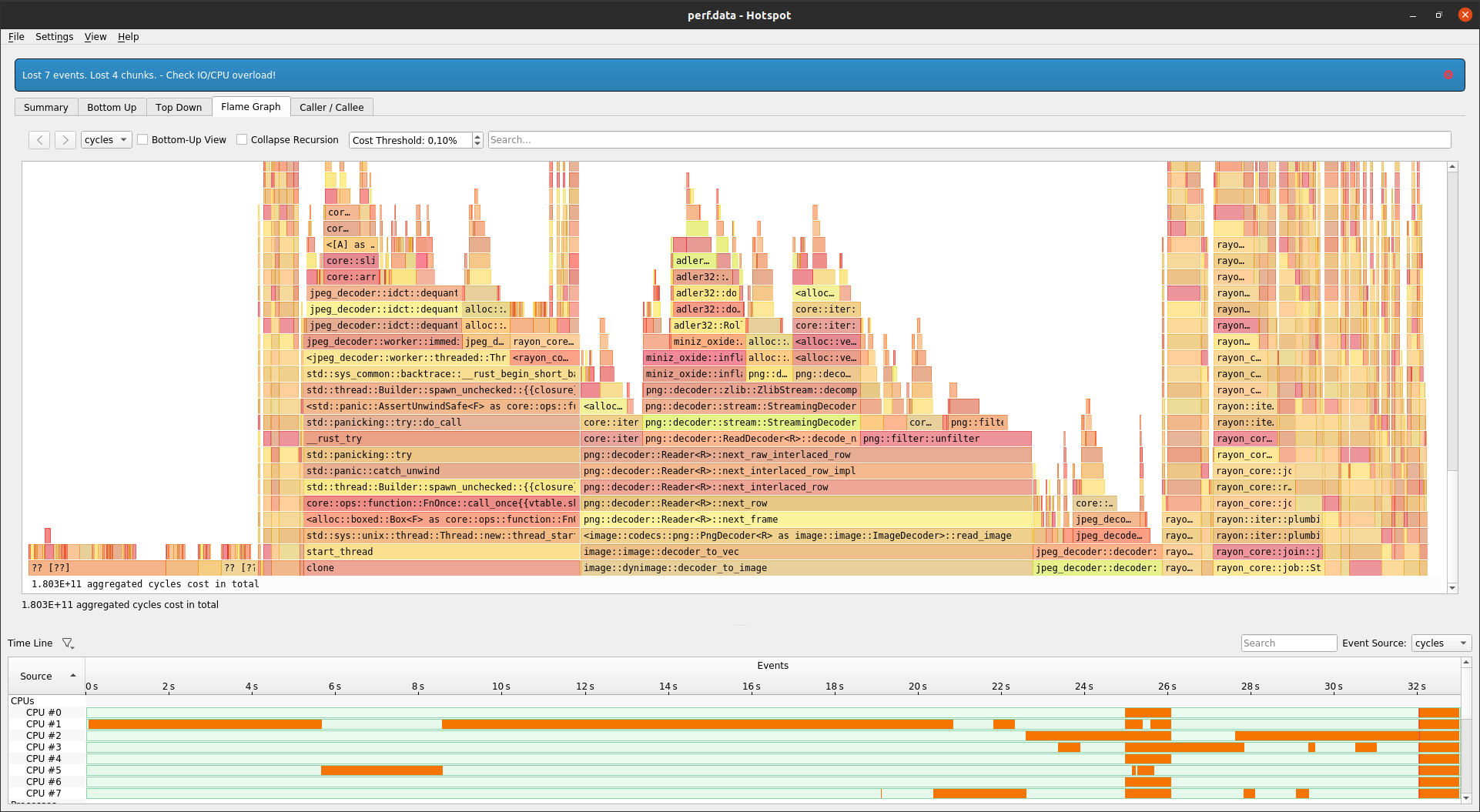
Graph which shows that most of the time was spend on decoding of image
qarmin
on 27 Nov 2020
@qarmin out of curiosity: Are there similar (non rust) libraries for image loading, which are a lot faster?
 oleid
on 27 Nov 2020
oleid
on 27 Nov 2020
@qarmin , are you really complaing that the image::open function should be named something else? It returns a ImageResult<DynamicImage>, i.e. a pixel buffer of all the decoded data. How could anything do that without reading the entire file?
 kaj
on 29 Nov 2020
kaj
on 29 Nov 2020
I guess you could argue that if the library offers other things to do with an image, such as just getting metadata, open() could return an object that allows you to do that without reading all pixel data.
For example, maybe OP just wanted to get the size or format of each image, to categorize them. It's probably a good idea to have an API that allows that (of course it need not be the module-level convenience function).
Still, for clarity and consistency with io::Reader, it might be better to use decode() instead of open(), also because the verb "open" has quite different overloaded meanings.
 birkenfeld
on 29 Nov 2020
birkenfeld
on 29 Nov 2020
Optimizations are always welcome, but without highlighting a specific part of the code that's sub-optimal (or even proving that we're slower than the competition) this issue really isn't actionable.
 fintelia
on 4 Dec 2020
fintelia
on 4 Dec 2020
Related issues
 nabijaczleweli
·
6Comments
nabijaczleweli
·
6Comments
 biot023
·
4Comments
biot023
·
4Comments
 theotherphil
·
3Comments
theotherphil
·
3Comments
 kolen
·
7Comments
kolen
·
7Comments
 martinlindhe
·
6Comments
martinlindhe
·
6Comments
Most helpful comment
I guess you could argue that if the library offers other things to do with an image, such as just getting metadata,
open()could return an object that allows you to do that without reading all pixel data.For example, maybe OP just wanted to get the size or format of each image, to categorize them. It's probably a good idea to have an API that allows that (of course it need not be the module-level convenience function).
Still, for clarity and consistency with
io::Reader, it might be better to usedecode()instead ofopen(), also because the verb "open" has quite different overloaded meanings.