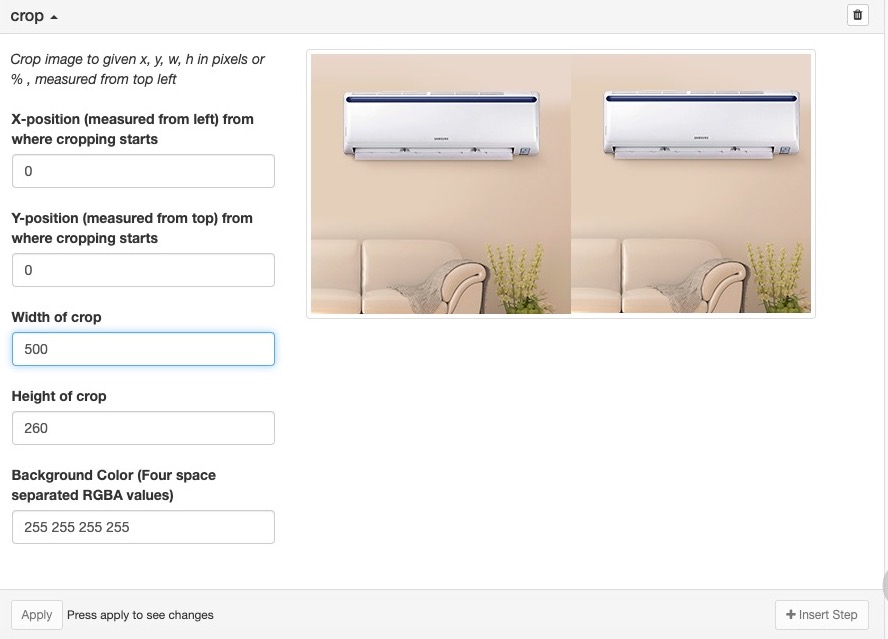
Image-sequencer: While croping the image, when we increase the width image repeats itself.
While cropping the image, when we increase the width more than it's original width image gets repeated
What did you expect to see that you didn't?
The image shouldn't get repeat after the increment of width.
Thank you!
 amreshk005
All 15 comments
Thanks for opening your first issue here! Please follow the issue template to help us help you 👍🎉😄
If you have screenshots to share demonstrating the issue, that's really helpful! 📸 You can make a gif too!
![welcome[bot] picture](https://avatars.githubusercontent.com/in/4141?v=4&s=40) welcome[bot]
on 16 Oct 2019
welcome[bot]
on 16 Oct 2019
@jywarren Please review this issue, is this a valid?
if it is valid I would like work on this issue
amreshk005
on 16 Oct 2019
@amreshk005 Thanks for opening the issue.I also noticed this bug earlier.I think expected behaviour should be to add whitespace as it does with the height.It must be an easy fix as behaviour of height is correct which just need to make some changes with height as well.Go ahead!!
 keshav234156
on 16 Oct 2019
keshav234156
on 16 Oct 2019
@HarshKhandeparkar what do you think?
keshav234156
on 16 Oct 2019
@amreshk005 , @keshav234156
I think Crop means to cut out unwanted part from Image either Horizontally (along Width) or Vertically (along height). Thus, the user must not write values greater than Orignal width and height of the Image. There should be error whenever User fills greater value in Width or Height.
Thanks 😊
 vaibhavmatta
on 16 Oct 2019
vaibhavmatta
on 16 Oct 2019
@keshav234156 , @amreshk005
Rather we should ask user to enter PERCENTAGE of WIDTH/HEIGHT Crop. It will look much professional and will be much easier for user to crop by adding % value as every user is not familiar with the dimensions of the Image he is working on.
@jywarren If you say that this idea is good.! Then I would open an issue for it as well and I know exactly what to do for making this happen.
vaibhavmatta
on 16 Oct 2019
I think Vaibhav is right here. That would be much better but we will still have to add error handling because user can enter >100%.
@amreshk005 you can add that as a possible fix to this issue body itself.
Amresh can still work on the issue.
 harshkhandeparkar
on 20 Oct 2019
harshkhandeparkar
on 20 Oct 2019
@amreshk005 Please confirm it once if you are working on it?
if YES, then please keep giving the updates regarding the issue so that I and @HarshKhandeparkar can plan for further actions on this module. Thanks 😊
vaibhavmatta
on 21 Oct 2019
@vaibhavmatta @HarshKhandeparkar I would like to work on this.
amreshk005
on 22 Oct 2019
@amreshk005 Plz do it. Tag me up wherever you feel stuck.
Happy Coding!
vaibhavmatta
on 22 Oct 2019
@amreshk005 any updates?
Are you still working on it?
vaibhavmatta
on 27 Oct 2019
Hi all, just noting that I think there are moments when "overcropping" is
useful, where you want to add white space around an image. So perhaps we
could solve this by adding a conditional for whether a pixel is outside the
original bounds, and adding either white or fully transparent pixels?
On Sun, Oct 27, 2019 at 4:18 PM VAIBHAV MATTA notifications@github.com
wrote:
@amreshk005 https://github.com/amreshk005 any updates?
Are you still working on it?—
You are receiving this because you were mentioned.
Reply to this email directly, view it on GitHub
https://github.com/publiclab/image-sequencer/issues/1276?email_source=notifications&email_token=AAAF6JZNOI5D3RPW6PLETKTQQXZNZA5CNFSM4JBFTWP2YY3PNVWWK3TUL52HS4DFVREXG43VMVBW63LNMVXHJKTDN5WW2ZLOORPWSZGOECLHAGI#issuecomment-546730009,
or unsubscribe
https://github.com/notifications/unsubscribe-auth/AAAF6J5YCACC6P5IE3ITWJ3QQXZNZANCNFSM4JBFTWPQ
.
 jywarren
on 28 Oct 2019
jywarren
on 28 Oct 2019
@jywarren You are right but this feature doesn’t fits to the exact meaning of CROP . We can make this feature an another module by the name lets say, add base, add bg etc .
Thanks
vaibhavmatta
on 28 Oct 2019
Actually i think there are some current use cases that do "overcropping" and we shouldn't prevent it even if we later clarify things better. Let's just be sure this can still be possible! Thanks!
jywarren
on 27 Nov 2019
we can close this issue as overcropping is helpful also!!!
keshav234156
on 12 Jan 2020
Related issues
jywarren
·
4Comments
 VladimirMikulic
·
3Comments
harshkhandeparkar
·
4Comments
keshav234156
·
4Comments
jywarren
·
4Comments
VladimirMikulic
·
3Comments
harshkhandeparkar
·
4Comments
keshav234156
·
4Comments
jywarren
·
4Comments