Image-sequencer: Select Module Does Not Reset After Adding A Module
Please describe the problem (or idea)
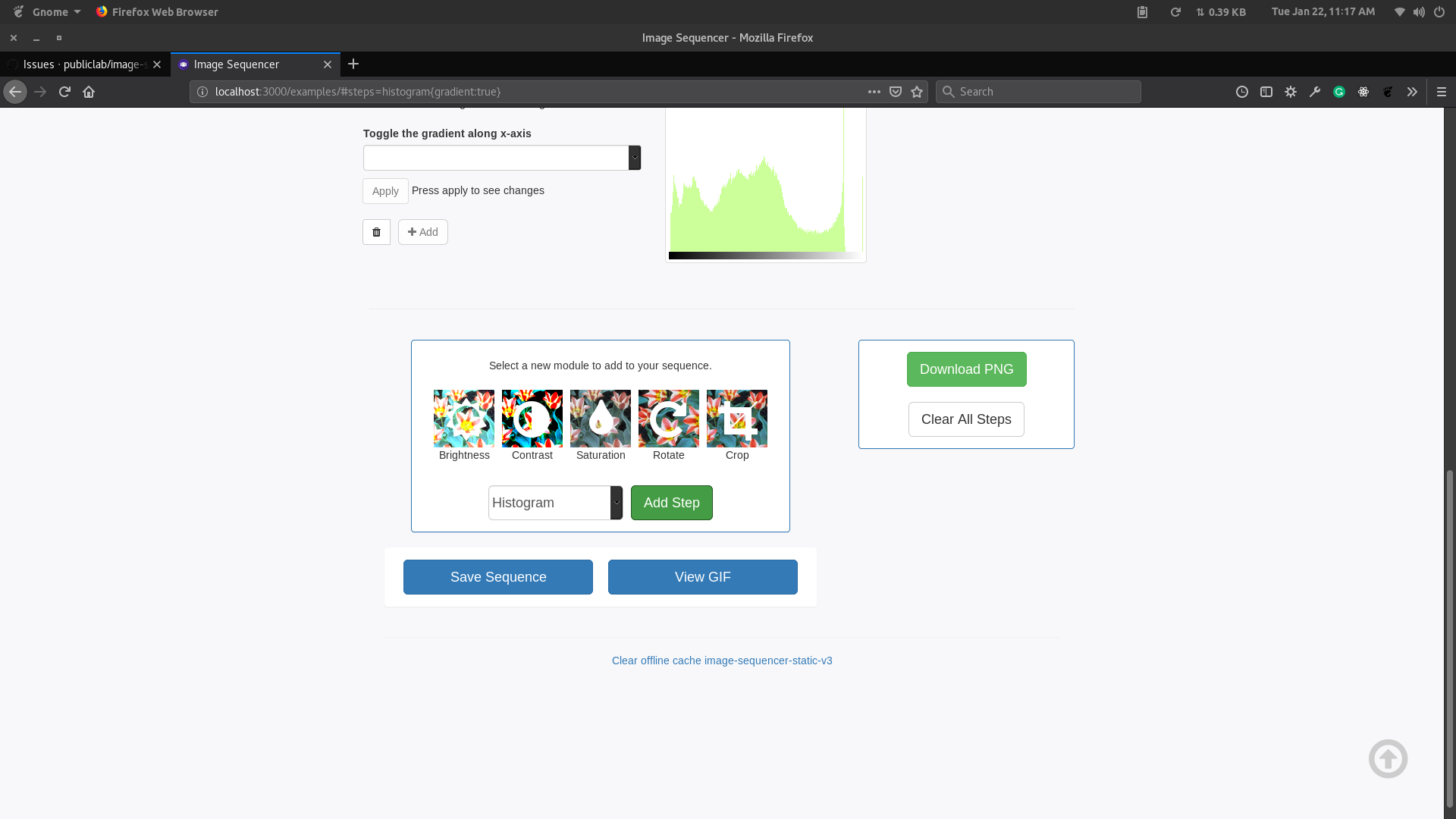
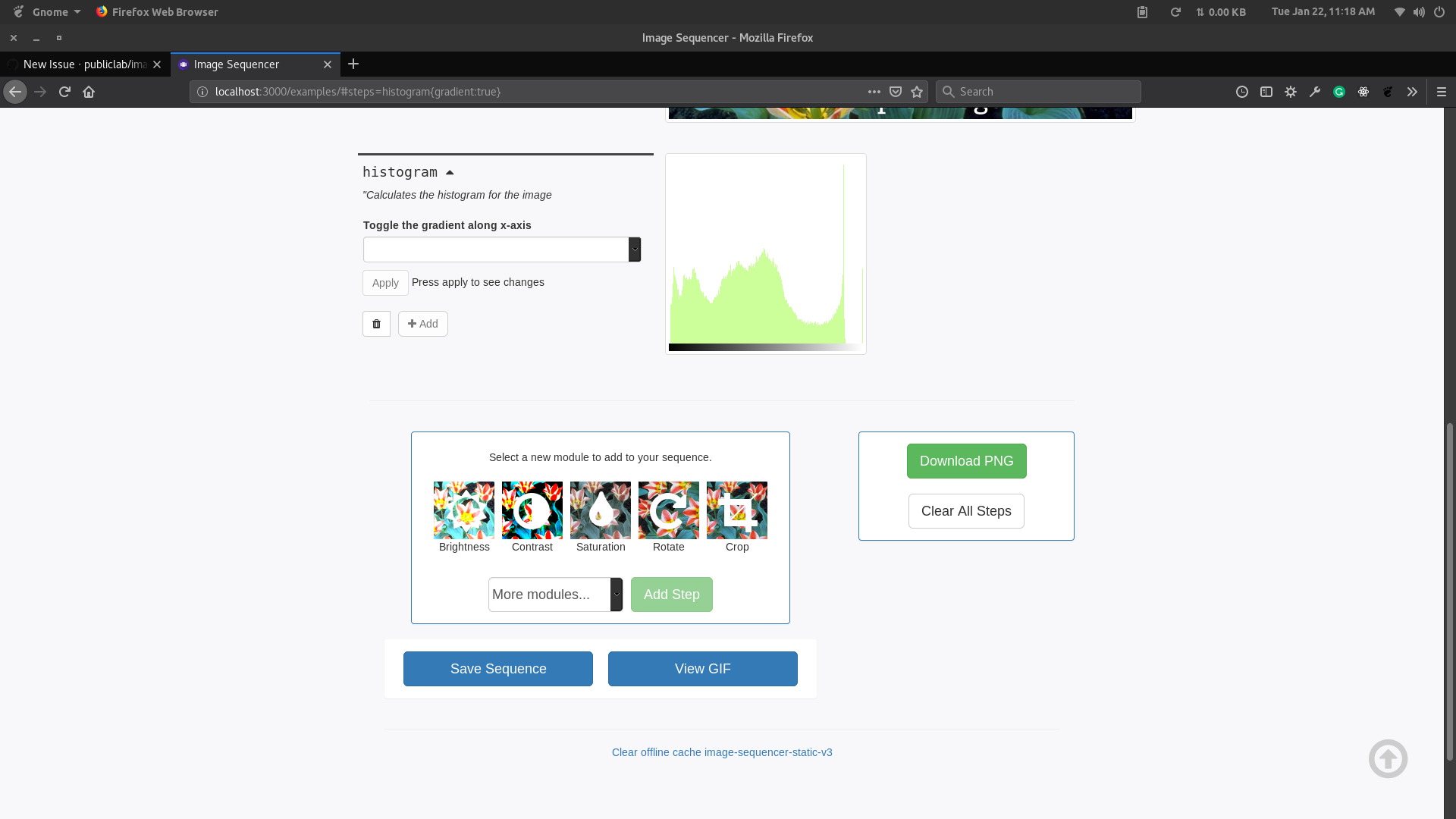
The select dropdown for adding modules doesn't reset to its normal text. i.e. More Modules... after adding a module. The name of the module is shown but the description is not shown above.
What happened just before the problem occurred? Or what problem could this idea solve?
What did you expect to see that you didn't?
FTO Candidate
This is a potential first-timers-only issue. If you are new to the community, then you can reformat this issue into a first timer only issue and mention @publiclab/is-reviewers to add the label. If you have contributed to Image Sequencer before, then you can resolve this one as a second-time contribution.
Files to look into
IntermediateHtmlStepUi
DefaultHtmlStepUi
Thank you!
Your help makes Public Lab better! We deeply appreciate your helping refine and improve this site.
To learn how to write really great issues, which increases the chances they'll be resolved, see:
https://publiclab.org/wiki/developers#Contributing+for+non-coders
 harshkhandeparkar
All 25 comments
Hello! I'm interested in working on this, but I'm not sure what exactly the bug is. What is missing?
 gfting
on 23 Jan 2019
gfting
on 23 Jan 2019
@gfting go ahead and resolve it. The bug is that the text inside the select dropdown does not change to the default text which is More modules... after the button is clicked but everything else including the description which is displayed above the quick buttons is reset.
harshkhandeparkar
on 23 Jan 2019
You can reproduce the bug by:
- Selecting a step.
- Clicking the
Add Stepbutton. - The text inside the select dropdown(i.e. the value) will not reset. It will still be the name of the module.
Thanks!
harshkhandeparkar
on 23 Jan 2019
Thanks! How do I test changes?
gfting
on 23 Jan 2019
You can test the changes by clicking the clear cache button at the bottom
of the page.
If you have edited any js files then you will have to run grunt build
locally and then click on the clear cache button. You have to clear the
cache each time you make any changes. Thanks and welcome !
On Wed 23 Jan, 2019, 7:42 PM Gabriel Ting <[email protected] wrote:
Thanks! How do I test changes?
—
You are receiving this because you authored the thread.
Reply to this email directly, view it on GitHub
https://github.com/publiclab/image-sequencer/issues/697#issuecomment-456815319,
or mute the thread
https://github.com/notifications/unsubscribe-auth/AhKOn-AmtioJ80d-0uUpjrDYW3M7VNLjks5vGG3CgaJpZM4aL-th
.
harshkhandeparkar
on 23 Jan 2019
Ah - how do I run the image sequencer locally? Thank again, this is super helpful!
gfting
on 23 Jan 2019
You can clone the repository and run npm run setup and then npm start
to view it in the browser. :+1:
On Wed 23 Jan, 2019, 7:45 PM Gabriel Ting <[email protected] wrote:
Ah - how do I run the image sequencer locally? Thank again, this is super
helpful!—
You are receiving this because you authored the thread.
Reply to this email directly, view it on GitHub
https://github.com/publiclab/image-sequencer/issues/697#issuecomment-456816401,
or mute the thread
https://github.com/notifications/unsubscribe-auth/AhKOnyzFUPI2v6BQ-DJ5Dozuro5XaaMcks5vGG54gaJpZM4aL-th
.
harshkhandeparkar
on 23 Jan 2019
I tried adding the selected property, using resfreshOptions, but it doesn't seem to make any changes. I'm not sure if I'm doing something wrong with the grunt build and clearing the cache, or something else. Could you give me more hints? Thank you so much
gfting
on 23 Jan 2019
You dont have to add any properties. You only have to change its value
using jquery val() method.
On Wed 23 Jan, 2019, 8:32 PM Gabriel Ting <[email protected] wrote:
I tried adding the selected property, using resfreshOptions, but it
doesn't seem to make any changes. I'm not sure if I'm doing something wrong
with the grunt build and clearing the cache, or something else. Could you
give me more hints? Thank you so much—
You are receiving this because you authored the thread.
Reply to this email directly, view it on GitHub
https://github.com/publiclab/image-sequencer/issues/697#issuecomment-456834345,
or mute the thread
https://github.com/notifications/unsubscribe-auth/AhKOn-Tm8xYJFe17RXLWsxZLVW2JfyvIks5vGHlugaJpZM4aL-th
.
harshkhandeparkar
on 23 Jan 2019
All you have to do is change the vlaue of the <select> html element. When I had opened the issue, I did not know which part of the code is to be changed.
You will have to change
https://github.com/publiclab/image-sequencer/blob/main/examples/demo.js#L68-L69
You will have to change the click event listener for the #add-step-btn and add a line which resets the value of the select element
harshkhandeparkar
on 23 Jan 2019
I'm a bit busy right now and even I don't quite know the solution right now. Maybe some @publiclab/is-reviewers can help him? Maybe @Mridul97 or @aashna27 if online? Thanks!
harshkhandeparkar
on 23 Jan 2019
@Divy123 @aashna27 @Mridul97 can one of you please help @gfting if online and of you have time?
harshkhandeparkar
on 23 Jan 2019
Hello @gfting! Can you tell me exactly what it is that you're unable to understand? Thanks!
 rexagod
on 23 Jan 2019
rexagod
on 23 Jan 2019
Hello @rexagod ! I've never used jquery before, so I'm a little lost
gfting
on 23 Jan 2019
@rexagod @HarshKhandeparkar I guess I'm not sure how to structure it - isn't the click event good? How do I set the value back to none after the step is added?
gfting
on 23 Jan 2019
@gfting the click event is good but it only adds the step. What you have to
intstead do is add the step and also reset the dropdown. @rexagod
On Wed 23 Jan, 2019, 10:22 PM Gabriel Ting <[email protected] wrote:
@rexagod https://github.com/rexagod @HarshKhandeparkar
https://github.com/HarshKhandeparkar I guess I'm not sure how to
structure it - isn't the click event good? How do I set the value back to
none after the step is added?—
You are receiving this because you were mentioned.
Reply to this email directly, view it on GitHub
https://github.com/publiclab/image-sequencer/issues/697#issuecomment-456879176,
or mute the thread
https://github.com/notifications/unsubscribe-auth/AhKOn2bsSR4x9Aee9pqBD9D-zoB9jb2qks5vGJNmgaJpZM4aL-th
.
harshkhandeparkar
on 23 Jan 2019
I haven't tested how to reset the value. Maybe other @publiclab/is-reviewers can help you?
harshkhandeparkar
on 23 Jan 2019
@gfting I guess if you're facing problems in restructuring the code, you may as well try to approach this issue by creating a custom event listener that detects for a module addition and resets the value after the same, and put all that snippet somewhere appropriate.
rexagod
on 23 Jan 2019
This is my first time issue - I'm even more lost honestly, give little knowledge of javascript @rexagod
gfting
on 23 Jan 2019
also, the build broke and I can't clear the offline cache anymore. I recloned and rebuilt but it stopped working @rexagod @HarshKhandeparkar
gfting
on 23 Jan 2019
@gfting there is a cache tab in chrome/firefox dev tools which can be used to clear cache manually.
https://developers.google.com/web/tools/chrome-devtools/manage-data/local-storage
harshkhandeparkar
on 23 Jan 2019
It looks like it's line 61 in the defaultHtmlSequencerUi.js file - how do I switch to the value of "none"
gfting
on 23 Jan 2019
I fixed the issue! @HarshKhandeparkar @rexagod, what are the next steps? This is my first time contributing to open source
gfting
on 23 Jan 2019
@gfting awesome. You can go ahead and open a PR and mention @publiclab/is-reviewers in the comments. Thanks ! :tada:. Its 1:18 AM here ao bye.
harshkhandeparkar
on 23 Jan 2019
@HarshKhandeparkar Thank you so much for your help, I really appreciate it! Good night
gfting
on 23 Jan 2019
Related issues
harshkhandeparkar
·
4Comments
 jywarren
·
5Comments
jywarren
·
5Comments
 VladimirMikulic
·
3Comments
harshkhandeparkar
·
4Comments
VladimirMikulic
·
3Comments
harshkhandeparkar
·
4Comments
 kindanduseful
·
5Comments
kindanduseful
·
5Comments