Image-sequencer: Input text is too close to edges
First Time?
This is a first-timers-only issue. This means we've worked to make it more legible to folks who either haven't contributed to our codebase before, or even folks who haven't contributed to open source before.
If that's you, we're interested in helping you take the first step and can answer questions and help you out as you do. Note that we're especially interested in contributions from people from groups underrepresented in free and open source software!
We know that the process of creating a pull request is the biggest barrier for new contributors. This issue is for you 💝
If you have contributed before, consider leaving this one for someone new, and looking through our general help wanted issues. Thanks!
🤔 What you will need to know.
Nothing. This issue is meant to welcome you to Open Source :) We are happy to walk you through the process.
The problem
After updating some of our modules to have sliders instead of text input fields, some of the styling we provided for the sliders overwrote the styling for the text input fields as well. This resulted in all of our input fields having their padding removed.
For ex: http://sequencer.publiclab.org/examples/#steps=crop{}
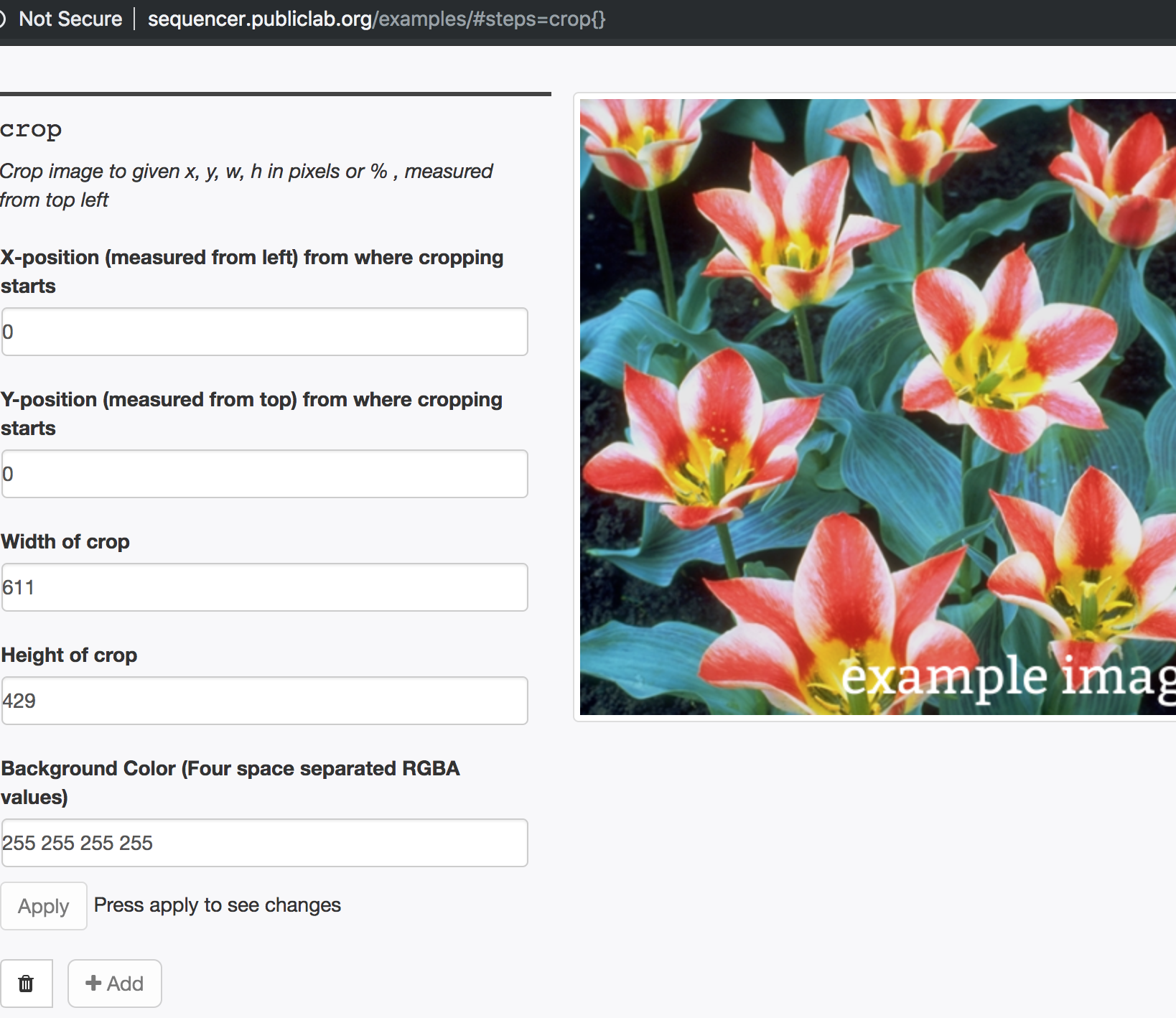
Solution
We will make our css declaration more specific so that it only removed padding on sliders:
On the demo.css page, for the below declaration add the attribute selector [type="range"] to the class selector .form-control so that it no longer effects the text input fields.
Thanks!!
Steps to Fix
- [ ] Claim this issue with a comment here, below, and ask any clarifying questions you need
- [ ] Fork the repository and set it up locally following the main repo README instructions https://github.com/publiclab/image-sequencer/blob/main/README.md
- [ ] Create a new feature branch with a unique name descriptive to the issue
- [ ] Try to fix the issue following the steps above, but even before you're done, you can:
commit your changes to your branch and start a pull request (see contributing to Public Lab software) but mark it as "in progress" if you have questions or if you haven't finished - [ ] Reference this issue in your pull request body
- [ ] Once you submit your pull request, an additional checklist will be provided for getting it merged
💬 Get help
If you need any help - here are some options:
- Comment below
- Join our gitter chat at https://gitter.im/publiclab/publiclab
 sashadev-sky
All 3 comments
Thanks for opening your first issue here! Please follow the issue template to help us help you 👍🎉😄
If you have screenshots to share demonstrating the issue, that's really helpful! 📸 You can make a gif too!
![welcome[bot] picture](https://avatars.githubusercontent.com/in/4141?v=4&s=40) welcome[bot]
on 21 Jan 2019
welcome[bot]
on 21 Jan 2019
Hi, I'd like to handle this for my first issue. Is that possible?
 nicoleortizga
on 21 Jan 2019
nicoleortizga
on 21 Jan 2019
@nic-og Yes, we would love your help! Thank you :+1:
sashadev-sky
on 21 Jan 2019
Related issues
 jywarren
·
4Comments
jywarren
·
4Comments
 blurry-x-face
·
4Comments
blurry-x-face
·
4Comments
 kindanduseful
·
5Comments
kindanduseful
·
5Comments
 keshav234156
·
4Comments
keshav234156
·
4Comments
 harshkhandeparkar
·
5Comments
harshkhandeparkar
·
5Comments
Most helpful comment
@nic-og Yes, we would love your help! Thank you :+1: