Image-sequencer: blob/region detection and extraction for particle analysis
region extraction -- https://github.com/linuxenko/rextract.js
This would let us identify objects on images like these:

Read more about this stuff here: https://publiclab.org/tag/particle-imaging
Especially here: https://publiclab.org/notes/mathew/09-19-2015/using-imagej-to-process-passive-particle-monitor-samples
Step-by-step guides to analysis:
https://publiclab.org/notes/SimonPyle/05-13-2016/automating-imagej-for-particle-image-analysis
 jywarren
All 14 comments
@jywarren i am now taking up this issue can you please elaborate a little what data do we need as output. We can edge detect the image for the particles, do we we need some data about each of the particles like area etc?
 tech4GT
on 10 Mar 2018
tech4GT
on 10 Mar 2018
Yes, after the several image filtering steps as in this post:
We'd then want to add to the metadata (and to display in the interface) a count of particles by size - ask AmirberAgain in the above post for some help!
Excited! Thank you!
jywarren
on 12 Mar 2018
But let's solve this in a set of chained modules if possible!
jywarren
on 12 Mar 2018
@jywarren totally, because we already have some of the steps which are needed, this would be better implemented with a set of chained modules
Also, I have an idea from this, we can have an ability to add macros so that users can save a set of most used modules, in browser that can be implemented with the url and in cli we can have a macros.json file and our first macro can be region extraction😁
what say?
tech4GT
on 12 Mar 2018
@jywarren also can you please have a look at the proposal for this project since the gsoc deadline is coming and the submission is already started, i have made changes according to what you and ccpandhare suggested, i have dropped the pwa and incorporated the modularization issue, please do have a look
tech4GT
on 12 Mar 2018
@jywarren I have made some progress on this one, So I have decided to follow these steps, please guide me if this seems correct
- First we apply edge-detect to the image to binarize it, We can have a foreground pixel and background pixel associated with the output(Since we decided that image can be on black background as well)
- We can then apply connected component labelling on the edge-detected image(I'll write a new module for this which will take in foreground pixel values and background pixel values and a binary image)
- We can then count the number of pixels in each of the components and that will give us the perimeter in pixels
- For area I have devised a method (but it will not be exact if particles are concave), we can run that for each component and it'll fill each component and then again we can count the number of foreground pixels in each component and get the area in pixels^2 (squared)
- Area and perimeter can be converted using a given scale to actual dimensions.
Algorithm:

tech4GT
on 23 Apr 2018
Hi! Very cool! I wonder if you could post on the thread with Amir where he
laid out his steps, and check with him if this matches the process he's
described?
On Mon, Apr 23, 2018 at 1:00 AM, Varun Gupta notifications@github.com
wrote:
@jywarren https://github.com/jywarren I have made some progress on this
one, So I have decided to follow these steps, please guide me if this seems
correct
- First we apply edge-detect to the image to binarize it, We can have
a foreground pixel and background pixel associated with the output(Since we
decided that image can be on black background as well)- We can then apply connected component labelling on the edge-detected
image(I'll write a new module for this which will take in foreground pixel
values and background pixel values and a binary image)- We can then count the number of pixels in each of the components and
that will give us the perimeter in pixels- For area I have devised a method (but it will not be exact if
particles are concave), we can run that for each component and it'll fill
each component and then again we can count the number of foreground pixels
in each component and get the area in pixels^2 (squared)- Area and perimeter can be converted using a given scale to actual
dimensions.Algorithm:
[image: img_0347]
https://user-images.githubusercontent.com/25617855/39107641-37119ea2-46e1-11e8-9974-adb68ff4c7b3.jpg—
You are receiving this because you were mentioned.
Reply to this email directly, view it on GitHub
https://github.com/publiclab/image-sequencer/issues/172#issuecomment-383454546,
or mute the thread
https://github.com/notifications/unsubscribe-auth/AABfJ6MSld5VLfoDA1Kak0YYN34N-H9tks5trV_SgaJpZM4SJAjq
.
jywarren
on 23 Apr 2018
@jywarren Done!! Can you also please have a look at the meta modules issue #200 , I have consolidated ideas and made a checklist, Thanks :)
tech4GT
on 23 Apr 2018
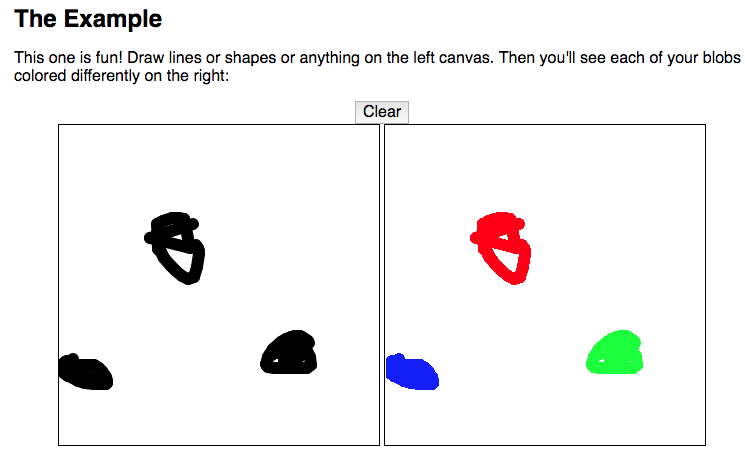
Found a nice reference for this!!! https://blog.acipo.com/blob-detection-js/
jywarren
on 18 Jan 2019
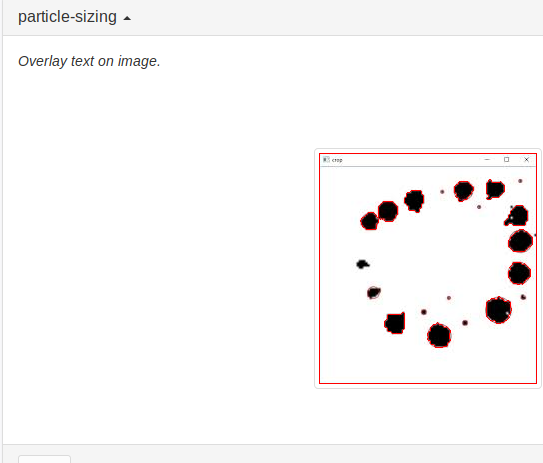
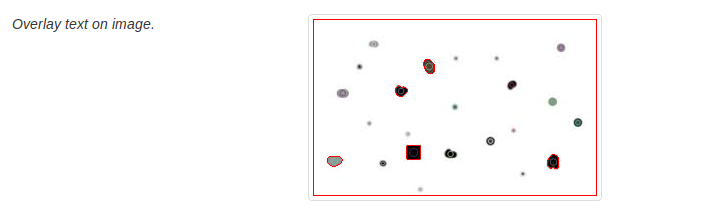
@jywarren I have made progress to this and I would like further guidance on it! The results that I am getting using opencv in our project are
Really excited to share these please let me know what you think!!
 aashna27
on 19 Jun 2019
aashna27
on 19 Jun 2019
Wow!!!! Amazing!!!!!
jywarren
on 19 Jun 2019
I think this is great. My thoughts are:
- the overall workflow is many steps, as in the documentation in the original issue at top. But we should as much as possible break it into different modules. Let's make a demo sequencer to demonstrate these steps with images from a microscope (at top)
- let's think about what the final desired output format is, by reading those docs at top. Is it a histogram of the particle size, is it about how round the particles are, how concentrated they are? All the above?
Thanks @aashna27 ! This is so exciting! Eventually we want people to be able to upload their microscope images (from https://publiclab.org/micro kits) and do an analysis, so let's build from distinct modules in that direction!
jywarren
on 19 Jun 2019
So I ll make a pr of the code uptill now, wherein we have markers to detect particles in microscopic images.
aashna27
on 20 Jun 2019
Great, can you lay out how this initial PR fits into the overall workflow from the posts above?
jywarren
on 2 Jul 2019
Related issues
 harshkhandeparkar
·
4Comments
jywarren
·
4Comments
harshkhandeparkar
·
4Comments
jywarren
·
4Comments
 kindanduseful
·
5Comments
jywarren
·
3Comments
kindanduseful
·
5Comments
jywarren
·
3Comments
 Divy123
·
5Comments
Divy123
·
5Comments
Most helpful comment
@jywarren totally, because we already have some of the steps which are needed, this would be better implemented with a set of chained modules
Also, I have an idea from this, we can have an ability to add macros so that users can save a set of most used modules, in browser that can be implemented with the url and in cli we can have a macros.json file and our first macro can be region extraction😁
what say?