Igniteui-angular: igxCombo component has to include caseSensitive property in filter search
Is your feature request related to a problem? Please describe.
I am using igx-combo component but in search feature filter has not involve case sensitive in Turkish language.

If you can see screenshot we have 4 scenarios in this issue..
scenario 1 : we have a list in combo
scenario 2 : when i type 'ti' letters result appears , perfect!
scenario 3 : But in Turkish alphabet 'i' and 'ı' also 'İ' and 'I' is not the same so when i type 'Tİ' search filter thinks 'İ' is unknown letter so no result appears but last scenario result had to come out again..
scenario 4 : However when I type 'TI' filter thinks 'I' means 'i' but no two different letters literally.
Same result comes out but it shouldn't.
Describe the solution you'd like
suggestion 1 : you can add new property to igxComboComponent API like caseSensitive:boolean so when we set that false component acts 'I' and 'İ' or any other letters are not the same.
suggestion 2 : you can add a new template option inside igxComboComponent as you have created earlier like 'igxComboItem' , 'igxComboHeader' etc. If you create new template 'igxSearchInput' we can change caseSensitive inside this template with igxInput (of course it works only you have property in igx-input for caseSensitive)
Describe alternatives you've considered
alternative 1 : In many projects combo search feature is using with (onSearchInput) event so $event goes to Rest api then calls new list.. but this search keeps searching in list again. we could have cut this filtering away ? I mean when we set
search input goes away but we set
Furthermore, even if you consider alternative solution without the api calls It is still a big problem with mock data.
I think the strongest solution will be adding a new property that I mentioned "suggestion 1".
 HeliosLive
All 18 comments
@HeliosLive , the feature request is in the list for the current milestone. You could follow the milestone progress on the Roadmap board or in the Roadmap file.
 radomirchev
on 18 Jun 2020
radomirchev
on 18 Jun 2020
@radomirchev I will & nice work Thank you all :)
HeliosLive
on 19 Jun 2020
@kdinev suggests adding a property that will add case sensitive icon that will toggle case sensitive/insensitive functionality.
 Lipata
on 30 Jun 2020
Lipata
on 30 Jun 2020
@kdinev @Lipata
As a further enhancement to the combo, we should also expose the functionality for users to change the filtering strategy that is used. Since in the initial implementation, we base the filtering off the grid's, we already have most of the interfaces in place. This will help w/ similar issues, where our default filtering strategy is not enough or even gets in the way. One such example:
https://www.infragistics.com/community/forums/f/ignite-ui-for-angular/121518/igx-combo-when-filterable-option-is-false-it-removes-filter-input-too
 ViktorSlavov
on 30 Jun 2020
ViktorSlavov
on 30 Jun 2020
@ViktorSlavov I want to be able to change case sensitivity similar to how it's done in search editors in common applications:

Case sensitivity in filtering is a parameter that gets passed around regardless of the strategy, and changing sensitivity should not require changing a strategy. Introducing filtering strategies is a bit out of scope for this item and if such a thing is requested, then it would be handled with the existing filtering strategy interfaces exposed for the grid.
 kdinev
on 30 Jun 2020
kdinev
on 30 Jun 2020
@kdinev There's a slight nuance between exposing searchCaseSensitive option and the UI icon - one is controlled by the dev and the other is user-facing. With the latter, the option can only set the default state and the user is free to change it, which I'm actually fine with. We should still look into future enhancement of allowing the search to be re-templated either way.
Keep in mind the current filter pipe is already case-insensitive. Different issue(s) here.
@HeliosLive As far as I understand the main issue is that searching for 'TI'('TI') produces results when it shoudn't and alternatively searching for 'Tİ'('Tİ') doesn't when in theory with Turkish script it actually should. It seems to me that both lower conversions are kinda wrong and that's all coming from the use of toLowerCase which is locale/culture-invariant.
For the I (dotless) - it's actually identical code to the latin character, so without specific locale, it lowers to i (dotted) which produces matches you wouldn't expect in Turkish. As for the dotted İ the case is a bit more curious - it does lower to i̇, however that's not the same string as i:
`İ`.toLowerCase() === "i"
> false
Turns out it kind of is, but with extra char at the end:
"i̇".length
> 2
"i̇".charCodeAt(1)
> 775
I can only assume that flag is there to allow toUpperCase to map back to the correct capital letter, but what it does in our case is cause the filter to not match, because it really isn't the same string.
I've actually tested the same behavior in VS Code and I get similar results regardless of case setting:

And the dotted İ doesn't match anything at all:

That i̇ actually looks different if I change my VS Code language, but the search once more doesn't match:

So I'm not even certain what the out-of-the-box expectation is here, TBH.
There's toLocaleLowerCase to consider, which actually shows this very same case as example, however the place to get the locale from seems to me a bit out of scope for the component. We could do that in our default pipe, though I feel like it's best to offer a way to override it completely. What bothers me is that we can get the locale from either the LOCALE_ID or perhaps the browser, but there's a difference between an application that's localized and a general purpose one that just wants all inputs to behave correctly. Likely why even Angular's lowercase pipe is also using the invariant toLowerCase - safer to leave alternative implementations to the app.
PS: Funnily enough, my browser search will match every single version of the letter (dotted or not) regardless of the search input.
TL;DR
I see a few issues/enhancements here:
- the invariant lower case we use can be confusing with scripts that use different mapping from Unicode (such as Turkish) which can either be addressed within our default pipe or exposing an override for it.
- The addition of option and UI to control the search case is its own thing to consider. Seems like a good enhancement, filter pipes should get this as param, the UI should ideally be templatable.
- Remote filtering feels like a separate issue too - remote data scenario should be detected and expect a remote filter to go with it and skip the local operation.
 damyanpetev
on 6 Jul 2020
damyanpetev
on 6 Jul 2020
@damyanpetev We definitely should provide the UI out of the box, which means that the input would be setting only the initial state of the case-sensitive button. The invariant lower case sounds like the correct approach to me, since the Angular lowercase pipe also behaves this way. Remote filtering is an entirely separate issue.
kdinev
on 6 Jul 2020
@damyanpetev I sure understand what you mean by saying those situation and toLocaleLowerCase property is taking you to completely different position. However my another suggestion is, If you @all consider not removing filter input but removing auto filter inside data, I could catch "onSearchInput()" event then I can rewrite filter string changing to toLocaleLowerCase and successfully handle my problem or any locale string problem that anyone is having.
P.S. I think adding an icon to input for changing case sensitive option is not looking good and not preferable.
HeliosLive
on 6 Jul 2020
@HeliosLive I agree, especially if I get correctly you are using remote data as well, you need to be able to ignore the default filter. It should be fairly simple to make onSearchInput cancellable and at that point you can, at least for now, handle it as you see fit. We'll start with that.
damyanpetev
on 7 Jul 2020
@damyanpetev yes you are correct I am using remote data so I don't even need filtering but i need that input :) So you will develop this feature soon ? really helpful 👌👍
HeliosLive
on 8 Jul 2020
@HeliosLive we have started the implementation of both cancellable onSearchInput and the caseSensitive option and we should be ready with both features for the next milestone.
 PlamenaMiteva
on 8 Jul 2020
PlamenaMiteva
on 8 Jul 2020
@StefanIvanov could you please advise on the case-sensitive button UI. We can use either an icon or an igxChip. The current initial implementation uses a selectable igxChip and the caseSensitive property changes according to the selected state of the chip. In case we opt for the icon option we need to know whether we have a case-sensitive icon and if not can we make one?
PlamenaMiteva
on 13 Jul 2020
@PlamenaMiteva @StefanIvanov Wouldn't the material text_fields icon work? Also I would prefer an icon button rather than a chip.
kdinev
on 14 Jul 2020
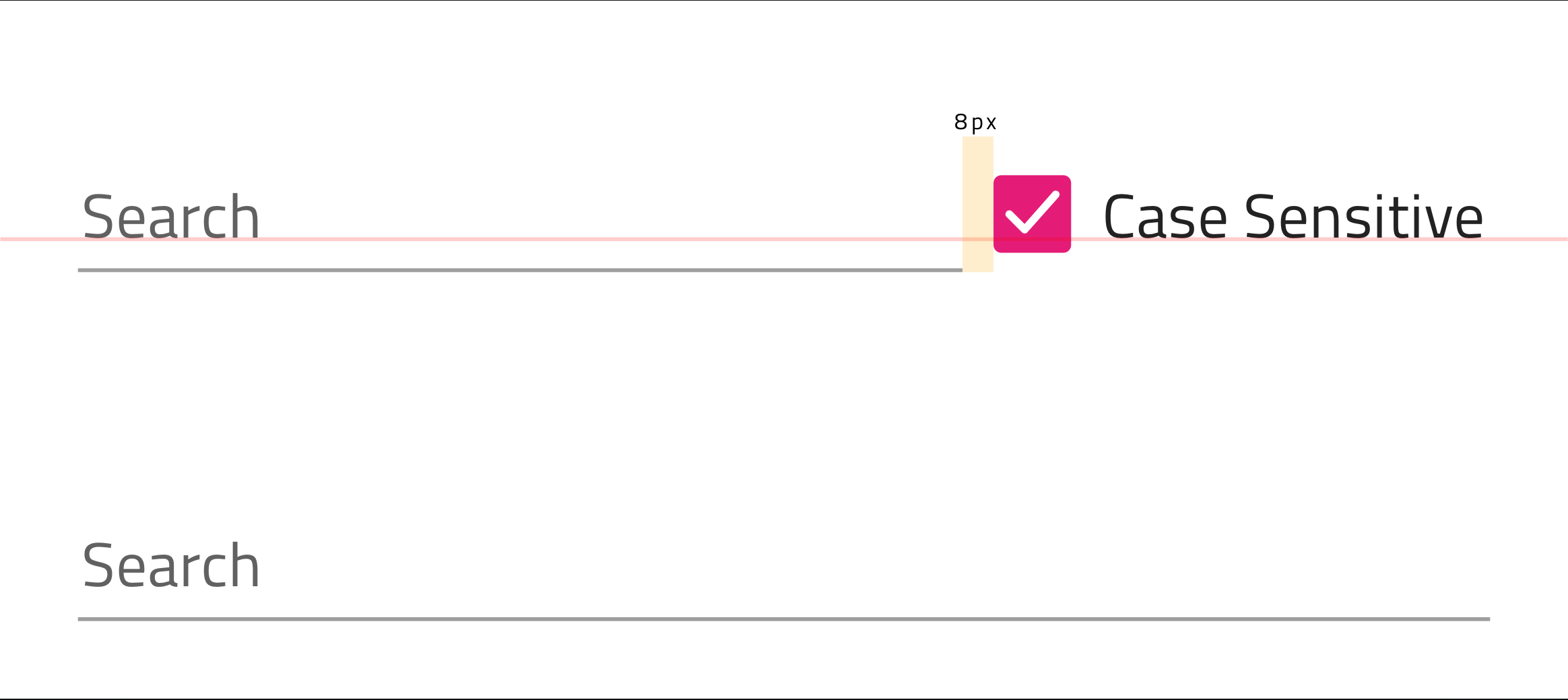
I went through the whole conversation and my concern is that with an icon it will be very frustrating for the user to know the state/configuration given the icon material provides. Therefore, I suggest an approach where we add a checkbox next to the input allowing users to toggle the case sensitivity see below
 StefanIvanov
on 15 Jul 2020
StefanIvanov
on 15 Jul 2020
I appreciate all of your suggestions and I wonder @damyanpetev we discuss before about this and we decided search input event could be canceled (not filter data immediately) and we can handle onSearchInput event then change input value to toLocaleLowerCase therefore case sensitive checkbox is not necessary..
HeliosLive
on 15 Jul 2020
@HeliosLive The cancellable output event is already implemented and will be released with the next patch for 9.1, as well as 10.0.
Now we're looking to implement the general enhancement of providing end-user experience for case sensitive searches out of the box with 10.1.
@StefanIvanov I don't think checkbox is suitable at all. Honestly, I've seen no such UI in any application. It's always a search input with toggle buttons - case sensitive, exact match, [regex].
kdinev
on 15 Jul 2020
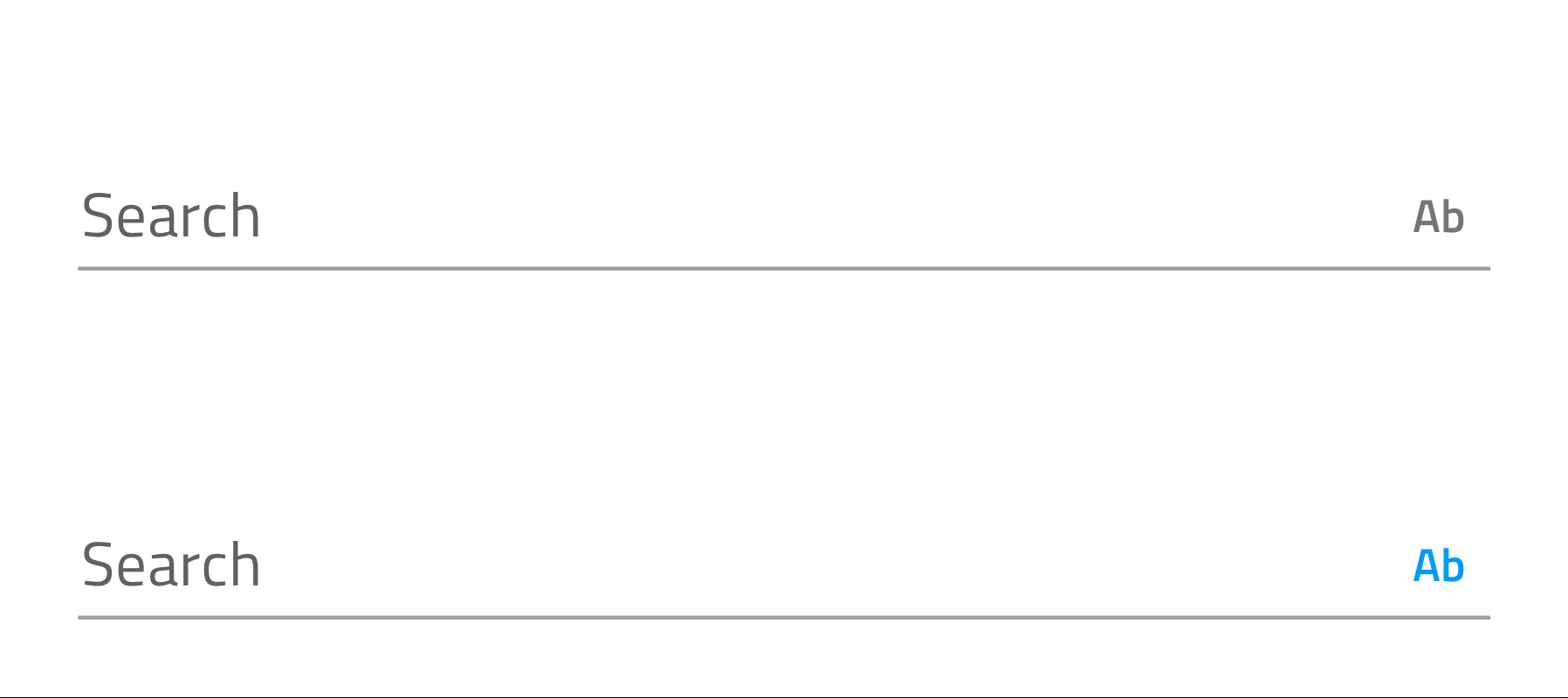
We will go with the icon approach, which will be more extensible in the future given that we decide to add more search config options and @sdimchevski will provide an svg icon to @PlamenaMiteva to use and I have illustrated below its states. Above you see the search ignoring case and below is the case sensitive search with the icon colored in primary,500 once it has been toggled.
P.S. both inputs are in idle state
StefanIvanov
on 15 Jul 2020
@HeliosLive The cancellable output event is already released with the patches for 9.1 and 10.0.
Now you can cancel the onSearchInput event and perform your custom filtering as follows:
```
handleOnSearchInput(event: IComboSearchInputEventArgs) {
event.cancel=true;
// your filtering logic here...
}
PlamenaMiteva
on 20 Jul 2020
Related issues
 lorenzo-iovino
·
3Comments
lorenzo-iovino
·
3Comments
 ChronosSF
·
3Comments
ChronosSF
·
3Comments
 nikunjgajera
·
3Comments
ChronosSF
·
3Comments
nikunjgajera
·
3Comments
ChronosSF
·
3Comments
 ymita
·
3Comments
ymita
·
3Comments
Most helpful comment
@HeliosLive we have started the implementation of both cancellable onSearchInput and the caseSensitive option and we should be ready with both features for the next milestone.