Igniteui-angular: IgxInput does not remove validation error style after the form is reset
Description
IgxInput does not remove its validation error style after the form is reset.
- igniteui-angular version: 8.1.0
- browser: any
Steps to reproduce
- Run the attached sample
- Set focus on Name field
- Set focus on Price field
- Click "reset state" button
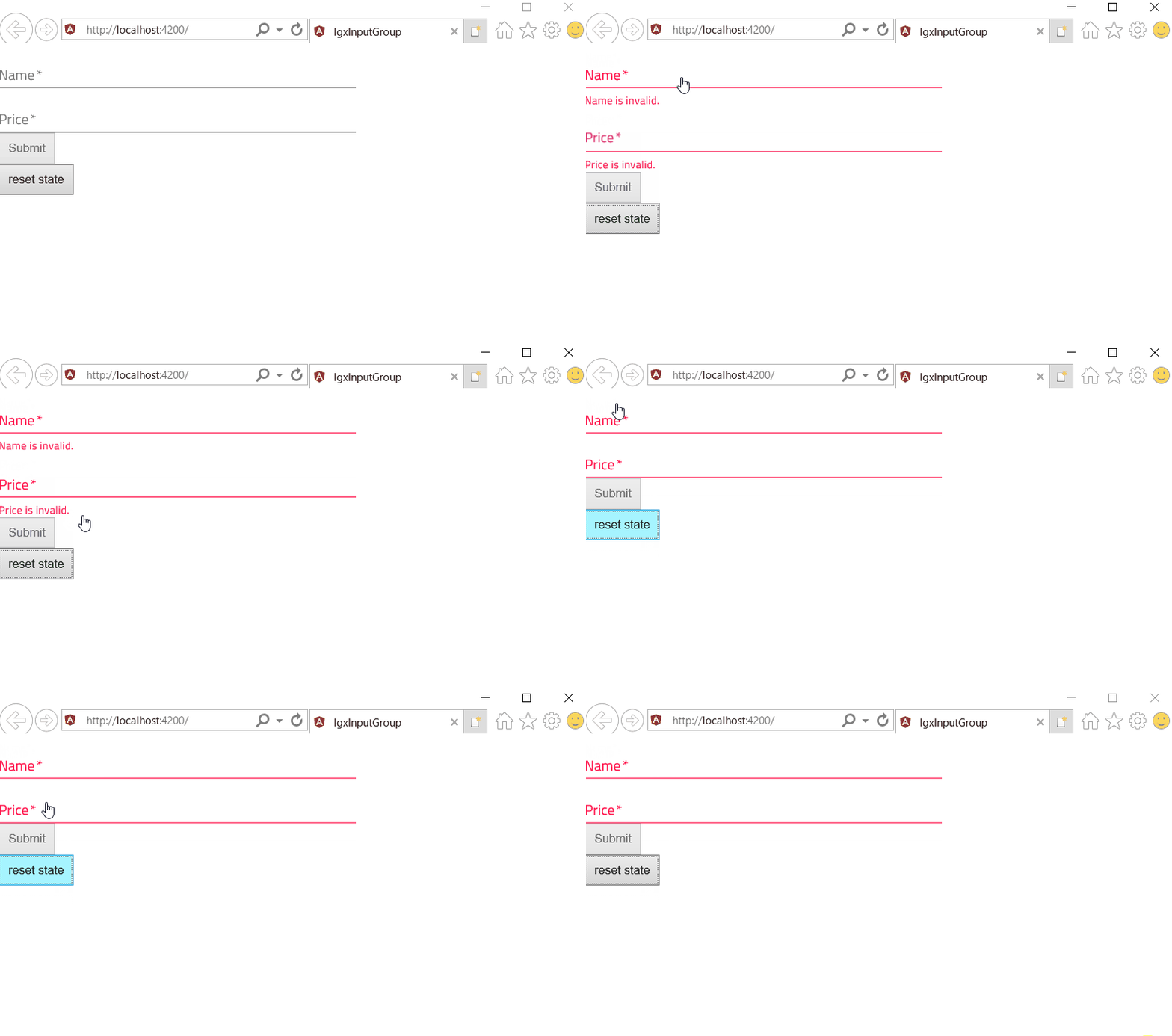
Result
Form state is reset but the Name field and Price field keep invalid style.
Expected result
Name field and Price field does not have invalid style.
Attachments
 ymita
ymita
All 4 comments
any update for this issue ?
 geandev
on 22 Aug 2019
geandev
on 22 Aug 2019
+1
 PixelShoot
on 22 Aug 2019
PixelShoot
on 22 Aug 2019
@GeanAlexandre, @PixelShoot we are starting to work on this. Regards!
 Lipata
on 23 Aug 2019
Lipata
on 23 Aug 2019
This issue should be fixed in next version. One note. If developer changes the value of any input by calling setValue or patchValue the input may or may not show validation errors. Here is how input should work by specification:
- if input is pristine and untouched it will never show validation errors whatever value developer sets through code behind.
- if input is touched or dirty:
- if developer sets correct value through code behind form will not show validation errors.
- if develper sets incorrect value through code behind form will show validation errors.
If developer needs to set invalid value, e.g. null or undefinde on touched or dirty form, and need to hide validation errors, he should call reset to make input pristine and untouched.
 wnvko
on 4 Sep 2019
wnvko
on 4 Sep 2019
👍2
Was this page helpful?
0 / 5 - 0 ratings
Related issues
ymita
·
3Comments
 ChronosSF
·
3Comments
ChronosSF
·
3Comments
 lorenzo-iovino
·
3Comments
lorenzo-iovino
·
3Comments
 furugen
·
3Comments
furugen
·
3Comments
 SAndreeva
·
3Comments
SAndreeva
·
3Comments
Most helpful comment
This issue should be fixed in next version. One note. If developer changes the value of any input by calling
setValueorpatchValuethe input may or may not show validation errors. Here is how input should work by specification:If developer needs to set invalid value, e.g.
nullorundefindeon touched or dirty form, and need to hide validation errors, he should callresetto make input pristine and untouched.